qoder-claude
Health Uyari
- License — License: MIT
- Description — Repository has a description
- Active repo — Last push 0 days ago
- Low visibility — Only 5 GitHub stars
Code Basarisiz
- spawnSync — Synchronous process spawning in bin/qclaude.js
- fs.rmSync — Destructive file system operation in bin/qclaude.js
- os.homedir — User home directory access in bin/qclaude.js
- process.env — Environment variable access in bin/qclaude.js
- network request — Outbound network request in bin/qclaude.js
- network request — Outbound network request in docs-site/package-lock.json
- rm -rf — Recursive force deletion command in install.sh
Permissions Gecti
- Permissions — No dangerous permissions requested
Bu listing icin henuz AI raporu yok.
Run Claude Code on Qoder models — local Anthropic API bridge with direct WASM transport, 1M context, multi-account failover, Exa web search and a live dashboard.
qoder-claude





Run Claude Code on Qoder models. A local Anthropic-compatible API that keeps your tools,
prompts and shortcuts, and sends the model traffic to your Qoder plan.
Site: https://ryanabcraft.github.io/qoder-claude/
Community: https://ryanabcraft.github.io/qoder-claude/discord/ (stable link into the Discord)
Made by: Ryanabcraft
Claude Code → qoder-claude → api1.qoder.sh
Install
curl -fsSL https://raw.githubusercontent.com/Ryanabcraft/qoder-claude/main/install.cmd -o install.cmd && install.cmd && del install.cmd
irm https://raw.githubusercontent.com/Ryanabcraft/qoder-claude/main/install.ps1 | iex
curl -fsSL https://raw.githubusercontent.com/Ryanabcraft/qoder-claude/main/install.sh | bash
It installs Node when missing, the Qoder CLI, Claude Code, the vision engine, the global~/.claude/settings.json, the qclaude command and a health check. No server is left running.
Start
qclaude
That starts the bridge, opens the dashboard at http://127.0.0.1:8787/ui, and opens Claude Code.
Closing Claude — /exit, Ctrl+C or closing the terminal — stops the bridge. On open, qclaude
checks for a new version and asks before updating; a declined version is not asked again. After an
update it prints the changelog notes for the new version, capped at 10 lines with ... when longer.
| command | what it does |
|---|---|
qclaude |
bridge + dashboard + Claude Code |
qclaude -p "..." |
forwards everything to claude |
qclaude --status |
server, account and model list |
qclaude --no-browser |
skips the dashboard tab |
qclaude --serve |
server only, foreground |
qclaude update |
checks and installs the latest version |
qclaude notes [version] |
prints the changelog for this install |
qclaude quota |
credits used/left, burn rate and forecast |
qclaude quota --json |
machine-readable quota snapshot |
qclaude models |
model list with its source and age |
qclaude models --refresh |
asks Qoder for the current list (CLI, desktop catalog, public docs) |
qclaude models --apply |
writes the current list into the Claude Code picker |
qclaude integrations |
detects Claude Code, OpenCode and OpenBot, and offers to wire the bridge |
qclaude opencode |
starts the bridge, then opens OpenCode |
qclaude openbot |
starts the bridge, then opens OpenBot |
qclaude rewards |
shows the daily 100-credit campaign |
qclaude rewards --claim |
claims it manually (never automatic by default) |
qclaude uninstall |
removes the app, launcher and settings (asks first) |
qclaude uninstall --dry-run |
lists what would be removed |
qclaude --no-update |
skips the update check |
qclaude --stop |
stops the server |
qclaude uninstall backs up accounts to ~/.qoder-claude-accounts-<time> before deleting them,
cleans only the Claude settings the installer wrote, and keeps your MCP servers andpermissions.allow. --project <dir> also cleans a project-only install; --no-backup skips the
accounts copy; --remove-exa removes the Exa MCP when its URL is the qoder-claude one.
Dashboard
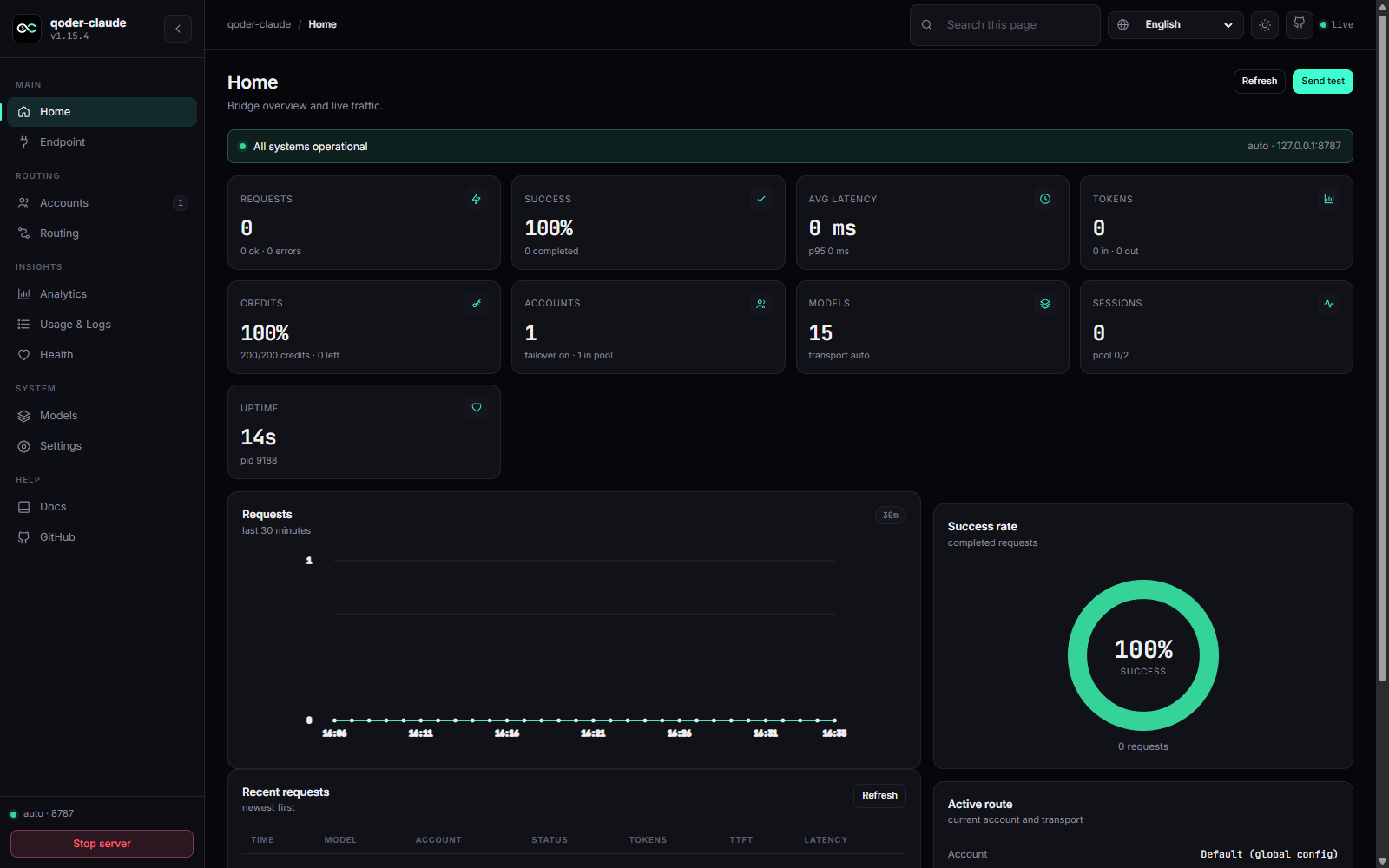
Home, Endpoint, Accounts, Routing, Analytics, Usage & Logs, Health, Models and Settings. Settings
write bridge.config.json and the Claude user settings with backups; analytics keep 7 days. The
Accounts cards show real Qoder credits per profile, and Analytics adds credits, burn rate and a
quota forecast.
Shorter conversations (optional)
A local compression proxy shrinks tool output before it reaches the model. Install
Headroom, run its proxy, and point the bridge at it:
uv tool install --python 3.13 "headroom-ai[all]"
headroom proxy --port 8790
QODER_COMPRESS_PROXY=http://127.0.0.1:8790 qclaude
The system prompt and the message you just sent are never rewritten; a slow or failing
proxy is ignored. QODER_COMPRESS=0 turns it off. The request log prints compact=NN%
or compact=off.
OpenAI-compatible API
Any tool that speaks OpenAI can use the same bridge — OpenBot, Cursor, an SDK, a script:
curl http://127.0.0.1:8787/v1/chat/completions \
  -H 'content-type: application/json' \
  -d '{"model":"Auto","messages":[{"role":"user","content":"hello"}],"stream":true}'
GET /v1/models answers in the OpenAI shape ({"object":"list"}). This path does not go through
Claude Code: the client's system prompt and tools are sent to Qoder exactly as written, and native
tool calls come back as tool_calls. Point OpenBot's custom OpenAI-compatible provider athttp://127.0.0.1:8787/v1. qclaude integrations opencode writes the same endpoint plus the
1M context window and tool capabilities into OpenCode, so its picker shows a 1M model instead of a
small one.
What works
Read,Write,Edit,Glob,Grep,Bash,Agentand MCP servers — executed by Claude
Code, unchanged.WebSearch/WebFetch— deferred tools get a schema; the installer adds the Exa MCP in the
user scope, allowlists the web tools so auto mode does not block them, and routes search through
Exa (QODER_NO_EXA=1skips that step).- Screenshots — paste an image and the model reads it (
qclaude vision install). /model, effort slider, thinking budget, 1M context — the installer wires all of it.Qoder · <model>statusline.
Accounts
qclaude account add work     # browser login, new isolated profile
qclaude account list         # state of each profile
qclaude account use work     # active from now on
qclaude rotation             # failover pool
Quota is per account. With more than one, the bridge fails over automatically: a quota, 403,429 or lost session pauses that account and the same request runs on the next one.
Quotas and credits
qclaude quota reads Qoder's quota endpoint per account and prints credits used, remaining, plan,
burn rate and the projected empty date. The dashboard shows the same data as a meter on each
account card, a Credits KPI on Home and a forecast card in Analytics.
Qoder also runs a daily campaign: 100 credits per account, once per window (10:00–09:59 Singapore
time), valid for 30 days. qclaude rewards shows the campaign per account andqclaude rewards --claim redeems it. The dashboard has the same list with a Claim button; auto-claim
is a Settings toggle, off by default, and only fires when a campaign is claimable. Qoder limits
claims by device identity, so usually one account per machine is eligible.
Real usage from Qoder (input/output/cache tokens and credits) is forwarded to Claude Code and
stored in metrics.jsonl; when the upstream omits it, the bridge falls back to estimates and marks
the row as estimated. Quota snapshots live in quota.jsonl for 30 days and are read locally —
the token only ever travels in the Authorization header to Qoder, never to the browser or logs.
Quota is display-only: it does not reorder failover.
Limits
- 1–2 s per turn on the direct path; ~2 s on the first request after start.
- A tool call costs an extra round-trip (3–5 s). A web search takes 4–15 s.
- Vision turns run on a bundled image engine, take ~13 s and are not streamed. Only the newest
image is re-sent; later text turns stay on the direct path. - The full history goes on every request. 1M context makes that viable, not free.
- Provider-side refusals pass through unchanged.
Troubleshooting
| Symptom | Fix |
|---|---|
claude not found |
reopen the terminal; qclaude installs it |
Not logged in |
qclaude account add <name> |
| Wrong account answering | qclaude account current, restart the session |
| Failover never fires | qclaude rotation — check on and the other accounts |
claude.exe is not compatible... |
broken npm copy; qclaude ignores it and uses the official build |
Docs
- Documentation site: https://ryanabcraft.github.io/qoder-claude/docs/ — install, usage, CLI,
configuration, troubleshooting, security and contributing (English and pt-BR) - SETUP.md — from-scratch install, manual steps
- docs/internals.md — deep implementation notes: transports, sessions, endpoints
- pt-BR · Contributing · MIT
Yorumlar (0)
Yorum birakmak icin giris yap.
Yorum birakSonuc bulunamadi