claude-telemetry
Health Uyari
- License — License: MIT
- Description — Repository has a description
- Active repo — Last push 0 days ago
- Low visibility — Only 5 GitHub stars
Code Gecti
- Code scan — Scanned 12 files during light audit, no dangerous patterns found
Permissions Gecti
- Permissions — No dangerous permissions requested
This tool provides a centralized web dashboard to track and aggregate Claude Code usage, costs, and rate limits across multiple computers. It uses a lightweight Python agent on each machine to sync data to a Supabase database, displaying it via a React frontend.
Security Assessment
The overall risk is rated as Medium. The architecture inherently involves accessing sensitive data, specifically your local Claude Code usage logs, which contain your chat prompts and token counts. While a light code scan found no hardcoded secrets, the tool requires you to manually provision and configure a Supabase backend and a Cloudflare Workers proxy. You must supply your own service_role keys, which shifts the security burden onto the user.
The tool relies on network requests to sync local data to your remote database, but it does this safely by using the existing `ccusage` tool rather than implementing custom, unaudited JSONL parsing. No dangerous system permissions are requested, and the frontend protects against exposing API keys by using a Cloudflare proxy.
Quality Assessment
The project is highly active, with its last code push occurring just today. It is properly licensed under the standard MIT license, and the included README is exceptionally detailed, professional, and provides clear setup instructions. The only notable drawback is a low community visibility, sitting at only 5 GitHub stars. This means the tool has not been extensively battle-tested or widely peer-reviewed by the open-source community.
Verdict
Use with caution — the code itself appears clean and well-documented, but the low community adoption and the manual requirement to securely manage your own cloud database keys and infrastructure elevate the implementation risk.
Centralized Claude Code usage tracking across multiple PCs — web dashboard with 5-hour blocks, rate limits, cost analysis, and multi-machine aggregation

claude-telemetry
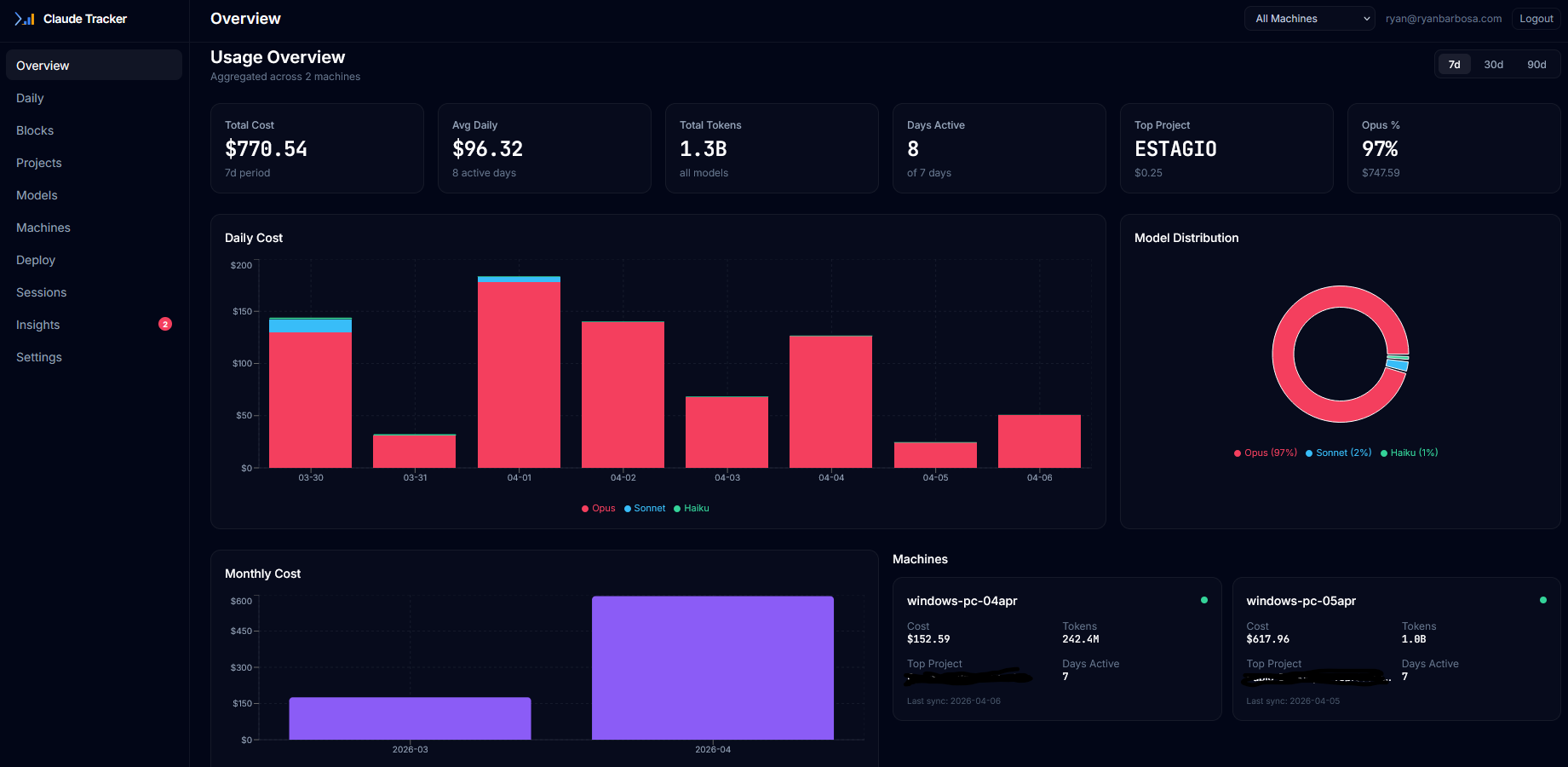
Centralized Claude Code usage tracking across multiple PCs



What is this?
CLI tools like ccusage and ccost are single-machine. If you use Claude Code across multiple PCs, you have no unified view of your total spending.
claude-telemetry solves this with an Elastic/Wazuh-style architecture: a lightweight Python agent on each PC auto-syncs usage data to a central Supabase database, and a React dashboard shows everything aggregated with filters by machine, project, model, and time period.
The agent does no custom JSONL parsing — it calls ccusage as the parsing/pricing layer and focuses only on multi-PC aggregation and centralized sync.
Features
- Multi-PC aggregation with per-machine tracking
- Auto-sync daemon (Elastic/Wazuh style agent)
- Dark-mode dashboard with interactive charts (Recharts)
- 5-hour block tracking with active block card, burn rate, and multi-PC timeline
- Plan vs API cost comparison (Pro/Max 5x/Max 20x/Custom)
- Rate limit progress bars (5-hour + weekly windows)
- Usage pace calculator with trend detection
- Project budget tracker with alerts at 90%/100%
- Weekly usage reports with daily/weekly toggle
- Cross-machine usage pace comparison
- Model mix analysis (Opus/Sonnet/Haiku breakdown)
- Supabase Auth (magic link login) with email whitelist
- Cloudflare Workers proxy (zero exposed keys in frontend)
- Deploy page with copy-paste agent install commands
- Statusline auto-setup for rate limit tracking
- Export data as CSV/JSON
- Uses existing tools (ccusage) — no custom JSONL parsing
Quick Start
Step 1 — Supabase (free tier)
- Create account at supabase.com
- New Project — choose name and region
- SQL Editor — paste and run each migration in order:
- Authentication > URL Configuration:
- Site URL:
https://your-app.pages.dev - Redirect URLs: add same URL
- Site URL:
- Settings > API — copy Project URL and service_role key
Step 2 — Dashboard (Cloudflare Pages)
git clone https://github.com/RyanTech00/claude-telemetry.git
cd claude-telemetry/dashboard
npm install
npx wrangler pages project create claude-telemetry
npx wrangler pages secret put SUPABASE_URL        # paste Project URL
npx wrangler pages secret put SUPABASE_SERVICE_KEY # paste service_role key
npx wrangler pages secret put ALLOWED_EMAILS       # e.g. "[email protected],[email protected]"
npm run build
npx wrangler pages deploy dist
Step 3 — Agent (each PC)
cd claude-telemetry/agent
python3 -m venv venv
source venv/bin/activate  # Windows: .\venv\Scripts\Activate
pip install -e .
claude-telemetry setup
claude-telemetry sync --verbose
claude-telemetry install-service  # auto-sync every 15min
Architecture
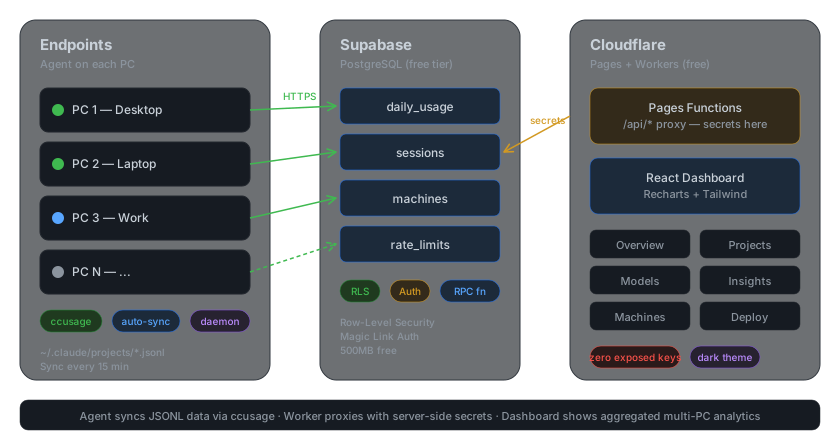
Dashboard Pages
| Page | Description |
|---|---|
| Overview | Total cost, daily chart, model pie, machine cards, plan savings, rate limits |
| Daily | Stacked area chart with daily/weekly toggle, top 10 days, hour heatmap |
| Blocks | 5-hour block timeline, active block card, burn rate, multi-PC table |
| Projects | Cost by project, pie distribution, budget progress bars, full table |
| Models | Opus/Sonnet/Haiku breakdown, mix over time, savings alert |
| Machines | Per-machine cards, comparison chart, daily pace, status badges |
| Deploy | Generate agent install commands with one-click copy, statusline setup |
| Sessions | Paginated table with sorting, filters by machine/project/type |
| Insights | Plan value, burn rate, rate limits, budgets, trend analysis, cross-machine |
| Settings | Plan selection, project budgets, alert thresholds, machine management, export |
CLI Reference
| Command | Description |
|---|---|
claude-telemetry setup |
Configure agent (interactive or --non-interactive) |
claude-telemetry sync |
Manual sync to Supabase |
claude-telemetry sync --verbose |
Sync with detailed output |
claude-telemetry sync --force |
Re-sync all data |
claude-telemetry daemon |
Run auto-sync in foreground |
claude-telemetry daemon --interval 10 |
Custom interval (minutes) |
claude-telemetry install-service |
Install as system service |
claude-telemetry uninstall-service |
Remove system service |
claude-telemetry service-status |
Check daemon status |
claude-telemetry status |
Show config and last sync |
claude-telemetry local --daily |
View local data without syncing |
claude-telemetry setup-statusline |
Configure rate limit tracking |
claude-telemetry uninstall |
Remove agent config from this machine |
Security
- Dashboard access: Only emails listed in
ALLOWED_EMAILScan log in. Set via:npx wrangler pages secret put ALLOWED_EMAILS # value: "[email protected]" or "[email protected],[email protected]" - API proxy: All Supabase keys are server-side only (Cloudflare Workers). Zero secrets in the browser bundle.
- Agent auth: Each machine uses a unique API key stored locally in
~/.claude-telemetry/config.json. - RLS: Row-Level Security ensures each user only sees their own machines and data.
Uninstall
To completely remove claude-telemetry from all services:
Step 1 — Remove agent (each PC)
# Stop and remove the service
claude-telemetry uninstall-service

# Remove config and data
claude-telemetry uninstall

# Or manually:
# Windows: rd /s /q %USERPROFILE%\.claude-telemetry
# Linux/macOS: rm -rf ~/.claude-telemetry

# Remove the package
pip uninstall claude-telemetry
# Delete the repo folder
Step 2 — Delete Cloudflare Pages
npx wrangler pages project delete claude-telemetry
# Or: Cloudflare Dashboard > Workers & Pages > claude-telemetry > Settings > Delete project
Step 3 — Delete Supabase project
Supabase Dashboard > Project Settings > General > Delete project.
This permanently deletes all data.
After these 3 steps, nothing remains — no data, no services, no secrets.
Tech Stack
| Component | Technology | Hosting |
|---|---|---|
| Agent | Python 3.11+, ccusage | Local (each PC) |
| Dashboard | React 18, Vite, TailwindCSS, Recharts | Cloudflare Pages |
| Database | PostgreSQL | Supabase (free tier) |
| Auth | Magic Link | Supabase Auth |
| API Proxy | Pages Functions | Cloudflare Workers |
Support
If this tool saved you from rate limit blindness, consider buying me a coffee:

Or just star the repo — it helps a lot!
Star History
License
MIT — see LICENSE
Author
Ryan Barbosa — [email protected]
Yorumlar (0)
Yorum birakmak icin giris yap.
Yorum birakSonuc bulunamadi