codex-pacer
Health Gecti
- License — License: MIT
- Description — Repository has a description
- Active repo — Last push 0 days ago
- Community trust — 26 GitHub stars
Code Gecti
- Code scan — Scanned 12 files during light audit, no dangerous patterns found
Permissions Gecti
- Permissions — No dangerous permissions requested
Bu listing icin henuz AI raporu yok.
A Dynamic Island for macOS that follows Codex and Claude Code: running tasks, output speed and quota pace, right at the notch.
Codex Pacer 2.1
简体中文 · Download the latest release
A native macOS island for Codex tasks, output rate and account quota. Hover to expand, move away to collapse, or pin it open.

- See local and enabled SSH tasks, their current stage, and ended turns; click a task to open its conversation.
- See the aggregate output-rate estimate for running tasks, with tool waits handled separately from generation.
- Track short and seven-day quota, reset countdowns, pacing and the current cycle. Banked resets expiring within the current cycle appear on the curve.
- View account Credit balance and available reset credits; click the reset count to see exact expiry times, or select an expiry marker on the curve.
- Keep ended-turn cards until clicked, their state changes, or the configured retention expires; receive a reminder while the island is collapsed.
- Adjust appearance, display, reminders and privacy. Menu-bar visibility is optional. Quit from the island or settings.
- Choose Automatic, Notch or Floating on any display; browse tasks three at a time while quota stays visible.
- Use adaptive width by default, or adjust a single width with a preview and slider in Settings.
- Customize the single-line collapsed bar: choose components by category and drag their order or left/right placement, with a live preview and one Save action.
- View task TPS and observed first-output latency; spawned agents are grouped under the parent with their running count and summed TPS. Previous measurements stay visible during tools or while awaiting new data; white means updated within 15 seconds, gray means older. Updates adapt automatically to collapsed/expanded state.
- Use English or Simplified Chinese, following your Mac's language by default or selecting a language in Settings.
- Update inside the app: daily checks by default, with download and installation after you choose to install.
Requirements: macOS 14 or later, Apple Silicon or Intel. Liquid Glass requires macOS 26 or later. An authenticated Codex installation and Python 3 provide account/task data; remote sources require existing non-interactive OpenSSH access.
Install the unsigned release
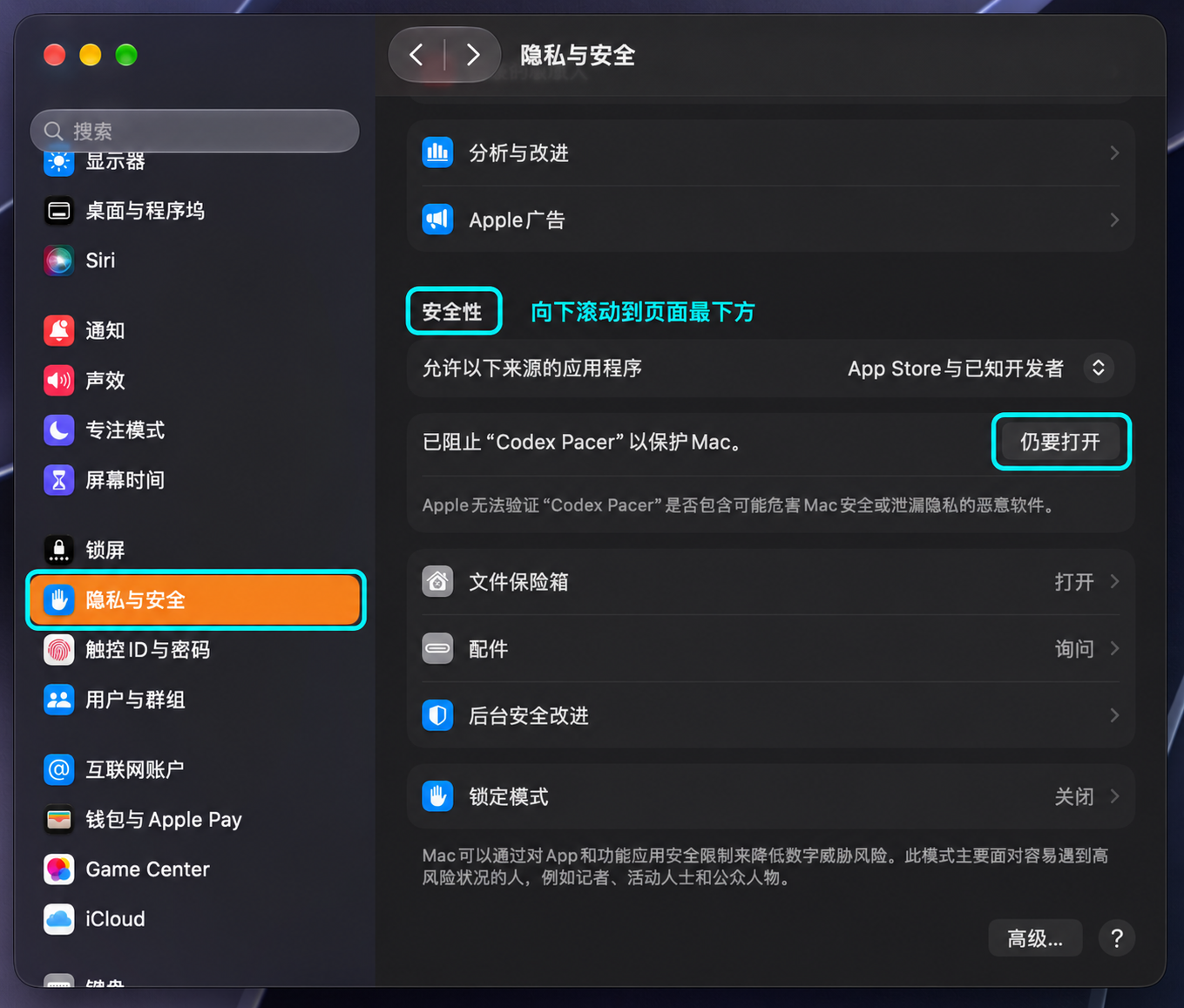
The unsigned release may be blocked by macOS before the DMG opens. For a manual replacement, quit the old version first. If your installed version has Check for Updates, use it to download, verify, install and relaunch automatically.
- Download the DMG from the latest release and double-click it first. Dismiss the macOS blocking alert.
- Go to System Settings → Privacy & Security, scroll to Security at the bottom, find the blocked installer, and choose Open / Open Anyway. Confirm when prompted.
- Double-click the DMG again, drag Codex Pacer into Applications, then launch it from Applications.
If macOS also blocks the app, repeat step 2 for Codex Pacer, then launch it again.
First-launch help from Apple · Chinese user guide
Development
Requires Xcode 26 or newer. The app has no npm or Rust dependencies.
make test TEST_FILTER='CompletionInboxTests|SessionNameTests' # during development
make build # when an app is needed for UI checks
Run the full suite once for a release candidate. Builds run in local temporary directories, reuse pinned dependency caches and print the app path. Use make release-unsigned for the unsigned universal DMG, or make release for the separate Developer ID signing/notarization workflow; no separate preview build is needed just for publication. See development and data semantics and releasing.
The maintained codebase contains only native macOS code. React/Tauri and Windows 1.x remain available in Git history and previous releases.
Yorumlar (0)
Yorum birakmak icin giris yap.
Yorum birakSonuc bulunamadi