claude-usage-page
Health Warn
- License — License: MIT
- Description — Repository has a description
- Active repo — Last push 0 days ago
- Low visibility — Only 6 GitHub stars
Code Fail
- os.homedir — User home directory access in sidebar/server/index.js
- process.env — Environment variable access in sidebar/server/index.js
- fs module — File system access in sidebar/server/index.js
- exec() — Shell command execution in tests/page_harness.js
- fs module — File system access in tests/page_harness.js
Permissions Pass
- Permissions — No dangerous permissions requested
No AI report is available for this listing yet.
Brings back the Claude desktop app's usage card as a local page, with Classic and Profile styles, and shows your local Codex usage too. /my-usage and $my-usage commands. macOS and Windows.
claude-usage-page

The Claude desktop app used to show a usage card on the Code tab's new-session screen: sessions, messages, tokens, a day heatmap and a per-model breakdown. It was removed in Desktop v2.42304.0 (October 2026; see anthropics/claude-code#102264). This brings the card back as a small local web page, kept up to date in the background, with a /my-usage command in Claude Code to open it. It can show your local Codex usage the same way.
Try the live demo (made-up data). Works on macOS and Windows.
Unofficial; not affiliated with Anthropic or OpenAI.
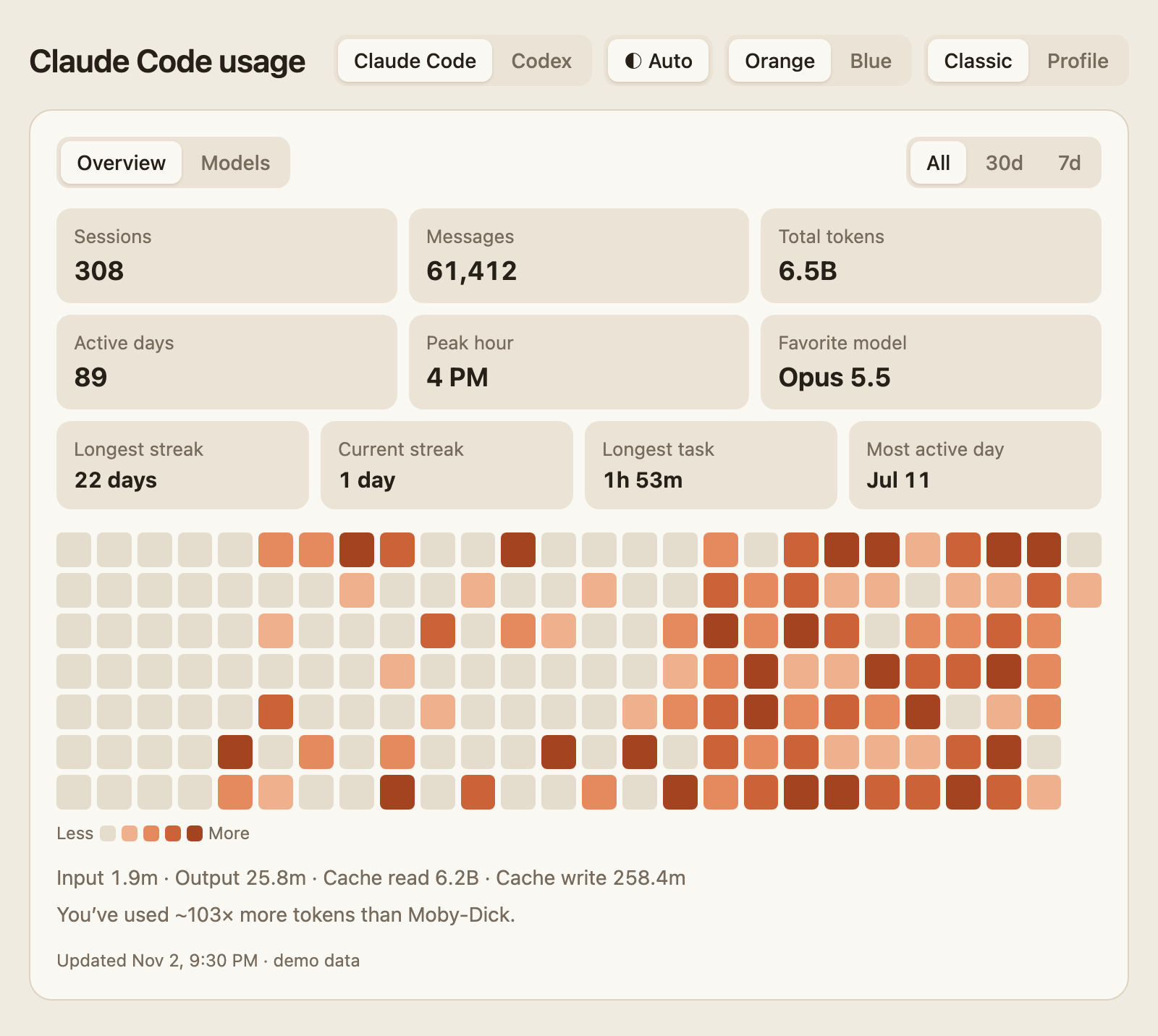
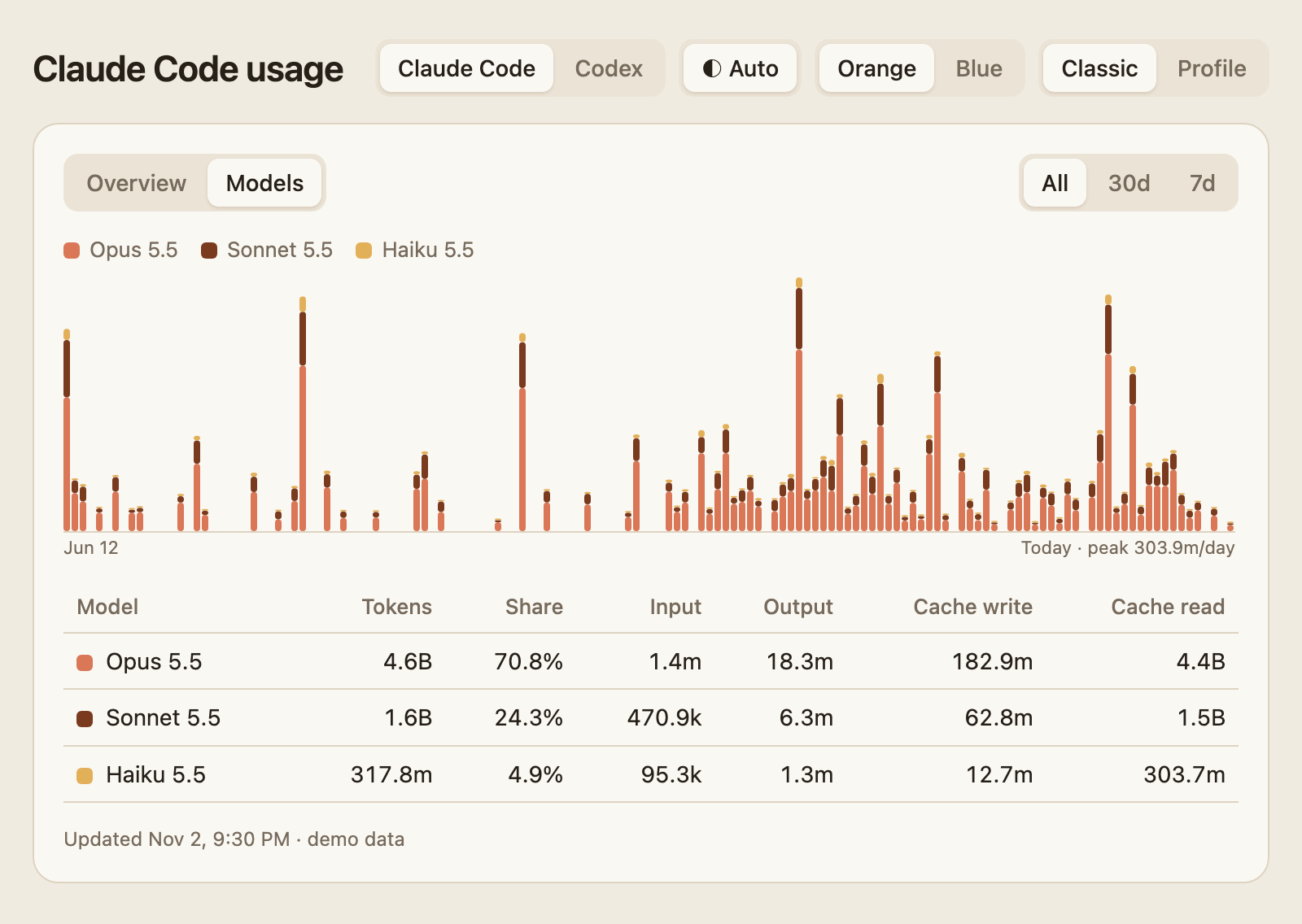
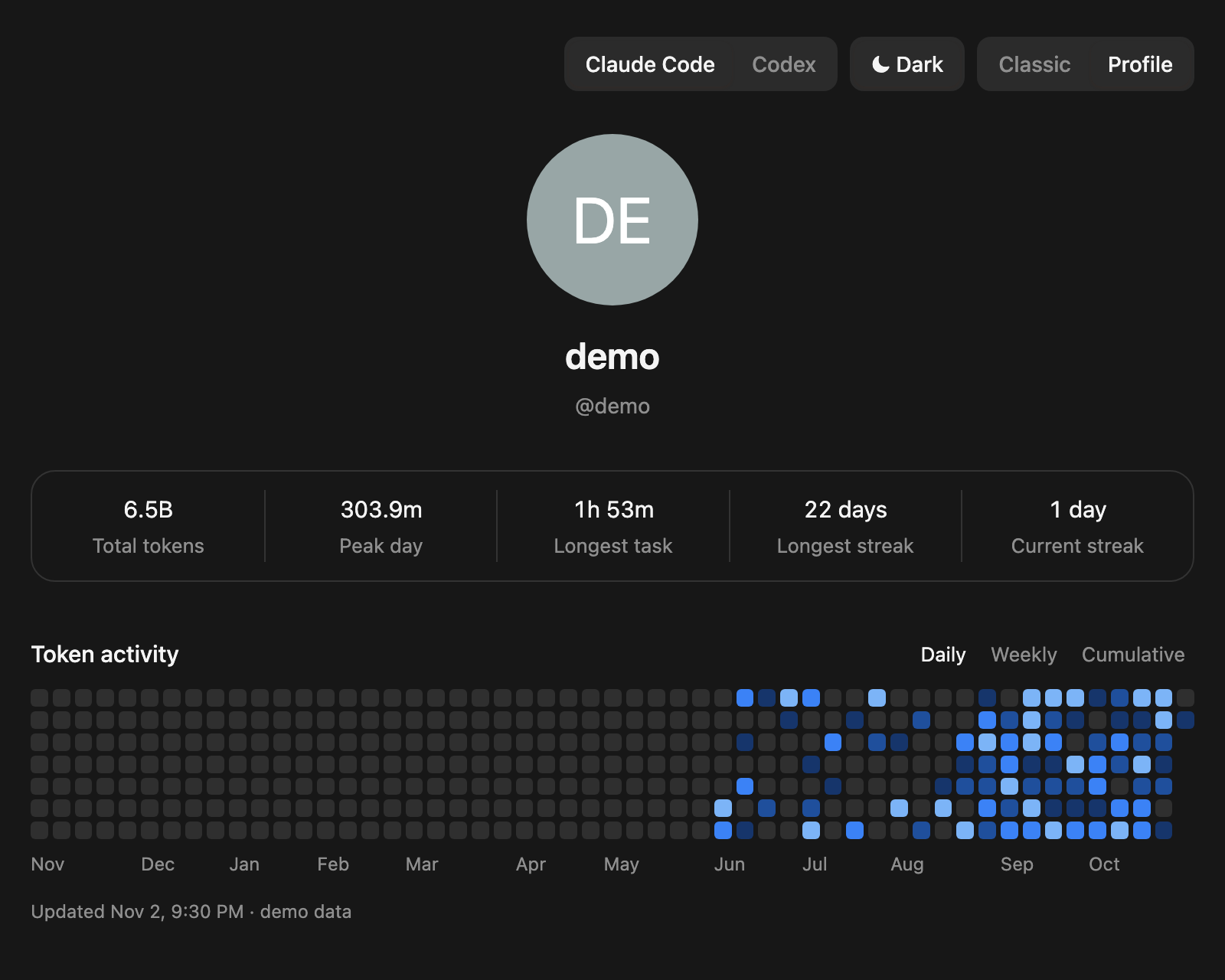
Screenshots use made-up data.
What it shows
- Overview: sessions, messages, total tokens, active days, peak hour, favorite model, longest and current streak, longest task, most active day, a 26-week heatmap and the input / output / cache split.
- Models: tokens per day stacked by model, and a table with each model's share and token types.
- Classic and Profile: the card above, or a profile page with five totals and a year of daily, weekly or cumulative tokens. Profile follows your browser's language, or pick English or Chinese with its language button.
- All / 30d / 7d ranges. Hover anything for exact values. Streaks and the heatmap always cover your whole history.
- Longest task runs from a message you send to the end of the reply. A gap over 30 minutes ends it, so a sleeping computer doesn't count.
- Pick auto, light or dark appearance, where auto follows your computer, and an orange or a blue color theme for Classic.
- API cost (Classic): what the same usage would cost through the Claude or OpenAI API at list prices, under the token split, per day on hover and per model on the Models tab. The $ API cost button turns it off. See API cost estimate.
When the numbers update:
/my-usagealways rebuilds first, then opens the page, so you see the latest numbers right away.- Opening or reloading the page yourself rebuilds it if the last build is over a minute old, which usually takes about a second. Within that minute you see the last build.
- A page left open reloads itself every 10 minutes, following the same one-minute rule.
- With no page open, a background job rebuilds every hour.
Only the new part of each transcript is read, so long sessions stay fast.
Where the numbers come from
The page reads everything locally and sends nothing anywhere. (The optional sidebar card's extension hands the same data to whatever calls it; see Sidebar card.)
Claude Code
- History comes from
~/.claude/stats-cache.json, the file behindclaude /stats. It keeps totals for days whose transcripts Claude Code has since cleaned up, so long-time users don't lose their early months. - Days after that file was last written come from the transcripts in
~/.claude/projects/, counting each API response once. - A parse cache keeps what it has seen, so transcripts deleted later by Claude Code's cleanup still count.
Totals land within a few percent of claude /stats. Two known differences: stats-cache.json splits days in UTC, so those older days change at UTC midnight while newer days use your local time; and older days only kept per-model totals, so their input / output / cache split is estimated from each model's overall mix (marked with ≈).
Codex
A switch at the top shows Codex in the same views. OpenAI's own Codex page adds up all your devices in the cloud; this one shows only what this computer holds, so the two can differ.
The page shows only the tools with history on this computer, so with just one of them there is no switch. A tool you add later appears at the next rebuild, and one whose folder (~/.claude, or ~/.codex / CODEX_HOME) you delete disappears; its history stays in the parse cache, left out of the page and the sidebar card's data, and returns if the folder does.
- Days, models and tasks come from
~/.codex/sessions/, counting each API response once. Only token counts and timestamps are kept, never what was said. - Days are split in UTC, like OpenAI's page, so the Codex view can show a different date from the Claude Code one in the evening. Automatic approval reviews are left out too.
- Longest task uses the run time Codex records for each task, the same figure as its profile page. It can be shorter than the time between start and finish, and it isn't measured the same way as Claude Code's.
- Each Codex response counts once, by its id, wherever it shows up: a forked thread's copy of its parent's history, or the replay in the file Codex writes when you edit an earlier message. A forked thread's copied messages count once by id, and its copied usage counts for the parent. When the parent's own file is gone, the fork's copy of its records prices it. Threads an earlier version of this page cached keep their totals, days and messages; a fork's copy adds only what came after them. Archived threads (
archived_sessions) count like the rest. - Known limits, each needing an unusual mix of Codex history: a fork whose file Codex had already compressed when this page first looked is known only from Codex's database, whose total for it includes what it inherited, so that part counts twice; an edited thread whose replayed rows carry no ids (older Codex formats) can count those rows twice; while an edited thread's original file is still readable, usage in its replacement after Codex compressed that is missed; and a parent cached by an earlier version only as a header, or a file that grew on an earlier version after this one cached it and is gone now, can lose some messages or a copy's prices.
- Threads whose session files Codex has compressed, or that have no token rows, come from Codex's state database, as does what a thread used after the last build before its file was compressed. They only have a total, so it is shared over the active days in the thread's life and its input / output / cache split is estimated (marked with ≈). While a thread's file is readable, the file is what counts.
API cost estimate
This is what the recorded usage would cost if you paid for it through the API at list prices. It is not your bill: a Claude or ChatGPT subscription is billed separately.
- Prices live in
pricing.json, copied from Anthropic's and OpenAI's pricing pages, with the date they were last checked (shown on hover). Edit it and reinstall when a price or model changes. - Each API response is priced once, before anything is added up. For Claude that includes 5-minute and 1-hour cache writes, fast mode, US-only inference, Haiku 5.5's long-prompt rate and web searches. For Codex it includes the Fast (formerly Priority) and Ultrafast tiers, the long-context rate over 272K input tokens per request, and $0.01 per hosted web search (page opens and finds in a page are free). Codex cache writes are priced at the 30-minute rate. Ultrafast's promotional rate ends on OpenAI's date in Pacific time. A session started in an older Codex and resumed in a newer one counts only its newer part, in tokens as in cost.
- Not priced, and shown as a share of the tokens the estimate covers (each response once): models or tiers with no listed price, or a token type with none (only that type); history kept only as totals, such as
stats-cache.jsondays with no transcript and Codex threads known only from its state database; transcripts cached before this feature whose files are gone, because their cache durations or tier weren't recorded; and Codex sessions from versions that didn't save the service tier, where Fast can't be told from standard. - History before
stats-cache.jsonwas last written is priced from the transcripts still on this computer. If Claude Code cleaned some up before you installed this page, that part of the estimate is low, and the page says history is partly estimated. - Batch discounts, regional endpoints other than Claude's US-only option, and tool fees other than web search are not included.
Install
Needs Python 3, and Claude Code, Codex or both.
macOS
git clone https://github.com/rzhang569/claude-usage-page.git
cd claude-usage-page
./install.sh
Then open http://127.0.0.1:8788/, or type /my-usage in Claude Code. Use another port with PORT=8790 ./install.sh.
The installer copies the scripts to ~/.claude-usage-page/, adds two launchd jobs (rebuild every hour; serve the page on 127.0.0.1 only, which serves the page and nothing else) and writes the skill to ~/.claude/skills/my-usage/. Run it again after pulling to update.
Uninstall with ./uninstall.sh: it removes the launchd jobs, ~/.claude-usage-page/ and both skills. This also deletes the parse cache (cache-v4.json), which holds history for transcripts Claude Code has since cleaned up and can't be rebuilt. To keep it, copy the file out before uninstalling, copy it back after reinstalling, then run python3 build.py in that folder. (cache.json, if present, is the cache of an earlier release, kept so going back to one still works.)
Windows
Install Python 3 from python.org first (the Microsoft Store stub won't do). Then, in PowerShell:
git clone https://github.com/rzhang569/claude-usage-page.git
cd claude-usage-page
powershell -ExecutionPolicy Bypass -File install.ps1
Then open http://127.0.0.1:8788/, or type /my-usage in Claude Code. Use another port with -Port 8790. No admin rights needed.
The installer copies the scripts to %USERPROFILE%\.claude-usage-page\, adds two Task Scheduler tasks (claude-usage-page-build every hour, claude-usage-page-serve at sign-in; both run without a console window) and writes the skill to %USERPROFILE%\.claude\skills\my-usage\. Run it again after pulling to update.
Uninstall with powershell -ExecutionPolicy Bypass -File uninstall.ps1: it removes both tasks, %USERPROFILE%\.claude-usage-page\ and both skills. This also deletes the parse cache (cache-v4.json), which holds history for transcripts Claude Code has since cleaned up and can't be rebuilt. To keep it, copy the file out before uninstalling, copy it back after reinstalling, then run python build.py in that folder. (cache.json, if present, is the cache of an earlier release, kept so going back to one still works.)
Claude Code's and Codex's own files are never touched on either system; only the two skills are added.
The installer also adds $my-usage to Codex, which replies with a link that opens the Codex view beside the chat. Both commands are added even if one of the tools isn't installed yet, so they're there when it is.
/my-usage shows up only in sessions started after the install: Claude Code reads its skill list when a session starts, so sessions that were already open won't list it. Start a new session, or restart Claude to make it appear in existing ones.
Other systems
build.py and serve.py are plain Python with no dependencies. Run python3 build.py on a timer (cron, a systemd timer) and python3 serve.py at login, or just open the generated index.html in a browser. Set CLAUDE_CONFIG_DIR if your Claude Code data isn't in ~/.claude.
Sidebar card (optional, Claude desktop app)
The same card can live in the Claude desktop app's sidebar, so it's one click away without a browser tab. It needs the page installed as above. Two parts:
- An extension (
claude-usage-page.mcpb), a tiny local server with one read-only tool. It hands the card thedata.jsonthe page's build writes next toindex.html, after asking the page server to rebuild if the data is over a minute old. It reads nothing else, writes nothing, and connects only to127.0.0.1. Whatever calls the tool gets the whole snapshot (your computer's user name, activity, models, tokens and estimated costs): the card, or Claude, if you let it use the tool in a conversation. - The card (
sidebar.html), published as a private artifact and pinned. It drawstemplate.htmlitself with that data, so it looks and behaves like the browser page, and refreshes every 10 minutes while open.
To set it up:
Run
python3 sidebar/make.py(on Windows,py -3 sidebar\make.py). It writes both files todist/.Open
dist/claude-usage-page.mcpbwith the Claude app (on macOS,open -a Claude dist/claude-usage-page.mcpb) and click Install.In the Claude app's Code tab, ask Claude to publish
dist/sidebar.htmlunchanged as an artifact with these capabilities, and to pin it:{"mcp": {"servers": [{"server": "host:Claude_Usage_Page", "tools": ["get_usage"]}]}}Open the card from the sidebar. The first time, allow it to use the extension.
The card only works inside the Claude desktop app with the extension turned on; anywhere else it says so and points to the browser page. Pins follow your Claude account, so the card also appears on your other computers, but the usage doesn't: each computer shows only its own, and only once the page and the extension are installed there. Until then the card says what's missing. Going back to a release from before the card leaves its data behind, so the card asks for the current version instead of showing numbers that no longer change. To remove it, unpin and delete the artifact, and remove the extension in the app's settings.
Tests
Run the standard-library-only test suite from the repository root:
python3 -m unittest -v
Tests generate fake Claude and Codex data and application copies in temporary directories, set CLAUDE_CONFIG_DIR and CODEX_HOME there, and start server subprocesses on free localhost ports. They do not use or modify your real data or installed usage page. The tests of the page's own script, the sidebar extension and the card's loader need Node and are skipped without it.
License
MIT
Reviews (0)
Sign in to leave a review.
Leave a reviewNo results found