quran-turn
Health Uyari
- License — License: NOASSERTION
- Description — Repository has a description
- Active repo — Last push 0 days ago
- Low visibility — Only 6 GitHub stars
Code Uyari
- network request — Outbound network request in app/notch.js
- network request — Outbound network request in app/reader.js
- network request — Outbound network request in app/text.js
Permissions Gecti
- Permissions — No dangerous permissions requested
Bu listing icin henuz AI raporu yok.
Read the Qur'an while your coding agent thinks. A Claude Code + Codex plugin: offline, exact Tanzil text, no account.
Quran Turn
Read the Qur'an while your coding agent thinks.
Quran Turn is a plugin for Claude Code and Codex. When you send your agent a prompt, the reader comes down out of your Mac's notch like a curtain, open at the exact ayah you left off. When the agent needs you, a strip slides in and one press of Space takes you back. When the turn ends, your place is saved and the curtain folds back into the notch.
The notch is the default on macOS, whichever agent you use. It works the same for Claude Code (terminal or desktop app) and Codex (CLI or app), because it follows the agent's hooks rather than a particular app. On a Mac without a notch it comes out of the middle of the menu bar. On Windows and Linux the reader opens in its own window. A frameless Windows version that drops from the top of the screen is available to try (see The notch).
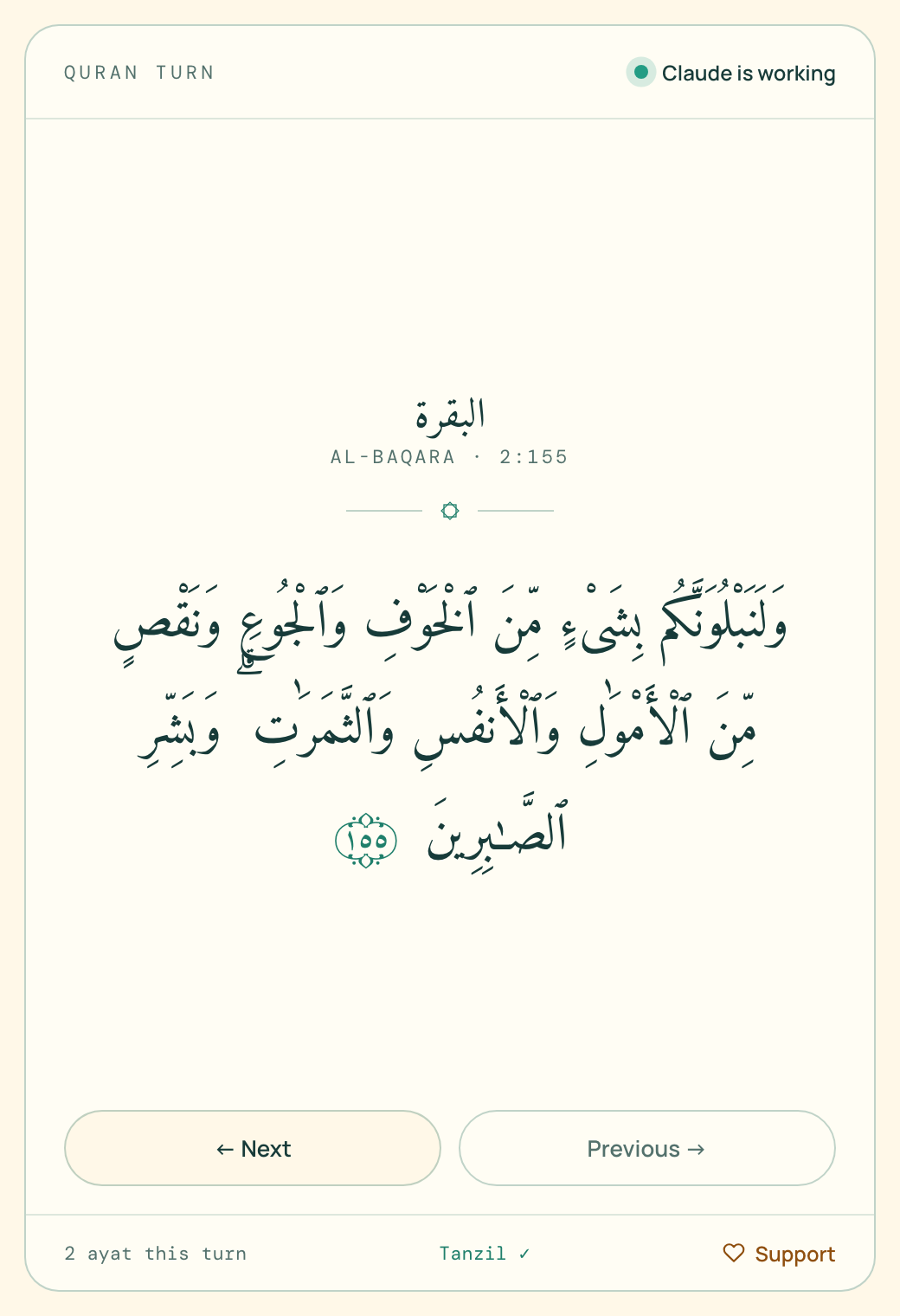
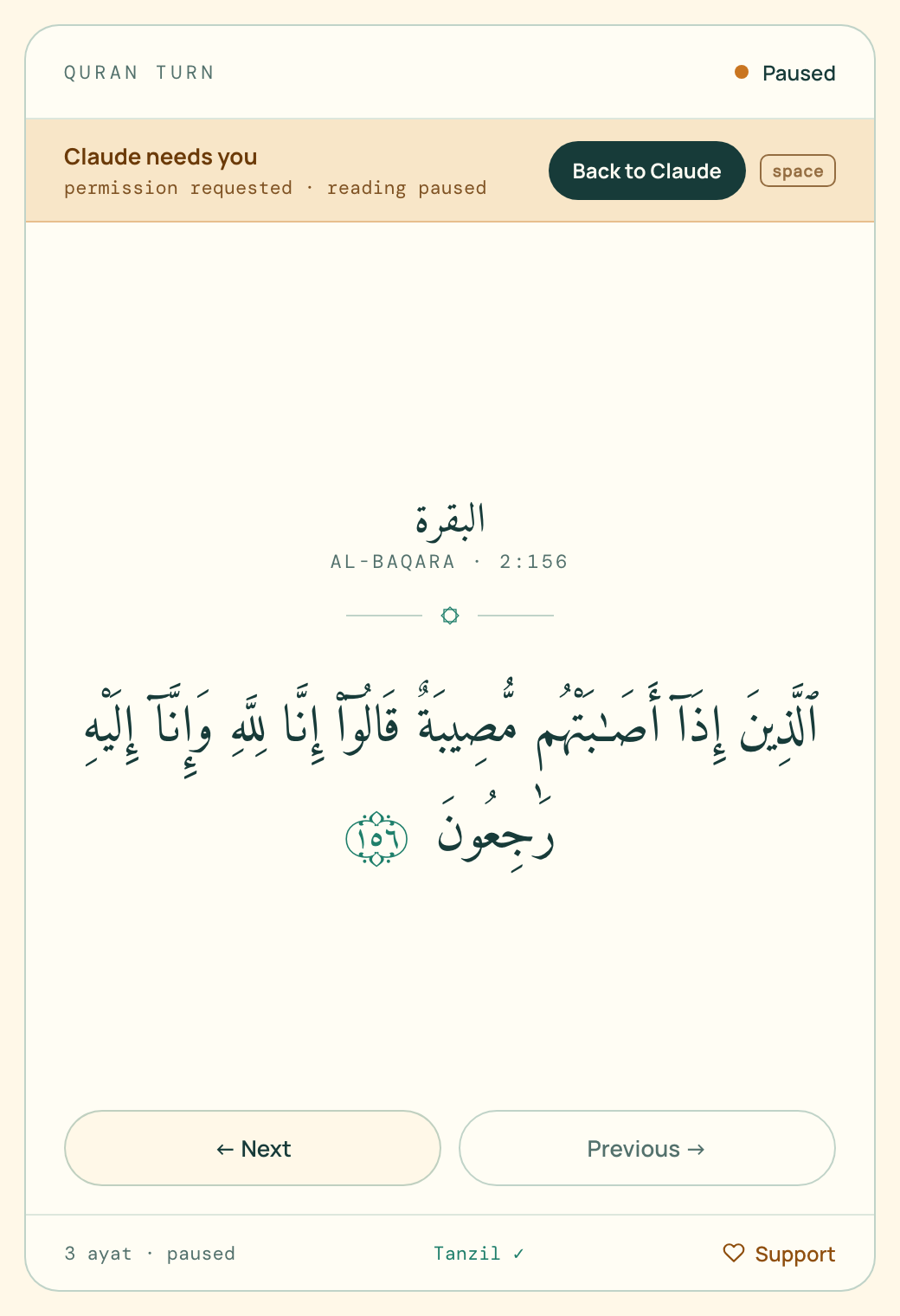
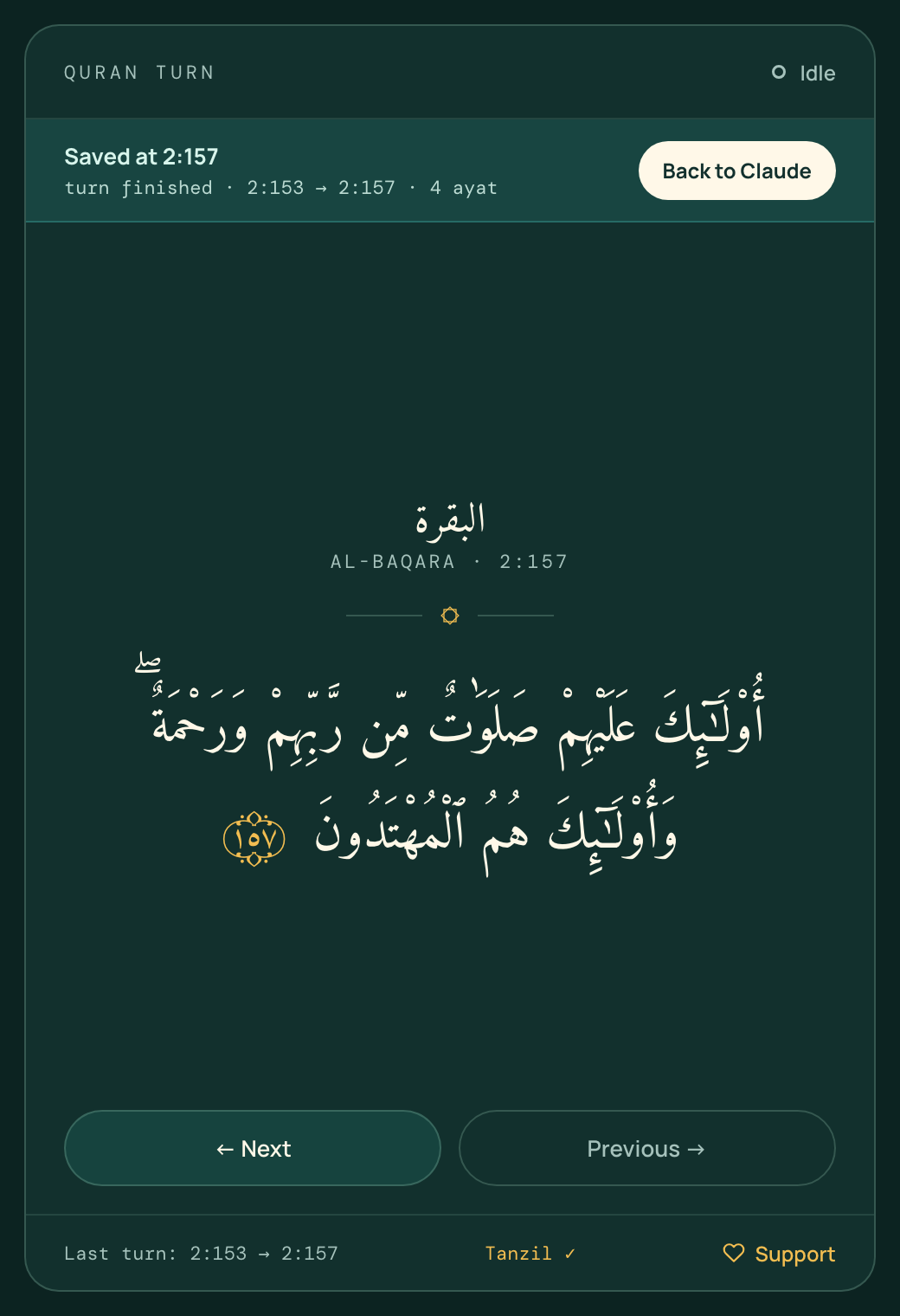
- Exact Qur'an text. It ships Tanzil's verified Uthmani text byte-for-byte and checks it by SHA-256 before a single letter renders. No code path, and no LLM, ever edits it.
- Fully offline. The text, fonts and reader all live on your machine. No account, sync, analytics or telemetry.
- Knows when you're needed. It isn't a timer: agent hooks tell it when the agent is working, waiting on you, or done.
- Calm by design. No streaks, XP or nag screens, just one log line per turn: where you started and where you stopped.
Install
Requires Node.js 18+. There's nothing to npm install, because Quran Turn has zero dependencies.
Easiest: ask your agent
Paste this into Claude Code (terminal, or the Code tab in the Claude desktop app):
Install the Quran Turn plugin for me. In the terminal, run `claude plugin marketplace add rzrizaldy/quran-turn` and then `claude plugin install quran-turn@quran-turn`. When both succeed, tell me to restart Claude Code. If the `claude` command isn't available, tell me to type `/plugin marketplace add rzrizaldy/quran-turn` and then `/plugin install quran-turn@quran-turn` myself, one line at a time.
Paste this into Codex (CLI or the Codex app):
Install Quran Turn for Codex. Run `codex plugin marketplace add rzrizaldy/quran-turn`, then `codex plugin add quran-turn@quran-turn`, and confirm it is enabled with `codex plugin list`. Tell me to open interactive `codex`, run `/hooks`, and individually review and trust Quran Turn's UserPromptSubmit, PermissionRequest, PostToolUse, and Stop hooks. Do not trust unrelated hooks or bypass hook trust. Then start a new Codex turn; restart the Codex app first if I use it.
Or run the commands yourself
Claude Code: type each line on its own (/plugin accepts one command at a time):
/plugin marketplace add rzrizaldy/quran-turn
/plugin install quran-turn@quran-turn
Codex: in your terminal:
codex plugin marketplace add rzrizaldy/quran-turn
codex plugin add quran-turn@quran-turn
Check codex plugin list for quran-turn@quran-turn with status installed, enabled. Then finish the hook setup:
- Start an interactive Codex CLI session with
codexand type/hooks. - Find the Quran Turn commands from this plugin. Review and trust each of its four events: UserPromptSubmit, PermissionRequest, PostToolUse, and Stop. Other plugins' hooks may appear in the same list; leave those to their own review.
- Start a new Codex turn. If you use the Codex desktop app, restart it first and then send a new prompt there.
Installing or enabling the plugin does not trust its hooks. Codex skips untrusted hooks even when codex plugin list says the plugin is enabled. In our Codex CLI test, the reader opened and recorded a turn as codex after the four hooks were trusted, without a trust bypass. During a Codex turn the reader says “Codex is working”; during a Claude turn it says “Claude is working.”
If the reader does not open, check /hooks and codex plugin list first. You can also run node bin/quran-turn open from a source clone to check the reader independently of Codex hooks. Do not use --dangerously-bypass-hook-trust as an installation step.
From source
git clone https://github.com/rzrizaldy/quran-turn
claude --plugin-dir ./quran-turn
Then send any prompt. On macOS the reader comes out of the notch. Elsewhere it opens as a small app window if Chrome, Edge, Brave or Chromium is installed, and in your default browser otherwise. It opens once and is reused, so later turns never open another tab.
How it works
 you send a prompt ─▶ UserPromptSubmit ─▶ the curtain comes out of the notch · "● Claude" or "● Codex" · counts ayat
                                            │
   agent asks approval ─▶ PermissionRequest ─▶ "Claude needs you" slides in · Space takes you back, the curtain folds up
                                            │
     you approve, tool runs ─▶ PostToolUse ─▶ the curtain comes back down where you were reading
                                            │
             turn ends ─▶ Stop ─▶ place saved automatically · "Saved at 2:157" · the curtain folds into the notch
With the reader window instead of the notch (quran-turn surface window, and on Windows or Linux), the window shrinks to a small strip and your agent comes to the front at the same moments.
- Your place saves itself. Every ayah you move is written to disk at once, and the Stop hook closes the turn. You never need to run a command;
quran-turn logis only there if you're curious. - Back to your agent in one key. When the agent needs you or is done, the strip shows Back to Claude (or Codex). Click it or press Space, and the app you're running the agent in (the Claude desktop app, Codex, Terminal, iTerm, VS Code…) comes to the front.
- The window, never full screen. With the window surface, the reader opens at 460×740, shrinks to a 380×112 strip, and grows back to your size, capped so it never returns full screen. Turn the automatic shrinking off with
quran-turn switch off. Window switching is macOS-only for now, and the first time, macOS asks to let your agent's app control your browser. - Hooks: they call
bin/quran-turn hook <event>, print nothing (agents read hook output as context), always exit 0, and take about 40 ms. - Reader server: a tiny local server on
127.0.0.1:47114serves the reader. The first hook starts it, and it exits after 30 minutes with no reader connected. - One hooks file for both agents: Codex provides
CLAUDE_PLUGIN_ROOTas an alias and also setsPLUGIN_ROOT, which is how Quran Turn tells the two apart.
The notch (default on macOS)
The reader lives in your MacBook's notch. It is black like the notch itself, so while nothing is happening you don't see it at all.
- You send a prompt (from any agent): the curtain widens just past the notch and drops into an ayah card, with a soft spring at the end. Beside the notch you see who is working (● Claude or ● Codex) and where you are (
2:155). - Read: click the card, then use ← / →, or the arrows on the card. Until you click it, your typing stays with your agent.
- The agent needs you: Claude needs you · Back to Claude slides into the card without cutting off your ayah. Press Space when you're ready: your agent comes to the front and the curtain folds up. It comes back down when the agent resumes.
- The turn ends: Saved at 2:157 · 4 ayat shows for a moment, then the curtain folds back into the notch. If your mouse is still on the card, it waits until you move away, so you're never cut off mid-ayah.
- Anytime: hover over the notch to peek at your ayah, and move away to fold it again. Esc folds it for the rest of the turn. ⤢ (or G) opens the full reader, with search, the surah list and Go to.
- First time: the notch asks where would you like to start? with one-tap starts (Al-Fatihah, Juz 'Amma, Al-Kahf, Yasin, Al-Mulk) and Search… for anything else.
Setup: nothing. The first time the notch opens, Quran Turn compiles its small macOS helper (native/QuranNotch.swift, about 400 lines you can read) on your Mac with the Swift compiler from Apple's Command Line Tools. That takes a few seconds, once. No prebuilt binary ships with the plugin, and the helper needs no permissions. If the Command Line Tools are missing (xcode-select --install adds them), or you're on macOS 11 or older, the reader opens in its window instead.
The helper only draws and animates the black shape. The reading itself is the same page as everywhere else, so the Qur'an text still goes through the SHA-256 check and textContent-only rendering.
Choose where the reader shows up:
quran-turn surface notch     # the default on macOS
quran-turn surface window    # the reader window (with Float mode)
quran-turn surface auto      # notch on macOS, window elsewhere
Windows (experimental). Windows has no notch, so quran-turn surface notch makes the reader drop from the top-centre of the screen instead. It runs in a Microsoft Edge app window with its title bar and frame removed, always on top, and uses nothing beyond what ships with Windows 10/11 (native/notch-win.ps1). It is opt-in while it gets tested on real machines, so please open an issue with what you see.
Float mode
Float belongs to the window surface (quran-turn surface window). Press Float in the reader (or the F key) and the reader becomes a small ayah card that stays on top of every app, including the Claude desktop app, Codex, Terminal and your editor. Drag it wherever you like, and it stays there.
- While the agent works: read with ← / →. The card never moves on its own and never steals focus.
- When the agent needs you: a strip slides into the card: Claude needs you · Back to Claude. Nothing jumps and your reading isn't cut off. Press Space (or Enter) when you're ready, and your agent comes to the front.
- When the turn ends: Saved at 2:157 · 4 ayat slides in. Press Space to go back, or keep reading with ←.
- Esc or × closes the card and brings the full reader back.
Float uses Chrome's Document Picture-in-Picture, so it needs Chrome, Edge or Brave, on macOS, Windows or Linux. Opening it takes one click or key press per session, because browsers require that for floating windows. Without Float, the reader works as a regular window, which shrinks to a strip when the agent needs you (macOS).
Start anywhere, find anything
The first time the reader opens, in the notch or the window, it asks where you'd like to start. After that, press G (or click the counter at the bottom of the window) to go anywhere. One search box understands:
| Type | Goes to |
|---|---|
2:255 |
an ayah (Ayat al-Kursi) |
18 · kahfi · yasin · al-mulk · the cave · الكهف |
a surah, by number, name or meaning |
juz 30 · j15 |
the start of a juz |
hal 50 · page 604 |
the start of a page in the Madani mushaf |
قل هو الله احد · الصلاة |
ayat containing those Arabic words |
There are one-tap starts for Al-Fatihah, Juz 'Amma, Al-Kahf, Yasin and Al-Mulk, and you can browse by Surah or Juz.
Search is forgiving. Harakat are optional, and modern spelling finds Uthmani spelling ("الصلاة" finds "ٱلصَّلَوٰةَ"). That loosening is used only for matching: every ayah in the results is shown exactly as Tanzil's text. The juz and page starts come straight from Tanzil's metadata.
From the terminal:
quran-turn start juz 30
start accepts anything the search box accepts: start kahfi, start 2:255, start hal 50.
Updating
New versions are released automatically, and CHANGELOG.md lists everything that changed (also on quran.allrize.tech). Updating takes one of three routes, and the reader handles the rest.
1. Set it once (Claude Code, recommended). Run /plugin, go to Marketplaces, choose quran-turn and pick Enable auto-update. Claude Code then checks for new versions in the background after it starts. Run /reload-plugins when it tells you, or the update loads the next time you start Claude Code. Third-party marketplaces have auto-update off by default, which is why this step is needed once.
2. Or ask your agent. Paste this into Claude Code:
Update the Quran Turn plugin: run `claude plugin marketplace update quran-turn` and then `claude plugin update quran-turn@quran-turn`. When it says it updated, tell me to run /reload-plugins.
Or paste this into Codex:
Update Quran Turn for Codex. Run `codex plugin marketplace upgrade quran-turn`, then `codex plugin add quran-turn@quran-turn`, and confirm the latest version is enabled with `codex plugin list`. Tell me to restart the Codex app if I use it. In interactive `codex`, run `/hooks` and review any Quran Turn hooks marked new or changed before starting a new turn; do not trust unrelated hooks.
3. Or run the commands yourself (the same ones as above). For Codex:
codex plugin marketplace upgrade quran-turn
codex plugin add quran-turn@quran-turn
codex plugin list
Confirm the latest version is enabled. Restart the Codex app if you use it. In an interactive Codex CLI session, run /hooks and review any Quran Turn hooks marked as new or changed; hook trust is tied to the current definition. Codex updates are a manual step here. Claude Code's marketplace has the auto-update switch described above.
Once the updated plugin is loaded and its hooks are trusted, the next prompt swaps the reader server to the new version and an open reader window reloads on its own. Your place and reading log in ~/.quran-turn are never touched by an update.
Coming from v0.4.0 or earlier? Refresh or close the reader window once after updating, because the self-reload arrived in v0.4.1. From then on it's automatic.
Which version am I on? It's in the reader's footer ("visit quran.allrize.tech for updates · v0.7.0"). Click it and the site tells you whether a newer version exists.
Using the reader
| Key | Action |
|---|---|
← j space |
Next ayah while the agent works (Arabic reads right to left) |
space / enter |
Back to Claude/Codex, when it needs you or is done |
→ k |
Previous ayah |
g |
Go to / search: surah, juz, ayah, page or Arabic words |
+ / - |
Text size |
d |
Toggle light / dark |
f |
Float: the always-on-top ayah card |
esc |
Close the float card, or fold the notch for this turn |
In the notch, ← / →, space, g and esc work the same once you've clicked the card.
quran-turn surface <s> notch · window · auto          → where the reader shows up
quran-turn open        open the full reader window
quran-turn where       your current position        → Al-Baqara 2:157  البقرة
quran-turn start <…>   start from anywhere          → quran-turn start juz 30
quran-turn log [n]     your last n turns            → Sep 22, 8:42 PM  2:153 → 2:157  4 ayat  claude
quran-turn status      one line for a status bar    → ☾ quran-turn · Al-Baqara 2:157 · reading
quran-turn on | off    enable or pause the hooks
quran-turn switch on | off   shrink the reader when the agent needs you (macOS)
(From a clone, run these as node bin/quran-turn ….)
Away from your desk: Ngaji Companion for Muse
quran.allrize.tech/agent has a prompt for a Muse scheduled task. At each of the five prayer times it sends you 5 verses (25 a day) with buttons to mark them read, skip, read more, or mark how far you got. It remembers where you stopped. No account, no API keys, nothing to install.
- Create a scheduled task in Muse that runs every 15 minutes.
- Paste the prompt from the page.
- Answer the onboarding question (where to start).
It runs inside Muse, not this plugin: prayer times come from the public Aladhan API and verses from api.alquran.cloud's quran-uthmani edition, which is the older Tanzil build described under Text accuracy. Quran Turn is not affiliated with Muse.
Your data stays yours
Everything is plain JSON in ~/.quran-turn/ (override with QURAN_TURN_HOME):
| File | What's in it |
|---|---|
state.json |
where you are: {"surah": 2, "ayah": 157} |
agent.json |
whether the agent is working, waiting on you, or done |
sessions.jsonl |
one line per turn: {"from":"2:153","to":"2:157","ayat":4,"agent":"claude", …} |
config.json |
{"enabled": true, "autoOpen": true, "autoSwitch": true} |
Your prompts, code and anything else from your agent session are never stored. Delete these files whenever you like.
Text accuracy
- Source.
data/quran-uthmani.txtis the Tanzil Quran Text (Uthmani) v1.1, downloaded with Tanzil's default options (pause marks and sajdah signs on, rub-el-hizb off).scripts/fetch-quran.shreproduces the download exactly. - Pinned.
data/SHA256SUMSpins the text, the metadata and the Qur'an font. The reader hashes the file again in the browser and refuses to render if it doesn't match. - Untouched. Each ayah goes into the page with
textContentonly: no normalization, trimming or HTML. - Basmala. Tanzil prefixes the basmala to ayah 1 of every surah except 1 and 9. The reader shows it as a header line by splitting the string, and verifies that the pieces join back to the exact original.
- Checked in the browser. Every one of the 6,236 ayat was stepped through in the real reader and matched the file exactly.
npm run verify # checksums · 114 surahs · 6,236 ayat · per-surah counts · lossless basmala split
npm run verify:remote # also compares every ayah's letters with a second Tanzil-derived copy
The remote check compares against api.alquran.cloud, which serves an older Tanzil build. All 6,236 ayat match letter-for-letter except five, and those five are exactly Tanzil's documented v1.1 corrections (2:181, 8:6 and 13:37 بَعْدَ مَا; 12:39 and 12:41 يَـٰصَـٰحِبَىِ).
Found a problem with the text itself? Please report it to Tanzil, which maintains it.
Support
Quran Turn is free and will stay free: no ads, no paywall, and no Qur'an behind an account. If it has a place in your day, you can support it at quran.allrize.tech:
- In Indonesia: QRIS, GoPay, bank transfer or card through Midtrans. Pick 5rb / 10rb / 25rb / 50rb or your own amount.
- Elsewhere: pay with card through Stripe.
The desktop app never talks to a payment provider. Its Support link only opens that page.
Deploying quran.allrize.tech (Cloudflare Pages)site/ is a Cloudflare Pages project:
public/holds the static pages.functions/api/donations/holds two small Pages Functions that create Midtrans Snap transactions server-side.
Deploy it with:
cd site && npx wrangler pages deploy
Set the Midtrans keys as Pages secrets, never in the repo:
npx wrangler pages secret put MIDTRANS_SERVER_KEY
npx wrangler pages secret put MIDTRANS_CLIENT_KEY
MIDTRANS_IS_PRODUCTION and SITE_URL live in site/wrangler.toml. Without keys, the Midtrans button shows "Pembayaran belum tersedia" and everything else keeps working.
Development
npm test # parser, state machine, hooks (silent + exit 0), server, donation API
npm start # reader at http://127.0.0.1:47114
bin/quran-turn          CLI and hook entry point
src/                    state machine, local server, window opener
app/                    the reader (HTML/CSS/JS, bundled fonts)
data/                   Tanzil text + metadata (verbatim) and checksums
hooks/hooks.json        hook wiring for Claude Code and Codex
.claude-plugin/         Claude Code plugin + marketplace manifests
.codex-plugin/          Codex plugin manifest
site/                   quran.allrize.tech (Cloudflare Pages: public/ + functions/)
scripts/                fetch + verify the Qur'an data
test/                   node:test suites
Contributions are welcome. The one rule: never modify anything in data/. Tanzil's license forbids changing the text, and npm run verify will catch it.
Credits & license
- Code: MIT
- Qur'an text and metadata: © Tanzil Project, CC BY 3.0. Distributed verbatim; changing it is not allowed. See data/LICENSE-TANZIL.md.
- Fonts: Amiri Quran, Manrope and DM Mono, all under the SIL Open Font License 1.1 (
app/fonts/OFL-*.txt).
Yorumlar (0)
Yorum birakmak icin giris yap.
Yorum birakSonuc bulunamadi