ccmeter
Health Warn
- No license — Repository has no license file
- Description — Repository has a description
- Active repo — Last push 0 days ago
- Low visibility — Only 5 GitHub stars
Code Fail
- rm -rf — Recursive force deletion command in Scripts/build.sh
- rm -rf — Recursive force deletion command in Scripts/release.sh
Permissions Pass
- Permissions — No dangerous permissions requested
No AI report is available for this listing yet.
macOS menu bar app to monitor your Claude Code usage — session and weekly limits at a glance
CCMeter
A macOS menu bar app that displays your Claude Code usage at a glance.
Features
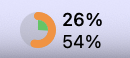
- Menu bar donut chart -- shows 5-hour session and 7-day weekly utilization as nested rings
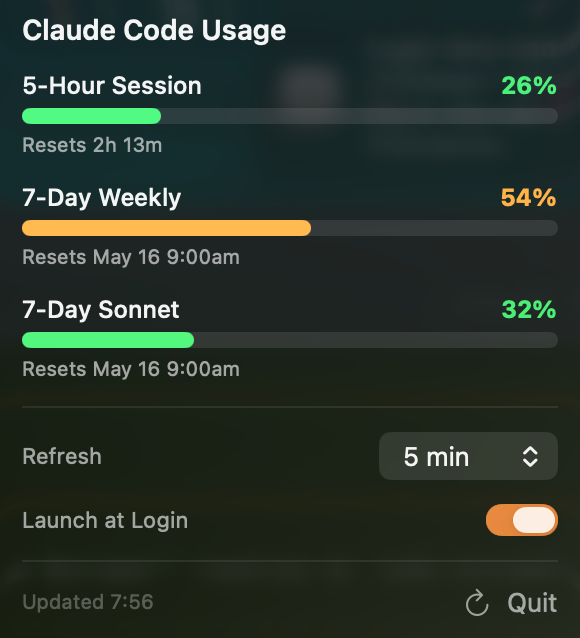
- Detailed popover -- 5-Hour Session, 7-Day Weekly, and 7-Day Sonnet rate limits with progress bars and reset times
- Auto-refresh -- configurable polling interval (1 / 3 / 5 / 10 / 15 / 30 / 60 min)
- Launch at Login -- optional auto-start on macOS boot
Requirements
- macOS 14.0 (Sonoma) or later
- Claude Code CLI installed and signed in
Plan compatibility
| Feature | Pro | Max |
|---|---|---|
| 7-Day Weekly usage | ✓ | ✓ |
| 7-Day Sonnet usage | ✓ | ✓ |
| 5-Hour Session usage | — | ✓ |
The 5-Hour Session row is only shown on Max plan. The Anthropic API does not return 5-hour session data for Pro plan subscribers, so that section is hidden automatically.
Keychain Access
CCMeter reads the OAuth credentials that Claude Code stores in the macOS Keychain (service: Claude Code-credentials). No password prompt is required -- the app reads credentials via the same security CLI that Claude Code itself uses, which macOS always permits without confirmation.
The app never performs its own OAuth login flow and never modifies Keychain entries. It only reads the token that Claude Code has already saved.
Privacy: All data is processed locally on your Mac. Your credentials and usage statistics are never sent to any server other than Anthropic's official API endpoints.
If you'd like to verify what the app does with your credentials, the relevant code is small and easy to follow:
Sources/CCMeter/Infrastructure/KeychainDataSource.swift— runssecurity find-generic-password -s "Claude Code-credentials"and parses the JSON outputSources/CCMeter/Repositories/TokenRepository.swift— extracts theaccessTokenandexpiresAtfields from the raw credentialSources/CCMeter/Domain/Services/UsageDomainService.swift— passes the access token to Anthropic's usage API and returns the result; the token is not stored or logged
Installation
Build from source (recommended)
Xcode (or the Xcode Command Line Tools with Swift 5.9+) is required.
git clone https://github.com/s-age/ccmeter.git
cd ccmeter
./Scripts/build.sh --install
This builds a release binary, assembles CCMeter.app, code-signs it, and copies it to /Applications.
Build options
| Flag | Description |
|---|---|
--clean |
Clean build artifacts before building |
--test |
Run tests before building |
--install |
Install to /Applications after building |
--skip-icon |
Skip app icon generation |
--no-sign |
Skip code signing |
Homebrew
brew tap s-age/ccmeter
brew install --cask ccmeter
License
MIT
Reviews (0)
Sign in to leave a review.
Leave a reviewNo results found