ghostty-blackhole
Health Pass
- License — License: MIT
- Description — Repository has a description
- Active repo — Last push 0 days ago
- Community trust — 319 GitHub stars
Code Fail
- rm -rf — Recursive force deletion command in tuner/make-app.sh
Permissions Pass
- Permissions — No dangerous permissions requested
No AI report is available for this listing yet.
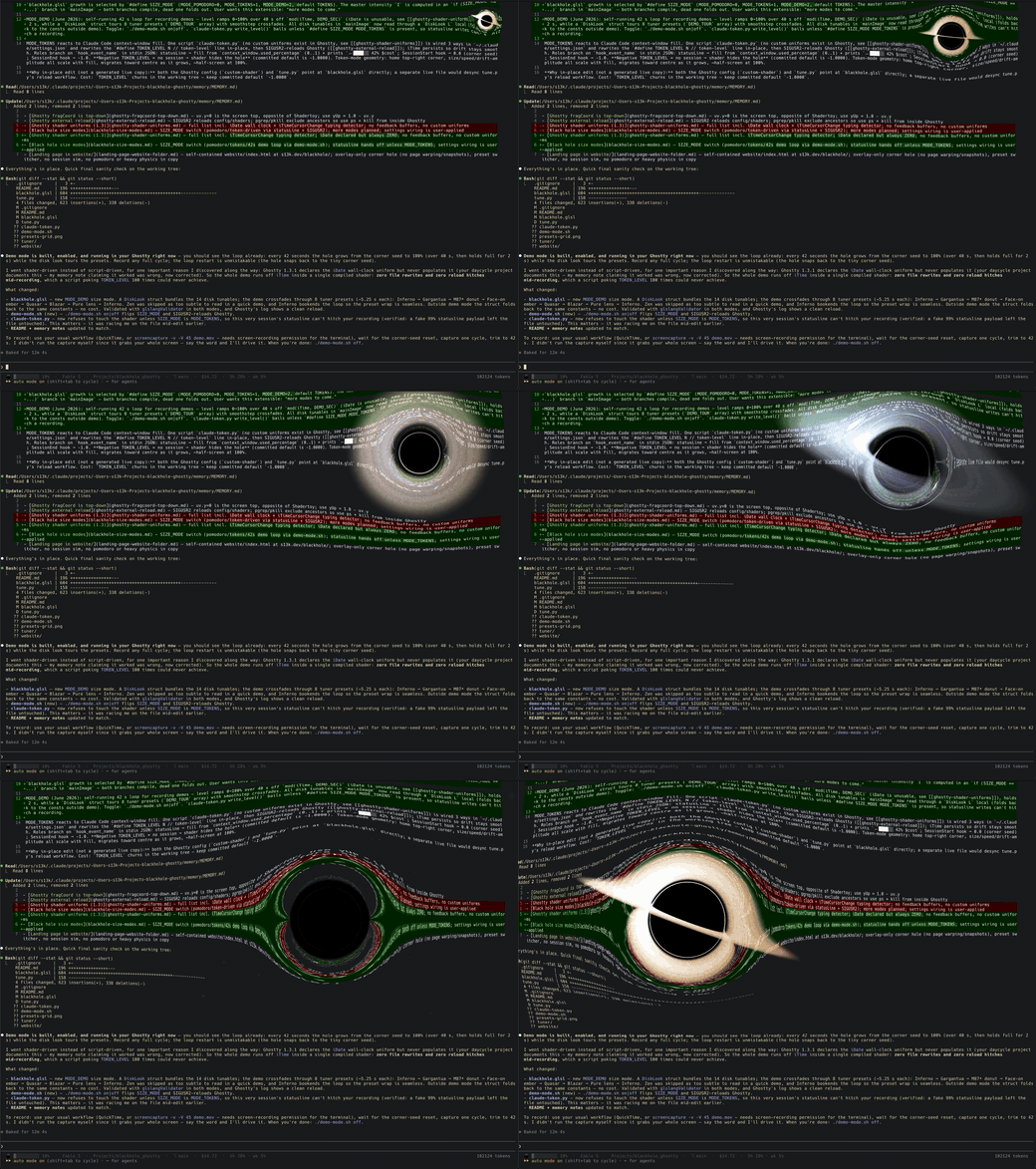
Ghostty Blackhole puts a real, ray-traced black hole inside your terminal. It grows as Claude Code's context window fills up, live. A fresh session is a quiet hole in the corner. A full one swallows half your screen. You'll always see /compact coming.
Ghostty Blackhole
Landing page: s13k.dev/blackhole
A black hole floating inside your Ghostty terminal. It
starts small and grows to swallow your screen, driven by whichever size mode
you pick: a built-in pomodoro clock (grow through the hour, demand a break,
leave you alone once you take it), or token mode, where it tracks how full
Claude Code's context window is in real time.
Modeled on Eric Bruneton's black hole shader,
which beam-traces Schwarzschild geodesics against precomputed lookup tables.
A Ghostty custom shader is a single Shadertoy-style fragment pass with no
custom textures, so the lookup tables are replaced by doing the physics live:
every pixel near the hole integrates its own null geodesic through the
Schwarzschild metric (the Binet-form acceleration a = -3/2 h² x/r⁵, which
gives the exact photon bending). Your terminal contents play the role of the
lensed background sky. Nothing below is painted on — it all falls out of the
ray tracing:
What it renders
- The shadow — rays with impact parameter under
b_crit = (3√3/2) r_s
spiral through the horizon and come back black. Text near the edge is
stretched into the photon ring before it disappears; text behind the hole
really is gone. - Gravitational lensing — escaped rays are projected back onto the
terminal "sky" plane: text bends, magnifies, and shows the mirrored
secondary image inside the Einstein ring. Far from the hole this hands off
to the analytic weak-field deflection (α = 2r_s/b), so only pixels near
the hole pay for the integration. Blue bends slightly more than red out
there for a touch of chromatic aberration. - Accretion disk — a thin Keplerian disk that a ray can pierce several
times: the far side arcs over and under the shadow (the Interstellar
look), and the photon-ring region shows higher-order disk images.
Coloring is physical: a Shakura–Sunyaev temperature profile rendered as
blackbody color, shifted and beamed by the relativistic factorg = √(1 − 1.5 r_s/r)/(1 − β·k̂)— the approaching side is blue-hot and
boosted byg^N, the receding side dim and red. - Photon ring — rays winding near the
1.5 r_sphoton sphere pick up
every disk crossing; the bright thin ring is emergent, not drawn. - Lensed starfield — a faint procedural sky sampled with the bent ray
direction, so stars smear into arcs around the hole (off by default —
raiseSTAR_GAINto enable). - Gravitational time dilation — the disk pattern at radius
radvances
at the proper rate√(1 − 1.5 r_s/r), so the inner orbits visibly freeze;
the whole disk also winds down as the hole grows heavier (DILATION_MIN). - The hole drifts on a slow Lissajous path, confined to the upper part of
the screen — the bottomWORK_AREAfraction (your prompt) is never
distorted. Drift speed and reach follow its size: small and calm, big
and restless.
Pomodoro mode
The break reminder is computed entirely inside the shader — no daemon, no
shell hooks, nothing outside blackhole.glsl.
Shaders are stateless (no buffers persist between frames, and Ghostty has no
custom uniforms), so a shader cannot remember when your work streak began.
Instead the schedule is anchored to the wall clock via iDate:
- Cycle: the hole is always present while you work — it starts small at
the cycle floor, grows overWORK_PERIOD_MIN(default 55 min), collapses
back to small in the last minute, and stays small throughBREAK_MIN
(default 5 min). With 55+5 the peak hits at five-to-the-hour — a fixed,
predictable rhythm. - Typing detector:
iTimeCursorChangetracks cursor activity in your
terminal. Stop using it forIDLE_FADE_SEC(default 90 s) and the hole
shrinks live, gone entirely after a few minutes of quiet — it never nags
while you aren't actually working.
The trade-off of self-containment: the cycle won't re-anchor to a break you
take at an odd time — it's an hourly bell, not a per-streak stopwatch.
Caveat: stock Ghostty (through 1.3) declares
iDatebut never
populates it — it is always zero — so on current releases the wall-clock
schedule doesn't advance: the hole sits at its small cycle-floor size and
only the typing detector works. The full cycle comes alive once Ghostty
wiresiDateup (you can preview it today withTIME_SCALE, which runs
offiTimeinstead). Token mode, the default, is unaffected.
Size modes
What drives the hole is selected by SIZE_MODE near the top of blackhole.glsl:
MODE_POMODORO— the self-contained wall-clock schedule described above. Works
standalone, no setup beyond the shader (but see theiDatecaveat above).MODE_TOKENS(default) — the hole tracks Claude Code's context-window
fill. Requires the bundled command (below).MODE_DEMO— a self-running 42-second showcase loop for recording demos:
the hole grows from the corner seed to 100 % exactly as token mode would,
while the disk look tours the tuner presets (Inferno → Gargantua → M87* donut
→ Face-on ember → Quasar → Blazar → Pure lens → Inferno), crossfading at each
~5 s slot boundary. Everything runs offiTimeinside one compiled shader —
no reloads, so a recording never hitches. Toggle it with./demo-mode.sh on|off(which also reloads Ghostty); the cursor channel is ignored in demo
mode, so a live Claude session can't disturb a recording. Record any full
cycle — the loop restart is obvious (the hole snaps back to the corner
seed).
Token mode
The hole reflects how full Claude's context window is, live:
- Empty context — a small hole in the top-right corner, sized to
coverTOKEN_AREA_MIN(default 0.06 %) of the terminal area — the same
felt size on any window shape. - Filling up — it grows toward
TOKEN_AREA_MAX(default ~3 % of the
terminal at 100 % context — that's the shadow; the bright disk reaches
~3× past it, so it reads far bigger), moves faster, and its allowed roam box
expands out of the corner — left and down — until it covers the whole
playable screen above the work area; the hole wanders pseudo-randomly
through all of it. The orbit is scaled to the box (never clipped —
clipping would park it dead at the boundary), with margins that keep the
shadow and bright inner disk on screen while it's small. /compactor a new session — snaps back to the corner seed.- No Claude session running — the hole disappears entirely; you get a plain
terminal.
How it works
Ghostty custom shaders take no custom uniforms — but they do get the cursor
color (iCurrentCursorColor), and any program can set the cursor color with a
standard OSC 12 escape. So the token count rides in on the cursor: a single
bundled script, claude-token.py, is wired into Claude Code three ways and
encodes the context fill into the low nibbles of an amber cursor color
(#f5b000 empty → #f0bf0a full); the shader decodes it back out every
frame. The fixed high nibbles plus a 4-bit checksum form a 16-bit signature,
so a theme's own cursor color can't accidentally summon a black hole. No file
is rewritten, nothing reloads, there is no recompile hitch — updates land on
the next frame.
Level steps land smoothly, too: Ghostty bumps iTimeCursorChange on any
cursor change including color and snapshots the old color intoiPreviousCursorColor, so the shader decodes both and glides between the two
levels — discrete updates read as continuous motion instead of popping the
whole warp field. The glide time scales with the jump (TOKEN_GLIDE_*):
1 % ticks ease over 0.3 s, a 10 % jump takes 1 s, capped at 1.5 s.
| Wiring | When it fires | What it does |
|---|---|---|
statusLine |
every assistant turn | encodes the context fill (0..1, 1/250 steps) into the cursor color and prints a built-in-style line: ⚫️ ██████░░░░ 61% · Fable 5 · Projects/blackhole · ⎇ main · $1.27 · 5h 24% · wk 41% (the last segment is your Claude usage limits; a window past 80 % also shows its reset time) |
SessionStart hook |
session start / resume / /clear |
resets to the corner seed (0.0) |
SessionEnd hook |
session exit (/exit, ctrl-d, …) |
resets the cursor color (OSC 112) — no signature means no hole |
A cursor color without the signature means "no session", so a bare install
shows nothing until a live session encodes a real fill. (The shader'sTOKEN_LEVEL define remains as a manual override for hand-testing a size;
it only applies while the cursor carries no signal.)
Install token mode
Two pieces — the shader and the command:
Point Ghostty at the shader (see Install below) with
SIZE_MODE MODE_TOKENS(the default).Add this to
~/.claude/settings.json(adjust the path), then start a new
Claude Code session:{ "statusLine": { "type": "command", "command": "/path/to/blackhole_ghostty/claude-token.py" }, "hooks": { "SessionStart": [{ "hooks": [{ "type": "command", "command": "/path/to/blackhole_ghostty/claude-token.py" }] }], "SessionEnd": [{ "hooks": [{ "type": "command", "command": "/path/to/blackhole_ghostty/claude-token.py" }] }] } }
This is global, so the hole reacts to any Claude Code session. A few notes:
- The cursor color is per-surface state, so every Ghostty split/window gets
its own hole — concurrent sessions in different surfaces don't fight. - Your cursor turns accretion-disk amber while a session is live (that is
the data channel). Anything else recoloring the cursor gets overwritten at
the next statusline refresh; a cursor without the signature simply means
"no hole". - Inside tmux/screen the OSC would need a passthrough to reach Ghostty —
token mode is built for plain Ghostty sessions. - To opt out, set
SIZE_MODE MODE_POMODOROand remove the entries above.
Install
Requires Ghostty 1.3+ (for the cursor shader uniforms).
Clone the repo, then add to your Ghostty config (~/.config/ghostty/config
or ~/Library/Application Support/com.mitchellh.ghostty/config on macOS):
custom-shader = /path/to/blackhole_ghostty/blackhole.glsl
custom-shader-animation = true
Reload the config (cmd+shift+, on macOS) or open a new window.
Tuning
Tuner app (macOS)
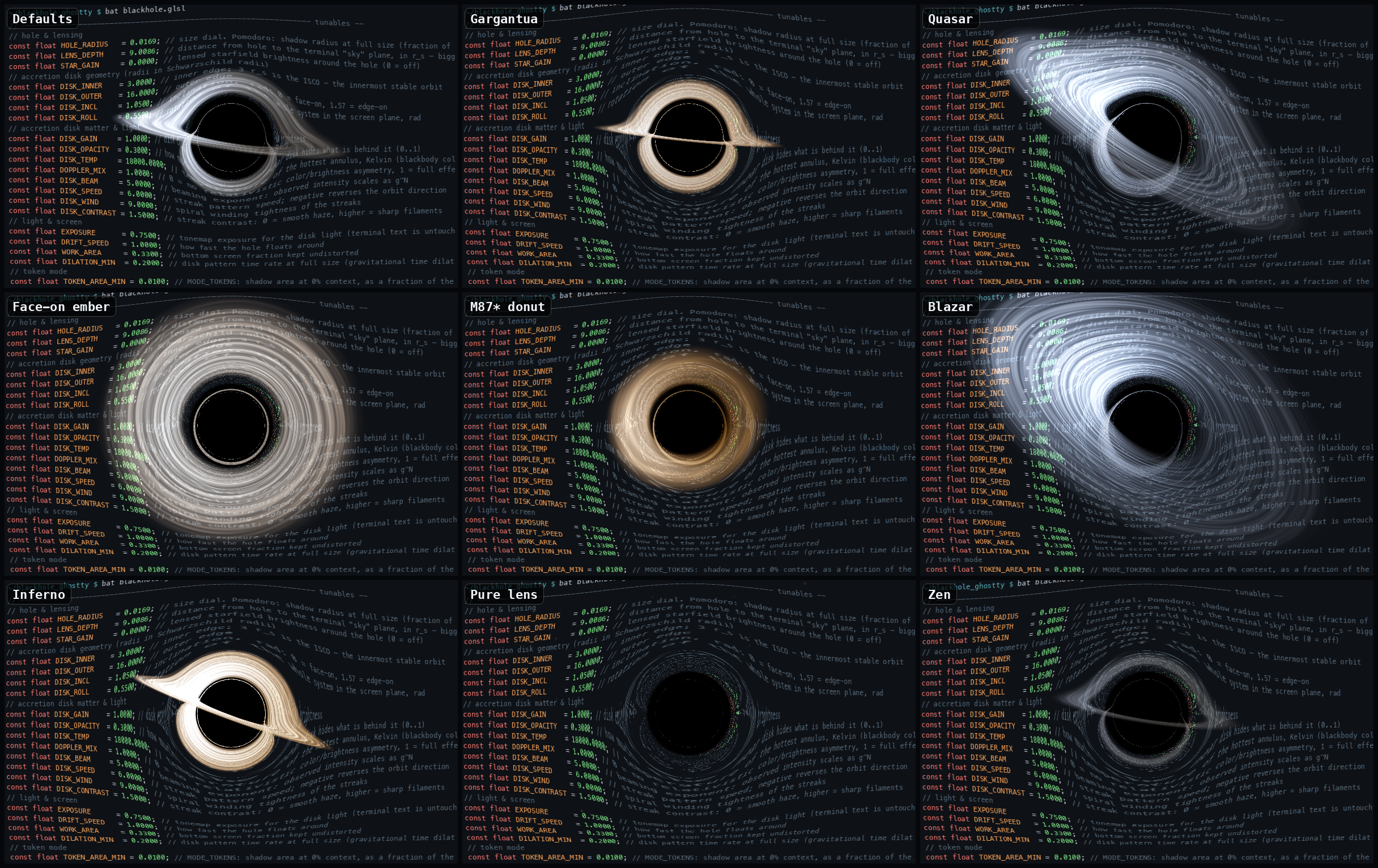
A native SwiftUI control panel in the spirit of
Bruneton's demo page
lives in tuner/: grouped sliders for every shader tunable, presets
(Gargantua, Quasar, M87* donut, Blazar, Inferno, Zen, …),
live two-way sync with the file, and every nudge hot-reloads Ghostty
instantly via SIGUSR2.
cd tuner && swift run            # run it
./tuner/make-app.sh              # or bundle tuner/dist/Black Hole Tuner.app
Or just edit the constants at the top of blackhole.glsl and reload
(cmd+shift+,).
Constants
At the top of blackhole.glsl. Radii are in Schwarzschild radii (r_s);
the ISCO — the innermost stable circular orbit — is at 3 r_s.
| Constant | Effect |
|---|---|
HOLE_RADIUS |
Size dial — pomodoro: shadow radius at full size (fraction of screen height); token mode: scales the area calibration (exact at 0.08) |
LENS_DEPTH |
Distance from hole to the terminal "sky" plane, in r_s — bigger bends text harder |
STAR_GAIN |
Lensed starfield brightness (0 = off) |
DISK_INNER / DISK_OUTER |
Disk inner/outer edge in r_s (inner clamps to stay outside the photon sphere) |
DISK_INCL |
Disk inclination, radians: 0 face-on, π/2 edge-on |
DISK_ROLL |
Rotation of the whole system in the screen plane |
DISK_GAIN |
Disk emission brightness |
DISK_OPACITY |
How much the near disk hides what's behind it |
DISK_TEMP |
Blackbody temperature of the hottest annulus, Kelvin |
DOPPLER_MIX |
Relativistic color/brightness asymmetry: 0 off, 1 full |
DISK_BEAM |
Beaming exponent — intensity scales as g^N |
DISK_SPEED |
Streak pattern speed; negative reverses the orbit |
DISK_WIND |
Spiral winding tightness of the streaks |
DISK_CONTRAST |
Streak contrast: 0 = smooth haze, higher = sharp filaments |
EXPOSURE |
Tonemap exposure for disk light (text is never tonemapped) |
DRIFT_SPEED |
How fast the hole floats around |
WORK_AREA |
Bottom screen fraction kept completely undistorted |
DILATION_MIN |
Disk's pattern time rate when the hole is fully grown (lower = more slowdown) |
TOKEN_AREA_MIN |
Token mode: shadow area at 0% context, as a fraction of the terminal area (default 0.06%) |
TOKEN_AREA_MAX |
Token mode: shadow area at 100% context (default ~3% of the terminal — render cost scales with it) |
TOKEN_HOME_X / TOKEN_HOME_Y |
Token mode: corner-home position in uv (1,0 = exact top-right; y runs top-down) |
TOKEN_EASE |
Token mode: growth curve exponent — 1 = proportional, <1 front-loads growth, >1 keeps it small until late |
TOKEN_REACH |
Token mode: how much of the playable screen the roam box covers at 100% context |
TOKEN_CALM / TOKEN_RUSH |
Token mode: drift speed at 0% / 100% context |
WORK_PERIOD_MIN |
Work minutes per pomodoro cycle (growth phase) |
BREAK_MIN |
Break minutes per cycle (hole stays small) |
IDLE_FADE_SEC |
Typing pause after which the hole starts to fade |
TIME_SCALE |
Testing only: 1 = real schedule; >1 fast-forwards growth via iTime |
N_STEPS (a #define) sets the geodesic integration budget per pixel; only
pixels inside the ray-traced circle around the hole pay it. It's the main
performance dial — that circle scales with the hole, so a big hole on a big
high-DPI display is where frames go to die. Lower N_STEPS (and/orTOKEN_AREA_MAX) if the terminal gets sluggish at high context fill.
To eyeball any token level without a Claude session, drive the cursor-color
channel by hand from a plain shell inside Ghostty: ./token-test.sh 0.42
holds a level, ./token-test.sh sweep runs 0 → 100 % over 25 s, and./token-test.sh off hides the hole again. (Don't run it in a surface with a
live session — its statusline re-emits the real level every refresh.) Note
that a size glide only survives while the cursor holds still — any cursor
move makes Ghostty snapshot previous = current, ending the transition early —
which is why the hold mode lingers ~1.6 s before exiting back to the prompt.
For a fast debug loop, set TIME_SCALE to e.g. 100 to watch a complete
pomodoro cycle — growth, collapse, break — in about 36 seconds, then set it
back to 1. (It fast-forwards via iTime rather than the wall clock, so it
works even on builds where iDate is stuck at zero.) The period knobs also accept
fractional minutes if you'd rather shorten the real schedule itself.
Uniforms Ghostty gives custom shaders (1.3)
iResolution, iTime, iTimeDelta, iFrameRate, iFrame, iMouse
(unused), iDate (wall clock — declared but stuck at zero through Ghostty
1.3, see the pomodoro caveat), iChannel0 (the terminal, iChannel1-3
unused), iCurrentCursor/iPreviousCursor (xy position, zw size),iCurrentCursorColor/iPreviousCursorColor, iCurrentCursorStyle/iPreviousCursorStyle, iCursorVisible, iTimeCursorChange, iFocus,iTimeFocus, iPalette[256], iBackgroundColor, iForegroundColor,iCursorColor, iCursorText, iSelectionForegroundColor,iSelectionBackgroundColor. No persistent buffers between frames — shaders
are stateless, which is why the pomodoro is wall-clock-anchored.
Three gotchas worth knowing if you hack on this:
- Ghostty's
fragCoordy-axis runs top-down, opposite of the Shadertoy
convention it otherwise follows. - To trigger a config reload from a script, send
SIGUSR2— but find the
PID withps, notpgrep/pkill: those silently exclude their own
ancestors, and Ghostty is an ancestor of any shell running inside it. - Claude Code spawns statusLine/hook commands with no controlling
terminal, so/dev/ttyfails there —claude-token.pyfinds the
session's pty by walking its ancestors withps -o ppid=,tty=.
License
MIT — see LICENSE.
Inspired by Eric Bruneton's black hole shader
(BSD-3-Clause). No code from that project is used here — this shader is an
independent screen-space approximation written from scratch; the credit is
for the idea and the physics it demonstrates.
Reviews (0)
Sign in to leave a review.
Leave a reviewNo results found