unsnooze
Health Gecti
- License — License: MIT
- Description — Repository has a description
- Active repo — Last push 0 days ago
- Community trust — 15 GitHub stars
Code Basarisiz
- rm -rf — Recursive force deletion command in scripts/e2e-simulate.sh
- process.env — Environment variable access in scripts/e2e-simulate.sh
- fs module — File system access in scripts/e2e-simulate.sh
- process.env — Environment variable access in src/agents/agy.js
- process.env — Environment variable access in src/agents/claude.js
- process.env — Environment variable access in src/agents/codex.js
- process.env — Environment variable access in src/agents/grok.js
- process.env — Environment variable access in src/agents/kimi.js
- process.env — Environment variable access in src/agents/opencode.js
Permissions Gecti
- Permissions — No dangerous permissions requested
Bu listing icin henuz AI raporu yok.
Auto-resume Claude Code, Codex CLI & Grok sessions in tmux when the usage limit (5-hour/weekly) resets


Claude Code · Codex CLI · Grok · Qwen · Kimi · OpenCode · Antigravity — when they hit the 5-hour or weekly usage limit
("You've hit your usage limit"), your session just… stops.
unsnooze auto-resumes them: it tracks every limit-stopped session across all
your projects and wakes each one up in tmux the moment the usage limit resets.
npm install -g unsnooze && unsnooze setup
Why unsnooze
Overnight and long-running agent work dies at the 5-hour / weekly limit, and every
existing tool solves only a slice of it:
| unsnooze | claude-auto-retry | autoclaude | hydra | |
|---|---|---|---|---|
| Multi-CLI (Claude Code + Codex + Grok) | ✅ | ❌ Claude only | ❌ Claude only | ✅ |
| GUI sessions (VS Code ext, desktop apps) | ✅ watcher daemon | ❌ | ❌ | ❌ |
| Waits for reset & resumes the same session | ✅ | ✅ | ✅ | ❌ switches provider |
| All sessions at once (shared ledger + one daemon) | ✅ | ❌ one pane | ✅ | ✅ |
| Revives sessions whose pane/process is gone | ✅ --resume <id> |
❌ | ❌ | ❌ |
| Survives laptop sleep & weekly-scale waits | ✅ epoch polling | partial | partial | n/a |
| Settings + first-run wizard | ✅ | ❌ | ❌ | ❌ |
Supported CLIs
- Claude Code — dual-channel detection: the
StopFailurehook (authoritative,
carriessession_id) plus tmux pane scraping for banners and the interactive
limit menu (always answered with "Stop and wait for limit to reset", never a
blind Enter). Dead sessions revive viaclaude --resume <id>. - OpenAI Codex CLI — scrape-based (Codex fires no event on limits). Detects
the exact■ You've hit your usage limit …banner strings from the Codex
source, parsestry again at 3:51 PM/Feb 23rd, 2026 9:01 PM/in 4 days 20 hours 9 minutes. Dead sessions revive viacodex resume <id> "<message>"— the prompt travels in argv. - Grok Build (xAI) — ⚠️ experimental. Hook channel works (Grok reads
Claude-compatible hooks, includingStopFailure); the limit banner text is
not publicly documented, so detection uses generic patterns with a safe
fallback. Hit a banner unsnooze missed? Rununsnooze reportand paste the
capture into an issue — that's how this adapter gets good. - Qwen Code — ⚠️ experimental. Dual-channel: a Claude-shaped
StopFailure
hook installed into~/.qwen/settings.json(fires witherror: rate_limit)
plus scraping for the verbatim quota renders (Qwen OAuth quota exceeded,
Coding PlanAllocated quota exceeded, and OpenRouterRate limit exceeded: limit_…passthroughs). Qwen never shows a reset time, so waits use the
5-hour fallback and self-correct on verify. Dead sessions revive viaqwen --resume <id>(session ids come from the*.runtime.jsonsidecars
qwen writes for exactly this purpose). - Kimi CLI (Moonshot) — ⚠️ experimental. Scrape-based: kimi retries a 429
three times within seconds, then stops with a redLLM provider error: Error code: 429 … rate_limit_reached_errorline — that's the detection anchor.
The 429 body carries no reset time (5h fallback + verify). Dead sessions
revive viakimi -r <id> -p "<message>"— with a guard: kimi silently starts
a new session for unknown ids, so the id is verified on disk first
(--continueotherwise).Membership expired(402) is notify-only. - OpenCode — ⚠️ experimental, and a different shape: OpenCode retries
rate limits itself, forever, honoringretry-after(it will sleep hours
until the reset, showingRate Limited [retrying in 2h5m attempt #4]). So
unsnooze records the stop but never touches a live self-retrying pane; its
job is reviving sessions whose process died mid-wait (laptop slept, tmux
gone) viaopencode -s <ses_id>, with the reset time parsed straight from
the banner countdown. Zen plan banners (5 hour/weekly/monthly usage limit reached…) and OpenRouter passthroughs are detected too;insufficient credits(402) is notify-only. - Antigravity CLI (Google,
agy) — ⚠️ experimental. The Gemini-CLI
successor. Scrapes the forum-reported quota strings (Model quota limit exceeded,Refreshes in 6 days and 18 hours— parsed, multi-day refresh =
the weekly cap) and treats503 MODEL_CAPACITY_EXHAUSTEDas a transient
overload, not a limit. Dead sessions revive viaagy --conversation=<id>
(ids from~/.gemini/antigravity-cli/history.jsonl). Like Grok: closed
source, sounsnooze reportcaptures make this adapter better.
OpenRouter (the API gateway) isn't a separate agent: its 429 bodies
(Rate limit exceeded: limit_rpd/…, free-models-per-day) are detected inside
the CLIs that use it (OpenCode, Qwen Code), and credit exhaustion (402) is
surfaced as a notification — there's no reset to wait for, only a top-up.
GUI surfaces (VS Code extension, desktop apps)
Terminal sessions are watched through the shell wrapper + tmux. Sessions in
Claude Code's VS Code extension / desktop app and Codex's IDE
extension / desktop app have no pane to scrape — so unsnooze daemon tails
the session files those surfaces already write:
- Claude Code records every rate-limit stop as a structured entry in its
~/.claude/projects/**.jsonltranscript (session id, cwd, reset time) —
shared by the CLI and the VS Code extension. - Codex writes a
rate_limitssnapshot (usage %, exact epoch reset
time) into every rollout under~/.codex/sessions/— shared by the CLI,
IDE extension, and desktop app. - Claude desktop (cowork) sessions (experimental, macOS) run in
sandboxes under~/Library/Application Support/Claude; unsnooze watches
those too and revives with the session's isolatedCLAUDE_CONFIG_DIR
(plus the keychain-scope override that keeps auth working — verified
against a real desktop session).
When the limit resets, the session is revived in a tmux window withclaude --resume <id> / codex resume <id> — it's the same session file, so
the continued conversation stays visible in the GUI's own history. (Resuming
inside the GUI panel isn't possible today: no extension/app exposes an
IPC/URI that can send a prompt.)
Enable it in unsnooze setup (installs a launchd agent / systemd user unit),
or run unsnooze install --daemon / unsnooze daemon yourself. Turn it off
anytime with unsnooze config set guiWatch off.
How it works
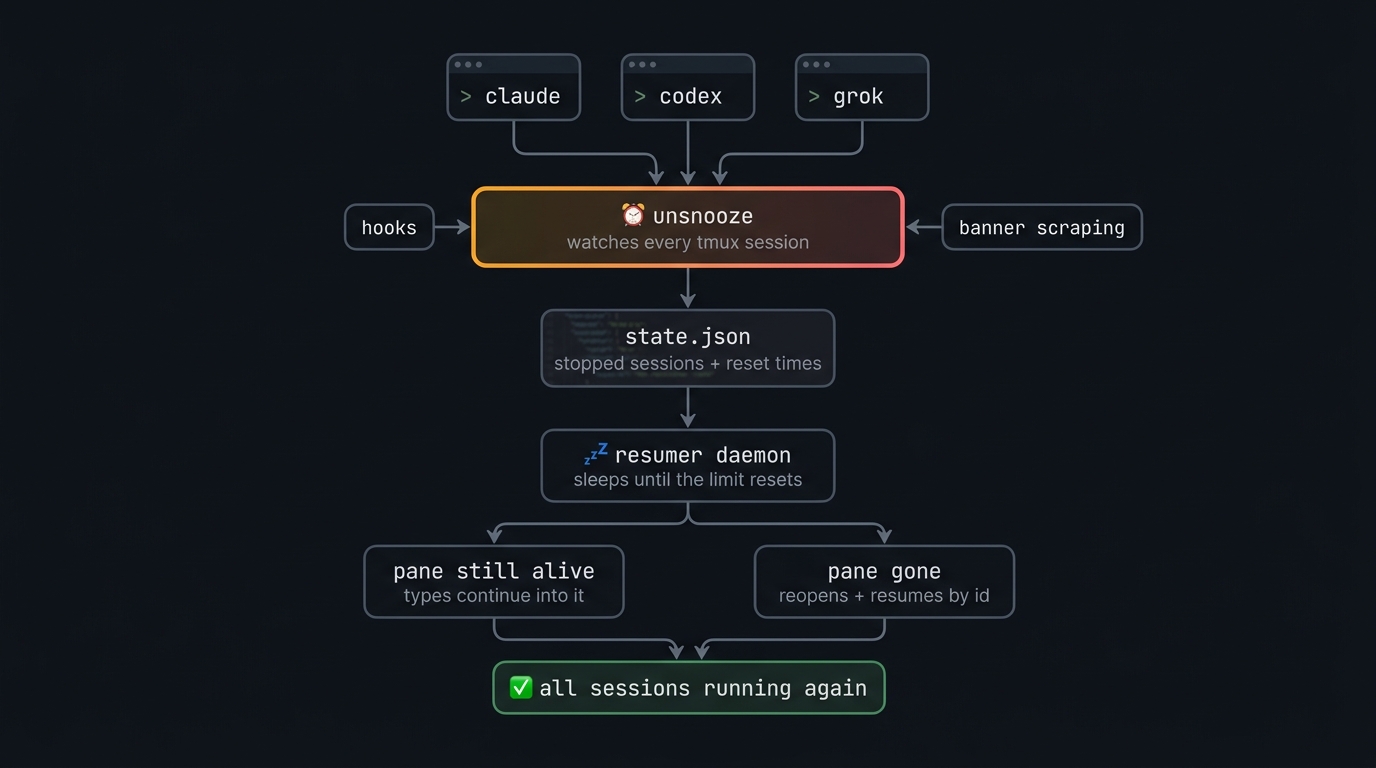
claude / codex / grok (shell wrapper) ──► unsnooze _run <agent> ──► CLI in tmux pane
                                              │
                                              ├─ per-pane monitor (scrapes for limit
                                              │  banners, drives Claude's limit menu,
                                              │  seconds-scale retry on 5xx/overload)
                                              │
StopFailure hook (claude, grok) ──────────────┤
                                              ▼
                                ~/.unsnooze/state.json
                                { agent, sessionId, cwd, pane, resetAt, status }
                                              │
                                              ▼
                                resumer daemon (singleton, epoch-polling —
                                survives laptop sleep and weekly-scale waits)
                                              │
                          ┌───────────────────┴────────────────────┐
                 pane still alive?                          pane gone?
                 send resume message into it                tmux new-window,
                 (only if the CLI is foreground             `unsnooze _run <agent>
                 and not mid-stream)                        --resume <id>`, verify
Limit events are never persisted by the CLIs themselves; the reset time is
parsed from the banner text, DST-safe, with a 5-hour fallback when unparseable
— and every resume is verified afterwards (banner came back → reschedule from
the fresh banner, capped at 5 attempts).
Usage
claude / codex / grok           # normal usage — wrapped automatically
unsnooze status                 # tracked sessions + reset countdowns
unsnooze resume-now [id|--all]  # don't wait for the reset time
unsnooze cancel [id|--all]      # stop tracking a session
unsnooze message <id> "text"    # per-session wake message (--clear to reset)
unsnooze config list            # settings (see below)
unsnooze config set <k> <v>     # e.g. autoResume off
unsnooze logs [-f]              # what unsnooze has been doing
unsnooze update                 # update unsnooze itself
unsnooze daemon                 # persistent GUI-session watcher (usually run
                                # by launchd/systemd via `install --daemon`)
unsnooze report [agent]         # capture a pane to report an undetected banner
unsnooze uninstall [--purge]    # remove wrappers + hooks (+ state with --purge)
unsnooze help                   # full command list (also -h / --help)
Settings
unsnooze setup writes ~/.unsnooze/config.json; change anything later withunsnooze config set:
| key | default | meaning |
|---|---|---|
autoResume |
true |
Master switch. Off = stops are still tracked, but nothing is resumed until you run unsnooze resume-now or turn it back on. |
menuAutoAnswer |
true |
May unsnooze answer Claude's limit menu (send keys in your pane)? Off = watch-only. |
notifications |
true |
Desktop notification on limit detected / session resumed / gave up. |
guiWatch |
true |
May the daemon watch session files for GUI-surface stops (VS Code extension, desktop apps)? Needs the daemon running (unsnooze install --daemon). |
resumeMessage |
"Continue where you left off…" | The message sent to wake a session. Override it for a single session with unsnooze message <id> "…" — visible in unsnooze status. |
resumeMessages.claude / .codex / .grok / .qwen / .kimi / .opencode / .agy |
"" |
Per-agent override of resumeMessage. Empty = use the global message; clear one with unsnooze config set resumeMessages.claude "". |
agents.claude / agents.codex |
true |
Which CLIs are guarded. |
agents.grok / agents.qwen / agents.kimi / agents.opencode / agents.agy |
false |
Experimental adapters — off by default; enable in unsnooze setup or unsnooze config set agents.qwen on. |
workspaceGuard |
inform |
Repo changed while a session slept? inform wakes it with a heads-up in the message; pause holds it (desktop notification, diff shown on resume-now); off disables. |
updateCheck |
true |
Daily new-version check (a plain GET to the npm registry, nothing identifying is sent). Notices after commands + one desktop toast per version. |
Every setting also has a UNSNOOZE_* env override (see src/settings.js), and
all timings/paths are tunable via UNSNOOZE_* env vars (see src/config.js).
Safety properties
- Never injects blind: keys are only sent when the pane's foreground
process is the agent CLI and no "esc to interrupt"-style busy footer is
visible. Recycled pane ids can't receive stray messages. - Never picks a menu option blind: if Claude's limit menu layout can't be
read, unsnooze does not press Enter (that could confirm "Upgrade your plan"). - Sleep-safe waits: the resumer polls wall-clock against the target epoch
every 30s instead of one long timer — a laptop asleep past the reset fires
on the next tick. Weekly limits are just a bigger epoch. - Verified resumes: after dispatch it re-captures the pane; if the limit
banner reappears (reset time misparsed / not actually reset), it reschedules
from the fresh banner, capped at 5 attempts. - Concurrent-writer safe: state updates go through a mkdir lock + atomic
rename; corrupt state is quarantined, never fatal (the hook path must never
block the CLI). - Overload ≠ limit: 5xx/529/429 transient errors take a seconds-scale
backoff path ([30,60,120,240,300]s ± jitter) and never enter the ledger. - Stale-workspace guard: the repo's HEAD + dirty state are fingerprinted
when a session stops. If another session (or you) changed the repo before
the wake, the resumed agent is told to re-read before acting — or, withworkspaceGuard=pause, the session is held andunsnooze resume-now
shows the diff first.
Requirements
- Node ≥ 20 and tmux
- macOS, Linux, or Windows via WSL (see below)
- zsh or bash (the wrappers are installed into
~/.zshrc/~/.bashrc)
Windows / WSL
unsnooze is built on tmux, so on Windows it runs inside
WSL — which is where the
agent CLIs live on Windows anyway:
# inside your WSL distro (Ubuntu etc.)
sudo apt install tmux
npm install -g unsnooze && unsnooze setup
Everything works as on Linux, including desktop notifications: inside WSL,
unsnooze raises native Windows toasts through powershell.exe (nonotify-send or X server needed). Native Windows (PowerShell/cmd, no WSL) is
not supported — without tmux there is nothing to watch; unsnooze will tell you
so and run your CLI unwatched instead of breaking it.
FAQ
What does "You've hit your usage limit" mean in Claude Code?
Claude subscription plans meter usage in a rolling 5-hour window plus a weekly
cap. When either runs out, Claude Code stops mid-task and shows the banner with
a reset time ("resets 3pm"). Nothing is lost — the session can be resumed withclaude --resume <id> once the limit resets. unsnooze does exactly that,
automatically, for every stopped session.
What about Codex — "You've hit your usage limit. Try again at …"?
Same idea: ChatGPT-plan Codex has 5-hour and weekly windows. The Codex TUI
stays open at the composer after the banner, so unsnooze either types into the
live pane or reopens the session with codex resume <id> at the reset time it
parsed from the banner.
Does this get around the rate limit?
No. unsnooze waits for the reset exactly like you would, resumes once, and
verifies the limit actually lifted. It replaces the 4am alarm, not the limit.
How do I update, and how do I know when to?
unsnooze update (or npm i -g unsnooze). unsnooze checks the npm registry at most once a day and
tells you when a newer version exists (a line after CLI commands, plus one
desktop notification per version); after updating, the next command shows a
short "what's new" from the changelog. It's a plain registry GET with nothing
identifying — turn it off with unsnooze config set updateCheck off.
What if another session changed the repo while one was stopped?
unsnooze fingerprints the workspace (HEAD + uncommitted state) at stop time
and re-checks at wake. By default the session still resumes, but the wake
message includes what changed ("HEAD abc1234 → def5678 — re-read before
continuing"). Set workspaceGuard to pause to hold such sessions for a
manual unsnooze resume-now (which prints the diff stat), or off to
disable the check.
Does it work if my laptop was asleep or the terminal was closed?
Yes — reset times are stored as absolute timestamps and checked every 30
seconds, so a laptop that slept through the reset resumes on the next tick,
and dead panes are reopened by session id in a fresh tmux window.
Development
npm test                     # unit tests (node:test)
./scripts/e2e-simulate.sh    # full detect → wait → re-open cycle in a
                             # scratch tmux session (no real limits needed)
License
Yorumlar (0)
Yorum birakmak icin giris yap.
Yorum birakSonuc bulunamadi