obeya
Health Uyari
- License — License: MIT
- Description — Repository has a description
- Active repo — Last push 0 days ago
- Low visibility — Only 8 GitHub stars
Code Gecti
- Code scan — Scanned 12 files during light audit, no dangerous patterns found
Permissions Gecti
- Permissions — No dangerous permissions requested
Bu listing icin henuz AI raporu yok.
A spatial workspace for directing AI coding agents like an engineering director

A spatial workspace for directing AI coding agents the way an engineering director directs a
team. Every task and every project is a card on one canvas. Agents do the work in the
background; you keep every essential decision — made by voice, from a narrated demo of the
finished work, without reading code or cycling through terminals. At your desk or from your phone.
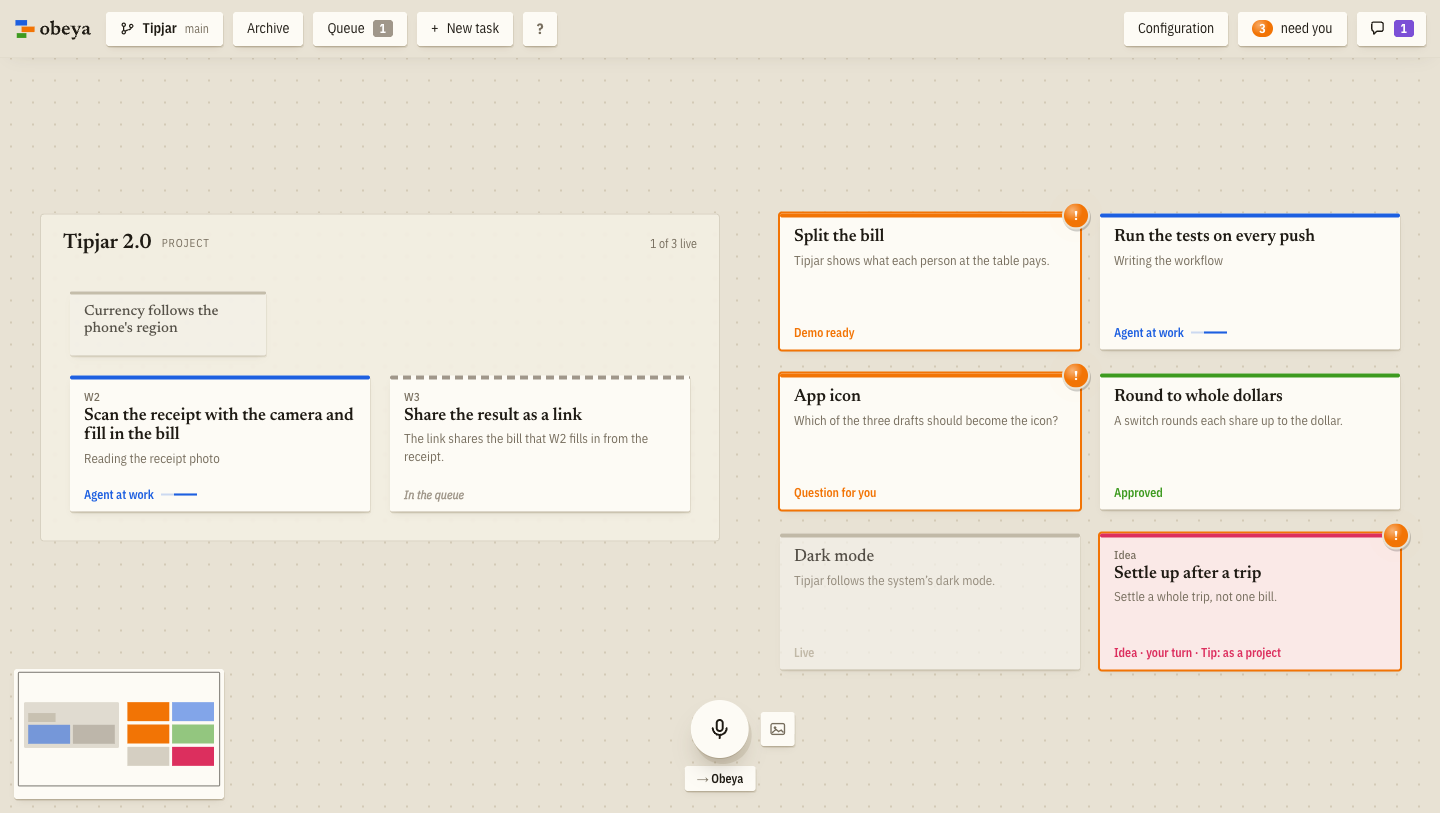
Obeya is Japanese for "big room": in lean management, the room where every project hangs
visibly on the walls. More on obeya.si.
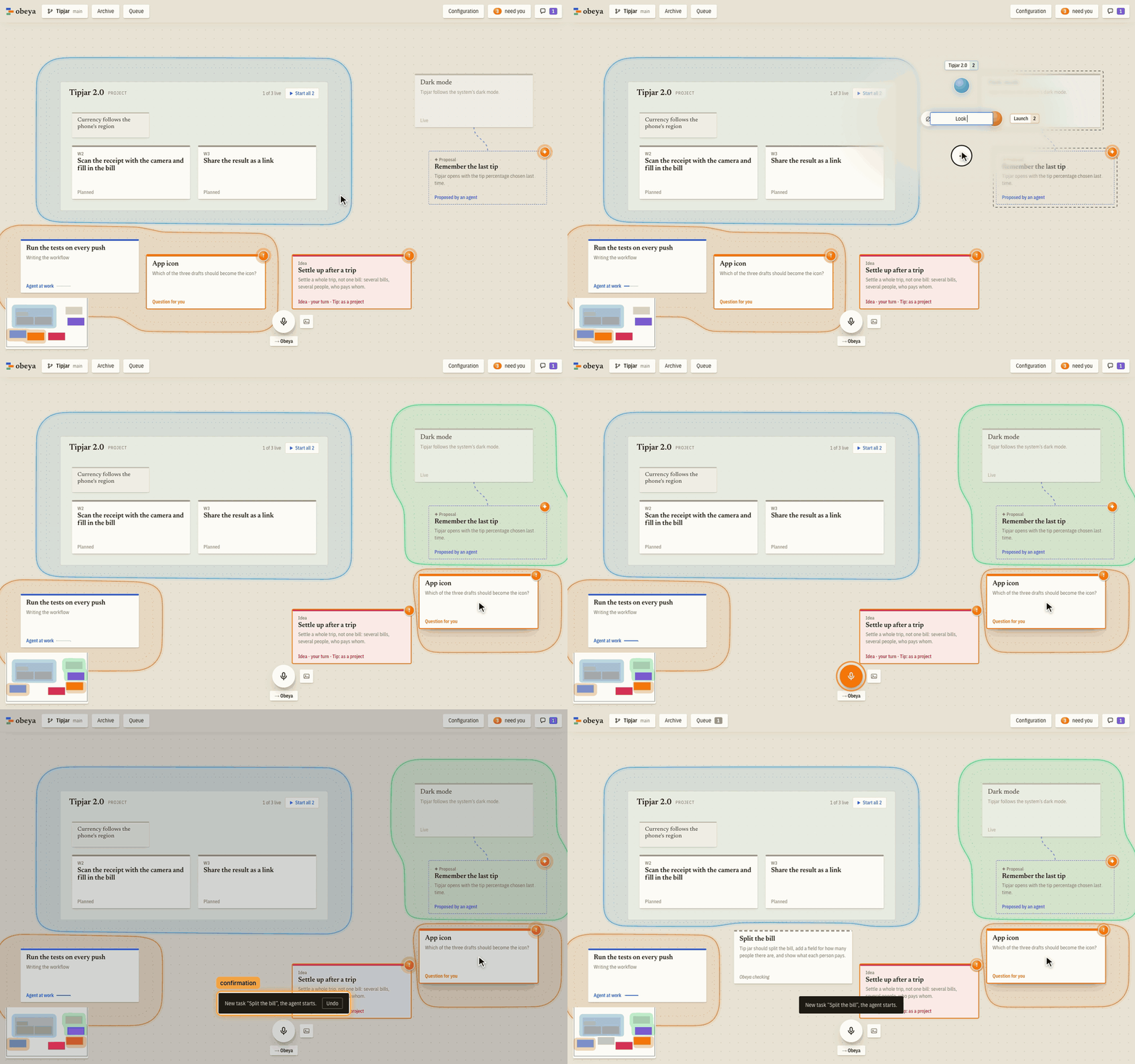
The video shows Obeya at work in four and a half minutes: an idea is said into the microphone, an
agent builds it and records its demo, and the approval lands it on main (watch on
obeya.si, with captions and chapters).
See every feature in action: each change to Obeya comes with the demo its agent recorded, on
demos.obeya.si.
How it works
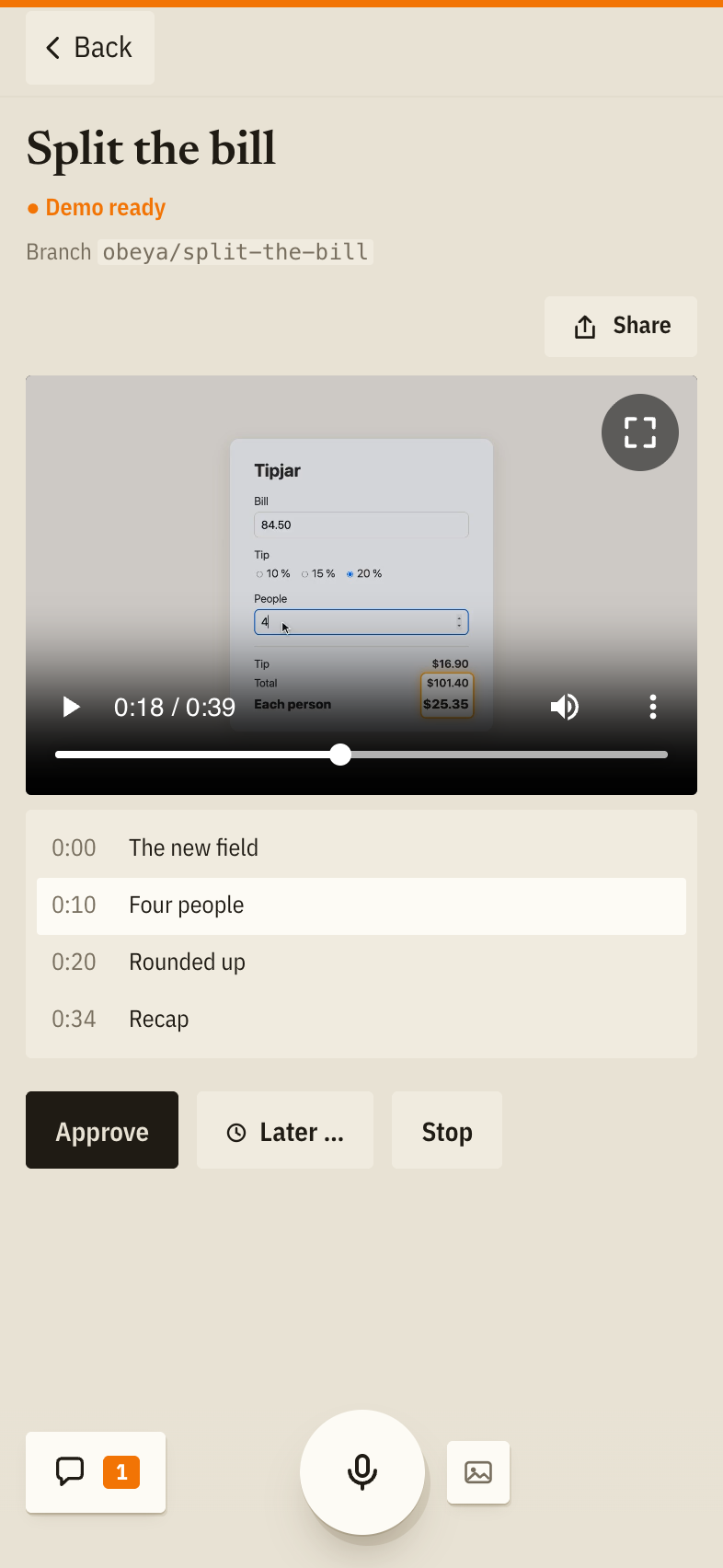
Each card gets its own agent (Claude Code) in its own clone or worktree of your repository, on
this machine or on another one reached over SSH. The agent asks on the card when it needs a
decision and hands over with a demo: a narrated screen recording of the change, or a page to look
at when the result is a layout or variants side by side. You approve it or say what to change, also
about one moment of the video: what you type or say while it stands there goes to the agent with
that frame and the narration's sentence. Approved work lands on main or goes out as a pull
request that Obeya carries to the merge; beside the branch the card shows how large the change is,
and a click shows the diff. "Share" puts a demo on a page of its own on your repository's demo
site, for colleagues to watch; the site can also take every approved demo by itself.
You talk to Obeya itself, spoken or typed: it takes your instructions, queues cards whose changes
would collide, cuts large ones into parallel packages and learns your preferences. An idea is
thought through on its card with an agent of its own, which keeps a brief of variants and open
questions and can have throwaway prototypes built; deciding builds it or plans it as a project,
or splits off the part that is settled as a task while the rest stays open. Larger work is planned
in plan docs, in the repository or in a folder of your own beside it, which show as projects with
a card per workstream. Each product you build gets a canvas of its own, over one repository or
several, and one Obeya runs them all.
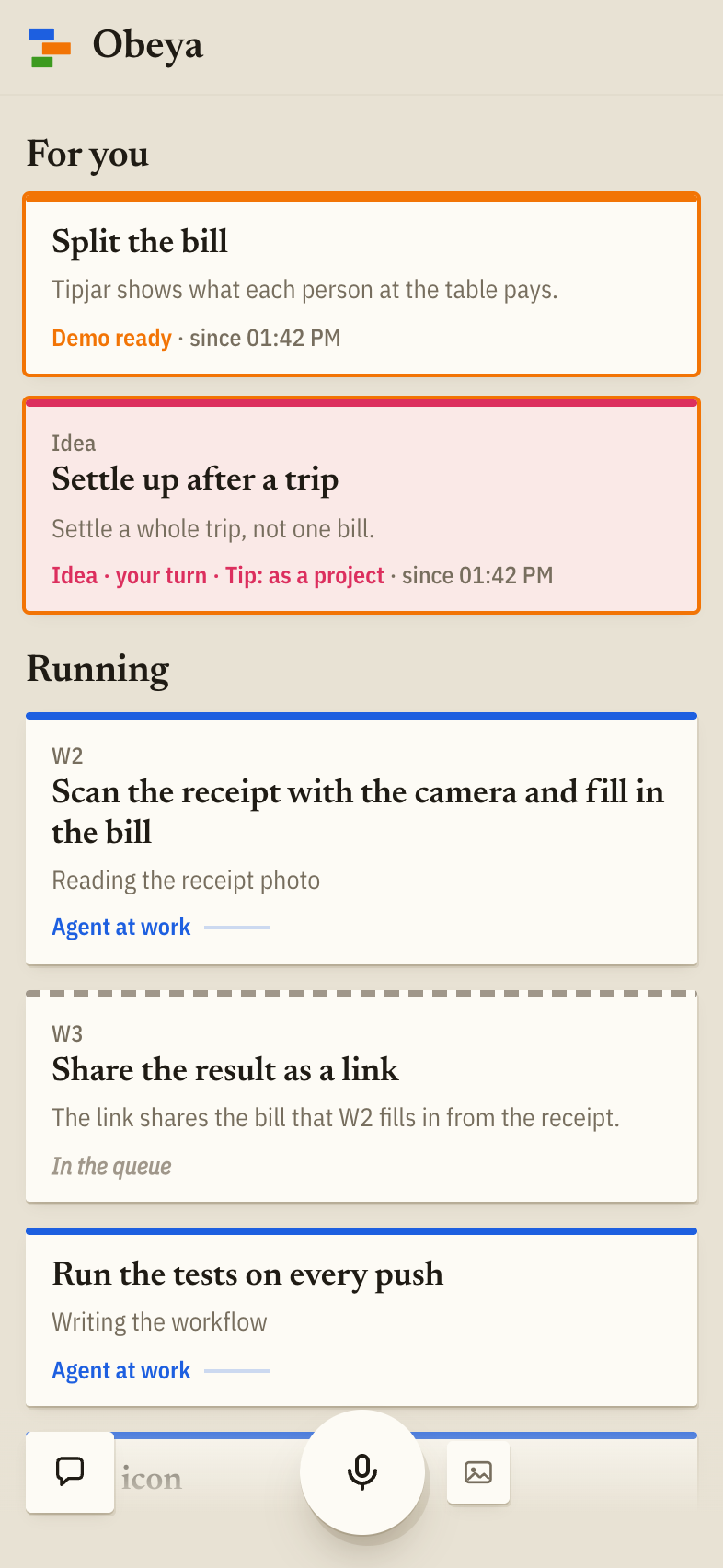
On your phone
Away from the desk, your phone shows what waits for you across all your canvases, and what is
running. Watch a demo and approve it, answer a question, or hold the microphone and say a new
task. A notification tells you when a card needs you.
Obeya keeps running on your computer, and the phone reaches it over your own private network:
Tailscale or another VPN. Nothing goes through a service of ours, and nothing is open to the
internet. How to connect a phone is below.
Status: early, but in daily use. Obeya is built with Obeya, and it's used to build commercial
software. It speaks English and German. How it works and why is indocs/design.md.
Download
| macOS | Apple Silicon · Intel (DMG) |
| Windows | Installer (x64) |
| Linux | AppImage for x64 · arm64, .deb for x64 · arm64 |
The app needs neither Bun nor a checkout. On its first start it checks the machine: what Obeya
needs (Claude Code with your login, git), what can wait (the
GitHub CLI for pull requests, voice, demos). It installs what it can
without admin rights and shows the command for the rest, then opens your first canvas on one of
your repositories. The Windows installer is not signed yet (applied for at the SignPath
Foundation): SmartScreen warns about it, and "More info" → "Run anyway" goes on (code signing
policy). On Linux, make the AppImage executable (chmod +x) first.
The app keeps itself up to date: a new release shows in its bar, and installing it waits until
the agents have paused, then the app restarts with it (a .deb is updated by installing the next
one).
On the canvas, double-click to write a task, then start its agent ("Start agent"). The card
shows what the agent is doing; when it waits for you ("need you" in the top bar), open it to
answer a question or watch the demo and approve it ("Approve"). Hold Space to say what to do
instead of typing; ? lists every key.
Connecting a phone
- Install Tailscale on the computer and on the phone, both logged in as
the same account. - In Obeya's "Configuration", under "Other devices", turn on "Reachable from other devices". The
section says what the network still lacks (Tailscale not running, HTTPS off in the tailnet, …),
each with its one step. - "Connect a phone" shows a QR code. Scan it with the phone: that pairs it, and the address opens
the phone view from then on. - Turn on notifications on the phone. On an iPhone this needs Obeya on the home screen first
("Share" → "Add to Home Screen", then open it from there).
Instead of Tailscale, Obeya can listen on an address of another VPN ("At an address"). That is
plain HTTP, so the phone's browser allows neither the microphone nor notifications there. Pairing
and removing devices happen on the computer only. The phone reaches Obeya only while the computer
is awake: "Keep this computer awake" beside the setting holds off sleep while an agent works, or
always (a closed laptop lid still sends it to sleep).
From source
Obeya is developed this way: started from a checkout, it updates itself whenever the checkout
moves to new code. When origin has new commits, the bar says so and offers to git pull them.
- Bun 1.3.14 or newer (on Linux, older 1.3 releases can hang the canvas).
- Claude Code, installed and logged in. Obeya starts it for every agent;
the agents run on your own login. - git, and the GitHub CLI (
gh, logged in) for repositories whose work
lands through pull requests. - For demos: Node.js 22.18 or newer, a Chromium browser, ffmpeg and uv. "Configuration" →
"Demos" shows what is missing and how to install it; seedocs/demo-setup.md. - For voice: ffmpeg and uv. Parakeet hears what you say, on the CPU of any machine (a fraction
of a second per command). "Configuration" → "Voice input" shows what is missing, installs the
rest and measures how fast it is; where it is too slow, it offers a cloud service instead (Groq
for free, Mistral, or any OpenAI-compatible endpoint). Everything else works without it.
git clone https://github.com/sadilek/obeya.git
cd obeya
bun install
bun start                       # then open the link it prints: it signs the browser in
The first start without canvases shows the same setup as the app. bun run build compiles the
single-file server and bun run build:app the app for the machine it runs on.
Running
bun start ~/dev/shop ~/dev/shop-web --name Shop   # one canvas, two repositories
bun start                       # the canvases in ~/.obeya/canvases.json (see src/server/main.ts)
bun start --config other.json   # those of another file
bun run dev ~/dev/shop          # same, with hot reload
bun test --parallel && bun run typecheck
Options: --port <n> (or OBEYA_PORT), --workspace <path> (repeatable) or --clones <n> to
have workers use clones instead of a worktree per card, --permission-mode <mode> for workers
(default auto). Data and worktrees live in ~/.obeya/ (OBEYA_HOME to move it), the same for
the app and a checkout, so canvases, settings, voices, models and paired phones carry over between
them. One Obeya runs per home: starting the app while a checkout's Obeya runs opens a window on
it, and bun start while the app runs says where it runs, with a new link that signs another
browser in. An Obeya older than the one that last ran on the home (an app not yet updated after a
newer checkout) leaves the database alone and says to update. Workers run on the Claude Code login
of the machine. The canvases and their repositories can be seen and changed in the app
("Configuration") or by telling Obeya; saving writes canvases.json, and the running canvases take
it over at once (started with repositories on the command line, Obeya restarts with the file).
Voice runs Parakeet (onnx-asr) in a sidecar through uv run, or in a Python of your own with that
package (OBEYA_WHISPER_PYTHON=/path/to/python). OBEYA_WHISPER_BACKEND chooses Whisper instead:mlx, faster, or whisper for this platform's. Demos are recorded by the skill inplugin/, which Obeya gives its workers; what a machine needs for them (Node, a browser, ffmpeg,
uv, a voice) is in docs/demo-setup.md.
bun run app starts Obeya in its app window from the checkout (it needs Rust, on Linux also
WebKitGTK's development files; the first build takes a few minutes). The app adds push-to-talk
from anywhere: hold the right Option key on a Mac, the right Ctrl key elsewhere, while another app
is in front (another key in the settings). On a Mac this needs the "Input Monitoring" permission,
which macOS asks for.
Workers on other machines
A repository's workers can also run on other machines, reached over SSH: "Configuration" lists them
per repository (the SSH target, the directory for the clones, how many clones and how many agents at
once). Obeya clones the repository there itself, and a new card goes there once this machine has no
free slot. The other machine needs git, Claude Code and what the repository's own work needs; the
logins go along with each start (Claude's from claude setup-token, saved as claude-token in
Obeya's home) and are not left there. Demos recorded there come back to this machine and are
narrated by its voice. How it works is under "Hosts" in docs/design.md.
Setting up a repository
Obeya works on any git repository, and on a folder that is to stay without git (a document
archive in a cloud drive, say): there cards work in the folder itself, each listing what it
changed, and "Discard changes" puts it back. How a project's app starts, which checks a change must pass,
how approved work lands and how a demo is recorded, the repository says in its settings,.obeya/settings.json; docs/settings.md describes them. "Configuration" shows
them, changes them for one machine and takes them over into the repository for everyone, and offers
a card whose agent writes them for a repository that has none. Commands a repository brings along
(in these settings and in its Claude Code configuration) run only once you have trusted them, and
after a change only once you have trusted them again.
Contributing
How Obeya itself is built, with Obeya, is in CONTRIBUTING.md. A wish or a bug
can be reported from inside Obeya ("Report a wish or a bug" in "Configuration"): it drafts a GitHub
issue for you to send.
Issues and pull requests are welcome.
License
MIT, © Daniel Sadilek.
Yorumlar (0)
Yorum birakmak icin giris yap.
Yorum birakSonuc bulunamadi