claude-usage-mac
Health Warn
- No license — Repository has no license file
- Description — Repository has a description
- Active repo — Last push 0 days ago
- Low visibility — Only 5 GitHub stars
Code Fail
- rm -rf — Recursive force deletion command in build.sh
Permissions Pass
- Permissions — No dangerous permissions requested
No AI report is available for this listing yet.
Claude Code usage in the macOS menu bar and as a desktop widget
claude-usage-mac






Claude Code usage in the macOS menu bar and as a desktop widget — session and
weekly limit percentages, token counts, and estimated cost.
A native port of claude-usage-streamdeck-plugin
for people who don't own a Stream Deck.
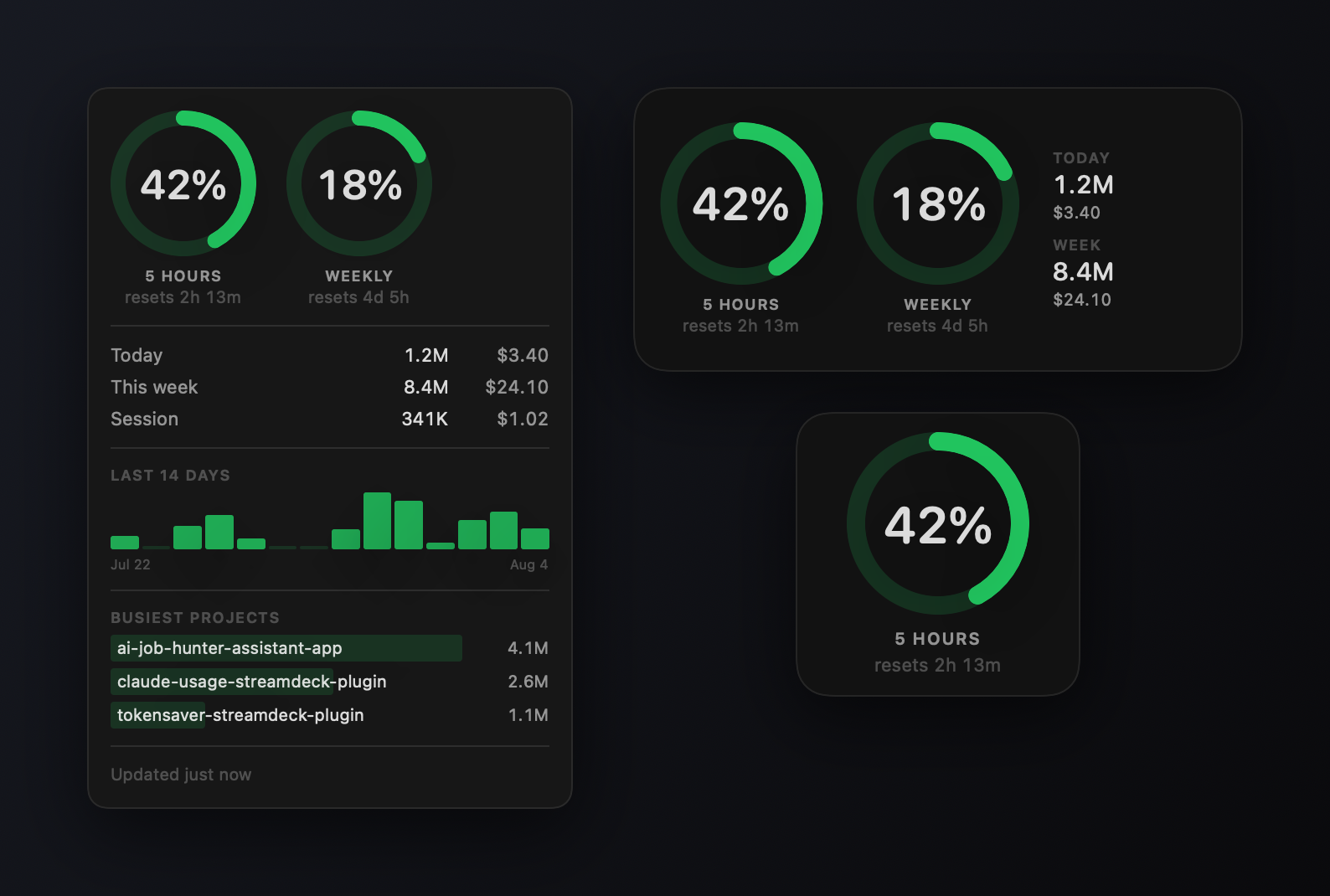
Status: built, not yet run on real hardware. Everything compiles, tests
pass, and the UI is reviewed through rendered snapshots — but the project is
developed on Windows, so nobody has launched it on a Mac yet. See
Unverified before trusting it.
Install
Requires macOS 14 or later.
brew tap saeedkolivand/tap
brew trust --cask saeedkolivand/tap/claude-usage
brew install --cask claude-usage
The trust step is required. Since Homebrew 6.0,
third-party taps must be explicitly trusted before Homebrew will evaluate their
Ruby — a response to a compromised tap being used to ship malware.--cask <tap>/<cask> trusts only this one cask; brew trust saeedkolivand/tap
would trust everything in the tap, now and in future.
Or download the DMG from Releases, or build from source withbrew install xcodegen && ./build.sh.
The widget shows up in the widget gallery once the app has run at least once.
Builds are ad-hoc signed, not notarized, so macOS quarantines them. The cask
clears that for you; if you install the DMG by hand, run:
xattr -dr com.apple.quarantine "/Applications/Claude Usage.app"
The cask is in a personal tap rather than homebrew/cask because that repo
drops casks failing Gatekeeper checks from 2026-09-01,
and --no-quarantine is being removed.
Gallery
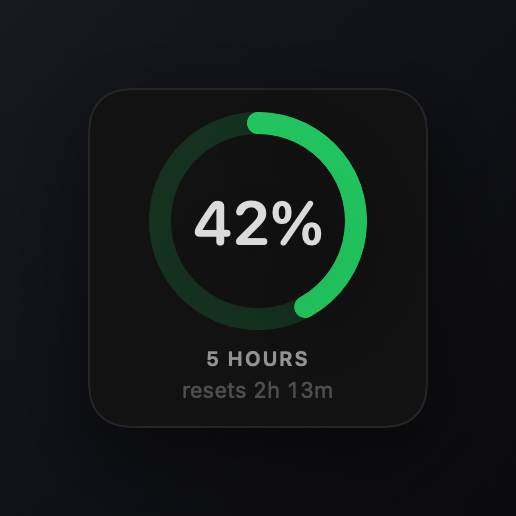 |
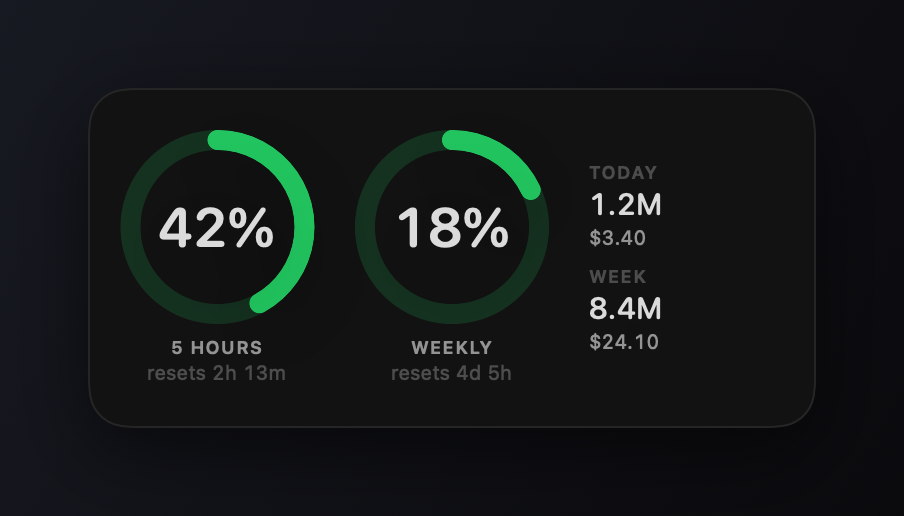 |
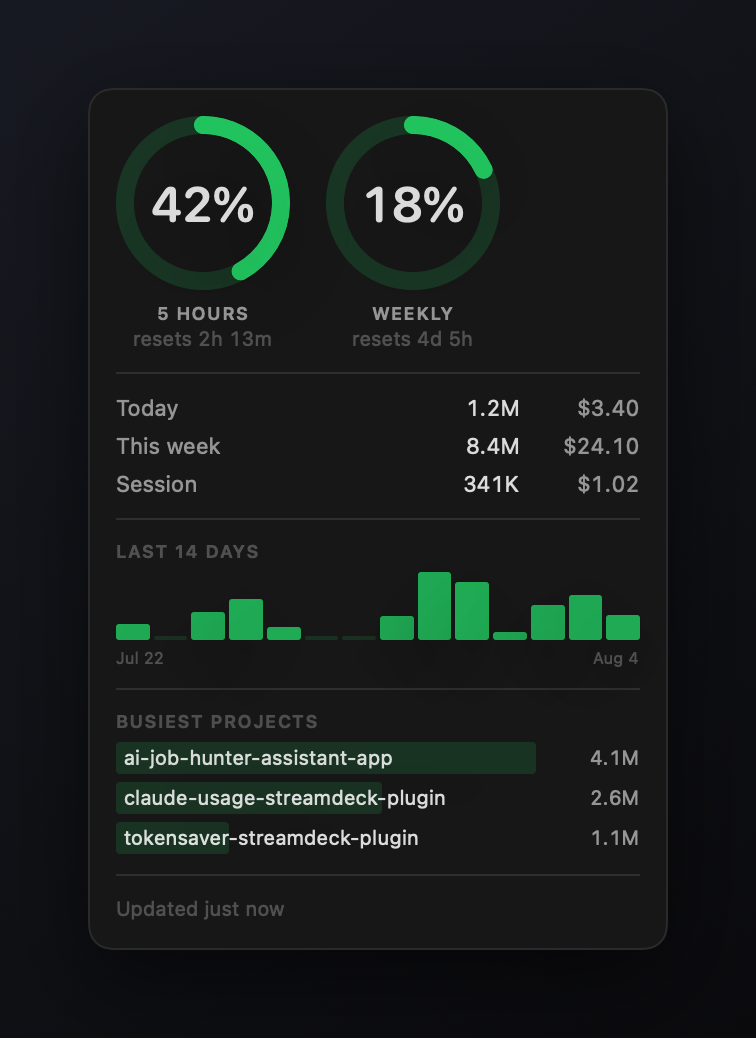
| Small — the 5-hour window, and when it resets. | Medium — both limits, plus today and this week. |
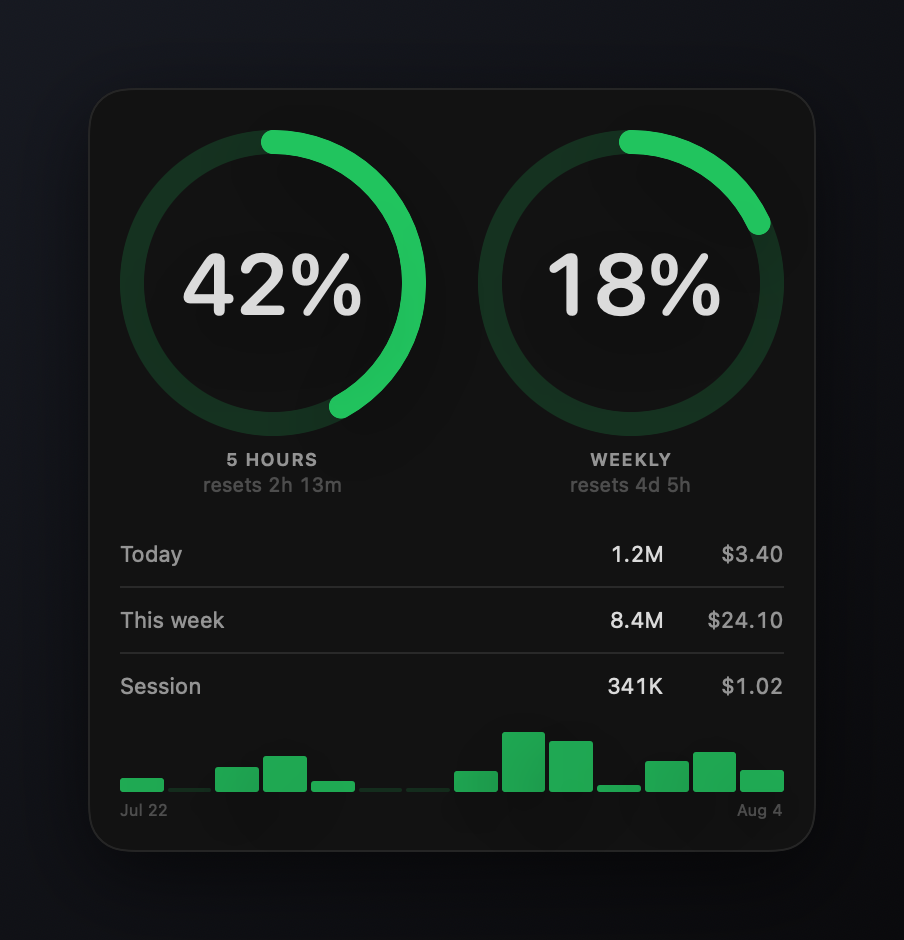 |
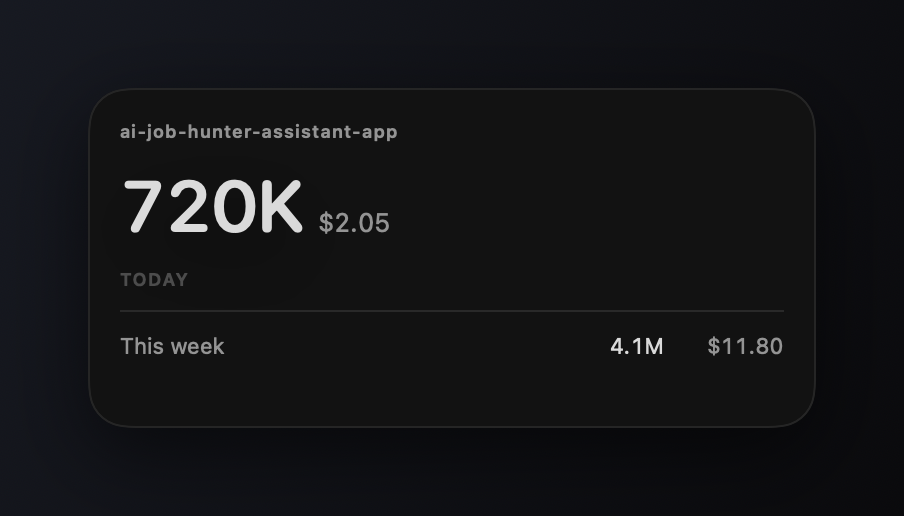 |
| Large — adds a 14-day chart. | Project-scoped — one directory's tokens and cost. No gauges: limits are account-level. |
Every widget carries its own configuration, so you can place one per account or
one per project, side by side.
What it reads
Two sources, both already on your machine. Nothing is sent anywhere.
| Source | Gives |
|---|---|
api.anthropic.com/api/oauth/usage, using the OAuth token Claude Code already stored |
5-hour and 7-day limit utilization, and when each resets |
~/.claude/projects/**/*.jsonl |
today / this week / current session token counts and estimated cost |
The token is read from the login Keychain (Claude Code-credentials), falling
back to <config dir>/.credentials.json. We never log in, never write
credentials, and never transmit anything except the one authenticated GET above.
macOS asks once for permission to read that Keychain item. "Always Allow" stops
it asking again.
Profiles
A profile is a Claude Code config folder — one logged-in account. Relocating it
with CLAUDE_CONFIG_DIR is the only way Claude Code supports more than one, so
that's what discovery looks for: ~/.claude, anything beside it whose name
starts with .claude, and folders you add in Settings. A folder counts when it
contains a projects directory.
Pick the menu bar's profile in Settings; each widget picks its own. Every
profile keeps its own cache and its own history file, so one account can never
show another's numbers.
macOS caveat. Claude Code keeps its token in the login Keychain under a
single name with no per-account variant, so only the default profile can read a
token from there. A second profile needs its own .credentials.json in its
config folder. Without one it reports no-token — deliberately, rather than
borrowing the default account's token and showing the wrong percentages. Tokens
and cost still work either way, since those come from transcripts on disk.
Architecture
Sources/
  UsageCore/     data layer, no UI — shared by the app, the widget, and the CLI
  SharedViews/   the ring gauge and palette, shared by the app and the widget
  MenuBarApp/    MenuBarExtra, the 60s poller, settings
  Widget/        AppIntent configuration and the widget families
  UsageCLI/      prints the snapshot; the CI smoke test
swift test covers UsageCore with no Xcode involved. The app and widget
bundle is built by Xcode via XcodeGen, since SPM can't express an app that
embeds an extension. Both build systems compile Sources/UsageCore directly —
there's no framework target to embed and sign.
Getting data to the widget is the fiddly part, and worth writing down:
- The widget extension must be sandboxed. macOS never registers an
unsandboxed app extension, so it silently never appears in the widget gallery.
That rules out reading~/.claudefrom the widget. - App Groups are the textbook answer and don't work here. They're a
provisioning-profile capability, so with ad-hoc signing and no teamcontainerURL(forSecurityApplicationGroupIdentifier:)returns nil. - The host app isn't sandboxed, so it writes directly into the widget's own
container at~/Library/Containers/…widget/Data/Library/Application Support/.
Inside the sandbox the widget reads exactly that as its Application Support —
no entitlement, no App Group, no paid account.
The host only writes there once macOS has created the container; materializing
one by hand leaves it without its container metadata, which can stop the
extension launching at all. So a freshly added widget shows a placeholder until
the next poll, at most 60 seconds.
Developing without a Mac
Swift doesn't build on Windows, so CI is the compiler and the display:
gh run download <run-id> -n snapshots -D snapshots
Tests/SnapshotTests renders every view — widget families, project scope, the
menu popover — across light and dark and every data state, and CI uploads the
PNGs. The gallery images above come from the same pipeline, so they can't drift
from the UI; they are the UI, with a backdrop and a shadow.
Unverified
What the snapshot loop cannot prove, and needs a pass on real hardware:
- The widget loads and appears in the widget gallery. It didn't at first — the
extension shipped unsandboxed and macOS never registered it.build.shnow
reports registration; if it says nothing is registered,killall chronod
forces a rescan. - The Keychain consent prompt behaves, and the token actually reads.
- "Open at login" sticks —
SMAppServiceneeds a properly signed app. - The popover's Refresh / Settings / Quit buttons.
ImageRendererdraws
interactive controls as unavailable, so they show as prohibition badges in
every snapshot. Layout around them is real; the buttons themselves aren't. - The Settings window.
Formwith.formStyle(.grouped)is NSTableView-backed
and renders empty detached, so there are deliberately no settings snapshots
rather than blank ones posing as coverage.
Try the data layer
Runs on any Mac with a Swift toolchain, no Xcode project needed:
swift run usage-cli              # human-readable summary
swift run usage-cli --profiles   # list discovered profiles
swift run usage-cli --json       # exactly what the widget will render
swift run usage-cli --write      # write the snapshot files to disk
Cost accuracy
Costs are computed from token counts, because current Claude Code transcripts no
longer record a costUSD field. Cache writes are billed by TTL — 1.25x input
for the 5-minute cache and 2x for the 1-hour cache — and Claude Code writes
almost exclusively 1-hour entries. Collapsing both into the 5-minute rate (which
the Stream Deck plugin did before v1.7) understates the real figure
substantially.
On Pro/Max plans this is notional equivalent API spend, not money you were
charged. Rates live in Sources/UsageCore/Pricing.swift; edit them when
Anthropic changes pricing.
Scanning is incremental — per-file byte offsets, so a 60s poll re-reads only
what was appended rather than the multiple gigabytes an active~/.claude/projects accumulates.
History and projects
Daily totals are kept in ~/Library/Application Support/ClaudeUsage/history.json.
They have to be recorded rather than recomputed: the scanner only reads the last
7 days of transcripts, and Claude Code prunes them after about a month. On first
launch a one-off backfill reads the whole archive so the chart starts populated
instead of filling in over a week.
Project names come from each entry's cwd. The directory name under~/.claude/projects is a slug that flattens /, \ and _ all to -, so it
can't be reversed into a real name.
Releasing
git tag v0.3.0 && git push origin v0.3.0
That builds, stamps the version, makes the DMG, publishes a release, and updates
the cask in saeedkolivand/homebrew-tap.
The tap update needs a TAP_TOKEN repository secret — a fine-grained PAT with
Contents: read/write on homebrew-tap. Without it the release still publishes
and the step is skipped.
License
MIT
Reviews (0)
Sign in to leave a review.
Leave a reviewNo results found