xcaffold
Health Warn
- License — License: Apache-2.0
- Description — Repository has a description
- Active repo — Last push 0 days ago
- Low visibility — Only 6 GitHub stars
Code Pass
- Code scan — Scanned 12 files during light audit, no dangerous patterns found
Permissions Pass
- Permissions — No dangerous permissions requested
No AI report is available for this listing yet.
Deterministic Agent Harness-as-Code. Declare agents, rules, skills, and policies in .xcaf manifests — compile to native config for Claude Code, Cursor, Gemini, Codex and more.


xcaffold



Your agents, by design. Every AI coding tool your team uses ships its own configuration format, directory structure, and file conventions. Use three tools and you maintain three separate configuration trees — .claude/, .cursor/, .gemini/ — that drift from each other silently. When someone updates the rules in one, the others are forgotten.
xcaffold gives you .xcaf manifests as your single source of truth — compiling deterministically into native configuration for every provider your team uses.
project.xcaf  ──►  xcaffold apply  ──►  claude        ──►  .claude/
                                   ──►  cursor        ──►  .cursor/
                                   ──►  gemini        ──►  .gemini/
                                   ──►  copilot       ──►  .github/
                                   ──►  antigravity   ──►  .agents/
                                   ──►  codex         ──►  .codex/
This is Harness-as-Code: the complete agent harness — system prompts, tools, rules, memory, hooks, MCP servers, and policies — declared once in version-controlled .xcaf manifests, compiled deterministically, with drift detection and compile-time policy enforcement.
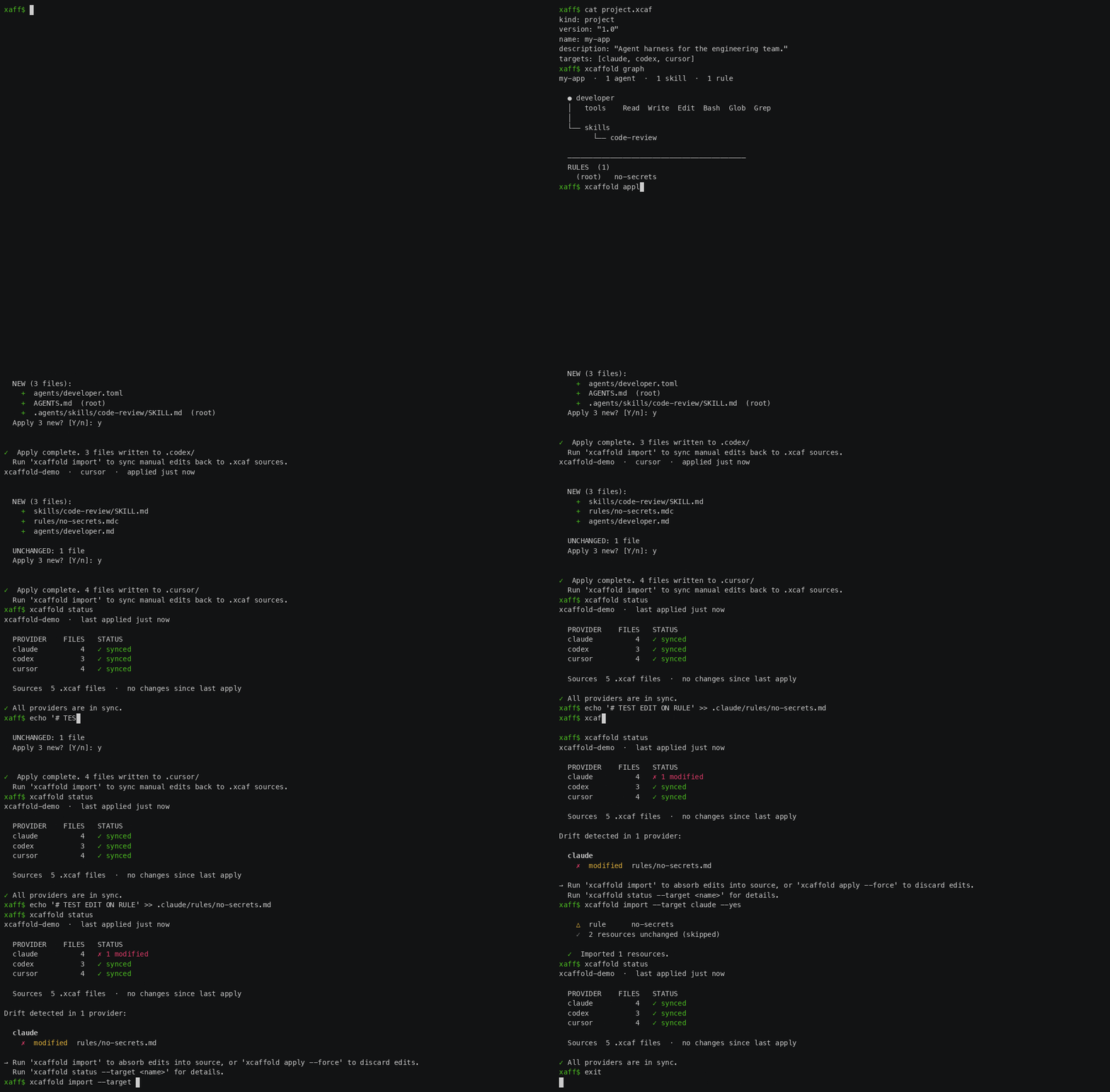
Installation
Homebrew (macOS/Linux)
brew install saero-ai/tap/xcaffold
Scoop (Windows)
scoop bucket add saero-ai https://github.com/saero-ai/scoop-bucket.git
scoop install xcaffold
Go install (All Platforms)
go install github.com/saero-ai/xcaffold/cmd/xcaffold@latest
Build from source
git clone https://github.com/saero-ai/xcaffold
cd xcaffold
make build
./xcaffold --help
# or: make install  (installs to $GOPATH/bin)
Pre-built binaries for Linux (amd64/arm64), macOS (amd64/arm64), and Windows (amd64) are available on the Releases page.
Why xcaffold
- Deterministic compilation. The same
.xcafinputs always produce the same output. Compilation is a pure function — no surprises, no state. - Drift detection.
xcaffold statuscompares SHA-256 hashes of compiled files against the source manifests. Unauthorized manual edits are flagged immediately. - Fidelity reports. When a provider cannot express a field, xcaffold emits a structured report. Configuration is never silently dropped.
- Compile-time policy enforcement.
kind: policyrules gatexcaffold apply. A policy withseverity: errorstops compilation before anything is written to disk. - Provider-native output. Cursor receives
.mdcfiles with glob patterns. Copilot receivesinstructions/files withapply-tofrontmatter. Claude receivesagents/*.md. Each provider gets its own format — not a flattened copy.
Quick Start
Already have a .claude/, .cursor/, or .gemini/ directory? Import your existing configuration in seconds:
xcaffold import --target claude # reads .claude/ → generates .xcaf manifests
Starting from scratch:
xcaffold init # scaffold a new project.xcaf
Core workflow:
xcaffold apply                     # compile .xcaf → .claude/, .cursor/, etc.
xcaffold status                    # detect drift in output directories
xcaffold validate                  # validate manifests without compiling
xcaffold graph                     # visualize resource scope and dependencies
xcaffold list                      # list all resources across providers
What xcaffold Manages
Each .xcaf manifest declares one resource in the agent harness. xcaffold compiles the full set to the appropriate native format per provider:
| Kind | Purpose |
|---|---|
agent |
Identity, system prompt, model selection, tool declarations |
skill |
Reusable capability modules with scoped tool access |
rule |
Constraints and standards enforced at the provider level |
hooks |
Lifecycle hooks — pre/post tool use, session events |
mcp |
MCP server declarations and connection configuration |
memory |
Persistent memory definitions |
settings |
Provider-level permissions and behavior settings |
policy |
Compile-time enforcement; violations block xcaffold apply |
workflow |
Multi-step agent procedures |
blueprint |
Resource subset selectors for multi-environment targeting |
context |
Formal workspace context declarations; optional path field renders to subdirectories for monorepo support |
Key Features
Variables and Overrides
Variables inject shared values into any manifest — frontmatter and body — from a single file. Change a value once, and every agent updates on the next apply.
xcaf/project.vars — committed, shared across all targets:
stack = TypeScript with React and Next.js
test-cmd = pnpm test
lint-cmd = pnpm lint
xcaf/agents/developer/agent.xcaf — references variables in both fields and body:
---
kind: agent
version: "1.0"
name: developer
description: "Full-stack developer for the application."
model: ${var.model}
tools: [Read, Write, Edit, Bash, Glob, Grep]
---
You are a senior developer working on a ${var.stack} codebase.

Run tests with: ${var.test-cmd}
Run linting with: ${var.lint-cmd}
Follow the conventions in CONTRIBUTING.md.
Per-target variable files override the base. xcaf/project.claude.vars sets model = opus while xcaf/project.cursor.vars sets model = auto — same agent, different model per provider.
For structural differences — different tools, different behavior — use override files. An override placed alongside the base merges at compile time:
xcaf/agents/developer/agent.claude.xcaf — Claude gets a more capable model and extra tools:
---
kind: agent
version: "1.0"
model: opus
tools: [Read, Write, Edit, Bash, Glob, Grep, WebFetch, WebSearch]
---
All other providers compile the base manifest unchanged.
Blueprints
A project with 12 agents, 30 rules, and 8 MCP servers compiles everything on every apply. That means every developer loads every agent — frontend rules firing for backend code, database MCP servers consuming context tokens during UI work.
A blueprint narrows the scope. Transitive dependencies (an agent's declared skills, rules, and MCP servers) are included automatically.
kind: blueprint
version: "1.0"
name: frontend
description: "Frontend development — React components, styling, tests."
agents: [frontend-dev, designer]
rules: [react-conventions, accessibility, no-secrets]
mcp: [storybook, figma-tokens]
kind: blueprint
version: "1.0"
name: backend
description: "API development — routes, database, infrastructure."
agents: [api-dev, dba]
rules: [api-conventions, sql-safety, no-secrets]
mcp: [postgres, redis]
xcaffold apply --blueprint frontend   # frontend dev gets only what they need
xcaffold apply --blueprint backend    # backend dev gets a different subset
Without --blueprint, xcaffold apply compiles everything.
Compile-Time Policies
A kind: policy file declares a constraint that runs on every xcaffold apply and xcaffold validate. severity: error blocks output entirely — no files are written to disk.
kind: policy
version: "1.0"
name: require-agent-description
description: "Every agent must have a description for delegation to work."
severity: error
target: agent
require:
  - field: description
    is-present: true
    min-length: 10
Drift Detection and Import
xcaffold status checks whether compiled output files match the SHA-256 hashes recorded at the last apply. xcaffold import --target <provider> reads an existing provider directory and generates .xcaf manifests from it — enabling a two-way workflow.
xcaffold status                      # report drift in all output directories
xcaffold import --target cursor      # capture manual edits back into .xcaf sources
xcaffold apply                       # recompile from the updated manifests
Provider Support
| Resource | Claude Code | Cursor | GitHub Copilot | Gemini CLI | Antigravity | Codex (Preview) |
|---|---|---|---|---|---|---|
| Agents | ✓ | ✓ | ✓ | ✓ | ✓ | ✓ |
| Skills | ✓ | ✓ | ✓ | ✓ | ✓ | ✓ |
| Rules | ✓ | ✓ | ✓ | ✓ | ✓ | — |
| Workflows | ✓* | ✓* | ✓* | ✓* | ✓ | — |
| Hooks | ✓ | ✓ | ✓ | ✓ | ✓ | ✓ |
| MCP Servers | ✓ | ✓ | ✓ | ✓ | ✓ | ✓ |
| Memory | ✓ | —** | —** | —** | —** | — |
| Settings | ✓ | ✓ | ✓ | ✓ | ✓ | — |
*Compiled as rules + skills for providers without a native workflow format.
**Persistent context can be delivered through context, rule, or hooks kinds. See memory reference.
[!NOTE]
Unified Antigravity Provider: Antigravity CLI (agy), Antigravity IDE, and Antigravity 2.0 runtime are unified into the canonicalantigravityprovider (.agents/). Legacyantigravity2configurations have been consolidated intoantigravity.
When a feature cannot be expressed in a target's native format, xcaffold emits a structured fidelity report rather than silently dropping configuration. You always know exactly what was and was not applied.
The provider architecture is open. Adding a new target requires implementing two Go interfaces (TargetRenderer and ProviderImporter). Agent SDKs with declarative configuration formats are natural expansion targets. See CONTRIBUTING.md.
Use Cases
Mixed-tool teams. Your team uses Claude Code, Cursor, and Codex. One project.xcaf with targets: [claude, cursor, codex] compiles a consistent harness for all three. When a rule changes, one commit updates every provider.
Migrating between tools. Moving from Cursor to Claude Code? xcaffold import --target cursor captures your existing .cursor/ setup as .xcaf manifests. Update targets, run apply, and your rules and agents compile to Claude's native format.
MCP server management. Six MCP servers across three tools means config entries that drift independently. xcaffold declares each server once in a kind: mcp manifest and compiles to every provider's native connection format.
Team governance. A kind: policy that requires every agent to declare a description, with severity: error, enforces the standard at compile time. Violations are caught in CI before any output reaches a developer's machine.
Documentation
- Guides — Tooling how-tos (shell completion, etc.)
- Tutorials — End-to-end setup guides
- Best Practices — Task-oriented recipes
- Concepts — Architecture, compilation, field model
- Reference — CLI commands,
.xcafschema, provider matrix
Contributing
See CONTRIBUTING.md.
License
Apache 2.0 — see LICENSE.
Reviews (0)
Sign in to leave a review.
Leave a reviewNo results found