CyberPulse
Health Uyari
- No license — Repository has no license file
- Description — Repository has a description
- Active repo — Last push 0 days ago
- Low visibility — Only 5 GitHub stars
Code Basarisiz
- process.env — Environment variable access in app/playwright.config.ts
- process.env — Environment variable access in app/server/crypto.test.ts
- Hardcoded secret — Potential hardcoded credential in app/server/crypto.test.ts
Permissions Gecti
- Permissions — No dangerous permissions requested
Bu listing icin henuz AI raporu yok.
Cybersecurity news aggregator with LinkedIn post generator and direct publishing. 100+ RSS feeds, AI posts, REST/MCP API.

CyberPulse
Cybersecurity news aggregator with a LinkedIn post generator.
Consumes 100+ RSS feeds, classifies articles by severity/category, and generates publication-ready content.




Table of Contents
- What is CyberPulse?
- Features
- Quick start with Docker
- Running without Docker
- How to add RSS sources
- Post directly to LinkedIn
- Personalized News with My Stack
- Built-in RSS sources
- Repository structure
- Additional documentation
- Screenshots
- Deploying it publicly
- Development
- License
What is CyberPulse?
CyberPulse is a productivity tool for cybersecurity professionals who need to stay current and share relevant content on LinkedIn.
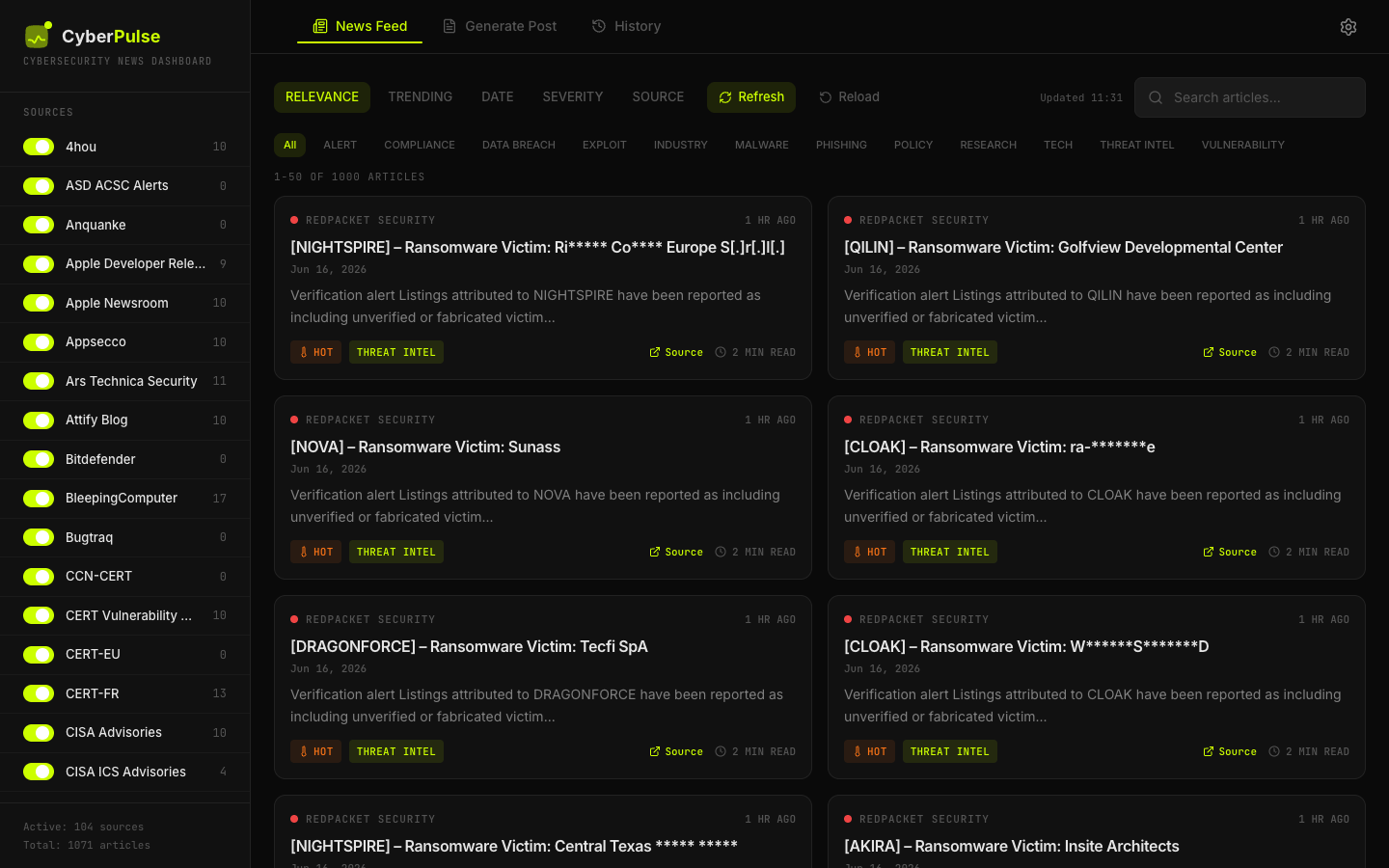
- Collects news from 100+ cybersecurity RSS feeds.
- Classifies each article by category (
VULNERABILITY,MALWARE,THREAT INTEL, etc.) and severity (critical,high,medium,low). - Generates LinkedIn posts in multiple formats and tones, with real bold text (HTML).
- Publishes directly to LinkedIn from the generator after OAuth authorization.
- Supports AI generation: connect your OpenAI-compatible provider (OpenAI, Groq, etc.) from the UI; falls back to local templates on failure.
- Exposes a REST API and an MCP endpoint for integration with AI agents like Hermes or OpenClaw.
- Runs 100 % locally with SQLite and Docker.
Features
- 📰 118 built-in RSS feeds, 101 enabled by default.
- 🔥 News feed with filters by category, source, search, and sorting by date, severity or trending.
- 🎯 My Stack tab: personalized news filtering based on your technology stack (Fortinet 7.0, PHP 7.4, Apache 2.4, etc.). Smart fuzzy matching finds variations, versions, and vendor names automatically.
- 🕰️ Reading windows: last 24h, 7 days, 30 days, or everything. Source counts follow the window, and sources with nothing to show collapse out of the way.
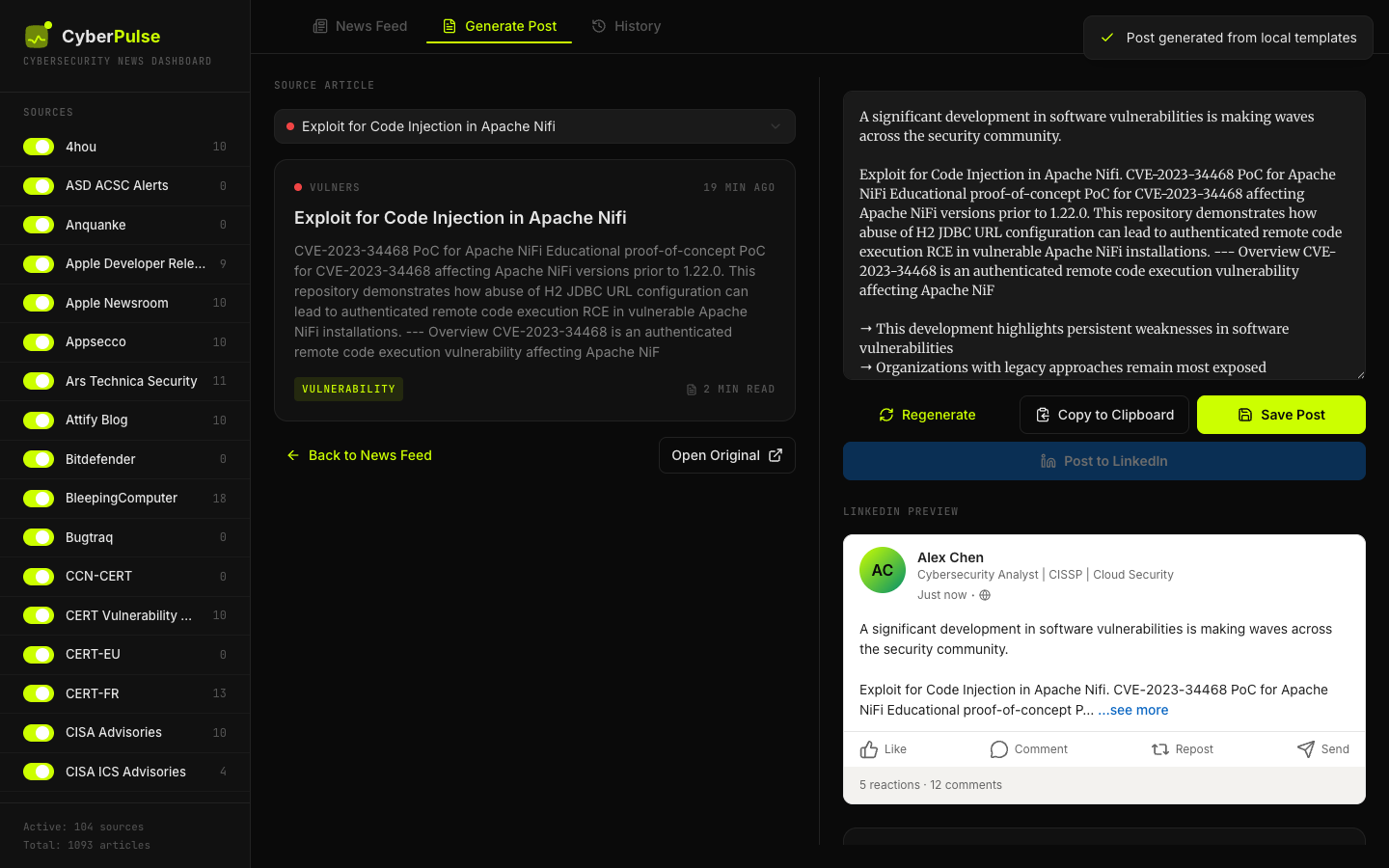
- ✍️ Post generator with 5 tones, 6 formats, and EN/ES support.
- 🚀 Post directly to LinkedIn from the generator.
- 🕐 History / saved posts to keep your generated content.
- 🤖 AI generation configurable from the UI (API key, model, base URL).
- ⚙️ Custom RSS sources from the web interface.
- 🔑 Optional API key to protect sensitive endpoints.
- 🐳 One-command Docker deploy.
- 📊 Stats, health checks, and logs built in.
Quick start with Docker
git clone https://github.com/safernandez666/CyberPulse.git
cd CyberPulse/app
docker compose up -d --build
Open http://localhost:3001 in your browser.
After rebuilding, use Ctrl + F5 or an incognito window to avoid the browser showing a cached frontend.
Useful commands:
# Check status
docker compose ps

# View logs
docker compose logs -f

# Force a manual scrape
curl -X POST http://localhost:3001/api/scrape

# List active sources
curl http://localhost:3001/api/sources

# Stop
docker compose down
Running without Docker
Requirements: Node.js 20+ and npm 10+.
cd CyberPulse/app
npm install
npm run build
npm run server
- App: http://localhost:3001
- SQLite database is created at
./data/cyberpulse.db.
How to add RSS sources
There are three ways to add a new source.
Option 1: From the web UI (recommended)
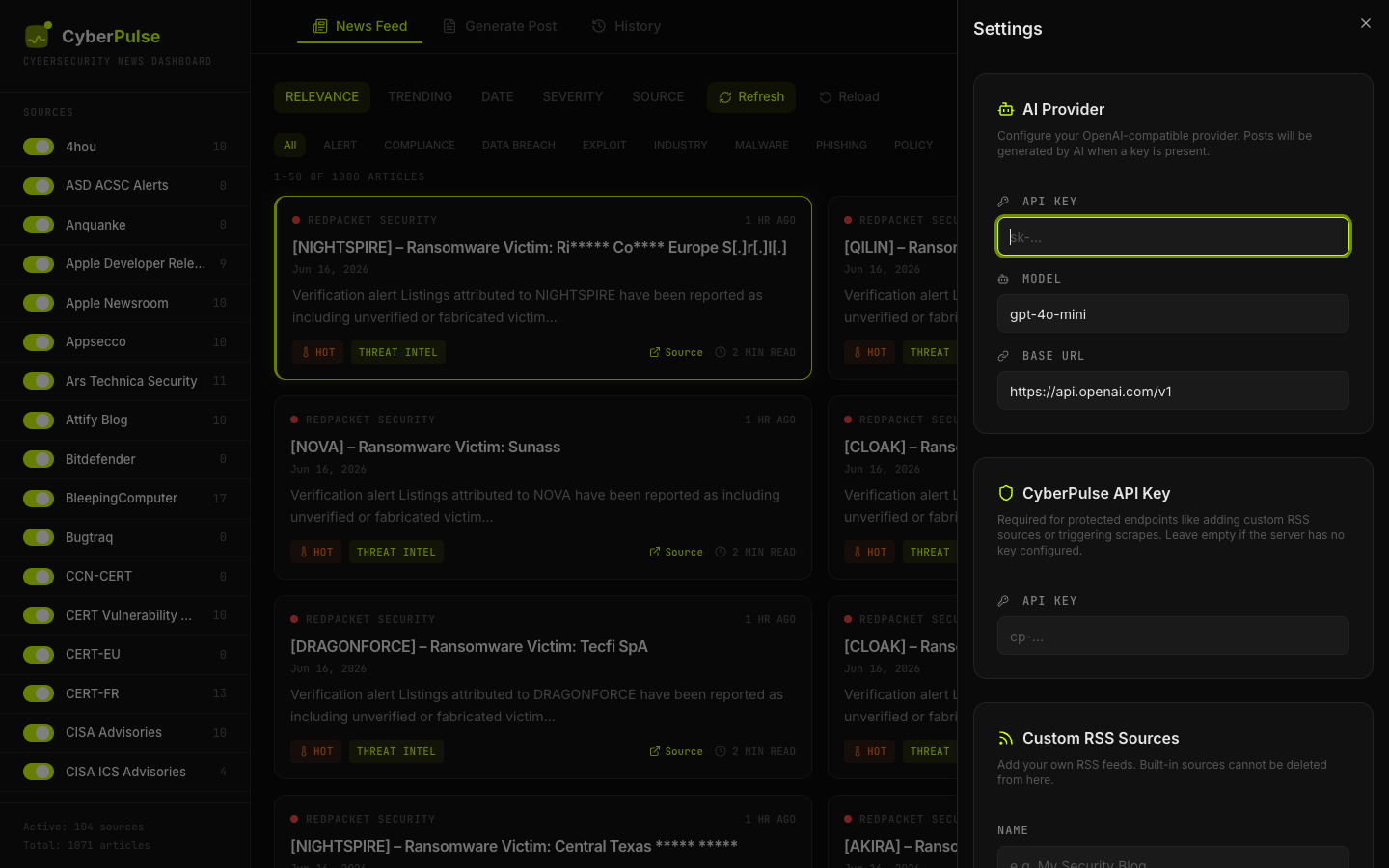
- Open CyberPulse and click Settings (gear icon).
- Go to the Custom RSS Sources section.
- Fill in:
- Name: display name of the source.
- RSS feed URL: e.g.
https://my-source.com/feed.xml. - Category: one of the existing categories (see list below).
- Click Add source.
- If you protected the backend with
CYBERPULSE_API_KEY, enter the CyberPulse API Key as well.
The new source is scraped in the next automatic cycle (every 15 minutes) or you can force it:
curl -X POST http://localhost:3001/api/scrape
Option 2: Via the REST API
# Without API key
curl -X POST http://localhost:3001/api/sources \
  -H "Content-Type: application/json" \
  -d '{
    "name": "My New Source",
    "rssUrl": "https://my-source.com/feed.xml",
    "category": "THREAT INTEL"
  }'

# With API key configured
curl -X POST http://localhost:3001/api/sources \
  -H "Content-Type: application/json" \
  -H "X-API-Key: your-secret-key" \
  -d '{
    "name": "My New Source",
    "rssUrl": "https://my-source.com/feed.xml",
    "category": "THREAT INTEL"
  }'
Option 3: Edit the code
- Open
app/server/seeds.ts. - Add an entry to the
RSS_SOURCESarray:
{
  name: 'My New Source',
  rssUrl: 'https://my-source.com/feed.xml',
  category: 'THREAT INTEL'
}
- Rebuild the container:
docker compose down
docker compose up -d --build
Available categories
| Category | Typical use |
|---|---|
VULNERABILITY |
Vulnerabilities, patches, advisories |
MALWARE |
Malware, ransomware, sample analysis |
THREAT INTEL |
Threat intelligence, actor reports |
DATA BREACH |
Data leaks, breaches |
PHISHING |
Phishing campaigns |
COMPLIANCE |
Regulatory compliance |
RESEARCH |
Security research |
PRIVACY |
Privacy |
POLICY |
Government policy |
INDUSTRY |
Industry news |
ALERT |
CERT/CISA/NCSC alerts |
AWARENESS |
Security awareness |
EXPLOIT |
Exploits, PoC, zero-days |
IOT |
IoT security |
TECH |
Relevant general tech |
Post directly to LinkedIn
CyberPulse can publish generated posts straight to your personal LinkedIn feed. It uses LinkedIn's official OAuth 2.0 API, so you keep full control of your account.
1. Create a LinkedIn Developer App
- Go to the LinkedIn Developer Portal and click Create app.
- Fill in the required details:
- App name: e.g.
CyberPulse - LinkedIn Page: you must associate a LinkedIn Company Page. If you don't have one, create a minimal page first.
- Privacy policy URL: your website or LinkedIn profile URL.
- App name: e.g.
- Under the Products tab, request:
- Share on LinkedIn — instant approval.
- Sign In with LinkedIn using OpenID Connect — instant approval.
- Go to the Auth tab:
- Copy your Client ID and Client Secret.
- Under OAuth 2.0 settings, add this redirect URL:
http://localhost:3001/api/linkedin/callback
2. Configure CyberPulse
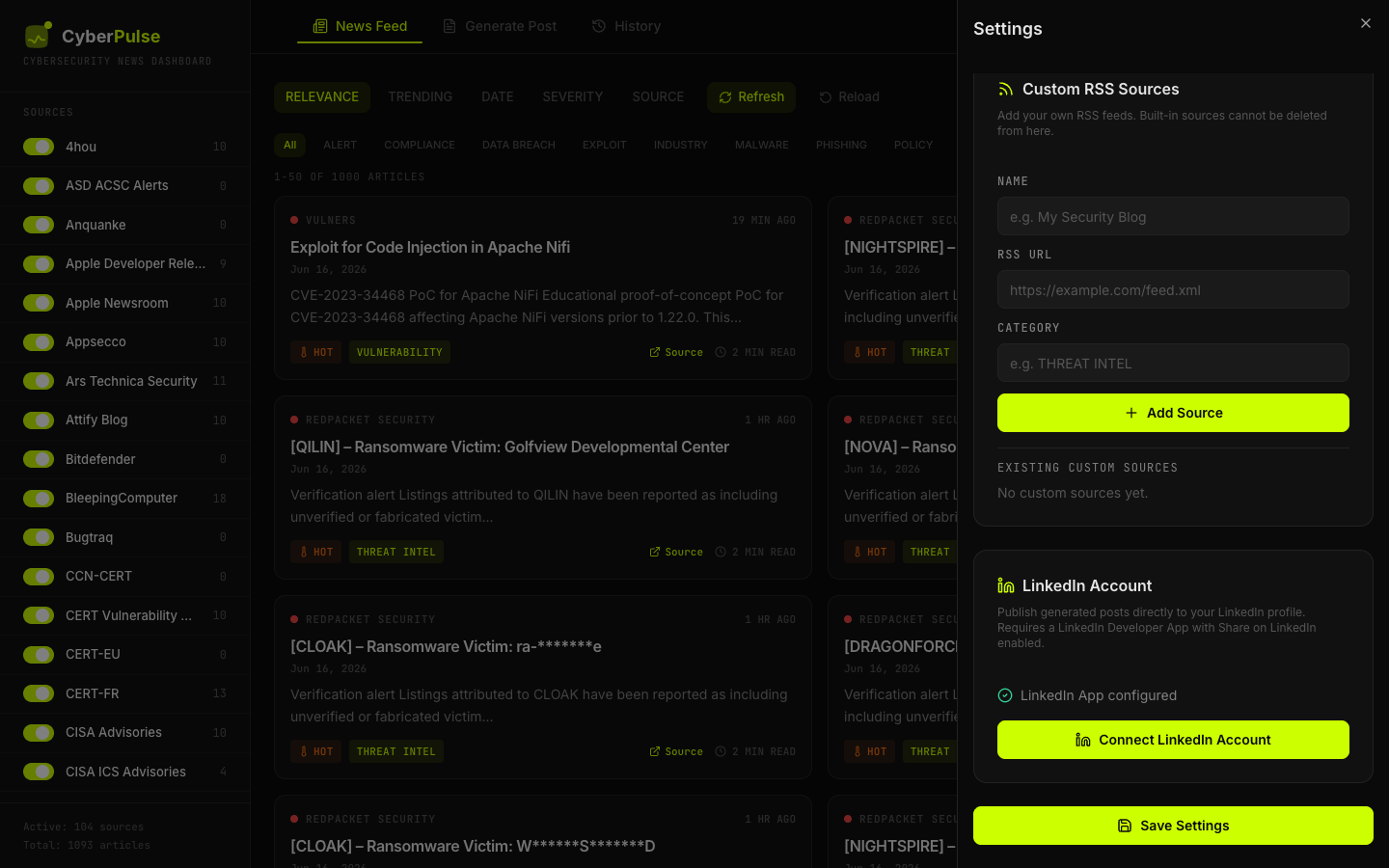
- Open CyberPulse and click Settings.
- Scroll to the LinkedIn Account section.
- Paste your Client ID, Client Secret, and the redirect URI (
http://localhost:3001/api/linkedin/callback). - Click Save LinkedIn App.
3. Connect your account
- In the same LinkedIn Account section, click Connect LinkedIn Account.
- Authorize CyberPulse in the LinkedIn popup.
- Once you see "LinkedIn Connected", you can close the popup.
4. Publish a post
- Go to Generate Post, choose an article, and create your post.
- Click Post to LinkedIn.
- Review the text, choose Public or Connections, and click Publish.
Note: LinkedIn access tokens expire after approximately 60 days. If posting stops working, reconnect your account from Settings.
Personalized News with My Stack
CyberPulse can filter news based on your specific technology stack. Configure your infrastructure and receive only relevant security news for the technologies you actually use.
How it works
- Open Settings and go to My Technology Stack
- Add your technologies with optional version, vendor, and category:
- Technology:
Fortinet,PHP,Apache,WordPress - Version:
7.0,7.4,2.4.x - Vendor:
Fortinet,Apache Software Foundation - Category:
Firewall,CMS,Web Server
- Technology:
- Click My Stack tab to see only relevant articles
Smart Fuzzy Matching
The matching algorithm finds variations automatically:
- Technology variations:
PHPfindsphp,php7,php8,php-fpm - Vendor names:
FortinetfindsFortiOS,FortiGate,Fortinet - Version matching:
7.4matches7.4.33,7.4.x,PHP 7.4 - Scoring system: Articles are ranked by relevance (version match, title appearance, severity)
Example
With a stack of Fortinet 7.0, PHP 7.4, Apache 2.4, and WordPress 6.2, CyberPulse found 59 relevant articles from 667 total (~9% precision), filtering out noise and showing only what matters to your infrastructure.
Built-in RSS sources (118 sources, 101 active)
CyberPulse ships with 118 cybersecurity feeds, 101 of them enabled by default. This list is generated from app/server/seeds.ts — run npm run docs:sources after changing it.
ALERT
| Source | RSS URL |
|---|---|
| CERT-EU | https://cert.europa.eu/publications/security-advisories-rss |
| CERT-FR | https://www.cert.ssi.gouv.fr/feed/ |
| INCIBE | https://www.incibe.es/incibe-cert/alerta-temprana/avisos/feed |
| JPCERT/CC | https://www.jpcert.or.jp/english/rss/jpcert-en.rdf |
| JPCERT/CC Blog | https://blogs.jpcert.or.jp/en/atom.xml |
| UK NCSC All | https://www.ncsc.gov.uk/api/1/services/v1/all-rss-feed.xml |
| UK NCSC News | https://www.ncsc.gov.uk/api/1/services/v1/news-rss-feed.xml |
| UK NCSC Reports | https://www.ncsc.gov.uk/api/1/services/v1/report-rss-feed.xml |
COMPLIANCE
| Source | RSS URL |
|---|---|
| Dark Reading | https://www.darkreading.com/rss.xml |
DATA BREACH
| Source | RSS URL |
|---|---|
| The Record | https://therecord.media/feed/ |
| Troy Hunt | https://www.troyhunt.com/rss/ |
EXPLOIT
| Source | RSS URL |
|---|---|
| Exploit-DB | https://www.exploit-db.com/rss.xml |
| Sploitus | https://sploitus.com/rss |
| ZDI Blog | https://www.zerodayinitiative.com/blog?format=rss |
| ZDI Published | https://www.zerodayinitiative.com/rss/published/ |
INDUSTRY
| Source | RSS URL |
|---|---|
| Cybersecurity Dive | https://www.cybersecuritydive.com/feeds/news/ |
| Infosecurity Magazine | http://www.infosecurity-magazine.com/rss/news/ |
IOT
| Source | RSS URL |
|---|---|
| Attify Blog | https://blog.attify.com/rss/ |
MALWARE
| Source | RSS URL |
|---|---|
| Bitdefender | https://www.bitdefender.com/blog/api/rss/hotforsecurity/ |
| Elastic Security Labs | https://www.elastic.co/security-labs/rss/feed.xml |
| Kaspersky Blog | https://www.kaspersky.com/blog/feed/ |
| Malwarebytes Labs | https://blog.malwarebytes.com/feed/ |
| Securelist | https://securelist.com/feed/ |
| SecurityWeek | https://feeds.feedburner.com/securityweek |
| SentinelOne | https://www.sentinelone.com/blog/feed/ |
| Sophos News | https://feeds.feedburner.com/sophos/dgdY |
| WeLiveSecurity | https://www.welivesecurity.com/en/rss/feed/ |
PHISHING
| Source | RSS URL |
|---|---|
| Krebs on Security | https://krebsonsecurity.com/feed/ |
POLICY
| Source | RSS URL |
|---|---|
| CyberScoop | https://cyberscoop.com/feed |
RESEARCH
| Source | RSS URL |
|---|---|
| Ars Technica Security | https://arstechnica.com/security/feed/ |
| Fuzzing Labs | https://webassembly-security.com/feed/ |
| Google Bug Hunters | https://bughunters.google.com/feed/en |
| Google Online Security | https://feeds.feedburner.com/GoogleOnlineSecurityBlog |
| Google Project Zero | https://googleprojectzero.blogspot.com/feeds/posts/default?alt=rss |
| InfoSec Write-ups | https://infosecwriteups.com/feed |
| MaskRay | https://maskray.me/blog/atom.xml |
| NVISO Labs | https://blog.nviso.eu/feed/ |
| paper - Last paper | https://paper.seebug.org/rss/ |
| S3cur3Th1sSh1t | https://s3cur3th1ssh1t.github.io/feed.xml |
| STAR Labs | https://starlabs.sg/publications/index.xml |
| Tencent Xuanwu Lab | https://xlab.tencent.com/cn/feed/ |
| Trail of Bits | https://blog.trailofbits.com/feed/ |
| XPN InfoSec Blog | https://blog.xpnsec.com/rss/ |
TECH
| Source | RSS URL |
|---|---|
| Hacker News Frontpage | https://hnrss.org/frontpage |
| Kali Linux | https://www.kali.org/rss.xml |
THREAT INTEL
VULNERABILITY
Retired (17)
Verified unreachable, so they ship disabled rather than costing a request on every scrape. They stay listed in Settings and can be re-enabled at any time.
| Source | Reason |
|---|---|
| Appsecco | serves HTML, feed removed |
| ASD ACSC Alerts | connection refused |
| CCN-CERT | HTTP 403 (bot protection) |
| Cyber Kendra | HTTP 403 (bot protection) |
| CyberNews | HTTP 403 (bot protection) |
| ENISA | HTTP 404, no replacement found |
| FBI Cyber | HTTP 403 (bot protection) |
| Fortinet Blog | HTTP 404, no replacement found |
| Google TAG | HTTP 404, folded into blog.google |
| Mandiant | redirects to HTML on cloud.google.com |
| NSA Cybersecurity | HTTP 403 (bot protection) |
| OSI | WAF rejects the request |
| Packet Storm | TLS cert does not match hostname |
| Security Boulevard | HTTP 403 (bot protection) |
| tttang | connection refused |
| VulDB | HTTP 403 (bot protection) |
| Yassine Aboukir | malformed XML entity |
Deploying it publicly
CyberPulse is a long-lived process with a SQLite file and a cron, so it needs
a container with a disk — not a serverless platform. Vercel and similar
cannot run it: the filesystem is ephemeral, so the database would be wiped,
and there is no process alive between requests for the scraper to run in.
Fly.io, Railway, Render or any small VPS all work. A fly.toml is included.
What a public deployment changes
Reads stay open — anyone can browse the feed. Everything that writes, touches
LinkedIn, calls an AI provider or triggers a scrape requires the API key. You
enter it once under Settings → CyberPulse API Key; visitors without it
simply do not see those controls.
Two settings are not optional once the app is reachable from the internet:
CYBERPULSE_API_KEY=$(openssl rand -hex 32)   # without it, anyone could post to your LinkedIn
CYBERPULSE_SECRET=$(openssl rand -hex 32)    # encrypts the stored LinkedIn credentials
The server refuses to start with NODE_ENV=production and no API key. If you
genuinely want it open, set CYBERPULSE_ALLOW_NO_AUTH=true and understand
that LinkedIn publishing is then unauthenticated.
Keep CYBERPULSE_SECRET safe: lose it and the stored LinkedIn connection
cannot be decrypted, and you will have to disconnect and reconnect.
Fly.io
cd app
fly launch --no-deploy --copy-config
fly volumes create cyberpulse_data --size 1 --region eze
fly secrets set CYBERPULSE_API_KEY=$(openssl rand -hex 32) \
                CYBERPULSE_SECRET=$(openssl rand -hex 32)
fly deploy
The volume is what makes the database survive a deploy, andauto_stop_machines = false is what keeps the scraper running — a stopped
machine silently stops collecting.
Set the LinkedIn redirect URI to https://<your-app>/api/linkedin/callback
in both the LinkedIn Developer console and LINKEDIN_REDIRECT_URI.
Hardening already in place
- Non-root container (uid 1000), no compiler or shell tooling in the runtime image.
helmetsecurity headers including a content security policy.- Rate limiting: 300 reads and 20 writes per minute per IP.
- CORS restricted to same-origin unless
CYBERPULSE_CORS_ORIGINSsays otherwise. - The AI proxy only reaches an allowlist of provider hosts over https.
Development
cd app
npm install
npm run dev          # Vite on :3000 + API on :3001
npm test             # 37 unit tests (vitest)
npm run build        # typecheck + production bundle
npm run lint
npm run docs:sources # regenerate the source tables in both READMEs from seeds.ts
The tests cover the scraper's date handling, the feed-window filtering, and
the security helpers (HTML escaping, the same-origin check, the AI host
allowlist). CI runs the build, the tests and npm audit --omit=dev on every
push and pull request.
After editing app/server/seeds.ts, run npm run docs:sources so the tables
in this file stay in step with what actually ships.
Repository structure
CyberPulse/
├── app/                  # Main application (React + Express + SQLite)
│   ├── src/              # Frontend
│   ├── server/           # Backend and scraper
│   ├── public/           # Logo and static assets
│   ├── docker-compose.yml
│   ├── Dockerfile
│   ├── API.md            # Full API documentation
│   └── DOCKER.md         # Detailed Docker guide
├── vscode-extension/     # VS Code extension for CyberPulse
├── research/             # Architecture and content strategy docs
└── README.md             # This file
Screenshots
A few captures of CyberPulse in action. Click any image to view it full size.
| News Feed | Generate Post | History | Settings |
|---|---|---|---|
 |
 |
 |
 |
| LinkedIn Settings | LinkedIn Button | LinkedIn Publish |
|---|---|---|
 |
 |
 |
Additional documentation
app/API.md– Complete REST and MCP endpoints.app/DOCKER.md– Advanced Docker guide.
Environment variables
| Variable | Default | Description |
|---|---|---|
PORT |
3001 |
Server port |
CYBERPULSE_API_KEY |
null |
Optional API key to protect sensitive endpoints |
LINKEDIN_CLIENT_ID |
null |
LinkedIn Developer App Client ID (optional — can also be set in the GUI) |
LINKEDIN_CLIENT_SECRET |
null |
LinkedIn Developer App Client Secret (optional — can also be set in the GUI) |
LINKEDIN_REDIRECT_URI |
http://localhost:3001/api/linkedin/callback |
LinkedIn OAuth redirect URI |
SCRAPE_CRON |
*/15 * * * * |
RSS scraping interval (cron syntax) |
CYBERPULSE_SCRAPE_CONCURRENCY |
8 |
Feeds fetched in parallel. A full scrape of 100+ feeds takes ~20 s |
CYBERPULSE_CORS_ORIGINS |
same-origin only | Comma-separated extra browser origins allowed to call the API. * disables the check — only sensible behind your own auth |
CYBERPULSE_AI_HOSTS |
(see below) | Comma-separated extra hosts the AI proxy may call. Defaults cover OpenAI, Groq, Anthropic, Mistral, Together, DeepSeek, OpenRouter and Google |
CYBERPULSE_MAX_NEWS |
20000 |
Hard ceiling on limit for GET /api/news |
CYBERPULSE_SECRET |
null |
Encrypts the LinkedIn token and client secret at rest (AES-256-GCM). Without it they are stored in clear text. Generate with openssl rand -hex 32 |
CYBERPULSE_ALLOW_NO_AUTH |
false |
Lets the server start in production without an API key. Every write endpoint is then unauthenticated |
CYBERPULSE_RATE_READ |
300 |
Read requests allowed per minute per IP |
CYBERPULSE_RATE_WRITE |
20 |
Write requests allowed per minute per IP |
TRUST_PROXY |
null |
Set to 1 behind a reverse proxy so rate limiting sees the real client IP |
NODE_ENV |
production |
Node environment |
License
MIT © Santiago Fernández
Yorumlar (0)
Yorum birakmak icin giris yap.
Yorum birakSonuc bulunamadi