s-code
Health Warn
- License — License: Apache-2.0
- Description — Repository has a description
- Active repo — Last push 0 days ago
- Low visibility — Only 5 GitHub stars
Code Pass
- Code scan — Scanned 12 files during light audit, no dangerous patterns found
Permissions Pass
- Permissions — No dangerous permissions requested
No AI report is available for this listing yet.
Safe, self-evolving, and swift coding agent.
S-Code
Safe, self-evolving, and swift coding agent.
For your terminal and browser.
Protect credentials. Reuse context. Cut repeated work.



Developer Preview ·
v0.1.0-preview.1· source only.
The first public release is still in preparation. Preview details →
Get started
Use macOS or Linux. The source installer checks your environment and offers to
install missing build tools and dependencies. You do not need to prepare Rust
or Node.js yourself. Installation details →
1. Install from source
git clone https://github.com/sai-foundation/s-code.git
cd s-code
scripts/install-from-source.sh
Installs into $HOME/.local/bin and configures your zsh, bash or fish command
path. In this checkout, ./s-code works immediately; new terminals can uses-code from any project. The installer also prints a command to activate it
in your current terminal.
Git is needed for the clone above; alternatively, download and extract the
repository's source ZIP, then run the same installer inside it.
2. Connect your model
./s-code setup
./s-code doctor
Choose OpenRouter, OpenAI, Anthropic, Gemini, a local model or a custom
OpenAI-compatible endpoint. Setup stores the credential's environment-variable
handle, never the provider secret.
3. Choose your interface
./s-code       # Terminal (from this checkout)
./s-code web   # Browser
Both interfaces use the same local sessions, tools, approvals and events.
The CLI starts the loopback service automatically.
setup supports OpenRouter, OpenAI, Anthropic, Gemini, local and custom
OpenAI-compatible endpoints. It stores only the environment-variable handle,
never the provider secret. doctor verifies the local service, encrypted
storage, credential-handle availability and bounded model-catalog reachability
before the first task. Because some providers expose a public model catalog,
only the first real task can prove that a provider accepted the credential.
Set S_CODE_INSTALL_DIR to choose a different installation directory.
The installer reuses compatible tools. Missing Rust 1.89 and Node.js 22/npm
are prepared automatically after confirmation; newly bootstrapped tools live
under ~/.cache/s-code/build-tools. Your existing Node installation is
unchanged. Python 3.9+, Git and build tools are installed
through supported system package managers; Linux also needs Bubblewrap for
command isolation. System packages may require your administrator password.
On macOS, complete Apple's developer-tools dialog if prompted; a missing
Python can be installed through an existing Homebrew installation.
Use scripts/install-from-source.sh --check-deps to inspect prerequisites,--yes to approve dependency installation without the initial prompt, or--no-install-deps to build using only existing tools. Add --no-modify-path
to leave shell configuration untouched. For a custom S_CODE_INSTALL_DIR,
keep that variable exported when using ./s-code. These build tools are
not required merely to launch the installed S-Code; tools needed by your own
projects are configured separately.
To update, stop S-Code, pull a reviewed revision or
version tag, run scripts/install-from-source.sh, then start s-code
again. The installer never kills active work; if you installed while the old
service was still active, run s-code restart.
Upgrading from the old project name requires a fresh profile; old databases
and backups are incompatible. Follow the migration guide
to preserve your existing history.
Why S-Code
| Principle | What the Preview delivers |
|---|---|
| Safe | Keep sensitive files out of built-in tools and command writes inside your workspace. Compare the protections → |
| Self-evolving | Task feedback, memory you explicitly save for later sessions, and repeatable evaluations. See what exists today → |
| Swift | Precise file operations and bounded history reduce repeated work. Terminal and browser share the same running agent service. See the mechanisms → |
Feedback and memory
Self-evolving in the Preview includes task feedback, saved memory, and repeatable
evaluations. Autonomous learning and self-upgrades are not implemented. You
control which context is saved and reused.
- Task feedback: tool results return to the model; bounded retries let it
respond to failures within the current task. - Saved memory: explicitly save cited context for a project, your sessions
or a team. Relevant saved context is loaded into later sessions, with expiry
and scope controls. - Repeatable evaluations: frozen tasks and outcome checks let contributors
measure the effects of a change. They do not automatically modify the agent.
The implementation is available in the agent loop,
memory interface, context assembly
and evaluation runner.
Privacy and control
Protect credentials even when a task runs a script. S-Code denies known
sensitive paths such as .env.production to both built-in file tools and
sandboxed commands. Ordinary workspace edits stay available.
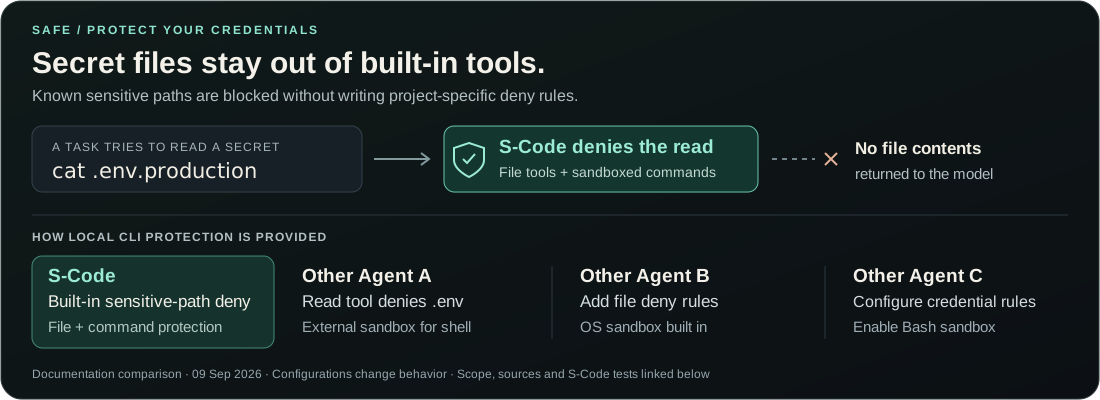
Other Agent B also includes an OS sandbox; Other Agent C offers sandbox and credential
rules; Other Agent A denies .env reads in its read tool. S-Code's distinction here
is sensitive-path protection built into both file and command tools.
Comparison sources, scope and reproducible tests →
- Command sandbox: macOS Seatbelt and Linux sandbox profiles enforce the
selected read-only or workspace-write boundary. - Network off: tool commands start without network access; enabling it is a
separately governed capability. - Secret protection: well-known sensitive workspace paths, parent traversal
and high-confidence credential-shaped process output are blocked or redacted. - Browser isolation: Provider keys and the daemon bearer token never enter
browser JavaScript, Web Storage, or URLs. Only authenticated local clients
(the installed launcher or experimental IDE client) may mint a single-use
browser bootstrap. It hands
that value through a URL fragment, which the page erases immediately before
exchanging it for an HttpOnly, SameSite=Strict cookie. - Private local state: fresh installs keep state under
~/.s-code/state, use private filesystem permissions and encrypt
sensitive transcript, attachment, extension and audit payloads with a locally
generated managed key. Operational indexes remain plaintext. - Protected audit: local audit payloads and transcript content are encrypted;
content-free metadata can be exported separately for verification.
One local execution plane
CLI + Local Web → Local execution service → Your model endpoint
The local service owns sessions, tools, policy, approvals, audit and persistence.
The browser uses those same sessions and events.
The execution service owns sessions, Agent execution, tools, approvals, audit
and local persistence. In direct-provider mode the daemon resolves the named
environment handle and sends the request, so the daemon process can access that
credential value. With an independent local model proxy, only the proxy holds
the provider key and the daemon needs no provider secret. Both modes keep the
browser thin and outside the provider-credential boundary.
Read the architecture overview for the process
and trust boundaries.
Efficiency and evidence
34.7% fewer reported tokens and 6.6% lower median time in the historical
Durable Task Queue comparison with Other Agent A. Both completed 3/3 runs
with the same GLM 5.3 model and frozen grader.
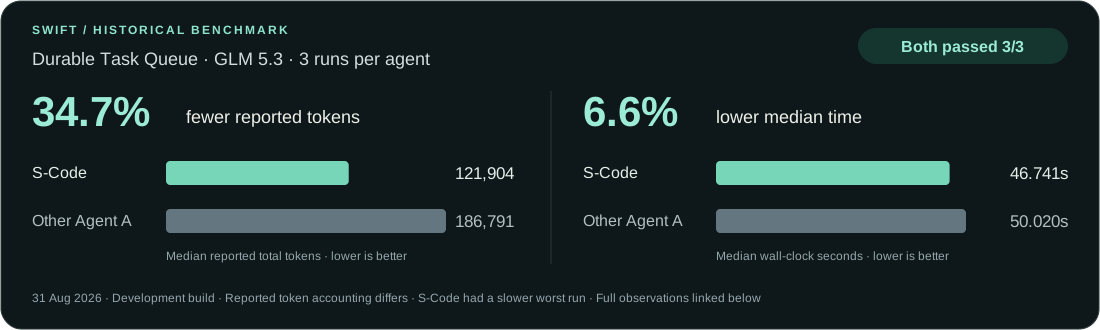
Measured 31 August 2026 on a development build. Token totals use each harness's
reported accounting; they are not a normalized billing comparison. The
S-Code cohort also had a slower worst run.
All observations, conditions and limitations →
S-Code includes frozen algorithm, repository and frontend tasks with repeatable
outcome checks. Use them to measure changes with the models and repositories
you care about. To make results reproducible, record the source revision,
model route, harness configuration, raw run artifacts and grader results.
- Precise file operations reduce malformed patches, stale writes and
recovery turns. - Bounded history compacts older payloads without discarding recent
evidence. - No hidden model work means ephemeral runs do not make a second provider
request just to generate a title. - Fast local approvals avoid unnecessary round trips while retaining an audit
decision. - One execution plane keeps the CLI and Local Web on the same sessions and
events.
Model endpoints
Use s-code setup to connect your model provider. For a separate local proxy,
the repository includes a development API Server.
Connect a provider without replacing the coding harness:
export OPENROUTER_API_KEY='your-key'
s-code setup --provider openrouter --model z-ai/glm-5.3 --yes
s-code doctor
Build and run the optional development API Server separately:
cargo build --locked --release -p s-code-api-server
OPENROUTER_API_KEY='your-key' \
  target/release/s-code-api-server
When using the independent API Server, keep credentials in that process
environment or an external secret manager. In direct-provider mode, export the
credential handle to the daemon's environment. Never commit a value or enter it
in Local Web. The default development proxy endpoint ishttp://127.0.0.1:18787/v1.
Explore
| Resource | Start here for |
|---|---|
| Product documentation | Guides and architecture reference |
| Security architecture | Sandbox, credentials, browser and audit boundaries |
| Tools and permissions | What the agent may do |
| Model endpoints | Provider and local model setup |
| Benchmark method | Frozen tasks, outcome graders and reproducible results |
| Contributing | Development workflow and DCO requirements |
License
The source is licensed under the Apache License, Version 2.0.
See Contributing and the project-name policy.
Reviews (0)
Sign in to leave a review.
Leave a reviewNo results found