Morse
Health Uyari
- License — License: MIT
- Description — Repository has a description
- Active repo — Last push 0 days ago
- Low visibility — Only 5 GitHub stars
Code Basarisiz
- exec() — Shell command execution in core/a11y.js
Permissions Gecti
- Permissions — No dangerous permissions requested
Bu listing icin henuz AI raporu yok.
Tell Morse what to add, remove, or change. It writes the code and applies it to the app. Even if it's closed source.
Morse: Change Any App
Your apps have cheat codes. You write them.
Reverse engineer closed apps. Rip out the parts you hate. Build the features they won’t give you.

Quick start · How Morse works · What you can change · Real runs · FAQ · Documentation

The company shipped its version. You don’t have to keep it. Morse inspects the running app and writes code to change it. Delete the feed. Build the missing export. Take a feature from another app and make it work here. Save your version as a mod you can read, edit and turn off.
Morse has no server and no account. It uses the AI you already have: Claude Code, Codex, or an API key.
Hack your version
These are example requests to try, not claims of recorded results. The real recording is under Real runs.
| The app | Tell Morse |
|---|---|
| YouTube | “Rip out Shorts and recommendations. Make the home page subscriptions-only.” |
| Spotify | “Give me my data. Add a CSV export for the playlist tracks already loaded: names, artists and albums.” |
| Gmail | “Give this inbox VS Code’s command palette. Search the actions on this page and run them from the keyboard.” |
| GitLab | “Add an approval tripwire. Flag changes made to this merge request after the last approval.” |
| An article behind an overlay | “Delete the paywall overlay and signup popup. Let me scroll.” The article must already be loaded. |
The point is control over the app on your computer. Morse can change the interface and behavior it can reach; it doesn’t unlock a service’s private backend or turn paid access into free access.
Quick start
Install
Mac: Apple silicon · Intel. Open the disk image and drag Morse to Applications.
Windows: Morse-Setup.exe. Linux: the AppImage.
Morse updates itself after that. First-time setup.
Open an app
Morse finds your AI and lists your apps. Click Open with Morse next to one. In the app, press Ctrl+Alt+Space (shown as ⌃⌥Space on a Mac).
Point at the part you mean, or target the whole app. Tell Morse what to rip out or build in. Press Enter, watch the change, then Save to keep your version.
How Morse works
The Morse app opens your app with one extra setting, so it can connect. When you ask for a change, Morse sends your words, the part you pointed at, and a picture of what you see to your AI. The change shows up while the AI writes it.
A change you save is a mod. Morse puts your mods back every time the app opens, even when you open it from the Dock or the Start menu.
What you can change
| Where | What works | Notes |
|---|---|---|
| Desktop apps | VS Code, Cursor, Slack, Discord, Spotify, Obsidian, Notion, Figma, Linear, Signal, Claude, and other apps built on web technology | Which apps work, and why some can't |
| Websites | Any site, in Chrome, Edge, Brave, Arc or Vivaldi | Morse opens the browser for you, still signed in to everything |
| Not yet | Safari, Firefox, and native apps like Finder or Notes | They give Morse no way in |
| Bring a feature | Take this in the app that has it. Bring here in the one that does not. Bring a feature |
| Inject code | Read the style and the script, and change them. Mods |
| Your own feature | A button, a shortcut, a panel. It stays when the app opens again. Changing things |
| A paywall | Point at the box on a page that already loaded. Morse does not sign you in, and it does not fetch a story the site never sent. |
Real runs
Actual recordings from installed apps and live sites. The requests above are ideas; this section shows what ran.
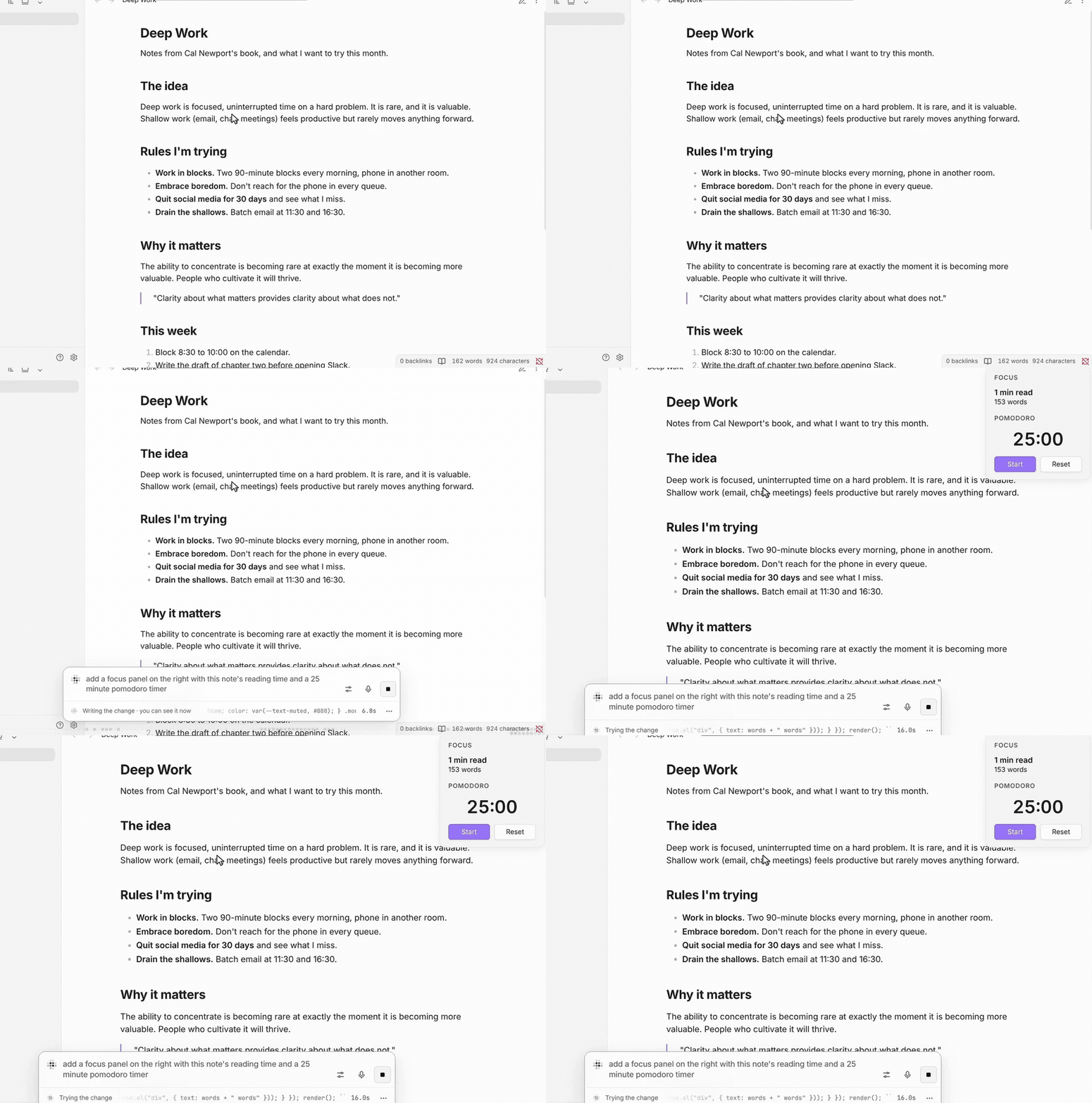
A timer Obsidian did not ship
Obsidian ships no focus timer. The note was open with none. Morse is open at the bottom with the ask: a panel with this note's reading time and a 25 minute countdown. The panel was not there. Then it is.
FAQ
Which AI does Morse use?The one you have: Claude Code or Codex signed in with your plan, or an Anthropic or OpenAI API key. The Morse app finds it by itself. With Claude Code or an Anthropic key, every change uses Opus: it thinks briefly for small changes and longer for new features. Models
Does Morse change the app's files?No. Morse opens the app with one extra setting so it can connect, and adds your changes while it runs. Turn every mod off with one shortcut, or quit Morse, and the app is exactly as it was.
Why does my Mac warn about Morse?Morse isn't notarized by Apple yet; that takes a paid Apple Developer ID. After installing the .dmg, open Morse, then System Settings, Privacy & Security, Open Anyway.
Do I have to sign in to my sites again?No. Since Chrome 136, browsers don't let any program control your everyday profile, for good reason, so Morse opens your browser on a copy of it in Morse's folder. The first time, the copy takes everything: sign-ins, saved passwords, tabs, extensions, bookmarks (on a Mac it's a clone, instant and free of extra space). Every time after, sign-ins you made in your everyday browser since are brought in too. Morse only reads your everyday profile; it never writes to it. How it works
What leaves my computer?What you ask, the part you pointed at, and a picture of it, sent to the AI you chose when you press Enter. Nothing else, and there is no Morse server. Your mods stay on your computer. Privacy and safety
A change didn't work. What now?Point at the exact part you mean and say it another way. Morse already checks whether a change did anything and tries again once; if nothing changed, it says so instead of saying it's done. Still stuck? See Troubleshooting, or open an issue with the app, what you asked, and what happened.
Documentation
- Getting started: install, the first change, and every way in.
- The Morse app: your apps, Always open with Morse, and updates.
- Desktop apps: which apps work, and why some can't.
- Models: Claude Code, Codex, API keys, and how Morse picks.
- Mods and Your controls: on, off, undo, share, and safe start.
- For developers: the
morsecommand, and building and testing Morse.
Contributing
Bugs and ideas: open an issue. Code and docs: send a pull request. CONTRIBUTING.md has the setup and checks, and How Morse works maps the code.
License
MIT. The first run's dots and sound come from Zephium, under the Mozilla Public License 2.0 (notice).
Yorumlar (0)
Yorum birakmak icin giris yap.
Yorum birakSonuc bulunamadi