rookhold
Health Uyari
- License — License: MIT
- Description — Repository has a description
- Active repo — Last push 0 days ago
- Low visibility — Only 6 GitHub stars
Code Basarisiz
- rm -rf — Recursive force deletion command in .github/workflows/ci.yml
- rm -rf — Recursive force deletion command in .github/workflows/release.yml
Permissions Gecti
- Permissions — No dangerous permissions requested
Bu listing icin henuz AI raporu yok.
Run untrusted Python, Node, and Bash with hard limits, live output, and verifiable receipts.
Rookhold
Give your AI agent a controlled place to run code
Rookhold runs short Python, Node.js, and Bash jobs in a separate service, applies
the limits you choose, and gives you a clear record of what happened.




Try it ·
How it works ·
Agent integrations ·
Production ·
Documentation
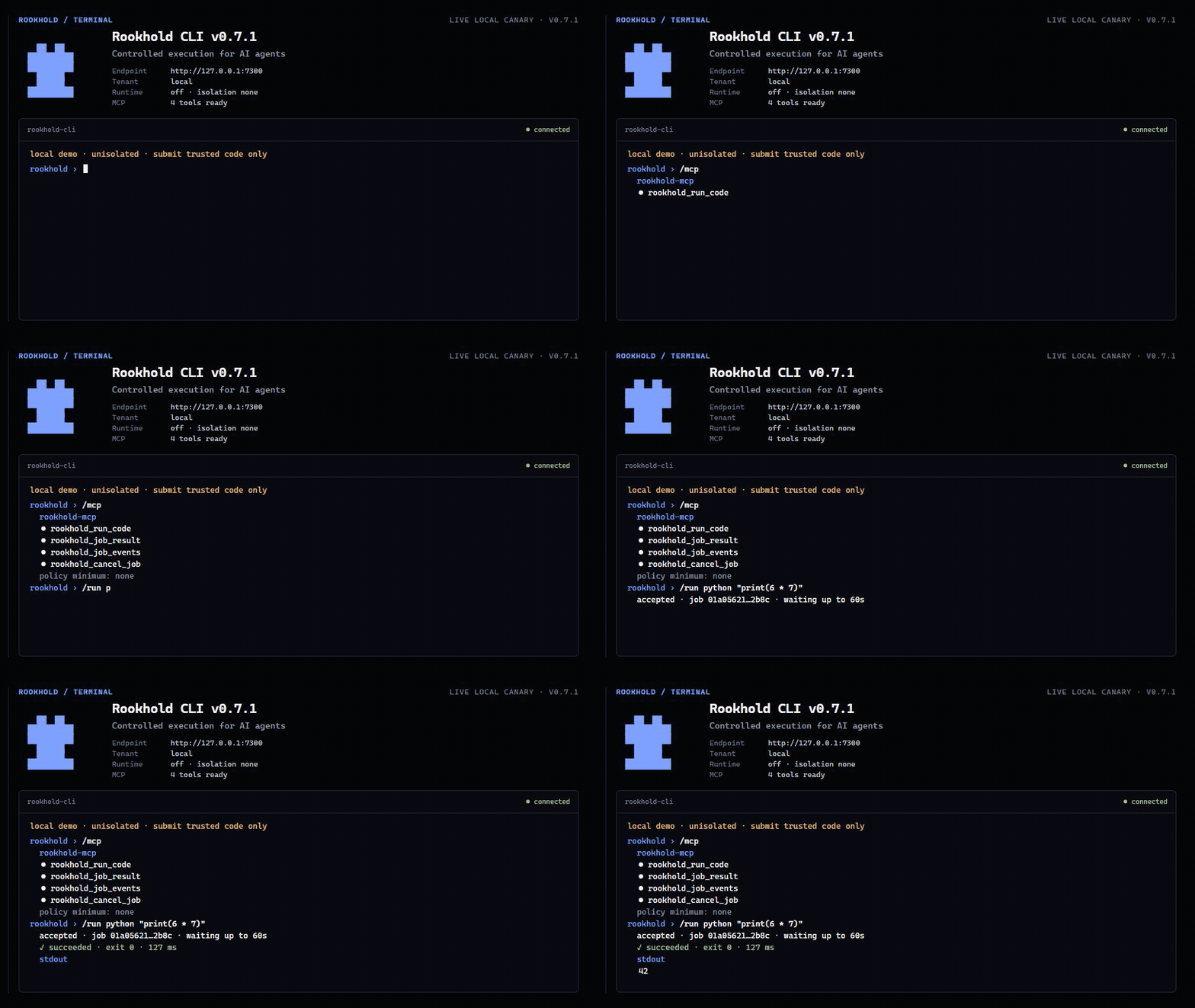
The recording uses the real rookhold-cli against a local v0.7 server: it
authenticates, initializes rookhold-mcp, lists the four live tools, submits
Python with the configured minimum isolation, and renders the bounded result.
Select it for the MP4.
What Rookhold does
Your agent—or any application—sends Rookhold a short job. Rookhold then:
- checks who is asking and what they are allowed to do;
- applies server-controlled time and resource limits;
- runs the job using the configured execution boundary;
- streams the output into the operator console; and
- keeps a result and evidence record you can inspect later.
You do not need to understand Rust or the Rookhold source code to use the
prebuilt app. You only need a supported computer and a terminal. A self-hosted
service also needs at least one job runtime, such as Python, Node.js, or Bash.
Download one CLI file
Already have a Rookhold endpoint? Download one self-contained file—no archive,
Python, pip, or source checkout. The same file opens the human terminal and
runs the MCP server for Claude Code, OpenCode, and other agent CLIs.
| Your computer | Single-file CLI |
|---|---|
| Windows, 64-bit | rookhold-cli-x86_64-pc-windows-msvc.exe |
| Mac with Apple silicon | rookhold-cli-aarch64-apple-darwin |
| Linux x86_64 | rookhold-cli-x86_64-unknown-linux-gnu |
Run it normally for the interactive CLI. Register the same path plus themcp-server argument in an MCP host. On macOS or Linux, mark the download
executable once with chmod +x ./rookhold-cli-*. Rename it to rookhold-cli
(rookhold-cli.exe on Windows) and place it on PATH for the copy-ready agent
configurations to work unchanged.
Try Rookhold in five minutes
This path uses a prebuilt app. You do not need Rust, a source checkout, or an
understanding of Rookhold's internals.
[!WARNING]
This quick start is an unisolated local demo for code you trust. Keep it on127.0.0.1; do not expose it to a network or use it for hostile code.
1. Download the app
Open the v0.7.1 release,
then choose the archive for your computer:
| Your computer | Download the complete app bundle |
|---|---|
| Windows, 64-bit | rookhold-x86_64-pc-windows-msvc.zip |
| Mac with Apple silicon | rookhold-aarch64-apple-darwin.tar.gz |
| Linux x86_64 | rookhold-x86_64-unknown-linux-musl.tar.gz |
Extract the archive. It contains the Rookhold service, rookhold-cli,rookhold-mcp, verification tools, and the copy-ready agent configurations.
You do not need Python, Rust, or a separate SDK package to use the terminal
apps. Rookhold automatically shows only the job runtimes that work on your
machine.
2. Start Rookhold
Open a terminal in the extracted folder and run one of these commands.
Windows PowerShell:
$env:ROOKHOLD_SANDBOX = "off"
$env:ROOKHOLD_JOBS_ROOT = Join-Path (Get-Location) ".rookhold-dev\jobs"
.\rookhold.exe
macOS or Linux:
chmod +x rookhold rookhold-verify
ROOKHOLD_SANDBOX=off ROOKHOLD_JOBS_ROOT="$PWD/.rookhold-dev/jobs" ./rookhold
Leave that terminal open. Rookhold is now running only on your computer.
3. Use it from your terminal
Point the included terminal app at the local service and open it.
Windows PowerShell:
$env:ROOKHOLD_BASE_URL = "http://127.0.0.1:7300"
$env:ROOKHOLD_API_KEY = "rookhold-dev-key"
.\rookhold-cli.exe
macOS or Linux:
ROOKHOLD_BASE_URL=http://127.0.0.1:7300 \
ROOKHOLD_API_KEY=rookhold-dev-key \
  ./rookhold-cli
The terminal shows the authenticated tenant, actual backend, observed
isolation, required minimum, and live MCP tool count before accepting work.
Try /mcp, then /run python "print(6 * 7)". Type /help for jobs, results,
events, cancellation, posture, and multiline paste commands.
The included QUICKSTART.md repeats these commands next to the executables.
If your operating system warns about an unidentified publisher, verify the
archive against SHA256SUMS and the GitHub provenance before allowing it. The
current community release is not yet backed by commercial Windows or Apple
code-signing certificates.
4. Or use the web console
- Open http://127.0.0.1:7300.
- Enter
rookhold-dev-keyin API key, then select Apply. - Keep the included example or paste a short trusted script.
- Select Queue run.
- Watch the transcript, then open Result & record.
The red off · none label is expected in this demo. It tells you honestly that
the local process is not sandboxed.
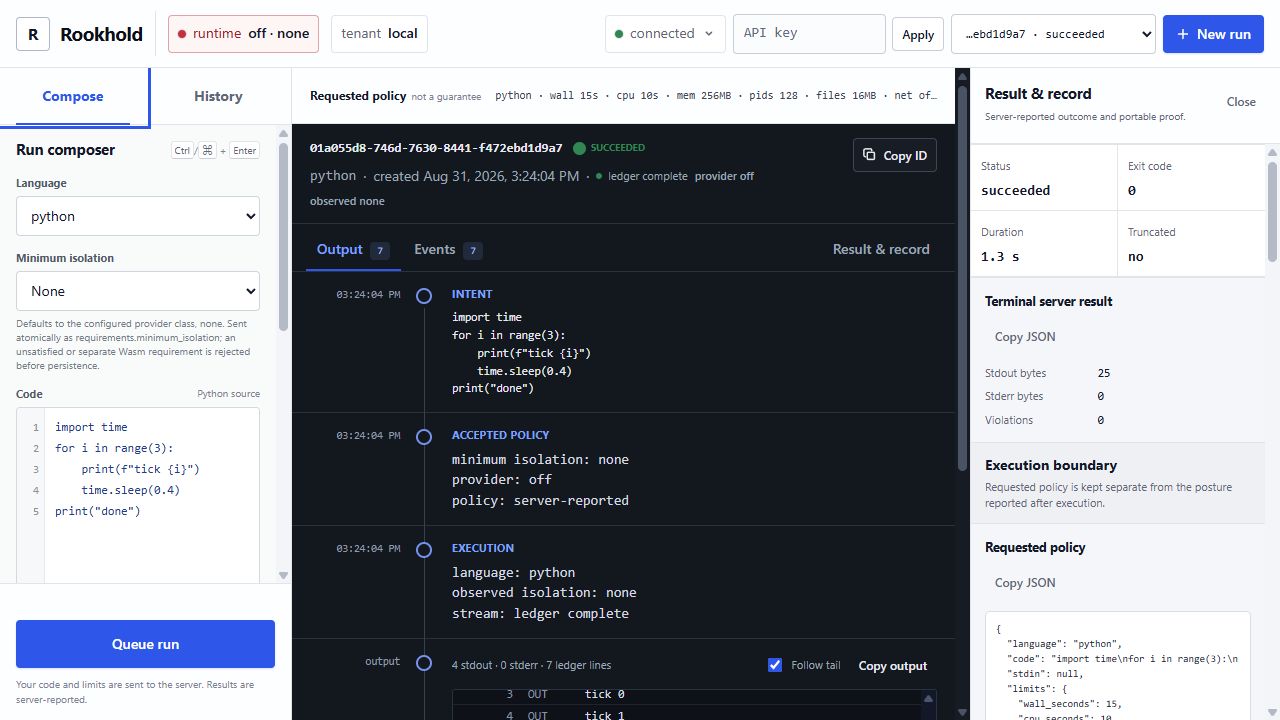
Console guide
| Area | What it is for |
|---|---|
| Compose | Choose a language, paste code, and set simple limits. |
| History | Reopen earlier jobs and see whether they succeeded. |
| Transcript | Follow accepted policy, execution, output, completion, and proof in order. |
| Result & record | Inspect the final outcome and download available evidence. |
| Runtime label | See the isolation Rookhold actually observed—not just what was requested. |
Connect an AI agent
Rookhold works with Claude Code, OpenCode, Codex, Hermes, OpenClaw, and other
MCP-compatible CLIs through rookhold-cli mcp-server.
- Start Rookhold using the demo above or the production deployment.
- Put the single-file
rookhold-clidownload in a stable path or keep the
extracted app folder where it is. - Copy the configuration for your agent, set its command to that file with
mcp-serveras the argument, and restart the agent.
Use the copy-ready guides for Claude Code,
OpenCode,
Hermes,
OpenClaw, or a
generic MCP host. The detailed,
fail-closed installation path is in Agent and harness integration.
Is Rookhold right for my task?
| Use Rookhold for | Keep using your agent's normal workspace for |
|---|---|
| short generated or user-supplied scripts | editing a repository |
| stateless transforms, checks, and evaluators | persistent files and package installation |
| work that needs limits, cancellation, or an evidence record | browsers, terminals, ports, and long-running services |
| execution that must cross a separately operated API boundary | trusted work already isolated well enough by the agent |
Using both is normal. Your agent decides what work is needed; Rookhold independently
decides whether and how a submitted job may run.
Before you run untrusted code
The quick start above is intentionally not a sandbox. For mutually untrusted
jobs, use the guarded production profile on a dedicated Linux x86_64 VM and
complete every deployment check.
[!IMPORTANT]
ThegVisorproduction profile is Linux x86_64-only. macOS, Windows, and other Linux architectures can run only the same-trust subprocess backend. The outer
Rookhold service is privileged even when each job uses gVisor, so it belongs on a
dedicated VM. Read the security boundary before
accepting untrusted jobs.
[!NOTE]
Current release: v0.7.1.
Its exact eleven-asset set includes checksums, a combined artifact-scoped SPDX
SBOM, GitHub SBOM/provenance attestations, and the offlinerookhold-verify
verifier inside each platform archive. Older release lines are unsupported
for new deployments.
Upgrading from Coop
Rookhold is the new project name as of v0.6. Existing integrations do not need
an all-at-once migration: the coop binaries, Python imports, TypeScript
compatibility export, coop-mcp command, and COOP_* environment variables
remain supported aliases. If both a ROOKHOLD_* and matching COOP_* variable
are set to different non-empty values, startup fails instead of guessing.
The /v1 API, application/vnd.coop... media types, coop:// evidence subject
names, and v1 predicate URI are unchanged because they are durable wire and
signature identities. See the v0.6 upgrade guide
for service files, paths, and rollback details.
Why Rookhold exists
Most agent sandboxes protect a development workspace. Rookhold adds a separately
operated execution boundary for short, risky, or user-supplied jobs without
letting the model hold the Rookhold key or choose its own server, tenant, language
allowlist, or required isolation posture.
Without Rookhold, a tool call often ends as subprocess.run(model_text) inside the
agent process or a long-lived container. The application then has to invent
authentication, resource ceilings, cancellation, output bounds, tenant
concurrency, reconnectable streaming, and an audit record.
With Rookhold, the trusted adapter submits once and receives a job ID. Operators
can answer five concrete questions: what ran, who submitted it, which controls
actually became effective, what output or violations were observed, and how
the run ended. Evidence survives failure, timeout, OOM, and cancellation.
you → AI agent or app → rookhold-cli mcp-server or SDK → Rookhold → short job
       decides what      submits safely                 policy + evidence
What ships
- standalone
rookhold-cliandrookhold-mcpexecutables in every platform archive—no Python installation required - one authenticated HTTP API for submit, inspect, cancel, wait, and event history
- live WebSocket output with one-use stream tickets and persisted history before live frames
- scoped indexed credentials or RFC 9068 JWTs, with legacy per-tenant keys retained for migration
- fair per-tenant admission, aggregate memory limits, logical storage quotas, and a disk-reserve watermark
- server-clamped wall-time, CPU, memory, process, and file limits
- a per-job gVisor OCI provider plus the Linux x86_64 namespace fallback, both with networking denied
- an operator dashboard served from the binary
- a SQLite schema-v4 job/evidence store with configurable retention, idempotent submission, and per-job hash chains
- terminal evidence receipts binding policy, runtime posture, output digests, outcome, and chain head
- Ed25519-signed DSSE/in-toto envelopes, exact result artifacts, restart backfill, and offline verification
- bounded OpenMetrics telemetry plus W3C Trace Context correlation
- stdlib-only Python and dependency-free TypeScript clients
- a dependency-free
rookhold-cliinteractive terminal and one-shot operator client - a dependency-free, concurrent MCP mode in the same
rookhold-clifile, plus therookhold-mcpcompatibility entry point
The event chain remains server-verifiable operational evidence. A signed envelope additionally proves that the configured Rookhold key asserted the authoritative tenant, exact receipt, and result digest. It does not prove deterministic re-execution, trusted hardware, remote attestation, or WORM storage; distribute or pin the public key out of band rather than trusting its API key_id hint.
Common questions
| Question | Answer |
|---|---|
| Do I need Rust? | No. Download a prebuilt release unless you want to contribute to Rookhold itself. |
| Do I need an AI model? | No. Any application can call Rookhold through HTTP or an SDK. |
| Can I use Claude Code, OpenCode, Codex, Hermes, or OpenClaw? | Yes. They can all launch the included stdio MCP adapter. |
| Does Rookhold replace my agent's normal workspace? | No. Keep repository editing in the workspace and send short execution jobs to Rookhold. |
| Is the five-minute demo safe for untrusted code? | No. It is loopback-only and unisolated. Use the guarded production deployment for mutually untrusted jobs. |
Build from source (optional)
Most users should use the prebuilt quick start.
This section is only for contributors or operators who specifically want to
compile Rookhold themselves. Install Rust 1.98 and the runtimes you intend to use:
git clone https://github.com/sambai-dev/rookhold.git
cd rookhold
ROOKHOLD_SANDBOX=off \
ROOKHOLD_JOBS_ROOT="$PWD/.rookhold-dev/jobs" \
cargo run --locked -p coop-server --bin rookhold
PowerShell:
git clone https://github.com/sambai-dev/rookhold.git
Set-Location rookhold
$env:ROOKHOLD_SANDBOX = "off"
$env:ROOKHOLD_JOBS_ROOT = Join-Path (Get-Location) ".rookhold-dev\jobs"
cargo run --locked -p coop-server --bin rookhold
Open http://127.0.0.1:7300. Development mode uses the public local keyrookhold-dev-key if ROOKHOLD_API_KEYS is unset. The explicit off setting uses an
unisolated subprocess. Do not expose it or submit code you do not trust.
At startup, development mode runs a bounded canary under the same sanitized
environment used for jobs. /v1/capabilities advertises only runtimes that
passed, and submissions for an unavailable runtime fail with422 runtime_unavailable. The resolved executable is cached for the process,
so admission and execution use the same runtime path.
Production on a dedicated Linux x86_64 VM
The supplied Compose deployment includes a purpose-built private rootfs and
uses one pinned gVisor workload per job. On a fresh dedicated VM, one guarded
command provisions the tenant credential, reviewed runsc binary, and local
Ed25519 signing key; builds the image; binds the exact rootfs-manifest digest;
starts the service; and runs receipt-and-attestation-checked canaries in every
runtime:
ROOKHOLD_PRODUCTION_VM_ACKNOWLEDGED=true scripts/bootstrap-production.sh
The bootstrap creates .env and .coop-runtime/ with owner-only permissions
and never replaces existing credentials or private key material. It also
derives .coop-runtime/attestation-public-key.pem locally as the explicit
operator trust pin. The image entrypoint stages the host-owned key and runsc
into root-owned container-local paths before Rookhold starts, preserving the
strict ownership boundary of a rootful deployment. On later runs the bootstrap
validates the exact staged runtime/key and existing pin, updates the rootfs
digest, deploys, and repeats the same production verifier with the packagedrookhold-verify. The acknowledgement is deliberate: it does not make the
privileged outer service safe on a general-purpose host.
Compose is loopback-only. Each submitted job crosses its own gVisor application-kernel boundary, but privileged: true still gives the outer Rookhold container host-equivalent authority for runtime and cgroup setup. Use this configuration only inside a dedicated, disposable x86_64 VM. It is not a safe control-plane deployment on a general-purpose Docker host. See deployment choices.
Production is more involved because the private rootfs, cgroup delegation,
reviewed runtime, signing key, tenant identity, TLS/private ingress, and
hostile canary are the security boundary—not optional setup noise. The
deployment guide separates the one-time VM prerequisites from the repeatable
Compose start and provides the exact posture assertions required before
traffic is admitted.
Run a job
Set the client key for the path you started: use the public development key only for the loopback local-development process, or use the random key portion you placed after tenant: in .env for Compose.
ROOKHOLD_CLIENT_KEY="${ROOKHOLD_CLIENT_KEY:-rookhold-dev-key}"
curl --fail-with-body -X POST http://127.0.0.1:7300/v1/jobs \
  -H "Authorization: Bearer $ROOKHOLD_CLIENT_KEY" \
  -H 'Idempotency-Key: readme-python-42-v1' \
  -H 'Content-Type: application/json' \
  --data '{
    "language": "python",
    "code": "print(6 * 7)",
    "requirements": {"minimum_isolation": "gvisor-application-kernel"},
    "limits": {"wall_seconds": 10, "mem_mb": 256}
  }'
Use minimum_isolation: "none" only with the explicitly unisolated local
quick start. A reused idempotency key returns the original job only when the
canonical request is identical; reuse with different code or policy fails.
The response contains a UUIDv7 job_id. Use it in the following requests:
curl --fail-with-body \
  -H "Authorization: Bearer $ROOKHOLD_CLIENT_KEY" \
  'http://127.0.0.1:7300/v1/jobs/JOB_ID/result?wait_seconds=60'

curl --fail-with-body \
  -H "Authorization: Bearer $ROOKHOLD_CLIENT_KEY" \
  http://127.0.0.1:7300/v1/jobs/JOB_ID/replay

stream_response=$(curl --fail-with-body -X POST \
  -H "Authorization: Bearer $ROOKHOLD_CLIENT_KEY" \
  http://127.0.0.1:7300/v1/jobs/JOB_ID/stream-ticket)
stream_path=$(printf '%s' "$stream_response" | \
  python -c 'import json, sys; print(json.load(sys.stdin)["stream_url"])')
websocat "ws://127.0.0.1:7300${stream_path}"
After a terminal job's attestation.available becomes true, download the
exact signed envelope and result artifact, then verify them with a public key
you obtained through a trusted operator channel:
curl --fail-with-body -H "Authorization: Bearer $ROOKHOLD_CLIENT_KEY" \
  -o job.dsse.json http://127.0.0.1:7300/v1/jobs/JOB_ID/attestation
curl --fail-with-body -H "Authorization: Bearer $ROOKHOLD_CLIENT_KEY" \
  -o job-result.json http://127.0.0.1:7300/v1/jobs/JOB_ID/result-artifact
rookhold-verify verify \
  --envelope job.dsse.json \
  --subject job-result.json \
  --public-key rookhold-attestation.pub.pem \
  --tenant TENANT_ID
/v1/attestation/public-key exposes the current public key for discovery, but
its own trust notice is important: fetching a key from the same server is not
independent key distribution. The predicate and exact result both bind the
authoritative tenant; pass the tenant expected by your workflow torookhold-verify rather than trusting a value copied from downloaded JSON.
PowerShell local-development equivalent:
$headers = @{ Authorization = "Bearer rookhold-dev-key" }
$body = @{
    language = "python"
    code = "print(6 * 7)"
    requirements = @{ minimum_isolation = "none" }
    limits = @{ wall_seconds = 10; mem_mb = 256 }
} | ConvertTo-Json -Depth 3
$job = Invoke-RestMethod -Method Post -Headers $headers `
    -ContentType "application/json" -Body $body `
    -Uri "http://127.0.0.1:7300/v1/jobs"
$result = Invoke-RestMethod -Headers $headers `
    -Uri "http://127.0.0.1:7300/v1/jobs/$($job.job_id)/result?wait_seconds=60"
$result
Prefer /result to status polling. Resume replay and WebSocket streams from the last accepted cursor after a transport close. Do not automatically retry a timed-out submission because it may already have committed; see API and streaming for the complete transport contract.
Execution lifecycle
accepted → queued → running → succeeded
                            ↘ failed
                            ↘ timed_out
                            ↘ oom_killed
                            ↘ cancelled
                            ↘ error
Each job has an ordered event history. A client that joins the WebSocket after execution began receives persisted events first and then live events. Output is bounded; truncation is recorded rather than allowing an unbounded server-memory or database write path.
API and clients
OpenAPI is served at /openapi.json. The core routes are:
| Method | Path | Purpose |
|---|---|---|
POST |
/v1/jobs |
Submit a job |
GET |
/v1/jobs |
Cursor-list the authenticated tenant's jobs |
GET |
/v1/jobs/{id} |
Inspect status, requested/effective policy, and terminal receipt |
DELETE |
/v1/jobs/{id} |
Cancel a queued or running job |
GET |
/v1/jobs/{id}/result |
Wait for and fold an outcome |
GET |
/v1/jobs/{id}/attestation |
Download the exact persisted DSSE envelope |
GET |
/v1/jobs/{id}/result-artifact |
Download the exact result bytes authenticated by that envelope |
GET |
/v1/jobs/{id}/replay |
Cursor-read ordered persisted events |
GET |
/v1/jobs/{id}/stream |
WebSocket history plus live events |
POST |
/v1/jobs/{id}/stream-ticket |
Mint a short-lived, one-use, job-bound stream credential |
GET |
/v1/status |
Authenticated build and sandbox posture |
GET |
/v1/capabilities |
Supported languages, limits, and server features |
GET |
/v1/attestation/public-key |
Discover the current signer key and explicit trust warning |
GET |
/v1/whoami |
Resolve the current principal, tenant, scopes, and authority lifetime |
GET |
/v1/metrics |
Prometheus-format process/job metrics |
GET |
/healthz |
Unauthenticated liveness only |
GET |
/readyz |
Unauthenticated process/store readiness; still verify authenticated posture |
See API and streaming and SDK usage. The dashboard uses the same API; it is an operator surface, not a separate source of truth.
Agent and harness integration
The same single-file rookhold-cli download starts MCP mode withmcp-server. It exposes four narrow tools—run, result, events, and
cancel—while keeping credentials and policy in the trusted adapter process.
It supports the stateless MCP 2026 discovery and opt-in Tasks contract while
retaining the legacy initialize flow. Concurrent stdio requests remain
responsive, cancellation is durable, and a timed-out wait returns the job ID
instead of losing ownership of the still-running job.
Connect a harness
Start Rookhold locally or deploy it on the dedicated VM.
Download and verify the single
rookhold-cli-*file for the harness host,
then put it at a stable absolute path. No Python environment is needed.Give the harness process—not the model—the connection and policy settings:
ROOKHOLD_BASE_URL=https://rookhold.internal.example
ROOKHOLD_API_KEY=replace-with-the-key-only
ROOKHOLD_MCP_MINIMUM_ISOLATION=gvisor-application-kernel
ROOKHOLD_MCP_ALLOWED_LANGUAGES=python,node
Point the harness's stdio MCP configuration at the downloaded
rookhold-clifile withmcp-serveras its argument, merge the matching
snippet below, and restart or reload the harness.
On Windows, keep the downloaded .exe extension.ROOKHOLD_MCP_MINIMUM_ISOLATION may be omitted or set to none only for the
explicitly unisolated local demo. Production integrations should specify the
exact minimum isolation class and fail closed.
Copy-ready configuration is included for:
Adding Rookhold does not disable an agent's existing exec, terminal, or native
code-execution tool. Deny those alternate routes when policy requires every
generated job to pass through Rookhold. See integration architecture and the
production checklist.
Configuration
| Variable | Default | Notes |
|---|---|---|
ROOKHOLD_ADDR |
127.0.0.1:7300 |
Listen address; keep private or place behind TLS |
ROOKHOLD_DB |
rookhold.db |
SQLite database path; an existing coop.db is adopted when the new default does not exist |
ROOKHOLD_API_KEYS |
dev key outside production | Comma-separated tenant:key entries; production rejects blank, short, and public keys |
ROOKHOLD_CREDENTIALS_FILE + ROOKHOLD_CREDENTIAL_PEPPER_FILE |
unset | Indexed, peppered HMAC credentials with principal, scopes, expiry, and revocation; preferred over legacy keys |
ROOKHOLD_OIDC_ISSUER, ROOKHOLD_OIDC_AUDIENCE, ROOKHOLD_OIDC_JWKS_URL, ROOKHOLD_OIDC_TENANT_MAP |
unset | Strict RFC 9068 JWT authority and tenant mapping; all core values are required together |
ROOKHOLD_METRICS_TOKEN |
unset | Separate operator credential for global /metrics; never accepted as a tenant credential |
ROOKHOLD_ENV |
unset | prod, production, or release enables fail-closed production checks |
NODE_ENV |
unset | Compatibility alias: prod, production, or release also enables the same production checks |
ROOKHOLD_SANDBOX |
auto |
gvisor, ns, auto, or off; production does not silently downgrade and Compose defaults to gvisor |
ROOKHOLD_ROOTFS |
unset | Required private rootfs for gVisor and namespaces; / is rejected |
ROOKHOLD_SANDBOX_HELPER |
sibling rookhold-sandbox-init |
Dedicated single-threaded Linux x86_64 bootstrap helper; package and version it with rookhold |
ROOKHOLD_GVISOR_RUNSC |
unset | Absolute path to the reviewed runsc binary |
ROOKHOLD_GVISOR_ROOTFS_SHA256 |
unset | SHA-256 of the exact /.coop-rootfs.manifest; required in gVisor mode |
ROOKHOLD_GVISOR_PLATFORM |
systrap |
Reviewed gVisor platform (systrap, or kvm on a separately reviewed host) |
ROOKHOLD_ATTESTATION_MODE |
off in development; signing required in production |
sign or explicit off |
ROOKHOLD_ATTESTATION_KEY_FILE |
unset | Strict Ed25519 PKCS#8 key; required for signing and must be absolute in production |
ROOKHOLD_UNSAFE_ALLOW_NAIVE |
false | Required acknowledgement for an explicit unisolated production-mode process |
ROOKHOLD_SECCOMP |
auto |
Namespace syscall filter; cannot be disabled in production |
ROOKHOLD_JOBS_ROOT |
/var/lib/rookhold/jobs on Linux |
Dedicated absolute non-symlink staging directory |
ROOKHOLD_WORKERS |
4 |
Worker count |
ROOKHOLD_TENANT_CONCURRENCY |
2 |
Concurrent jobs per tenant |
ROOKHOLD_TENANT_QUEUE_CAPACITY |
64 |
Durable accepted-but-queued jobs per tenant |
ROOKHOLD_MAX_JOB_MEM_MB / ROOKHOLD_MEMORY_BUDGET_MB |
1024 / 4096 |
Per-job ceiling and weighted aggregate in-flight memory budget |
ROOKHOLD_STORAGE_TENANT_MB / ROOKHOLD_STORAGE_GLOBAL_MB |
4096 / 16384 |
Transactional logical retained-data quotas |
ROOKHOLD_STORAGE_FREE_RESERVE_MB |
1024 |
Filesystem free-space watermark below which growth fails closed |
ROOKHOLD_RATE_PER_MIN |
120 |
Requests per minute per tenant |
ROOKHOLD_RETENTION_HOURS |
168 |
Terminal-job retention; 0 disables deletion |
ROOKHOLD_SWEEP_INTERVAL_SECS |
3600 |
Retention sweep interval, minimum 60 |
ROOKHOLD_PYTHON, ROOKHOLD_NODE, ROOKHOLD_BASH |
PATH lookup |
Interpreter overrides; paths must exist in the private rootfs too |
RUST_LOG |
info |
Rust tracing filter |
Requested limits are clamped to compiled ceilings before execution, but
"requested" is not the same as "enforced." The gVisor and namespace providers
enforce the clamped wall-time, CPU, memory, process, and file controls. The
unisolated development subprocess enforces only wall time; its CPU, memory,
process, and file values are null in effective policy and theirlimit_enforcement flags are false. allow_network is not an egress opt-in
in the current release: both isolated providers deny job networking, while the
development backend retains the service account's host networking and reportsnetworking: "host" after the workload reaches its ready boundary.
Repository map
| Path | Responsibility |
|---|---|
crates/coop-types |
API types, statuses, and limit ceilings |
crates/coop-store |
SQLite jobs, events, quotas, signing outbox, and exact attestation artifacts |
crates/coop-exec |
development, Linux namespace, and per-job gVisor OCI providers |
crates/coop-attestation |
DSSE/in-toto profile, Ed25519 keys, and rookhold-verify |
crates/coop-server |
API, fair scheduler, identity, observability, signer, dashboard, and OpenAPI |
sdks |
Python and TypeScript clients |
integrations |
MCP templates for Claude Code, OpenCode, Hermes, OpenClaw, and generic hosts |
hostile-jobs |
adversarial payloads used by containment verification |
crates/coop-server/tests/hostile.rs |
containment harness and invariant assertions |
docs |
architecture, boundary, API, deployment, and operations |
PRODUCT.md |
durable users, purpose, positioning, and product constraints |
DESIGN.md |
operator-console tokens, responsive rules, and component language |
The coop-* crate and compatibility filenames are intentional durable internal,
wire, and evidence identities retained across the public rename; new user-facing
interfaces use Rookhold names.
Verification
cargo fmt --all --check
cargo clippy --locked --workspace --all-targets -- -D warnings
cargo test --locked --workspace --all-targets
python scripts/check-release-surface.py
python -m pip install --no-deps ./sdks/python
python -m unittest discover -s sdks/python/tests -v
cd sdks/typescript
npm ci
npm test
npm run typecheck
Containment tests and isolated providers are Linux x86_64-only. Namespace tests require Linux 5.14+, cgroup.kill, recursive mount_setattr, root, cgroup v2, the matching helper, and a trusted private rootfs. The gVisor gate additionally uses the exact reviewed runsc, rootfs manifest, OCI init, and lifecycle/crash tests. Run from a root-owned test environment with Rust 1.98:
sudo env \
  ROOKHOLD_ROOTFS=/opt/rookhold/rootfs \
  ROOKHOLD_SANDBOX_HELPER=/usr/local/bin/rookhold-sandbox-init \
  cargo test --locked -p coop-server --test hostile -- --ignored --nocapture

sudo env \
  ROOKHOLD_GVISOR_RUNSC=/usr/local/bin/runsc \
  ROOKHOLD_GVISOR_SERVER_BIN=target/debug/rookhold \
  bash scripts/smoke-gvisor.sh
A successful unit test run on macOS, Windows, or another Linux architecture is not evidence that Linux x86_64 containment works. Those platforms use the unisolated development subprocess backend only. Release CI constructs an ephemeral x86_64 private rootfs, expects exactly 18 hostile tests, checks every prerequisite, and fails if the suite cannot run or reports a skip.
Documentation
- Architecture
- Security boundary and trust tiers
- API and streaming
- SDKs
- Terminal clients
- Agent and harness integrations
- Deployment
- Operations, backup, and restore
- Upgrading
- Releasing
- Contribution lifecycle and exact-head evidence
- Troubleshooting
- Security policy
- Security review record
- Changelog
Runnable starting templates for systemd, its environment file, and Caddy live under deploy/.
Contributing
Issues and focused pull requests are welcome. Start with CONTRIBUTING.md and the contribution lifecycle for declared scope, RED/adversarial evidence, exact-head validation, hostile-suite requirements, and precise implementation/review/integration status.
Project direction
Rookhold now has the hardened-runtime, signed-evidence, scoped-identity, MCP 2026,
and bounded-observability foundations selected by the v0.4 research. The next
credible steps are external KMS/HSM signing and key history, transparency
anchoring, a destination-bound credential broker for tightly controlled
egress, and optional hardware/confidential-VM providers. Persistent workspaces,
general browsers/PTYs, arbitrary images, and multi-node scheduling remain
deliberate non-goals until their durability and trust boundaries are designed.
License
Yorumlar (0)
Yorum birakmak icin giris yap.
Yorum birakSonuc bulunamadi