specops
Health Gecti
- License — License: MIT
- Description — Repository has a description
- Active repo — Last push 0 days ago
- Community trust — 50 GitHub stars
Code Gecti
- Code scan — Scanned 12 files during light audit, no dangerous patterns found
Permissions Gecti
- Permissions — No dangerous permissions requested
This skill adds a structured, four-phase planning workflow to AI coding assistants. Instead of allowing an AI to immediately write code, it forces the agent to analyze requirements, create a specification, and plan tasks before implementation begins.
Security Assessment
The automated code scan reviewed 12 files and found no dangerous patterns, hardcoded secrets, or requests for risky permissions. However, developers should be aware that the "Quick Start" guide highly recommends running a remote bash script via `curl | bash`. While the documentation thoughtfully provides a direct link to inspect the script beforehand, executing remote shell scripts is an inherently risky practice that bypasses standard security reviews. The tool functions by interacting with your codebase and AI environment, but does not appear to maliciously access sensitive data. Overall risk is rated as Low.
Quality Assessment
The project is actively maintained, with its most recent push occurring today. It utilizes the highly permissive MIT license and has garnered 50 GitHub stars, indicating a fair level of early community trust. The repository is well-documented, featuring clear instructions, a CI pipeline, and detailed use-cases for multiple AI platforms.
Verdict
Safe to use, provided you review the remote installation script before executing it or opt for the manual Git clone method instead.
Make your AI agent think before it codes.
Make your AI agent think before it codes.


You describe a feature to your AI coding assistant. It starts writing code immediately. No requirements. No design. No task breakdown. You spend the next hour correcting assumptions it made in the first minute.
The problem isn't the AI. It's that nobody told it to think first.
What SpecOps Does
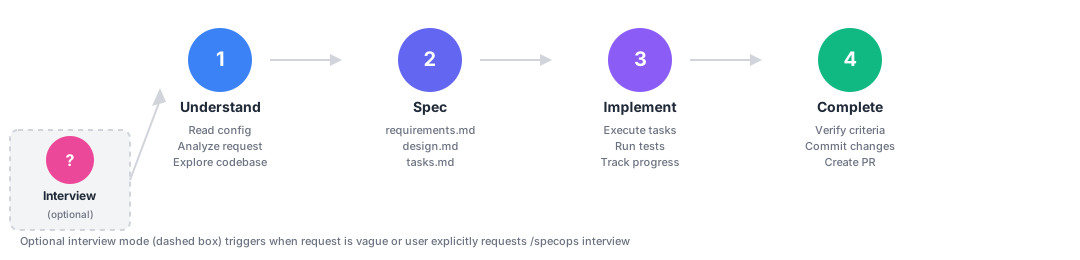
SpecOps adds a structured thinking step to AI coding. One command triggers a 4-phase workflow:
- Understand the codebase and context
- Spec requirements, design, and ordered tasks
- Implement from the spec, not from assumptions
- Complete with verified acceptance criteria
Specs are git-tracked, survive across sessions, and work natively with Claude Code, Cursor, OpenAI Codex, GitHub Copilot, and Google Antigravity.
Quick Start
Claude Code (plugin marketplace):
/plugin marketplace add sanmak/specops
/plugin install specops@specops-marketplace
/reload-plugins
One-line install (any platform):
bash <(curl -fsSL https://raw.githubusercontent.com/sanmak/specops/main/scripts/remote-install.sh)
# Inspect the script first: https://github.com/sanmak/specops/blob/main/scripts/remote-install.sh
Or clone and run:
git clone https://github.com/sanmak/specops.git && cd specops && bash setup.sh
Try it:
/specops Add user authentication with OAuth
Platform-specific install details: QUICKSTART.md | Full command reference: docs/COMMANDS.md
Before and After
Without SpecOps:
You: "Add OAuth authentication"
Agent: *writes auth.ts, picks JWT without asking, hardcodes Google,
       skips rate limiting, creates 6 files*
You: "No, I needed GitHub too, and..." (30 min of corrections)
With SpecOps:
You: "/specops Add OAuth authentication"
Agent:
  requirements.md  ->  4 user stories, 12 acceptance criteria (EARS notation)
  design.md        ->  JWT vs sessions trade-off, provider abstraction layer
  tasks.md         ->  8 ordered tasks with dependencies and effort estimates
  Then implements each task against verified criteria.
Problems SpecOps Solves
| Problem | How SpecOps handles it |
|---|---|
| AI starts coding without understanding the domain | 7 vertical templates: backend, frontend, infra, data pipelines, library/SDK, fullstack, builder |
| Specs lost when you close the session | Git-tracked spec files with cross-session context recovery |
| Agent forgets decisions from yesterday | Local memory layer, loaded automatically every session |
| No way to review specs before coding starts | Built-in team review workflow with configurable approval gates |
| Agent hallucinates vague acceptance criteria | EARS notation for precise requirements: WHEN [event] THE SYSTEM SHALL [behavior] |
| Specs drift from codebase after implementation | 5 automated drift checks with audit and reconcile commands |
| AI adds packages without checking maintenance or license | Dependency introduction gate: 5-criteria evaluation (scope, maintenance, size, security, license) before any install |
| Agent marks its own work as "done" without scrutiny | Adversarial evaluation: separate evaluator scores specs and implementations against hard thresholds |
| Production reveals things specs missed | Production learnings layer: capture discoveries, link to specs, surface in future work |
| Locked into one AI coding tool | One source of truth, 5 platform outputs |
Built With SpecOps
Every feature of SpecOps was specified, designed, and implemented using the SpecOps workflow. All specs are public in .specops/. The friction log captures 42 lessons learned that shaped the tool.
Multi-Spec Features
Large features that span multiple bounded contexts are automatically detected and split into coordinated specs.
You: "/specops Add OAuth authentication and payment processing"
Agent:
  Scope assessment → 2 bounded contexts detected (auth, payments)
  Proposed split:
    Spec 1: oauth-authentication (wave 1 — walking skeleton)
    Spec 2: payment-processing (wave 2 — depends on auth)
  Initiative: oauth-payments (tracks both specs)

  You approve → 2 specs created, linked via specDependencies
  /specops initiative oauth-payments → executes both in order
Dependency gates, execution waves, and initiative tracking handle the coordination automatically.
Production Learnings
Specs end at "completed." But production reveals things specs missed. SpecOps closes this loop: capture discoveries with /specops learn, link them to originating specs, and surface relevant learnings automatically when future specs touch the same code.
/specops learn batch-processing
→ Learning: "Concurrent writes above 500 connections degrade P99"
→ Prevention: "Design docs must include concurrency limits for write-heavy ops"

# Later, a new spec touching the same files loads this automatically
Full details: docs/LEARNINGS.md
What Only SpecOps Does
- Production learnings: the only spec tool that captures post-deployment discoveries, links them to originating specs, and surfaces relevant learnings in future work. No competitor closes the spec-to-production feedback loop.
- Multi-platform: the only spec-driven development tool that works across Claude Code, Cursor, OpenAI Codex, GitHub Copilot, and Google Antigravity from a single source
- Spec decomposition: automatic scope assessment splits large features into multiple coordinated specs with dependency tracking and initiative orchestration
- Vertical awareness: domain-specific spec templates. Infrastructure specs include rollback steps and resource definitions. Data pipeline specs include data contracts and backfill strategy.
- Adversarial evaluation: a structurally separated evaluator scores spec quality (Phase 2) and implementation quality (Phase 4) against hard thresholds. Agents praise their own work; a second pass with skepticism prompting catches what they missed.
- Dependency governance: every new package must pass a 5-criteria gate (scope match, maintenance health, size proportionality, security surface, license compatibility) before installation. Always active, no bypass.
- Enforcement, not suggestions: CI-integrated drift detection, checkbox completion gates, dependency gates, and approval workflows that block implementation until specs are approved
- Open source, local, no lock-in: everything is git-tracked markdown. No cloud service, no account required. MIT license.
Full comparison with Superpowers, Kiro, EPIC/Reload, and Spec Kit | Plan Mode vs Spec Mode
Platforms
| Platform | Trigger |
|---|---|
| Claude Code | /specops [description] |
| Cursor | Use specops to [description] |
| OpenAI Codex | Use specops to [description] |
| GitHub Copilot | Use specops to [description] |
| Google Antigravity | Use specops to [description] |
Configuration
Create .specops.json in your project root. Configuration is optional. SpecOps uses sensible defaults.
{
  "specsDir": ".specops",
  "vertical": "backend",
  "team": {
    "conventions": ["Use TypeScript", "Write tests for business logic"],
    "reviewRequired": true
  }
}
Examples: examples/ | Full schema reference: REFERENCE.md | Steering files: STEERING_GUIDE.md
Writing and Engineering Philosophy
Specs follow principles from Orwell, Bezos, Lamport, Brooks, Beck, and Leveson. Every requirement passes the ANT test: if a statement cannot be false, it carries no information and gets rewritten. Writing rules | Engineering rules
Contributing
Contributions welcome. See CONTRIBUTING.md for guidelines.
License
Yorumlar (0)
Yorum birakmak icin giris yap.
Yorum birakSonuc bulunamadi