career-ops
Health Gecti
- License — License: MIT
- Description — Repository has a description
- Active repo — Last push 0 days ago
- Community trust — 69671 GitHub stars
Code Gecti
- Code scan — Scanned 12 files during light audit, no dangerous patterns found
Permissions Gecti
- Permissions — No dangerous permissions requested
This agent serves as an AI-powered job search command center. It automates the evaluation of job offers, generates tailored PDF resumes, scans job portals, and tracks application pipelines.
Security Assessment
The tool makes network requests to scan external job portals and ATS platforms. The automated scan flagged a synchronous shell command execution (`execSync`) inside a `merge-tracker.mjs` script. While not inherently malicious, this execution method can be a vector for command injection if the tool processes untrusted external inputs. The project does not request dangerous account permissions, and no hardcoded secrets were detected. Because of the shell execution risk, the overall security risk is rated as Medium.
Quality Assessment
The project is under active development, with its most recent code push occurring today. It is distributed under the standard MIT license and includes a thorough, well-documented README. Community trust is currently minimal, represented by only 10 GitHub stars. Despite the low audience size, the clear documentation and the creator's real-world case study suggest a solid, practical utility.
Verdict
Use with caution—review the implementation of the shell execution function before running the tracker or processing untrusted data.
Open-source AI job search: scan job portals, evaluate listings into a structured A-H report with a global 1-5 score, tailor your CV, track applications — runs locally in your AI coding CLI (Claude Code, Codex, OpenCode, Antigravity…)

English | Español | Deutsch | Français | Português (Brasil) | 한국어 | 日本語 | 简体中文 | 繁體中文 | Українська | Русский | Polski | Dansk | தமிழ் | العربية | हिन्दी | Türkçe

I spent months applying to jobs the hard way. So I engineered the system I wish I had.
Companies use AI to filter candidates. I just gave candidates AI to choose companies.
Now it's open source.

Landed yours? Share it → · your card shows someone mid-search that the way out exists.

Every count is a public story you can audit → · every one of them started where you are now.

FEATURED IN


740+ job listings evaluated · 100+ personalized CVs · 1 dream role landed
Created and maintained by Santiago Fernández de Valderrama Aparicio (@santifer)



Also runs on any agent-skill-standard CLI. See Supported CLIs.










What Is This
career-ops (career-ops.org, also known as careerops) turns any AI coding CLI into a full job search command center. Instead of manually tracking applications in a spreadsheet, you get an AI-powered pipeline that:
- Evaluates offers into a structured report -- blocks A through H, with a global 1-5 score reached by holistic judgement across five dimensions rather than an arithmetic formula. Block G is a separate posting-legitimacy assessment that never affects the score; block H is drafted only at 4.5 and above
- Generates tailored PDFs -- ATS-optimized CVs customized per job description
- Scans portals automatically (Greenhouse, Ashby, Lever, company pages)
- Processes in batch -- evaluate 10+ offers in parallel with sub-agents
- Tracks everything in a single source of truth with integrity checks
- Researches companies and finds the right person to contact -- applications get you in the queue; research gets you a conversation
Important: This is NOT a spray-and-pray tool. career-ops is a filter -- it helps you find the few offers worth your time out of hundreds. The system strongly recommends against applying to anything scoring below 4.0/5. Your time is valuable, and so is the recruiter's. Always review before submitting.
career-ops is agentic: whichever AI coding CLI you choose navigates career pages with Playwright, evaluates fit by reasoning about your CV vs the job description (not keyword matching), and adapts your resume per listing.
Heads up: the first evaluations won't be great. The system doesn't know you yet. Feed it context -- your CV, your career story, your proof points, your preferences, what you're good at, what you want to avoid. The more you nurture it, the better it gets. Think of it as onboarding a new recruiter: the first week they need to learn about you, then they become invaluable.
Built by someone who used it to evaluate 740+ job offers, generate 100+ tailored CVs, and land a Head of Applied AI role. Read the full case study.
The CareerOps Manifesto
career-ops is the first reference implementation of the CareerOps Manifesto. read it. if it says what you believe, sign it. your signature becomes a commit.
Features
| Feature | Description |
|---|---|
| Auto-Pipeline | Paste a URL, get a full evaluation + PDF + tracker entry |
| A-H Evaluation | Role summary, CV match, level strategy, comp research, personalization, interview prep (STAR+R) -- plus a Block G posting-legitimacy check that flags scams and ghost jobs, and a Work-Auth signal that flags an explicit no-sponsorship JD as a hard blocker |
| Interview Story Bank | Accumulates STAR+Reflection stories across evaluations -- 5-10 master stories that answer any behavioral question |
| Negotiation Scripts | Salary negotiation frameworks, geographic discount pushback, competing offer leverage |
| ATS PDF Generation | Keyword-injected CVs with Space Grotesk + DM Sans design |
| Cover Letter Generator | Research-backed cover letters with keyword mirroring, four interactive angle prompts (why/problems/approach/tone), draft-in-chat approval gate, and A4 PDF via the same HTML + Playwright pipeline as CVs. Auto-drafts on every evaluation; complete and generate on demand via /career-ops cover |
| Application Email Drafts | Formal recruiter/referral/cold application emails from a report or pasted JD, with subject line, attachment checklist, source-backed fit points, and a profile-driven contact block. Draft-only -- career-ops never sends, submits, or clicks anything. |
| Portal Scanner | 100+ companies pre-configured (Anthropic, OpenAI, ElevenLabs, Retool, n8n...) + custom queries across Ashby, Greenhouse, Lever, Wellfound |
| Funded Company Discovery | Review-first company:funded command surfaces recently funded companies and source diagnostics from structured public feeds without editing your data |
| Batch Processing | Parallel evaluation with headless CLI workers (claude -p / opencode run) |
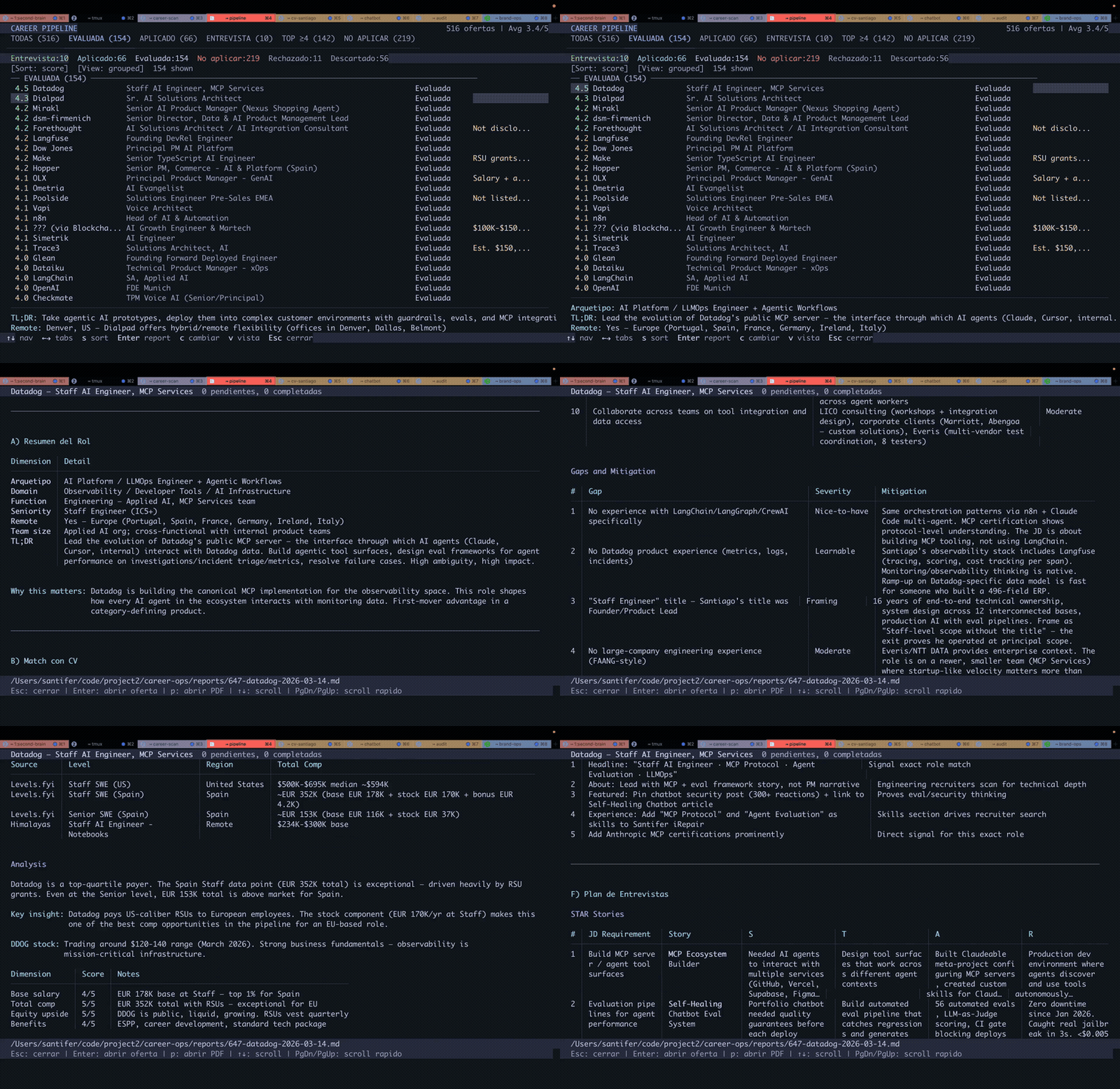
| Dashboard TUI | Terminal UI to browse, filter, and sort your pipeline |
| Human-in-the-Loop | AI evaluates and recommends, you decide and act. The system never submits an application -- you always have the final call |
| Pipeline Integrity | Automated merge, dedup, status normalization, health checks |
| Interview Suite | Time-blocked prep plans, practice sessions with feedback, post-interview debriefs (interview/), and a company red-flag detector (interview-redflag) |
| Offer Stage | Contract reading companion -- clause walk plus a lawyer question list (offer-prep) -- and a desired/advertised/actual salary-gap analyzer (salary-gap.mjs) |
| Follow-ups & Replies | Follow-up cadence calculator and seeded reminders (followup-cadence.mjs, followup-seed.mjs); employer reply classification into tracker updates (reply-watch) |
| Pattern Analysis | Rejection patterns and per-ATS-channel advance rates (analyze-patterns.mjs), lifetime funnel stats (stats.mjs), repost/ghost-job detection (detect-reposts.mjs) |
| Plugin System | Opt-in integrations (Gmail, Notion, Apify + a community registry), disabled by default -- see docs/PLUGINS.md |
| Beyond the CV | Company research (deep) surfaces AI strategy, recent moves, engineering culture, and the angle your profile should take. Contact discovery (contacto) identifies the hiring manager, recruiter, or team peer worth reaching out to and drafts a ≤300-character LinkedIn message tuned to each contact type. Formal application email drafts (email) turn an evaluated report or pasted JD into a subject line, body, and attachment checklist without sending, submitting, or clicking anything. Applications get you in the queue; research gets you a conversation. |
Quick Start
Fastest way — one command:
npx @santifer/career-ops init
💡
npxships with Node.js — it runs the installer once,
without installing anything globally. No Node yet? Install it first.
(Already using a Claude Code / Gemini / Codex CLI? Then you already have it.)
This clones the latest release into ./career-ops and installs dependencies. Then:
cd career-ops
claude   # or codex / qwen / opencode / agy / grok — open your AI CLI here
On first launch, career-ops walks you through setup — your CV, profile and target roles — just by chatting. Nothing to edit by hand.
Prefer to set it up manually? (git clone)git clone https://github.com/santifer/career-ops.git
cd career-ops && npm install
npx playwright install chromium # only needed for PDF generation
# 2. Check setup
npm run doctor # Validates all prerequisites
# 3. Configure
cp config/profile.example.yml config/profile.yml # Edit with your details
cp templates/portals.example.yml portals.yml # Customize companies
# 4. Add your CV
# Create cv.md in the project root with your CV in markdown
# 5. Open your AI CLI in this directory
claude # or codex / opencode / qwen / agy / grok
# Then ask your CLI to adapt the system to you:
# "Change the archetypes to backend engineering roles"
# "Translate the modes to English"
# "Add these 5 companies to portals.yml"
# "Update my profile with this CV I'm pasting"
# 6. Start using
# Paste a job URL or JD text to trigger auto-pipeline
# If your CLI supports slash commands, use /career-ops (or its CLI-specific alias)
# In Codex, ask for the same mode in plain language, e.g.:
# "Run the career-ops scan mode"
# "Run the career-ops pipeline mode for data/pipeline.md"
# "Run the career-ops pdf mode for the latest evaluated role"
# "Run the career-ops tracker mode and summarize the current statuses"
Global install
npm i -g @santifer/career-ops
This installs the career-ops binary globally so you can run it directly instead of via npx. Unlike npx @santifer/career-ops init (which bootstraps a project directory), the global install gives you a persistent career-ops command available anywhere in your terminal.
Which one should you use?
npx @santifer/career-ops init— best for first use; creates a dedicated project folder.npm i -g @santifer/career-ops— best once you have a project folder and want to run career-ops commands directly.
The system is designed to be customized by your AI coding CLI itself. Modes, archetypes, scoring weights, negotiation scripts -- just ask it to change them. It reads the same files it uses, so it knows exactly what to edit.
See docs/SETUP.md for the full setup guide, docs/RUNNING_ON_A_BUDGET.md for instructions on running career-ops cheaply using custom or local models (and docs/FREE_TIER.md for running it at zero cost on Antigravity CLI's free tier), docs/AUTOMATION.md for scheduling recurring scans and a zero-token triage-to-shortlist recipe, docs/APPLY_AUTOFILL.md for details on the ATS auto-fill flow, docs/LINKEDIN_JOIN.md for cross-referencing a LinkedIn connections export against the companies in your funnel, and docs/FAQ.md for answers to common setup questions, including how story provenance prevents invented numbers. Design principles live in ARCHITECTURE.md; runtime flows in docs/ARCHITECTURE.md.
Antigravity CLI Integration
career-ops supports Antigravity CLI natively, the same way it supports Claude Code and OpenCode. All slash commands are available through the shared skill entrypoint, using the same modes/*.md evaluation logic.
Google has transitioned consumer Gemini CLI access to Antigravity CLI. GEMINI.md is now a no-op compatibility guard so Antigravity does not duplicate the full project instructions when it reads both AGENTS.md and GEMINI.md.
Native Antigravity CLI
# 1. Run in the career-ops directory
cd career-ops
agy

# 2. Use the unified /career-ops command with subcommands:
/career-ops "Senior AI Engineer at Anthropic..."
/career-ops pipeline
/career-ops scan
/career-ops pdf
/career-ops tracker
The skill is defined using the open standard in .agents/skills/career-ops/SKILL.md and symlinked/referenced for each supported CLI (e.g. .claude/, .cursor/, .qwen/, .antigravitycli/, .grok/).
Codex Integration
career-ops supports Codex through the same shared router, but the invocation model is different from CLIs that auto-register slash commands. For the full guide, see docs/CODEX.md.
Interactive Codex
cd career-ops
codex
Slash commands are not guaranteed in Codex. If /career-ops is unavailable, ask Codex to run the mode directly in plain language:
Evaluate this JD with career-ops auto-pipeline: https://company.com/jobs/123
Run the career-ops scan mode and summarize new matches.
Run the career-ops pipeline mode for data/pipeline.md.
Run the career-ops pdf mode for the latest evaluated role.
Run the career-ops tracker mode and summarize the current statuses.
One-shot Codex (codex exec)
codex exec "Evaluate this JD with career-ops auto-pipeline: https://company.com/jobs/123"
codex exec "Run career-ops scan mode in this repo and summarize new matches."
codex exec "Run career-ops pipeline mode for data/pipeline.md."
codex exec "Run career-ops pdf mode for the latest evaluated role."
codex exec "Run career-ops tracker mode and summarize the current statuses."
Grok Build CLI Integration
career-ops supports Grok Build CLI natively, the same way it supports Claude Code and OpenCode. AGENTS.md is auto-loaded as project rules, and all slash commands are available through the shared skill entrypoint.
Native Grok Build CLI
# 1. Run in the career-ops directory
cd career-ops
grok

# 2. Use the unified /career-ops command with subcommands:
/career-ops "Senior AI Engineer at Anthropic..."
/career-ops pipeline
/career-ops scan
/career-ops pdf
/career-ops tracker
For headless batch workers, use grok -p "prompt" (add --yolo to auto-approve tool executions).
Standalone Gemini API Script (No CLI install needed)
# 1. Get a free API key at https://aistudio.google.com/apikey
cp .env.example .env
# Edit .env, set GEMINI_API_KEY=your_key_here

# 2. Install dependencies
npm install

# 3. Evaluate a job description
node gemini-eval.mjs "We are looking for a Senior AI Engineer..."
node gemini-eval.mjs --file ./jds/my-job.txt
node agent-inbox.mjs add "..."   # queue a request for the next session
npm run gemini:eval -- "JD text here"
Free tier: Both options work without billing. Native CLI uses Google OAuth; the API script uses
gemini-3.6-flash(rate limits are model- and tier-dependent; see Google AI docs for current quotas).
Usage
career-ops uses a shared command router. In CLIs that register slash commands, it looks like this:
/career-ops                → Show all available commands
/career-ops {paste a JD}   → Full auto-pipeline (evaluate + PDF + tracker)
/career-ops scan           → Scan portals for new offers
/career-ops pdf            → Generate ATS-optimized CV
/career-ops cover          → Cover letter generator (paste JD or /career-ops cover {slug})
/career-ops email          → Formal application email draft (draft-only; never sends, submits, or clicks)
/career-ops batch          → Batch evaluate multiple offers
/career-ops tracker        → View application status
/career-ops apply          → Fill application forms with AI
/career-ops outcome        → Record application outcome & archive artifacts
/career-ops pipeline       → Process pending URLs
/career-ops contacto       → Find hiring manager / recruiter / peer + draft a ≤300-char LinkedIn message per contact type
/career-ops deep           → Generate a structured 6-axis research prompt (AI strategy, recent moves, culture, challenges, competitors, candidate angle)
/career-ops training       → Evaluate a course/cert
/career-ops project        → Evaluate a portfolio project
Or just paste a job URL or description directly -- career-ops auto-detects it and runs the full pipeline.
In Codex, slash commands are not guaranteed. Use the same mode names in a prompt instead, or call them from codex exec.
How It Works
You paste a job URL or description
        │
        ▼
┌──────────────────┐
│  Archetype       │  Classifies: LLMOps / Agentic / PM / SA / FDE / Transformation
│  Detection       │
└────────┬─────────┘
         │
┌────────▼─────────┐
│  A-H Evaluation  │  Match, gaps, comp research, STAR stories, legitimacy
│  (reads cv.md)   │
└────────┬─────────┘
         │
    ┌────┼────┐
    ▼    ▼    ▼
 Report  PDF  Tracker
  .md   .pdf  entry
Pre-configured Portals
The scanner comes with 100+ companies ready to scan and 45+ search queries across major job boards. Copy templates/portals.example.yml to portals.yml and add your own:
AI Labs: Anthropic, OpenAI, Mistral, Cohere, LangChain, Pinecone
Voice AI: ElevenLabs, PolyAI, Parloa, Hume AI, Deepgram, Vapi, Bland AI
AI Platforms: Retool, Airtable, Vercel, Temporal, Glean, Arize AI
Contact Center: Ada, LivePerson, Sierra, Decagon, Talkdesk, Genesys
Enterprise: Salesforce, Twilio, Gong, Dialpad
LLMOps: Langfuse, Weights & Biases, Lindy, Cognigy, Speechmatics
Automation: n8n, Zapier, Make.com
European: Factorial, Attio, Tinybird, Clarity AI, Travelperk
Job boards searched: 55+ provider modules cover ATS APIs, board-wide feeds, XML/RSS feeds, markdown feeds, and local parsers. See Supported job boards for the full table.
By default node scan.mjs (a.k.a. npm run scan) trusts what each ATS feed returns. Some companies leave stale postings in their public API even after the role is closed, so those expired entries can leak into pipeline.md. Pass --verify to launch Playwright after the API pass and drop expired postings before they hit the pipeline:
node scan.mjs --verify # zero-token discovery + Playwright liveness check
The verification is sequential and only runs against new offers (after dedup), so the cost stays bounded.
Dashboard TUI
The built-in terminal dashboard lets you browse your pipeline visually:
npm run serve:dashboard   # launch the TUI
npm run build:dashboard   # optional: build the standalone binary
Features: 6 filter tabs, 4 sort modes, grouped/flat view, lazy-loaded previews, inline status changes.
There is also an experimental web UI (alpha, opt-in — nothing runs unless you start it): see web/README.md.
Project Structure
career-ops/
├── AGENTS.md                    # Canonical agent instructions (all CLIs)
├── CLAUDE.md                    # Claude Code wrapper (imports AGENTS.md)
├── CODEX.md                     # Codex wrapper (imports AGENTS.md)
├── OPENCODE.md                  # OpenCode wrapper (imports AGENTS.md)
├── GEMINI.md                    # Legacy no-op guard to avoid Antigravity duplicate context
├── cv.md                        # Your CV (create this)
├── article-digest.md            # Your proof points (optional)
├── config/
│   └── profile.example.yml      # Template for your profile
├── modes/                       # Skill modes
│   ├── _shared.md               # Shared context (customize this)
│   ├── oferta.md                # Single evaluation
│   ├── pdf.md                   # PDF generation
│   ├── cover.md                 # Cover letter generation
│   ├── email.md                 # Formal application email drafts
│   ├── scan.md                  # Portal scanner
│   ├── batch.md                 # Batch processing
│   └── ...
├── templates/
│   ├── cv-template.html         # ATS-optimized CV template
│   ├── portals.example.yml      # Scanner config template
│   └── states.yml               # Canonical statuses
├── batch/
│   ├── batch-prompt.md          # Self-contained worker prompt
│   └── batch-runner.sh          # Orchestrator script
├── dashboard/                   # Go TUI pipeline viewer
├── data/                        # Your tracking data (gitignored)
├── reports/                     # Evaluation reports (gitignored)
├── output/                      # Generated PDFs (gitignored)
├── fonts/                       # Space Grotesk + DM Sans
├── docs/                        # Setup, customization, budget guide, architecture
└── examples/                    # Sample CV, report, proof points
External Data Directory (Optional)
By default, user-layer data (such as cv.md, portals.yml, and data/ / reports/ / output/ folders) lives inside the project root folder.
To separate your personal data from the code (making it easier to switch branches, pull updates, or test multiple profiles), you can configure an external data directory using the following precedence:
- Environment Variables: Set the
CAREER_OPS_ROOTorCAREER_OPS_DATA_DIRenvironment variable:export CAREER_OPS_ROOT=~/my-career-data - Marker File: Create a
.career-ops-datafile in the repository root containing the path to your data directory. - Default: Defaults to the repository root.
Once resolved, all user files are resolved and written relative to that folder, while prompt files and scripts continue to resolve relative to the repository.
- Tracker Override: You can also set
CAREER_OPS_TRACKERto override the applications tracker file path directly. - Writes: All write operations (such as merges) canonically target
{DATA_ROOT}/data/applications.md.
The Go dashboard TUI, Node.js scripts, and AI agent modes all automatically respect this resolution hierarchy.
Tech Stack
- Agent: AI coding CLI with shared skills and modes (
AGENTS.md+ CLI wrapper) - PDF: Playwright + HTML template
- Cover letters: HTML template + Playwright (A4 PDF, same pipeline as CVs)
- Scanner: Playwright + Greenhouse API + WebSearch
- Dashboard: Go + Bubble Tea + Lipgloss (Catppuccin Mocha theme)
- Data: Markdown tables + YAML config + TSV batch files
Also Open Source
- cv-santiago -- The portfolio website (santifer.io) with AI chatbot, LLMOps dashboard, and case studies. If you need a portfolio to showcase alongside your job search, fork it and make it yours.
FAQ
What is career-ops?
career-ops is an open-source, CLI-agnostic job-search command center. It turns any AI coding CLI into a pipeline that evaluates job offers against your CV, generates ATS-tailored PDFs, finds the right person to contact, and tracks everything in one place — while you keep the final decision. It is the first reference implementation of the CareerOps Manifesto. More at career-ops.org.
Can I run career-ops for free, or on a cheaper / local model?
Yes. career-ops is CLI-agnostic and runs on free and local models — via OpenRouter free models, Ollama, or any OpenAI-compatible endpoint — so you are not tied to a paid subscription. See docs/RUNNING_ON_A_BUDGET.md for the full setup.
I pay for Claude Pro/Max but career-ops is burning API credits. Why?
Because an ANTHROPIC_API_KEY in your environment takes precedence over your logged-in subscription: the CLI uses the key and bills per token. Run echo $ANTHROPIC_API_KEY, and if it prints anything, remove it from your shell profile, restart the terminal and run /login. Batch mode is the exception, since claude -p workers do not use the interactive login: run claude setup-token once and export the result as CLAUDE_CODE_OAUTH_TOKEN. Full walkthrough in docs/RUNNING_ON_A_BUDGET.md.
Which AI CLIs does career-ops work with?
career-ops runs on any major AI coding CLI — Claude Code, Codex, Gemini / Antigravity, OpenCode, Grok, Qwen and more — through the open Agent Skill Standard, so it is never locked to a single vendor. Use the CLI you already have.
How do I install career-ops on Windows?
career-ops runs on Windows. Platform-specific setup and the known sharp edges — Git Bash discovery, line endings, Task Scheduler — are in docs/WINDOWS.md. If skills fail to load with a symlink error during install, the fix is in docs/FAQ.md. Full steps are in docs/SETUP.md.
Does career-ops auto-apply to jobs for me?
No. career-ops is a filter, not a spray-and-pray auto-applier. The AI evaluates, ranks and drafts; you review and decide. It never submits, sends, or clicks anything — you always have the final call. That human-in-the-loop design is the whole point.
Is career-ops free and open source?
Yes. career-ops is free and open source, and for the candidate it always will be — it is the first reference implementation of the CareerOps Manifesto. Read it, and if it says what you believe, sign it.
About the Author
I'm Santiago Fernández de Valderrama Aparicio (santifer) -- Head of Applied AI, former founder (built and sold a business that still runs with my name on it). I built career-ops to manage my own job search. It worked: I used it to land my current role.
Curious how this repo is maintained in ~4 hours a week? Read Agentic maintenance: how career-ops is run by a fleet of AI agents.
My portfolio and other open source projects → santifer.io
Wikidata: Santiago Fernández de Valderrama Aparicio · career-ops.
Disclaimer
career-ops is a local, open-source tool, NOT a hosted service. By using this software, you acknowledge:
- You control your data. Your CV, contact info, and personal data stay on your machine and are sent directly to the AI provider you choose (Anthropic, OpenAI, etc.). We do not collect, store, or have access to any of your data.
- You control the AI. The default prompts instruct the AI not to auto-submit applications, but AI models can behave unpredictably. If you modify the prompts or use different models, you do so at your own risk. Always review AI-generated content for accuracy before submitting.
- You comply with third-party ToS. You must use this tool in accordance with the Terms of Service of the career portals you interact with (Greenhouse, Lever, Workday, LinkedIn, etc.). Do not use this tool to spam employers or overwhelm ATS systems.
- No guarantees. Evaluations are recommendations, not truth. AI models may hallucinate skills or experience. The authors are not liable for employment outcomes, rejected applications, account restrictions, or any other consequences.
See LEGAL_DISCLAIMER.md for full details. This software is provided under the MIT License "as is", without warranty of any kind.
Contributors
Every person who has shipped code, docs, translations or tests is listed in
CONTRIBUTORS.md — including non-code contributions, which
the graph above cannot show.
Got hired using career-ops? Share your story!
License & Trademark
The code is licensed under MIT. The "career-ops" name and
brand are governed by the Trademark Policy, permissive
for community use, reserved for commercial product naming and
endorsement.
Let's Connect





Yorumlar (0)
Yorum birakmak icin giris yap.
Yorum birakSonuc bulunamadi