sanvio-factory
Health Warn
- License — License: MIT
- Description — Repository has a description
- Active repo — Last push 0 days ago
- Low visibility — Only 5 GitHub stars
Code Fail
- rm -rf — Recursive force deletion command in .github/workflows/review-pr-bedrock.yml
Permissions Pass
- Permissions — No dangerous permissions requested
No AI report is available for this listing yet.
Issues in, reviewed pull requests out. An agent factory with skills, gates, hooks and a review agent. Works with Claude Code, Codex and Kiro.
Sanvio Factory
Built and maintained by Sanvio Labs. Free under MIT.
Sanvio Factory takes issues in and turns out reviewed work. You label an issue
for the loop. An agent plans it, builds it in a checkout of its own and runs
the tests, a second agent reviews the pull request, the checks run, and you
decide whether it merges. The loop never merges a pull request unless you turn
on auto_merge in its loop.json. Then it merges only one it graded, by an
author you trust, into a branch you name, once every check has passed. What it
writes is branches, pull requests, comments and labels on GitHub, and it spends
model tokens as it works. Nothing here sends email or makes a payment.
Two layers do that. The harness is what one agent session works inside: the
rules it reads, the procedures it follows, the checks that stop it, and the
other agents it hands work to. The factory is everything between sessions: the
queue of issues, the loop that works them, and the review and the gates between
a pull request and a merge. The model is the engine. The harness holds one run
to your rules and checks, and the factory turns many runs into pull requests you
review. Set up says where the guard stops, and
What makes it a factory has the rest.
On this page: Set up · Where things live · The five layers · One file, three tools · Rules versus enforcement · Gates · Beyond the five layers · The main loop · Borrowing skills · People to follow · Guides · Your turn · Licence and credit · Who made this
The first two pictures are the harness: what one session inside the factory
works in. The third is the factory, and the idea the rest of this page keeps
coming back to: the flywheel. Each issue is one turn through five phases,
Discover, Shape, Build, Validate and Scale, and each phase ends at a gate. A
turn ends at a pull request you review, and what went wrong in it goes to.loop/lessons.md, where the learn skill turns a repeated mistake into
a rule. The main loop has the whole wheel and the four smaller
loops inside it.
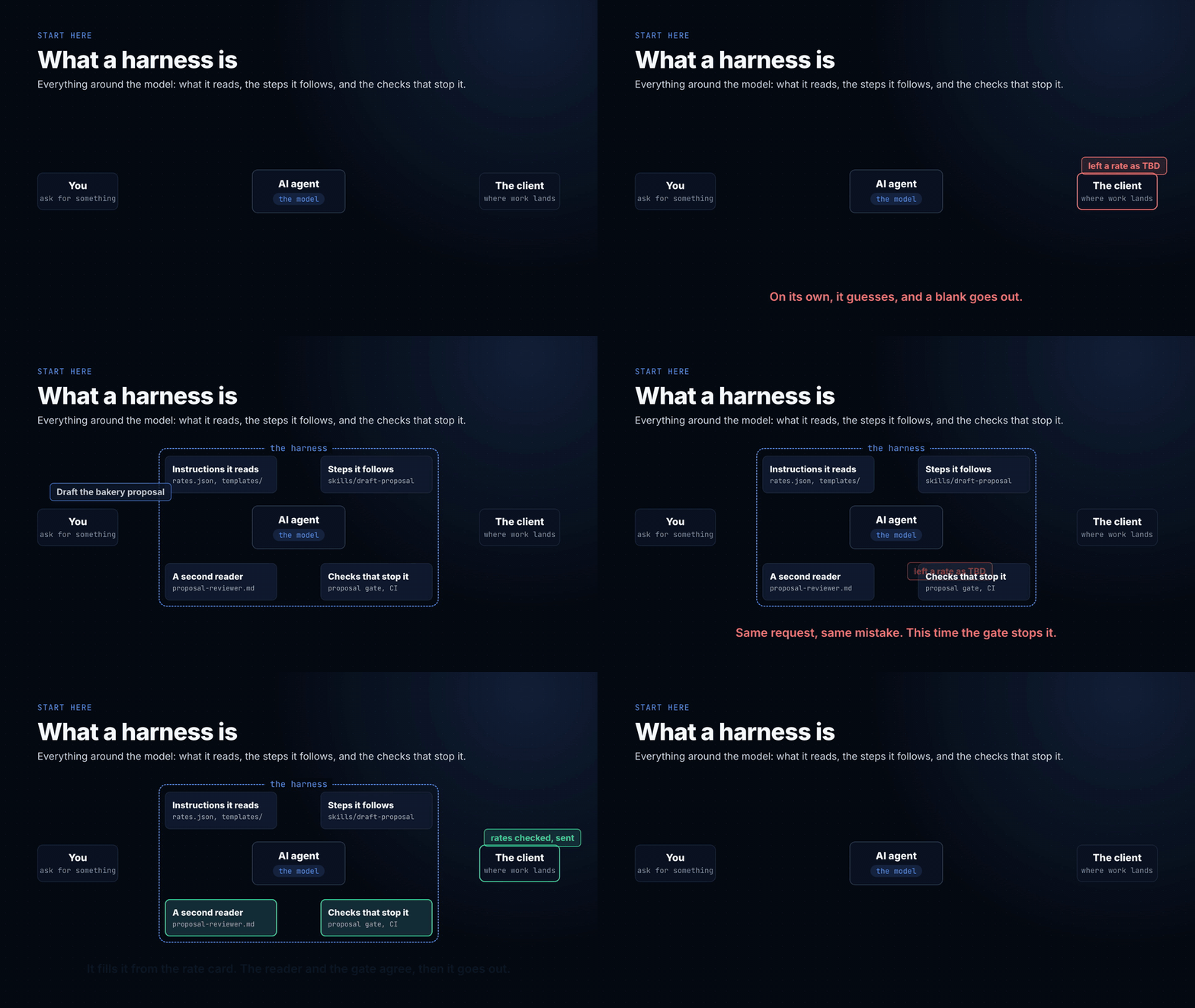
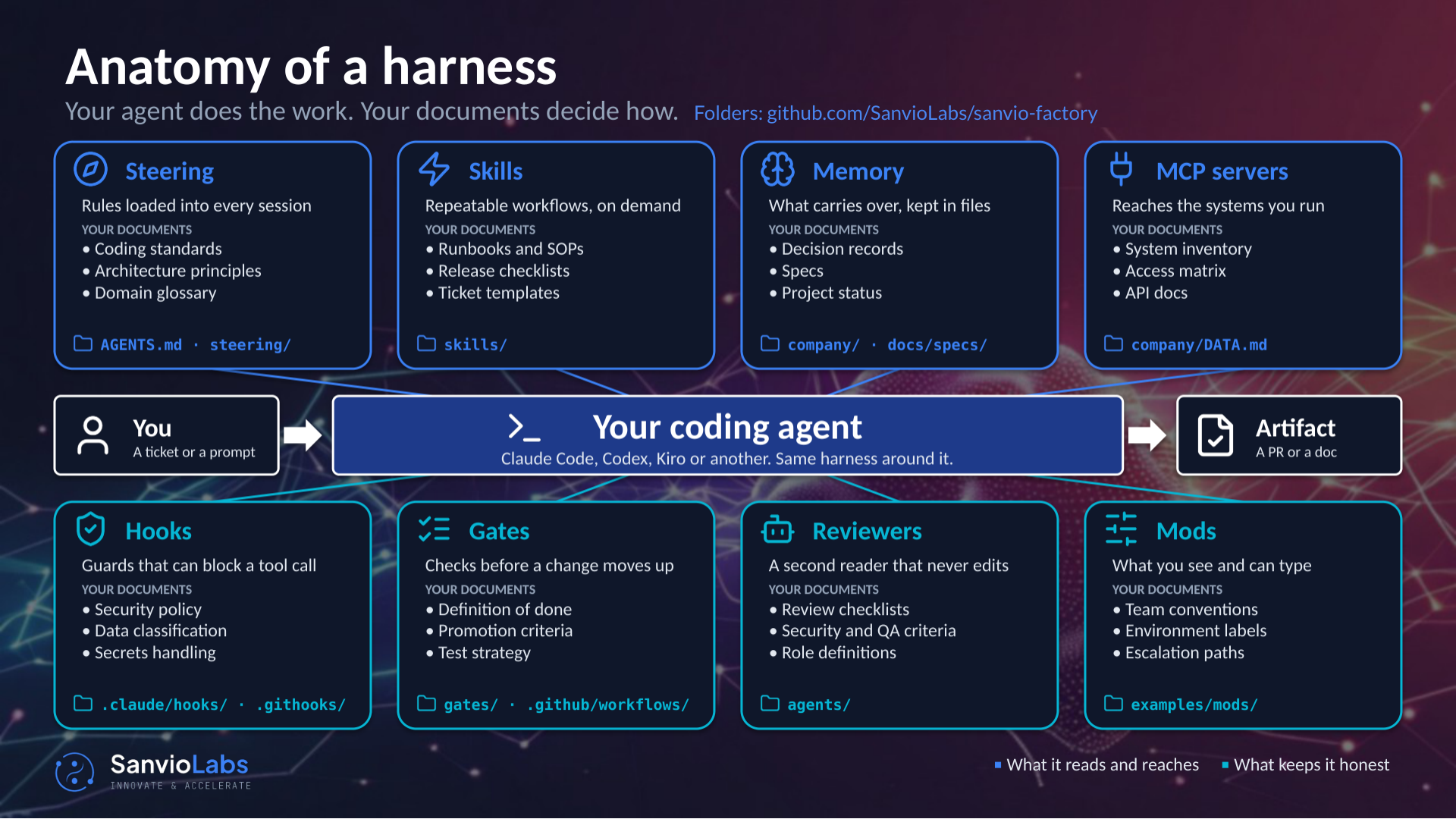
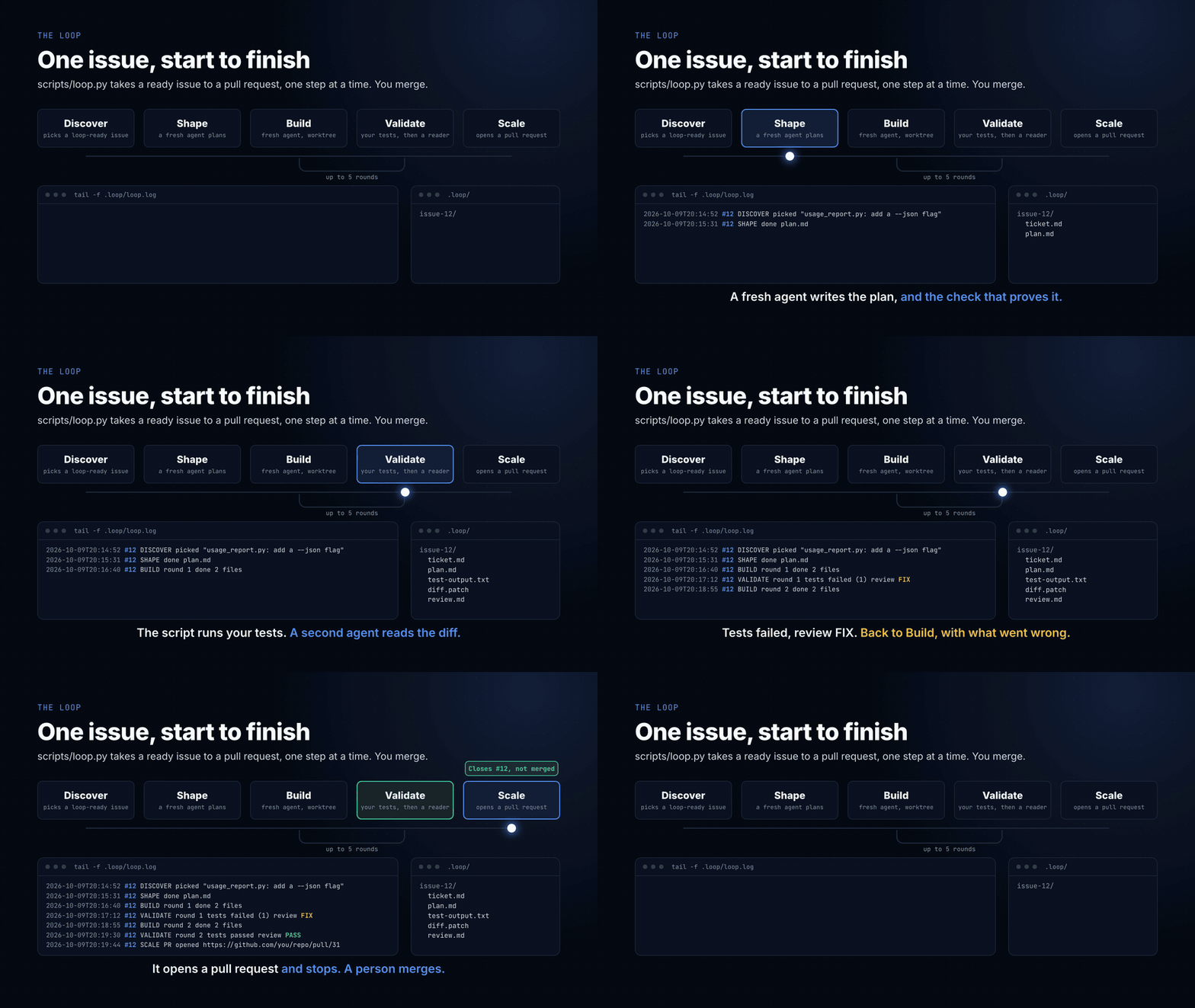
This repo is the smallest factory that still does the job. The harness at its
root is generic: rules, skills, a reviewer, the checks, and a place for your
company and your code. One worked job sits in examples/proposal/, drafting client
proposals, because a proposal is where the cheap mistakes live: a placeholder
left in, a rate somebody made up, a total that doesn't add up. None of those are
hard. All of them ship anyway when the process lives in your head. You read
the example, then build your own job the same way at the root. For code,examples/typescript/ is a TypeScript project the loop can test with Node
alone.
The rules, skills and gates work in Claude Code, Codex and Kiro. The guard, the
mods and bin/factory need Claude Code.
At the Humanbulb talk on 15 October 2026? The slides are here,
as a PDF, a PowerPoint and an offline web page.
Set up
git clone <this repo> my-factory && cd my-factory
git config core.hooksPath .githooks
python3 scripts/check_setup.py
Don't skip the middle line. Git won't run the hook in .githooks/ unless
you point it there, and the setting doesn't travel with a clone. Skip it and
every check in the hook silently does nothing. That exact line was missing from
a real harness for months, and nobody noticed because nothing failed.
You need Python 3.9 or newer and no packages.
In Claude Code, start it from the repo's root and say yes when it asks
whether you trust the folder. A line then sits above the prompt:
◆ harness steering: 3 always on skill: none yet gate: none run guard: no refusals review: none yet
That's the harness lens. It names each layer as it acts on your session, and/lens lists everything it did. No line? Your Claude Code may be older than
the version it was tested on (2.1.295), or the folder isn't trusted.examples/mods/harness-lens/ has the two commands that install it from inside a
session. Codex and Kiro don't show it: neither has mods.
Trusting the folder also switches on Stelliad, an MIT-licensed set of
skills Sanvio Factory uses for specs and tickets. There's no separate yes: the
trust is the yes. It's the one set of someone else's skills this repo
installs rather than has you review first, and Borrowing other people's
skills says why, what that trusts, and how to keep it off. Each one runs asstelliad:<name>, so /stelliad:create-spec starts a spec and/stelliad:create-ticket writes an issue the loop can take.
Working through this on your own? Open the repo in your agent and run/orientation in Claude Code, or say "get me started" in any of them.skills/orientation/ checks your setup, asks where your company's data lives
and how the agent should reach it, then walks you through the five layers
around your own job.
Others pushing to your copy? Ask your agent "what's new", or run /whats-new
in Claude Code. It compares your CHANGELOG.md with the one on your copy's own
remote and tells you what you don't have yet and what to do to take it.
For what the public Sanvio Factory has shipped since you copied it, ask "check
the starter": skills/factory-updates/ asks what you want to bring over, then lists
each commit and says which to take.
Copied before 2026-11-08, when this repo was sanvio-harness-starter?docs/upgrading-to-sanvio-factory.md has the steps to take the rename, in order.
python3 scripts/check_setup.py runs the setup check on its own: Python, the
hook, the links below, and whether origin is still this public repo. Make
your own private copy before any company material goes in.
On Windows, clone with git clone -c core.symlinks=true from a terminal with
Developer Mode on, or the two links below arrive as plain text files. If they
do, AGENTS.md still works for every tool.
Before you choose where to run the factory, read Keeping the loop to its own work: an agent the loop starts can reach whatever its login can, and it says how to narrow that.
Where to run it
Tried on 2026-10-23 on a fresh clone, with Claude Code 2.1.309, its VS Code
extension in VS Code 1.143.0, and Claude Desktop 3.6556.2 on macOS:
| Where | What works |
|---|---|
| Terminal | Everything: the setup message, the guard, the skills, Stelliad and the mods. It's where this factory was built |
| VS Code extension | The setup message, the guard, the skills and the three mods: the lens and GitHub status lines above the prompt, and the loop's pane, which is now /factory-floor's List view and hasn't been tried here under that name. Open the repo's root as the folder, as in the terminal |
| Claude Desktop, Code tab | The same: the trust prompt, the setup message, the guard, /whats-new, the plugins in /plugin, both lines above the prompt and the loop's pane, now /factory-floor's List view. Pick the repo's root under Local, then Open folder… |
| Claude Desktop, chat | None of it. Chat opens no folder, so no hooks, guard, skills, mods or company/ load. Asked, it can read this repo's AGENTS.md as text, but nothing enforces it. Use the Code tab |
/factory-dashboard came after those tries. It's on by default and has been seen in the terminal
and the VS Code extension.
/factory-floor's Crew view came after those tries too. It's on by default, and its drawing has only been seen in Claude Code run in VS Code's integrated terminal, against a pretend loop.
Two clones of this repo on one machine share one set of mods: the
marketplace is registered under one name for the whole machine, so the mods
load from whichever clone registered it first. claude plugin list says which
folder they're read from.
Run a skill from anywhere
bin/factory runs a skill without opening a session, from any folder. It startsclaude -p at the harness root, so the rules, skills and guards load as they
would in the terminal. Add an alias to your shell's startup file:
alias factory=~/path/to/my-factory/bin/factory
factory review-pr 42
factory --json review-pr 42    # Claude Code's JSON output, for a script to read
It runs only a skill whose frontmatter says headless: true, and passes the
tools its headless-tools line names to --allowedTools, so those run without
asking. That's a key of the harness's own: Claude Code's allowed-tools would
grant the same tools in every session the skill runs in, where the guard below
doesn't apply. Every entry on that list has to be in bin/factory-tools, or the
skill doesn't start, and the wrapper sets the permission mode and the tools
itself. Any other name stops with exit code 2 before Claude starts.
One skill is marked: review-pr. No Bash allow rule is safe on its own, sincegh pr view -R <host>/... reaches any host and your own Bash allow rules apply
to a headless run too, so .claude/hooks/guard.py holds a run bin/factory
started to gh pr view <n>, gh pr diff <n> and gh issue view <n>, with--comments on a view. Every other command and every connector is refused, so
is a call the guard fails on while checking it, and the wrapper loads no MCP
servers. The guard has to start for any of that: with no python3 on the path,
or a guard that times out, only the gh prefixes hold, and those don't stop-R.
Its file tools reach only the harness root: a Read, Grep or Glob whose path
or pattern lands outside it, after .. and links resolve, is refused, so a
review reads the code cloned under projects/ and not the rest of your machine.
A headless Grep whose glob could match a credential file at all, however broad,
is refused too.
Inside the root, a headless run also doesn't reach the files that hold tokens or
company data: .claude/settings.local.json, any .git folder or bare repo
(*.git), company/, local-data/, a leftover .inbox/ and factories/. A Grep over the root leaves those out:.ignore lets company/ back into a search so an ordinary session
can read it, so each headless Grep is passed on with!/{company,local-data,.inbox,factories} added to its glob, and Claude Code'sGrep skips .git. A glob that matches one of them would bring
it back in ({company,*.md} does), so a headless Grep with such a glob is
refused. Glob lists names and reads nothing; a pattern that names one of them
outright is refused, but a wildcard such as c*/** can still list the names undercompany/.
A bare repo counts when its folder ends .git. Each headless Grep is passed on
with !*.[gG][iI][tT] (!*.git in any case) added to its glob, which ripgrep lets
win over any glob before it, so a search leaves out a bare repo at any depth
(vendor/lib.git/ included). That was
measured on Claude Code 2.1.310; if a later version stops applying a hook'supdatedInput, a bare repo deeper than a project's top folder is searched again,
and so is company/ by a Grep over the root.
In every session, a Grep that names a credential file in its path or glob, or
whose glob can only match one, is refused as a Read of it is, and so is a link
that lands on one. What the guard can't see is which files a search
opens: a Grep over a folder that holds a credential file isn't stopped, and a
link a search meets inside the folder it walks isn't checked. A headless review doesn't run the
tests, and says so in its report.
A headless run has nobody to ask. When the guard would ask you before a
connector call, the call is refused. A skill that needs to ask you a question
can't wait for the answer, so give it everything in the arguments. The
arguments reach the skill joined by spaces, so quoting inside one argument is
lost.
Where things live
The harness holds the method. Everything else is reached where it lives.
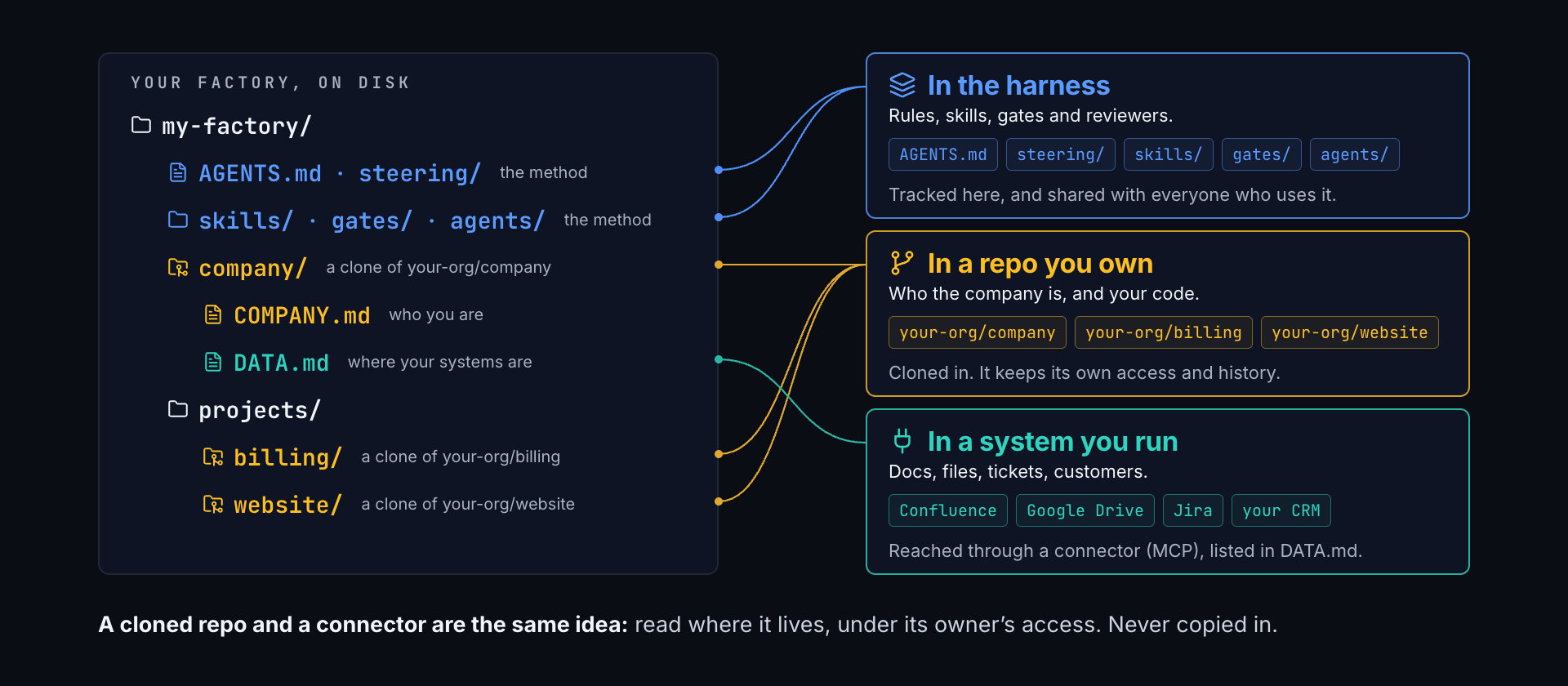
| Where | What | How the agent reaches it |
|---|---|---|
| In the harness | Rules, skills, gates, reviewers | Tracked here, in this repo |
| In a repo you own | company/, projects/ |
Cloned in, under that repo's own access control |
| In a system you run | Wikis, drives, trackers, CRMs | A connector or MCP server, listed in company/DATA.md. Read where it lives, never copied in |
A cloned repo and a connector are one idea for different storage. Each is
reached where it lives, stays under its owner's access control, and the
harness records only where it is.
Every session reads company/COMPANY.md (who the company is) andcompany/DATA.md (where its data lives) before company work, becauseAGENTS.md says so. The record can take four forms. Pick by who should see it:
| Form | Fits when |
|---|---|
Local files, written by /orientation (the default) |
You work alone, or haven't decided yet |
| Committed in a private copy of this factory | Your whole team shares one private factory |
A private repo cloned in with git clone <url> company |
Several factories or people share one record, or the factory is public and the record can't be |
A short COMPANY.md whose sections name wiki pages, with the wiki's connector in DATA.md |
The answers already live in a wiki |
company/ is gitignored, so by default the record stays on your machine. To
commit it in your copy, first check the copy is private
(gh repo view --json visibility -q .visibility prints PRIVATE), then
delete the company/ line from .gitignore. With a company repo,python3 scripts/check_setup.py asks GitHub for its visibility and fails if
it's public.
The five layers, one step at a time
Each step is a tag. Check one out to see the harness as it stood at that point,
or diff two to see exactly what a layer adds.
| Tag | Adds | What it fixes |
|---|---|---|
step-0 |
A rate card, a template, one finished proposal | Nothing yet. The agent guesses |
step-1 |
AGENTS.md, the instructions file |
The agent stops inventing rates and knows where things go |
step-2 |
skills/draft-proposal/, a skill |
Drafting becomes the same procedure every time, with a defined output |
step-3 |
gates/proposal_gate.py, a gate |
"Done" becomes something a script checks, not something the agent claims |
step-4 |
.githooks/pre-commit, a hook |
The gate runs whether anyone remembers it or not, and secrets can't be committed |
step-5 |
agents/proposal-reviewer.md, a review agent |
A second reader who reads like the client, and reports without editing |
git checkout step-2          # the harness after step 2
git diff step-2 step-3       # what the gate adds
git checkout main            # everything
The tags build the proposal job at the root, one layer at a time, which is
how the talk builds it. On main the same files live in examples/proposal/,
the reviewer is generic (agents/reviewer.md, with the proposal brief in the
example), and the root is left for your own job. Check out step-0 to start
where the talk started.
One file, three tools
Each tool reads its instructions from a different place. So there's one real
file and the others point at it:
| Tool | Reads | Here |
|---|---|---|
| Codex | AGENTS.md |
The real file |
| Claude Code | CLAUDE.md |
@AGENTS.md, plus one warning for a session started in the wrong folder |
| Kiro | .kiro/steering/ |
Symlinks to AGENTS.md and the steering files it loads every session |
Skills and agents work the same way: the real file lives in skills/ oragents/, and AGENTS.md names it so every tool can find it. Claude Code also
picks them up natively through .claude/.
A second copy of an instruction is worse than none. It drifts, and it still
reads as the rule.
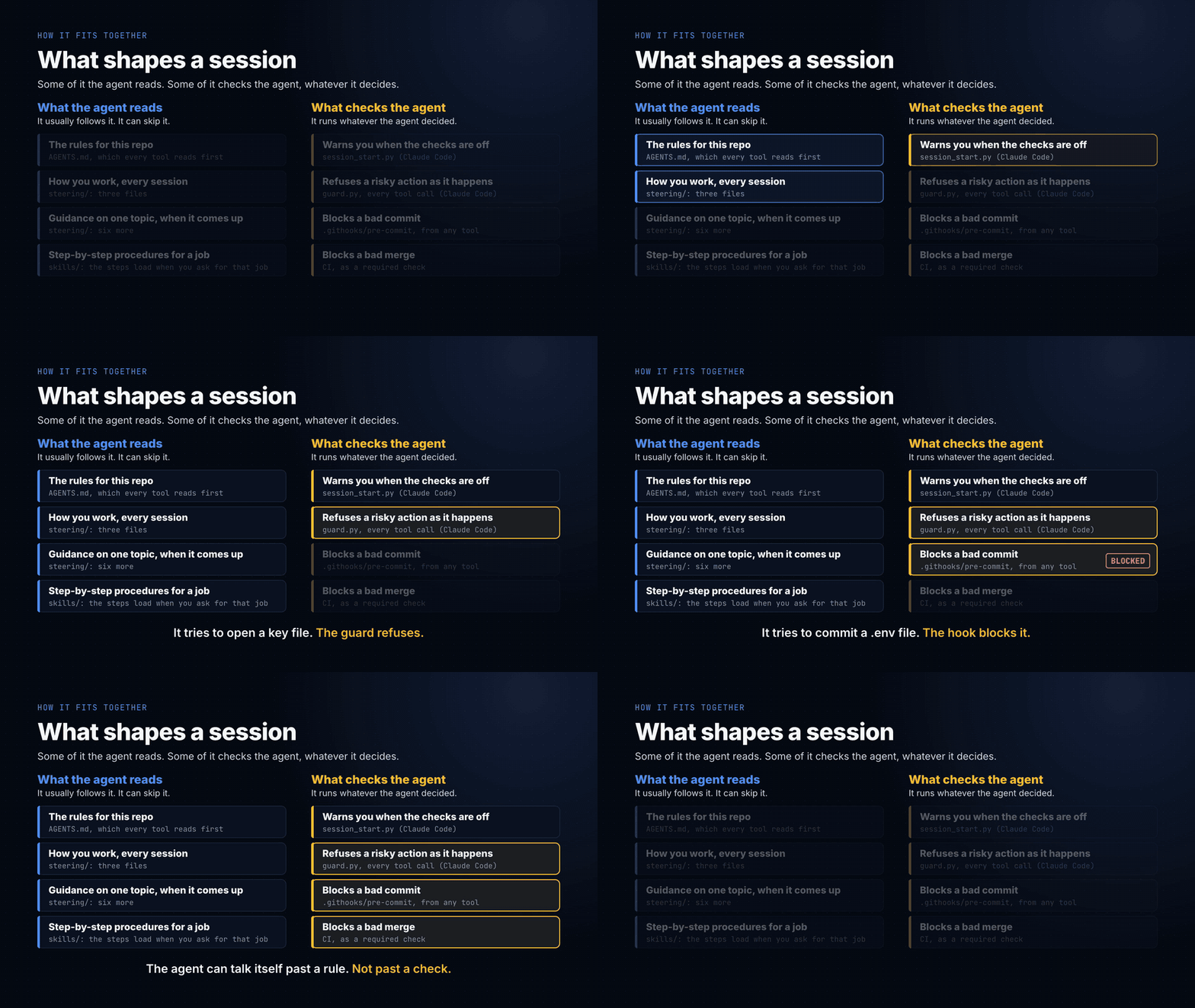
Rules versus enforcement
AGENTS.md is context. The agent reads it and usually follows it. The hook is
enforcement. It runs whatever the agent decided. Anything you'd hate to get
wrong belongs in the second one.
Here's which is which, in the order a session meets them:
Gates: done is a script's call
A gate is a script that fails when work isn't ready. It turns "done" from
something the agent says into something a script checks: no placeholder left
in, every section filled, every rate from the rate card, every total adding up.
The example's gate is examples/proposal/gates/proposal_gate.py, andgates/README.md has how to write one for your own job.
One file runs in three places, and each catches what the one before missed:
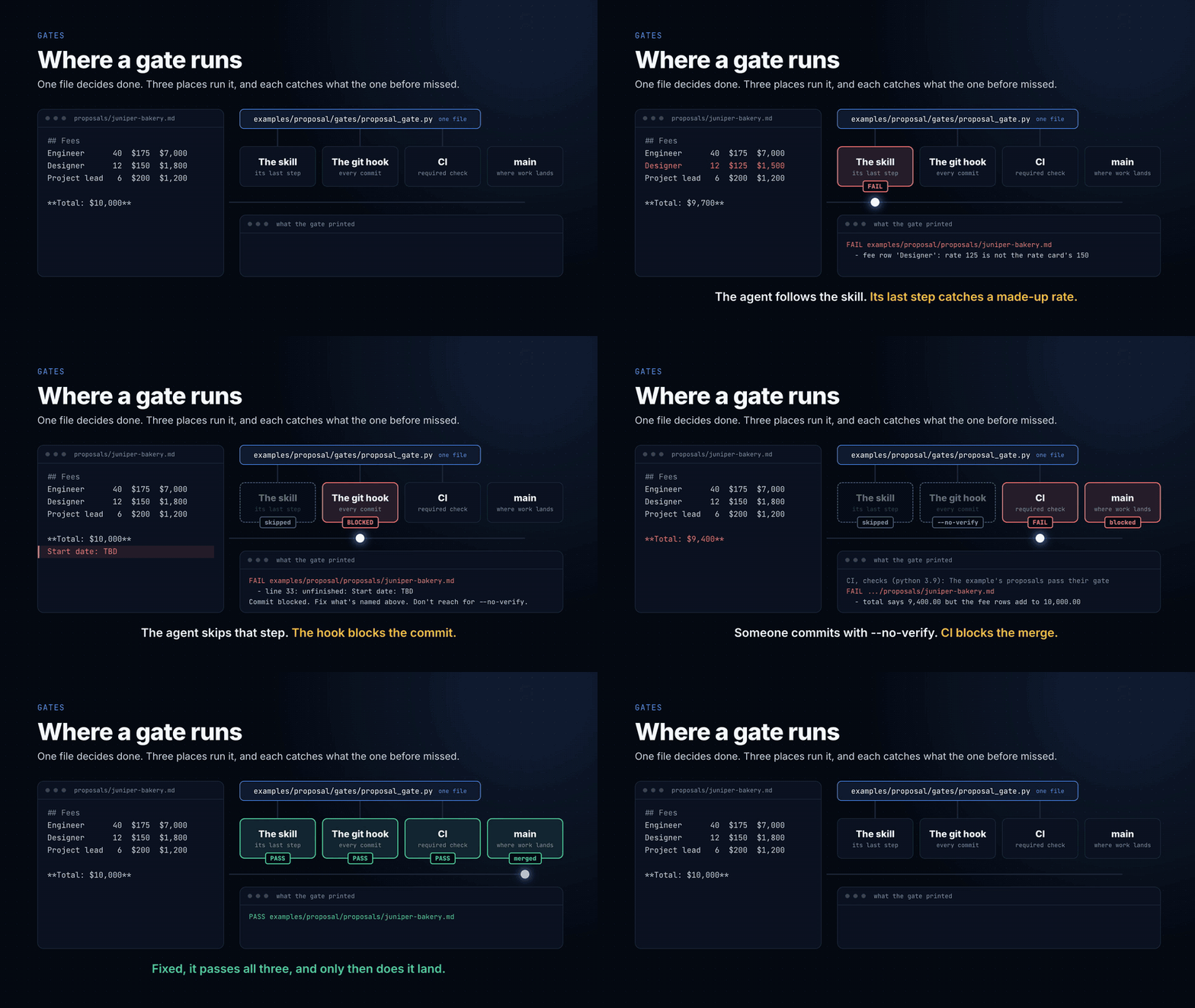
The skill's last step runs it, so the agent fixes what it names before you see
the work. That's the cheapest catch, but an agent can skip a step. The git
hook runs it on every commit from any tool, unless the hook is off in that
clone or someone uses --no-verify. CI runs it on every push, and once it's a
required check, it's the one nobody can skip.
A check earns a gate when a script can decide it, missing it costs more than
checking it, and it has to hold even when the agent decides otherwise. Anything
that needs judgement goes to the reviewer instead. Never edit a gate to make
work pass. Fix the work.
"Gate" also names the checkpoint at the end of each phase of the
flywheel. That one is a question, mostly answered by a person: was it
measured against real use? Can it run without you? One or two become scripts,
and Build's runs the job's gate above. steering/gates.md has both: where each
check runs, and what each phase asks. A bigger harness names its gates, one set
per phase and one per repo, and lists each one's checks in a file. Start with
one script.
Beyond the five layers
Each piece below is the small version of something a working harness runs on
every day.
| Piece | Where | What it does |
|---|---|---|
| Steering | steering/ |
Standing guidance, one topic per file: how the agent operates and replies, what data may go to which tool, writing, new-project setup, building and testing, deploying, gates, and model choice. Three load every session; the rest when their moment comes. Light versions of what a working harness runs on, to edit into yours |
| A company record | company/ |
Who the agent works for: what you sell, how you sound, what you won't do, and where your data lives. /orientation interviews you for it. Gitignored, so it never reaches a public repo by accident |
| Guards inside the agent | .claude/settings.json, .claude/hooks/ |
Claude Code runs guard.py before every tool call: it refuses credential files (env files, keys, keystores, cloud and cluster config) to reads and searches, asks you before any connector tool whose name doesn't say it's a plain read, and holds the security reviewer's shell to read-only audits. A session-start check says out loud when the git hook is off |
| Your repos, inside it | projects/ |
Clone your code repos here and start the agent from the harness root, so every repo works under the same rules, skills and guards. projects/README.md has the catch we measured: start inside a project and the hooks and skills don't load |
| Review skills | skills/review-pr/, skills/review-tests/ |
A PR review that runs the tests and ranks findings by cost, and a test review that breaks the code on purpose, in a scratch copy, to see which tests notice |
| Specs and tickets | The Stelliad plugin, switched on in .claude/settings.json |
stelliad:create-spec, stelliad:plan-spec, stelliad:implement-spec and stelliad:review-spec take a feature from idea to spec, to plan, to code one tested task at a time, then review it. stelliad:create-ticket and stelliad:review-ticket write and grade issues, and skills/loop-control/ puts a ready one on the loop. It's pinned to one Stelliad commit in .claude-plugin/marketplace.json. claude plugin disable stelliad@sanvio-factory --scope local switches it off for you; "stelliad@sanvio-factory": false there switches it off for everyone |
| A way to learn | skills/learn/ |
Say "learn from that" after the agent gets something wrong, and it writes the rule into the file that governs it, dated, with the reason |
| A morning read | skills/standup/ |
Say "standup" or "what's on me today": one pass over the pull requests waiting on your review, your own with their checks, issues assigned to you, what the loop opened or blocked in the last day, and your calendar, email and tracker where a connector exists. It names any source it skipped, asks about each item, and ends with an order for the day. It reads only and changes nothing |
| A mail read | skills/inbox/ |
Say "inbox" or "check my email": one pass over your mail, Gmail by default, where company/DATA.md clears it. It says what needs a reply from you, what's waiting on someone, and what matters today, one line per thread, and counts the bulk mail. Standup reads your email the same way. It only searches and reads, and never sends, labels or marks a message |
| A daily question | skills/pulse/, scripts/pulse.py, reports/pulse/ |
Say "pulse": one multiple-choice question a day from a shared synced folder, with each person's answers in a file named after their login and counts for everyone to read. Standup mentions the day's question where company/DATA.md clears the folder. Ask it to summarise for leadership and it writes a period's counts and Other answers, never a login, to a gitignored report you read and send |
| A release log | CHANGELOG.md, skills/whats-new/ |
Ask "what's new" and the agent reads the log, compares it with your copy's own remote, and says what you don't have yet and what to do to take it. Changes to your own factory go in the same file |
| A usage log and sprint report | .claude/hooks/usage_log.py, skills/factory-trends/ |
Each person's sessions log which skills, agents and commands ran and when the guard refused or asked: names and counts, never content, kept on their own machine. At sprint end factory-trends turns it into a short report with their proposals, shared as a PR, so whoever owns the harness sees what the team actually uses and what to add. SANVIO_USAGE_LOG=off turns it off for you. Entries older than 90 days (SANVIO_KEEP_DAYS) are dropped at each session start |
| A session retro | .claude/hooks/session_retro.py, skills/retro/ |
Off unless you set SANVIO_RETRO=on, the same way SANVIO_USAGE_LOG is set. When a session ends or compacts, it keeps a copy of its log in local-data/retro/ if you corrected the agent or one file was edited three or more times. Say "retro" and a fresh agent that can only read goes through it, says why the agent didn't know, and the findings that hold up against the log go in .loop/lessons.md for learn. The copies hold everything said in the session, stay on your machine readable by you alone, and are deleted once read or after 30 days. The loop's own sessions are never kept |
| A work report | scripts/work_report.py, skills/work-report/ |
Say "work report" or "what did we ship": one page on a repo over a period, from what GitHub recorded. What merged, by type, and who made, reviewed and approved it, what the loop built, releases and closed GitHub milestones, the specs closed issues name, a chart of merges by day (by week past a month), and what to watch, such as work nobody but its author approved. It names people by GitHub login, stays gitignored in reports/work/, and changes nothing |
| An optional extra: a loop that runs without you | scripts/loop.py |
Not one of the five layers, and the harness works without it. Takes the next open issue labelled loop-ready, has a fresh agent plan it, build it in a worktree, runs your tests itself, has a second fresh agent review the diff, and opens a pull request when both pass. It follows the flywheel (Discover, Shape, Build, Validate, Scale), writes one plain log you read with tail -f .loop/loop.log, and never merges unless you turn on auto_merge. max_workers in loop.json lets it work several issues at once, each issue's agents writing to .loop/issue-N/agent.log, with an issue-N window per issue when it runs in tmux. Each worker runs its own agent sessions, so usage grows with the number of workers. It records each issue's tokens and estimated cost on its pull request, and max_issue_tokens can stop an issue at a budget. It blocks a round that adds nothing or changes a lockfile, and its build agent installs no packages. Label only issues you wrote or have read, since a ticket is an instruction to an agent. One standard-library file, so it's yours to change. HOW-IT-WORKS.md has the shape |
| Another factory to hand work to | scripts/factories.py, scripts/factory_checks.py, skills/dispatch/, factories/ |
Name a second factory in factories.json, such as another team's delivery system or another copy of this factory, and say "dispatch #12". The agent shows what goes to it and adds that factory's label to the issue on your yes, nothing else. When a pull request comes back, the loop's own reviewer reads it. Changes go back on your yes, up to a set number of rounds, and the pull request's required checks are reported apart from any verdict. It never merges. factories/README.md has the setup |
| Evals for the whole factory | scripts/eval_factory.py, examples/eval-suite/, examples/eval-suite-tool-library/, examples/eval-adapters/ |
One command runs a factory through a suite of jobs in a new private repo, then scores the result with tests and traps its agents can't see: tests passed, traps avoided, time, stops for a person, build rounds, tokens and cost. compare shows what a factory change did, over repeat runs too, report writes it up as HTML, Markdown and PDF, and new-suite starts a suite of your own. A run spends model tokens, so a person starts it, and only a person deletes its repo. Works on any factory that takes GitHub issues. docs/eval-walkthrough.md walks through a first run, step by step, docs/writing-eval-suites.md covers building a suite, and docs/factory-evals.md is the reference |
| CI | .github/workflows/ |
The tests, the gate, the setup check, the link check (python3 scripts/link_files.py --check) and a secret scan of the whole history run on every push, so a check someone skipped locally still runs before anything merges. Make it a required check in your branch protection, or it only reports. To put your factory in a product repo's CI, with a review on every pull request, follow docs/factory-in-ci.md |
HOW-IT-WORKS.md explains what's running underneath: where the loops are, how
context is kept separate, and how little of it is code.
The in-agent guards are Claude Code only. Codex and Kiro have their own hook
systems; the git hook is the check all three share.
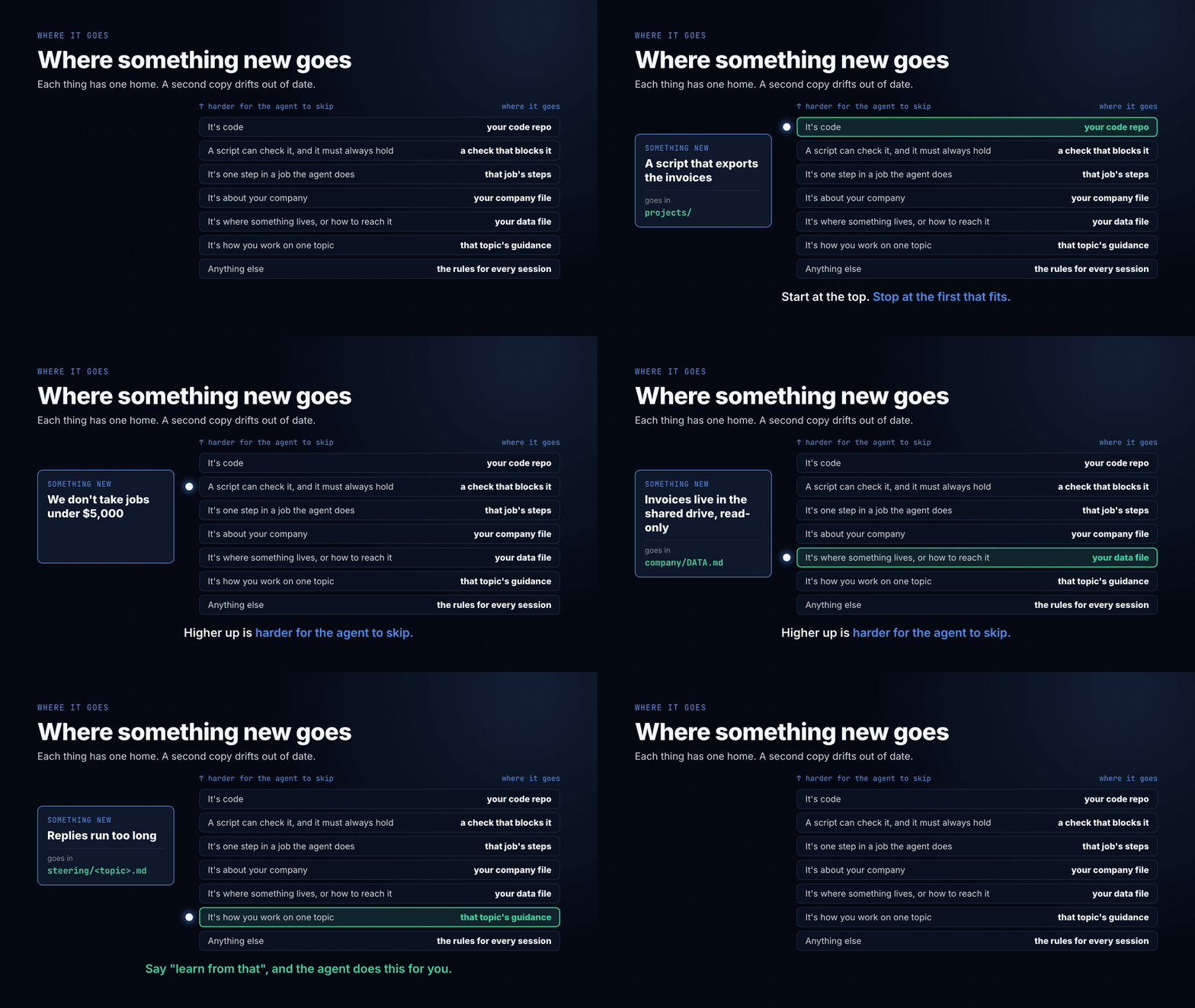
Where something new goes. A rule, a fact about your company, a check:
each has one home, and a second copy drifts. skills/learn/ picks the home
in this order, starting with the places the agent can't skip, and stops at the
first that fits.
The main loop, and four inside it
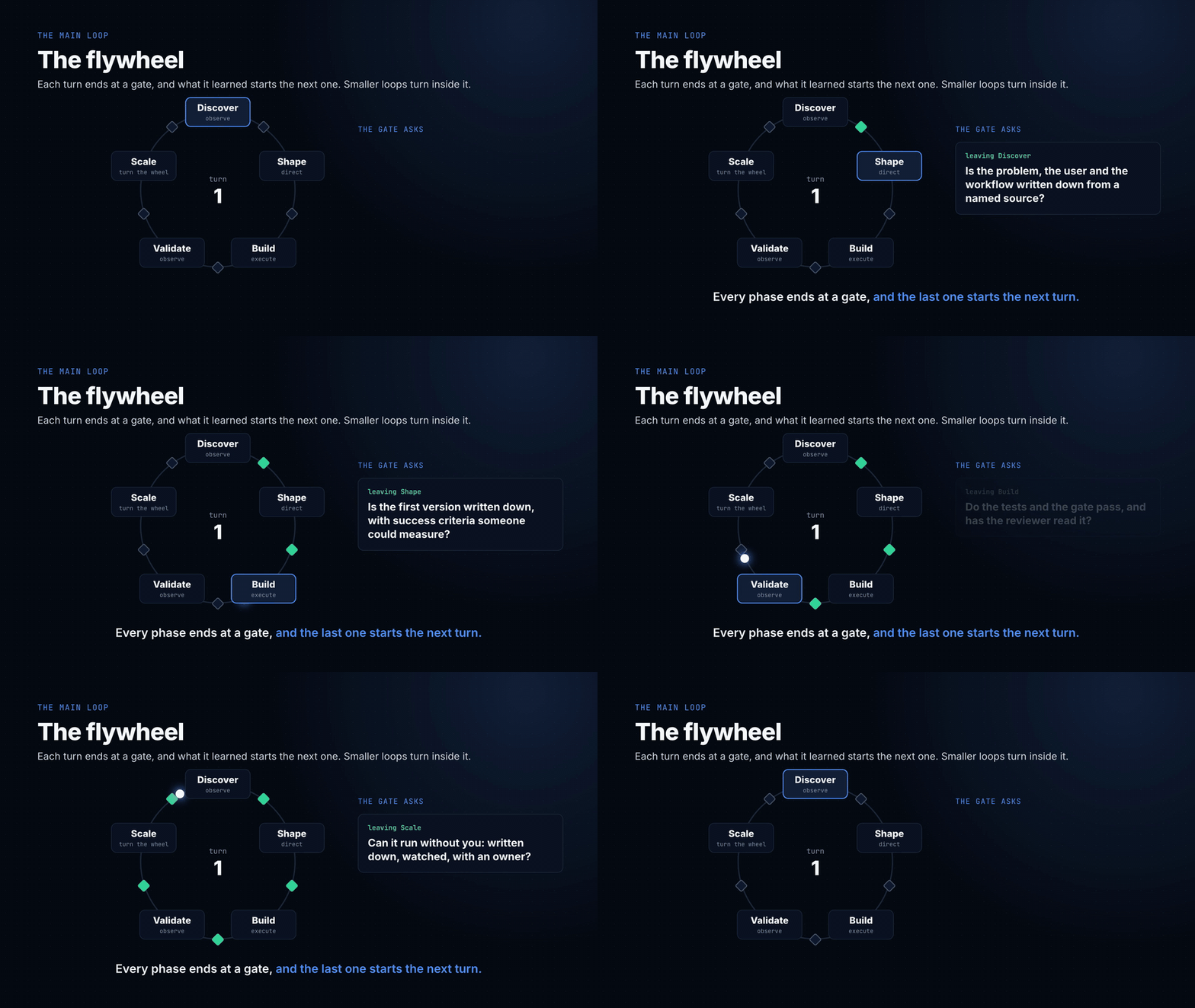
The layers are what a harness is made of. The loops are how you run it. The
flywheel is the main loop, and four smaller loops turn inside it. Each one is
small, and each one is the difference between a harness that works on day one
and a harness that still works in month six.
The main loop: the flywheel. Every stage ends at a gate, and the output of
one turn is the input to the next. A proposal becomes a signed scope, the scope
becomes the build, and the build's lessons change the next proposal. Keep each
turn small enough to finish. scripts/loop.py runs one turn per issue.
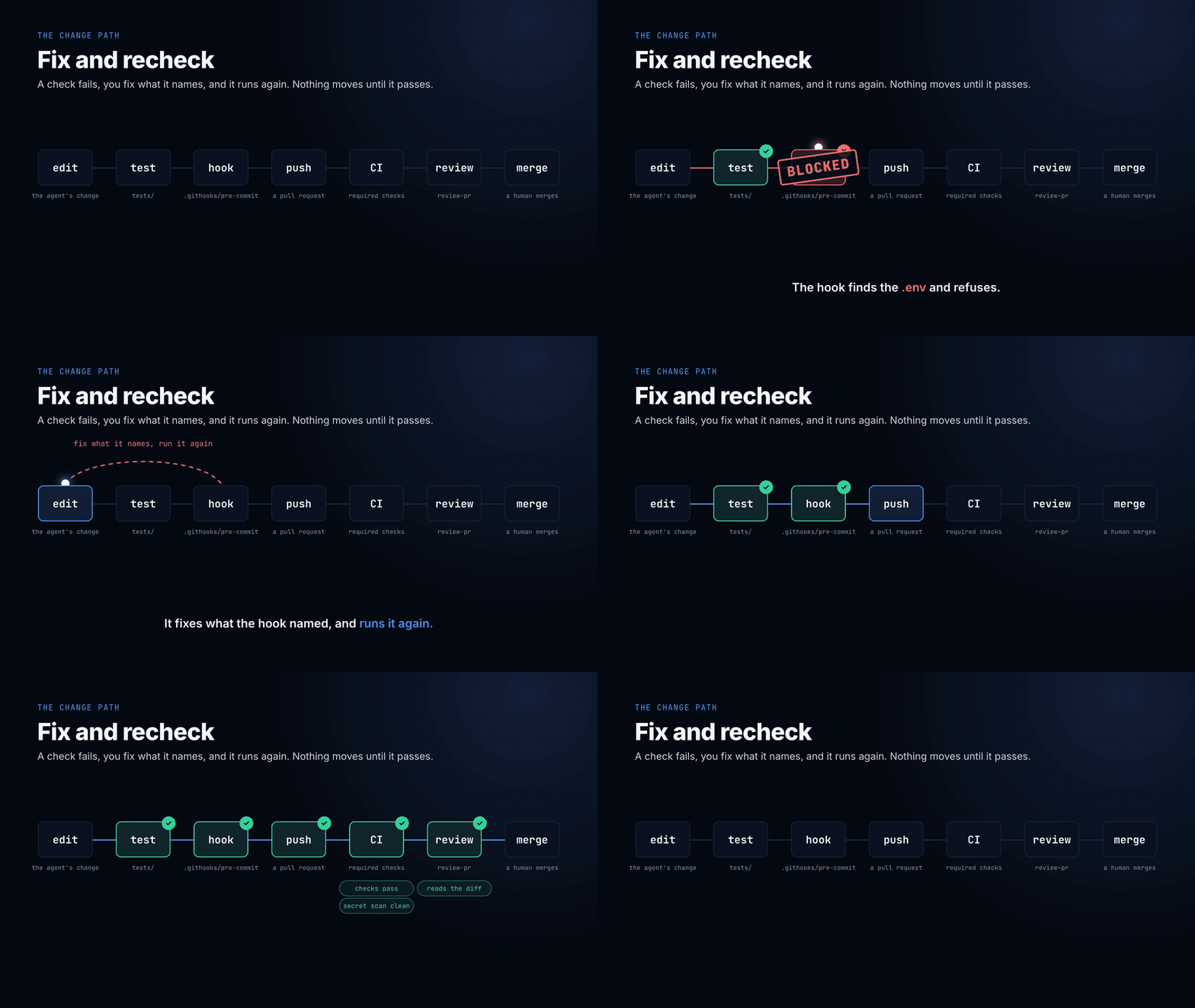
1. Fix and recheck. A check fails, you fix what it names, it runs again,
and nothing moves until it passes. Here that's the skill's last two steps and
the hook refusing a commit. The rule that makes it a loop: never edit the check
to make the work pass.
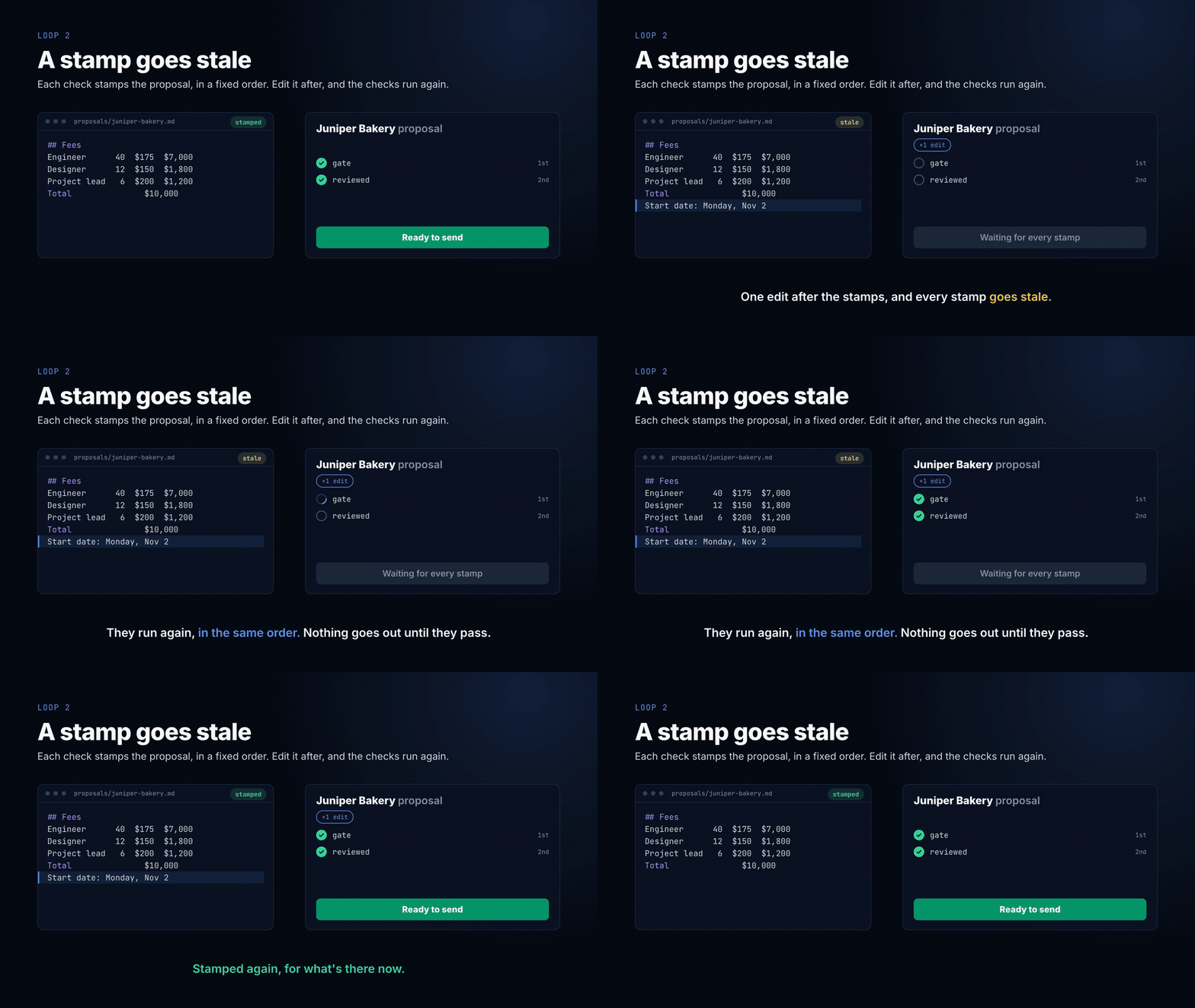
2. A stamp goes stale. A check that passed yesterday says nothing about the
file you edited this morning. So each check stamps the proposal with a
fingerprint of its text, in a fixed order: the gate first, then your okay on
the review. Edit it after, and every stamp goes stale until they run again.examples/proposal/gates/stamp.py writes the stamps and stamp.py status says
which are fresh. It's the same reason the gate runs in the hook on every
commit, not once when someone remembers.
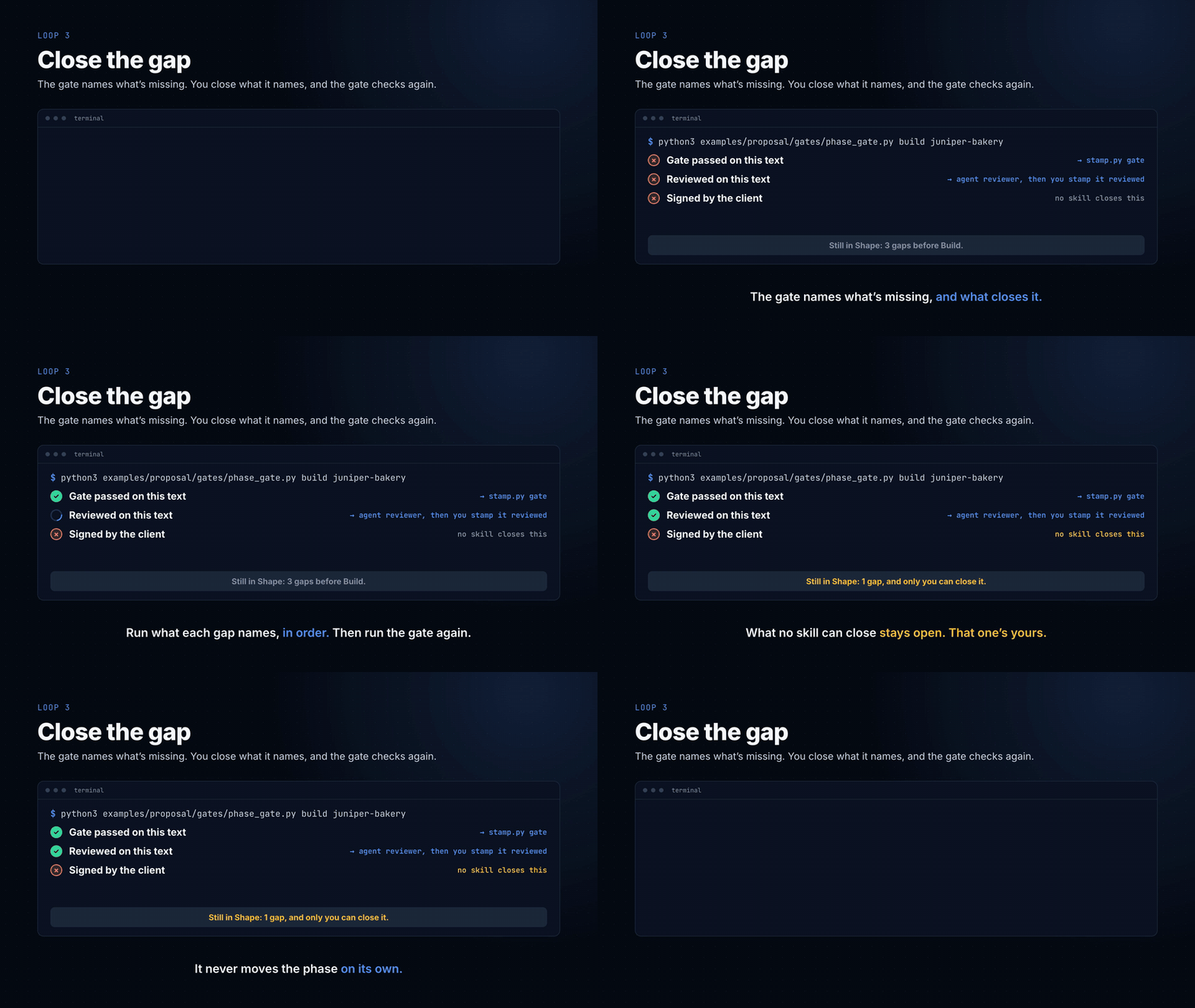
3. Close the gap. Every phase of the flywheel ends at a gate, and a gate
that only says "no" leaves you guessing. examples/proposal/gates/phase_gate.py
names each thing a proposal is missing before Build and what closes it: a
command, the reviewer, or only you. Run what it names, then run it again. What
no skill can close, like the client's signature, stays open, and it never
moves the phase on by itself.
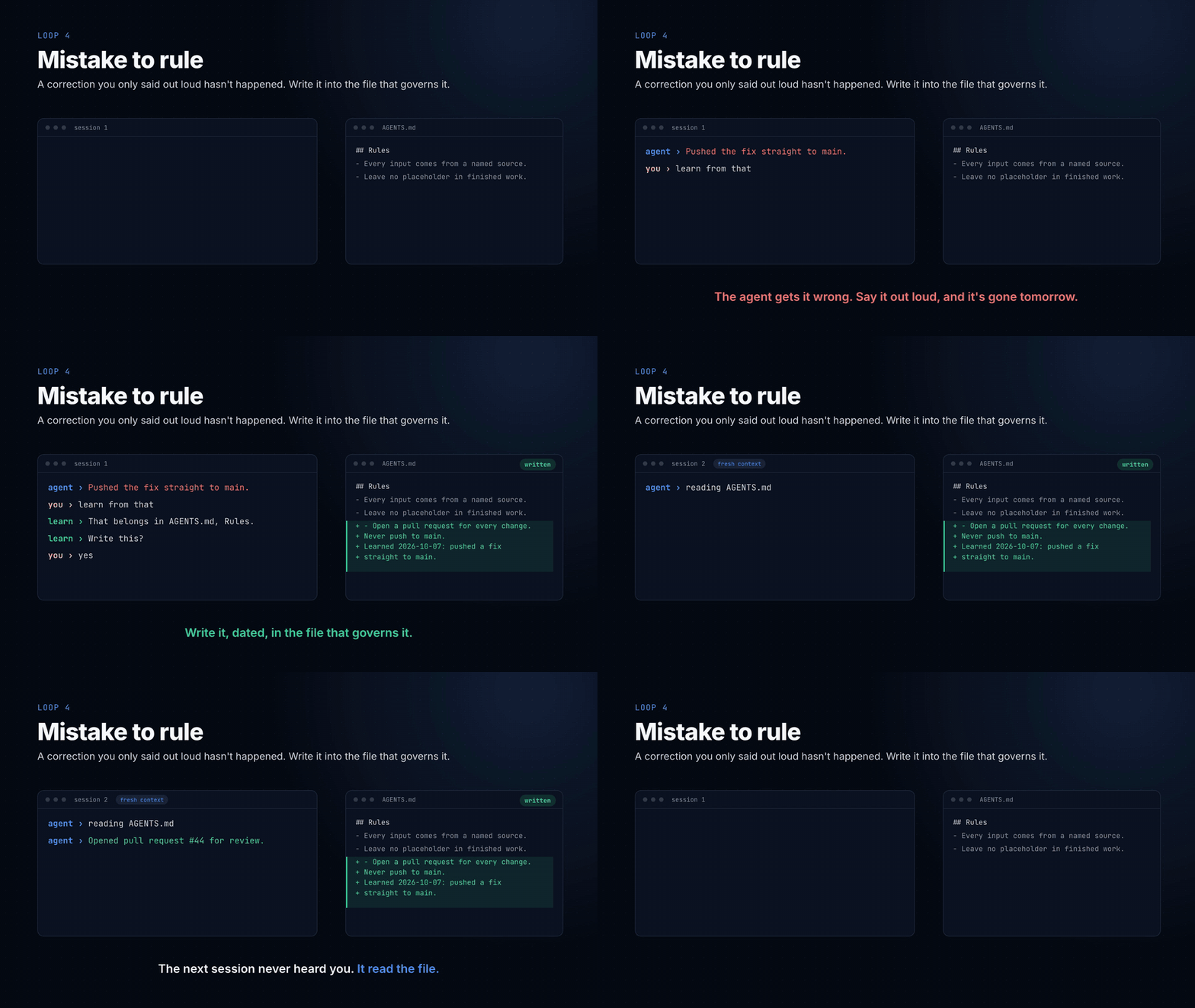
4. Mistake to rule. When the agent gets something wrong, don't just fix the
output. Write the rule that stops it happening again, in the file that governs
it: AGENTS.md, a skill, or a gate if it has to hold. Mitchell Hashimoto calls
this harness engineering. A correction you only said out loud hasn't happened,
because the next session never heard it.
The fourth loop is the one that makes the others better. Every other file in
this repo exists because of it.
Where it goes: factories. A harness with its flywheel turning inside is a
factory: work goes in, checked work comes out. Sanvio Factory is one. A company
can run several that feed each other, each taking only what the next one
needs, and work crosses from one to the next only through a gate.
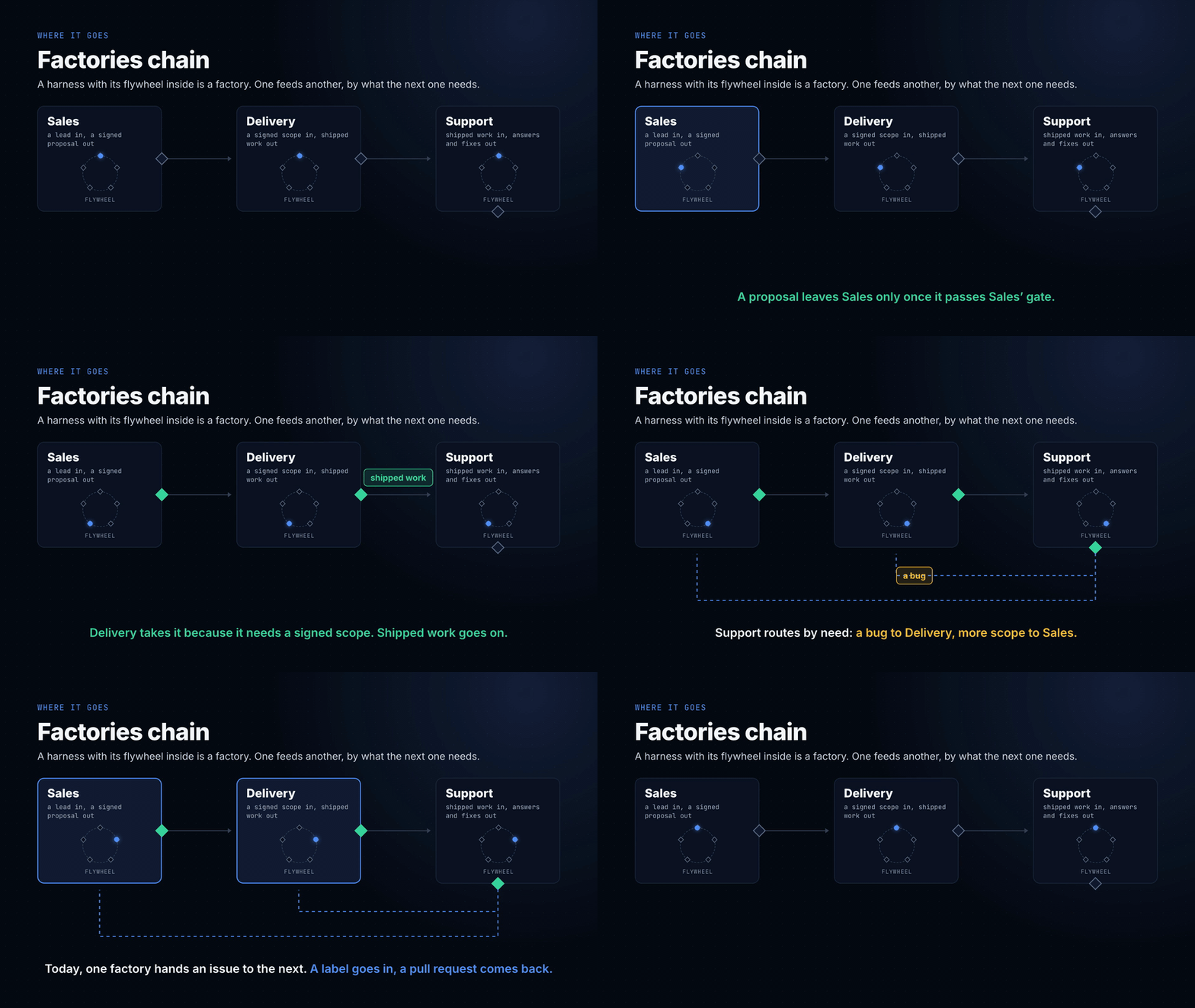
To hand an issue to another factory, name it in factories.json and say
"dispatch #12". scripts/factories.py adds that factory's label to the issue,
on your yes, and watches for the pull request it sends back. The loop's own
reviewer reads it, changes go back on your yes, and a person merges.
HOW-IT-WORKS.md has the shape.
Borrowing other people's skills
Other people's skills are the fastest way to get better. Matt Pocock's and Jesse
Vincent's collections below are full of procedures you'd take months to arrive
at on your own. Use them.
Carefully, though. A skill is instructions your agent follows with your
permissions, and the registries have no review. In February 2026, Snyk scanned
3,984 public skills and found 13.4% with a critical issue: malware, prompt
injection, exposed secrets.
So don't install a skill. Have your harness review it:
review the skill at https://github.com/<someone>/<skills>/tree/main/<skill>
skills/review-skill/ quarantines it in ~/skill-quarantine/, reads every file, flags
anything that reaches for credentials or tells the agent to skip your rules,
then compares it with what you already have. You adopt only the gaps, rewritten
in your own conventions, with the source and licence noted. Your harness stays
yours, and it gets better every time you read someone else's.
Stelliad is the one exception: trusting the folder switches it
on, with no separate prompt. Sanvio Factory's spec and ticket steps run on it, so it's
installed rather than copied. Its skills are built the same way as this
repo's: each one ends in a verdict backed by evidence, and ships aCUSTOMIZE.md for adapting it. Trusting the folder trusts its authors too, which is the
trade step 3 of STARTER-SKILLS.md warns about. It's pinned to one commit: thesha on its entry in .claude-plugin/marketplace.json is what everyone
installs, so a new commit on Stelliad's main branch reaches nobody until
someone reads the diff and moves the pin in a pull request. If that's more
trust than you want, set "stelliad@sanvio-factory": false in.claude/settings.json before you first trust the folder, or switch it off
afterwards with claude plugin disable stelliad@sanvio-factory --scope local. Then
run the skills you need through review-skill like anyone else's.
People to follow
- Mitchell Hashimoto named harness engineering: every agent mistake becomes
a permanent fix in its environment. Start with
My AI Adoption Journey. - Matt Pocock publishes his own skills, including a TDD skill that won't let
the agent write code before a failing test:
mattpocock/skills. - Jesse Vincent built Superpowers, a whole method as skills: brainstorm,
plan, test, review: obra/superpowers. - Geoffrey Huntley runs the same prompt in a loop with fresh context and
lets the files carry the state:
everything is a ralph loop. - Dex Horthy wrote the principles for agents that hold up in production:
12-factor agents. - Simon Willison writes up what actually works, week by week, with the
receipts: simonwillison.net.
Guides
Each one walks through a single job from start to finish, with an animation of how its parts connect.
| Guide | For when you want to |
|---|---|
docs/factory-in-ci.md |
Run your factory in a product repo's CI: checks on every push, a review on every pull request from one factory repo, and the loop on a runner |
docs/factory-evals.md |
Measure a factory change: check a reviewer still catches what it should, run the whole factory through a suite of jobs, and compare two runs |
docs/workshop/ |
Run the workshop yourself: the deck, a walkthrough of each section with its finish line, and eight one-page onboarding cards, from the first commands to your own loop, a deploy, and the monthly review for the owner and finance |
Your turn
EXERCISES.md has the hands-on: pick a job you actually do, and build the
same five layers around it that examples/proposal/ has.
In Claude Code, the line above the prompt names each layer as it acts, so you
can watch yours work. It's on by default. examples/mods/harness-lens/
has how to read it.
Licence and credit
MIT. Take it, change it, ship it. See LICENSE.
The licence asks one thing: keep the copyright notice. I'm asking one more.
If you build on this, keep the line that says where a file came from, and
link back here when you write about it. GitHub's "Cite this repository"
button gives you the wording (CITATION.cff).
Tell me what you built. I'd like to see it.
Who made this
Sanvio Labs. I build AI products from idea to
production, and I build harnesses like this one inside engineering teams that
already have coding agents and want a method around them. If that's your
team, write to [email protected].
Reviews (0)
Sign in to leave a review.
Leave a reviewNo results found