24-7-ai-orchestrator
Health Pass
- License — License: MIT
- Description — Repository has a description
- Active repo — Last push 0 days ago
- Community trust — 19 GitHub stars
Code Fail
- rm -rf — Recursive force deletion command in scripts/disk-guard.sh
- rm -rf — Recursive force deletion command in scripts/receipt-remote.sh
Permissions Pass
- Permissions — No dangerous permissions requested
No AI report is available for this listing yet.
Blueprint for a hybrid AI lab: one Claude Code session orchestrates frontier AIs and local models 24/7. Setup, specs, pipeline, lessons, templates.
24/7 AI Orchestrator
An AI coding assistant that waits for you to type is idle most of the day, and one that checks its own work lets its own mistakes through. This repo is a blueprint for the alternative: a hybrid AI lab where one Claude Code session runs around the clock as the lead engineer and keeps a team of always-on local machines busy alongside frontier coding AIs. Every job is a slot that a cloud AI or a model on your own hardware can fill: building, a first review, a second review from a different AI family, designs. Your own machines also run every full test suite, with unlimited tokens, so every full test run, and any slot you move local, stays on your own machines. Nothing merges until both reviews and the full local test runs pass, and the lead engineer reports to you in plain words. You steer it from your phone and approve anything that matters. It covers the setup, the specs and the strategy, written so you can start from zero with one Mac and grow from there.
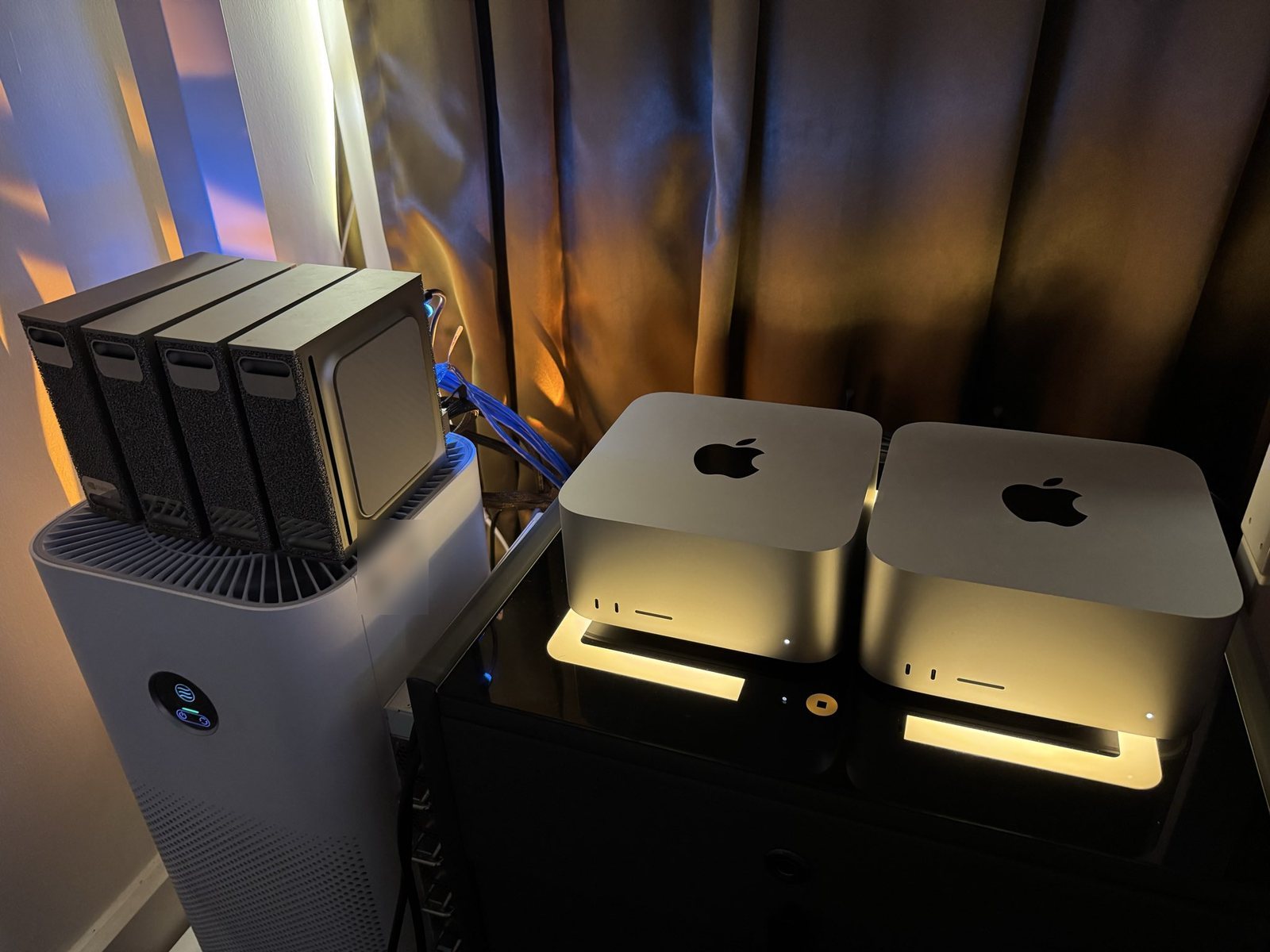
Four DGX Sparks (left) and two Mac Studios (right): local machines doing real building, reviewing and testing beside the cloud models.
The pattern works with whatever local hardware you have: one Mac, a gaming PC with an NVIDIA card, a rack of GPU servers, or a mix. Nothing here depends on a particular brand or model; the orchestrator only needs to reach each machine over ssh or an OpenAI-compatible API. To keep it concrete, every guide uses the owner's own lab as the worked example (two Mac Studios, four DGX Sparks, a Linux box and an always-on Mac), with notes on what to change for a smaller or different setup.
Guides
Two PDF guides sit beside the docs:
- simple-guide.pdf: the 7-page overview, for anyone.
- advanced-guide.pdf: the whole blueprint in one document, for the person setting it up.
Why hybrid
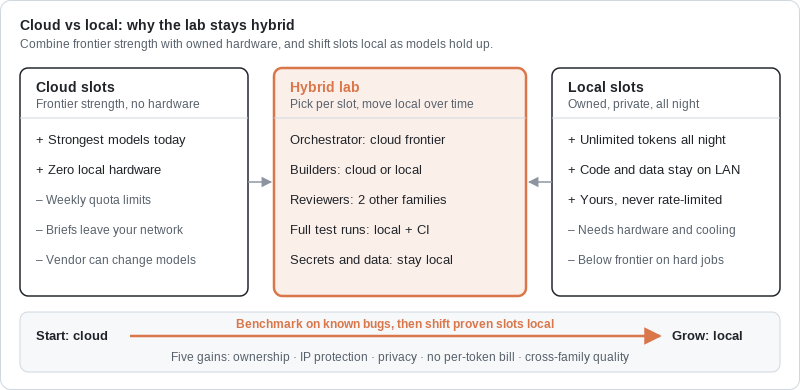
Going fully local today means giving up the strongest models. Going fully cloud means renting all of your intelligence, sending all of your code out, and stopping when a quota runs out. A hybrid lab sits in between and moves toward local over time.
| Reason | What it means in practice |
|---|---|
| Intelligence ownership | Models running on your own machines are yours. They do not change, disappear or get rate-limited without your say. Every job you move local is a job nobody can take away |
| IP protection | Local work never leaves your network. Cloud AIs see only what a job needs, and briefs are checked for private data before they go out |
| Privacy | Customer data, keys and internal paths stay local. The rules in docs/06-safety.md make that a habit, not a hope |
| Cost | Local models and your own machines have no per-token bill, so they can run all night. Frontier subscriptions are paced so they last the whole week |
| Quality | Code built by one AI family is reviewed by two others. Different families miss different things |
Every slot except the orchestrator can run locally: building, both reviews and designs can each go to a local model such as DeepSeek on the Sparks or GLM on the Mac Studios, and every full test-suite run already happens on your own machines (Mac Studios and the Linux box). Which slots you fill locally depends on your hardware, your quotas and how each local model measures up on known bugs. Moving more work local is the direction; it is not a measured share.
Your choice: how much to run locally. A good first move is one slot, such as a reviewer, a builder for small slices, or test runs. Check the local model against a frontier reviewer on changes with known bugs, and move more only when it holds up.
How it fits together
A lab that only acts when you message it is not running 24/7, so everything is built around waking the orchestrator the moment something happens. Here is the lab as its owner sees it, live: every worker and machine with its current state.
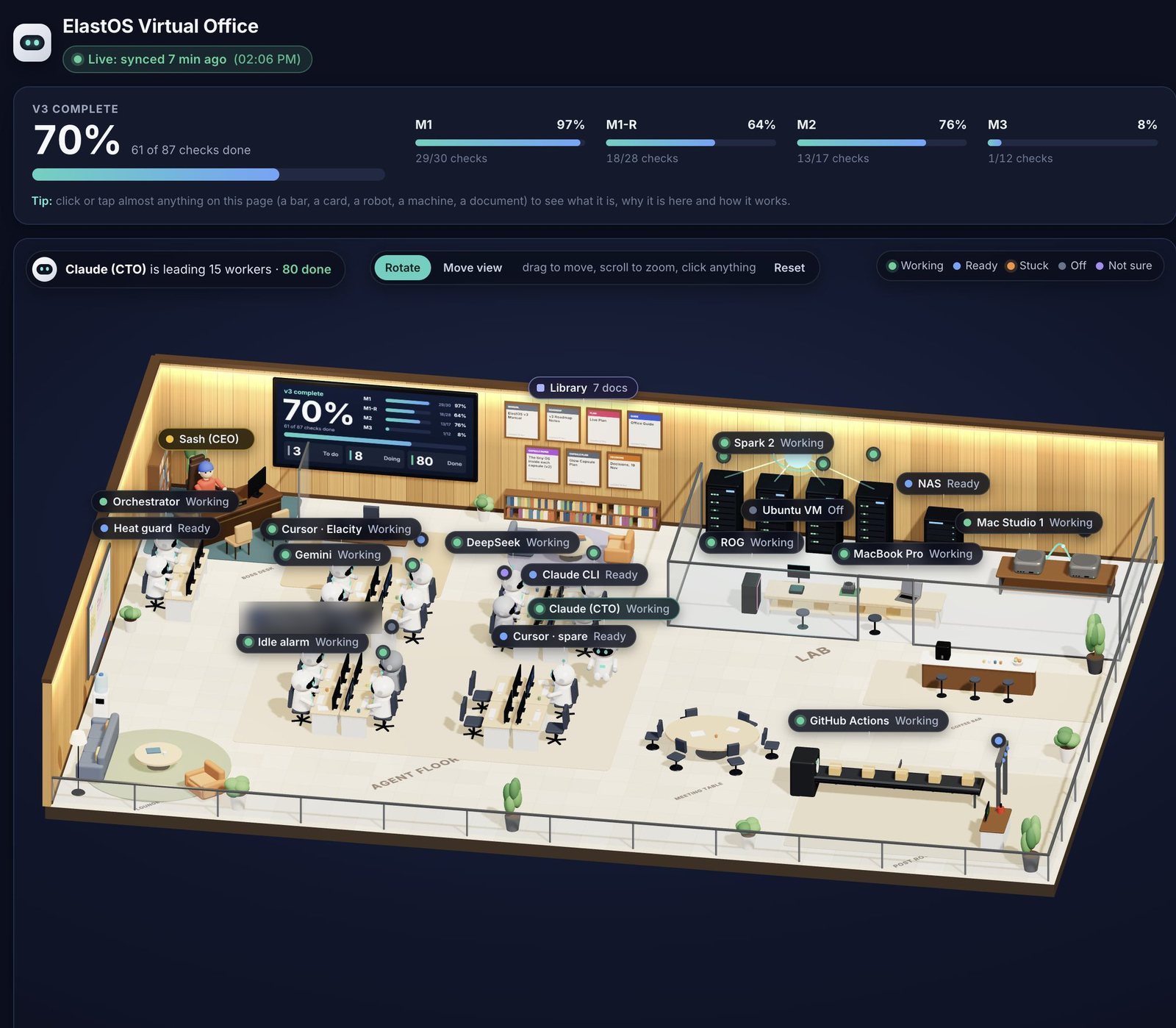
The Virtual Office: the whole lab at a glance, from a phone or a laptop. See docs/15 to build your own.
And the same lab as an architecture, showing who wakes whom:
flowchart TB
    you["You<br/>Claude app on your phone<br/>goals, decisions, approvals"]
    orch["Orchestrator: Claude Code, Opus 5.5, high effort<br/>always-on Mac<br/>plans, assigns, checks, merges, reports"]
    alerts[("Alert log<br/>one 'ended:' line per job")]
    subgraph slots["Slots: each filled by a cloud AI or a local model"]
        builders["Builder<br/>cloud: Grok via Cursor agent CLI, Codex CLI<br/>local: DeepSeek on the Sparks, GLM on the Mac Studios<br/>own git worktree, commit locally, never push"]
        rev1["Reviewer 1<br/>cloud: Gemini via Antigravity CLI<br/>local: GLM on the Mac Studios"]
        rev2["Reviewer 2 and designs<br/>cloud: Codex or Gemini<br/>local: DeepSeek on the Sparks"]
    end
    subgraph machines["Your machines (no per-token bill)"]
        sparks["4 x DGX Spark<br/>DeepSeek V4 Flash on TensorFold<br/>building or reviewing, plus designs"]
        studios["2 x Mac Studio<br/>GLM-5.3-Flash on TensorFold,<br/>builds and full test-suite receipts"]
        linux["x86 Linux box<br/>Linux test receipts"]
    end
    gh["GitHub<br/>pull requests, CI, merge queue"]

    you <--> |Remote Control| orch
    orch --> |spec| builders
    orch --> |brief| rev1
    orch --> |brief| rev2
    orch --> |exact commit| studios
    orch --> |exact commit| linux
    builders -.-> |local option| sparks
    builders -.-> |local option| studios
    rev2 -.-> |local option| sparks
    rev1 -.-> |local option| studios
    builders --> alerts
    rev1 --> alerts
    rev2 --> alerts
    studios --> alerts
    linux --> alerts
    alerts --> |wakes| orch
    orch --> |PR and merge under rules| gh
Two things wake the orchestrator: a heartbeat every 15 minutes, and the alert log, which gets one line the moment any job ends. Each time it wakes it reads what happened, starts the next job, restarts anything that is down and tells you where things stand.
Who does what
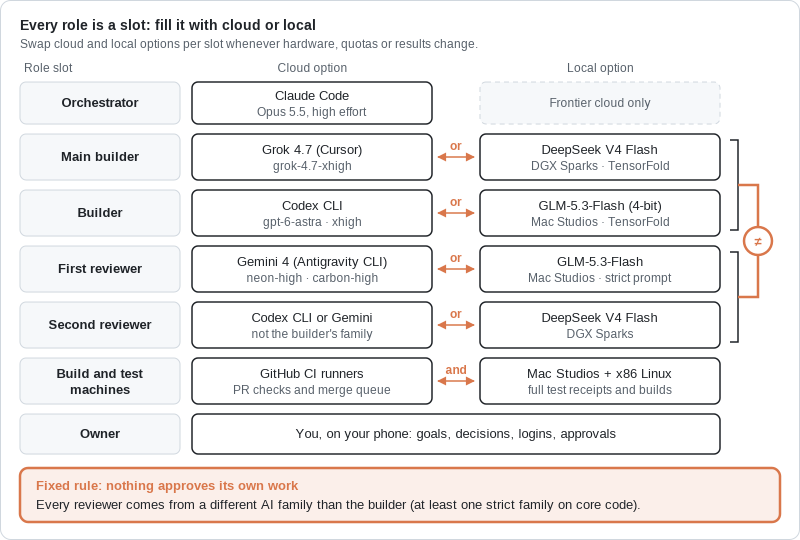
Every role in the lab is a slot, not a fixed product: each one can be filled by a cloud AI or by a model on your own hardware, and you can move a slot between them whenever your hardware, quotas or results change. The only fixed rules are that every worker has one clear job and none approves its own work, so a reviewer always comes from a different AI family than the builder. The options this lab uses for each slot:
| Role | Cloud option (model, setting) | Local option (model, engine) | What the role does |
|---|---|---|---|
| Orchestrator | Claude Code: Claude Opus 5.5, high effort | Plans, writes specs, assigns jobs, checks results, merges under written rules, reports in plain words | |
| Main builder | Grok 4.7 via Cursor's agent CLI: model grok-4.7-xhigh (extra-high reasoning) |
DeepSeek V4 Flash on DGX Sparks, served by TensorFold | Writes the code, one spec at a time, in its own git worktree, and never pushes |
| Builder | OpenAI Codex CLI: model gpt-6-astra, reasoning xhigh, workspace-write sandbox |
GLM-5.3-Flash (4-bit, MTP drafting) on Mac Studios, served by TensorFold | Test fixes, smaller slices, designs |
| First reviewer | Gemini 4 via Google's Antigravity CLI (agy): gemini-4-neon-high by default, gemini-4-carbon-high for the hardest reviews, read-only plan mode, paced to about 14% of the weekly quota a day |
GLM-5.3-Flash on Mac Studios, with the strict review prompt | Reviews every change; also audits the whole program |
| Second reviewer | Codex CLI (read-only sandbox) or Gemini, whichever is not the builder's family | DeepSeek V4 Flash on DGX Sparks | A second, independent review of every change, plus designs |
| Build and test machines | GitHub CI runners | Mac Studios (also serving local models and builds) and an x86 Linux box | Every full test-suite run at the exact commit, plus builds |
| Owner | You, on your phone | Goals, decisions, logins, approvals |
Model names and settings change often; treat these as the lab's current picks and check each vendor's docs for what is available to you. The settings matter more than they look: builders run at the highest reasoning level because a wrong build costs a whole review and test cycle, while reviewers mostly run one step lower to save quota and are moved up only for the hardest changes.
Pick per slot. Local models give unlimited tokens and keep that slot's work on your own machines; cloud models give the strongest results today without hardware. Every local option above runs through the same builder lane and review rules as the cloud ones (written spec, time cap, removed-line check, review by another family). One limit stays: a local model is never the only strict review family on core code, so at least one of the two reviewers on code that runs in the product has been measured as strict on known bugs. See 01 Concepts for how to decide, and 07 Lessons for what running local coders and reviewers taught us.
What you need: three budget tiers
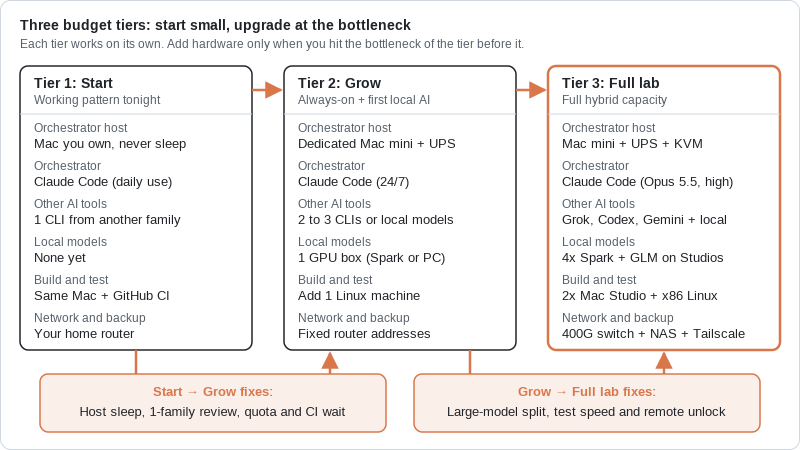
Buying the full lab before you know what you need is the most expensive way to start. Each tier below works on its own, and each upgrade fixes the bottleneck of the tier before it.
| Tier 1: Start | Tier 2: Grow | Tier 3: Full lab (the owner's setup) | |
|---|---|---|---|
| Orchestrator host | A Mac you already own, set to never sleep | A dedicated Mac mini on a UPS | A Mac mini on a UPS, with a remote KVM and Tailscale |
| Orchestrator | Claude Code on a plan that allows heavy daily use | Same | Claude Code, Opus 5.5, high effort, 24/7 |
| Other AI tools | One CLI from another family that can build (Codex CLI or Cursor's agent CLI). Claude, in a separate read-only run, is the reviewer from another family, with MIN_REVIEWERS=1 |
Two or three CLIs or local models, so builder and both reviewers are different families | Cursor agent CLI (Grok) and Codex CLI, Gemini via the Antigravity CLI, plus local models in any builder or reviewer slot |
| Local models | None yet | One GPU box (one DGX Spark, or a Linux PC with an NVIDIA GPU) serving an open model as a builder or reviewer | 4 x DGX Spark (DeepSeek V4 Flash on TensorFold); GLM-5.3-Flash on TensorFold on the Mac Studios |
| Build and test machines | The same Mac (TEST_HOSTS="local"), plus GitHub CI |
Add one Linux machine | 2 x Mac Studio (local models, builds and full test runs) and one x86 Linux box (Linux test runs) |
| Network and backup | Your home router | Fixed addresses for every machine | 400G-class switch for the Sparks, NAS backups, Tailscale |
Tier 1 really runs on one Mac: Claude orchestrates, one other CLI builds, a separate read-only Claude run reviews (MIN_REVIEWERS=1, so one review instead of two), and the full test suite runs on the same Mac (TEST_HOSTS="local"), all set in ~/office/lab.env. Add a second reviewer family as soon as you can. Full specs and cheaper alternatives are in docs/02-hardware.md. What it costs to run, without price figures: docs/10-costs.md.
Quick start
The fastest way to learn the pattern is a small version running tonight, then one addition at a time:
- Keep a Mac awake. In Terminal:
sudo pmset -a sleep 0andsudo pmset -a autorestart 1. - Install Claude Code and open it in a new folder, for example
~/office. This is the orchestrator's home. - Copy templates/STANDING-BRIEF.md into
~/officeand fill in your goal, what "done" means, and what Claude may do alone. - Install one other AI CLI and log in to it yourself. Claude never types your passwords.
- Copy the scripts/ into
~/office/scripts. They are templates; Claude will adapt them to your machines with you. - Paste templates/first-prompt.md as your first message, fill in the brackets, and let Claude set up the heartbeat, the alarms and the first worker.
- Turn on Remote Control so you can talk to the same session from your phone.
Then add one worker or machine at a time, and check each one works before the next. The full walk-through is docs/03-setup.md.
The docs
The docs follow the order you will need them: ideas first, then setup, then running and fixing the lab.
| Doc | What it covers |
|---|---|
| 01 Concepts | The roles, why different AI families review each other, and quotas |
| 02 Hardware | The real kit with specs, cheaper options, power, remote access, heat, networking |
| 03 Setup | Step by step from zero to a working orchestrator |
| 04 Pipeline | The six gates, the merge rule, the size rule, stacked pieces, receipts |
| 05 Operations | Heartbeat, alarms, queues and locks, disk, night rules, quota pacing, reports, counting progress |
| 06 Safety | What the orchestrator may do alone, what needs your yes, and backups |
| 07 Lessons | What went wrong in a real lab, and what we do now |
| 08 Beyond code | Running research, content and operations work the same way |
| 09 Local AI engines | Choosing an engine (TensorFold, MLX, llama.cpp, Ollama, LM Studio, vLLM, SGLang), measuring it yourself, model licences |
| 10 Costs | What costs exist, how to start cheap, and quota pacing as a cost tool |
| 11 Security for local AI | Locking down model servers, ssh, KVMs, switches and the lab network |
| 12 Recovery runbook | What to do when something stops: symptom, check, fix |
| 13 A day in the life | A worked example day and night: heartbeat, alerts, replies, phone updates |
| 14 Power | UPS sizing, what goes on it, smart plug, KVM, restart tests |
| 15 Virtual Office | A live dashboard of every worker and machine, and how to build your own |
| 16 Heat and power | GPU clock caps, heat guards and cooling gates, as choices you make |
| 17 From mission to merge | The whole thread: mission, milestones, checks, slices, specs, gates, booking grades |
| 18 Network | Router, fast switch, Tailscale, fixed addresses, and when to upgrade |
| 19 GitHub CI | One workflow, one required check, safe caches, the merge queue, and saving time without losing tests |
| 20 Linux and WSL | Linux host equivalents (systemd, power-on after AC loss, ufw, disk unlock) and keeping a WSL build box alive |
Templates: lab.env (every script setting), STATE.md, NEXT-UP.md, STANDING-BRIEF.md, first-prompt.md, spec-template.md, builder-preflight.md, review-prompt.md, claude-settings.json, checks-ledger.md, grader-prompt.md, ci-workflow.yml
Scripts (templates to adapt): heartbeat-check.sh, alert-watch.sh, idle-alarm.sh, run-build.sh, run-review.sh, on-round-done.sh, receipt-remote.sh, queue-lock.sh, disk-guard.sh, guard-pr.sh, push-branch.sh, lab-ctl.sh, launch.sh
24-7-ai-orchestrator/
├── README.md
├── simple-guide.pdf     the 7-page overview, for anyone
├── advanced-guide.pdf   the whole blueprint in one document
├── docs/                01 to 20, read in order
├── images/              diagrams and photos
├── templates/           standing brief, first prompt, spec, pre-flight, review and grader prompts, settings, lab.env, checks ledger, CI workflow
└── scripts/             bash templates: heartbeat, alarms, build, review, receipts, locks, disk, PR guard, overnight helper
Each folder has its own index: docs · images · templates · scripts.
FAQ
The questions people asked most after the owner described the lab:
What are the specs of the machines?
Orchestrator: a Mac mini that never sleeps, with a UPS and a GL.iNet Comet remote KVM. Local AI: 4 x NVIDIA DGX Spark serving DeepSeek V4 Flash with TensorFold for building or reviewing, plus designs, the model split across all four over an RDMA ring, GPU clock capped at about 1300 MHz, with a heat guard and a cooling gate. Local models, builds and tests: 2 x Mac Studio, Apple M5 Ultra, 512 GB unified memory, 4 TB SSD each; 512 GB of unified memory holds 300B+ mixture-of-experts weights alongside builds and tests, so they serve GLM-5.3-Flash with TensorFold, running builds and running full test suites, at the same time with care. Published results: GLM-5.3-Flash at 141 tok/s on two Mac Studio M5 Ultras. Linux tests: one x86 gaming laptop running Linux under WSL, which matches the chip family of GitHub's CI runners. A MikroTik CRS812 switch (400G/200G/50G ports) for the Sparks, a NAS for backups, Tailscale for remote access. Details in docs/02-hardware.md.
Can a non-technical person do this?
Yes, if you are comfortable with basic Terminal and Git, or willing to learn them; it is not a zero-terminal setup. Claude does most of the technical setup: it writes the scripts, explains what each one does, and asks before anything risky. Your job is to set the goal, log in to each tool yourself, run the few commands that need your password (such as sudo), and say yes or no to the decisions it brings you. Start with Tier 1 (one Mac, Claude and one other tool) and get that running for a week before adding machines. Expect to ask "what does this mean?" a lot. Plain-language explanations are part of the orchestrator's job, and the standing brief says so.
I already pay for frontier subscriptions. How do I get more value from local machines?
Give local machines any slot they handle well: building, reviewing, design checks and every full test run. They have no per-token bill, so they should never sit idle, and a slot can move between cloud and local whenever quotas or results change. Keep the orchestrator on a frontier model, and measure each local model on known bugs before giving it a slot. Pace each subscription so it lasts the week (the owner paces Gemini at about 13 to 14% of its weekly limit a day). The orchestrator's heartbeat flags any idle machine, so an unused GPU becomes an action, not a forgotten box. See docs/01-concepts.md and docs/05-operations.md.
Does it work for business tasks, not just code?
The pattern does: a written brief, one AI does the work, two others check it, an objective check where one exists, and a human yes before anything goes out. Code is the easiest case because tests give a hard pass or fail. For research, content and operations the checks are weaker, so the human approval matters more. See docs/08-beyond-code.md for an honest take.
Does Claude write the code?
Very little. The builders write most of it: Grok via Cursor's agent CLI, Codex, or a local model such as DeepSeek on the DGX Sparks or GLM on the Mac Studios, whichever fills the builder slot in your setup. Claude's quota goes on planning, writing specs, checking results and deciding what happens next. It also commits for sandboxed builders and makes tiny merge fixes.
What does it cost?
It depends on your tier and which subscriptions you already have. This repo does not quote prices because they change; check each vendor's current plans. docs/10-costs.md lists every cost to fill in yourself.
Is it safe to leave running overnight?
Only after the rules in docs/06-safety.md are written into your standing brief. The most important night rule: never run a command that might wait for an approval prompt. One such command froze the owner's orchestrator for six hours.
Credits
Built and run by @sash__mit. The lab described here builds real software every day; everything in this repo comes from running it, including the mistakes in docs/07-lessons.md.
This lab is how Elacity Labs (elacitylabs.com) builds ElastOS v3, the next version of the Elastos Runtime: a personal, local-first operating environment where apps and AI agents run as signed capsules on your own machine, with no authority of their own beyond what you grant. The v3 work happens in the open at Elacity/elastos-agent-host-spike.
Local inference by TensorFold, maintained by ashhart. Spark tools: sparkDash and sparkLimiter.
Licensed under MIT. See LICENSE.
Reviews (0)
Sign in to leave a review.
Leave a reviewNo results found