agentbox
Health Gecti
- License — License: GPL-3.0
- Description — Repository has a description
- Active repo — Last push 0 days ago
- Community trust — 77 GitHub stars
Code Basarisiz
- process.env — Environment variable access in .claude/skills/review-pull-requests/lib.mjs
- rm -rf — Recursive force deletion command in .claude/skills/review-pull-requests/run-untrusted.sh
- exec() — Shell command execution in .claude/skills/review-pull-requests/scan.mjs
- rm -rf — Recursive force deletion command in .claude/skills/review-pull-requests/scan.mjs
- network request — Outbound network request in .claude/skills/review-pull-requests/scan.mjs
- spawnSync — Synchronous process spawning in .claude/skills/verify-agentbox/scripts/breaker.mjs
- process.env — Environment variable access in .claude/skills/verify-agentbox/scripts/breaker.mjs
- fs.rmSync — Destructive file system operation in .claude/skills/verify-agentbox/scripts/browse.mjs
- process.env — Environment variable access in .claude/skills/verify-agentbox/scripts/browse.mjs
- spawnSync — Synchronous process spawning in .claude/skills/verify-agentbox/scripts/check-machines.mjs
- fs.rmSync — Destructive file system operation in .claude/skills/verify-agentbox/scripts/check-machines.mjs
- spawnSync — Synchronous process spawning in .claude/skills/verify-agentbox/scripts/check-setups.mjs
- spawnSync — Synchronous process spawning in .claude/skills/verify-agentbox/scripts/check-this-machine.mjs
- os.homedir — User home directory access in .claude/skills/verify-agentbox/scripts/check-this-machine.mjs
- process.env — Environment variable access in .claude/skills/verify-agentbox/scripts/check-this-machine.mjs
Permissions Gecti
- Permissions — No dangerous permissions requested
Bu listing icin henuz AI raporu yok.
An inbox for your coding agents. macOS app, runs Claude Code and Codex on your own subscription, no server and no account.

Agentbox
Give your agents an inbox.
Run dozens of coding agents at once and only hear from the ones that need you.
Get it · How it works · Priorities · Keys · Privacy · GPL-3.0

Free and open source. Runs in your browser or as a Mac app, on the Claude Code or Codex plan you already have.
No server, no account, no extra subscription.
Install
There are two ways to run it: in the browser, or as a Mac app. Both need Node 22 and Claude Code or Codex installed and signed in.
In your browser. One command, nothing to install first:
npx agentbox-app
It starts on your machine and opens a tab. On Linux that open goes through xdg-open. Nothing is hosted: it listens only on 127.0.0.1, and the address carries a key that is new every run. Add --help to see the options. --no-open prints the address and leaves the browser to you.
From a checkout, build the screen once, then start it the same way:
npm install
npm run build
npx agentbox-app
As a desktop app. Build it from this repo. npm start is the desktop command on Omarchy and on a Mac:
git clone https://github.com/savannahfeder/agentbox.git
cd agentbox
npm install
npm start
On Linux, npm install puts agentbox on ~/.local/bin and adds the app to the launcher. The entry is $XDG_DATA_HOME/applications/agentbox.desktop (~/.local/share/applications when that variable is unset), and it runs agentbox. That command starts this checkout. Open the app from the launcher.
npm start builds the app and opens it. On first run it walks you through connecting Claude Code or Codex and choosing a folder to work in.
On macOS, the system may ask to let Terminal find devices on your local network. Agentbox does not need that, so Don't Allow is fine.
The chat window is the bottleneck
Today you run agents in chat windows and terminals, and you wait for each one
to finish before you prompt it again. So the number of agents you can run is limited
by the number of windows you can keep track of.

Models are now good enough that most tasks do not need watching. They need
someone to review the work at the right moment. Agentbox drops the chat window
and gives each agent a row in an inbox instead, so you can run far more of them
than you could ever watch and only deal with one when it actually needs you.
How it works
1. File the work

Paste a list, send over a board of issues, or type one task. Each item becomes
its own row, and each row is its own agent, already working.
2. Walk away

Nothing needs you while they run. Go to lunch. A row only comes back to you
when its agent is done or stuck, so a hundred agents working is as quiet as one.
3. Come back to an inbox
Every row opens with what the agent did and what it wants from you, in two
lines you can read at a glance. Most of the time the answer is yes. Press 1
and it merges, and the next one is already in front of you.

4. Answer however fits
 Pick a design. Ask for options before anything is built, and agents come back with versions drawn in your actual app. Pick one and that one gets built. |
 Send it back. When none of the options is right, type a sentence. The agent picks up where it left off, and the row comes back to you when it is done. |

5. Stay the person in the loop
Your job stops being watching agents work. It becomes reviewing what they made
and deciding whether it is good enough. This agent got a failing test to pass by
editing the test instead of the code, which is exactly the moment you want to be
asked. Code changes open right beside the row.
What matters most goes first
Twenty agents means twenty things competing for your attention and for a limited
number of running sessions. Agentbox keeps one order and uses it for both.
- Tag a task Urgent, High, Medium or Low, when you file it or later from
⌘KorCtrl+K. - Rank your projects once by dragging them into order. A project's place
counts for more than any single task's tag, so your most important project
never waits behind a side one. - The order decides who starts. When there are more tasks than session
slots, the queue starts the most important first. An answer you have already
given wins a tie against new work, so replies never pile up. - Urgent rises to the top. Urgent rows sit above everything else in the
inbox under their own heading. - Only your tags count. An agent cannot promote its own work. If it says
its task is urgent, that is ignored.
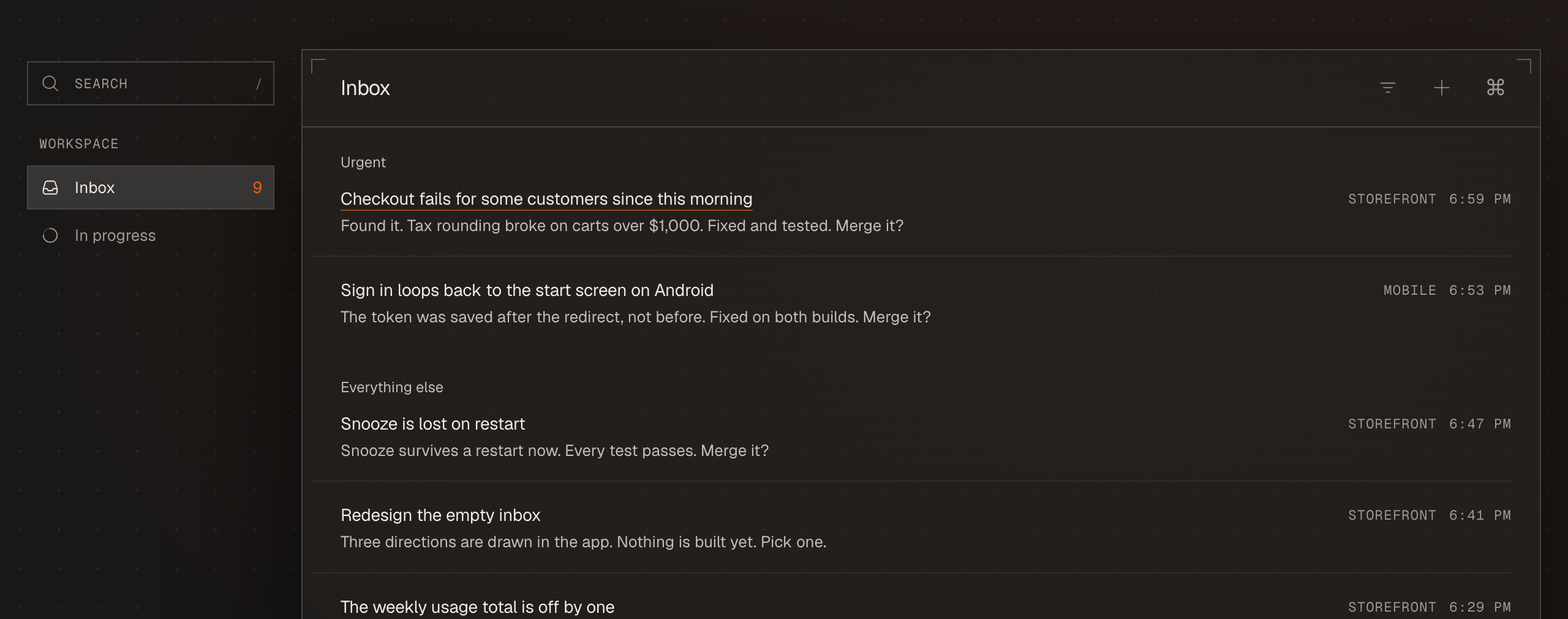
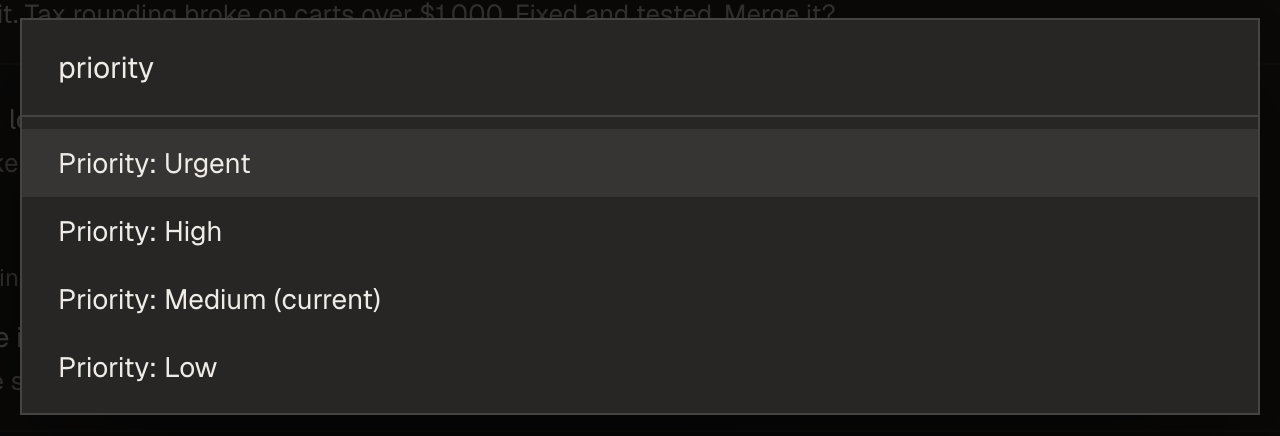
Any row's priority is a ⌘K or Ctrl+K away.
Built for the keyboard

| Key | Does |
|---|---|
J K or arrows |
Move through the inbox |
Enter |
Open a row |
E |
Approve the recommendation, or mark a row done |
1 2 3 |
Pick an option an agent offered |
R |
Reply |
N |
New thread |
L |
Later: put a task off until a time you pick |
S |
Show or hide the summary, in an open task |
Z |
Undo |
⌘K or Ctrl+K |
Everything else |
Fifteen skins, each in light and dark, from plain slate to woodblock and riso
prints. Press ⌘K or Ctrl+K and type "theme". Ctrl+K is the same palette on Linux, where there is no Command key.
Runs on the plan you already have
Agentbox drives Claude Code and Codex on your own machine, signed in with your
own subscription. When you first open it, it finds the agents you have already
set up and offers to bring them in. There is no server, no account to make, and
nothing new to pay for.
Reference
Configzero.config.json in the repo root, gitignored and machine-specific. Every
default works unset and they all live in main/config.mjs. The ones that
matter:
storeRoot: where the store lives. On macOS this defaults to a folder
named after the app in your home directory. On Linux it defaults to$XDG_DATA_HOME/agentbox, which is~/.local/share/agentboxwhen that
variable is unset.claudeBin: the binary to run. The app findsclaudeitself if you leave
this alone.maxConcurrentSessions: how many agents run at once. The queue absorbs the
rest, in priority order.sessionArgs: what a spawned session may do. The default grants only the
store tools, so an agent can read the store, file questions and update work
items, and nothing else. To let agents edit code and run commands, opt in:{ "sessionArgs": ["--allowedTools", "mcp__agentbox", "--permission-mode", "acceptEdits"] }That grant is yours to make deliberately. The app never escalates it for you.
personalProducts: workspaces that are your own tasks rather than a product,
for example["personal"]. Sessions there get your message and nothing else,
and replying resumes the same session, like a thread.diagnostics:falseturns off the counts described below.
Nothing, unless you are running a build that was signed and released with a
PostHog key baked into it. A build made from this repo has no key, so a clone
and a fork are silent, and with no key the whole path is off at every send.
A released build counts eighteen things, and they are counts:
- the app was opened
- the app was used today, once a day
- a setup step was reached, by its number
- first run finished
- a repo was connected
- an agent was seen
- a task was written
- a task was opened
- a reply was sent
- a task finished
- an agent started work
- an agent stopped work
- the app was quit
- the corner tag was hidden
- the corner tag was turned off
- setup offered agents to import
- setup imported agents
- counts were turned off
Each carries a random install id, the app and platform version, and at most
seven other things: how long something took, how many of a thing there were,
which kind of row it was out of six fixed words, whether an agent or you did
it, whether an agent's run failed, whether it happened in setup's practice
project, and which coding agent ran it, Claude Code or Codex.
No file contents, no prompts, no paths, no titles, nothing you typed.shared/analytics-events.mjs is the whole list, and anything a caller attaches
beyond those seven is dropped rather than sent, so nobody can widen it by
accident. Crash reports travel the same way and are scrubbed first
(shared/crash-scrub.mjs).
The events can be turned off, and either way is enough on its own:
- In the app: Settings, then the "Counts and crash reports" switch.
- In
zero.config.json:"diagnostics": false.
Either way nothing is sent from that moment, with one exception: turning the
switch off in the app sends one last count saying counts were turned off, so
you are not read as someone who stopped using Agentbox. Editing the file sends
nothing at all.
The update check is separate and is not routed through any of this. It is a
request to github.com for the latest release, it carries no identity and no
key, and it only happens in a packaged build.
The thing that sends the most is not ours at all. This app drives Claude Code
and Codex, so whatever a session reads and writes goes to Anthropic or OpenAI
under their terms, exactly as it would if you ran those tools yourself.
Sessions are cattle and the store is the truth. The durable state is a folder
on disk at storeRoot, written through main/store/ so the fold rules exist
in exactly one place. The app can crash, restart or be rewritten without any
agent noticing.
main/the Electron main process: config, the store
(main/store/work-items.mjsis the single write path), the supervisor that
spawns one headless session per work item, and IPC.mcp/the store server handed to those sessions.renderer/the inbox: list, focus mode, rail, compose, palette, browser.briefs/the judgment: worker and dispatcher prompts. Edit these rather than
the code to change how agents behave.tests/the suite, which is large and is the documentation of record for how
any of this is meant to behave.
npm run dev        # vite HMR plus electron
npm test
Useful modes:
ZERO_FIXTURES=1canned data, with no store and no agents touchedZERO_FIXTURES=emptyinbox zeroZERO_NO_SUPERVISOR=1never spawn sessionsZERO_SCREENSHOT=/tmp/x.pngcapture the window and quit
The same fixture worlds are reachable off the url, which is how thescripts/shot-*.mjs family photographs them: ?fixtures, ?fixtures=empty,?fixtures=crowded, ?fixtures=mock, ?working=3. ?engines=
picks which coding agents the fixture Mac has, where nothing is one agent,?engines=missing is the gate open with Codex not found, and ?engines=claude
or ?engines=codex give two.
To open the app as somebody who has never seen it, with its own throwaway home
and nothing of yours inside it, press ⌘K or Ctrl+K and choose "Open Agentbox as a new
user". npm run fresh does the same from a terminal. ZERO_NO_SUPERVISOR=1 applies to npm start and to npx agentbox-app.
The app is named in exactly one place, shared/product-name.mjs. Change it
there and run node scripts/product-name.mjs --write, and everything else
follows. The zero and ZERO_ prefixes through the code are the name it had
first and are load-bearing in places, so they are left alone.
The pictures in this README live in docs/readme/. The two stills are taken of
the real app by scripts/shot-readme.mjs; the moving ones are cut from the
launch film.
Licence
GPL-3.0-or-later. See LICENSE.
Yorumlar (0)
Yorum birakmak icin giris yap.
Yorum birakSonuc bulunamadi