focus-with
Health Warn
- License — License: MIT
- Description — Repository has a description
- Active repo — Last push 0 days ago
- Low visibility — Only 9 GitHub stars
Code Pass
- Code scan — Scanned 12 files during light audit, no dangerous patterns found
Permissions Pass
- Permissions — No dangerous permissions requested
No AI report is available for this listing yet.
A private-by-default, self-hosted focus system with projects, timers, daily insights, distraction nudges, and optional AI/MCP companions.
FocusWith
A private-by-default focus system that helps turn meaningful plans into finished work.
简体中文 · Install · AI providers · Local MCP · Remote MCP
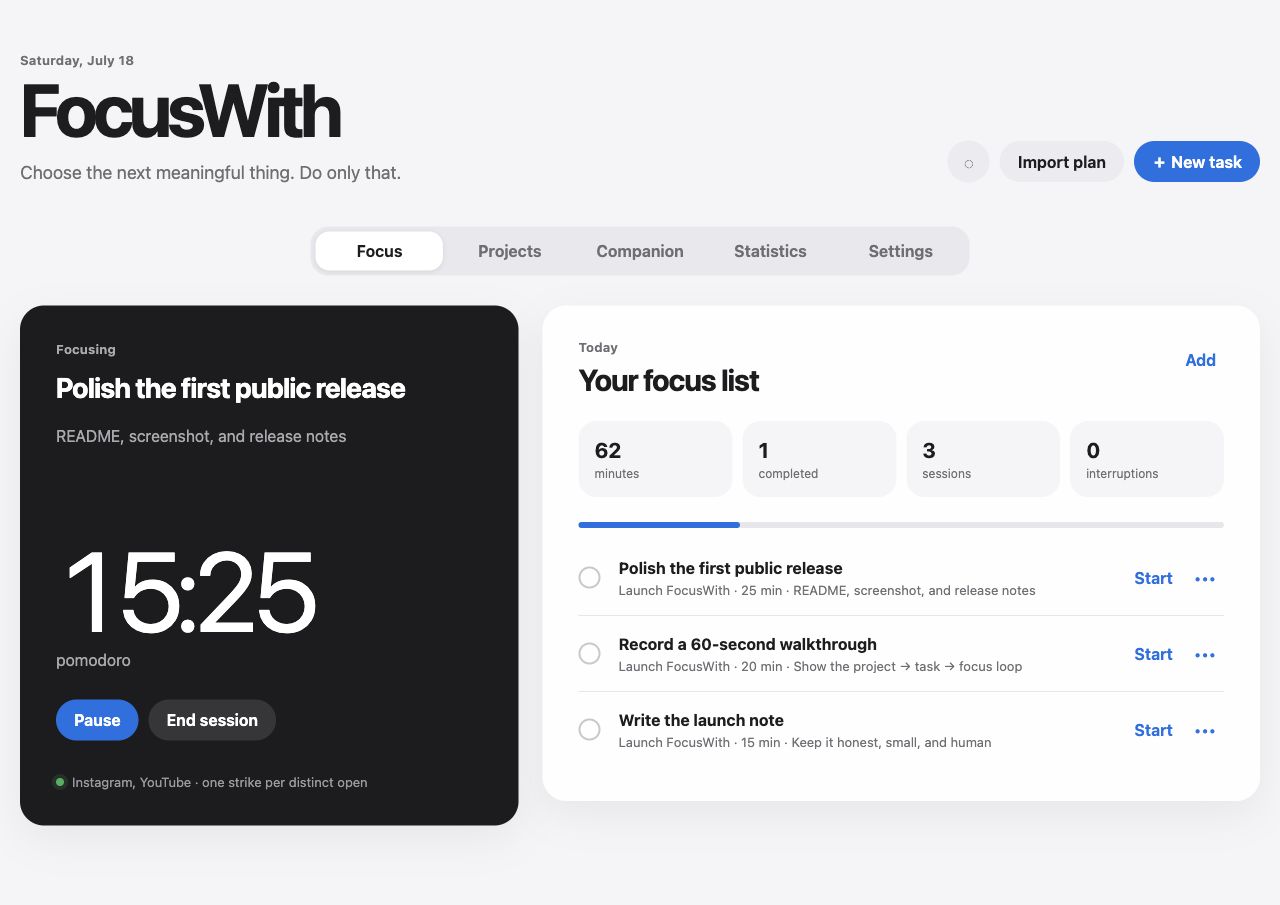
FocusWith turns vague goals into directions, projects, tasks, and focused sessions. It keeps the core loop simple: choose one thing, start, return when distracted, finish, and decide what comes next.
It works without Telegram and without an AI key. The core is a self-hosted web app; optional adapters add an AI companion, MCP connections, Telegram buttons, iPhone Shortcut events, an Android usage/timer companion, and a native macOS floating timer.
The web interface automatically follows Chinese browsers and can be switched between Simplified Chinese and English at any time. The choice is stored only in that browser.
Public preview: FocusWith is currently a single-owner
0.xproject. Back up your data before upgrading and review AI tool actions before approving them.
Why FocusWith
- Private by default. Local installs bind to
127.0.0.1; public MCP is opt-in and OAuth-protected. - Plans become something you can do. Organize directions → projects → tasks, or paste a Markdown plan generated by an AI chat.
- The loop does not stop at a timer. FocusWith records sessions, merges repeated work on the same task, carries unfinished work forward, and recommends the next action.
- AI is optional, not the owner. Use the app alone, add a provider, or connect an existing Claude/Codex-compatible client through MCP.
- Distraction reminders have context. Phone events can be linked to the active session, with grace periods, strikes, reminders, and user-defined consequences.
What works
- Directions, projects, actionable tasks, and manual project assignment.
- Simplified Chinese and English interfaces with automatic browser-language detection and a persistent language switch.
- Markdown plan import with duration parsing and break recognition.
- Pomodoro, deep-focus, free-focus, and count-up sessions with custom durations.
- Pause, resume, finish, cancel, complete, and abandon flows.
- Daily and weekly statistics; repeated sessions for one task are merged into one activity total.
- Editable monitored-app policy, grace period, strike count, and consequence pool.
- Browser notifications and optional Telegram delivery with action buttons.
- iPhone Shortcut event ingestion and daily app-usage summaries.
- Android usage-event sync with a persistent timer notification and an optional floating capsule.
- Built-in companion using OpenAI Responses, Anthropic, or an OpenAI-compatible API, including compatible local endpoints.
- Seven annotated MCP tools for Claude Desktop/Code, Codex, and other local clients.
- Optional OAuth-protected Remote MCP for Claude.ai and compatible ChatGPT workspaces, with automated clean-VPS HTTPS deployment.
- Native macOS floating timer with an opt-in, local-only camera companion; full Xcode is not required.
- Local installer and Docker Compose deployment.
Fastest installation
Give this repository to a coding agent and ask it to install FocusWith. The exact prompt and safety contract are in docs/AI_INSTALL.md and AGENTS.md.
Manual installation requires Python 3.11 or newer:
./scripts/install.sh
./scripts/focus start
Open http://127.0.0.1:8765. On localhost, the browser connects without asking you to copy the generated API token.
Useful commands:
./scripts/focus status
./scripts/focus doctor
./scripts/focus logs
./scripts/focus stop
Optional AI and MCP
For the built-in companion, edit the ignored .env file and restart FocusWith. The complete provider recipes are in docs/AI_PROVIDERS.md.
FOCUS_AI_PROVIDER=anthropic
FOCUS_AI_API_KEY=your-provider-key
FOCUS_AI_MODEL=your-model-name
For DeepSeek, GLM, a local model, or another compatible service:
FOCUS_AI_PROVIDER=openai-compatible
FOCUS_AI_API_KEY=your-provider-key
FOCUS_AI_MODEL=your-model-name
FOCUS_AI_BASE_URL=https://provider.example/v1
Provider keys stay on the server and are never sent to browser JavaScript.
To use an existing AI client, connect the private local server in docs/MCP.md. Claude.ai and eligible ChatGPT workspaces can use the authenticated Remote MCP in docs/REMOTE_MCP.md. Remote mode uses HTTPS, OAuth discovery, Dynamic Client Registration, S256 PKCE, rotating refresh tokens, strict callback allowlisting, and revocation; it is disabled by default.
Optional integrations
- macOS floating timer:
./macos/FocusFloat/install.sh - Camera companion and cross-platform event contract: docs/CAMERA_COMPANION.md
- iPhone Shortcuts: docs/IPHONE_SHORTCUTS.md
- Android companion: docs/ANDROID.md
- Signed Android downloads: GitHub Releases
- Telegram: set
FOCUS_TELEGRAM_BOT_TOKENandFOCUS_TELEGRAM_CHAT_IDin.env, then restart.
Telegram is a delivery adapter, not the owner of the Focus session. Timer completion and distraction events are created by FocusWith, then delivered to the browser and any enabled channel.
Docker and Remote MCP
Local Docker deployment:
./scripts/setup_env.py
docker compose up -d --build
Compose publishes only to 127.0.0.1:8765 by default and stores the database in a named volume.
For a dedicated public hostname and Claude.ai connector on a clean Docker VPS:
./scripts/deploy_remote.sh --domain focus.example.com
The script refuses to replace an existing service on ports 80/443. See docs/REMOTE_MCP.md for prerequisites, the existing-proxy mode, Claude connection steps, password rotation, and revocation commands.
Security
- The default server bind is
127.0.0.1. - Separate random tokens protect the main API and phone-event endpoint.
- Runtime data,
.env, logs, generated apps, and databases are ignored by Git. - API/provider tokens are not embedded in JavaScript, documentation, MCP configuration, or the macOS bundle.
- Camera frames stay inside the companion app. The server accepts only an event ID, sustained duration, timestamp, and client source; image-derived fields are rejected.
- Remote MCP cannot run with only half of its OAuth configuration.
- Remote MCP uses a salted owner-password hash, strict callback allowlisting, PKCE, scoped audience-bound bearer tokens, rotation, and revocation.
- OAuth bearer tokens, refresh tokens, authorization codes, login tickets, and CSRF artifacts are stored only as hashes.
Read SECURITY.md before exposing FocusWith outside localhost.
Development
python3.12 -m venv .venv
.venv/bin/pip install -r requirements-dev.txt
.venv/bin/pytest -q
./macos/FocusFloat/test.sh
The server API is documented at /docs while it is running. Contributions are welcome under the MIT License; see CONTRIBUTING.md.
Credits
Created by @sayhi2e10414-cpu, built together with OpenAI Codex.
Reviews (0)
Sign in to leave a review.
Leave a reviewNo results found