artmark
Health Uyari
- License — License: Apache-2.0
- Description — Repository has a description
- Active repo — Last push 0 days ago
- Low visibility — Only 5 GitHub stars
Code Gecti
- Code scan — Scanned 11 files during light audit, no dangerous patterns found
Permissions Gecti
- Permissions — No dangerous permissions requested
Bu listing icin henuz AI raporu yok.
Local bookmark manager for AI agents
artmark
Early / v0.3: artmark is usable, but the CLI, JSON output, and SQLite schema are not yet stable compatibility contracts.
A local bookmark manager for your agents.
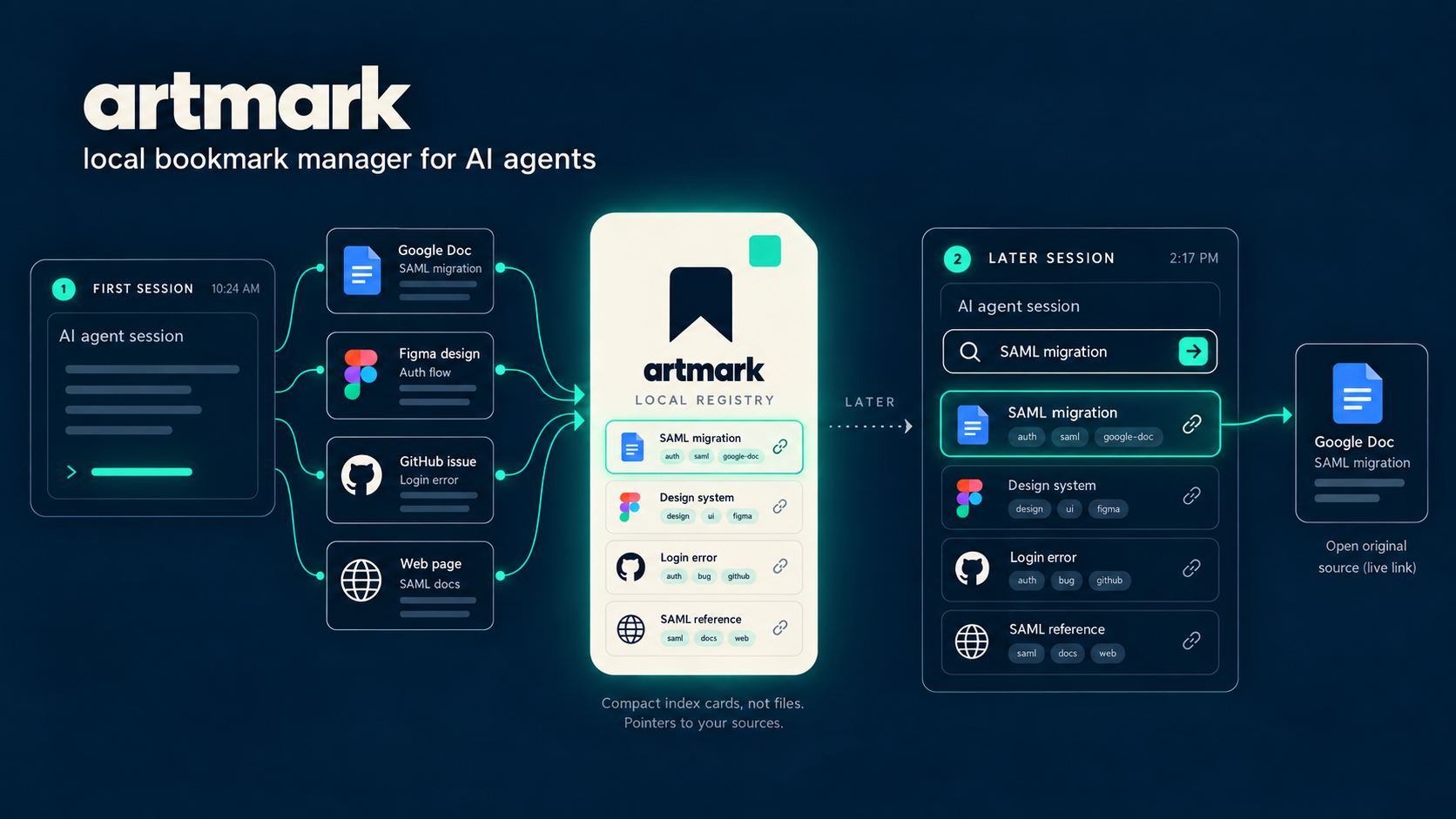
Your agent sees useful artifacts all day: Google Docs, Figma designs, GitHub issues, PDFs, web pages, local files, and more.
The problem is that the session is temporary, but the artifacts are not.
You may give an agent ten useful links while working on something, but weeks later a new session doesn't reliably know they existed. You end up searching old chats, finding the links again, and rebuilding the prompt.
artmark makes them findable across agent sessions.
It keeps a small, searchable local catalog of the artifacts you and your agents encounter, so later you can ask:
Find the doc where we discussed SAML migration.

What was that Figma file for the onboarding redesign?

Find the GitHub issue about webhook retries.
and your agent has somewhere durable to look.
Think of artmark as bookmarks for agents — a local Yellow Pages for your artifacts.
How it works
artmark is the agent's local catalog. Your agent's existing harness and tools access Google Drive, Figma, GitHub, the web, or your filesystem. artmark itself does not fetch from those systems.
When you ask an agent to save an artifact—or approve notable artifacts it read at the end of a task—the agent uses its provider tool to inspect the source and saves the pointer together with a compact search card:
You ask to save (or approve at task end)
        │
        ▼
agent resolves and reads the source
        │
        │ using its harness tools:
        │ Drive / Figma / GitHub / browser / filesystem
        ▼
agent creates a compact search card
        │
        ▼
artmark saves pointer + indexes card in local SQLite
Later:
"Find the architecture doc about SAML migration"
        │
        ▼
  artmark search
        │
        ▼
 Enterprise Authentication Architecture
 Google Doc · gdrive:doc:ABC
        │
        ▼
agent retrieves the current document
through its Google Drive tool
artmark does not silently bookmark every URL you paste. By default, saved entries include a content-derived search card built after inspecting the source; pointer-only registration is kept as a fallback when no tool can read the source. artmark stores the pointer, search card, and retrieval hints, never a copy of the source artifact.
The original Google Doc stays in Google Drive; the Figma file stays in Figma; the GitHub issue stays in GitHub.
When an agent needs current details, it goes back to the authoritative source using those tools.
More than a URL
A traditional bookmark might remember:
https://docs.google.com/document/d/ABC/edit
That is not enough for an agent to find the document six months later when you ask:
Where was the doc where we talked about migrating
old enterprise customers to SAML?
After the agent's tool has read the source, the agent can store a compact search card:
{
  "source_metadata": {
    "title": "Enterprise Authentication Architecture"
  },
  "catalog": {
    "summary": "Architecture for enterprise identity migration.",
    "search_text": "SAML migration, SCIM provisioning, Okta integration, legacy tenant rollout, enterprise SSO, identity federation.",
    "topics": [
      "SAML",
      "SCIM",
      "enterprise SSO"
    ]
  },
  "retrieval": {
    "provider": "google_drive",
    "external_id": "ABC"
  }
}
search_text is a retrieval-oriented description, not a cached copy of the document. It helps answer:
What might I vaguely remember about this artifact later?
The search card gives a later session enough context to find the artifact again:
I've seen this artifact before.
This is what it is about.
This is where it lives.
This is how to retrieve it again.
artmark is an artifact registry. The source system still owns the artifact.
Use artmark with an agent
The repository includes an artmark skill that teaches agents how to use the registry. Copy skills/artmark from this checkout or a release archive to ~/.codex/skills/artmark for Codex or ~/.claude/skills/artmark for Claude Code. The skill checks whether the CLI is available when first used in a session. Installing or upgrading the CLI is a separate setup step that you request explicitly.
artmark doctor checks for the Codex skill and suggests either installing it or running artmark context init when it is missing. The context command adds a managed artmark section to the AGENTS.md file in the current directory. It can be run again to refresh that section and preserves instructions outside its markers.
The agent workflow is:
1. Do not silently bookmark every pasted link.
2. When you ask to save an artifact, resolve the source with an existing tool and save the pointer and search card together.
3. At the end of a substantive task, ask which notable durable artifacts read during the task should be remembered, and save + index only the approved ones.
4. When a task requires identifying an artifact by description, search artmark before a provider search, even if the provider is named. Then retrieve the current source through the provider tool.
See AGENTS.md for the full registration policy.
Local by design
artmark is intentionally small.
The catalog lives in:
$HOME/.artmark/artmark.db (macOS and Linux)
%USERPROFILE%\.artmark\artmark.db (Windows)
Search uses SQLite FTS5.
There is:
no server
no account
no cloud database
no provider credentials stored by artmark
no copy of your source documents
no embeddings required
Search works locally and offline once an artifact has been indexed.
The agent's provider tools remain responsible for retrieving current source content.
Install
Download the latest prebuilt binary and its matching .sha256 file from GitHub Releases. These instructions use the v0.3.0 filenames; substitute the filenames shown on the latest release if it is newer.
Starting with v0.2.1, each archive contains the executable, the artmark agent skill at skills/artmark/SKILL.md, and LICENSE.
Pick the archive for your machine:
| Platform | Archive suffix |
|---|---|
| Linux x86-64 | x86_64-unknown-linux-gnu.tar.gz |
| macOS Intel | x86_64-apple-darwin.tar.gz |
| macOS Apple Silicon | aarch64-apple-darwin.tar.gz |
| Windows x86-64 | x86_64-pc-windows-msvc.zip |
From a terminal in the directory containing both downloaded files, use the commands for your system. On Linux x86-64:
archive=artmark-v0.3.0-x86_64-unknown-linux-gnu.tar.gz
sha256sum -c "$archive.sha256"
mkdir -p "$HOME/.local/bin"
tar -xzf "$archive" -C "$HOME/.local/bin" artmark
export PATH="$HOME/.local/bin:$PATH"
artmark --version
On macOS, choose one archive name: artmark-v0.3.0-aarch64-apple-darwin.tar.gz for Apple Silicon or artmark-v0.3.0-x86_64-apple-darwin.tar.gz for Intel. Then run:
archive=artmark-v0.3.0-aarch64-apple-darwin.tar.gz  # change to Intel filename if needed
shasum -a 256 -c "$archive.sha256"
mkdir -p "$HOME/.local/bin"
tar -xzf "$archive" -C "$HOME/.local/bin" artmark
export PATH="$HOME/.local/bin:$PATH"
artmark --version
Add $HOME/.local/bin to your shell's PATH configuration if you want artmark available in future terminal sessions.
macOS Gatekeeper: The release binaries are currently unsigned and not notarized. macOS may block the first run with “Apple cannot check it for malicious software” or an unidentified-developer warning. After verifying the release checksum and attempting to run artmark --version, open System Settings → Privacy & Security, select Open Anyway for artmark, and confirm Open. If macOS reports that the binary is damaged or will harm your computer, do not override that warning; download a fresh archive and verify its checksum again. See Apple's Gatekeeper instructions.
On Windows x86-64, in PowerShell from the directory containing the downloads:
$archive = 'artmark-v0.3.0-x86_64-pc-windows-msvc.zip'
$expected = ((Get-Content "$archive.sha256") -split '\s+')[0]
$actual = (Get-FileHash $archive -Algorithm SHA256).Hash
if ($actual -ne $expected) { throw 'Checksum mismatch' }
$bin = Join-Path $HOME '.local\bin'
New-Item -ItemType Directory -Force $bin | Out-Null
Expand-Archive $archive -DestinationPath $bin -Force
$env:PATH = "$bin;$env:PATH"
artmark --version
Add %USERPROFILE%\.local\bin to your user PATH to use artmark in future terminals.
Rust users can also build from source:
git clone https://github.com/sboorlagadda/artmark.git
cd artmark
cargo install --locked --path .
Try it
These are the CLI commands an agent uses. To try them yourself, save the example search card above as card.json, then register and index an artifact in one step:
artmark add \
  'https://docs.google.com/document/d/ABC/edit' \
  --explicit \
  --json-input card.json \
  --json
artmark returns the indexed entry with its art_... ID.
You can also register a pointer alone when the source cannot be inspected yet, then update its card later with artmark index art_... --json-input card.json. Use artmark recent --state registered to list pointer-only entries that have not been indexed yet.
Find it later:
artmark search 'enterprise SSO migration' --json
Inspect the catalog entry:
artmark get art_... --json
search returns compact artifact cards.
get returns artmark's catalog metadata and retrieval hints.
Neither command fetches the source artifact.
Other commands include:
recent
stats
doctor
context init
reindex
forget
artmark context init works without opening the artmark database. Run it from the project directory where the agent should receive the artmark guidance.
reindex rebuilds the local FTS5 index from artmark's catalog.
forget removes the artmark entry. It never deletes or modifies the underlying artifact.
Run:
artmark --help
for all commands, options, and filters.
Data and privacy
artmark's default database is:
$HOME/.artmark/artmark.db (macOS and Linux)
%USERPROFILE%\.artmark\artmark.db (Windows)
Use:
--database PATH
or:
ARTMARK_DB
to choose another database.
On Unix, artmark creates the directory with 0700 permissions and the database with 0600 permissions.
artmark does not store provider credentials.
It does not need Google, Figma, GitHub, or other provider authentication. Those responsibilities remain with the agent harness or tools that already have access.
Back up a stopped database or use SQLite's backup mechanism for a consistent copy.
See SECURITY.md for private vulnerability reporting and docs/design.md for the registry design.
Agent-friendly CLI behavior
Commands support --json.
When JSON output is requested:
stdout = machine-readable JSON
stderr = diagnostics
Exit codes are:
| Code | Meaning |
|---|---|
0 |
Success |
2 |
Invalid arguments |
3 |
Artifact not found |
4 |
Database or index failure |
6 |
Invalid catalog input |
Search scores are local ranking scores, not probabilities.
Status
artmark is an early v0.3 release. CLI behavior, JSON fields, and the local database schema may change before 1.0.
The CLI and local FTS5 catalog are available now.
Planned next steps include:
stdio MCP interface
optional local semantic search
additional agent integrations
The core architecture will remain the same:
artmark remembers enough to find the artifact. The source system still owns the artifact.
Contributing
Development setup, PR checks, and release versioning are documented in CONTRIBUTING.md.
The brand kit contains the logo and graphics for launch posts.
Issues, ideas, and pull requests are welcome.
artmark is licensed under Apache-2.0.
Yorumlar (0)
Yorum birakmak icin giris yap.
Yorum birakSonuc bulunamadi