Terminalcontrol
Health Uyari
- License — License: MIT
- Description — Repository has a description
- Active repo — Last push 0 days ago
- Low visibility — Only 6 GitHub stars
Code Basarisiz
- network request — Outbound network request in client/src/main.ts
- network request — Outbound network request in client/src/tasks.ts
- network request — Outbound network request in client/src/terminal.ts
- spawnSync — Synchronous process spawning in scripts/install-service.js
- process.env — Environment variable access in scripts/install-service.js
Permissions Gecti
- Permissions — No dangerous permissions requested
Bu listing icin henuz AI raporu yok.
A grid of real terminals in one browser window — run a Claude in every box; when one needs you, it glows, dings, and jumps to the top bar.
▦ FleetView — Terminal Control
One browser window. A grid of real terminals. A Claude in every box.
When a Claude needs your approval or finishes, its box glows, dings, and a
chip jumps to the top bar — so you can run a fleet of agents at once and never miss
the one that's waiting on you.





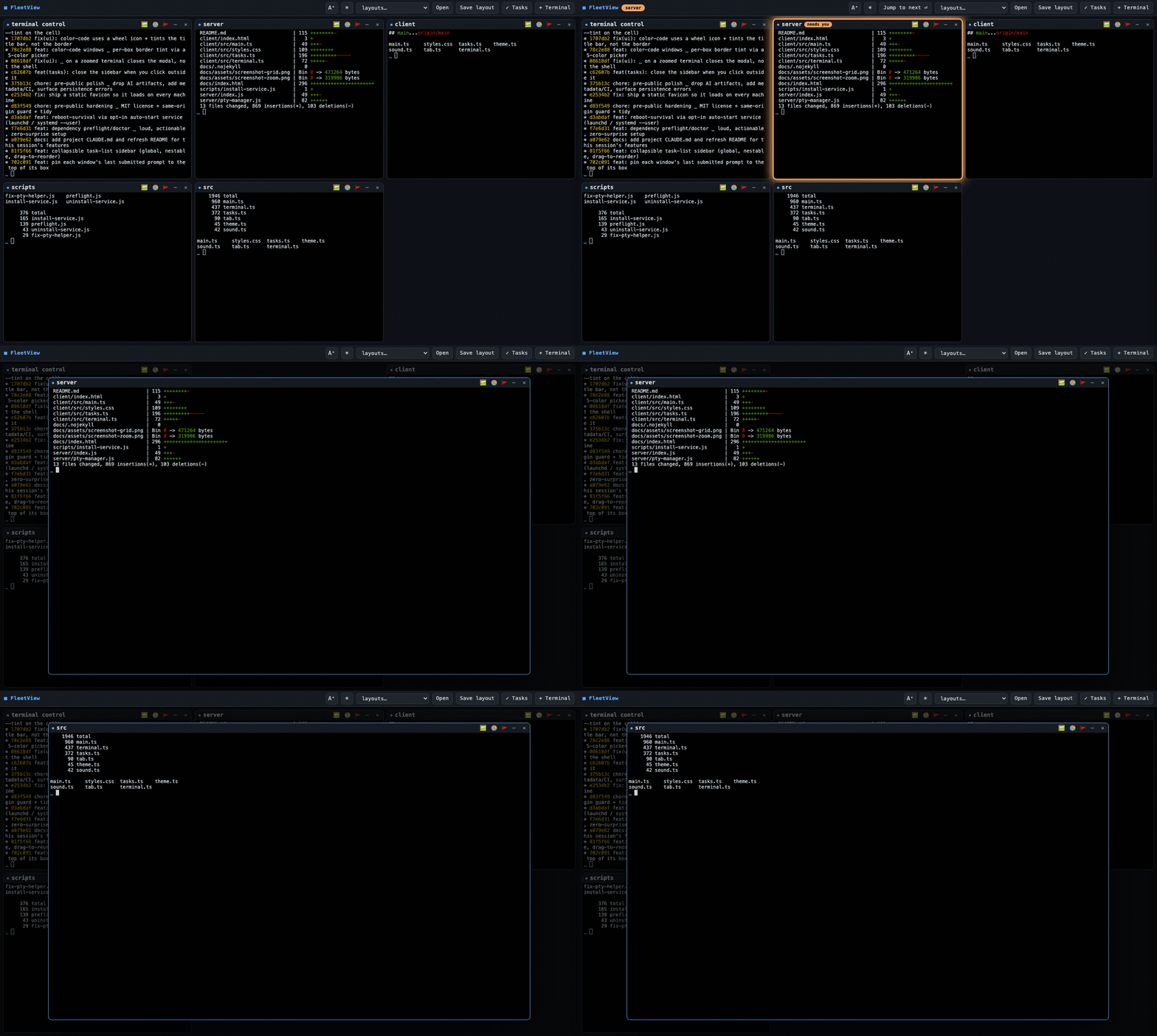
A box needs you → a chip jumps to the top bar → click to fly it to center → another finishes done. (still shot)
FleetView is a local tool. A tiny Node server on localhost spawns real shells on
your machine (macOS or Linux, via node-pty) and a single-page app renders them as a
grid of xterm.js boxes. Point each one at a folder, run claude
in it, and drive a whole fleet from one window. It binds to 127.0.0.1 only — it is
not for the cloud or a shared network. See Security.
Why FleetView
- 🖥️ A grid of real shells — one
node-ptyterminal per box, the actualclaude
(or any shell), not a wrapper or a fake. Click a box and it flies to the center
over a dimmed backdrop; click away or pressEscand it flies home. - 🔔 Attention without output-scraping — each shell carries a unique
FLEET_PANE_ID, and Claude Code hooks tell FleetView exactly which box needs
you. Nothing is parsed from terminal text; the hooks are a no-op in any shell
that isn't a FleetView terminal. Glow + ding + browser-tab badge. - 💾 Sleep-safe & restart-proof — every box runs inside a detached
tmuxsession,
so your Claudes survive a server restart or crash and auto-reconnect after
the laptop sleeps. No lost context, no manual refresh. - ↩️ Never silently lose a session — if a session dies or you set it aside, the box
isn't dropped: it lands in a recovery bar, reattachable with full state. - 🗂️ Layouts — save and restore whole sets of terminals (folders + order); reorder
by dragging; open a layout to add to the window or replace (non-destructively). - ✅ Shared task list — a nestable, drag-to-reorder checklist synced live across
every window. - 🎨 Make it yours — light/dark, large-text mode, and per-box border color-coding,
all persisted. - 🔒 Local-only by default — loopback bind, a same-origin / anti-DNS-rebind guard,
and honest docs for the one safe way to reach it remotely (a private tailnet).
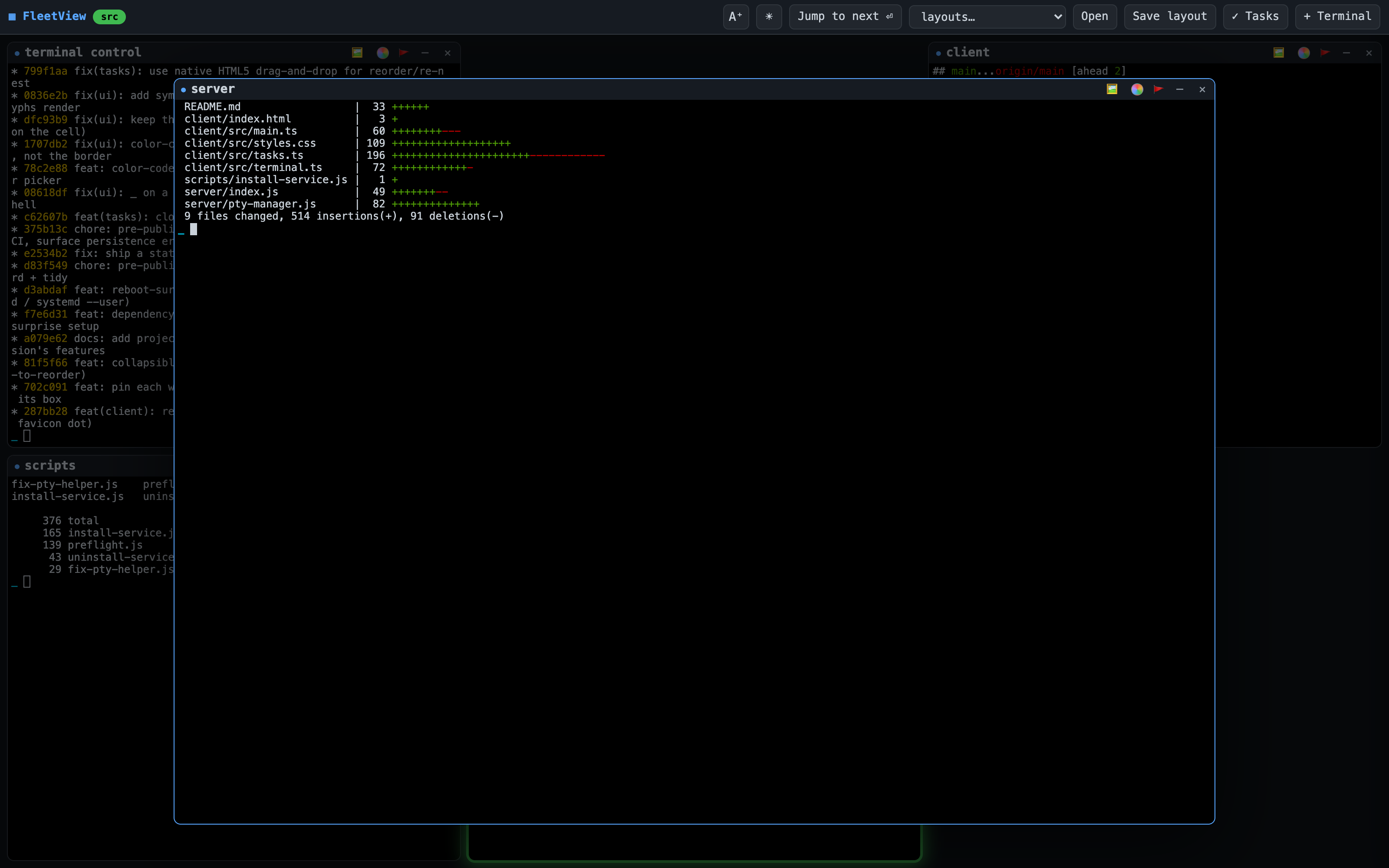
Click any box to zoom it to center; the rest of the fleet dims behind it.
Quick start
npm install      # builds node-pty (native) and pulls xterm/vite
npm run doctor   # checks tmux / curl / claude; offers to install tmux
npm run go       # build the client, then start the server
Open http://localhost:4280. Click + Terminal, pick a folder, and a shell opens
there running claude (untick "run claude" for a plain shell).
🌐 A visual tour lives at schoppllc.github.io/Terminalcontrol.
Dependencies
Needs Node.js (macOS or Linux). Three external tools matter:
| Tool | Needed for | If missing |
|---|---|---|
| tmux | durability — terminals surviving a server restart / sleep | the headline "sleep-safe / survives restart" feature won't work; treat tmux as required |
| curl | the attention hooks (glow / ding) | no alerts; usually preinstalled |
claude |
running claude in a box |
plain shells still work |
npm run doctor reports exactly what's missing with the install command for your
platform, and can install tmux for you (interactive, or set FLEET_AUTO_INSTALL=1).npm run go / npm start also run this check on boot and warn loudly if a
dependency is missing — a missing dependency is never silently ignored.
- Restart without rebuilding:
npm start(serves the existingdist/).npm run gorebuilds the client every time — use it after client changes or a
freshnpm install; usenpm startfor a plain restart (e.g. after installing tmux). - Different port:
FLEET_PORT=5000 npm run go.
Security
FleetView spawns real shells with no authentication: anything that can reach
its port can run arbitrary commands on the host. To contain that, the server
binds to 127.0.0.1 (loopback) by default, so only programs on this machine
can connect.
Do not expose it to a network. If you knowingly need LAN access (trusted,
firewalled network only), opt in explicitly:
FLEET_HOST=0.0.0.0 npm run go # reachable from the network — you accept the risk
It prints a warning when bound to anything other than loopback. There is still no
auth, so put it behind a VPN/SSH tunnel/reverse proxy if you go this route.
Also enforced for any browser request: a same-origin / anti-DNS-rebind guard.
A request carrying an Origin must have it match the Host, and (in loopback mode
or when an allowlist is set) the Host must be a trusted authority — so a website
you visit can't drive localhost:4280 (cross-site fetch/WebSocket → your shells).
The local curl hooks send no Origin and are allowed.
Remote access (securely)
Because there's no app auth, never expose FleetView with a public URL (notailscale funnel, ngrok-to-public, or open port). Reach it over a private,
authenticated network instead. Recommended: Tailscale (WireGuard mesh).
- Install Tailscale on the host and each device you'll connect from; sign in;
enable 2FA on the Tailscale account (an authenticator app is fine). - Keep FleetView on the default loopback bind.
- Front it with a tailnet-only proxy (HTTPS, never public):
tailscale serve --bg 4280 - Tell FleetView's guard to trust your tailnet name, and bake it into the
login service so it survives reboots:
(find the name withFLEET_ALLOWED_HOSTS=<machine>.<tailnet>.ts.net npm run service:installtailscale status/ the admin console). Without this, the
guard rejects proxied requests with a 403. - Harden the tailnet in the admin console: turn on device approval, and add an
ACL allowing only your devices to reach this host on:4280.
Then browse to https://<machine>.<tailnet>.ts.net from any approved device,
anywhere. Nothing is ever exposed to the public internet; access requires a
signed-in, approved device on your tailnet.
Interactions
- Open a terminal —
+ Terminalopens an in-browser folder browser: drill in
with breadcrumbs, search the current folder, sort by name / last edited /
last created, create a folder (+ Folder), one-click recent folders, and
★ Start to pin the folder the picker opens to by default. Then it spawns the
shell. Sort choice and default folder persist inlayouts.json. - Zoom — click a box to fly it to center over a dimmed scrim; click the scrim
or pressEscto send it home. - Minimize — the
–control shrinks a box to a chip in the bottom tray (its
Claude keeps running); click the chip to restore. The grid reflows to fill. - Close — the
✕control kills that shell. - Drag to rearrange — grab a box by its title bar and drop it onto another
slot to reorder the grid. - Appearance —
☀/☾toggles light/dark,A⁺/A−toggles large text. Both
persist (localStorage) and apply to the terminals and UI live. - Layouts —
Save layoutrecords this window's terminals (folders + order);Openrespawns a layout and asks whether to add it to the current window or
replace what's open. Stored inlayouts.json. When a layout is the window's
current one (shown as▣ namein the bar), dragging to reorder auto-saves
the new order back to it. Replace is non-destructive — it sets the current
terminals aside (recoverable), it doesn't kill them. - Recover — if a terminal's session dies (e.g. a long system sleep tears down
tmux) or you Replace a layout, the box isn't lost: it appears in the ⏎ recover
strip in the top bar; click to bring it back (reattached with full state if its
session is still alive, otherwise a fresh shell in the same folder). - Pinned prompt — the last prompt you sent a window's Claude is pinned under its
title bar (❯ …, full text on hover) so you can see what you asked each one. - Tab badge — when a box needs you, the browser tab title and favicon show it,
so you notice from another tab. - Tasks —
✓ Tasksopens a collapsible right sidebar (closed by default): a
single shared, nestable checklist. Add tasks/subtasks, check them off, edit
inline, and drag to reorder or re-nest. Stored server-side intasks.json
and synced live across all your windows. - Sleep-safe — close the laptop and reopen: terminals auto-reconnect; no manual
refresh needed.
Windows & sessions
Each browser window is an independent workspace (a "session", kept insessionStorage). A refresh reconnects to that window's terminals; a new
window starts empty so you can run a different layout in each window. Terminals,
dings, and the attention queue are scoped per window; layouts are shared across
all windows (saving one updates every window's dropdown live).
How the alerting works (no output scraping)
Each terminal is spawned with a unique FLEET_PANE_ID in its environment. On every
server start, FleetView merges three Claude Code hooks into ~/.claude/settings.json:
- Notification → POSTs
{pane, kind:"question"}to the server (Claude needs you) - Stop → POSTs
{pane, kind:"done"}(Claude finished its turn) - UserPromptSubmit → forwards your submitted prompt (it's pinned to that box)
So Claude tells FleetView exactly which box needs attention — nothing is parsed
from the terminal text. The hook commands are guarded with[ -n "$FLEET_PANE_ID" ], meaning they're a no-op in any shell that isn't a
FleetView terminal.
Removing the hooks
Open ~/.claude/settings.json and delete the hook entries whose command
contains FLEET_PANE_ID (under hooks.Notification, hooks.Stop, andhooks.UserPromptSubmit).
What persists
- Browser refresh / reopen while the server is up → reconnects to the same
live shells (your Claude sessions keep running, screen repainted from scrollback). - Server restart / crash (machine stays powered on) → if tmux is installed,
each shell runs inside afleet_<id>tmux session that outlives the server, and
FleetView reattaches on the next start (pane metadata is kept insessions.json). The inner tmux is made transparent — no status bar, no prefix
key, low escape-time — so Claude's TUI behaves normally. Without tmux, shells are
tied to the server process and a restart loses them. - Reboot → the tmux server dies too, so live sessions do not survive.
Boxes come back as fresh shells in the same folders (not restored Claude
sessions). The server can auto-return on login — see
Surviving a reboot. - Dead/set-aside terminals aren't dropped — their metadata is kept so you can
recover them (see the ⏎ recover strip). - Layouts are stored in
layouts.json; window order + per-pane last-prompt insessions.json; the task list intasks.json.
tmux is required for durable terminals. Run
npm run doctor(or just start
the server — it checks on boot) and it'll tell you loudly if tmux is missing,
with the exact install command, e.g.brew install tmux(then restart FleetView).
Surviving a reboot
By default the server doesn't come back after a reboot — you'd run npm start
again. To have it start automatically on login:
npm run service:install     # launchd (macOS) or systemd --user (Linux)
npm run service:uninstall   # stop auto-starting
service:install captures a working PATH into the service environment (otherwise
launchd/systemd hand it a minimal PATH and it can't find tmux/claude/curl). PassFLEET_PORT / FLEET_HOST at install time to bake them in; on macOS logs go to~/Library/Logs/fleetview.log. On Linux, to keep it running after you log out:loginctl enable-linger $USER.
Honest scope — what "survives a reboot" means:
- ✅ The server auto-restarts and
localhost:4280comes back up. - ❌ Your terminals do not — a reboot kills the tmux server, so the restored
boxes are fresh shells in the same folders, not your live Claude sessions.
(tmux only preserves sessions across a server restart while the machine stays
powered on.)
Don't run the service and
npm start/npm run goby hand at the same time —
two servers will fight for the port (the second now exits with a readable error).
Usenpm run service:uninstallto stop the auto-start one.
Architecture
Browser (per window)                 Node server (localhost:4280)
  grid of xterm.js boxes  ──WS /term──►  PtyManager  → one node-pty shell per box
  FLIP zoom-to-center                    LayoutStore → layouts.json
  attention queue/glow/sounds ◄─WS /control─ grid events (created/closed/attention)
                                       POST /hook  ◄── Claude Code hooks
| File | Responsibility |
|---|---|
server/pty-manager.js |
spawn/kill shells, tmux sessions, scrollback, attention, dormant recovery, persistence |
server/layout-store.js |
read/write named layouts + recent folders |
server/task-store.js |
read/write the global task tree (tasks.json) |
server/fs-browse.js |
list sub-directories for the folder picker |
server/setup-hooks.js |
idempotently install the guarded Claude Code hooks |
server/index.js |
HTTP + WebSocket wiring, REST + hook endpoints, static client |
client/src/terminal.ts |
one xterm box bound to one PTY socket (auto-reconnects) |
client/src/main.ts |
grid, zoom, minimize/tray, drag-reorder, folder picker, queue |
client/src/tasks.ts |
the task-list sidebar (tree, drag, debounced save) |
client/src/tab.ts |
browser-tab title + favicon attention indicator |
client/src/sound.ts |
generated alert tones (WebAudio) |
Contributing
Issues and PRs welcome. Before opening a PR: npm run typecheck and npm run build
should pass (CI runs typecheck + build + node --check). There's no test framework —
verify changes with throwaway Node scripts against isolated temp state (never boot a
real server for a test; it reads/writes live sessions.json / layouts.json /tasks.json and reattaches real tmux sessions).
License
MIT — see LICENSE.
Yorumlar (0)
Yorum birakmak icin giris yap.
Yorum birakSonuc bulunamadi