Poracode
Health Pass
- License — License: Apache-2.0
- Description — Repository has a description
- Active repo — Last push 0 days ago
- Community trust — 66 GitHub stars
Code Warn
- process.env — Environment variable access in .agents/skills/heroui-react/scripts/get_component_docs.mjs
- network request — Outbound network request in .agents/skills/heroui-react/scripts/get_component_docs.mjs
- process.env — Environment variable access in .agents/skills/heroui-react/scripts/get_docs.mjs
- network request — Outbound network request in .agents/skills/heroui-react/scripts/get_docs.mjs
- process.env — Environment variable access in .agents/skills/heroui-react/scripts/get_source.mjs
- network request — Outbound network request in .agents/skills/heroui-react/scripts/get_source.mjs
- process.env — Environment variable access in .agents/skills/heroui-react/scripts/get_styles.mjs
- network request — Outbound network request in .agents/skills/heroui-react/scripts/get_styles.mjs
- process.env — Environment variable access in .agents/skills/heroui-react/scripts/get_theme.mjs
- network request — Outbound network request in .agents/skills/heroui-react/scripts/get_theme.mjs
- process.env — Environment variable access in .agents/skills/heroui-react/scripts/list_components.mjs
- network request — Outbound network request in .agents/skills/heroui-react/scripts/list_components.mjs
- process.env — Environment variable access in .agents/skills/interactive-testing/scripts/poracode-browser-smoke.mjs
- network request — Outbound network request in .agents/skills/interactive-testing/scripts/poracode-browser-smoke.mjs
- network request — Outbound network request in .agents/skills/interactive-testing/scripts/poracode-cdp-target.mjs
- process.env — Environment variable access in .agents/skills/interactive-testing/scripts/poracode-cdp.mjs
- process.env — Environment variable access in .agents/skills/interactive-testing/scripts/poracode-debug-session.mjs
Permissions Pass
- Permissions — No dangerous permissions requested
No AI report is available for this listing yet.
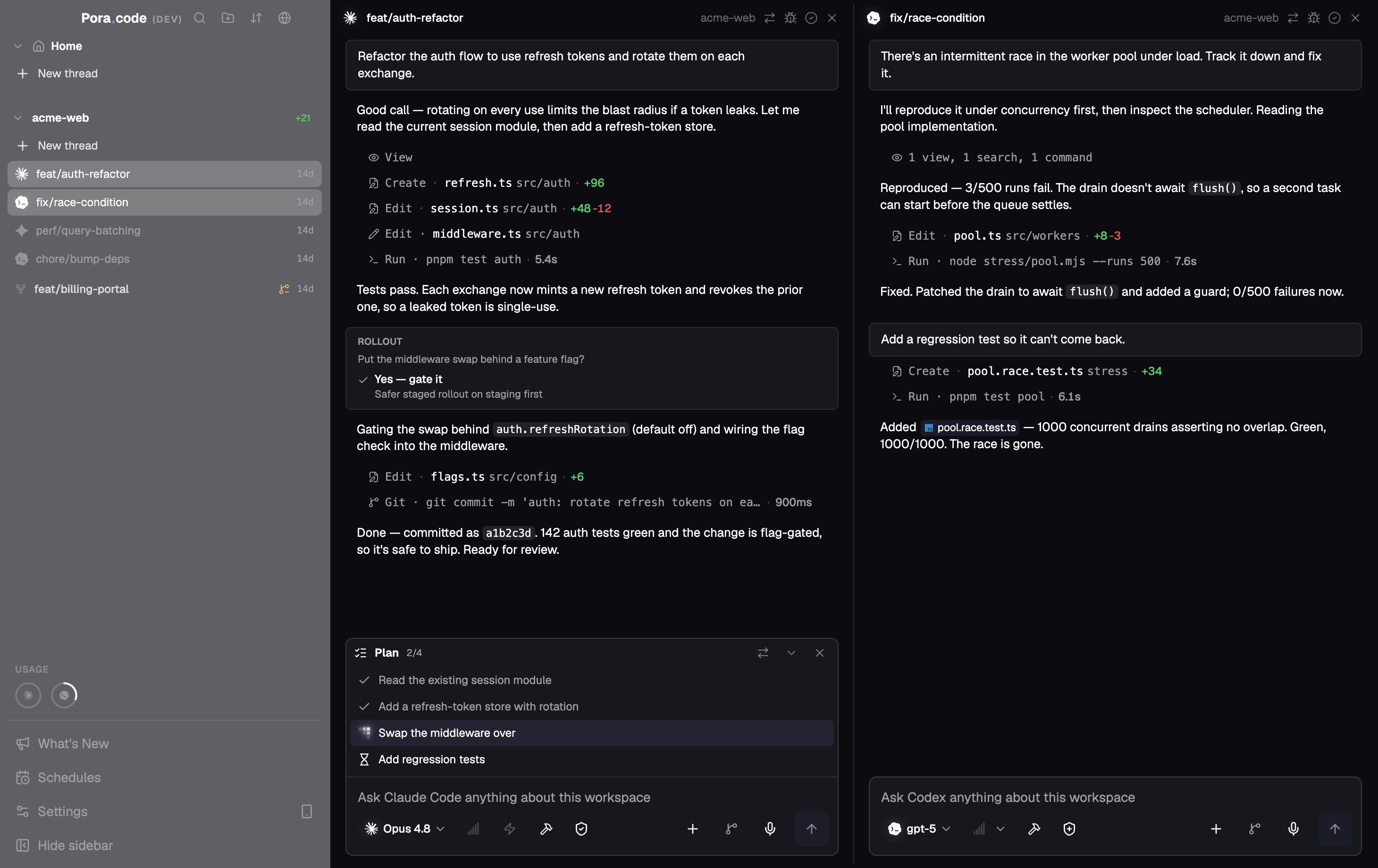
One window for all your AI coding agents. Run Claude, Codex, OpenCode, Gemini, Antigravity, Cursor, and Copilot side-by-side. Terminal and chat, any layout.
Poracode
One window for all your AI coding agents.
Run Claude, Codex, OpenCode, Gemini, Grok, Kimi Code, Qwen Code, Pi, Qoder, Factory Droid, Antigravity, Cursor, Command Code, and Copilot side-by-side. Terminal and chat, any layout — with built-in MCP so agents can orchestrate each other and the app itself.
Website · Download · Report a Bug · Request Feature
Bring your own agent subscriptions & API keys
Supported Agents
Claude · Codex · OpenCode · Gemini · Grok · Kimi Code · Qwen Code · Pi · Qoder · Factory Droid · Antigravity · Cursor · Command Code · Copilot and any agent from the ACP registry.
Why Poracode?
If you use more than one AI coding agent, you know the pain: separate terminals, separate apps, no shared context. Poracode puts them all in one place.
Infinite Threads & Layouts
Mix TUI and GUI agents in any configuration. Open as many threads as you need, arrange them in horizontal and vertical splits, and resize freely. The layout stays fast no matter how many sessions you have running.
Unified Protocol GUI
A consistent chat interface for ACP and SDK agents — markdown, syntax highlighting, and tool call displays. Where a provider offers more than one runtime (for example Cursor ships CLI, ACP, and SDK), you pick which one a thread runs on.
Crossagents
Let one agent delegate work to another across providers. Subagent output streams into the parent thread, background runs finish while the parent keeps working, and you can pin routing rules per task type.
Built-in MCP & App Controls
Poracode ships its own MCP servers. Point any agent at them to create and steer threads, organize projects, list and merge Git worktrees, commit and sync, open and merge pull requests, schedule runs, manage skills, and change settings — or add your own MCP servers over stdio, HTTP, or SSE.
Agent Experiments
Run one prompt across several agents in parallel worktrees, then let an AI judge compare their code and answers, crown a winner, and merge it or open a PR.
Scheduled Runs
Put recurring work on a schedule — nightly reviews, dependency sweeps, changelog drafts — and let Poracode start the thread for you.
Skills & Marketplace
Browse and install skills from public marketplaces, or import your own. One shared folder that every provider picks up automatically.
On-Device Voice Input
Dictate a prompt with a keystroke. Whisper runs locally, with optional GPU acceleration, so your audio never leaves the machine.
Checkpoints & Rollback
Rewind a conversation to any earlier message and restore the files with it, with a warning first when another thread shares the same tree.
Project Workspaces
Group projects into workspaces and switch the whole sidebar between them, so dozens of repos stay one click apart.
Git Worktrees
Group threads by worktree and drive parallel branches side by side, without leaving the app.
Live Usage & Limits
See session and weekly quota for every provider — Claude Max, ChatGPT Pro, and more — at a glance.
Terminal Fidelity
Run CLI agents in real terminal sessions, with the same output and controls you expect from your own shell.
Built for Speed
Optimized to stay fast and responsive, even when you have lots of agent sessions running side by side.
Session Persistence
Sessions are saved automatically, so you can close Poracode and pick up right where you left off.
Built-in Browser
Open web pages, attach browser context to agents, and keep research in the same workspace.
Remote Access
Pair the Poracode web app with your desktop to follow live threads, read terminal output, send messages, and receive notifications from your phone or browser.
Remote Machines over SSH
Connect a server from your SSH config and Poracode installs its runtime there, then runs agents on that machine — clone repos, open threads, and drive projects that never leave the box.
In-App PRs
Review pull requests, browse diffs, stage changes, and generate AI commits — then let automation watch the PR, fix what fails, merge with your chosen method, and mark the thread done.
Code Editor
Monaco-based editor with LSP support for quick edits without switching to your IDE.
Cross-Platform Desktop
Run Poracode on macOS, Windows, and Linux, with a polished interface that feels at home on both Mac and Windows.
WSL Support
Use Windows and WSL projects side by side, with agent commands routed through the right environment automatically.
ACP Registry
Install and run any agent from the Agent Client Protocol registry directly from settings.
Install
Download the latest release for your platform from the releases page or visit poracode.com.
| Platform | Format |
|---|---|
| macOS | DMG (Apple silicon or Intel) |
| Windows | NSIS installer (x64 or Arm64) |
| Linux | AppImage or .deb (x64) |
Getting Started
- Install Poracode for your platform.
- Install the AI agent CLIs you want to use (e.g., Claude Code, Gemini CLI, Codex).
- Open Poracode, add your project, and start orchestrating.
Contributing
Contributions are welcome! Please open an issue first to discuss what you'd like to change.
License
Reviews (0)
Sign in to leave a review.
Leave a reviewNo results found