sealwire
Health Uyari
- License — License: NOASSERTION
- Description — Repository has a description
- Active repo — Last push 0 days ago
- Low visibility — Only 8 GitHub stars
Code Basarisiz
- rm -rf — Recursive force deletion command in .github/workflows/npm-release.yml
- rm -rf — Recursive force deletion command in .github/workflows/rust-ci.yml
- exec() — Shell command execution in claude-worker/cli-account.mjs
- process.env — Environment variable access in claude-worker/fake-claude-worker-pending-repro.mjs
Permissions Gecti
- Permissions — No dangerous permissions requested
Bu listing icin henuz AI raporu yok.
Your coding agents, working together on your machine — cross-agent review, /goal, and phone approvals.

Sealwire



English · 中文
Your coding agents, working together on your own machine — and in your pocket wherever you go.
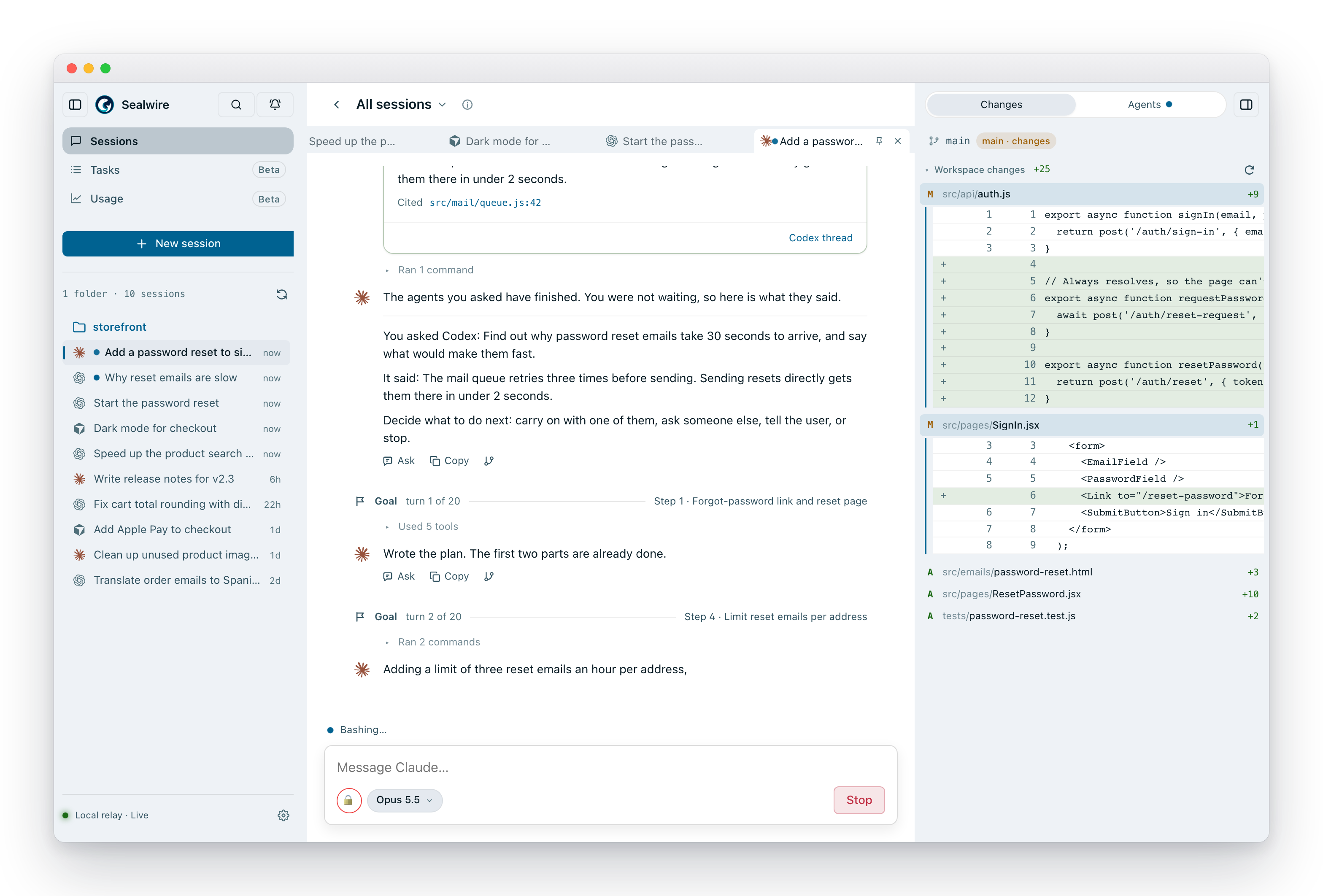
Sealwire puts Claude Code, Codex, Cursor, OpenCode and Pi behind one simple screen. Start
work at your desk, check on it from your phone, approve the next step from the
couch. The agents run on your computer, next to your code — Sealwire itself never
sees it.
- All your agents in one place. Claude Code, Codex, Cursor, OpenCode and Pi
side by side, in the same window, with the same controls. Use whichever one you like for
each job, or switch mid-project. - Agents that check each other's work. Ask a different agent to review
what was just written — Claude reviews Codex, Codex reviews Claude — and let
them go back and forth until the reviewer is happy. - Agents that work as a team. Set a goal and let an agent run until it's
done, pass a side job to another agent, or hand the whole thing over — each
one a single slash command. - Pick up anywhere. The same session follows you from laptop to browser to
phone. You get a notification when an agent needs you, and can approve it
right there. - Private by default. Sealwire has no copy of your code or your
conversations. When your phone connects from outside, everything is end-to-end encrypted — even the server
in the middle can't read it. - Free for personal and internal business use. No account and nothing to
deploy — one command and you're running. Reaching it from your phone goes
through SealWire Cloud, which needs an access key.
Get started
You need Node.js 20 or later and at least one of these installed and logged in:
- Claude Code — a Claude
login or anANTHROPIC_API_KEY. Everything else it needs comes bundled. - Codex — the
codexcommand-line tool. - Cursor — the
cursor-agentcommand-line tool. - OpenCode — the
opencodecommand-line tool,
with a model set up. - Pi —
npm install -g @earendil-works/pi-coding-agent,
with a model set up. Pi sessions always run with full access.
Then, in the folder you want to work on:
npx sealwire
Sealwire opens in your browser at http://localhost:8787. It only listens on
your own machine until you decide otherwise.
Tip: run it on a computer that's always on — a desktop, a home server — and
long jobs keep going even with your laptop closed.
Connect your phone
npx sealwire cloud
The first time, it asks for your SealWire Cloud access key. Cloud is in beta;
email [email protected] for a key. Then open
Settings › Devices › Pair new device on your computer, scan the QR code with
your phone, and click Approve back on the computer. The same sessions show up
on your phone at https://app.sealwire.dev. Add it to your home screen and it
works like an app, notifications included.
Step-by-step guide, with fixes for common problems:
Connect from your phone or another computer.
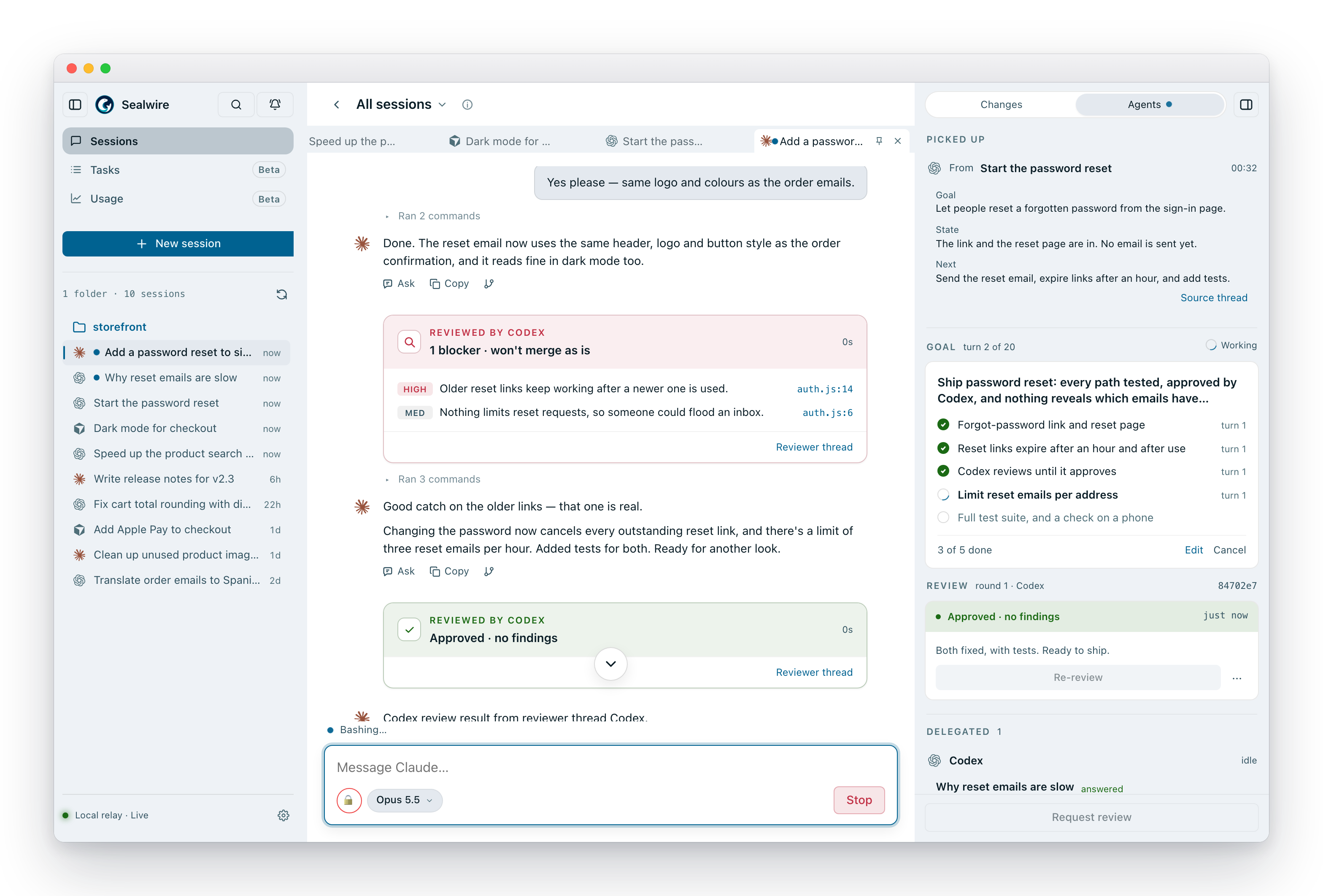
Let agents review each other
One model checking its own homework isn't much of a check. In Sealwire, review
is one click: pick who should review, which model, and how many rounds of back
and forth you'll allow.
The reviewer works in its own session, looks at the actual changes, and posts
its findings — and a clear verdict — back into your conversation. Allow more
than one round and the two agents keep going until the reviewer approves.
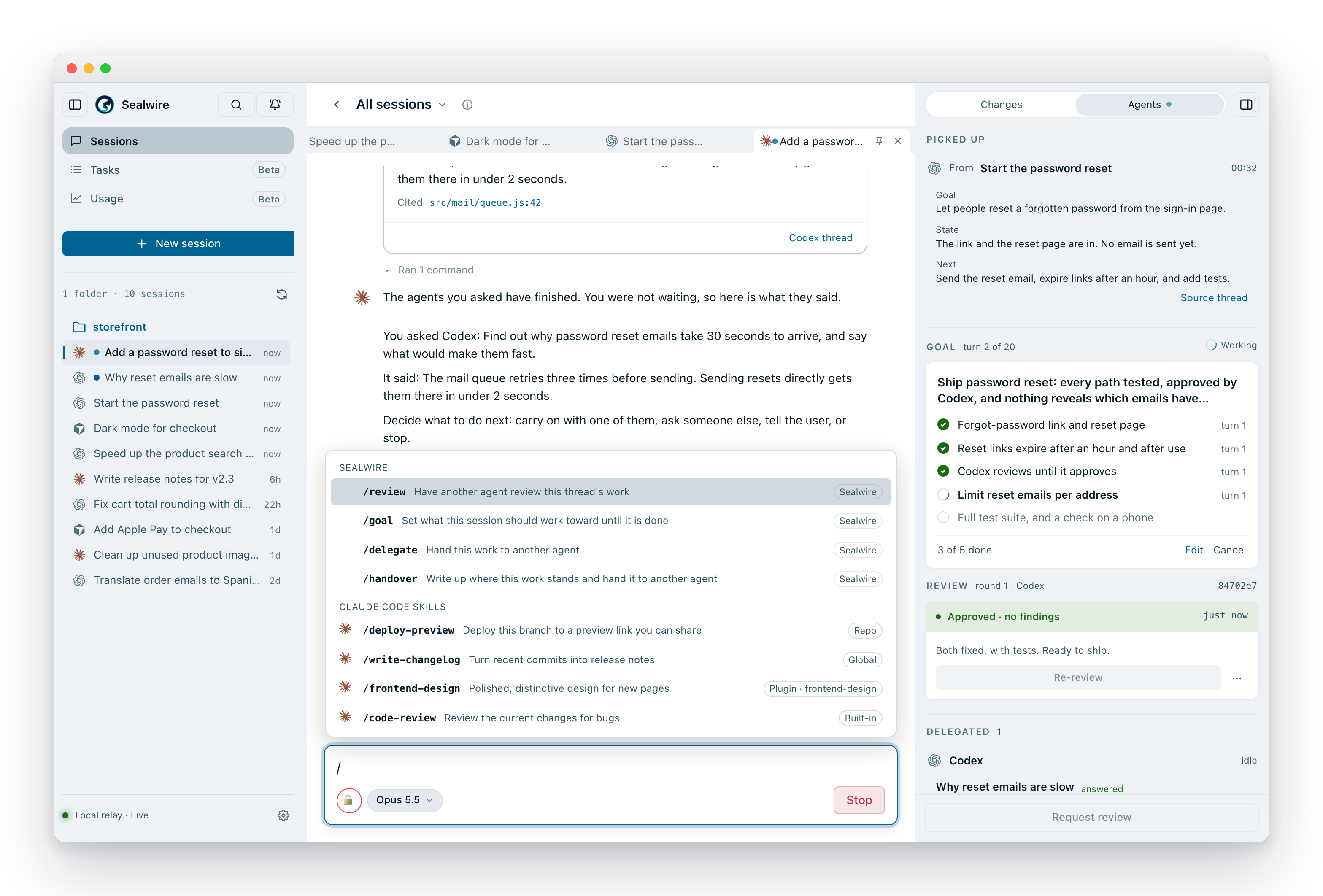
Four commands that do the heavy lifting
Type / in the message box. Each command reads plain words for who and how
— codex, opus 5, high — and whatever you write after that is the
instruction.
| Command | What it does |
|---|---|
/goal |
Give the agent a finish line and let it keep going on its own until it gets there. It stops only to say done (with proof), stuck (and why), or I need you to decide something. |
/review |
Have a different agent check the work so far. /review codex gpt-5.5 high focus on the error paths |
/delegate |
Pass a side job to another agent and get the answer back — say, Codex chases a flaky test while Claude keeps going. Both conversations stay open, so you can read along or step in. |
/handover |
The current agent writes up where things stand and hands the whole job to another one to finish. Handy when you've run out of quota, or want a fresh pair of eyes. |
With /delegate and /handover you can also type @ to pick a session that's
already open, instead of starting a fresh one. Your agents' own commands and
skills show up in the same menu, right beside these.
How the four differ, and which ones an agent can also start on its own over
MCP: Slash commands.
Stay in control from anywhere
Long work shouldn't need you at your desk. Every session is on your phone —
which agent is on what, which goal is still running and how far along it is,
and what the agents you brought in came back with.
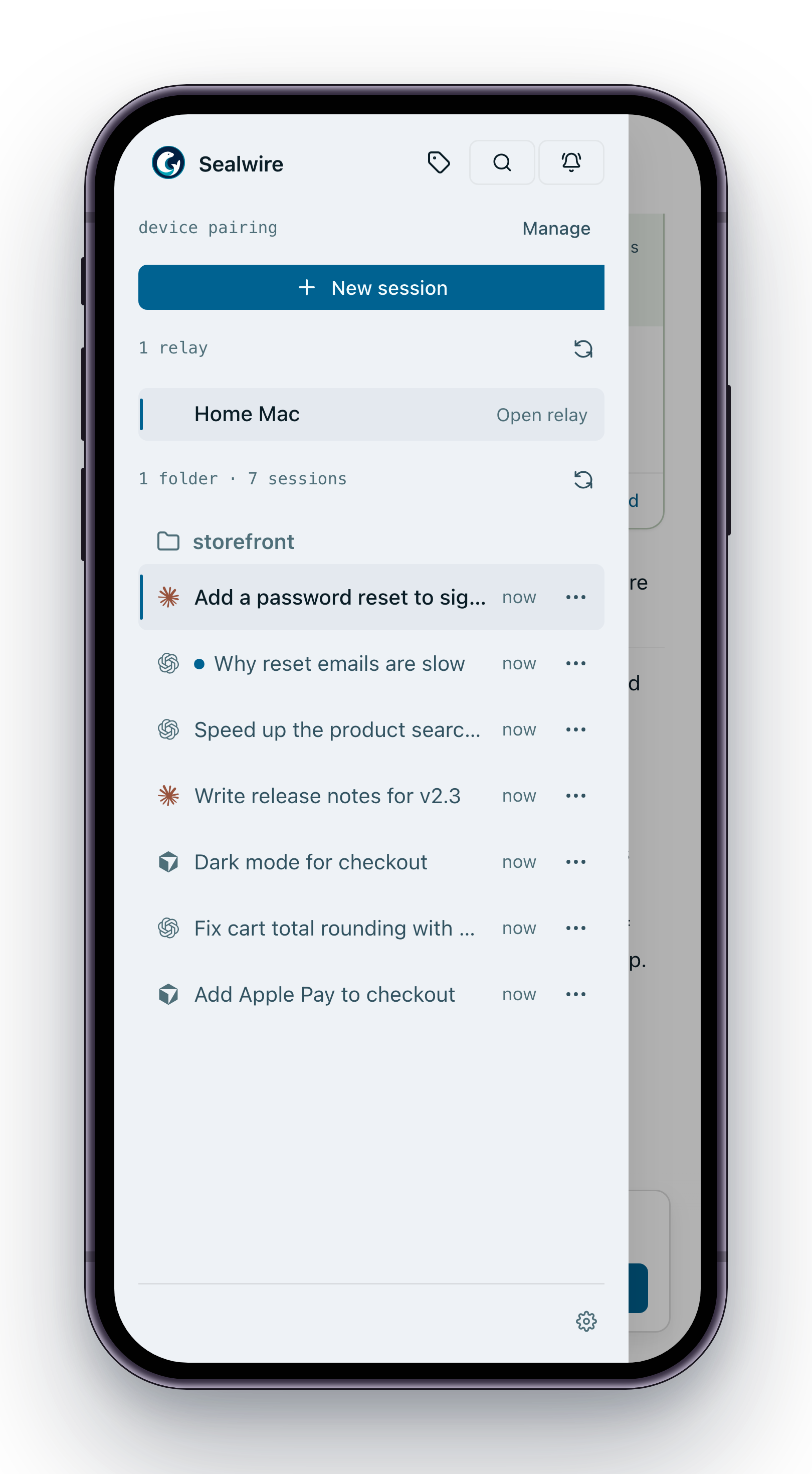
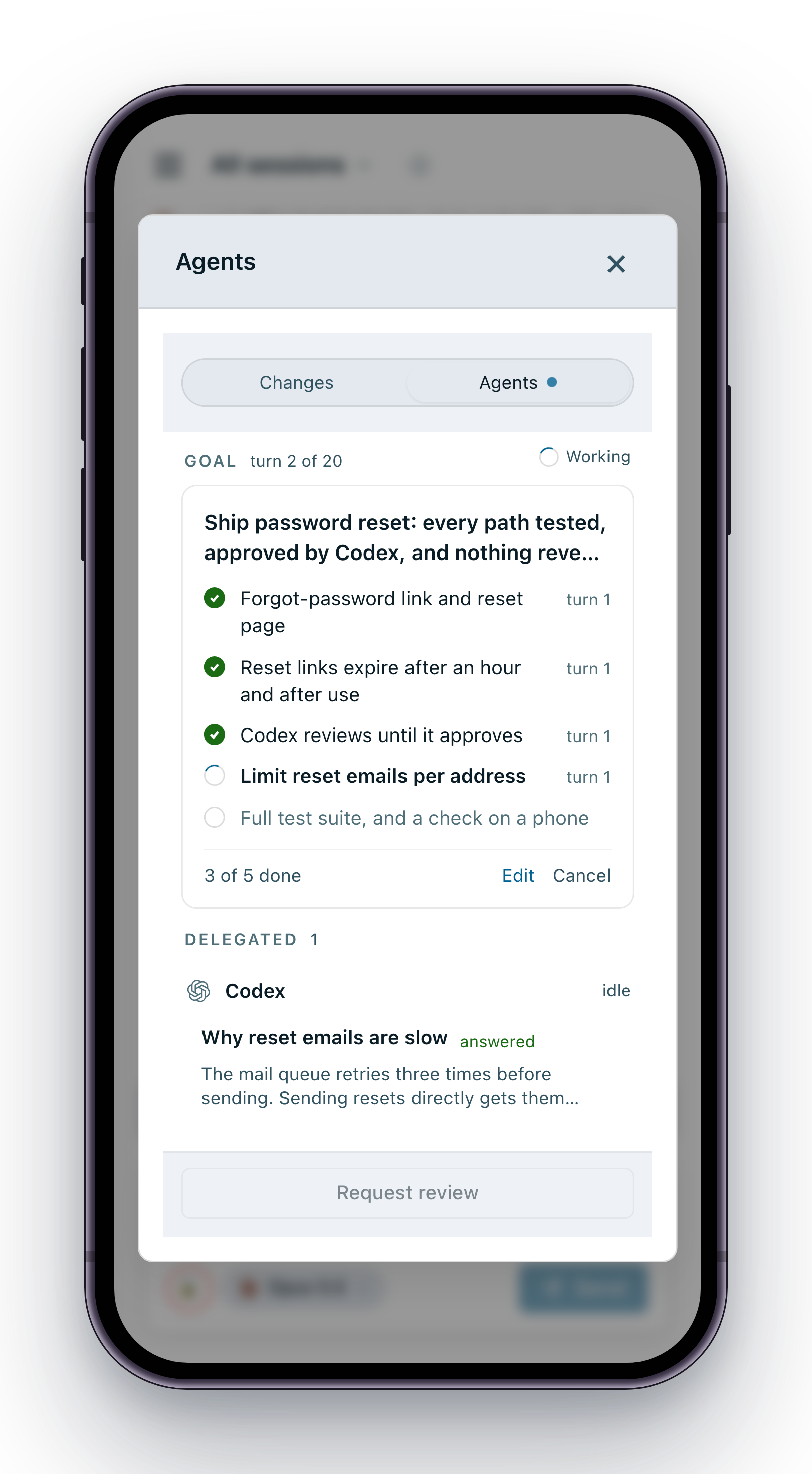
When an agent wants to run a command or change something important, you see
exactly what it's asking for and approve or deny it right there. Push
notifications tell you when a session needs you, finishes, or runs into trouble,
and any session picks up from whichever device is in your hand.
And a lot more
- Projects and worktrees — sessions grouped by repo and branch, with a
panel showing exactly what changed. - Tabs and pins — keep several sessions open side by side.
- Fork a conversation from any message to try another idea without losing
the original — even into a different folder. - Search and a notification bell across every session, so an agent that
needs you in the background never gets lost. - Approval modes per session, from "ask me about everything" to "just go".
- Desktop app for macOS (preview), with a menu-bar icon.
Commands
npx sealwire                 # start on this machine only, and open the browser
npx sealwire cloud           # also let your phone connect from anywhere (access key)
npx sealwire local           # guarantee it never talks to the internet
npx sealwire --port 8788     # use a different port
npx sealwire --no-open       # don't open a browser
npx sealwire --help          # everything else
Prefer to run your own connection server instead of Sealwire Cloud? Point--broker at a self-hosted one.
What's coming
- Tasks and task teams — give Sealwire a goal, and a coordinator agent
plans it, splits it across several agents, and has their work reviewed before
it lands. You approve the plan; it does the rest. - Usage and cost — how many tokens, and how much money, each agent and
project is using, week by week. - More agents.
- A native mobile app, where the web version hits its limits.
Security
Private mode is the default: anything that travels between your devices is
end-to-end encrypted, and the connection server only ever passes along data it
can't read. The details are in docs/security-model.md.
Development
Sealwire is a Rust server, a small Node worker for Claude Code, and a Vite web
app. AGENTS.md has the code map and the checks to run after a
change, and docs/testing-matrix.md explains what
each test suite covers.
cargo test -p relay-server
node --test claude-worker/*.test.mjs
npm test
License
Source-available under the PolyForm Internal Use License 1.0.0, with
additional permissions for private personal use and contributions to Sealwire.
See LICENSE for the complete terms.
- Use and modify Sealwire for your company's internal business operations,
including commercial development, or for your own private personal use. - Software you independently develop using Sealwire is not subject to this
license merely because you used Sealwire as a tool. - Distributing Sealwire or a modified version, bundling it in a product, or
providing it to customers as a service requires a separate license, even for
free or non-competing offerings. The contribution exception only permits
sharing needed to contribute to this project. - Allowing customers to use or trigger Sealwire's functionality through another
product's backend also requires a separate license. Using it internally to
produce work you deliver to a client is permitted, including use by your
company's contractors.
For a separate license, contact [email protected].
Third-party components retain their own licenses. Their copyright and license
texts ship as THIRD_PARTY_NOTICES.txt in every release and are served at/static/THIRD_PARTY_NOTICES.txt. After changing dependencies, build the
frontend and run npm run licenses:generate before building release binaries.
npm packaging preserves the notices supplied with each prebuilt binary.
Contributions
By submitting a contribution you agree to the terms inCONTRIBUTING.md, including a broad license that allows the
maintainer to relicense contributions in the future.
Yorumlar (0)
Yorum birakmak icin giris yap.
Yorum birakSonuc bulunamadi