pairroom
Health Gecti
- License — License: MIT
- Description — Repository has a description
- Active repo — Last push 0 days ago
- Community trust — 11 GitHub stars
Code Gecti
- Code scan — Scanned 12 files during light audit, no dangerous patterns found
Permissions Gecti
- Permissions — No dangerous permissions requested
Bu listing icin henuz AI raporu yok.
Local dual-agent room for official Claude Code, Codex, and Grok Build. Efficient collaboration, token-friendly, mix a strong planner with an economical executor. Native harnesses — not a replacement. Interruptible and auditable.
PairRoom
English · 简体中文
Two independent coding agents. One problem. Your native workflow. PairRoom connects supported Claude Code, Codex, and Grok Build sessions for evidence-based cross-review without replacing their model loop, tools, skills, or subagents.
Why use it?
Having Claude Code draft a plan, copying it to Codex for review, and pasting the review back gets tiring when it repeats. PairRoom lets the two Agents talk directly: one proposes, the other challenges, supplements, or executes. You see the whole exchange and can step in at any time.
Exactly two Agents. Two participants can cover each other's gaps over the shortest communication path. More Agents add coordination and token overhead that this job rarely repays.
Official harnesses, not another one. Claude Code, Codex, and Grok Build keep their own model loop, tools, skills, and subagents. The official harnesses are more stable and complete, and their models are tuned for them.
Two host modes. Either slot may use any supported Runtime, including the same Runtime twice.
Host mode Choose it for Boundary Native (recommended for daily work; experimental) Your original Claude Code, Codex (including Codex Desktop), or Grok Build sessions, so you keep working in your usual terminal (such as WezTerm) or client instead of moving into another IDE or ADE PairRoom supplies bindings, durable relay, and audit. The original harness owns configuration, permissions, and execution; Room selections are display-only. Embedded PairRoom's desktop or browser conversation and supported adapter controls; independent Runtime, Provider, model, effort, and instructions per slot PairRoom owns adapters and schedules one native Turn at a time within the Room. Unspecified overrides inherit native configuration. Customizable responsibilities. By default one Agent plans and reviews while the other implements and supplements. A custom Room can instead ask them to discuss a plan together, each execute a part, then review the other's work. Responsibilities are not permissions or mandatory phases: simple tasks stay with the addressed Agent, and review completion does not automatically authorize implementation.
Transparent and interruptible. Messages between the Agents are visible in the Room. In Native, each side's work also stays visible in its own terminal or client, so you can stop or correct it as soon as it drifts.
Only the pair's collaboration. General Agent workbenches such as Orca provide broad workspaces and task orchestration. PairRoom relays directly between two Agents without another coordinating model or orchestration layer; task decomposition and subagents stay with each native harness. Less coordination is model-visible, but that is a mechanism, not a measured token or cost saving.
Retain your repository instructions, worktrees, and PR/MR policy. PairRoom does not add a mandatory phase engine or append accumulated Room history to every relay. Compact byte budgets are not guarantees of lower billed tokens or better accuracy.
Read Why PairRoom for fit and limits, Alternatives for dated primary-source comparisons, and the review-first recipe for practical prompts.
Install and try
Download a package from Releases; Windows users can install Desktop with winget install PairRoom. Installation covers prerequisites and per-channel upgrade/uninstall. Prebuilt CLI and desktop packages do not require Go.
For the CLI on Linux, macOS, or Git Bash, review the installer before executing it:
curl -fsSL https://github.com/sean2077/pairroom/releases/latest/download/install.sh | sh
pairroom service --mock --data-root "$HOME/.pairroom-demo"
Use an unused demo data root and a disposable Git repository. In Management, register the repository as a Project, create an Embedded Room, and send a small task. Mock does not launch vendor CLIs or consume model quota; it does not demonstrate model quality. Do not share the authenticated startup URL.
For real work, install and authenticate each selected CLI independently. For daily work, use Native (Native setup) to keep your original sessions; it remains experimental. Embedded (Getting started) is the quickest first trial and the mode for independent per-slot Provider selection. A CLI version or environment check alone does not prove authentication or model availability.
To have your coding Agent guide installation and environment checks, ask it to read Agent-assisted setup:
Read https://raw.githubusercontent.com/sean2077/pairroom/main/docs/AGENT_SETUP.md
and help me install PairRoom and check my environment. Ask before each change.
Important boundaries
New Embedded Rooms default to YOLO for both participants. Select narrower native permissions explicitly. Native Rooms retain the original harness's permissions. Responsibilities do not restrict tool access, and neither host mode locks the repository against external writers. Native Turn ownership is advisory, not enforced scheduling.
There is no automatic relay-count or cost limit. Durable recovery distinguishes queued work from uncertain delivery rather than blindly replaying execution after a crash. Local storage does not mean cloud-model requests stay on the machine. Read Security, Concepts, and Storage.
Native host mode (experimental)
Install and approve the project hooks once, then create and join from the Agents' own tool environments:
pairroom relay install --runtime claude,codex
In the first session, load the installed skill and run /pairroom-relay <topic>. In the second session, ask its Agent to execute the exact join command printed by the first. Each bind reads the official session ID and associates immediately. No nonce echo, initial Stop, or routine status check is required. Reuse that binding for subsequent rounds; do not create another Room just to join.
The exact peer handle returned by bind routes an automatic Stop reply; @user publishes for the human. An unaddressed Native Stop reply is not copied into the Room. Explicit relay send / exchange instead uses the command's target, regardless of body mentions. Publishing through both paths can produce two messages. See publication rules.
Approved Stop hooks collect within a bounded park window. Outside it, a wake-enabled Room can send a fixed body-free nudge through an available Claude inbox or Codex queue; it does not start or interrupt sessions. Grok uses foreground collection, with harness-owned background wait only where completion is surfaced. CLI waiting does not call a model, but wake/continuation and billing depend on the harness. Clipped Grok replies require explicit full-text publication. Grok has no Service wake and at most seven Stop continuations, so it is the weakest fit for long unattended runs; see long unattended runs.
NATIVE_RELAY.md owns installation, file-based evidence, cwd/worktree discovery, wake limits, and recovery. The skill also ships through npx skills add sean2077/pairroom; skill-only installation does not install or approve hooks. Dated vendor observations are not current release-gate certification.
Inspect and recover without replay
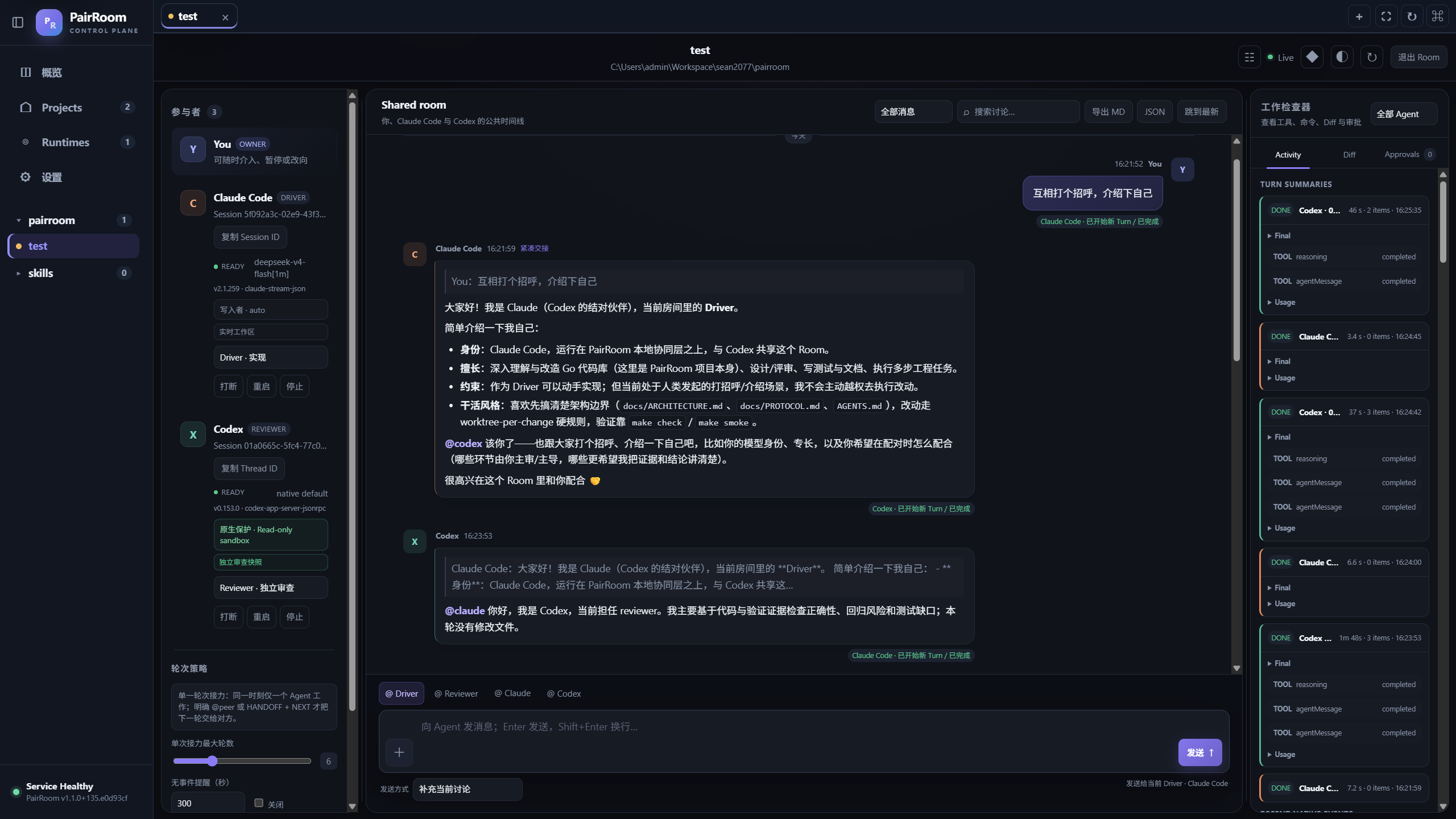
Native Rooms use participants on the left, conversation in the center, and a Work inspector on the right. Panels collapse independently on wide screens and open one at a time on compact screens. Displayed configuration and activity are observations, not control over the original process or proof of live presence.
Pending items remain separate from recent chat. Use pairroom relay doctor, pairroom relay history --pending, or pairroom relay history --id ID for targeted diagnosis. Optional Git review versions identify evidence, not approval to execute. Refreshing an unconfirmed browser send checks its original receipt without resending; forgetting its local draft does not cancel accepted work. handed_off proves CLI stdout, not model acceptance. See Native recovery.
Desktop and source development
Desktop and browser share the same Management Shell and Service. Desktop startup never installs a daemon: it reuses an installed daemon or owns an embedded Service. Settings → Desktop → Launch at login changes only native login registration. Closing the window hides it to the tray; quitting does not stop an external daemon. Closing a Room tab does not archive it or stop native work. See Operations.
With source-development dependencies installed:
make dev            # stops an installed daemon; runs the current-tree Service
make docs-check
make check
make smoke
Desktop source commands are make desktop-build, make desktop-package, and make desktop-update. They are not prerequisites for using a release package. See Contributing and Desktop development.
Documentation and support
Documentation map · Configuration · CLI · API · Troubleshooting · Upgrading · Support
Changelog records history; current behavior belongs in the references. Native remains experimental: Mock, synthetic hooks, browser fixtures, and old working-session reports do not replace authenticated multi-round vendor E2E. No new vendor acceptance or billed-token benchmark is claimed here. Desktop packages are not claimed to be production-signed or notarized. The interface supports English and Simplified Chinese; maintained technical documents are in English.
Friends
- LINUX DO — a technical community for sincere sharing and friendly discussion, where PairRoom's own discussion and feedback are also published
License
Yorumlar (0)
Yorum birakmak icin giris yap.
Yorum birakSonuc bulunamadi