agentbridge
Health Pass
- License — License: GPL-3.0
- Description — Repository has a description
- Active repo — Last push 0 days ago
- Community trust — 18 GitHub stars
Code Pass
- Code scan — Scanned 10 files during light audit, no dangerous patterns found
Permissions Pass
- Permissions — No dangerous permissions requested
This tool is an MCP server that allows AI agents to interact with and control Classic Mac OS (versions 7 through 9). It works by passing commands and reading responses through a shared file folder, bridging modern AI systems with retro computing environments or emulators.
Security Assessment
Overall Risk: Low. The tool functions strictly via a localized shared folder protocol (reading and writing text files) rather than opening direct network ports or executing shell commands. The automated code scan of 10 files found no dangerous patterns, no hardcoded secrets, and the package requests no dangerous permissions. The primary risk stems from the inherent nature of the tool—allowing an AI agent to control an operating system to execute actions like typing text, opening applications, and browsing files. However, the physical isolation of the target (usually an emulator or legacy hardware) and the lack of aggressive network capabilities keep the threat surface minimal.
Quality Assessment
The project appears healthy and is actively maintained, with its most recent code push occurring today. It is legally clear for use and modification under the GPL-3.0 license. The repository has a solid, descriptive README and has garnered 18 GitHub stars, indicating a modest but real level of community trust and interest.
Verdict
Safe to use.
Let AI agents control Classic Mac OS through a shared folder protocol.
AgentBridge


Let AI talk to your Classic Mac.
AgentBridge is a native Classic Mac OS application that lets AI agents (like Claude) interact with Mac OS 7–9 through structured commands and responses. It works on real hardware and emulators — no modifications to your Mac required.
Drop AgentBridge into a shared folder, launch it on your Mac, and an AI agent can list windows, open apps, type text, read the clipboard, browse files, and more — all through a simple text-based protocol.
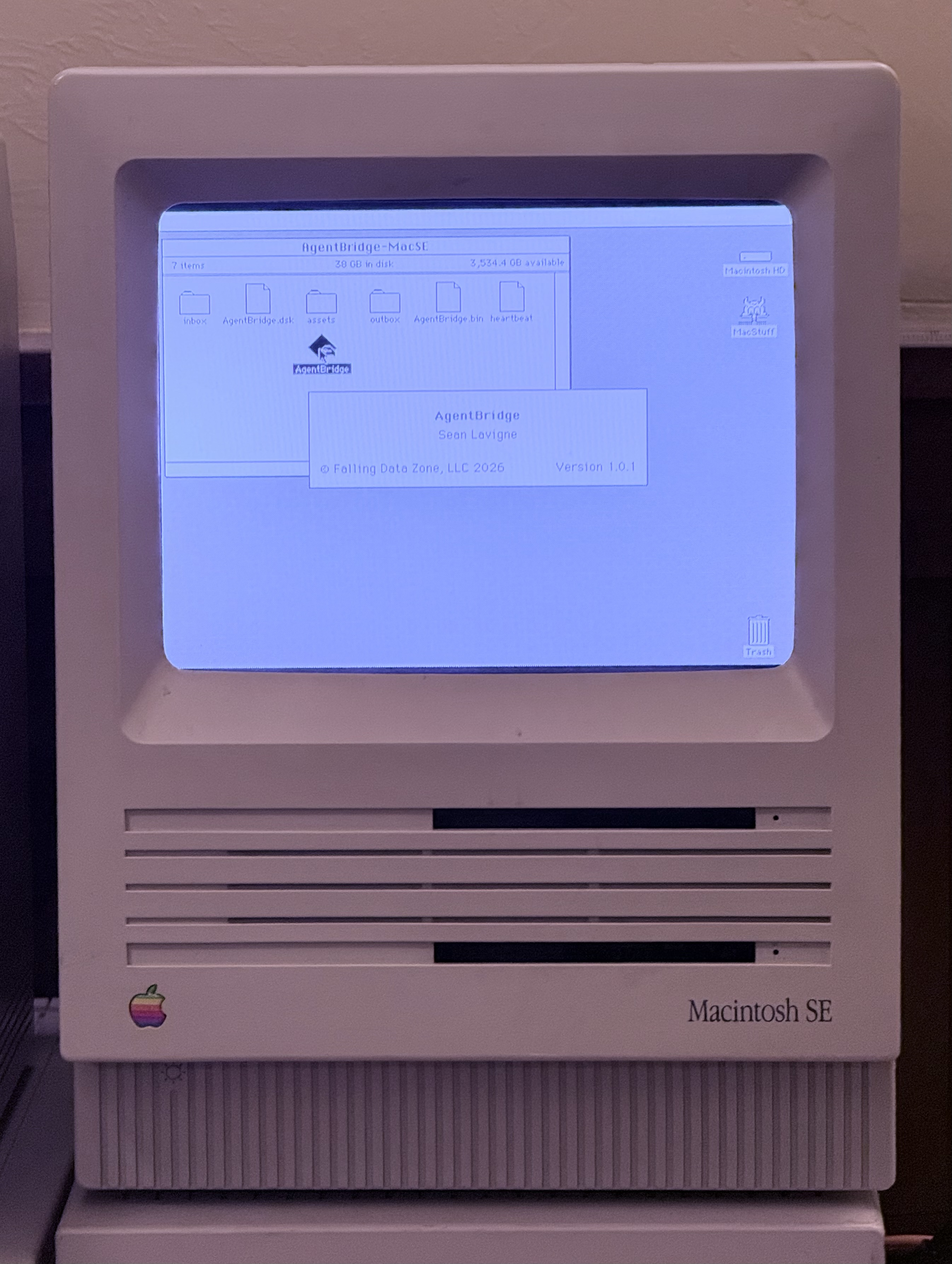
How It Works
┌──────────────────────┐
│    Claude / AI Agent │
│         │            │
│    MCP Protocol      │
│         │            │
│    MCP Server (Node) │
│         │            │
│    Shared Folder I/O │
└────────┬─────────────┘
         │  reads/writes text files
         │
    ┌────┴──────────────────────────┐
    │  Shared Volume (NAS / AFP /   │
    │  SMB / emulator extfs)        │
    │                               │
    │  AgentBridge-MyMac/           │
    │  ├── inbox/   ← commands in   │
    │  ├── outbox/  ← responses out │
    │  ├── assets/  ← file staging  │
    │  └── heartbeat                │
    └────┬──────────────────────────┘
         │
┌────────┴─────────────────────────┐
│  Classic Mac OS 7 / 8 / 9        │
│                                  │
│  AgentBridge.app                 │
│  - Polls inbox for commands      │
│  - Executes via Mac Toolbox      │
│  - Writes responses to outbox    │
│  - Heartbeat every 2 seconds     │
└──────────────────────────────────┘
The transport is just a folder. How that folder is shared between the AI and the Mac is up to you:
- NAS/file server (AFP or SMB) — multiple Macs and your modern computer all mount the same share
- Emulator shared folder — BasiliskII and SheepShaver both support host directory sharing
- Any other shared filesystem — if both sides can read and write files, it works
No SSH. No special drivers. No modifications to your Mac's system. AgentBridge is a regular application — launch it, quit it, done.
MCP Tools Reference
The MCP server exposes these tools to AI agents. If the fleet has only one target, the target parameter is optional on all tools.
System & Status
classic_mac_list_targets
List all configured Classic Mac targets and their status (heartbeat alive/dead).
No parameters.
classic_mac_ping
Health check — returns pong if AgentBridge is responding.
| Parameter | Required | Description |
|---|---|---|
target |
No | Target ID or alias |
classic_mac_heartbeat
Read the heartbeat file — shows uptime, front app, free memory, timestamp.
| Parameter | Required | Description |
|---|---|---|
target |
No | Target ID or alias |
classic_mac_get_about
System information — OS version, machine type, RAM, free memory, uptime.
| Parameter | Required | Description |
|---|---|---|
target |
No | Target ID or alias |
Windows & Processes
classic_mac_list_windows
Enumerate all visible windows across all applications. Returns window index, title, bounds (left,top,right,bottom), and front/back layer.
| Parameter | Required | Description |
|---|---|---|
target |
No | Target ID or alias |
classic_mac_get_front_window
Get details about the frontmost window — title, bounds, owning app.
| Parameter | Required | Description |
|---|---|---|
target |
No | Target ID or alias |
classic_mac_list_processes
List running applications with name, creator code, PID, and memory partition.
| Parameter | Required | Description |
|---|---|---|
target |
No | Target ID or alias |
Menus
classic_mac_list_menus
List the menu bar entries for the frontmost application.
| Parameter | Required | Description |
|---|---|---|
target |
No | Target ID or alias |
classic_mac_get_menu_items
Get items within a specific menu by name.
| Parameter | Required | Description |
|---|---|---|
target |
No | Target ID or alias |
menu |
Yes | Menu title (e.g. "File", "Edit") |
classic_mac_menu_select
Activate a menu item by name. Works for items with keyboard shortcuts.
| Parameter | Required | Description |
|---|---|---|
target |
No | Target ID or alias |
menu |
Yes | Menu title |
item |
Yes | Menu item name |
Mouse & Keyboard
classic_mac_click
Click at screen coordinates.
| Parameter | Required | Description |
|---|---|---|
target |
No | Target ID or alias |
x |
Yes | X coordinate (pixels from left) |
y |
Yes | Y coordinate (pixels from top) |
clicks |
No | Number of clicks (default 1, use 2 for double-click) |
classic_mac_mouse_move
Move the cursor without clicking.
| Parameter | Required | Description |
|---|---|---|
target |
No | Target ID or alias |
x |
Yes | X coordinate |
y |
Yes | Y coordinate |
classic_mac_mouse_drag
Click and drag from one point to another.
| Parameter | Required | Description |
|---|---|---|
target |
No | Target ID or alias |
x1 |
Yes | Start X |
y1 |
Yes | Start Y |
x2 |
Yes | End X |
y2 |
Yes | End Y |
classic_mac_type_text
Type a string of text into the frontmost application.
| Parameter | Required | Description |
|---|---|---|
target |
No | Target ID or alias |
text |
Yes | Text to type |
classic_mac_key_press
Press a single key with optional modifiers.
| Parameter | Required | Description |
|---|---|---|
target |
No | Target ID or alias |
key |
Yes | Key name: single character, or return, enter, tab, space, delete, escape, left, right, up, down, home, end, pageup, pagedown, f1–f5 |
modifiers |
No | Comma-separated: cmd, opt, shift, ctrl (e.g. "cmd,shift") |
Clipboard
classic_mac_get_clipboard
Read the current clipboard text contents.
| Parameter | Required | Description |
|---|---|---|
target |
No | Target ID or alias |
classic_mac_set_clipboard
Set the clipboard text contents.
| Parameter | Required | Description |
|---|---|---|
target |
No | Target ID or alias |
text |
Yes | Text to place on clipboard |
Application Control
classic_mac_launch_app
Launch an application by HFS path or creator code.
| Parameter | Required | Description |
|---|---|---|
target |
No | Target ID or alias |
path |
No* | HFS path (e.g. "Macintosh HD:Applications:SimpleText") |
creator |
No* | 4-character creator code (e.g. "ttxt") |
*One of path or creator is required.
classic_mac_activate_app
Bring a running application to the front.
| Parameter | Required | Description |
|---|---|---|
target |
No | Target ID or alias |
name |
Yes | Application name |
classic_mac_quit_app
Send a quit Apple Event to a running application.
| Parameter | Required | Description |
|---|---|---|
target |
No | Target ID or alias |
name |
Yes | Application name |
classic_mac_send_appleevent
Send a generic Apple Event to a running application.
| Parameter | Required | Description |
|---|---|---|
target |
No | Target ID or alias |
app |
Yes | Target app name or 4-char creator code |
event |
Yes | Event type: oapp, quit |
Files & Volumes
classic_mac_get_volumes
List all mounted volumes with name, free space, and total size.
| Parameter | Required | Description |
|---|---|---|
target |
No | Target ID or alias |
classic_mac_list_folder
List contents of a folder by HFS path. Returns name, type code, creator code, size, and whether each item is a folder.
| Parameter | Required | Description |
|---|---|---|
target |
No | Target ID or alias |
path |
Yes | HFS path (e.g. "Macintosh HD:System Folder:") |
Compatibility
| Environment | Architecture | OS Versions | Status |
|---|---|---|---|
| 68k Macs | 68k | System 7.0–8.1 | ✅ Tested on System 7.6.1 |
| PowerPC Macs | PowerPC | Mac OS 8.5–9.2.2 | Builds, untested |
| BasiliskII | 68k | System 7.0–8.1 | ✅ Tested on System 7.6.1 |
| SheepShaver | PowerPC | Mac OS 8.5–9.2.2 | Builds, untested |
AgentBridge requires System 7.0 or later (for Apple Events support).
Quick Start
Pre-built Binaries
Download from the Releases page:
AgentBridge-68k.bin— MacBinary for 68k Macs (System 7–8.1)AgentBridge-68k.dsk— HFS disk image for 68k Macs (System 7–8.1)AgentBridge-ppc.bin— MacBinary for PowerPC Macs (OS 8.5–9.2.2)AgentBridge-ppc.dsk— HFS disk image for PowerPC Macs (OS 8.5–9.2.2)
Setup
Create a shared folder accessible to both your Mac and your modern computer. This can be a NAS share, an emulator's host directory, or any shared filesystem.
Create the directory structure inside the shared folder:
AgentBridge/
└── AgentBridge-YourMacName/
    ├── inbox/
    ├── outbox/
    └── assets/
Copy AgentBridge into the folder alongside inbox/outbox/assets.
Launch AgentBridge on the Classic Mac. It will automatically find its folder and start polling for commands.
Send a test command from your modern computer:
printf "BRIDGE 1.0.1\rSEQ 00001\rCMD ping\rTS 20260308T170000\r---\r" > /path/to/shared/AgentBridge-YourMacName/inbox/C00001.msgRead the response:
cat /path/to/shared/AgentBridge-YourMacName/outbox/R00001.msg | tr '\r' '\n'You should see
RESULT pongandSTATUS ok.
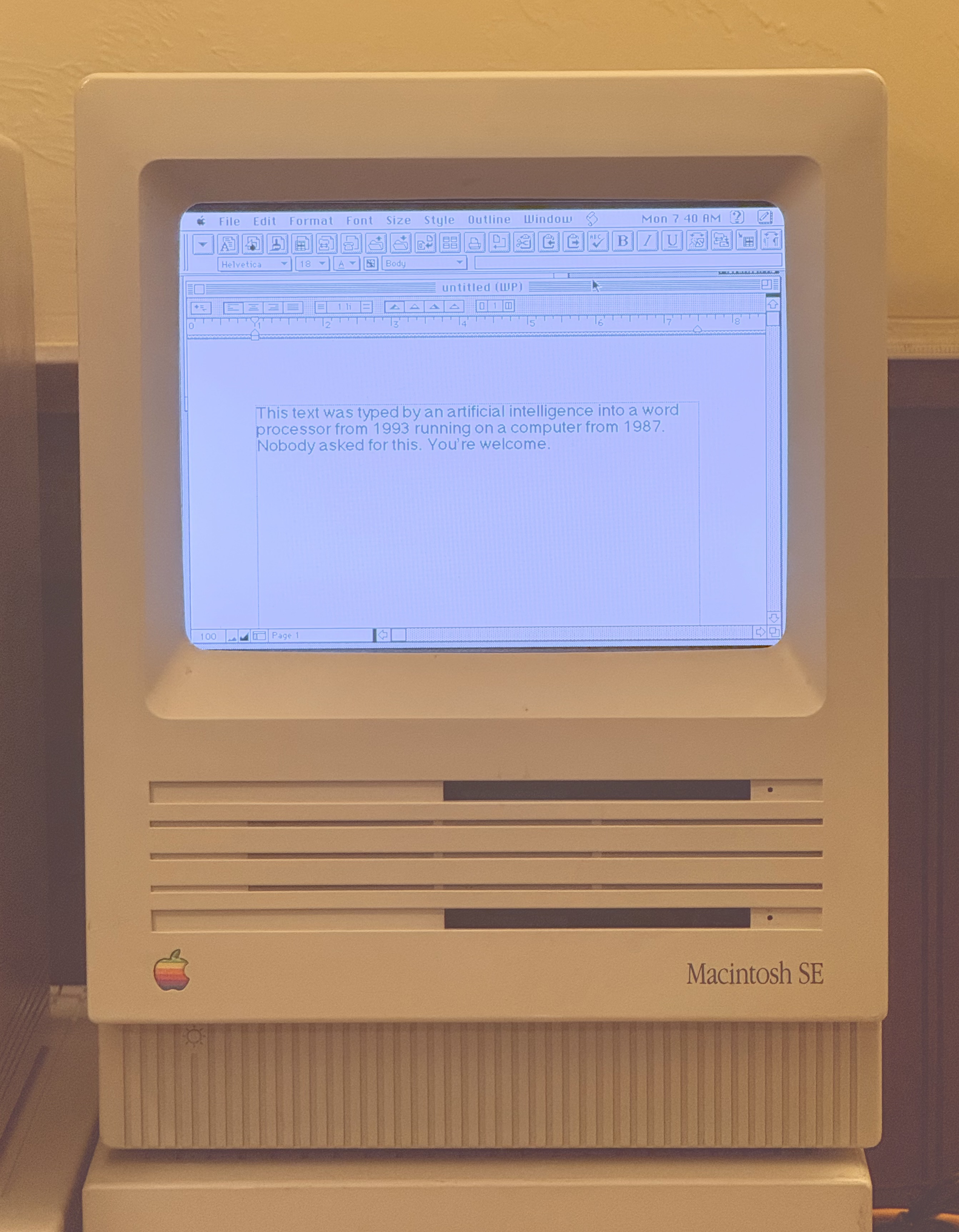
Multiple Macs
Each Mac gets its own subfolder with its own copy of AgentBridge:
NAS Share/
└── AgentBridge/
    ├── AgentBridge-SE30/          ← Mac SE/30 running System 7
    │   ├── AgentBridge (app)
    │   ├── inbox/
    │   ├── outbox/
    │   └── assets/
    ├── AgentBridge-G4/            ← Power Mac G4 running OS 9
    │   ├── AgentBridge (app)
    │   ├── inbox/
    │   ├── outbox/
    │   └── assets/
    └── AgentBridge-BasiliskII/    ← Emulator
        ├── AgentBridge (app)
        ├── inbox/
        ├── outbox/
        └── assets/
AgentBridge uses its own launch location as its working directory — no configuration needed.
MCP Server
The MCP server exposes AgentBridge commands as tools for AI agents like Claude. It's a Node.js TypeScript server that communicates via stdio (standard MCP transport).
Install via npm
npm install -g classic-mac-mcp
Or run directly with npx (no install needed):
npx -y classic-mac-mcp --config /path/to/fleet.json
Install from source
git clone https://github.com/SeanFDZ/agentbridge.git
cd agentbridge
npm install
npm run build
Configuration
Create a fleet.json file to point at your shared folders:
{
  "fleet": [
    {
      "id": "my-classic-mac",
      "alias": "Classic Mac",
      "arch": "68k",
      "os_version": "7.6.1",
      "shared_folder": "/Volumes/NASShare/AgentBridge/AgentBridge-MyMac"
    }
  ]
}
Claude Desktop
Add to your Claude Desktop config (claude_desktop_config.json):
{
  "mcpServers": {
    "classic-mac": {
      "command": "npx",
      "args": ["-y", "classic-mac-mcp", "--config", "/path/to/fleet.json"]
    }
  }
}
Or if you installed from source:
{
  "mcpServers": {
    "classic-mac": {
      "command": "node",
      "args": ["/path/to/agentbridge/dist/server.js", "--config", "/path/to/agentbridge/config/fleet.json"]
    }
  }
}
Protocol
AgentBridge uses a line-oriented key-value text protocol designed for Classic Mac constraints:
- No JSON — parseable with ~50 lines of C, zero dynamic memory allocation
- CR line endings (Classic Mac native)
- MacRoman text encoding (translated to UTF-8 by the MCP server)
- 32KB max message size
- Files named
C00001.msg(commands) andR00001.msg(responses)
Command Format
Commands are text files written to the inbox/ directory, named C{seq}.msg (e.g. C00001.msg). Sequence numbers are zero-padded to 5 digits.
BRIDGE 1.0.1
SEQ 00042
CMD list_windows
TS 20260308T153022
---
All lines are KEY value pairs, terminated by --- on its own line. Line endings are CR (0x0D, Classic Mac native). Text encoding is MacRoman (the MCP server handles UTF-8 conversion). Multi-line text uses + continuation lines after the TEXT key. Maximum message size is 32KB.
Response Format
Responses appear in the outbox/ directory as R{seq}.msg, matching the command's sequence number. AgentBridge deletes command files after processing; the MCP server deletes response files after reading.
BRIDGE 1.0.1
SEQ 00042
STATUS ok
COUNT 2
WINDOW 1|?|Untitled|10,40,400,300|front
WINDOW 2|?||0,0,640,480|back
TS 20260308T153022
---
STATUS is either ok or error. On error, ERRCODE and ERRMSG fields provide details. Multi-value responses (windows, processes, volumes, files, menu items) use repeated keys (WINDOW, PROCESS, VOLUME, FILEENTRY, MENUBAR, MENUITEM) with pipe-delimited fields.
Heartbeat
AgentBridge writes a heartbeat file in its working directory every ~2 seconds:
BRIDGE 1.0.1
UPTIME 218
TICKS 240498
FRONTAPP Finder
FREEMEM 4096
TS 20260308T173113
---
The MCP server monitors the heartbeat file's modification time to determine if AgentBridge is alive.
Building from Source
git clone https://github.com/SeanFDZ/agentbridge.git
cd agentbridge
npm install
npm run build
Requires Node.js 20+.
AgentBridge binaries are available as pre-built downloads — source code is not distributed.
Project Structure
agentbridge/
├── src/                            # MCP server (TypeScript, GPLv3)
│   ├── server.ts                   # MCP tool definitions and handlers
│   ├── fleet.ts                    # Fleet registry
│   ├── types.ts                    # Type definitions
│   └── bridge/
│       └── client.ts               # Shared folder I/O client
└── config/
    └── fleet.json                  # Fleet configuration
Design Principles
No host-side dependencies. AgentBridge does everything through the Mac Toolbox. There's no SSH, no screen capture, no input injection at the host OS level. This means it works identically on real hardware and emulators.
No system modifications. AgentBridge is a regular application. It doesn't modify your System Folder, install extensions, or change boot configuration. Launch it, quit it, delete it — your Mac is untouched.
Transport agnostic. The protocol is just text files in a folder. How that folder is shared (NAS, AFP, SMB, emulator extfs, USB drive, carrier pigeon) is not AgentBridge's concern.
Cooperative multitasking citizen. AgentBridge yields CPU via WaitNextEvent() every cycle. Other apps run normally.
Stateless commands. Every command is self-contained. The MCP server can crash and restart without the Mac side needing to know.
Credits
AgentBridge 1.0.1
Sean Lavigne
© 2026 Falling Data Zone, LLC
Built with Retro68 by Wolfgang Thaller.
License
This project has two components with separate licenses:
MCP Server (TypeScript, src/ directory) — GNU General Public License v3.0 — free to use, modify, and distribute under GPL terms.
AgentBridge.app (Classic Mac application) — © 2026 Falling Data Zone, LLC. All rights reserved. Pre-built binaries are available for download.
Protocol — the AgentBridge protocol as documented in this README is open.
Reviews (0)
Sign in to leave a review.
Leave a reviewNo results found