Convert-Markdown-PDF-MCP
Health Uyari
- No license — Repository has no license file
- Description — Repository has a description
- Active repo — Last push 0 days ago
- Community trust — 15 GitHub stars
Code Gecti
- Code scan — Scanned 8 files during light audit, no dangerous patterns found
Permissions Gecti
- Permissions — No dangerous permissions requested
Bu listing icin henuz AI raporu yok.
MCP server that converts Markdown to a styled PDF in VS Code's markdown look, with ReportLab. Built Feb 2025, retired, kept working.
Convert-Markdown-PDF-MCP
An MCP server that turns Markdown into a styled PDF. The look follows VS Code's markdown preview, typeset with ReportLab and a bundled sans-serif family.
Status: built in February 2025 and retired once this kind of tooling became standard in model releases. Updated in November 2026 to run on the current MCP SDK, render general Markdown, and start from any directory. Kept working.
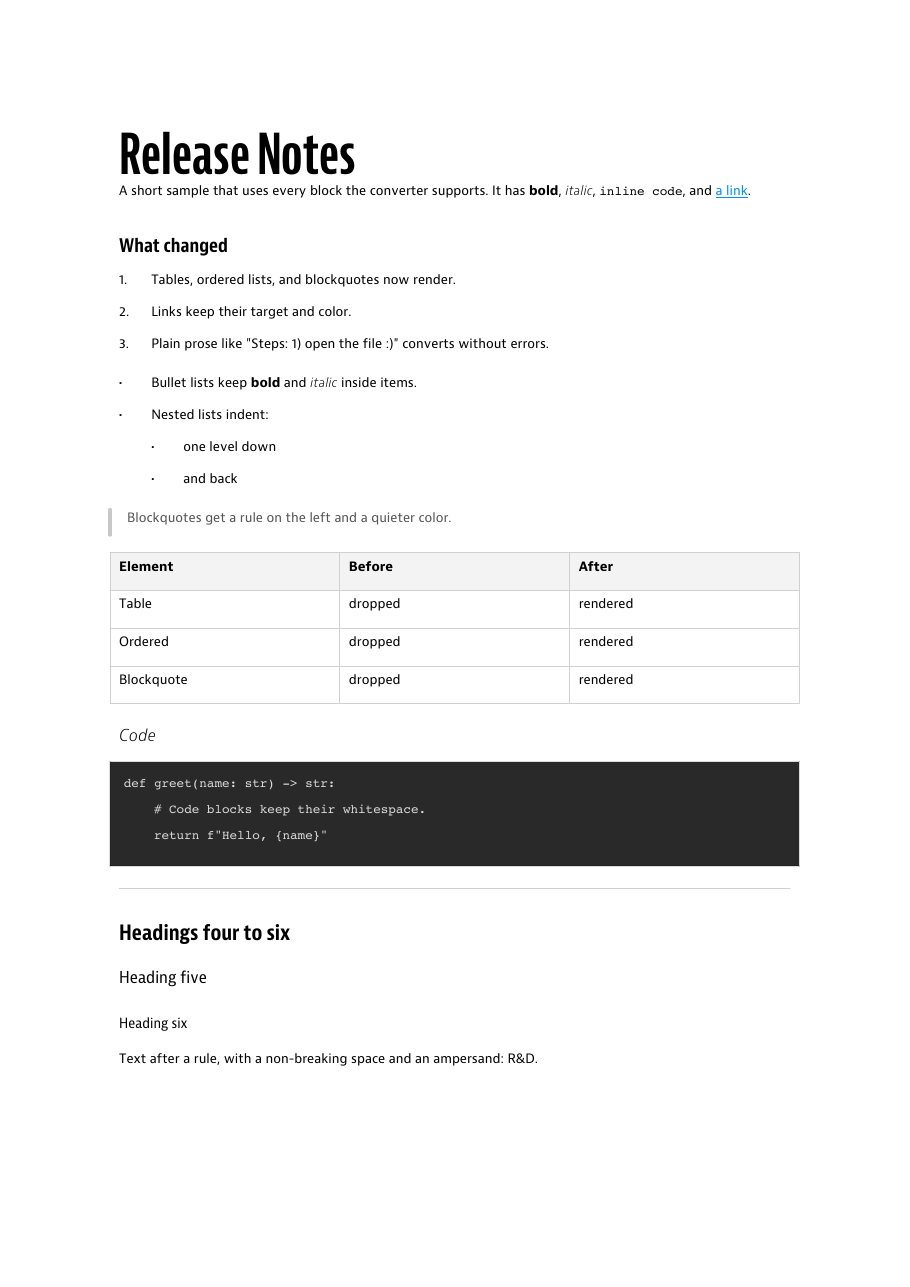
That page is tests/fixtures/sample.md rendered with the default theme. The full PDF is in docs/.
What It Renders
Headings one to six, paragraphs, bold, italic, inline code, links that stay clickable, ordered and bulleted lists, nested lists, blockquotes, tables, fenced code blocks, horizontal rules, and images (local paths or URLs, scaled to the page width). Nested list items need four spaces of indentation, which is Python-Markdown's rule.
The Tool
convert_markdown takes:
markdown(required): the Markdown text.output_path(required): where to write the PDF..pdfis added if it's missing, and missing folders are created. Use an absolute path; a relative one resolves against the server's working directory.theme:light(the default) orhigh-contrast. It changes the colors of code blocks, quotes, and tables.
It returns the path it saved to. Failures come back as MCP tool errors.
Install
Requires uv, which installs Python 3.12 if needed.
git clone https://github.com/seanivore/Convert-Markdown-PDF-MCP.git
cd Convert-Markdown-PDF-MCP
uv sync
uv run pytest
Connect It
Claude Code:
claude mcp add md-pdf -- uv --directory /absolute/path/to/Convert-Markdown-PDF-MCP run md-pdf-mcp
Claude Desktop, in claude_desktop_config.json:
{
  "mcpServers": {
    "md-pdf": {
      "command": "uv",
      "args": ["--directory", "/absolute/path/to/Convert-Markdown-PDF-MCP", "run", "md-pdf-mcp"]
    }
  }
}
Use It From Python
from md_pdf_mcp import convert_markdown_to_pdf

convert_markdown_to_pdf("# Hello\n\nSome **bold** text.", "/tmp/hello.pdf", theme="light")
How It Works
md_pdf_mcp/converter.py parses Markdown with Python-Markdown, walks the resulting HTML, and builds ReportLab flowables. md_pdf_mcp/vscode_styles.py holds the type scale and colors, modeled on VS Code's markdown preview stylesheet, which is kept in docs/markdown.css. ReportLab replaced an earlier WeasyPrint attempt. The fonts live inside the package, so the server starts from any working directory.
Development
uv run pytestruns the converter tests and an MCP test that starts the server from another directory.npx @modelcontextprotocol/inspector uv --directory . run md-pdf-mcpopens the MCP Inspector.
Yorumlar (0)
Yorum birakmak icin giris yap.
Yorum birakSonuc bulunamadi