faaah
Health Warn
- License — License: MIT
- Description — Repository has a description
- Active repo — Last push 0 days ago
- Low visibility — Only 6 GitHub stars
Code Pass
- Code scan — Scanned 4 files during light audit, no dangerous patterns found
Permissions Pass
- Permissions — No dangerous permissions requested
No AI report is available for this listing yet.
FAAAH (Filesystem As An AI Handler) - Reuse your AI Agent subscription via text files.
🗣️ FAAAH (Filesystem As An AI Handler)

The simplest OpenAI-compatible LLM proxy you will ever need.™️
FAAAH allows you to reuse your AI Agent subscription as a generic
OpenAI-compatible local server.
FAAAH is dependency-free, implemented as a plain-text file protocol
(UNIX-philosophy certified):
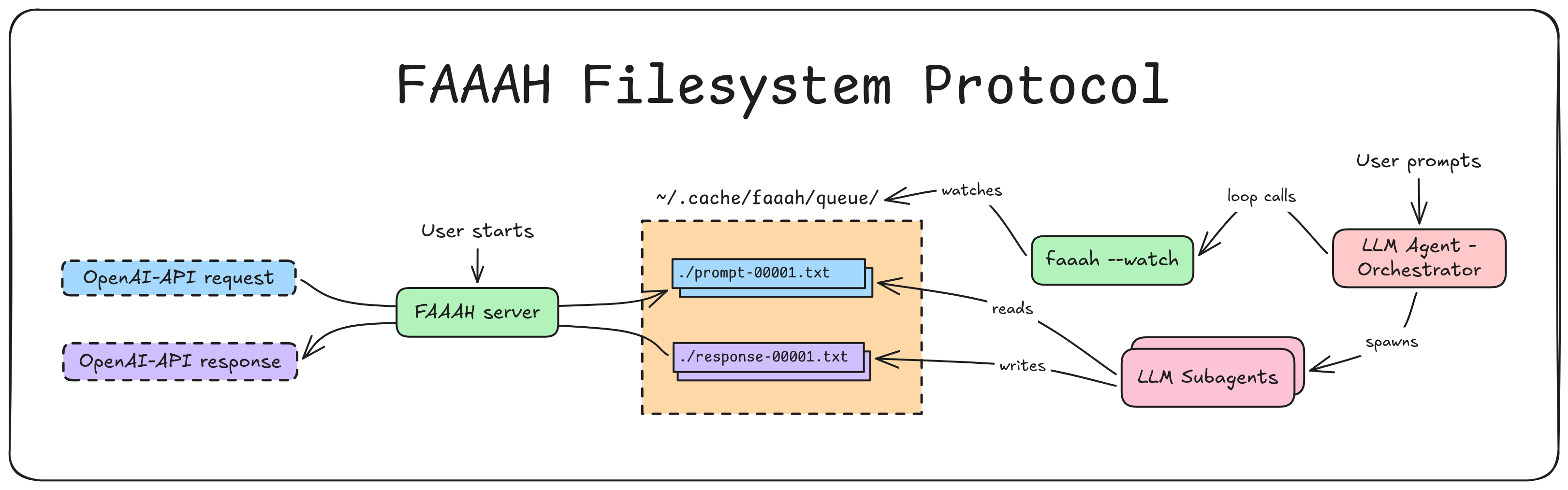
- Instead of sending your prompts to cloud LLM APIs, send them to FAAAH,
which reads OpenAI-compatible requests and dumps them into a folder as.txtfiles. - Then, tell your existing AI coding agent (Claude Code, opencode, etc) to
read the files and write responses to other.txtfiles. - FAAAH then packages the responses into OpenAI-compatible JSON, and returns
them to your app.
Why?
Because you already pay for an AI coding assistant. Stop paying for API keys
just for your weekend side projects! faaah!
It's also an agnostic proxy between any OpenAPI-expecting tool, and any LLM.
For an advanced usage, GraphRAG fully driven through FAAAH, see
graphrag-faaah.
Video Demo
https://github.com/user-attachments/assets/079620cb-e40d-49d0-9d70-7a8f6a6e1f07
Is This Allowed?
It is my understanding that local, non-commercial use of this tool doesn't
break the existing ToS of any AI agent provider.
But if any lawyer disagrees, kindly send me a message. I would then introduce
you to a friend of mine: Miss Barbra Streisand.
Be cautious about using FAAAH to process massive datasets. Some providers
(you know which ones) might do some Kafkaesque interpretations of their
ambiguous ToS, and deploy Orwellian telemetry to detect infractions (hasn't
happened to me yet, YOLO!)
Features
- Zero Dependencies: Uses Python's
http.server. That's it. - 308 lines of code: Have you seen the bloat of other tools in this
space? Yuck. - Unix Philosophy: Everything is a file. Do one thing well. Keep it KISS,
ya YAGNI. - Universal Compatibility: If a tool supports the de-facto OpenAI API
format (GraphRAG, LangChain, LlamaIndex, LiteLLM, theopenaiSDK), it
supports FAAAH. - Agent Agnostic: Due to the agent entrypoint being a prompt, it's not
tied to any specific agent provider/version. Future-proof. - Human-in-the-loop Fallback: If the AI agent gets stuck or hits usage
limits, you can literally open the current response file (sayresponse-0004.txt), type the answer yourself (or copy-paste the request to
your favorite web chatbot), and hit save. FAAAH will succeed.
Usage
0. Install
Install with uv:
# from inside this repo
uv tool install .             # installs the `faaah` command on PATH
Or straight from the git repository:
uv tool install git+https://github.com/sebastiancarlos/faaah
1. Start the server
faaah                       # listens on 127.0.0.1:8000, queue ~/.cache/faaah/queue
faaah --port 8080           # override port
faaah --queue /tmp/q        # override queue directory
2. Point your agent at the queue
The agent prompt is printed on startup. To grab it again:
faaah --agent-message
Paste it into your coding agent, which then starts a FAAAH coordinator
loop:
- Call
faaah --watchto obtain the next request (blocks until one exists). - Delegate the request to a worker subagent (to prevent accumulating
context). - Repeat. If a worker leaves no response file,
faaah --watchsimply returns
the same path again, so the coordinator retries it.
Note: FAAAH uses subagents to prevent exhaustion of context on multiple
requests. Thereby, your AI Agents must support creation of subagents on
request by prompt.
3. Send a request
You can use curl, for example:
curl http://127.0.0.1:8000/v1/chat/completions \
  -H "Content-Type: application/json" \
  -H "Authorization: Bearer anything" \
  -d '{
    "model": "faaah",
    "messages": [{"role": "user", "content": "Write a haiku."}]
  }'
Or any OpenAI-API shaped client:
from openai import OpenAI
client = OpenAI(base_url="http://127.0.0.1:8000/v1", api_key="anything")
response = client.chat.completions.create(
    model="faaah", # this field is ignored anyway
    messages=[{"role": "user", "content": "Write a haiku."}],
    timeout=None,           # agents can be slow
).choices[0].message.content
print(response)
A dependency-free example lives in examples/chat.py.
For an advanced usage, GraphRAG fully driven through FAAAH, see
graphrag-faaah.
CLI usage
usage: faaah [-h] [--host HOST] [--port PORT] [--queue QUEUE] [--timeout TIMEOUT] [--agent-message] [--watch]

Filesystem As An AI Handler: an OpenAI-compatible proxy backed by an AI agent working over text files.

options:
  -h, --help         show this help message and exit
  --host HOST        Address to bind (default: 127.0.0.1).
  --port PORT        Port to listen on (default: 8000).
  --queue QUEUE      Directory where prompt/response files live (default: ~/.cache/faaah/queue).
  --timeout TIMEOUT  Abort each call after N seconds. 0 (default) waits forever.
  --agent-message    Print ONLY the agent prompt and exit (it's also printed on launch).
  --watch            Block until a pending prompt exists, print its path.
Protocol (The "Filesystem API")
The protocol relies on files on the queue directory (~/.cache/faaah/queue by
default).
Each request produces a prompt-<id>.txt file, where the first one's ID will be00001 and increase monotonically.
FAAAH then expects the agent (or anything really) to generate a correspondingresponse-<id>.txt.
The subagent workers are prompted to write a first pass asresponse-<id>.txt.draft, which they may revise, before renaming it to the
final response-<id>.txt they consider final.
| File | Who writes | Meaning |
|---|---|---|
prompt-<id>.txt |
server | an incoming request for the agent |
response-<id>.txt.draft |
agent | an in-progress, editable draft |
response-<id>.txt |
agent | the answer |
Retry is automatic: a prompt with no response file is simply re-offered byfaaah --watch to the coordinator until one appears.
License
MIT
Reviews (0)
Sign in to leave a review.
Leave a reviewNo results found