atelier
Health Uyari
- License — License: NOASSERTION
- Description — Repository has a description
- Active repo — Last push 0 days ago
- Low visibility — Only 5 GitHub stars
Code Gecti
- Code scan — Scanned 12 files during light audit, no dangerous patterns found
Permissions Gecti
- Permissions — No dangerous permissions requested
Bu listing icin henuz AI raporu yok.
Manage your work across multiple agents

Atelier
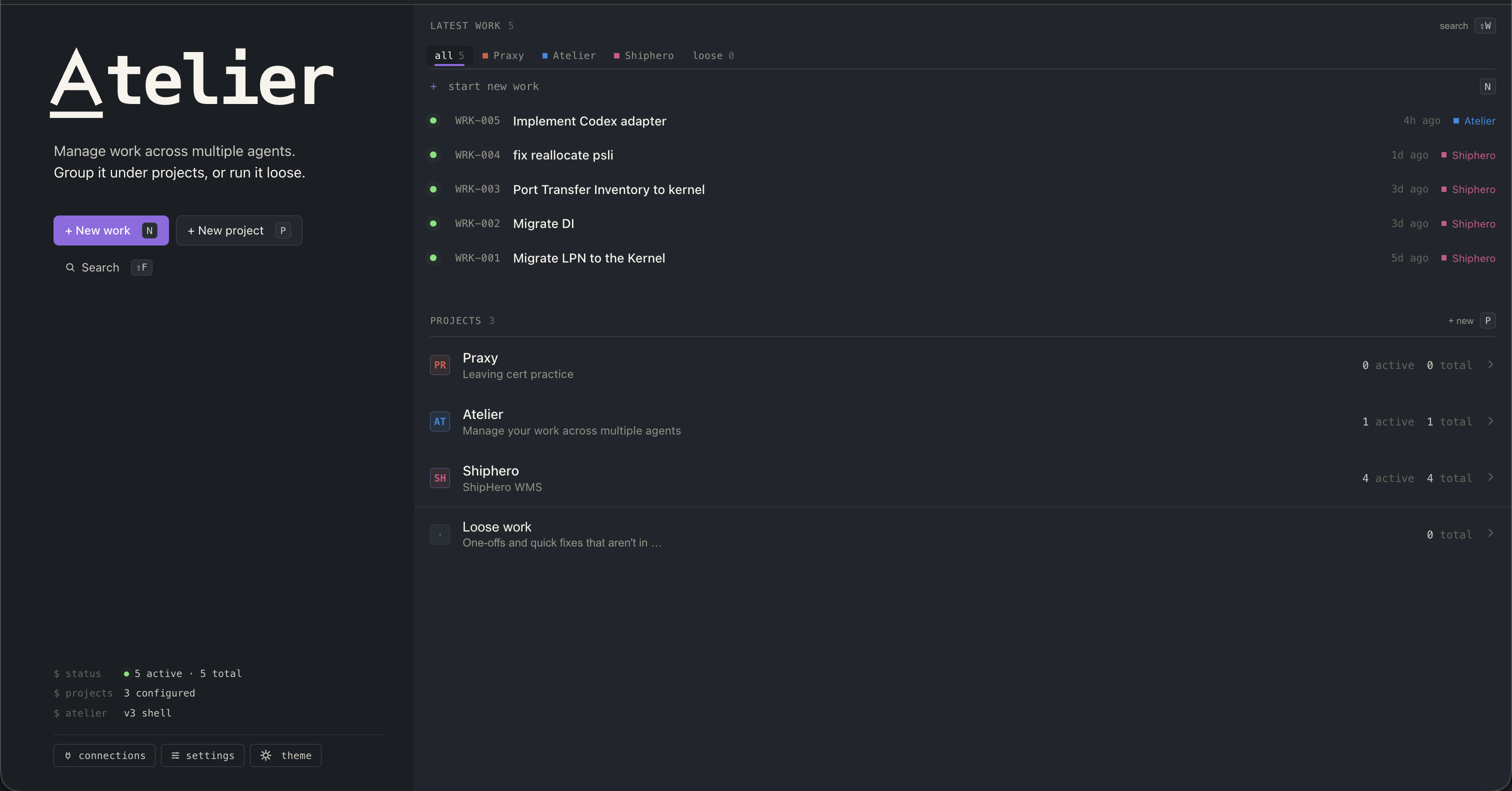
A centralised workspace for all the work you do with AI agents — no matter which agents you use.
Organise, track, and improve how you coordinate them. Atelier handles the orchestration: source-backed context, agent-to-agent handoff, isolated per-agent worktrees, and automatic artifact tracking (PRs, Jira tickets, docs). When you need to drop into the CLI, sessions stay in sync — pick up exactly where you left off, in either direction.
Contents
- Quick start — clone, run, open in your browser
- Install as a desktop app — Chrome / Safari / Edge / Firefox
- What you get — feature gallery
- Working on Atelier — first-time setup, dev loop, updating, wipe
- Skills for contributors —
/update,/migrate,/test,/dev,/wipe,/new-migration - Going deeper — developer docs index
- One-click desktop launcher — macOS / Linux / Windows
- Status — what's working, what's rough
- License — FSL-1.1-ALv2
Quick start
You'll need Python 3.11+, Node 18+, and uv for the backend env.
git clone https://github.com/sebastiandev/atelier.git
cd atelier
./scripts/dev.sh
Frontend serves at http://127.0.0.1:4173, backend API at http://127.0.0.1:8001.
Install as a desktop app (PWA)
You can turn the Atelier tab into a standalone app window — no address bar, its own Dock / Taskbar icon, opens in one click. Atelier is just a local web app, so any modern browser's "install" or "create shortcut" flow works.
- Chrome / Edge / Brave / Arc — open
http://127.0.0.1:4173, then ⋮ menu → Cast, save and share → Install page as app… (older Chrome: More tools → Create shortcut…, tick Open as window). The app shows up in~/Applications/Chrome Appson macOS and in the Start menu on Windows. - Safari (macOS 14 Sonoma+) — open Atelier, then Share button (square with arrow up) in the toolbar → Add to Dock. Pins it to your Dock; click to launch in a standalone window.
- Vivaldi — right-click the Atelier tab → Progressive Apps → Install Atelier as a Progressive Web Application. Vivaldi launches it in its own window with its own taskbar icon, no browser chrome.
- Firefox (desktop) — Firefox doesn't ship PWA install on desktop. Workarounds: the
PWAsForFirefoxextension, or just use the desktop launcher below which gives you a.app/.desktop/.lnkshortcut that boots both servers and opens the page.
Tip: start ./scripts/dev.sh from your ~/.zshrc / startup folder so the backend is always up when you click the app icon.
What you get
A quick tour of the surface area:
- One workspace, many agents — Work units with live tiles
- Multi-provider — Claude and Amp side-by-side
- Detach to CLI — terminal handoff with full resume
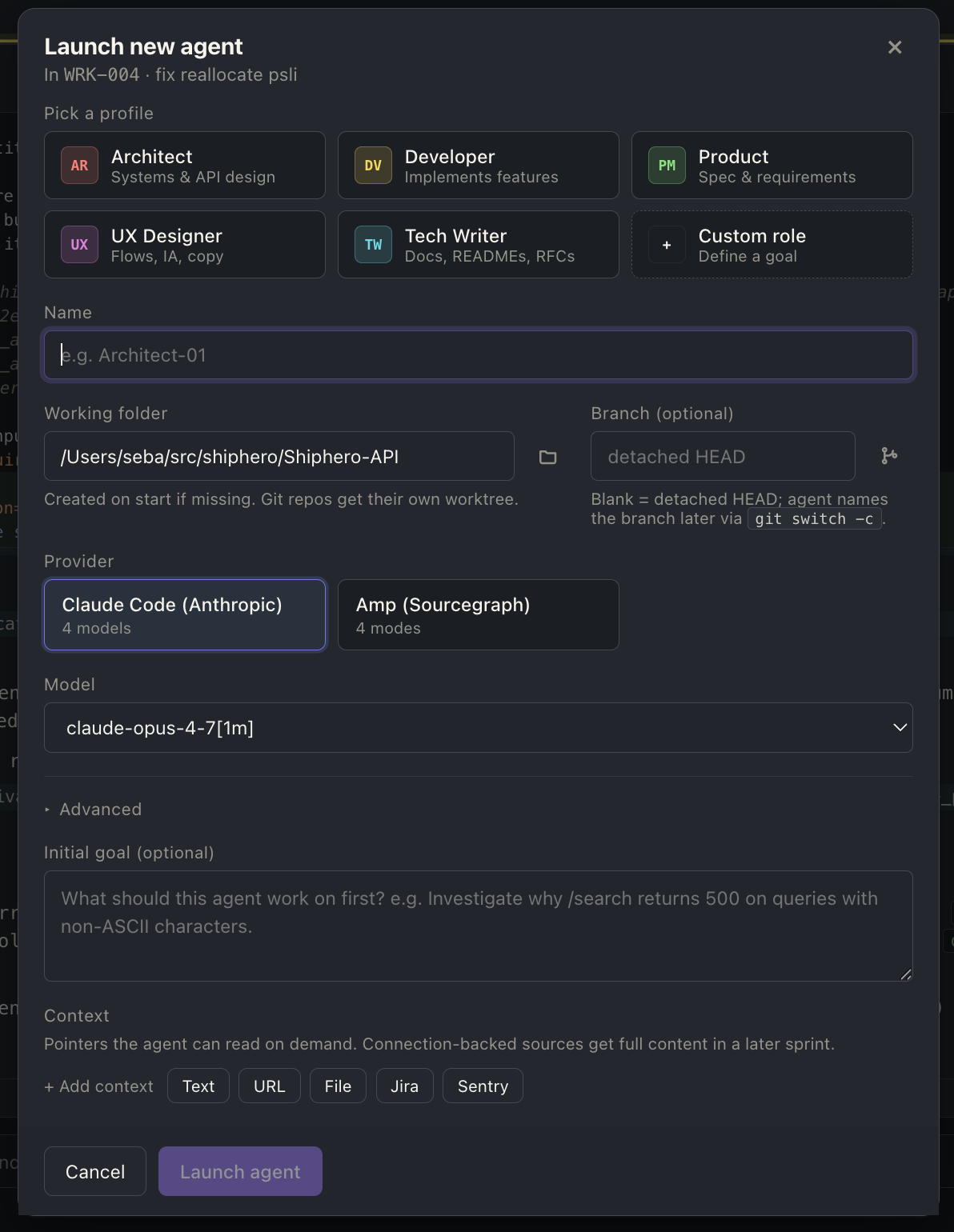
- Hand off to a new agent — checkpoint doc + forked worktree
- Artifact detection — PRs, Jira tickets, docs surface on a rail
- Re-organize the canvas — drag tiles into the order you want
- Maximize a tile — zoom one agent to fill the canvas
- Agent shortcuts — per-tile toolbar: detach, hand off, maximize, close
- Source-backed context — Jira / Sentry / Honeycomb on first turn
- Per-agent git worktrees — automatic, isolated, detached by default
- Open in your IDE — one-click VSCode / Cursor on the worktree
- Rich tool rendering — paired call+result, syntax-highlighted diffs
- Persistent everything — transcripts on disk, conversations resume
- Token + cost rollup — context %, session spend, per-tile
- Projects — optional grouping with shared defaults
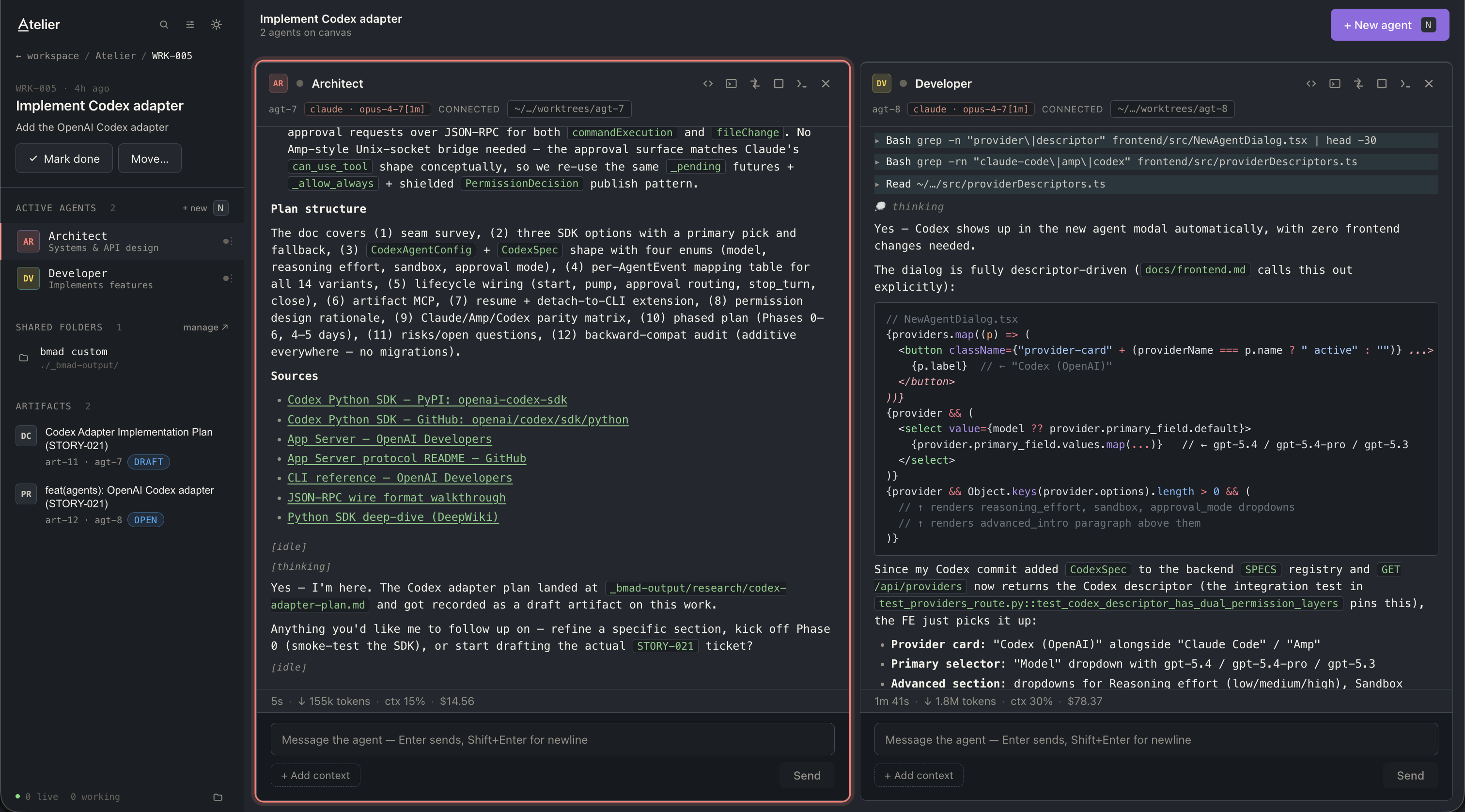
One workspace, many agents
Group agents into a Work unit — a single goal like "STORY-018 connections
page" — and watch them in parallel. Each tile is one agent, streaming live.
Pin tiles to a rail when you want them out of the way; bring them back without
losing the conversation.
Multi-provider
Claude (via the SDK) and Amp (via the CLI) are both first-class. Pick a
provider per agent — one persona on Claude, another on Amp — and they share
the same Work unit, the same context, the same transcript log.
Detach to CLI, come back seamlessly
Sometimes the UI gets in the way. Click Detach: Atelier stops the SDK
process, opens your terminal with the provider's resume command, and hands
the agent over. Work in the CLI as long as you want. When you're done, the
agent reattaches in Atelier with the full transcript intact — including
everything that happened in the terminal.
https://github.com/user-attachments/assets/398f3e22-9c2a-4cce-9add-cab3b27d7358
Hand off to a new agent
When an agent's done its piece — planning's complete, the bug's diagnosed,
the design doc's written — hand the work off to a fresh agent without
losing context. Atelier summarises the source's transcript into a Markdown
checkpoint (goal, decisions, open questions, key files, blockers), then
opens the new-agent dialog pre-filled with the doc as the next agent's
starting context. The new worktree is forked from the source's at its
current HEAD with all uncommitted work carried over — detached HEAD, no
auto-branch; you name one when you're ready.
Artifact detection
Agents announce the things they produce so they surface on the work's
artifact rail — no scrolling through twenty turns of transcript to find the
link the agent dropped earlier. Three artifact types are tracked today:
- Pull requests — agents call a dedicated tool with the PR URL and
metadata. Atelier monitors the PR on GitHub and keeps the artifact
in sync, updating its status as it moves throughdraft → open → merged(orclosed) — no need to chase it manually. - Jira tickets — URL + title + status (
todo,in_progress,in_review,done,blocked). - Documents — markdown notes, ADRs, plans, design docs the agent
authored in its worktree. The rail row reveals the file in your OS file
browser when clicked; status (draft/pending/committed) is
derived from whether the file matches HEAD.
Click any rail entry to open: PRs and tickets open the URL in a new tab;
docs open the local file.
https://github.com/sebastiandev/atelier/raw/main/docs/screenshots/artifact_detection.mp4
Re-organize the canvas
Drag any tile by its header to put your agents in the order that makes
sense for the work. The arrangement is per-work, persisted across reloads,
and the rail mirrors the canvas so both stay in sync.
https://github.com/user-attachments/assets/491b0e98-505b-4d1c-a02e-49de874770f7
Maximize a tile
Click the maximize control on a tile header to zoom that agent to fill the
canvas — handy when you want to read a long transcript or scan a tool's
full output without the other tiles competing for space. Shift+Esc /
Cmd+Esc restores the multi-tile layout.
https://github.com/user-attachments/assets/dc22bbe0-60d8-4a04-9730-df4e4069be7e
Agent shortcuts
Atelier surfaces a small set of actions in the agent toolbar:
- Detach — detach the agent to the CLI
- Hand off — hand off to a new agent
- Open in console — open the agent's worktree in your terminal
- Open in editor — open the agent's worktree in your editor
- Maximize — zoom the agent to fill the canvas
- Close — pin the agent to the rail
https://github.com/user-attachments/assets/014f5121-282b-47ed-a7c0-6c32083a8c14
Source-backed context
Plug in your Jira, Sentry, or Honeycomb credentials once. Pull a ticket, an
error, or a trace into an agent's starting context — Atelier fetches the full
payload and renders it as a context file the agent reads on its first turn.
Add more context mid-session without restarting.
Per-agent git worktrees
Atelier provisions a separate git worktree per agent automatically. Two
agents on the same repo don't step on each other's branches. When you're done,
the worktrees are still there for review.
By default the worktree starts in detached HEAD — no auto-named branch
clutters your git branch list, and the agent decides on a branch name (or
asks you for one) when there's something worth pushing. The new-agent dialog
has a Branch field if you want to name one upfront, with a picker that shows
existing branches in the source repo. The agent's system prompt warns it not
to checkout/switch away from a detached worktree without first creating a
branch from current HEAD — that's the only path that orphans commits.
Open in your IDE
Each agent tile has an "Open in editor" button that opens its worktree in
VSCode or Cursor (vscode://file/<path>) — handy when you want to review the
agent's diff in your normal IDE flow without leaving Atelier.
Rich tool rendering
The transcript collapses each tool call into a one-line summary that actually
tells you something — ▸ Bash · git diff, ▸ Edit · ~/…/conftest.py · +12 −3,▸ Read · ~/…/foo.py · L1-100. Edit and MultiEdit calls render the diff
inline with red/green line backgrounds and per-language syntax highlighting;
Bash results that look like a unified diff (e.g. git diff output) get the
same treatment. Tool calls and their results are paired into a single card
instead of two siblings, so you read each invocation top-to-bottom.
Persistent everything
Close a tile, restart the backend, reboot your machine — the transcripts are
on disk (one NDJSON per agent), the SQL index gets reconciled against them on
startup, and the next time you open the agent the conversation picks up
exactly where it left off.
Token + cost rollup
Each agent tile shows a per-turn rollup at the bottom: turn duration, tokens
this turn, context % used of the model's window, and running session
cost. Context turns orange at 60% and red at 85% so you know when to compact
or hand off before the next turn squeezes the prompt. Pricing and window come
from the backend's provider spec, so they stay correct as new models are
added — and Opus 4.7 ships with the 1M extended-context tier as the default.
Detached turns count too: when an agent comes back from CLI, the merge pulls
usage off each assistant message so the cost rollup never has gaps.
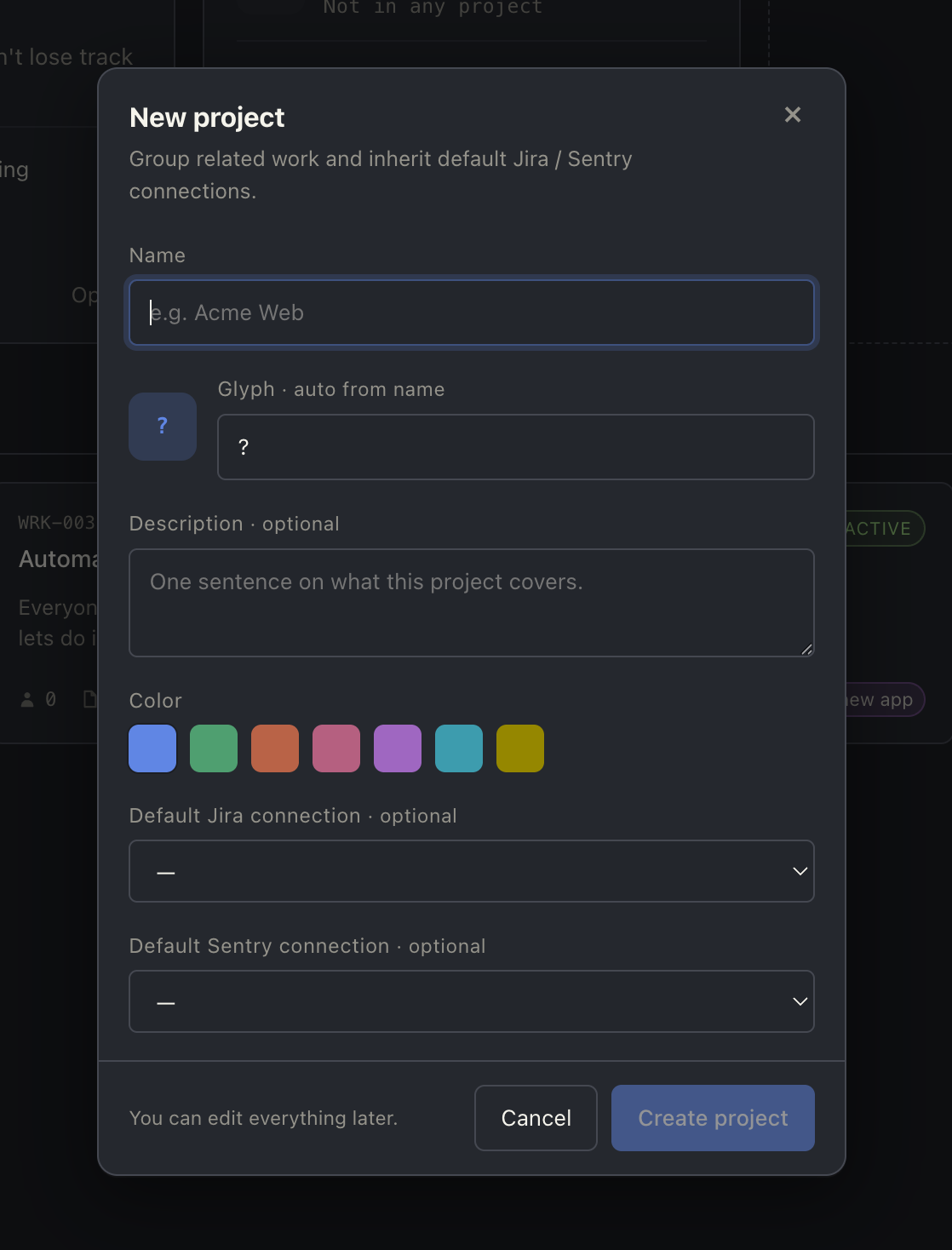
Projects
Long-running effort? Wrap a set of Work units in an optional Project
with a glyph and a hue. Per-project default connections, filtered work
feeds, and a project home page that scopes everything to that effort.
Working on Atelier
For contributors making changes — not just running the app.
First-time setup
After the Quick start clone, the first ./scripts/dev.sh run will:
- Install backend Python deps via
uvintobackend/.venv(nopip install -eneeded;uvhandles it). - Install frontend Node deps via
npm installintofrontend/node_modules/. - Initialise the SQLite database at
~/Atelier/atelier.dband run any pending schema migrations. - Start backend on
127.0.0.1:8001and frontend on127.0.0.1:4173.
If you want backend or frontend in isolation: ./scripts/dev-backend.sh or ./scripts/dev-frontend.sh.
Daily flow
- Run dev servers —
./scripts/dev.sh(or invoke the/devskill in Claude Code). - Run tests —
cd backend && uv run pytest -q(or/test). The venv lives atbackend/.venv; alwaysuv runorsource backend/.venv/bin/activatefrombackend/— never use the system Python. - Read the docs — design decisions and conventions live in
docs/(see Going deeper).
Updating your checkout
Pulling new commits may bring schema changes (DB migrations auto-run on backend boot) and on-disk shape changes (transcript, JSON files — these need explicit migration). The /update skill handles both end-to-end:
/update
That pulls main, runs uv sync / npm install if lockfiles changed, runs every scripts/migrate-*.py, and tells you whether to restart the dev server.
Equivalent manual flow if you don't use Claude Code:
git pull --ff-only origin main
cd backend && uv sync             # if backend/uv.lock changed
cd ../frontend && npm install     # if frontend/package-lock.json changed
cd .. && for f in scripts/migrate-*.py; do (cd backend && uv run python ../"$f"); done
# then restart ./scripts/dev.sh if backend deps or migrations changed
Wiping local state
Need a clean slate (testing migration paths, debugging stale data, etc.)?
./scripts/wipe.sh all                  # all works + projects + cleanup
./scripts/wipe.sh work WRK-001         # one work
./scripts/wipe.sh project PRJ-001      # a project + its works
The script preserves connections (DB rows + keychain) and schema_version. It also handles state outside the workspace dir — pruning stale git worktree registry entries in source repos and clearing the Claude SDK's per-session cache at ~/.claude/projects/. Stop the backend first so its in-flight writes don't race the deletes.
The /wipe skill wraps this with a backend-stopped check.
Skills for contributors
When working on Atelier with Claude Code, six project-local skills live under .claude/skills/ (committed to the repo, shared across contributors):
| Skill | What it does |
|---|---|
/update |
Pull main, install deps, run pending migrations, surface what needs a restart. |
/migrate |
Run all scripts/migrate-*.py — FS-side state migrations. (DB schema migrations auto-apply on backend boot.) |
/new-migration |
Scaffold a new migration: db <slug> for SQL schema; fs <slug> for an on-disk shape change. Encodes the "ALTER only, never .create()" pitfall. |
/test |
Run pytest under the backend venv with optional path/test filter. |
/dev |
Start ./scripts/dev*.sh with the project's port conventions baked in. |
/wipe |
Wraps wipe.sh with a backend-stopped pre-check. |
Each SKILL.md has the full step-by-step the model follows — read them if you want to know exactly what a skill does, or if you want to extend / customise one.
Going deeper
The codebase has its own developer docs in docs/:
| Doc | Scope |
|---|---|
architecture.md |
Clean architecture layers, the command pattern |
backend.md |
Supervisor model, persistence, WS protocol, TurnMetrics semantics |
frontend.md |
Routing, state, the agent stream hook |
design-system.md |
Tokens, brand mark, visual conventions |
api-flows.md |
Sequence diagrams per endpoint |
For AI assistants working on the codebase, see CLAUDE.md — it covers the architecture rules, the backward-compatibility contract, and the project conventions every change should respect.
One-click desktop launcher
Prefer double-clicking an app icon over typing a script?
# macOS / Linux
./scripts/install-launcher.sh

# Windows (PowerShell, requires Git Bash on PATH)
powershell -ExecutionPolicy Bypass -File scripts\install-launcher.ps1
This drops an Atelier.app (macOS), atelier.desktop entry (Linux), or
Start Menu + Desktop shortcut (Windows) that launches the dev servers in a
terminal window.
Status
Atelier is early. The core loops — multi-agent Work units, multi-provider,
detach/resume, connection-backed context — are working. Lots of polish and
feature surface still ahead; expect rough edges, but the workflow is real.
License
Functional Source License, Version 1.1, Apache 2.0 Future License
(FSL-1.1-ALv2). Plain English: use it, fork it, modify it, run it at work,
build on top of it. The one thing you can't do is package it as a competing
commercial product or hosted service. Two years after each release, the
matching version automatically converts to Apache 2.0 — fully permissive
from there on.
Quick guide:
- Personal use, internal company use, consulting / professional services
using Atelier — fine. - Forks, modifications, contributions back — fine.
- "Atelier Cloud" or a paid managed service that competes with Atelier —
not allowed during the FSL window.
If you want to do something that feels close to that line, open an issue
and we'll talk.
Yorumlar (0)
Yorum birakmak icin giris yap.
Yorum birakSonuc bulunamadi