research-explainer-skill
Health Uyari
- License — License: MIT
- Description — Repository has a description
- Active repo — Last push 0 days ago
- Low visibility — Only 6 GitHub stars
Code Gecti
- Code scan — Scanned 12 files during light audit, no dangerous patterns found
Permissions Gecti
- Permissions — No dangerous permissions requested
Bu listing icin henuz AI raporu yok.
Claude Code skill: 3Blue1Brown-style research explainer videos and slides in English and Persian (Farsi), with claim checks and real-data figures
research-explainer
English · فارسی
A skill for Claude Code that turns research into a 3Blue1Brown-style explainer video, and optionally a matching slide
deck, in English and/or Persian (Farsi). Every number on screen is traced to a source, and every data image comes from a
real run. The story is told visually: things move, split, stack and transform; words are labels, and voice and subtitles
are optional layers.
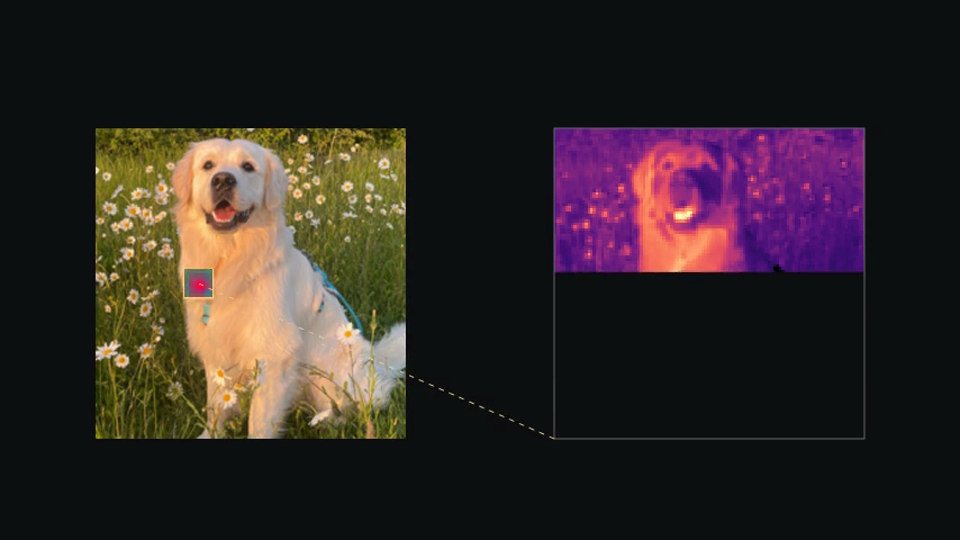
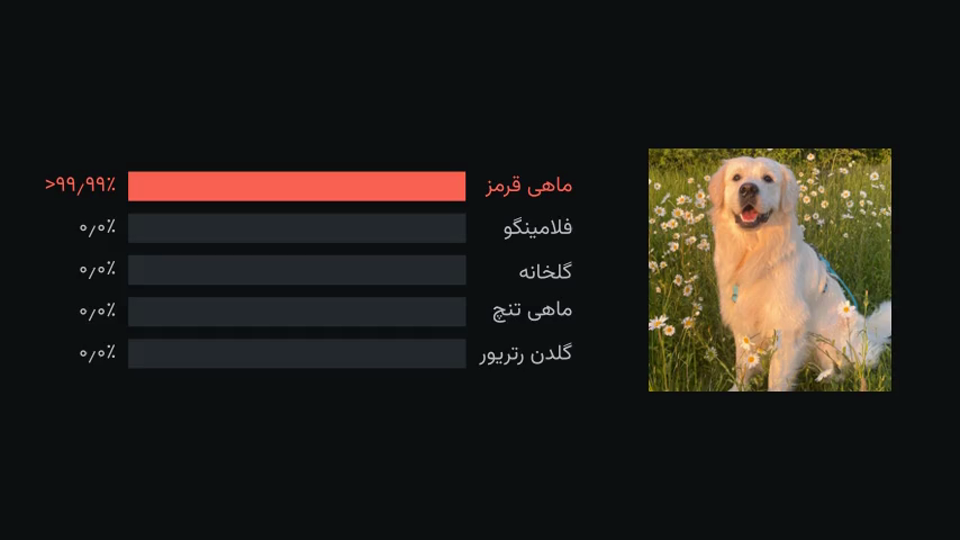
| A real network's filter sweeping a photo (English) | The same network fooled by a 2/255 change (Persian) |
|---|---|
 |
 |
What it does
You say "make an explainer video of my paper" (or your experiments, or a set of papers). Claude then:
- Asks a few questions: what the source is, the audience, the length, the language, the voice, whether it may run
experiments, and which results are final. - Reads every source and writes a claims ledger (
claims.json): each claim with its status (final / development
/ planned / reported from another paper) and its source (page and table, or file and run). - Makes the figures from real data: your code, your logs, or small new experiments. Each image is registered with the
script, seed and hash that produced it. - Plans the scenes in the 3Blue1Brown style, beat by beat by what moves, and shows you the plan before writing any
animation. - Checks and builds the video with Manim.
rx.py claimsfails if any number in the narration is missing from the
ledger or the measured data; the agent runs it before building. Then it reviews its own frames (contact sheets, a
phone-size sheet), scores them on seven criteria, and fixes the worst problems until every score is 8 or more. - Delivers
video.mp4, a small copy for messaging apps, and subtitles (.srt, or burned in if you ask). It can also make
slides from the same claims and images, and a 20-30 s launch video (rx.py promo: motion graphics, music
synthesized in code or your own track, cuts on the measured beat, landscape, vertical or square).
Two more formats. A hand-drawn paper-diorama style (a cut-paper set with a puppet and graph-paper slips of real
runs; an HTML/SVG page rendered by Playwright, templates/diorama/), and vertical shorts for YouTube Shorts or
LinkedIn (HyperFrames compositions rendered at 1080x1920 with a checked voice, timed captions and a CC0 sampled score,templates/short/).
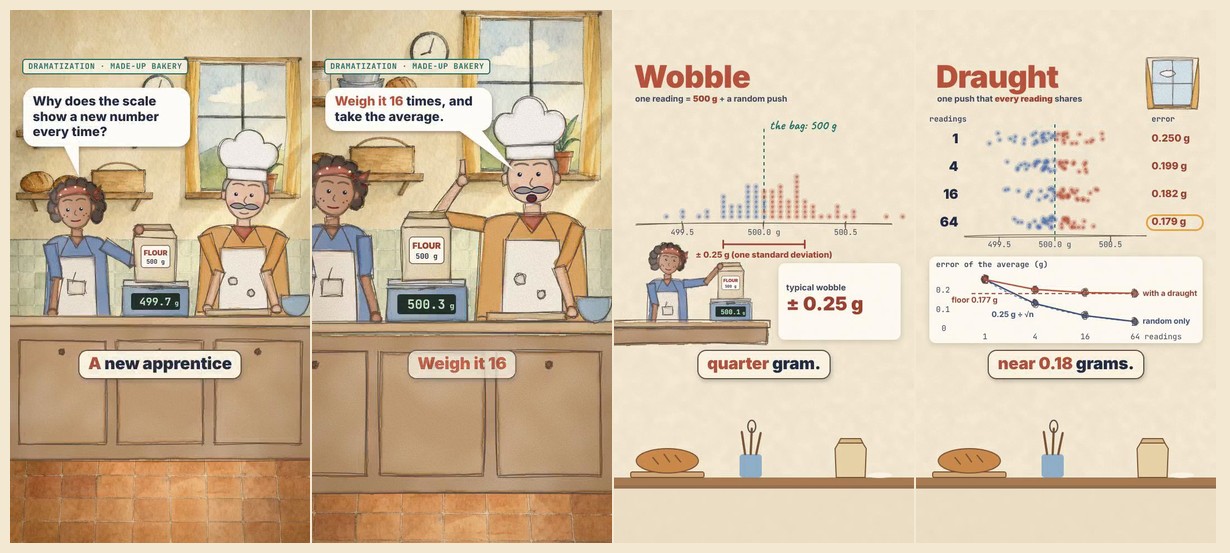
Watercolor story shorts. A vertical short that opens on a small painted scene with characters and then explains the
idea: an image model paints the empty set and a paper wash once, and the engine animates painted puppets in front of it
(they blink, mime their speech bubbles, react), with one narrator voice. Switch the look in one line: watercolor, paper
cut-out or hand-drawn ink. templates/watercolor-story/, guide in references/style-watercolor.md.
Voice options
| option | cost | notes |
|---|---|---|
| none (text only) | free | captions paced for reading, quiet generated music |
| Piper | free, offline | good English; play a Persian sample before choosing it |
| your own recordings | free | Claude writes the script with one clip per beat; you record or use any TTS website |
OpenAI (gpt-audio-1.5) |
paid, your API key | the best English and Persian; each clip is transcribed back and checked |
Your API key goes in ~/.config/openai/key (or $OPENAI_API_KEY). Never paste a key into a chat.
Persian, done properly
Right-to-left layout; Persian digits (۰٫۲۵); the Vazirmatn font; mixed Persian/Latin lines ordered correctly
(روی CIFAR-10, n = ۴); numbers spoken as words; captions paced for comfortable reading.
Install
Requirements: Python 3.10+, Manim Community Edition, FFmpeg. Optional: Piper (free
voice), LaTeX (formulas), an NVIDIA GPU (experiments).
# Linux (Debian/Ubuntu):
sudo apt install ffmpeg libcairo2-dev libpango1.0-dev pkg-config python3-dev
# macOS:
brew install ffmpeg cairo pango pkg-config
# then (any OS; get uv from https://docs.astral.sh/uv/):
uv tool install manim
uv tool install piper-tts        # optional free voice
Option A: Claude Code plugin (recommended). Inside Claude Code, type:
/plugin marketplace add sepi2p/research-explainer-skill
/plugin install research-explainer@research-explainer-skill
Start a new session. The first time you ask for a video, Claude runs a setup check and installs the bundled fonts.
Option B: install script.
git clone https://github.com/sepi2p/research-explainer-skill.git
cd research-explainer-skill
./install.sh                     # skills -> ~/.claude/skills, fonts installed, then a setup check
Flags: --project installs into the current project's .claude/skills only. --no-gl skips the optional ManimGL skill,
which has a non-commercial licence. --codex installs into ~/.agents/skills for OpenAI Codex (untested).
Option C: OpenAI Codex / ChatGPT desktop.
codex plugin marketplace add sepi2p/research-explainer-skill
codex plugin add research-explainer@research-explainer-skill
(or ./install.sh --codex). Then ask Codex for a video, or call the skill with $research-explainer. In the ChatGPT
desktop app, add the same marketplace and install the plugin from the Plugins directory (not tested yet).
ChatGPT on the web or mobile cannot run Manim, so there the skill only plans: the questions, the claims ledger, the
scene plan, the narration and the scene code. You render on your computer with any of the options above.
Having an AI agent install it? Point it at AGENTS.md.
Use
Open Claude Code in the folder with your paper or project and ask, for example:
Make an explainer video of
paper.pdffor researchers in nearby fields.
I want a 10-minute Persian video about my experiments in
./runs, no voice, plus a slide deck.
Make a 5-minute English video comparing these three papers in
./papers, with the free voice.
Claude asks its questions and shows you the claims ledger and the scene plan before it builds. Outputs land in the
project's build/ folder.
Try the demos
examples/how-a-network-sees/ (1.5 min, EN + FA): a pretrained ImageNet classifier (ResNet-18) on CC0 photos. Pixels,
its 64 learned filters sweeping the image, feature maps layer by layer, the prediction, where it looks, and a change of at
most 2/255 per pixel that turns a golden retriever into a goldfish. Two scripts make every image and number: one downloads
the photos after checking their CC0 licence, one runs the network.
cd examples/how-a-network-sees
python3 experiments/fetch_images.py && python3 experiments/network.py   # needs torch + torchvision (CPU is fine)
python3 ../../skills/research-explainer/scripts/rx.py build en --quality l
examples/averaging-noise/ is a 1-minute video built from a tiny real experiment ("why averaging removes noise", including
its limit when the noise is correlated). It needs only numpy, and rx.py selftest builds it.
cd examples/averaging-noise
SK=../../skills/research-explainer/scripts
~/.local/share/uv/tools/manim/bin/python experiments/averaging.py     # any Python with numpy + pillow
python3 $SK/rx.py build fa --voice none                               # Persian, text only
python3 $SK/rx.py build en --voice piper                              # English, free voice
What is inside
skills/research-explainer/      the skill: SKILL.md, references/, scripts/rx.py + explainer library, templates/, fonts
skills/manim-composer/          scene planning (bundled, MIT, by Adithya S Kolavi)
skills/manimce-best-practices/  Manim CE coding (bundled, MIT, by Adithya S Kolavi)
skills/manimgl-best-practices/  ManimGL (optional, CC BY-NC-SA 4.0, by Adithya S Kolavi after 3Blue1Brown)
examples/how-a-network-sees/    demo: a neural network, real filters and maps, an adversarial example
examples/averaging-noise/       small demo, used by rx.py selftest
.claude-plugin/                 Claude Code plugin + marketplace manifests
.codex-plugin/, .agents/         OpenAI Codex / ChatGPT plugin + marketplace manifests
install.sh, AGENTS.md           installation for people and for agents
Status and limits
- Tested with Claude Code on Linux (Manim CE 0.22): plugin install, full builds,
rx.py selftest. - Codex CLI 0.154: plugin install tested (all four skills found). A full video made by Codex has not been tested yet.
- macOS should work. Windows is untested (WSL is recommended).
- Missing something?
rx.py request ...logs it, or open an issue.
What changed: CHANGELOG.md. - The skill makes the work faster and keeps it checkable. It does not replace the authors' review: watch the video and
read the claims ledger before you share it.
Licence
MIT (LICENSE) for everything except the bundled third-party skills and fonts, which keep their own licences:
see THIRD_PARTY.md. One of them, the optional manimgl-best-practices, is non-commercial (CC BY-NC-SA 4.0).
Yorumlar (0)
Yorum birakmak icin giris yap.
Yorum birakSonuc bulunamadi