c3
Health Uyari
- License — License: Apache-2.0
- Description — Repository has a description
- Active repo — Last push 0 days ago
- Low visibility — Only 5 GitHub stars
Code Basarisiz
- rm -rf — Recursive force deletion command in .github/workflows/release.yml
Permissions Gecti
- Permissions — No dangerous permissions requested
Bu listing icin henuz AI raporu yok.
code creative center
c3 — Code Creative Center
An AI workbench that centrally manages and drives the work of multiple AI coding agents — Claude Code, Codex, and more — from one browser UI.
┌────────────┐       /ws        ┌──────────────────────────────┐
│  Browser   │ ───────────────► │  Hono server (this app)      │
│  (Vue 3)   │ ◄─── ws ───────  │  sessions / workflows / gate │
│            │                  │              │               │
│  Control   │                  │   vendor-neutral adapters    │
└────────────┘                  └──────────────┬───────────────┘
                                              │ spawns
                                  ┌───────────┼───────────┐
                                  ▼           ▼           ▼
                               Claude       Codex       Cursor
                                CLI          CLI      cursor-agent
Core workflow
flowchart LR
  Disc["Discussion<br/>several agents (and you)<br/>round-table a topic"]
  Auto["Automation<br/>cron schedule<br/>/ system event"]
  Queue["Intent queue<br/>intents marked automate,<br/>ordered by deps + priority"]

  subgraph Intents["Intents — one tracked unit of work each"]
    direction TB
    I1["Intent A<br/>spec → review → worktree → commit → PR"]
    I2["Intent B"]
    I3["Intent C"]
  end

  Del["Delivery<br/>one branch collects<br/>the PRs of N intents"]
  Main["Mainline"]

  Disc -->|conclusions become intents| Intents
  Auto -->|creates intents, starts discussions| Intents
  Queue -->|develops them unattended| Intents
  I1 --> Del
  I2 --> Del
  I3 --> Del
  Del -->|every intent PR merged → verify → delivery PR| Main
- Discussions are where intents come from. Round-table a topic with several
agents, then turn the conclusion into one or more intents — or write an intent
directly if you already know what you want. - An intent is one tracked unit of work: spec → read-only review → human
approval → code in its own Git worktree → commit → PR. - A delivery is the integration unit. Many intents point at one delivery; their
PRs land on its branch, and once all of them are merged and you have verified the
result, one delivery PR takes the batch to the mainline. - Automations and the intent queue drive the loop. Automations fire on a cron or
a system event to create intents and start discussions; the queue picks up every
intent markedautomateand develops them in dependency order, backing off and
parking on failure.
Features
- Browser-mediated permission gateway — approve/deny every sensitive tool use in the browser, not the terminal; optional multi-agent consensus voting.
- Multi-vendor agents — managed Claude Code / Codex CLIs under
~/.c3/vendor, with per-role routing and a fallback chain. - Intents — turn a prompt into a tracked intent with a dependency graph, its own sessions, and branch / commit / PR state.
- Spec-driven development — write spec → read-only review → human approval before any code; editing a spec invalidates its verdict.
- Intent queue — mark intents
automateand a deterministic scheduler runs them in dependency order, backing off and parking on failure. - Worktree isolation — each intent develops in its own Git worktree, so parallel work never fights over one checkout.
- Multi-agent discussions — several agents (and you) round-table a topic, then turn the conclusion into an intent.
- Automations — run agent work on a cron or on system events, chained, each in its own session.
- Sandboxed runs — opt-in process-level isolation via arapuca: kernel MAC, deny-by-default paths, no containers.
- Code browsing — read-only branches, commits, diffs and Git status in the browser, with an embedded session to ask about the code.
- Chat robots —
@an agent in a Feishu group (or DM) and get an answer back from an unattended c3 turn; only the final answer ever leaves c3. - Workcenter — cross-workspace dashboard plus a notification inbox for answering permission prompts in one place.
- Optional account auth — username/password accounts with an admin gate (off by default; loopback-only otherwise).
- External MCP access — let your own agents (an independent Claude Code / Codex session, a CI job) read this c3 over MCP with a long-lived API key, scoped to the workspaces you grant.
- Single self-contained binary — one native executable per platform. New releases download in the background; the header offers "restart to update", and
c3 upgrade+c3 restartdo the same from a terminal. - Desktop app — download the installer from GitHub Releases, double-click, tray-resident. No terminal, no browser.
See doc/features.md for the full feature tree.
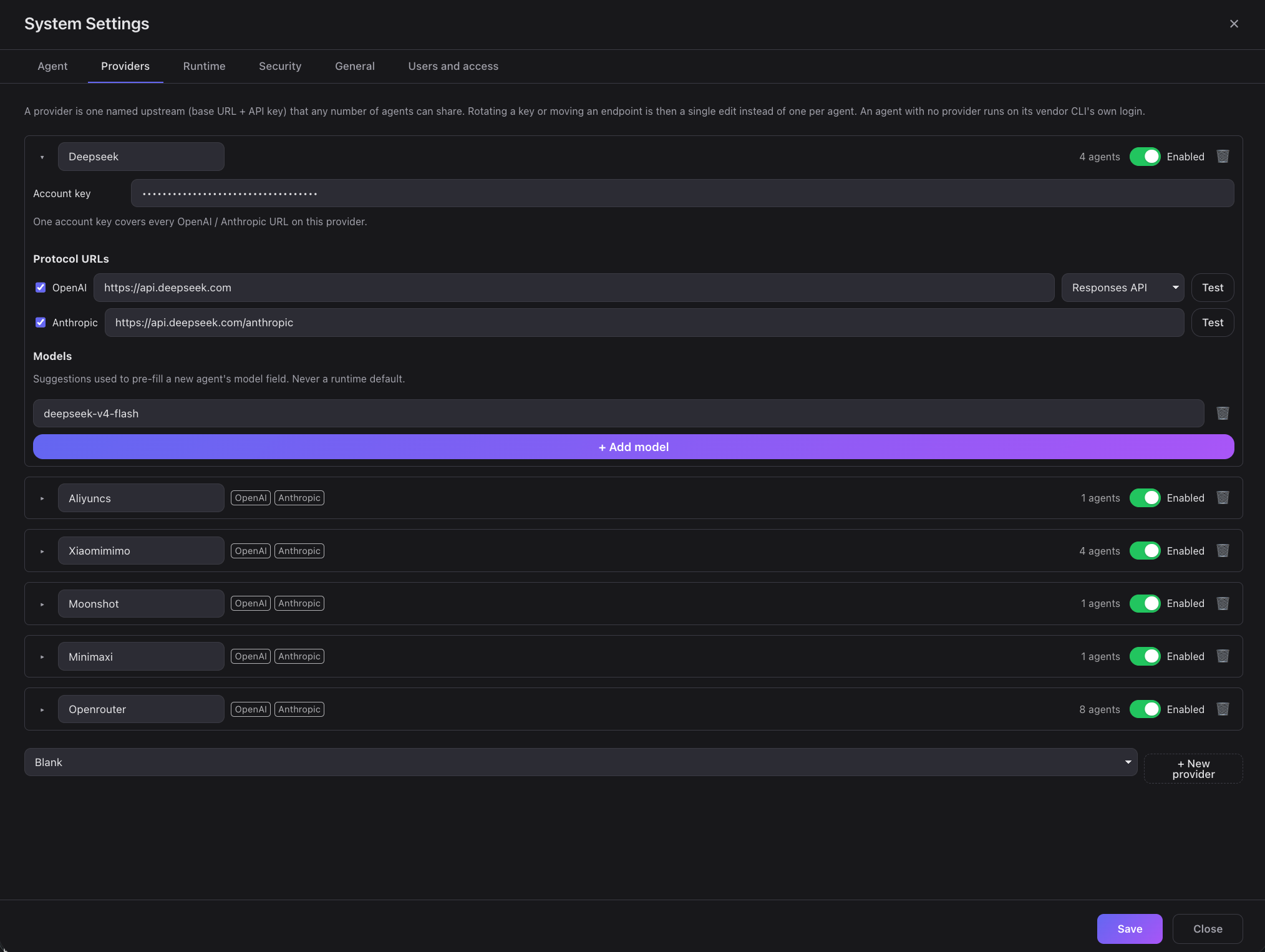
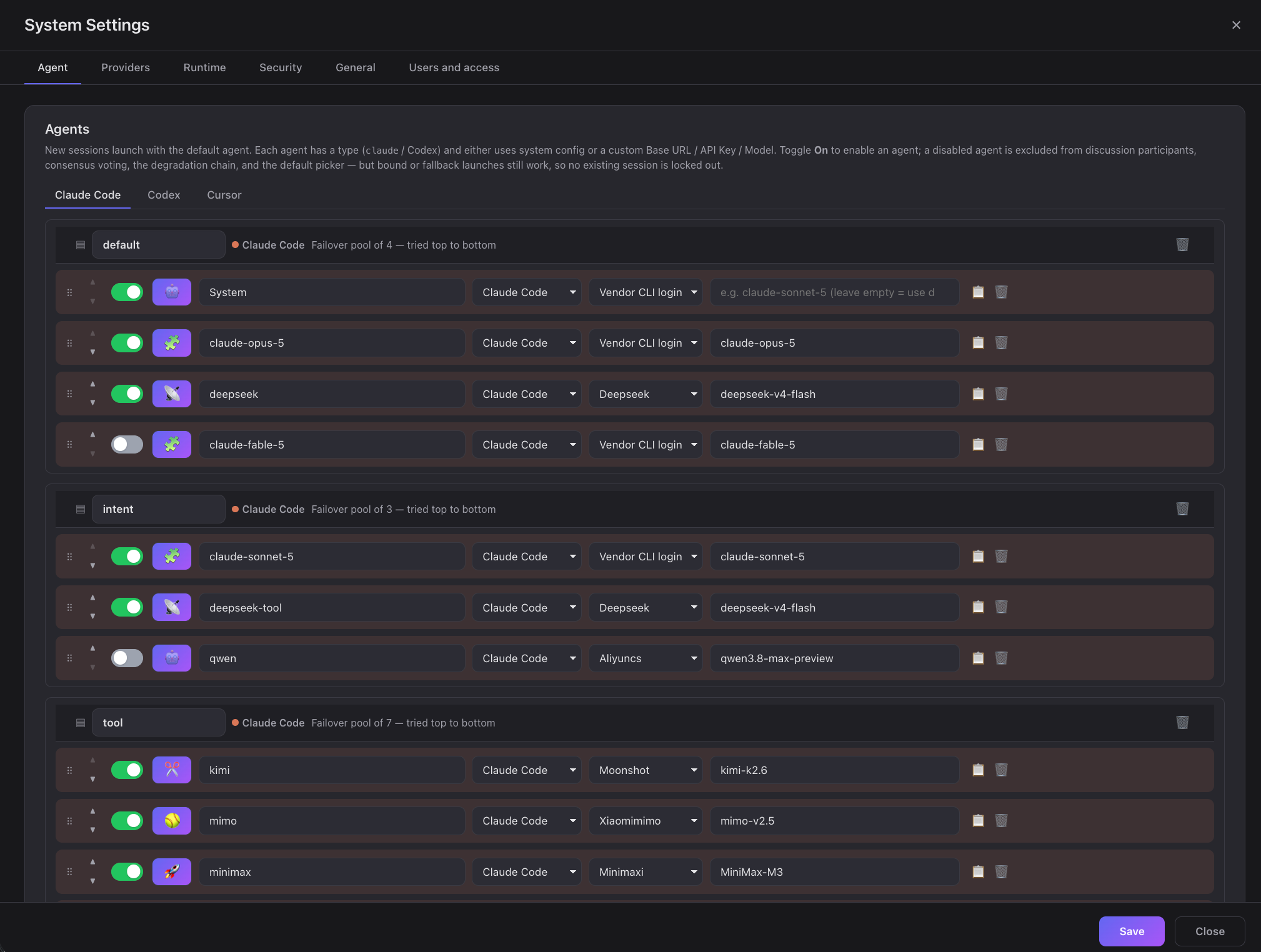
Usage
CLI single binary
Homebrew
brew install sequencestream/tap/c3   # install
brew upgrade sequencestream/tap/c3   # update to the latest release
Download
Release binaries are published on GitHub Releases.
shasum -a 256 -c c3-cli-v0.18.0-macos-arm64.tar.gz.sha256
# c3-cli-v0.18.0-macos-arm64.tar.gz: OK
# or check every artifact at once:
shasum -a 256 -c SHA256SUMS
Run
./c3 --port 3000 --daemon
# open http://localhost:3000
c3 listens on 127.0.0.1 only unless you say otherwise. To accept LAN or
remote connections, choose the interface explicitly:
./c3 --port 3000 --host 0.0.0.0 --daemon
OS service (c3 install / c3 uninstall)
c3 install # registers c3 as a **per-user** OS service (no root/admin required) that runs
c3 start # under the platform's service manager. The current `--port`/`--host`/`--settings`
c3 uninstall # removes the current platform's registration and is idempotent. It **only**
External MCP access
Point an agent c3 did not start — an independent Claude Code / Codex session, a
CI job, a monitoring script — at this deployment over MCP. The endpoint carries no
credential: the key rides Authorization: Bearer, the workspace ridesX-C3-Workspace.
export C3_MCP_KEY='c3k_…'   # from the one-time reveal; keep it out of the command line

# Claude Code
claude mcp add --transport http c3 "http://<host>:3000/mcp" \
  --header "Authorization: Bearer $C3_MCP_KEY" \
  --header "X-C3-Workspace: <workspace-name>"
# Codex CLI — ~/.codex/config.toml
[mcp_servers.c3]
url = "http://<host>:3000/mcp"
bearer_token_env_var = "C3_MCP_KEY"
env_http_headers = { "X-C3-Workspace" = "C3_MCP_WORKSPACE" }
// Cursor — ~/.cursor/mcp.json
{
  "mcpServers": {
    "c3": {
      "url": "http://<host>:3000/mcp",
      "headers": {
        "Authorization": "Bearer ${C3_MCP_KEY}",
        "X-C3-Workspace": "<workspace-name>",
      },
    },
  },
}
- Generate a key in Workspace Settings → External MCP access. That page
administers the key; it does not grant the workspace it lives on. Which
workspaces the key reaches is decided by its owner's administrator-managed
scope. The plaintext is shown once — it is stored only as a saltedscrypt
hash and can never be recovered, only replaced. - Open the listener with
--host(above) if the client is on another machine.
A non-loopback bind with no configured administrator makes/mcpanswer 503
until you configure one. - Pick the workspace per session. One key can serve every workspace its owner
is allowed into;X-C3-Workspacechooses which one at initialization. Switching
means starting a new session, not a new key. - Grant write tools explicitly if needed. A new key can only read:
find_intents,view_intent,find_discussions,view_discussion,publish_event, pluslist_workspaces/whoami, which report the key's own
reach so a client never has to probe for it. Anything that changes c3 state
(save_intents,submit_spec_review,start_session_for_intent, …) must be
ticked in the key's tool scope, behind a risk confirmation — it really does
change c3 state. A write may target another workspace in the key's reach with
an optionalworkspaceNameargument; every attempt is authorized again for
that call and recorded in c3's write-audit trail. - Revoke when done. Revoking a key in Workspace Settings takes effect on its
very next request and closes any MCP session it already had open.
Security. Plain HTTP exposes the bearer token to anyone on the network. c3
does not ship or require TLS: put it behind your own HTTPS reverse proxy before
exposing it beyond the local machine, and suppress sensitive headers in its logs.
c3 itself never logs theAuthorizationvalue.
X-C3-Workspaceis a c3 HTTP extension, not an MCP protocol field — MCP's
Streamable HTTP transport defines protocol headers such asMcp-Session-Idand
leaves tenant selection to the application. Clients that cannot send arbitrary
headers cannot use this endpoint, and there is no fallback. Claude.ai custom
connectors need an OAuth-capable server, which c3 is not, so they are not
supported by this static-key endpoint.
Connect a Feishu bot
Bring c3's agents into a Feishu group: @ the bot with a question, c3 runs one
unattended turn in the bot's own directory, and only the final answer goes back
to the chat — tool calls, intermediate reasoning, and file contents never leave
c3. Manage it in Workcenter → Chat robots (the "New robot" action is
admin-only).
- Create the app.
- One-click (Feishu China region only). Pick platform Feishu, click
Create Feishu app, and scan the QR with an admin account (official Device
Authorization). c3 registers a bot-only app with the minimum scope —im:message:send_as_bot,im:message.group_at_msg:readonly,im:message.p2p_msg:readonly,application:bot.basic_info:read, eventim.message.receive_v1— and switches it to long-connection automatically.
If that last step can't complete, you land inmanual_setup_requiredwith
the credentials already filled in; finish step 2 by hand. - Manual. Create a bot app yourself at open.feishu.cn/app, grant the four
scopes and the event above, then paste its App ID / App Secret into the form.
- One-click (Feishu China region only). Pick platform Feishu, click
- Long connection, not a webhook. In the app's Event & Callback settings,
set the subscription method to long connection and add theim.message.receive_v1event — the one-click path does this for you; a
manually created app needs it checked by hand, or the bot connects but never
receives messages. - Pick vendor, agent, and tools. Choose which vendor/agent runs the turn and
tick its tool allowlist. A new robot defaults to read-only; write/exec tools
need an explicit admin tick, one at a time. - Enable it. A new robot is created disabled. Enabling asks an admin to
confirm the outbound reach (which chats/DMs it may answer in) once, on the
record — skip that and the server refuses to enable it. - Bind your IM identity. Each sender links their Feishu account to their c3
account once, from Personal settings → IM identity, before the bot will
answer them; an unbound sender only gets a fixed instruction to bind. - Talk to it. Group chats require
@mentionby default; DMs are closed by
default (disabled— switch toallowlistoropenif you want them).
Documentation
- Handbook: English |
简体中文 — getting started guides for c3,
discussions, multi-agent consensus, intents, SDD, and automation engineering. - Development guide — build from source, single binary, release
pipeline, end-to-end tests, WebSocket protocol, and how permission interception works. doc/— architecture spec, ADRs, domain specs, and flows (the source of
truth kept in sync with the code).
License
Yorumlar (0)
Yorum birakmak icin giris yap.
Yorum birakSonuc bulunamadi