OCI-draw.io-Architect
Health Uyari
- License — License: MIT
- Description — Repository has a description
- Active repo — Last push 0 days ago
- Low visibility — Only 6 GitHub stars
Code Basarisiz
- rm -rf — Recursive force deletion command in oci-drawio-architect/install.sh
Permissions Gecti
- Permissions — No dangerous permissions requested
Bu listing icin henuz AI raporu yok.
Claude Code plugin that generates draw.io OCI architecture diagrams from Terraform configs or descriptions
OCI draw.io Architect — Claude Code Plugin
A Claude Code plugin that generates production-quality draw.io architecture diagrams for Oracle Cloud Infrastructure (OCI) — from Terraform configurations or free-form descriptions.





Author: Sergio Farfan · [email protected]
Version: 1.2.0 · Download archive · Changelog
The Problem
If you've ever had to document an OCI architecture, you know the drill. You open draw.io, hunt for the right Oracle icon set, drag shapes onto the canvas, manually wire up VCNs and subnets, nudge elements into alignment, then spend another 30 minutes making sure the colors match Oracle's official template — only to realize the Terraform config changed last week and the diagram is already out of date.
For cloud architects working with OCI, this is a recurring tax on every project:
- Diagrams drift from reality. Terraform is the source of truth, but draw.io doesn't know that. Every infrastructure change means a manual diagram update that usually doesn't happen until someone asks for it in a review.
- The OCI icon set is not built into draw.io. You have to find it, import it, and figure out which icon maps to which service — across a dozen categories and more than 150 icons.
- Layout is time-consuming. Getting the Region > VCN > Subnet > Service hierarchy right, with proper spacing, no overlapping containers, and Oracle's color scheme, takes significant effort even for experienced users.
- Hub-and-spoke topologies are especially painful. When you have 10–15 spoke VCNs connected through a DRG, laying that out cleanly by hand is an hour-long exercise in pixel arithmetic.
- Diagrams are created once and abandoned. Because updating them is expensive, teams stop maintaining them. By the time a new engineer joins or an audit happens, the diagram shows an architecture from two sprints ago.
The root cause: architecture diagrams are treated as a design artifact — something you create manually — rather than something you generate from the actual infrastructure definition.
What It Does
Type /drawio-architect in any Claude Code session and the plugin generates a production-quality .drawio file directly from your infrastructure — no manual drawing, no icon hunting, no layout math.
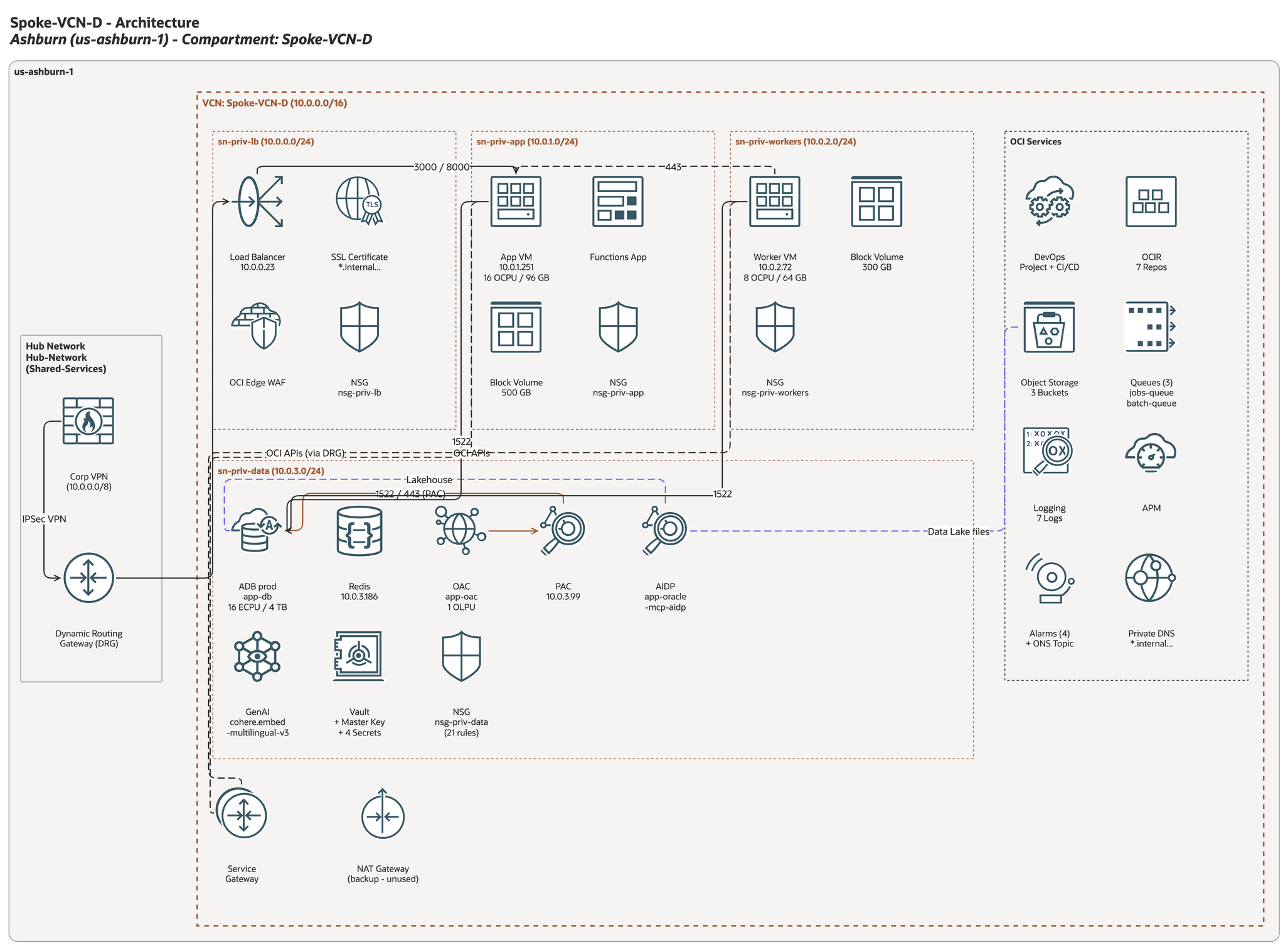
Single-VCN topology with Hub Network, subnets, OCI service icons, and Oracle color palette — rendered by draw.io from the reference layout example (oci-drawio-architect/examples/generate_reference_layout.py); every connector is routed automatically.
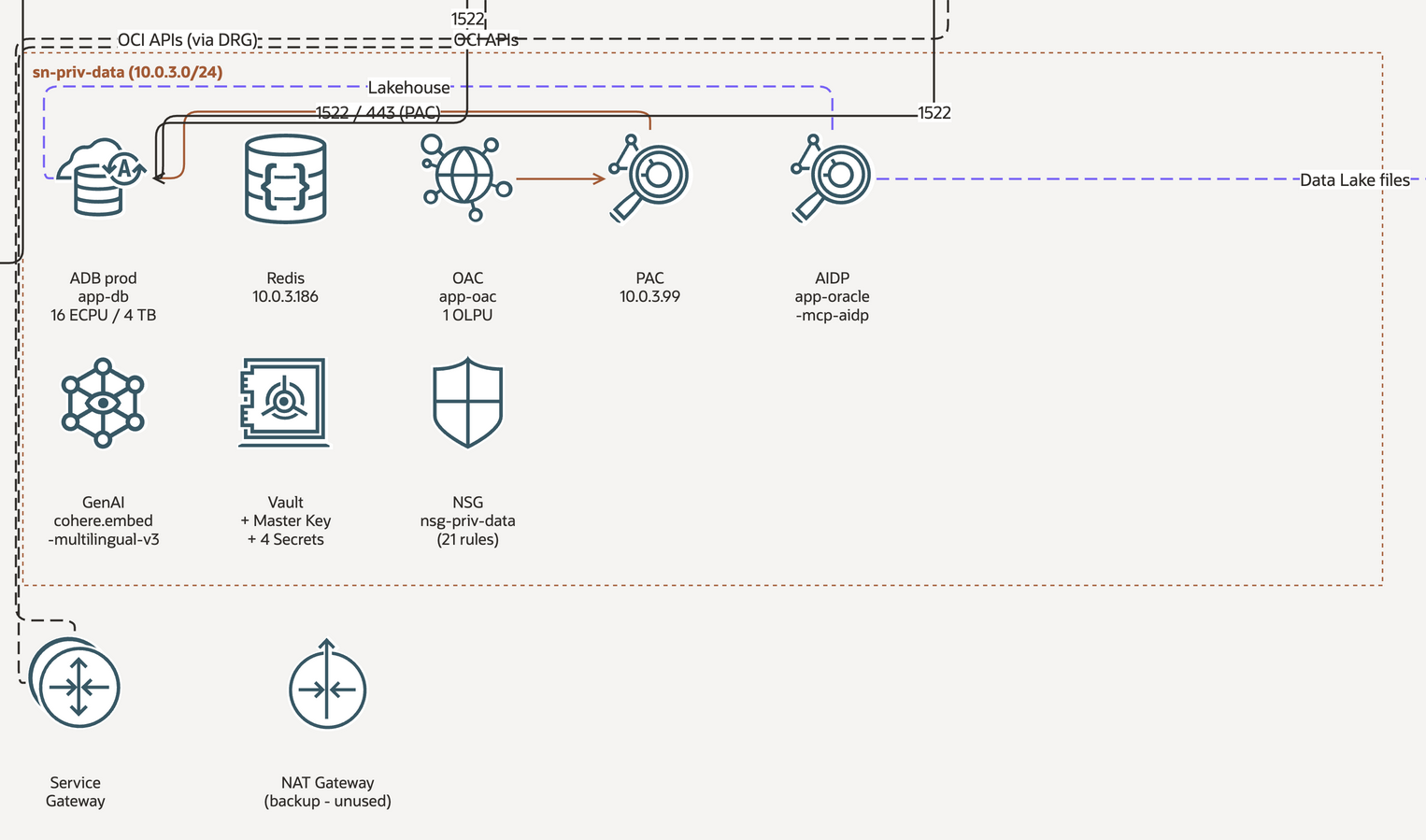
Detail view: data subnet with ADB, Redis, OAC, PAC, AIDP, GenAI, Vault, NSG and the gateway row — uniform icon sizes, captions under every icon, connectors kept in the gutters.
How It Works
The plugin accepts three input types: a Terraform directory (HCL or terraform show -json output) — parsed to extract VCNs, subnets, gateways, and DRG attachments — a VCN name resolved against existing .tfvars files, or a plain-text description of the target architecture. Whatever the input, it is first normalized into a small model (subject, region, hub, VCNs with subnets and their icons, an OCI Services panel, gateways, edges). A deterministic layout recipe (scripts/oci_layout.py) turns that model into a diagram with the same structure as the reference sample: subnets in traffic order, a services panel, a gateway row, a hub panel vertically centred on the VCN. Under the hood, a DrawioBuilder class backed by 159 bundled OCI SVG icons sizes every container from its children, routes every connector through the gutters so it doesn't cross unrelated icons or captions, styles everything with Oracle's Redwood palette, and validates the result (overlaps, containment, dangling ids, label overflow, edge crossings) before the file is written. If draw.io desktop is installed, the plugin also exports a PNG so the result can be inspected visually. The entire workflow runs inside Claude Code via a single /drawio-architect command.
7-step workflow
- Settings — on first run, auto-detects tenancy, region, VCNs, compartments and logos from Terraform configs,
~/.oci/configand the OCI CLI, and saves them to.claude/oci-drawio-architect.local.md - Input — asks what to diagram: Terraform directory path, VCN name, or free-form description
- Model — normalizes the input into the diagram model (VCNs, subnets, services, gateways, hub, DRG topology, edges)
- Generate — writes a
generate_<name>_drawio.pyscript that imports the plugin'sDrawioBuilder/oci_layoutdirectly from the plugin (sys.path.insert(0, "<plugin>/scripts")) — nothing is copied into your project - Run — executes the script to produce the
.drawiofile - Validate + render — gates on
scripts/check_overlaps.py(exit 0 required) and, when draw.io desktop is available, exports a PNG withscripts/render_drawio.pyfor a visual check - Report — file path, size, what's in the diagram, settings used, and viewing instructions
Diagram types
All four types share the same model and layout recipe; the page is sized from the content (fit_page()), so there is no fixed canvas size to pick.
| Type | Best For | Layout |
|---|---|---|
| Single-VCN Topology | Application stacks | Region > optional hub panel + one VCN column: subnet rows in traffic order (LB → app → compute → mgmt), data tier, OCI Services panel, gateway row |
| Hub-and-Spoke Network | Network overview with DRG | Hub / on-premises panel on the left (CPE, DRG, firewall), spoke VCN columns to the right, DRG edges routed through the gutters |
| Service Inventory | Compartment-level resource view | Compartment and services panels built with place_icons() / fit_to_children(); NSG or route rules as add_table() pages |
| Multi-VCN Overview | VCN interconnections via DRG | Several VCN columns, a regional OCI Services panel, cross-VCN edges parented to the common ancestor automatically |
What's new in 1.2.0
Driven by a full code review and output-quality audit of 1.1.0 (see the changelog for the complete list):
- The workflow works out of the box. Generated scripts import the builder from the plugin directory instead of copying
drawio_builder.pyinto your project; icons resolve through$OCI_SVG_DIR, the plugin'sicons/,$CLAUDE_PLUGIN_ROOT/iconsand the standard~/.claude/pluginsinstall locations. - The reference look is back. Region / on-premises / compartment labels top-left at 12px, charcoal 1px dashed services panel, dashed edges with
dashPattern=6 3, and a font stack (Oracle Sans,Arial,Helvetica,sans-serif) so labels never fall back to a serif face. Three style profiles:default,official(strict OCI toolkit v24.2) andv1.0. New container typesother,metro_or_realm,third_party_cloud,internet. - Icons render at one size, without ghost boxes. 16 icons (VM, Functions, Block Volume, Buckets, Object Storage and others) carried a leftover caption-placeholder rectangle; it is gone, every viewBox is cropped to the glyph, and every glyph is fitted into a uniform 70×70 area of a 75×95 slot. 55 empty stencil shells were removed and 4 scrape-artifact filenames fixed (159 icons in 12 categories remain, every one addressable by file stem plus 206 short aliases).
- Edges route themselves.
add_edge()picks the common-ancestor parent and routes through container margins and gutters, avoiding icons, captions and container titles; labels dodge collisions.route="direct"androute="pinned"keep the 1.1.0 and 1.0.0 behaviours. - Validation catches what used to slip through. Any-two-container overlaps, child containers spilling out of their parent, icon/caption collisions, unknown
parent/source/targetids (which made draw.io silently drop the whole diagram), long captions and estimated edge crossings — with compressed pages andUserObjectwrappers handled. - Layout helpers so nobody hand-computes coordinates:
place_icons,fit_to_children,resize,fit_page,add_title,add_legend,add_table,add_page/use_page/add_layer, deterministic ids viakey=,metadata/tooltip/link,render(). - New tools:
oci_layout.py(model → diagram CLI),render_drawio.py(PNG/SVG/PDF export),build_icon_catalog.py,smoke_test.sh,parse_terraform.py(Terraform HCL directory,--plan-jsonor--state-json→ model, with--vcnfiltering) and the experimentalquery_tenancy.py(live tenancy → model via the OCI CLI);examples/generate_reference_layout.pyrebuilds the reference sample from a model dict; atests/suite covering the builder, settings detection and the icon set. - Settings detection rewritten:
region = var.regionresolved through tfvars and variable defaults, comment stripping, provider-block scoping, complete region table (eu-london-1was never a region —uk-london-1is),[DEFAULT]inheritance in~/.oci/config, CLI timeouts and session-token auth, logo classification fixed, relative logo paths, new keysvcns,compartments,terraform_dirs,auth_tenancy_ocid,oci_auth,subscribed_regions,home_region. - Installer and packager hardened:
python3 -m pip --user, Pillow optional (warns, never blocks),rsyncwithcpfallback, JSON-based upsert ofmarketplace.jsonthat preserves other plugins, 8 verification checks including a post-install smoke test, cleaner uninstall;pack.shis reproducible, excludeslogos/and tarballs, always includesLICENSEandicons/NOTICE, and prints the SHA256.
Prerequisites
- Claude Code (CLI) installed and working
- Python 3.9+ — the builder uses only the standard library
- draw.io desktop for viewing generated
.drawiofiles (and for the optional PNG export) - Pillow (optional) — needed only to embed PNG/JPEG logos with
add_image(); SVG logos and all bundled icons work without it - OCI CLI (optional) — for tenancy name and region subscriptions during settings auto-detection
The plugin bundles 159 OCI SVG icons (12 categories, about 1.4 MB); no external icon dependency is needed.
Installation
One-line install
curl -fsSL https://github.com/sergio-farfan/OCI-draw.io-Architect/releases/download/v1.2.0/oci-drawio-architect-v1.2.0.tar.gz | tar -xz && ./oci-drawio-architect/install.sh
This will:
- Download and extract the archive
- Check prerequisites (Claude Code directory, Python 3.9+,
rsyncorcp) - Try
python3 -m pip install --user Pillowif Pillow is missing — and continue without it if that fails - Create or update the local marketplace at
~/.claude/plugins/marketplaces/local/(only theoci-drawio-architectentry inmarketplace.jsonis touched) - Copy the plugin files into the marketplace (staged, then swapped in atomically)
- Verify all components (8 checks, including a post-install smoke test that generates the demo diagram and runs the overlap checker on it)
Register in Claude Code
Open Claude Code and run these two commands:
/plugin marketplace add ~/.claude/plugins/marketplaces/local
/plugin install oci-drawio-architect@local
Restart Claude Code
Exit and reopen Claude Code for the plugin to load.
Verify
/drawio-architect
The command will prompt you for what to diagram.
Auto-detected Settings
On first run, the plugin probes your Terraform files, ~/.oci/config and the OCI CLI (each CLI call is bounded by an 8 s timeout) and saves what it finds:
| Setting | Source | Description |
|---|---|---|
tenancy_name |
OCI CLI (oci iam tenancy get) |
Tenancy display name (for the diagram title) |
tenancy_ocid |
Terraform provider block / tfvars, ~/.oci/config |
Tenancy OCID (must match ocid1.tenancy.) |
auth_tenancy_ocid |
~/.oci/config |
Reported when the CLI identity's tenancy differs from the Terraform one |
region |
Terraform provider "oci" block (var.region resolved via tfvars / variable defaults), then ~/.oci/config |
OCI region identifier |
region_label |
Auto-derived | Human-readable region name (55-entry table; a label is derived for unknown regions) |
home_region, subscribed_regions |
OCI CLI (oci iam region-subscription list) |
Tenancy's home region and subscriptions |
oci_profile, oci_auth |
Terraform provider block, ~/.oci/config |
CLI profile; security_token when session auth is configured |
compartment, compartment_ocid, compartments |
Terraform (oci_identity_compartment resources, compartment_ocid / compartment_id variables) |
Diagram scope — edit compartment by hand if needed |
vcns |
Terraform (oci_core_vcn resources or vcns = {...} tfvars maps) |
VCN names and CIDRs |
logo_light, logo_dark |
File scan (logos/, assets/logos/, assets/images/, docs/logos/, then the plugin-local logos/) |
*dark* / *black* files become logo_light (dark artwork for light backgrounds); *white* / *light* become logo_dark. Project paths are stored relative |
terraform_dir, terraform_dirs |
Directory walk (shallowest dir with a provider "oci" block, else with tfvars; .terraform, .git, node_modules pruned) |
Chosen directory plus any tied candidates |
Settings are stored in .claude/oci-drawio-architect.local.md (per-project; ignored via .claude/*.local.md in .gitignore). Edit the file directly to change values. Delete the file and re-run /drawio-architect to re-detect, or run the probe yourself:
python3 ~/.claude/plugins/marketplaces/local/plugins/oci-drawio-architect/scripts/detect_settings.py [--no-cli] [terraform_dir]
Skill auto-activation
The plugin also activates automatically when you mention in conversation:
- "draw.io OCI"
- "diagram this architecture"
- "drawio with OCI icons"
Uninstall
~/.claude/plugins/marketplaces/local/plugins/oci-drawio-architect/install.sh --uninstall
This removes the plugin files, its cache, its installed_plugins.json entry and its marketplace.json entry (other plugins are preserved); the local marketplace itself is removed only when nothing else lives in it.
Then inside Claude Code:
/plugin uninstall oci-drawio-architect@local
(and /plugin marketplace remove local if the installer reported the marketplace is now empty). Restart Claude Code.
Development
Everything runs from the source tree; no install is needed.
# Unit tests (builder, settings-detection fixtures, icon-set integrity and alias map)
python3 -m unittest discover -s oci-drawio-architect/tests

# End-to-end smoke test: demo diagram -> overlap checker -> PNG (if draw.io desktop is present)
oci-drawio-architect/scripts/smoke_test.sh            # SMOKE_SKIP_PNG=1 to skip the export

# Rebuild the reference sample from its model dict, then validate and render it
python3 oci-drawio-architect/examples/generate_reference_layout.py out.drawio --render
python3 oci-drawio-architect/scripts/check_overlaps.py --strict out.drawio     # exit 0 clean, 1 errors, 2 unusable input
python3 oci-drawio-architect/scripts/render_drawio.py out.drawio -f png        # exit 3 when draw.io desktop is missing (DRAWIO_BIN overrides)

# Terraform -> model JSON -> diagram with the shared recipe
python3 oci-drawio-architect/scripts/parse_terraform.py terraform/envs/prod --vcn app-vcn --out model.json   # or --plan-json / --state-json
python3 oci-drawio-architect/scripts/oci_layout.py model.json -o out.drawio --profile default --legend --render png

# Regenerate / verify the icon catalog after touching icons/
python3 oci-drawio-architect/scripts/build_icon_catalog.py --check

# Regenerate the README screenshots from the reference example (needs draw.io desktop)
python3 oci-drawio-architect/examples/make_screenshots.py

# Package a release (version is read from .claude-plugin/plugin.json; prints size, entry count and SHA256)
oci-drawio-architect/pack.sh /path/to/output
Expect generated .drawio files to weigh roughly 7–9 KB per embedded icon (the two-page demo with 8 icons is about 77 KB; the reference sample with 31 icons about 280 KB). The reference sample itself is OCI_Architecture.drawio at the repository root.
Icon licensing
The plugin code is MIT-licensed (see LICENSE). The SVG files under oci-drawio-architect/icons/ are Oracle Cloud Infrastructure architecture icons — Copyright (c) Oracle and/or its affiliates — sourced from the OCI Architecture Diagram Toolkit. They are not covered by the MIT license; they are bundled solely so the plugin can embed them when documenting OCI architectures. See oci-drawio-architect/icons/NOTICE for the attribution and refer to Oracle's page for the applicable terms before using the icons for any other purpose.
Troubleshooting
| Problem | Fix |
|---|---|
/drawio-architect not found |
Restart Claude Code after plugin install |
Pillow is required for PNG/JPEG logos |
python3 -m pip install --user Pillow (add --break-system-packages on PEP 668 Pythons, or use a venv). Only PNG/JPEG logos need it; use an SVG logo to avoid the dependency |
OCI icon directory not found / Icon SVG not found |
The builder searches $OCI_SVG_DIR, the plugin's icons/, $CLAUDE_PLUGIN_ROOT/icons and ~/.claude/plugins/.... Export OCI_SVG_DIR=/path/to/oci-drawio-architect/icons or call set_icon_dir() |
| Unknown icon key | The error lists close matches; every SVG is usable by its file stem (compute_virtual_machine_vm) or alias (vm) — see references/icon-catalog.md |
check_overlaps.py exits 1 |
Read the ERROR: / OVERLAP: lines: fix the container sizes (fit_to_children()), the parent ids, or the layout math, regenerate and re-run |
render_drawio.py exits 3 |
draw.io desktop not found on PATH, /Applications, /opt or snap — install it or set DRAWIO_BIN=/path/to/drawio |
| Settings not detected | Ensure a provider "oci" {} block exists in your Terraform directory (or pass the directory to detect_settings.py) |
| Want to re-detect settings | Delete .claude/oci-drawio-architect.local.md and re-run |
| Tenancy name missing | Install and configure OCI CLI (brew install oci-cli); --no-cli skips the queries entirely |
| Fonts look wrong in draw.io | Close and reopen the file (draw.io caches renders); labels use the Oracle Sans,Arial,Helvetica,sans-serif stack |
Yorumlar (0)
Yorum birakmak icin giris yap.
Yorum birakSonuc bulunamadi