web-stylebook-mcp
Health Pass
- License — License: MIT
- Description — Repository has a description
- Active repo — Last push 0 days ago
- Community trust — 76 GitHub stars
Code Fail
- process.env — Environment variable access in .github/workflows/publish.yml
- process.env — Environment variable access in scripts/check-canonical-catalog.mjs
- exec() — Shell command execution in scripts/sync-visual-contract.mjs
- process.env — Environment variable access in scripts/sync-visual-contract.mjs
Permissions Pass
- Permissions — No dangerous permissions requested
No AI report is available for this listing yet.
MCP server that gives AI coding agents scored design directions, UI-state plans, and WCAG-checked design tokens. Deterministic, offline, no API key.
web-stylebook-mcp
Improve existing UI with design judgment, real changes, and before/after evidence.
An MCP server for coding agents (Codex, Claude Code, Cursor, and any MCP client): the agent applies researched design knowledge, edits the actual interface, verifies affected behavior, and reports the result.


English · 한국어
web-stylebook-mcp gives a coding agent design knowledge and a way to show its work. For an existing interface, the agent keeps what already works, picks a fix that fits the context, edits the real source, verifies the result, and shows the before/after difference. The server supplies researched design foundations and checks the evidence the agent submits; the agent itself makes the edits and takes the captures. New builds can also use the visual directions, UX principles, UI states and tokens from the curated Web Stylebook catalog.
No API key. No model call. No network. No project filesystem access. Deterministic, read-only, fully local.
Quick start
- Add the server to your agent (Node ≥ 20; other clients are under Install):
claude mcp add web-stylebook -- npx -y web-stylebook-mcp@latest - Ask for a change to a screen you already have, for example "Improve the incidents table so the incident that needs attention first stands out." The agent starts with
get_design_improvement_plan, edits your code, and finishes withvalidate_design_improvement_result. - For a new product or page, describe it instead. The agent starts with
recommend_design_direction.
The companion skill tells the agent when to call which tool.
Without it / with it
Without web-stylebook-mcp |
With web-stylebook-mcp |
|
|---|---|---|
| Direction | Guesses one look, commits to it | Scored candidates + reason codes + what it rejected and why |
| Craft | Principle names dropped into a doc, nothing verified | Placement guidance + an observable check per principle, cautions attached |
| UX evidence | "Hick's Law says…" as a conversation-ender | Evidence-labeled prompts (strong / contextual / contested) you can't restate as law |
| UI states | Happy path only; empty / error / loading bolted on later | Required / recommended / domain states up front, per surface |
| Tokens | Hand-picked hexes, contrast rarely checked | Role-based tokens with WCAG contrast warnings |
| Structure | Tokens recolor the default hero + logos + 3 cards template | A layout archetype and signature moves per direction, and an audit that flags the template in the built page |
| Audit | "Looks good" from a summary | Surface-aware checks with stable ids, severity, required evidence, and explicit unverified states |
| Result | Findings without a changed UI | Actual implementation, matched comparison and an evidence-linked report |
Improve an existing UI — the default workflow
An improvement request means inspect → decide → implement → verify → compare/report.
The host agent edits the actual UI and uses the MCP to guide its decisions and check completion.
It does not stop at a critique. Explicit review-only requests still stay read-only; a new build or
new visual direction uses the existing direction tools.
get_design_improvement_plan is the entry point. It supplies 24 researched foundations, 48
illustrative applications and 30 attributed sources in English, Korean and Japanese, plus a
structured host workflow. Capture the original UI first, then record the actual task and target
conditions in context:
// → get_design_improvement_plan
{
  "surface": "data-table",
  "concerns": [
    "scanability",
    "focus",
    "consistency"
  ],
  "limit": 6,
  "locale": "en",
  "context": {
    "userTask": "Find the incident that needs attention first.",
    "targets": [
      {
        "id": "incidents-desktop",
        "surface": "data-table",
        "route": "/incidents",
        "conditions": {
          "viewport": {
            "width": 1280,
            "height": 900
          },
          "theme": "light",
          "locale": "en-US",
          "state": "populated",
          "dataKey": "incident-fixture-v1@fixed-clock",
          "scrollAnchor": "first-row",
          "zoom": 1,
          "deviceScaleFactor": 1
        }
      }
    ]
  }
}
Each foundation connects observations, conditional remedies, counterexamples, preservation and
observable checks. Apply the relevant rules and edit real source. Preserve product identity and
working behavior; a new style is optional. The default is 6 entries, maximum 12, with omitted matches
listed in coverage.omittedIds. Use category or explicit foundationIds to narrow retrieval.
Filters combine with AND, concerns within a filter with OR. Browse webstylebook://foundations.
After implementation, call validate_design_improvement_result with plan (the exact input you
sent to get_design_improvement_plan), expectedPlanHash (the returned workflow.planHash), and asubmission of actual captures, changed files/diffs, observed checks, target outcomes and limitations:
// → validate_design_improvement_result
{
  "plan": { "surface": "data-table", "concerns": ["scanability", "focus", "consistency"], "context": { … } },
  "expectedPlanHash": "sha256:…",
  "submission": { "captures": […], "changes": […], "checks": […], "outcomes": […], "limitations": […] }
}
It returns:
complete: submitted implementation and comparison evidence covers every planned target.needs-work: follownextActions; missing before images, mismatched data/fonts/viewports,
proposals without edits, skipped targets, unsupported passes and regressions cannot complete.no-change: fully verified unchanged UI with no implemented/proposed changes; never present it
as an improvement.reportMarkdown: paired before/after links, changes and reasons, verification, tradeoffs and
remaining unverified work. The host can present the real screenshots in a side-by-side/toggle viewer.
Each target needs visual, behavior, preservation and affected-accessibility checks. Static markup
preservation alone is insufficient. The MCP validates supplied coverage and consistency, not
artifact contents or design quality. The host performs edits, captures and observations; no claimed
user-study results or numerical usability gains are invented. A query without context remains valid
for knowledge discovery but cannot complete an improvement. Commit/push/release/deployment need
separate authorization.
See the result contract and cross-UI example
and research record (in Korean). The machine-readable workflow iswebstylebook://workflows/improve-ui, also advertised by manifest.improvementWorkflow.
Watch it decide
"High-density monitoring dashboard for SREs, watched all day on call. Calm, technical. Avoid cyberpunk."
// → recommend_design_direction  (input)
{
  "productDescription": "High-density monitoring dashboard for SREs, watched all day on call",
  "productType": "operational-saas",
  "tone": ["calm", "technical"],
  "density": "high",
  "usageFrequency": "daily",
  "avoid": ["cyberpunk"]
}
// ← result (trimmed)
{
  "confidence": "high",
  "candidates": [
    { "styleId": "quiet-utility",  "score": 0.93 },
    { "styleId": "runtime-signal", "score": 0.89 },
    { "styleId": "notion-style",   "score": 0.83 },
    { "styleId": "console-launch", "score": 0.77 },
    { "styleId": "platform-core",  "score": 0.77 }
  ],
  "ranking": {
    "winner": "quiet-utility",
    "runnerUp": "runtime-signal",
    "gap": 0.04,
    "tied": false,
    "reasonCodes": ["USE_CASE_FIT", "LOWER_UPKEEP"],
    "explanation": "quiet-utility outranks runtime-signal by 0.04: 3 of 3 bestFor entries aim at operational-saas (runtime-signal: 2 of 3); lighter upkeep for daily use (quiet-utility: motion low, maintenance low; runtime-signal: motion low, maintenance medium)."
  },
  "rejected": [                        // 29 in total, three shown
    { "styleId": "aurora-gradient",  "reasonCodes": ["PRODUCT_NOT_IDEAL", "DAILY_USE_OVERSTIMULATION"] },
    { "styleId": "claymorphism",     "reasonCodes": ["PRODUCT_NOT_IDEAL"] },
    { "styleId": "cyberpunk-glitch", "reasonCodes": ["EXPLICITLY_AVOIDED", "DAILY_USE_OVERSTIMULATION"] }
  ],
  "pairings": [
    { "styleId": "notion-style",       "pairWith": "quiet-utility", "role": ["forms", "navigation", "repetitive surfaces"] },
    { "styleId": "macos-liquid-glass", "pairWith": "quiet-utility", "role": ["forms", "navigation", "repetitive surfaces"] }
  ],
  "guidance": "Treat candidates as scored evidence; choose using product context. candidates[0] is the strongest match, not a mandate."
}
Notice what it does: the top candidates get clearly different scores (0.93, 0.89, 0.83), and ranking says why #1 beat #2 — here every bestFor entry of quiet-utility targets operational SaaS, and its upkeep is lighter for daily use. When the top two really do score alike, ranking.tied says so instead of inventing a winner. Rejected styles come with reason codes, and pairings are suggestions rather than a mandate. The server provides evidence; the agent decides.
Then turn the chosen direction into real tokens:
// → compose_design_tokens({ primaryStyleId: "quiet-utility", format: "css-variables" })
// 0 WCAG contrast warnings
:root {
  --color-canvas: #ffffff;
  --color-text:   #1f2328;
  --color-accent: #526371;
  --color-border: #cecfd0;
  /* … role-based color, type, spacing, radius, motion, density */
}
Two calls, and the agent chose a direction, saw what was rejected and why, and got tokens that pass WCAG, without generating a line of code.
Structure, not just tokens
Tokens only recolor a page, so every candidate also carries structure: a layout archetype (hero composition, grid rhythm, section order, density, and how the type scale is used), two or three signature moves with the job each one does, and the patterns the page must not ship. webstylebook://styles/{id} adds each move's build steps and each ban's detection criteria, and compose_design_tokens points back to it (style id, resource URI, and move ids) and prints the hero and moves in its text output. Where an archetype breaks from the style's specimen page, its basis is authored and departure says why.
After building, pass the page's HTML and CSS to audit_page_structure. This is its real output for a page an agent built from the default SaaS template (generic-saas-tailwind.html), checked against quiet-utility:
// → audit_page_structure({ html, styleId: "quiet-utility" })
// ← structure audit (trimmed)
{
  "summary": { "clean": false, "findings": 8, "major": 6, "minor": 2, "notVerified": 0, "checked": 12 },
  "findings": [
    {
      "patternId": "logo-strip",
      "name": "Logo strip",
      "severity": "major",
      "locations": ["section#customers > div.mx-auto"],
      "observed": { "logos": 5, "marquee": false, "muted": true },
      "replaceWith": {
        "instruction": "Remove it unless you have permission and a reason to name real customers; show proof a visitor can inspect instead (a real result, artifact, or named case) with this style's proof move.",
        "moves": [
          { "id": "hairline-gap-list", "name": "Gap-as-hairline state list", "purpose": "Triage: shows many resources and their current state at an even rhythm, with dividers that cannot drift out of alignment." },
          { "id": "stepped-state-badges", "name": "Three-step state badges", "purpose": "Calm status: state reads through steps of weight and fill instead of traffic-light colors, so the one urgent item stands out." }
        ]
      }
    },
    {
      "patternId": "generic-saas-skeleton",
      "observed": { "sections": "opening → proof → features → testimonials → cta", "templateSections": 5 },
      "replaceWith": {
        "archetype": {
          "sectionOrder": [
            "Top bar: breadcrumb path on the left, search and one primary action on the right",
            "The primary working list or table with its filter row",
            "A detail or form panel for the selected item",
            "Secondary panels such as activity, audit history, or settings for the same object",
            "Empty, loading, and error states drawn in the same slots as the data"
          ]
        }
      }
    }
    // 6 more: centered-stack-hero, trusted-by-band, icon-feature-grid, testimonial-carousel, closing-cta-banner, quiet-utility/corner-radius
  ]
}
Each finding names where the pattern is, what was observed, and what to put there instead: the chosen style's signature moves for the same job (proof, in the logo strip's case), its hero composition, or its section order. Rebuild, run the audit again, then add "structure" to get_design_audit_plan.includeGroups and pass the returned evidence and results to validate_design_audit_result. Audit each viewport with its own targetId: the evidence ids include it, so the runs validate together. The checks are deterministic heuristics over the submitted HTML and CSS, not a browser render, so clean means every check ran and found none of these patterns, not that the design passed. Per-style guidance (archetypes and moves) is written in English, like the catalog's own layout and typography fields; pattern names and instructions follow locale.
Must-haves a style can't remove
A direction must not cost the page its function. In an earlier showcase run (#7), the luxury skincare page built with the MCP kept a single buy button above the fold, while the control page showed sizes, a per-night price, add to bag, and delivery and guarantee details. So recommend_design_direction also returns mustHaves: the elements the resolved product type requires and the zone each one must sit in. A style restyles them but never removes them or moves them out of their zone, and they come before the archetype's limits on the opening ("one action, one short line"): every first-screen item goes in the hero. Each candidate's structure.mustHaves names that style's signature moves that do the same job, for example the proof move that can carry delivery and guarantee details.
| Product type | Page | First screen | Anywhere on the page |
|---|---|---|---|
operational-saas |
main dashboard | Current status (current-status), What changed (recent-changes) |
— |
developer-tool |
product landing page | Code sample (code-sample), Documentation link (docs-link) |
— |
documentation |
docs home | Search (search), Quickstart (quickstart) |
— |
data-analytics |
analytics dashboard | Current status (current-status), What changed (recent-changes), Time range (time-range) |
— |
security-console |
security overview | Current status (current-status), What changed (recent-changes) |
— |
finance-admin |
finance overview | Current status (current-status), What changed (recent-changes) |
— |
healthcare-portal |
portal home | Primary action (primary-cta) |
Contact (contact), Privacy notice (privacy-notice) |
commerce |
product detail page | Price (price), Variant choice (variant-choice), Add to cart (add-to-cart), Delivery and guarantee details (purchase-assurance) |
— |
ai-chat |
chat screen | Message input (composer) |
AI limits note (ai-limits) |
content-editorial |
article page | Author (author), Publication date (publish-date) |
— |
knowledge-base |
help center home | Search (search) |
Topic index (topic-index) |
portfolio |
portfolio home | — | Work samples (work-samples), Contact (contact) |
campaign |
landing page | Primary action (primary-cta) |
Proof (proof) |
consumer-app |
app landing page | Primary action (primary-cta) |
Proof (proof) |
The first screen is everything up to the end of the opening section (the section that holds the page's h1), plus up to two following sections while each section so far is short (≤ 40 words, no image, video, table, or large SVG, and not sized to fill the viewport). The site header counts; the footer does not. A brief whose product type is neither given nor inferred resolves to other, which has no list, and the result says so instead of inventing one. Every criterion is in webstylebook://structure/must-haves.
Pass the same productType to audit_page_structure, and it reports which must-haves the built page is missing. This is its real output for the showcase failure, rebuilt as a fixture (commerce-buy-button-only.html):
// → audit_page_structure({ html, styleId: "midnight-noir", productType: "commerce" })
// ← must-have audit (trimmed)
{
  "mustHaves": {
    "productType": "commerce",
    "page": "product detail page",
    "missing": [],
    "misplaced": ["price", "variant-choice", "purchase-assurance"],
    "items": [
      { "id": "price", "checkId": "structure-must-have-price", "zone": "first-screen", "status": "misplaced", "count": 1,
        "locations": ["section#buy > div > p.price:nth-of-type(1)"] },
      { "id": "add-to-cart", "checkId": "structure-must-have-add-to-cart", "zone": "first-screen", "status": "present", "count": 1,
        "locations": ["body > main > section.masthead:nth-of-type(1) > div > a.button"] }
      // 2 more: variant-choice and purchase-assurance, both misplaced
    ]
  },
  "findings": [
    {
      "patternId": "must-have/price",
      "scope": "must-have",
      "severity": "major",
      "observed": { "status": "misplaced", "zone": "first-screen", "found": 1, "inZone": 0 },
      "replaceWith": {
        "instruction": "Move it onto the first screen; the audit found it only further down the page. Show the price with its currency next to the product name; when sizes differ in price, show the price of the selected size.",
        "moves": [],
        "archetype": { "hero": "Left-heavy and low: a 1.7fr/1fr grid with align-items: end …" }
      }
    }
    // 2 more: must-have/variant-choice, must-have/purchase-assurance
  ]
}
Each must-have is present, missing, misplaced (on the page, but not on the first screen), or not-verified (the stylesheets exceeded the selector budget, parsing stopped before the end of the page, or the page has no section to place the first screen in). Each one is also a structure-must-have-<id> check: pass productType with the structure group to get_design_audit_plan, and the audit's evidence and results validate as they are. Detection reads markup, ARIA roles, and visible text in English, Korean, and Japanese. Anything hidden (hidden, display: none, a visually hidden sr-only box, or aria-hidden="true") does not count. Native controls are found reliably: a select or radio group for variants, an input type="search" for search, a time element for dates.
What an agent builds with it
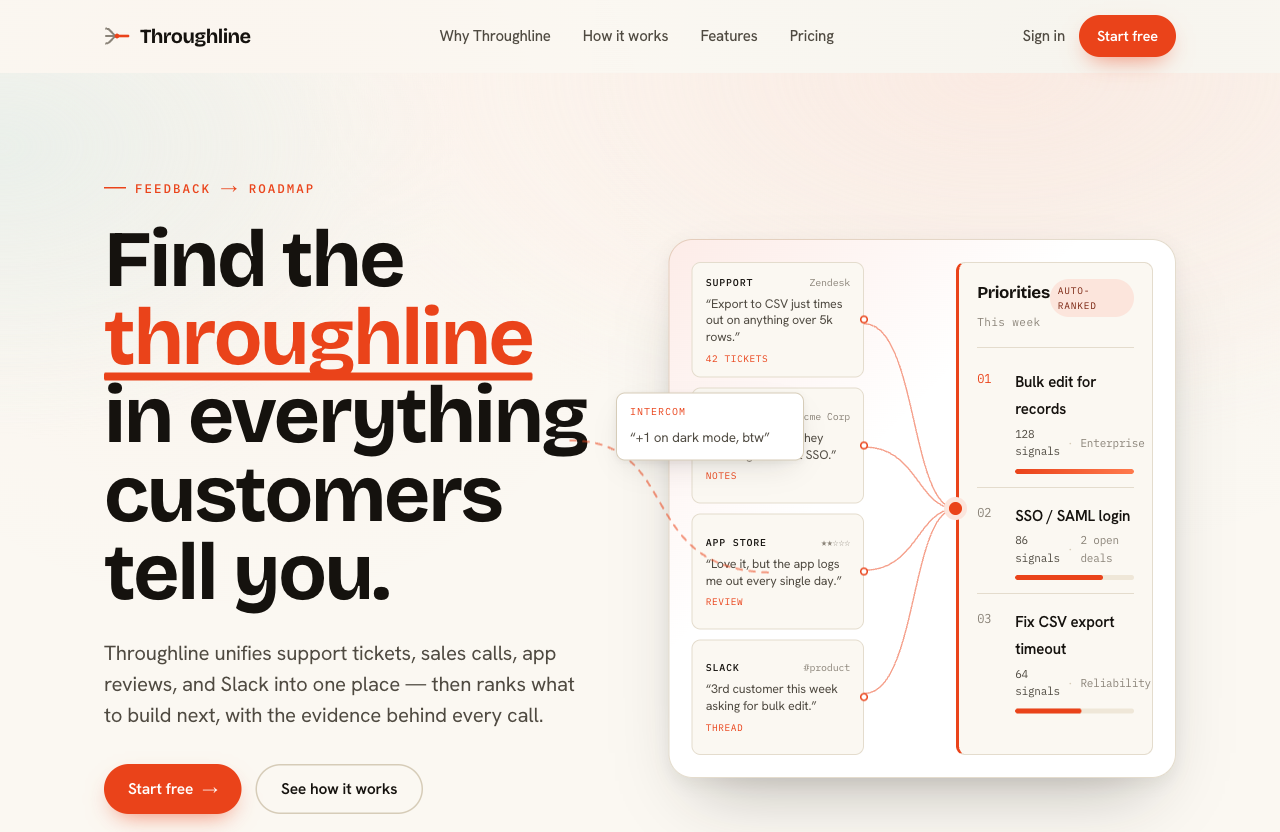
A different brief — "a marketing landing page for Throughline, a B2B SaaS that turns scattered customer feedback (support tickets, sales calls, app reviews, Slack) into one prioritized roadmap." No layout, no hero, no styling was specified. Following the companion skill, the agent composed the opening from the product's core idea instead of reaching for a stock hero: the right half is a bespoke diagram of the product's actual mechanic — feedback sources converging into an auto-ranked roadmap — not a decorative card you could paste onto any other site.
How it works
flowchart LR
    A[Existing UI + user task] --> B[Host captures before]
    B --> C[get_design_improvement_plan]
    C --> D[Host edits and verifies]
    D --> E[validate_design_improvement_result]
    E -->|needs-work| D
    E -->|complete / no-change| F[Before/after report]
That is the flow for an existing UI: the validator checks the submitted evidence without opening the referenced artifacts or judging visual quality. For a new build, the agent describes the product, the server scores its curated catalog and returns structured evidence, and after building, the agent passes the page markup to the structure audit, which never reads files on its own. No code is generated and nothing leaves your machine.
Install
Requires Node ≥ 20.
Codex CLI · IDE extensionUse the Codex CLI:
codex mcp add web-stylebook -- npx -y web-stylebook-mcp@latest
Or add it to ~/.codex/config.toml. You can also use a project-scoped.codex/config.toml in a trusted repository:
[mcp_servers.web-stylebook]
command = "npx"
args = ["-y", "web-stylebook-mcp@latest"]
Restart Codex or open a new session after editing config. In the Codex TUI, run /mcp
to confirm the server is active.
claude mcp add web-stylebook -- npx -y web-stylebook-mcp@latest
Add to your MCP config:
{
  "mcpServers": {
    "web-stylebook": {
      "command": "npx",
      "args": ["-y", "web-stylebook-mcp@latest"]
    }
  }
}
Add the same block to your claude_desktop_config.json, then restart:
- macOS:
~/Library/Application Support/Claude/claude_desktop_config.json - Windows:
%APPDATA%\Claude\claude_desktop_config.json
{
  "mcpServers": {
    "web-stylebook": {
      "command": "npx",
      "args": ["-y", "web-stylebook-mcp@latest"]
    }
  }
}
Companion skill
A companion skill ships in skill/ so your agent reaches for these tools at the right moment — and uses the results well (compose, don't recolor; offer multiple candidates; earn trust, don't fake it; land on reusable components). It is in this repository and in the npm package; to get a copy without cloning, run npm pack web-stylebook-mcp and extract package/skill/ from the tarball.
Codex
- Copy or symlink
skill/web-stylebook-design/into a Codex skill location such as.agents/skills/web-stylebook-design/in your repo, or~/.agents/skills/web-stylebook-design/
for your user profile. - If you do not want to install the skill, copy
skill/AGENTS.mdinto your project'sAGENTS.md.
Claude Code
- Copy
skill/web-stylebook-design/to.claude/skills/web-stylebook-design/in your project, or~/.claude/skills/web-stylebook-design/for every project, or - Copy
skill/CLAUDE.mdinto your project'sCLAUDE.md.
Other agents
- Point your agent's skills directory at
skill/web-stylebook-design/, or copyskill/CLAUDE.md
into its rules file.
Tools
| Tool | What you get | The honest part |
|---|---|---|
get_design_improvement_plan |
Selected foundations plus the capture → decide → implement → verify → report workflow, target context and workflow hash | The host edits the actual UI; context-free calls are discovery only |
validate_design_improvement_result |
Completion state, missing-work actions, normalized outcomes and a before/after report from actual change/capture/check references | Checks submitted evidence coverage and consistency, not artifact contents or independently measured design quality |
recommend_design_direction |
Scored style candidates with reason codes, a ranking that says why #1 beat #2 (or reports a tie), rejected styles with why, secondary pairings, confidence, each candidate's page structure, and the product type's mustHaves with the zone each must sit in |
The model makes the final pick — this is the evidence provider |
compare_design_directions |
2–4 directions compared across product-fit, repeated-use, density, trust, distinctiveness, accessibility-risk, motion, maintenance | No single winner is declared |
search_design_references |
Bounded search across real-world references by text, category, and tags, with concise localized observations | Returns attributed research summaries, not copied screenshots or brand assets |
get_design_reference |
One complete localized reference with palette/layout/interaction/motion observations, normalized tokens, source revision, attribution, and rights notice | Original-site copy, typefaces, screenshots, and visual identity remain with their owners |
get_design_principle_plan |
A focused placement, application, and verification plan selected by visual concerns, surface, phase, or principle ids — with source references where available | Craft prompts are testable guidance, not empirical laws or a fixed recipe |
get_ux_principle_plan |
A focused apply-and-verify plan selected by outcomes, surface, phase, or principle ids — with questions, cautions, confidence, and references | Principles are contextual prompts, not universal laws or a substitute for research |
get_ui_state_plan |
Required / recommended / domain UI states for a surface (data-table, form, checkout, chat, developer-console) — triggers, must-show, must-not, a11y, motion | Covers the states agents forget: empty, error, loading, edge |
compose_design_tokens |
Role-based tokens as json / css-variables / tailwind / typescript, or a whole DESIGN.md file (design-md); opt into the shared visual contract to preserve authored style values and editor changes |
Contract mode uses authored color modes and applies only explicitly accepted contrast repairs |
get_design_audit_plan |
Localized, surface-aware checks with stable ids, severity, applicability, required evidence, remediation, user-facing content checks, selected principle checks, and UI-state coverage | The tool plans the audit but never pretends it inspected your project; missing evidence is NOT_VERIFIED, not PASS |
validate_design_audit_result |
Contract validation for the plan query, target matrix, durable evidence references, and one verdict per check/target, with normalized verdicts and stable hashes | It verifies coverage and evidence consistency, not visual quality; valid: true is never an overall design pass |
audit_page_structure |
Banned generic and style-specific patterns found in the HTML and CSS you pass in, each with its location, observed values, and the chosen style's replacement moves; with productType, the must-haves the page is missing or keeps off the first screen; plus evidence and results for the structure audit group |
Declared-style heuristics, not a browser; a clean result is not a design pass |
compare_page_revisions |
Before/after comparison of a redesign: which links, form fields and labels, handlers, test hooks, script selectors, headings, figures, landmarks, visible words, and product must-haves it kept, reworded, or dropped, with acknowledged for intended removals; plus evidence and results for a revisionPreservation audit plan |
Static markup, not a browser; it does not run your scripts or record screenshots |
Catalog: 520 real-world design references · 48 styles · 25 interface design principles · 23 UX principles · 51 structured audit checks · 20 components · 5 surfaces · 57 UI-state recipes · 29 motion profiles · 14 product archetypes.
Structure: 48 layout archetypes · 144 signature moves · 9 banned generic patterns · 142 style-specific bans from 19 detectors · 21 must-haves across 14 product types.
The reference library is an adapted, high-completeness subset of OpenDesign, whose structured specifications are licensed under CC BY 4.0. Web Stylebook excludes upstream screenshots and brand assets. Original sites, brands, copy, typefaces, and visual identities remain the property of their respective owners; inspect each detail's attribution and rights notice before use.
Preserve the website's visual specification
Opt into the shared contract when the selected style or web-editor adjustments must survive token generation:
{
  "primaryStyleId": "brutalist-grid",
  "format": "css-variables",
  "contract": { "schema": "webstylebook.visual.v1" },
  "locale": "ko",
  "overrides": {
    "colors": { "text": "#111111" },
    "typography": { "body": { "lineHeight": 1.75 } }
  }
}
Read webstylebook://manifest for visualContract.contractSchema and the bundled library's visualContract.contentHash. Read webstylebook://styles/brutalist-grid for the selected native contract and its visualContract.revision. Pass those values as contract.schema, contract.contentHash, and contract.revision to pin the source; a mismatch returns INVALID_INPUT. Omitting colorMode uses the style's authored native mode. Requesting light, dark, or both succeeds only when the required modes are authored.
overrides accepts semantic colors, typography roles, spacing, density, and font metadata. Use these explicit values for selections taken from another style; secondaryStyleId remains the legacy accent overlay and is rejected in contract mode. Unknown fields and conflicting density / accentOverride aliases are rejected. Supply contract whenever using overrides or acceptedRepairs.
The result includes the selected visualContract, source identity in contract, and repairProposals. Repairs stay unapplied until their exact proposal objects are sent back in acceptedRepairs; stale proposals are rejected. Apply accepted repairs with a single light or dark request; both requests return separate mode proposals. Keep visualContract alongside exported CSS: it carries component color pairs, font loading and license metadata, usage rules, provenance, and accepted repairs. Theme output also includes roleStyles and a complete metadata companion. Font loading and rendered appearance still require checks in the consuming app. The shared runtime includes seven portable MIT sources, including fontSources.ts metadata for Korean/Japanese heavy display fallbacks, but no browser font loader or font binaries.
Export a DESIGN.md
compose_design_tokens with format: "design-md" returns the chosen direction as a DESIGN.md file (spec version alpha), so other agents and tools can read it. The server never writes the file: save content as DESIGN.md in the project.
{
  "primaryStyleId": "brutalist-grid",
  "format": "design-md",
  "contract": { "schema": "webstylebook.visual.v1" },
  "locale": "ko",
  "designMd": { "tokenPlacement": "interleaved", "productType": "developer-tool" }
}
designMd.tokenPlacement:front-matter(default) puts every token in one YAML block at the top.interleavedkeeps onlynameanddescriptionthere and puts each token group in a YAML block inside its section.includeProse,includeDoDont, andincludeStructure(alltrueby default) control the prose, the Do's and Don'ts built from the style's bans and the banned page patterns, and the page structure in Layout.productTypeadds that product type's must-haves to Layout.- Colors use DESIGN.md names:
primaryis the text color,surfacethe page background, thenaccent,on-accent,surface-container,outline, and so on. The Colors prose names thecompose_design_tokensrole behind each one. Color values are hex; translucent colors become 8-digit hex. Components reference tokens, for example{colors.action-primary}. Dimensions are px, em, or rem only, and fluid type keeps its maximum size. - The result also has
sections,omitted(sections left out, each with a reason),lossy(values DESIGN.md has no key for, such as a second color mode, status colors, motion, and shadows),specVersion, andsourceHash. The same input returns the same bytes. webstylebook://design-md/{id}serves the same file for one style from its pinned visual contract. Optional query parameters:locale,mode,placement.
Every style, in both placements, all three locales, and with or without a contract, passes npx @google/design.md lint (0.4.0) with no errors. Its only warnings are text/background pairs below 4.5:1, which compose_design_tokens also reports.
Localized output
Every tool takes an optional locale. Reason codes, guidance, and labels come back in the requested language:
"en" | "ko" | "ja" // English · 한국어 · 日本語
Resources
Browse the catalog directly over MCP resources:
webstylebook://manifest
webstylebook://styles · /styles/{id}
webstylebook://motion · /motion/{id}
webstylebook://components · /components/{id}
webstylebook://principles · /principles/{id}
webstylebook://design-principles · /design-principles/{id}
webstylebook://foundations · /foundations/{id}?locale=ko · /foundations/sources
webstylebook://states/surfaces · /states/{surface} · /states/{surface}/{state}
webstylebook://products · /products/{id}
webstylebook://references · /references/{id}
webstylebook://policies/anti-patterns · /policies/verification · /policies/audit-checks
webstylebook://structure/banned-patterns · /structure/must-haves
webstylebook://design-md/{id}
webstylebook://workflows/improve-ui
Style detail accepts optional locale, mode, and expected revision query parameters, for example webstylebook://styles/brutalist-grid?locale=ko&mode=light. It returns one resolved locale and mode; unsupported values, duplicate parameters, and unknown query names return an explicit error.
Foundation detail accepts one optional locale=en|ko|ja parameter. manifest.designFoundations describes this independently versioned MCP knowledge layer; the website's canonical catalog and its content hash remain separate.
Prompts
Ready-made MCP prompts for common workflows:
improve-ui · design-product · design-screen · complete-ui-states · redesign-with-style · audit-design-direction · audit-design-principles · audit-ux-principles
improve-ui starts the implementation/comparison workflow for existing interfaces. It asks only for
missing information that blocks execution, not routine reapproval. audit-design-direction is an
explicit review prompt: omitted scope defaults to read-only visual/content inspection. ItsauditScope and changeScope parameters still allow narrower reviews, proposals or implementation;implement-and-verify continues through the improvement workflow.
Content coverage checks more than jargon: it tests whether material claims, conclusions, and
recommendations match their support and expressed certainty, whether prominent copy conveys concrete
context-specific information, and whether its visual emphasis matches information value, task
relevance, and support. Cards, statistics, and Sitemap links are still judged by their actual
user-task value rather than banned as types.
Keep what worked through a redesign
Redesigns quietly drop links, form fields, handlers, the selectors a script queries, and must-haves. Before you redesign a page, save its rendered HTML (for example document.documentElement.outerHTML) and its CSS. When the redesign is built, pass both versions to compare_page_revisions:
{
  "before": { "html": "<!doctype html>…", "css": ["…"] },
  "after": { "html": "<!doctype html>…", "css": ["…"] },
  "scriptSelectors": ["#cart-form", ".js-variant"],
  "productType": "commerce",
  "acknowledged": [
    { "kind": "link", "key": "/pricing", "change": "dropped", "reason": "Pricing moved to the sales contact page" }
  ]
}
| Inventory | What is compared | When it is lost |
|---|---|---|
| links | a[href], with scheme and host lowercased, a trailing slash dropped, and query parameters sorted |
FIX_NOW, major |
| fields | input, select, textarea by name (else id), and whether each keeps a label |
FIX_NOW, major |
| handlers | form action and method, formaction, inline on* attributes |
FIX_NOW, major |
| test hooks | data-testid, data-test, data-cy |
FIX_NOW, minor |
| script hooks | each scriptSelectors entry that matched the original |
FIX_NOW, major |
| headings, figures, landmarks | h1–h3 text, image alt text and figure captions, main/nav/footer |
RISK |
| words | visible words; Korean, Chinese, and Japanese by character | RISK when the original had more than 80 and the redesign keeps under 60% |
| must-haves | with productType, the must-haves audit_page_structure finds |
FIX_NOW when one present before is missing or off the first screen |
A heading or link whose wording changed while its place or target stayed is reported as reworded (RISK). An acknowledged entry needs the matching kind, key, and change and a reason of at least 12 characters; a shorter reason does not excuse the loss and adds a RISK finding. Links, headings, figures, landmarks, words, and must-haves count visible elements only. Fields, handlers, and both kinds of hook also count hidden elements, because a hidden CSRF field, a closed dialog, or a cart drawer behind display: none is still part of how the page works.
The result has verdict (PASS, FIX_NOW, or RISK), an inventory with kept, lost, reworded, and acknowledged items, wordCount, findings, and evidence and results for the redesign-kept-<inventory> checks. To record them, call get_design_audit_plan with revisionPreservation: true (and the same productType); that plan holds only these checks, so validate_design_audit_result accepts the evidence and results as they are. Plans without revisionPreservation keep their checks and hash.
Audit result contract
get_design_audit_plan returns an identity with the catalog version/hash and a deterministicplanHash. After inspecting the actual implementation, submit the same plan query plus:
- one target per inspected route or screen, state, viewport, theme, locale, and role;
- evidence with a durable artifact reference, content hash, or exact route/selector/file/region;
- a before/input/after/recovery phase for interaction evidence; and
- one result for every planned check/target pair.
validate_design_audit_result regenerates the plan and rejects stale plan hashes, missing or duplicate
result slots, broken evidence references, cross-target evidence, invalid regions, unsupportedNOT_APPLICABLE, and PASS that lacks required evidence or contradicts failed evidence. Missing result
slots are materialized as NOT_VERIFIED, never hidden. With includeGroups containing structure and astyleId, the plan adds one automated check per banned pattern, and productType adds one per must-have;audit_page_structure returns evidence and results for those check ids that the validator accepts as they are. With revisionPreservation: true, the plan holds only the redesign-kept-* checks that compare_page_revisions answers. The result carries content-addressed plan,
evidence-bundle, and normalized-result hashes for comparable rechecks. The tool never opens the
artifact references and never turns contract validity into a design-quality score.
The repository includes a reproducible contract-quality benchmark:
npm run eval:audit-contract
Across 14 human-labeled normal and adversarial cases, legacy pass-through verdicts score 4/14
(28.57%) with 9 false PASS results. The validator scores 14/14 with 0 false PASS results and
classifies every contract-valid/invalid case correctly. The corpus covers missing, narrative-only,
unknown, cross-target, indeterminate, phase-less, blocker/major/minor failure, honestNOT_VERIFIED, and valid/invalid NOT_APPLICABLE cases. This demonstrates result-contract
correctness; it does not claim that subjective visual judgment itself is 100% accurate.
CLI
Your MCP client starts the server for you. With no arguments (or --stdio), the command runs the server over stdio and waits for a client. The other options print and exit:
npx -y web-stylebook-mcp --help
npx -y web-stylebook-mcp --version
npx -y web-stylebook-mcp --catalog-info       # catalog version, hash and counts
npx -y web-stylebook-mcp --validate-catalog   # non-zero exit on failure
Privacy & security
| Property | |
|---|---|
| API key | None |
| Model calls | None |
| Network access | None — works fully offline |
| Project filesystem access | None — the server only reads its bundled catalog snapshot |
| Behavior | Deterministic, read-only |
The server reads from a catalog snapshot bundled in the package. Nothing is sent anywhere; the same inputs always yield the same contracts. To report a vulnerability, follow SECURITY.md.
Compatibility
- Node: ≥ 20
- Transport: stdio (Model Context Protocol)
- Clients: Codex CLI / IDE extension, Claude Code, Claude Desktop, Cursor, Windsurf, and any MCP-compatible client
Tool inputs are unchanged apart from new optional values, and structure is an added output field. Plans requested without includeGroups keep their checks and hash, because structure is opt-in. Calls without contract keep the same token shape and light-mode default. Since 0.11.1 (0.11.0 was tagged but never published), those calls emit the pinned style's authored shadows instead of the generic soft shadow, and editorial or monospace-led styles emit authored font families instead of the style-family fonts. Color, type scale, line-height, spacing, radius, motion, and omitted density stay on the previous legacy path. An explicit density still takes precedence over a family's row and gutter, and CSS / theme output retains line-height tokens. Pass contract for the full authored specification. The shared contract is additive; no new tool is required.
Development
npm ci
npm test       # builds, then runs the test suite
npm run dev    # runs the server from source over stdio
Changes are listed in CHANGELOG.md. Release steps, including the catalog sync with the web-stylebook repository, are in RELEASING.md.
License
MIT — covers the code and the bundled catalog snapshot (free for commercial use).
The webstylebook.com website is licensed CC BY-NC. The same owner grants an MIT license for the catalog snapshot bundled in this package.
UX-principle entries are independently written application and verification guidance. They
attribute and link to Laws of UX (CC BY-NC-ND 4.0) and supporting
references; Laws of UX prose, illustrations, and page layouts are not bundled.Interface-design-principle entries form an independently authored, task-oriented review system for
contemporary interfaces. They cover semantic structure, responsive reflow, localization, tokens
and themes, multiple input modes, complete state models, recovery, and motion preferences.
Reviews (0)
Sign in to leave a review.
Leave a reviewNo results found