jarvis-py
Health Uyari
- License — License: MIT
- Description — Repository has a description
- Active repo — Last push 0 days ago
- Low visibility — Only 5 GitHub stars
Code Gecti
- Code scan — Scanned 12 files during light audit, no dangerous patterns found
Permissions Gecti
- Permissions — No dangerous permissions requested
Bu listing icin henuz AI raporu yok.
Offline AI voice assistant with semantic memory, wake-word detection, local LLM inference, streaming TTS, and modular tool-agent architecture.
JARVIS-PY





Local-first AI voice assistant with online/offline speech recognition, wake-word detection, semantic memory, document RAG, streaming LLM responses, a tool-agent, and interruptible TTS.
Overview
JARVIS-PY is a Python voice assistant built for:
- Local-first, offline-capable operation
- Real-time voice interaction with interruptible replies (Stop button /
Esc/ type a new query) - Semantic conversation memory + PDF document RAG
- AI-driven tool routing
- Fast keyword routing for known intents
- Modular, easy-to-package architecture
Platform support
JARVIS-PY is developed and tested on Windows. The voice/LLM/memory core
(wake word, STT, TTS, Ollama, semantic + document memory) is portable, but the
built-in OS automation (app launch/close and system status) currently targets
Windows (os.startfile, taskkill, SAPI5 voices). macOS/Linux parity is on the
roadmap. TTS uses pyttsx3.init() and will pick the native driver per
platform (SAPI5 / NSSpeechSynthesizer / espeak).
Core Features
Speech
- Wake word: openWakeWord
hey_jarvis(ONNX, ~1 MB) - STT online: Google (
speech_recognition.recognize_google) - STT offline: Vosk (local model, auto-fallback when offline)
- TTS: pyttsx3 (SAPI5 / NSSpeechSynthesizer / espeak)
- Streaming sentence-level TTS queue (each sentence speaks fully before the next, no cut-offs
- Interruptible replies) a Stop button,
Esc, or typing a new query cuts Jarvis off mid-sentence (interrupting by speaking isn't reliable; the mic hears Jarvis's own voice, no echo cancellation)
Brain
- Local LLM via Ollama (default
phi3) - Streaming token output
- Semantic memory retrieval (fastembed ONNX + numpy cosine)
- Document RAG over PDFs (FAISS, similarity-thresholded; your résumé won't leak into unrelated answers)
- User profile context injected into every prompt
Routing
- Fast keyword router for app / media / browser / system intents
- LLM tool agent fallback for fuzzy matches (action-verb gated to skip unnecessary LLM hops)
- LLM chat as final fallback
Tasks
- Voice-set reminders ("remind me in 10 minutes to ...")
- Persisted across restarts, fired by
threading.Timer(second-accurate)
Architecture
USER SPEAKS
    ↓
Wake-word Detection (openWakeWord)
    ↓
STT  ─── online?  ─── Google ──┐
       └─ offline ─── Vosk  ───┤
                               ▼
               clean_query → routing
                               │
        ┌─── reminders / exit / profile capture
        ├─── fast keyword router → registry ToolCall (instant)
        ├─── action-verb gate → LLM tool agent → registry ToolCall
        └─── LLM chat fallback (Ollama)
                               ↓
                Streaming TTS queue (serialized)
                               ↓
                       pyttsx3 speak
                               ↑
          interrupt: Stop / Esc / │  typed query
                       cancels ───┘
Detailed: docs/ARCHITECTURE.md
Tech Stack
| Layer | Tech |
|---|---|
| LLM | Ollama (Phi3 default) |
| Embeddings | fastembed (ONNX, no torch / transformers) |
| Vector index | FAISS (cosine via IndexFlatIP) |
| STT online | SpeechRecognition + Google |
| STT offline | Vosk (small-en-us) |
| Wake word | openWakeWord (ONNX) |
| TTS | pyttsx3 |
| System control | PyAutoGUI, psutil, pyperclip (clipboard) |
Project Layout
jarvis-py/
├── app.py                  # main loop
├── build_memory.py         # rebuild PDF vector index
├── debug_wake.py           # diagnose wake-word + mic
├── config/settings.py
├── core/
│   ├── ai/                 # ollama LLM client
│   ├── agent/              # registry + @tool builtins + plugin loader + LLM tool agent + executor
│   ├── speech/             # wake, engine, online/offline STT, TTS queue
│   ├── memory/             # embedder, semantic, document, profile
│   ├── router/             # fast keyword router (returns a registry ToolCall)
│   ├── tasks/              # reminders + persistence
│   ├── state/              # session
│   ├── setup/              # first-run checks + mic auto-detect + model pull
│   ├── hud/                # HUD event bus, WebSocket server, stats/theme
│   └── utils/              # logger, greetings, paths
├── data/                   # runtime data (gitignored, READMEs in each folder)
│   ├── documents/          # drop PDFs here
│   ├── profile/            # user_profile.json
│   └── tasks/              # reminders persistence
└── models/                 # ML models (gitignored, READMEs in each folder)
    ├── wake/               # openWakeWord ONNX
    ├── vosk/               # Vosk STT model
    └── embeddings/         # fastembed cache
Installation
git clone https://github.com/Shaan-alpha/jarvis-py.git
cd jarvis-py
python -m venv venv
venv\Scripts\activate          # Windows
pip install -r requirements.txt
Ollama
Install from https://ollama.com/, then:
ollama pull phi3
Vosk model (offline STT)
The auto-download path works out of the box (Vosk fetches to ~/.cache/vosk/ on first offline use). For a project-local install, see models/vosk/README.md.
Wake-word model
Auto-downloaded into the openWakeWord package on first run (one-time, ~1 MB). For a project-local override, see models/wake/README.md.
User profile
Optional, see data/profile/README.md to pre-populate user_profile.json so Jarvis greets you by name.
Documents (PDF RAG)
Optional; drop PDFs in data/documents/ and run python build_memory.py. See data/documents/README.md.
Run
python app.py
Speak the wake phrase "hey jarvis", wait for "Yes Boss?", then issue your command.
Interrupting: saying "hey jarvis" again while Jarvis is talking can cut the current sentence off, but it's unreliable; the mic hears Jarvis's own voice (no echo cancellation). For reliable interruption, run the HUD (--hud) and use the Stop button, Esc, or type a new query.
Exit / sleep: say "bye", "goodbye", "exit", "shutdown", or "stop listening". Or wait 20 s in silence.
Diagnostics: if the wake word never fires, run python debug_wake.py; it lists your input devices and prints live wake-word confidence scores.
Desktop HUD (optional)
Launch an always-on-top HUD panel: a fluid glassmorphism orb (a flowing,
audio-reactive blob that pulses with your voice and shifts by state), streaming
captions (your speech and Jarvis's reply), a type-to-Jarvis text box, a Stop
button (or Esc) to cut Jarvis off mid-sentence, and a live status row (CPU /
battery / model / online). The theme adapts to the time of day: cyan by day,
gold in the evening, frosted at night.
python app.py --hud
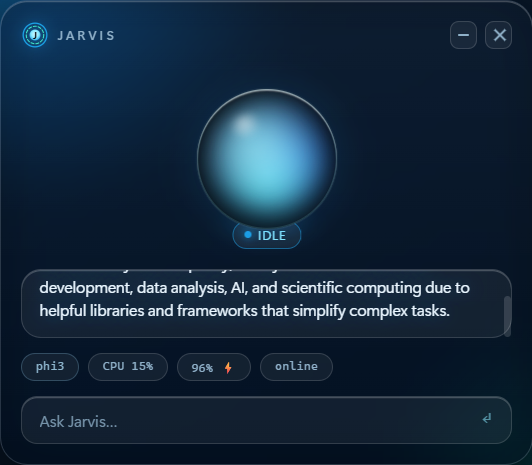
The HUD is a separate pywebview window that talks
to the voice core over a local WebSocket; fully free and local. Without --hud,
the assistant behaves exactly as above. (Note: interrupting by speaking while
Jarvis talks isn't supported (the mic would hear its own voice) so use the Stop
button, Esc, or just type the next question to interrupt.)
Extend with plugins
Drop a .py file in plugins/ and decorate a function with @tool; the loader
auto-discovers it at startup and registers it with both the fast keyword router
and the LLM tool-agent. No wiring, no restart of the architecture:
# plugins/roll_dice.py
import random

from core.agent.registry import tool


@tool(
    "roll_dice",
    "Roll an N-sided die",
    params={
        "sides": {"type": "int", "required": False, "default": 6, "desc": "number of sides"},
    },
)
def roll_dice(sides=6):
    return f"You rolled a {random.randint(1, sides)} on a {sides}-sided die."
Now say "hey jarvis… roll a dice" and Jarvis calls your tool, speaking the
returned string. The same @tool decorator powers the built-in actions in
core/agent/builtins.py (open/close apps, volume,
clipboard, system status, web search).
Build a Windows binary (optional)
Produce a standalone one-folder app with PyInstaller:
Prerequisites on the build machine: the Vosk + wake-word models undermodels/ (see models/*/README.md), and pip install -r requirements-dev.txt.
.\build.ps1
Output: dist\JarvisAI\Jarvis.exe. On first launch it opens a setup HUD that
checks prerequisites, offers to pull the model, and captures your name; later
launches are voice-only (--hud to show the HUD).
The target machine still needs Ollama installed with a
model pulled (ollama pull phi3) and the Microsoft WebView2 runtime (for the
HUD). User data lives in %APPDATA%\JarvisAI.
To sanity-check a build, run dist\JarvisAI\Jarvis.exe --check-paths; it prints
where the bundled models and HUD assets resolve and exits, without needing a mic
or Ollama.
Config
All config in config/settings.py:
| Key | Default | Purpose |
|---|---|---|
MODEL_NAME |
phi3 |
Ollama model |
WAKE_WORD |
hey_jarvis |
openWakeWord model name |
WAKE_MODEL_PATH |
models/wake/hey_jarvis_v0.1.onnx |
Project-local wake-word ONNX override |
WAKE_THRESHOLD |
0.3 |
Wake-word confidence cutoff |
WAKE_CONSECUTIVE |
1 |
Frames over threshold required to fire (raise to debounce false wakes) |
SESSION_TIMEOUT |
20 |
Seconds of silence before returning to sleep |
VOSK_MODEL_PATH |
models/vosk/vosk-model-small-en-us-0.15 |
Project-local Vosk model |
MEMORY_SIMILARITY_THRESHOLD |
0.45 |
Min cosine for conversation-memory recall |
DOCUMENT_SIMILARITY_THRESHOLD |
0.45 |
Min cosine for doc-RAG injection |
ONLINE_CHECK_* |
8.8.8.8:53, 1 s timeout, 5 s cache |
Online/offline auto-detection |
⭐ Star History & Community
We welcome contributions, bug reports, and feature requests! Check out our new interactive issue forms if you have ideas for new tool agents or integrations. If you find Jarvis helpful, consider giving it a star or sponsoring the project!


License
MIT
Yorumlar (0)
Yorum birakmak icin giris yap.
Yorum birakSonuc bulunamadi