lintel
Health Gecti
- License — License: GPL-3.0
- Description — Repository has a description
- Active repo — Last push 0 days ago
- Community trust — 14 GitHub stars
Code Gecti
- Code scan — Scanned 12 files during light audit, no dangerous patterns found
Permissions Gecti
- Permissions — No dangerous permissions requested
Bu listing icin henuz AI raporu yok.
A notch toolkit for Windows: AI coding agents, approvals, chat, media and system tools. Rust core, no telemetry.
Lintel
A notch toolkit for Windows: an island that stays hidden at the top of the screen and slides out when you hover it or when something needs you.
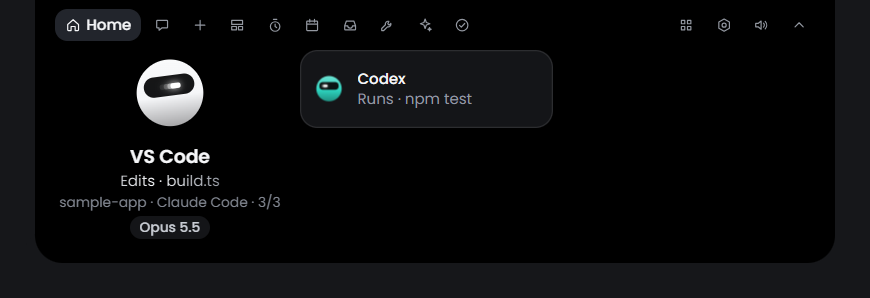
Lintel shows your AI coding agent sessions and lets you answer their permission requests without leaving your work. It also holds a chat, the music that is playing, system tools, screenshots and recording, and a voice assistant. Every part has its own switch.
Contents
- Why Lintel
- What it does
- Requirements
- Install
- First steps
- Guide and documentation
- Build from source
- Privacy
- Downloads and extra consent
- Known limits
- Code signing policy
- Contributing
- Credits
- Licence
Why Lintel
The Mac has a whole shelf of notch apps: NotchNook, The Boring Notch, Alcove, DynamicLake, MediaMate, TopNotch, NotchBar, NotchFlow, DropNotch, Coucou, Vorssaint. Windows has only a handful (DynamicWin, which is open source, Notchify, Venu, Dynamic Edge), and they are mostly about media and widgets. So there are very few for Windows, and none that does all of this. That is why Lintel was built.
Where it comes from: Lintel grew from the Windows edition of Coucou (MIT). It re-implements for Windows the best ideas of Vorssaint and Boring Notch (both GPL-3.0), and then adds its own. NOTICE.md has the exact credits.
The name: a lintel is the beam across the top of a door or a window. Lintel sits at the top of your Windows.
It is made for Windows 10 and 11 first, and it holds to four values:
- Efficiency. The core is Rust, with a light web view for the interface (Tauri 2). Hidden and idle, the optimised build used 0.49 % of one processor core over two minutes in the audit of version 1.0.0.
- Optimisation. A feature that is switched off loads nothing: no hooks, no timers, no threads, no windows. Where Windows offers an event, Lintel waits for the event and does not poll.
- Privacy. No telemetry and no account. Network calls go only to what you turned on. Keys are kept in Windows Credential Manager. Nothing is approved, sent or deleted without your click.
- Necessity. Every feature can be turned off. You keep what you use and switch off the rest.
What it does
The island
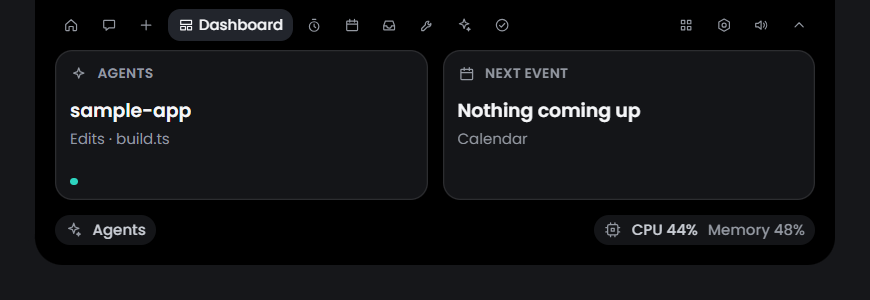
- Stays hidden at the top edge. Opens on hover, on a click or with a shortcut. Folds away when you press outside it.
- A Home view with what matters now, and a section for each feature that has something to show.
- A resting strip with a small mascot. The island can also be dragged away from the top and float as a pill.
- Steps aside while a full-screen app is in front. You choose the display it lives on.
- Ten interface languages. Global shortcuts that you can change.
Coding agents and approvals
- Shows the sessions of Claude Code, Codex, Gemini CLI, Cursor, GitHub Copilot CLI, OpenCode, Amp, Hermes, Antigravity, Kiro CLI, JetBrains terminals and the Claude desktop app. Claude Code works inside WSL and on SSH hosts too.
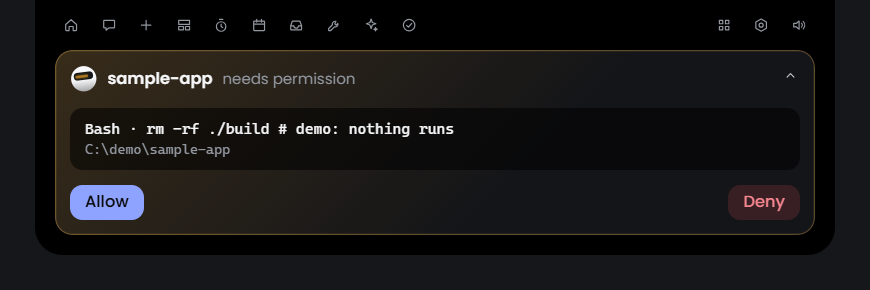
- A permission request becomes a card with the command or the diff. You answer Allow, Always or Deny from the island. Lintel never answers a card by itself.
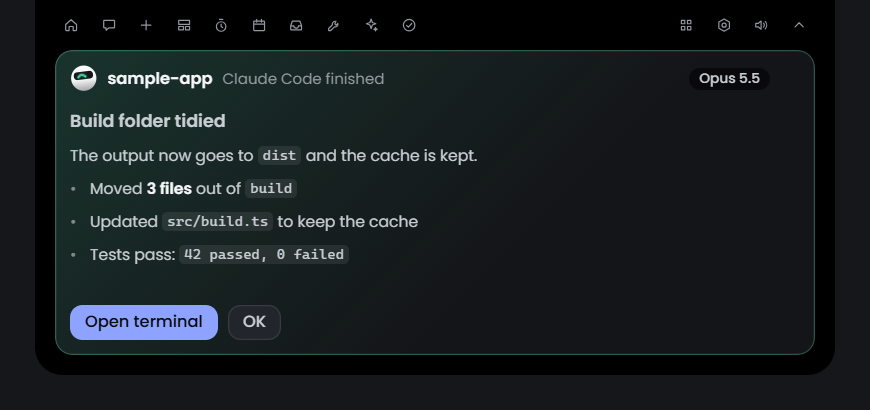
- Plan cards for Claude Code (Auto mode, Manual or Change plan), questions from an agent, a live diff of its edits, and a card with the summary when it finishes.
- Jumps to the terminal or editor a session runs in.
- Plan usage for Claude (a card for each profile), Codex and OpenCode, local usage figures, a weekly pace line and a weekly recap.
- Updates from the island: after you agree once, Lintel checks GitHub for new versions, and Update now installs one after checking its SHA-256. Nothing installs without your click.
- Connecting an agent changes its settings file only after a dated backup, a diff on screen and your confirmation. If Lintel is closed, the agent carries on as if it were not installed.
Chat
- A chat with Anthropic, OpenAI, Google or OpenRouter models through your own key, with any OpenAI-compatible server, with a local model (Ollama, LM Studio), or through a command-line agent you already use.
- Drop a file on the island to ask about it. Drag the mascot onto a window to attach it as context.
- Formulas drawn as math, and tools from the MCP servers you already set up in other apps (each call asks first).
Media
- What is playing, from any player Windows knows: cover, title, seek bar and transport buttons. When several browser tabs play media, you can switch between them.
- Synced lyrics (off until you turn the lookup on), a visualiser, and a volume mixer per app.
- Small level displays for volume, brightness and the microphone.
System tools
- System monitor: processor, memory, graphics, disks and network. Temperatures and fans come from an optional hardware helper.
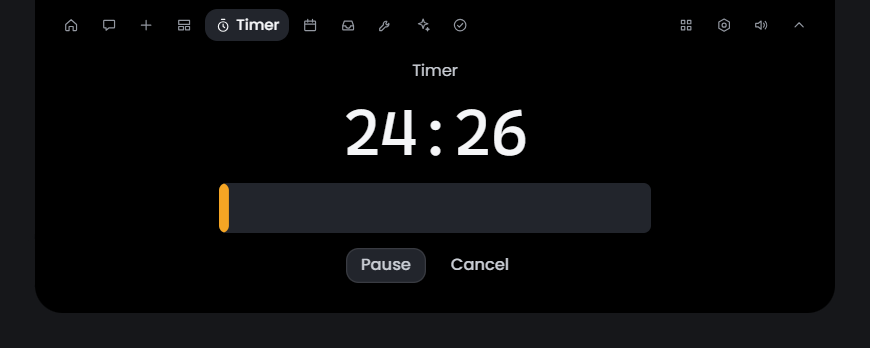
- Battery, clipboard history, a shelf for files, a scratchpad, a timer with Pomodoro and stopwatch.
- Calendar from links you paste, reminders, weather.
- Keep awake, display controls, quick toggles, input tools.
- Window layout: snap to halves, thirds and quarters, pin a window on top, drag a window from anywhere, and a strip of your named virtual desktops.
- Notifications from other apps (WhatsApp, Telegram, Teams and more) shown as they pop up. Off by default; nothing leaves your PC.
- A command bar and a radial menu.
- App updates through winget, a cleaner with a disk map and a duplicate finder, and an uninstaller.
- Read-only status from GitHub (also GitLab and Gitea), Vercel, Stripe, n8n, Resend, Notion, Cal.com and Linear, each with your own key.
- A desktop companion: the mascot can leave the island and sit on your desktop.
Capture and recording
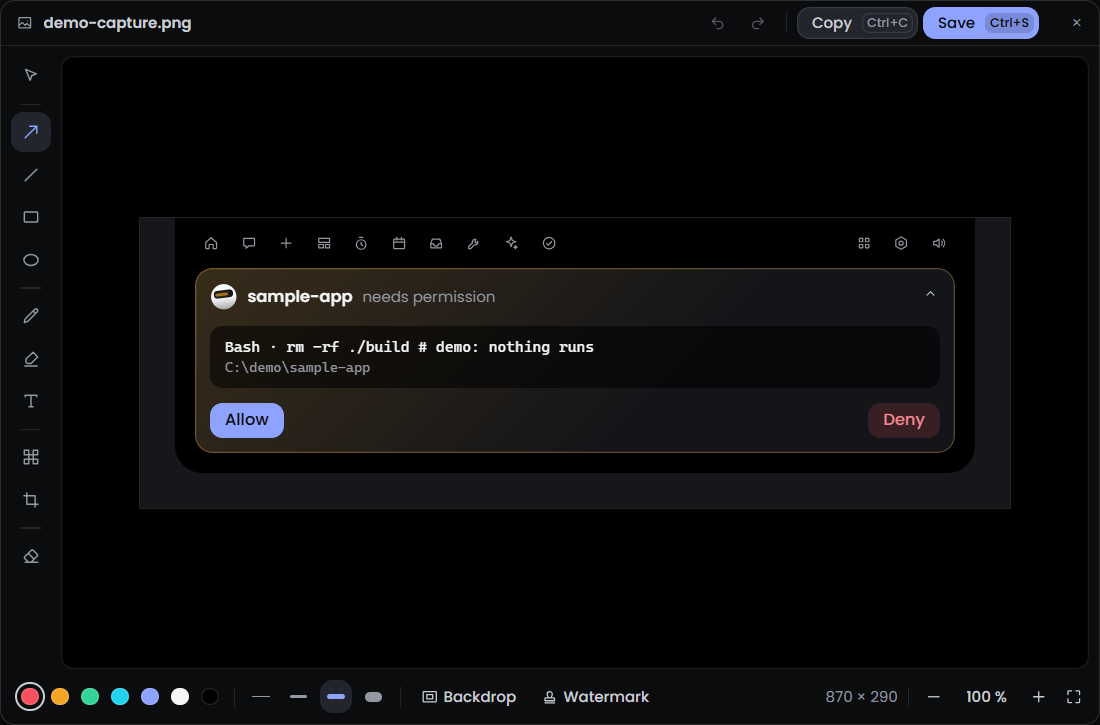
- Screenshots of an area or the whole screen, with an editor to mark them up: spotlight, magnifier, ruler, curved arrows and filled shapes.
- Copies text and reads QR codes in a capture. A colour picker and a ruler for the screen.
- Draw on the screen.
- Screen recording of an area, a window or the whole screen.
- Media tools to convert and resize pictures.
Voice (off by default)
- Hold a key and talk, or say "OK Lintel" if you turn the wake phrase on.
- Commands such as "set a timer for five minutes" or "pause the music", and spoken answers to questions.
- Speech recognition, the command model, the voice and the text model all run on your computer. An online model is an option you turn on with your own key.
- Dictation: hold a key and your words are typed into the app in front.
- Voice has had little testing. See Known limits.
Settings
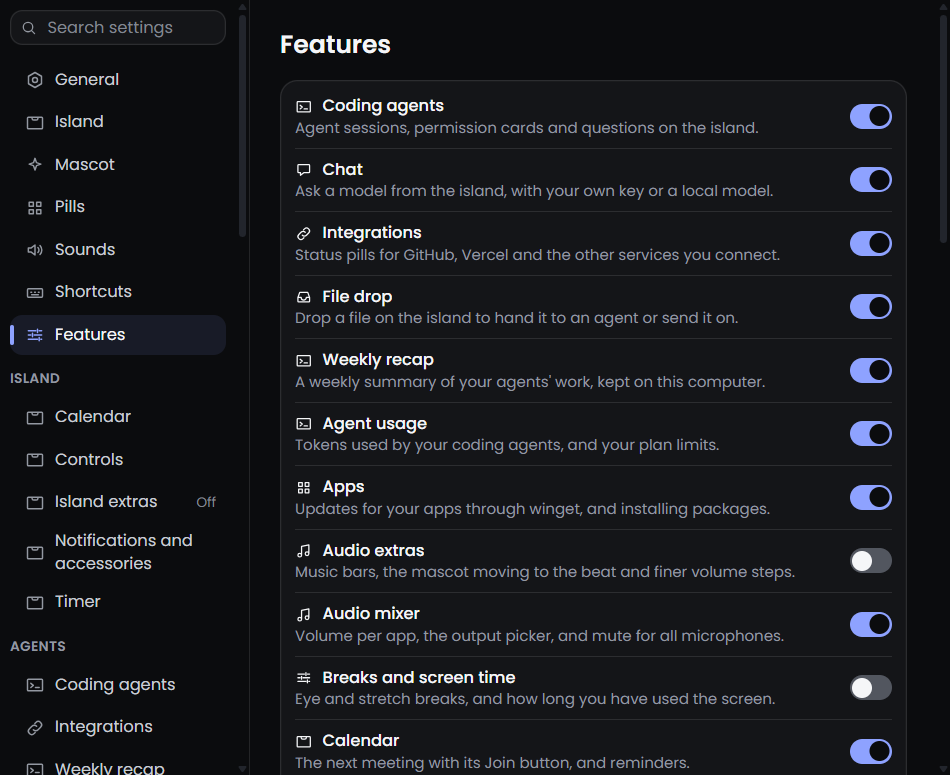
Every feature has a switch on the Features page, and a page of its own for its options.
Requirements
- Windows 10 or Windows 11, 64-bit.
- The WebView2 runtime. Windows 11 has it. On Windows 10 the installer fetches it if it is missing.
Install
- Download the installer from the latest release, or from lintel.thisissbk.com/download.
- Run it. It installs for your user only and does not ask for administrator rights.
- The installer is not code-signed, so Windows SmartScreen will warn. Choose "More info", then "Run anyway", if you trust the file you downloaded.
Coming to winget: the package has been submitted and is waiting for Microsoft's moderators. Until it is accepted, use the installer above.
To remove Lintel, use Settings, Apps in Windows. The uninstaller takes Lintel's entries out of your agents' settings and leaves your own data unless you tick the box to delete it.
First steps
- Start Lintel. Move the pointer to the top centre of the screen and the island opens.
- Right-click the tray icon and open Settings.
- On the Features page, switch on what you want and switch off the rest.
- Under Coding agents, connect an agent. Lintel shows the change to the agent's settings file and waits for your confirmation.
- Start a session in that agent. Its permission requests now appear on the island.
Guide and documentation
The guide and the documentation are on the website: https://lintel.thisissbk.com.
In this repository:
- docs/FEATURES.md: every feature and how far it is built.
- docs/ARCHITECTURE.md: how the app is put together.
- docs/PRIVACY.md: every host the app can call.
- docs/VOICE.md: the voice assistant.
- docs/ROADMAP.md: what is left open, and where help is wanted.
- CHANGELOG.md: what each release holds.
Build from source
You need Node.js, the Rust toolchain and the WebView2 runtime. The hardware helper also needs the .NET 8 SDK, but only npm run pack builds it.
npm install
npm run build            # type-check and vite build (also builds the hook relay)
npm test                 # node --test suites
cargo check --workspace  # needs dist/ to exist, so run `npm run build` first
npm run tauri dev        # run the app
npm run pack             # installer into release/
npm run fake-session     # a pretend agent session through the relay, while the app runs
Privacy
- No telemetry, no analytics, no crash reports and no account.
- On a fresh install with default settings Lintel calls no host. Network calls go only to the services you turned on or gave a key for.
- Keys and tokens are kept in Windows Credential Manager, never on disk.
docs/PRIVACY.md lists every host, what turns the call on and what is sent.
Downloads and extra consent
Nothing below is fetched or started until you click its button.
| What | Size | Needed for |
|---|---|---|
| Speech recognition model | about 19 MB | Voice and Dictation |
| Command model | about 35 MB | Voice commands in your own words |
| Natural voice (Kokoro) | about 370 MB | Spoken answers in a natural voice |
| Local text model (Qwen3.5-4B) | about 2.7 GB, and about 4.3 GB of memory while loaded | Answers to open questions without an online service |
Each file is pinned to one revision and checked by SHA-256 before it is kept.
Hardware sensors (temperatures and fans) need two more consents. The helper lintel-hw.exe runs as administrator, so Windows shows its prompt when you switch the feature on. It reads the hardware through the PawnIO driver, which is not bundled: you install it yourself, or Lintel offers to install it through winget. The rest of Lintel never runs elevated.
Known limits
- The voice assistant understands English only.
- An answer from the local text model is slow on a laptop: 9 to 15 seconds before the first word, and about half a minute the first time after a start.
- Voice was tested with recorded clips more than with live speech. The wake phrase "OK Lintel" has not been measured with many voices.
- The installer is not code-signed, so SmartScreen warns. A Microsoft Store version is being prepared.
- Updating from the island is new and has had little testing across real releases. The Linear pill has not been tried against a real account.
- Claude Code in WSL needs a running distro, and on SSH hosts it needs python3 on the host.
- The interface is translated into ten languages, but some newer lines are English only.
- With "The small island stays" on and the mascot shown, the resting island uses about 10 % of one processor core. With the mascot hidden it is about 1 %.
- The island lives on one display at a time.
- On some laptops the sensor library cannot read the fans.
docs/ROADMAP.md has the full list.
Code signing policy
Lintel's releases are not code-signed. The SignPath Foundation, which signs open-source projects for free, reviewed Lintel's application in October 2026 and declined it for now, because the project is still young: it looks for public signals such as stars, forks, contributors and outside mentions. Lintel may apply again later. A Microsoft Store version is being prepared; the Store signs the apps it distributes, so that version will be signed by Microsoft.
Until then, every release is built on GitHub's own runner from the tagged source by the public release workflow, and the release page lists the installer's SHA-256. Anyone can also build it from source. SmartScreen warns on an unsigned installer: choose "More info", then "Run anyway", if you trust the download.
Privacy policy: this program will not transfer any information to other networked systems unless specifically requested by the user or the person installing or operating it. docs/PRIVACY.md lists every address Lintel can call and what turns each one on.
Until then, each release gives the SHA-256 of its installer so a download can be checked.
Contributing
Everyone is welcome here, first-time contributors too.
CONTRIBUTING.md explains how to build, how to add a feature or a translation, and the few rules that are not negotiable.
docs/ROADMAP.md lists work that is open, sorted by size, if you want a place to start.
Please read the code of conduct. To report a vulnerability, see SECURITY.md.
Credits
Lintel grew from three open-source projects: Coucou, whose Windows edition it was forked from, and Vorssaint and Boring Notch, whose ideas it re-implements for Windows. Thank you to their authors and contributors. Their names, logos, characters, sounds and artwork are not used here, and Lintel is not affiliated with them.
NOTICE.md has the exact credits and every third-party component with its licence. The licence texts are in licenses/.
Licence
GPL-3.0-or-later. See LICENSE.
Yorumlar (0)
Yorum birakmak icin giris yap.
Yorum birakSonuc bulunamadi