Agent-Skill-Architecture-Guide
Health Uyari
- License — License: MIT
- Description — Repository has a description
- Active repo — Last push 0 days ago
- Low visibility — Only 7 GitHub stars
Code Gecti
- Code scan — Scanned 1 files during light audit, no dangerous patterns found
Permissions Gecti
- Permissions — No dangerous permissions requested
Bu listing icin henuz AI raporu yok.
A comprehensive reference for building and organizing AI agent skills across Claude Code, KiloCode, OpenClaw, and OpenAI Codex. Covers SKILL.md specifications, folder structures, mode-scoped skills, agent orchestration, and self-hosted model configuration.
Agent Skills Architecture Kit
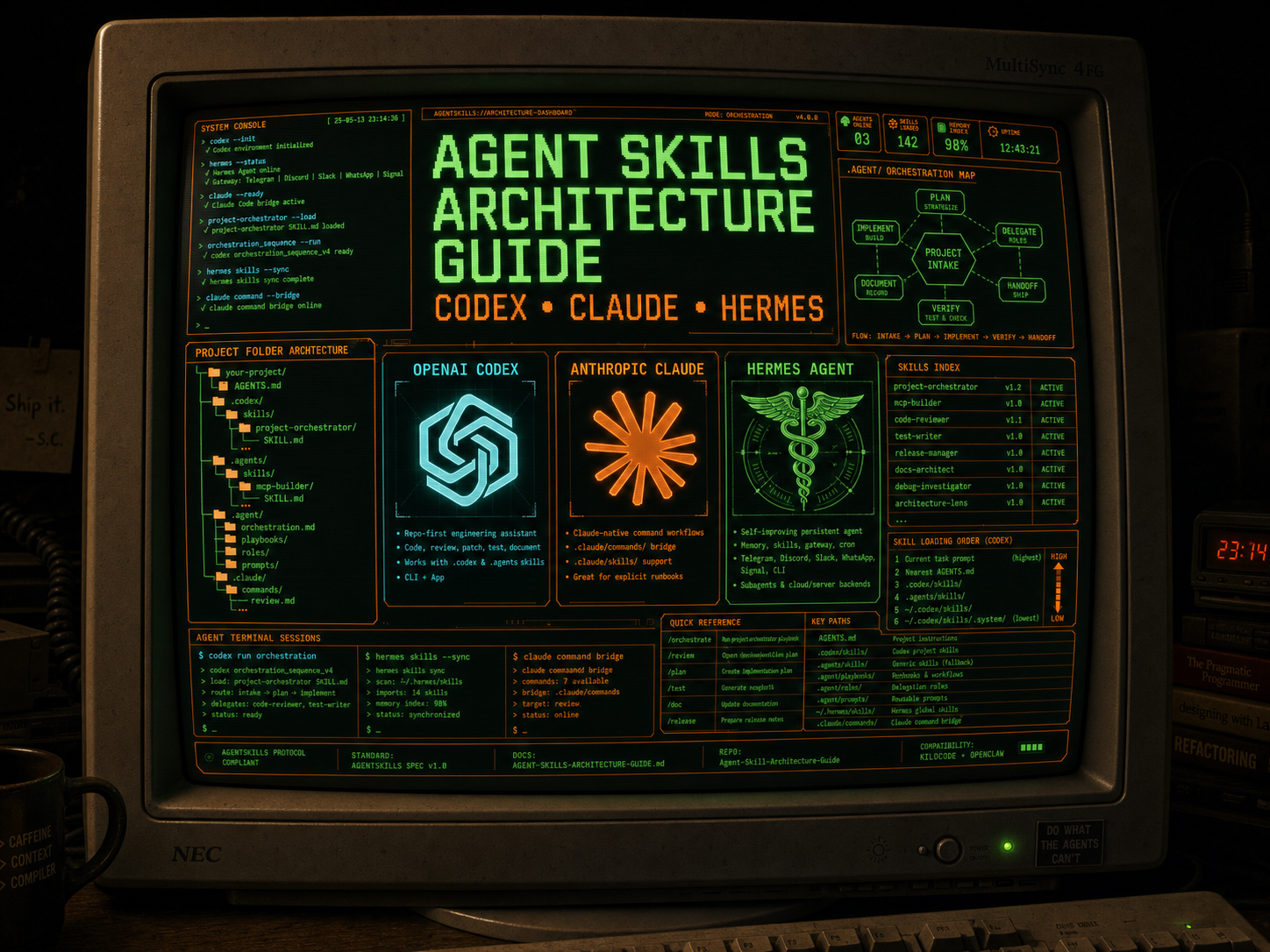
Up to date (as of 5/13/26) agentic folder protocol and buildout guide for OpenAI Codex, Hermes Agent, KiloCode, Claude Code, and any AgentSkills-compatible agent. The repo features drag-and-drop agent folders with new-skill and mcp-builder skills preinstalled, plus .agent/ orchestration examples for roles, playbooks, reusable prompts, and handoff workflows.
📄 Get the Full Guide
[Download the Agent Skills Architecture Guide (PDF)] — covers Codex-first folder structure, AGENTS.md, SKILL.md anatomy, frontmatter reference, .agent/ orchestration folders, Claude command-folder equivalents, self-hosted model config (Ollama / LM Studio), troubleshooting, and more.
Follow [@shaneswrld_] on X
🚀 Install
Option 1: Download and drag (easiest)
Drop-in
.codex/,.agents/,.agent/,.kilocode/, and.claude/folders with skills, architecture reference, and starter config — ready to use with OpenAI Codex, Hermes Agent, KiloCode, Claude Code, and any AgentSkills-compatible agent.
- Download this repo as a ZIP (green Code button → Download ZIP)
- Unzip it
- Drag and drop the folders into your agent folder:
- For OpenAI Codex: Drag
.codex/or.agents/into your project root and keepAGENTS.mdat the root - For Hermes Agent: Use
.agent/as the project orchestration map and install reusable skills into your Hermes skills path - For KiloCode: Drag
.kilocode/into your project root (or use.claude/as fallback) - For Claude Code: Drag
.claude/into your project root - For AGENT.MD: Drag
.agent/AGENT.MDinto your project root (or copy to your existing.agent/AGENT.md)
- For OpenAI Codex: Drag
- Done — your agent now has skills installed and ready to use
How to Drag & Drop MCP Skills
To add MCP skills (like the included mcp-builder skill) to your agent:
- Download this repo as a ZIP (green Code button → Download ZIP)
- Unzip it on your computer
- Navigate to the agent folder you want to add MCP skills to:
- For OpenAI Codex:
.codex/skills/or.agents/skills/folder inside your project - For Hermes Agent: your Hermes skills folder, or a project/repo
skills/folder when configured - For KiloCode:
.kilocode/skills/folder inside your project - For Claude Code:
.claude/skills/folder inside your project
- For OpenAI Codex:
- Drag and drop the skill folder (e.g.,
new-mcp-builder/from.agent/skills/new-mcp-builder/) into your agent'sskills/folder - Restart your agent — the MCP skill will now be available
Note: The
new-mcp-builderskill is located at:
.agent/skills/new-mcp-builder/(generic / Hermes orchestration reference).kilocode/skills/new-mcp-builder/(KiloCode).claude/skills/new-mcp-builder/(Claude Code)
How to Drag & Drop AGENT.MD
To add the AGENT.MD configuration file to your project:
- Download this repo as a ZIP (green Code button → Download ZIP)
- Unzip it on your computer
- Navigate to
.agent/folder in the unzipped repo - Drag and drop
AGENT.MDinto your project's agent folder:- For Hermes Agent or generic orchestration: Drop into your project's
.agent/folder - For existing
.agent/folder: Merge with your existing AGENT.md or replace
- For Hermes Agent or generic orchestration: Drop into your project's
- Restart your agent — the agent configuration is now loaded
Tip: If you already have an AGENT.MD file, you can merge the contents or use the included one as a template/reference.
Tip: If you already have an agent folder (
.codex/,.agents/,.agent/,.claude/, or.kilocode/), you can just drag theskills/subfolder into your existing agent folder to add the skills without overwriting your config. Use.agent/playbooks/for command-style workflows andskills/for reusable capabilities.
Option 2: Clone
git clone https://github.com/shane9coy/agent-skills-kit.git

# OpenAI Codex:
cp -r agent-skills-kit/.codex/ your-project/.codex/
cp agent-skills-kit/AGENTS.md your-project/AGENTS.md

# Legacy Codex / .agents convention:
cp -r agent-skills-kit/.agents/ your-project/.agents/

# Hermes Agent / generic .agent orchestration:
cp -r agent-skills-kit/.agent/ your-project/.agent/

# KiloCode:
cp -r agent-skills-kit/.kilocode/ your-project/.kilocode/

# Claude Code:
cp -r agent-skills-kit/.claude/ your-project/.claude/
📁 What's Inside
agent-skills-kit/
├── .agent/                                # Hermes / general orchestration
│   ├── AGENT.md                          # Agent configuration and memory
│   └── skills/
│       ├── new-skill-builder/
│       │   ├── SKILL.md                   # Skill installer / scaffolder
│       │   └── references/
│       │       ├── Agent-Skills-Architecture-Guide.md
│       │       └── claude-skills-guide.md
│       └── new-mcp-builder/
│           └── SKILL.md                   # MCP builder skill
│
├── .codex/                                # OpenAI Codex
│   ├── AGENTS.md                          # Codex project memory
│   └── skills/
│       └── new-skill/
│           ├── SKILL.md
│           └── references/
│               └── claude-skills-guide.md # Architecture reference for the agent
│
├── .kilocode/                             # KiloCode
│   ├── AGENTS.md                          # KiloCode project memory (AGENTS.md standard)
│   └── skills/
│       └── new-skill/
│           ├── SKILL.md
│           └── references/
│               └── claude-skills-guide.md
│
├── .claude/                              # Claude Code
│   ├── CLAUDE.md                          # Starter project config
│   └── skills/
│       └── new-skill/
│           ├── SKILL.md                   # Skill installer / scaffolder / validator
│           └── references/
│               └── claude-skills-guide.md
│
├── .agents/                               # Legacy / generic AgentSkills
│   └── skills/
│       └── new-skill/
│           ├── SKILL.md
│           └── references/
│               └── claude-skills-guide.md
│
├── AGENTS.md                              # Codex project memory (root-level fallback)
├── README.md
└── LICENSE
All four folders contain compatible skills — use whichever matches your tool. For Codex-first projects, keep AGENTS.md at the repo root, use .codex/skills/ or .agents/skills/ for skills, and use .agent/ as the human-readable orchestration map for roles, playbooks, prompts, and handoffs. KiloCode also reads .claude/skills/ as fallback, so Claude + KiloCode users can share .claude/.
🛠 What new-skill Does
Once installed, your agent gets 5 workflows:
| # | Workflow | How to trigger |
|---|---|---|
| 1 | Create a skill from scratch | "create a new skill for X" |
| 2 | Install from GitHub / zip / markdown | "install this skill: <url>" |
| 3 | Install the MCP Builder skill | "set up the mcp-builder skill" |
| 4 | Validate a skill | "check if my skill is set up correctly" |
| 5 | Audit entire agent folder | "scan and fix my .codex/.agents/.agent structure" |
🔀 Compatibility
The AgentSkills spec is a shared standard. This kit works with:
| Tool | Agent folder | Skill folder | Memory file |
|---|---|---|---|
| OpenAI Codex | .codex/ |
.codex/skills/ (also reads .agents/skills/) |
AGENTS.md |
| Hermes Agent | .agent/ as orchestration map |
Hermes skills path / project skills/ when configured |
AGENTS.md / context files |
| KiloCode | .kilocode/ |
.kilocode/skills/ (also reads .claude/skills/) |
AGENTS.md (reads CLAUDE.md as fallback) |
| Claude Code | .claude/ |
.claude/skills/ |
CLAUDE.md |
| OpenCode | .opencode/ |
.opencode/skills/ (also reads .claude/skills/) |
— |
| Cursor / Windsurf / Cline | .claude/ |
.claude/skills/ via openskills |
— |
| Any AgentSkills agent | .agents/ |
.agents/skills/ |
— |
KiloCode also supports mode-specific skills — drop skills into skills-code/, skills-architect/, skills-debug/, etc. to scope them to specific agent modes.
📖 Key Concepts (from the PDF guide)
- AGENTS.md — durable Codex repo instructions: stack, conventions, architecture boundaries, testing bar, and handoff expectations.
- SKILL.md — the only required file. YAML frontmatter (
name+description) for discovery, markdown body for instructions. - .agent/ — project orchestration folder for roles, playbooks, prompts, and review gates. This is the Codex-friendly equivalent of a command/runbook layer.
- Description is the trigger — the model matches your request against descriptions, not the body. Put all "when to use" info in the description.
- Progressive disclosure — frontmatter is always loaded (~24 tokens/skill), body loads on trigger, references/ load on demand, scripts/ execute on demand.
- Quote your descriptions — unquoted YAML with special characters silently breaks registration.
- Keep SKILL.md under 500 lines — move depth to
references/.
🤝 Credits
Compiled by s.coy
@shaneswrld_ | github.com/shane9coy
📜 License
MIT — use it, fork it, ship it.
Yorumlar (0)
Yorum birakmak icin giris yap.
Yorum birakSonuc bulunamadi