Whisperer
Health Uyari
- License — License: MIT
- Description — Repository has a description
- Active repo — Last push 0 days ago
- Low visibility — Only 5 GitHub stars
Code Gecti
- Code scan — Scanned 12 files during light audit, no dangerous patterns found
Permissions Gecti
- Permissions — No dangerous permissions requested
Bu listing icin henuz AI raporu yok.
Self-hosted, privacy-first desktop dictation and meeting notes. Electron + FastAPI + on-device ONNX speech recognition.

An open-source, self-hosted, privacy-first desktop dictation and meeting-notes app.




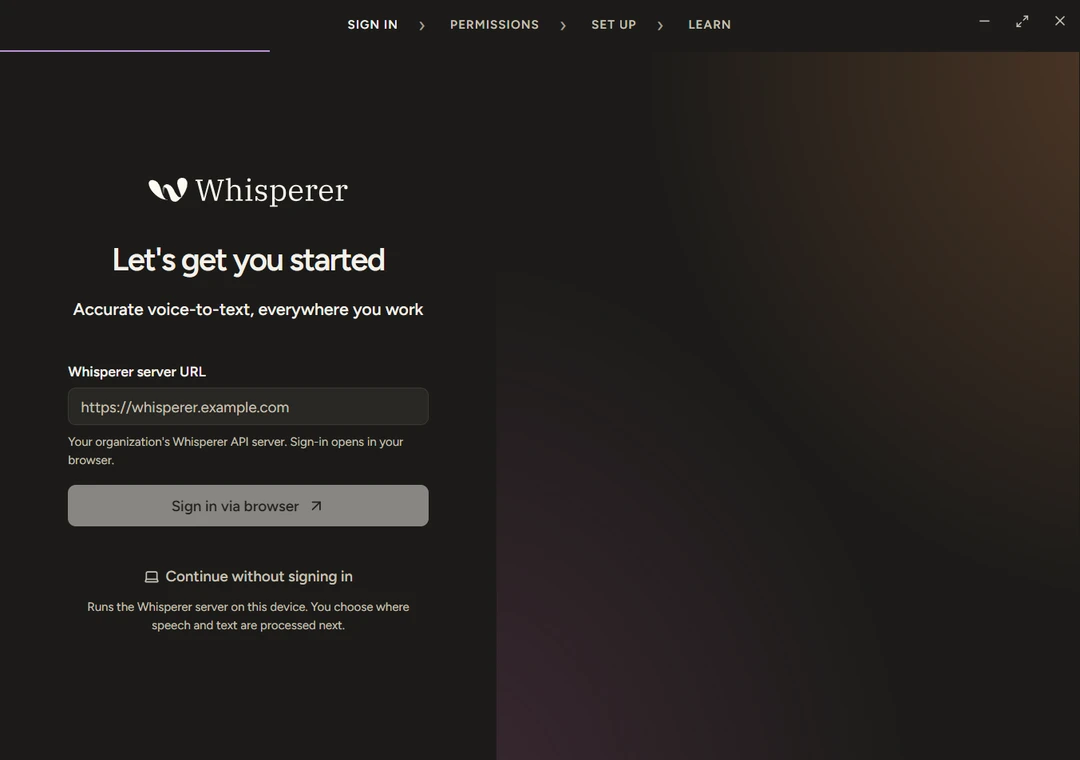
Hold a shortcut, speak, and Whisperer types polished text into whatever app has focus. Record a meeting and get a transcript, an editable summary and answers to questions about what was said. Everything runs against a FastAPI server you control, or, with Continue without signing in, against the same server running on your own computer with on-device speech recognition.
- Self-hosted. Sign in through your own OpenID Connect provider and pick the inference: OpenAI, LiteLLM, Ollama or any OpenAI-compatible endpoint.
- Local mode. No account and no server. Pinned ONNX speech models run on this computer.
- No telemetry. No analytics, crash reporting or tracing. Diagnostics stay in a local log file.
- Honest about data flow. The UI says where audio and text are sent. Any HTTP endpoint you configure receives them, even on localhost.
The demo above is a real recording of a Linux build against synthetic fixture data. The text is pasted into a separate window through the actual X11 insertion path.
Why it's interesting
- A sandboxed Electron app with a validated bridge. Every window runs with
sandbox,contextIsolationand a strict Content-Security-Policy, and loads only from a privilegedwhisperer://protocol. The renderer reaches the main process only through named methods. Each request and response is checked against Zod schemas inshared/protocol.ts, in main on the way in and in the preload bridge on the way out. Packaged builds flip Electron fuses inafter-pack.cjs. - Contract first, from FastAPI to TypeScript. The API exports
openapi.json, andgenerate-api-client.mjsturns it into the typed client the desktop uses. CI regenerates both and fails if either is stale, so the two sides cannot drift. - On-device speech you can verify. The model store pins Parakeet and Whisper ONNX models to exact commits, with the size and SHA-256 of every file. Downloads stream into a staging folder and are moved into place only when every file matches, and files are hashed again before loading. The runtime itself,
uv, Python and the locked API packages, is pinned the same way inruntime-manifest.json. - A local server that proves it is yours. Local mode starts the API as a loopback child process.
LocalServerServicesends its boot token only on the child's stdin, never in argv, the environment or a file. It trusts the port only after the health check returns its owninstanceIdand the child answers an HMAC challenge (local_auth.py). - A read-only MCP server. AI clients sign in through your identity provider and can list, page through and ask about their own meetings, and nothing else. See
mcp_server.pyandmcp_meetings.py. - Local-first sync with tombstones. Local mode keeps its own data until you choose to sync.
sync.pymerges snapshots by stable ID, lets the newerupdatedAtwin, carries deletions over as tombstones and never moves audio.DataSyncCoordinatorruns one two-way sync at a time.
Features
- System-wide dictation. Hold to talk or toggle hands-free. The text is inserted into the focused app, with a clipboard fallback where insertion is not available, such as Wayland. Insertion is verified end to end on Linux X11 and Windows with the packaged app, a virtual microphone and a separate text window; on macOS it is implemented but not yet verified end to end (see the roadmap). Get started
- Polish, dictionary and snippets. A personal dictionary fixes names and jargon, and snippets expand saved text. Polish, which cleans up each dictation, needs a language model you configure, such as Ollama.
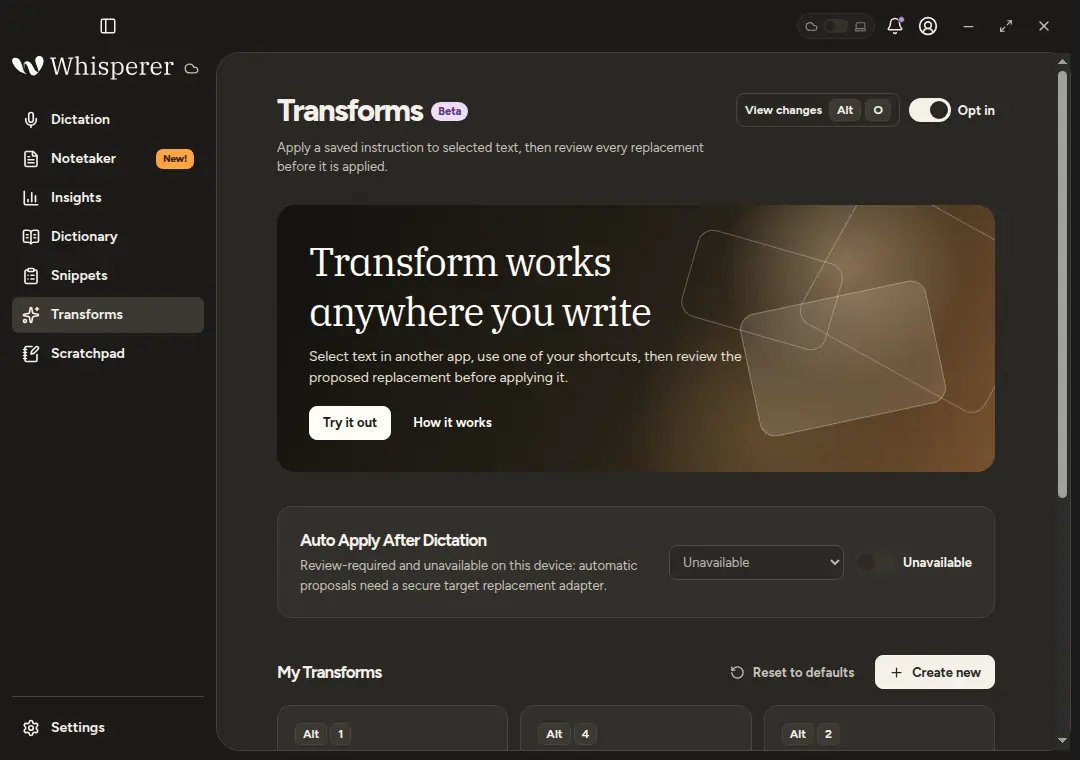
- Transforms. Apply a saved instruction to selected text in any app, then review the before and after. Transforms
- Notetaker. Record a meeting from the microphone, get a transcript and an editable summary, and ask questions answered from the saved meeting. Notetaker
- Read-only MCP endpoint. Let an MCP client on your machine list, read and ask about your meetings, signed in through your identity provider. Connect your AI app
- Insights. Words dictated, words per minute, streaks and a daily heat map, computed by the server from numbers only.
- Sync between Local mode and a server, in both directions, when you ask for it. Local mode
 |
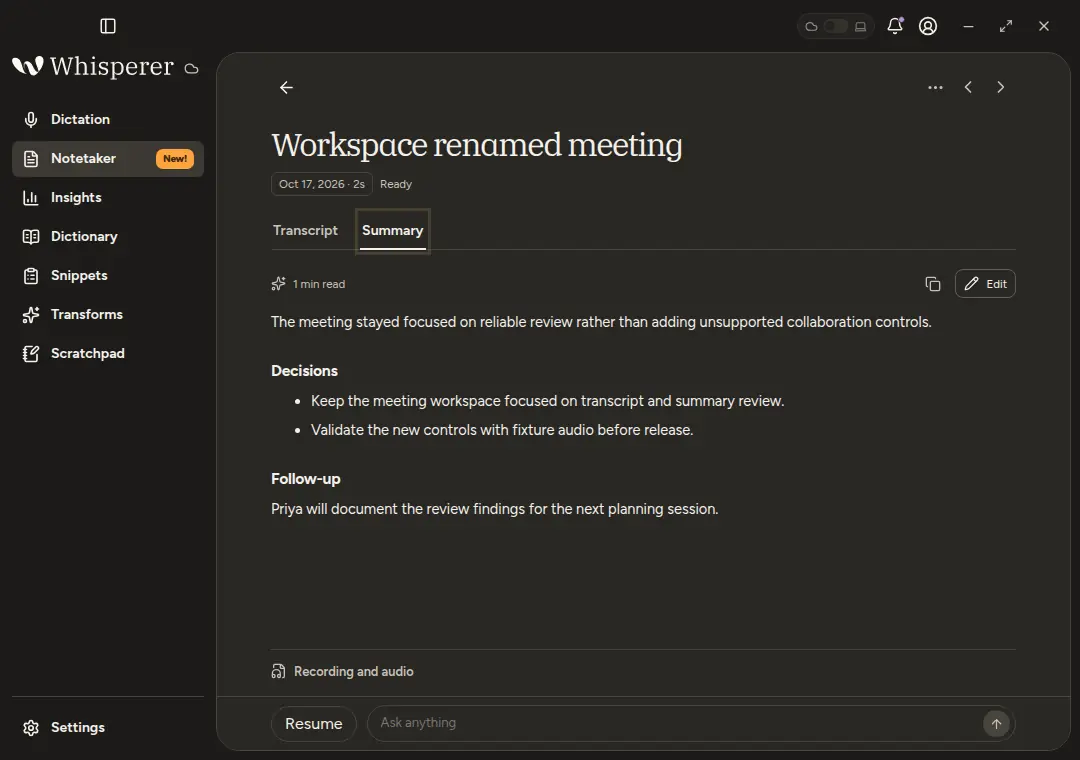 |
| Sign in or continue in Local mode | Notetaker summary and questions |
 |
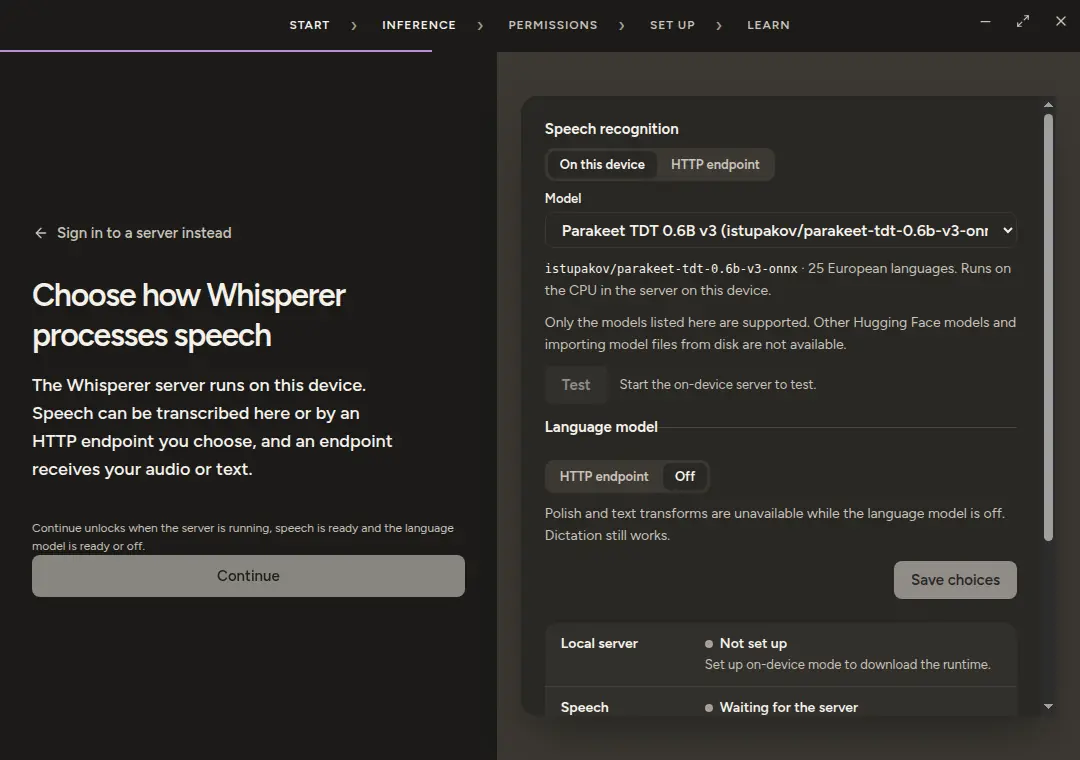 |
| Transforms | Local mode inference setup |
Architecture
flowchart LR
  subgraph Desktop["Electron desktop"]
    R["Renderer<br/>React 19, sandboxed"] -->|"window.whisperer<br/>Zod-validated IPC"| P["Preload bridge"]
    P --> M["Main process"]
    M --> C["Generated OpenAPI client"]
    M --> S[("Scoped SQLite cache")]
  end

  C -->|"Remote: HTTPS + bearer session"| API["FastAPI API"]
  API --> OIDC["OIDC provider"]
  API --> DB[("SQLite")]
  API --> GW["OpenAI-compatible gateway<br/>OpenAI, LiteLLM, Ollama"]

  M -->|"Local mode: spawn loopback child,<br/>verify instanceId + HMAC,<br/>boot token over stdin"| LAPI["Same API, serve-local"]
  C -->|"127.0.0.1 + boot token"| LAPI
  LAPI --> ONNX["onnx-asr + ONNX Runtime<br/>pinned Parakeet / Whisper"]
  LAPI -.->|"optional polish"| OLL["Ollama or another HTTP endpoint"]
- One API for both modes. Local mode runs the same FastAPI code as a server, so features, tests and the generated client are shared rather than duplicated in Electron.
- Inference stays out of Electron. Speech and language models run in the API process, which keeps the desktop small and lets a server use GPUs it owns.
- The main process owns everything sensitive. Windows, credentials (encrypted with
safeStorage), the API client, the local SQLite cache partitioned by server and user, global shortcuts and native text insertion all live there. The renderer has no network access of its own. - Identity by issuer and subject. Accounts are bound to the OIDC issuer and subject, never to an email address.
- Honest capabilities. Wayland insertion and system audio are reported as unavailable with a reason, and the UI never fabricates transcripts, metrics or claims of system audio capture.
| Layer | Technologies |
|---|---|
| Desktop | Electron 44.10, electron-vite 5, React 19.3, TypeScript 6.0, Tailwind CSS 4.3, TanStack Query 5, Zod 4.6, better-sqlite3 13, uiohook-napi 1.5 |
| Backend | Python 3.12, FastAPI 0.143, Uvicorn, SQLAlchemy 2.1, pydantic 2.14 and pydantic-settings, Authlib 1.9, joserfc, pydantic-ai 2.57, FastMCP 4.1 |
| Inference | onnx-asr 0.12, ONNX Runtime, NumPy, PyAV, or any OpenAI-compatible gateway (OpenAI, LiteLLM, Ollama, speaches) |
| Tooling | uv, npm, GNU Make, Ruff, mypy --strict, pytest, ESLint, Prettier, Vitest, node:test, Playwright (Electron driver), hey-api, electron-builder 26, Docker Compose, GitHub Actions |
Quick start: Local mode in three steps
- Install. Download the installer for your platform from Releases. Builds are unsigned, so macOS and Windows warn once; Get started explains how to open them.
- Continue without signing in. On the sign-in screen, choose Continue without signing in. No account or server is needed.
- Set up and download a model. Onboarding's Inference step installs the pinned runtime and downloads a speech model when you press the buttons, and not before. The runtime needs about 2 GiB of free disk space. Whisper base (about 108 MB) downloads much faster than Parakeet TDT 0.6B v3 (about 670 MB).
Then hold the dictation shortcut and speak. Local mode lists what is downloaded, where it goes, and where audio and text are sent.
To run from source instead, you need Node.js 22.18 or newer, uv and Python 3.12:
make setup      # install locked desktop dependencies and build the app
make desktop    # build and launch Electron
Self-hosting
cp .env.example .env    # replace every CHANGE_ME
make api-up             # the API alone, against your existing gateway network
make stack-up STACK=cpu # or: the API with bundled inference
| Stack | Speech model | Language model | Notes |
|---|---|---|---|
cloud |
gpt-transcribe |
gpt-6-luna |
OpenAI or any OpenAI-compatible provider, no local services. Set OPENAI_API_KEY. |
cpu |
Systran/faster-whisper-small |
gemma3:1b |
speaches and Ollama on the CPU. |
nvidia |
istupakov/parakeet-tdt-0.6b-v3-onnx |
gemma3:4b |
Needs the NVIDIA Container Toolkit. |
apple |
istupakov/parakeet-tdt-0.6b-v3-onnx |
gemma3:1b |
Docker on macOS has no GPU; a native Ollama is faster. |
Without STACK, make stack-up picks apple on an Apple Silicon Mac, nvidia when nvidia-smi works, and cpu otherwise. Defaults live in deploy/<stack>.env, and .env overrides them. The API listens on port 14318; put a TLS reverse proxy in front of it. Self hosting has the full steps and Configuration explains every setting, from the OIDC client and PUBLIC_URL to the gateway, model names and the optional MCP endpoint.
Usage
Onboarding checks permissions, tests the microphone and sets the language and the dictation shortcut, then runs a short tutorial. In Local mode it adds an Inference step.
Default shortcuts, all changeable in Settings:
Action macOS and Linux Windows Push to talk (hold) Control+AltControl+SuperHands-free start and stop Control+Alt+SpaceControl+Super+SpacePaste last transcript Control+Command+Von macOS,Alt+Shift+Zon LinuxAlt+Shift+ZCopy last transcript Control+Command+Con macOS,Alt+Shift+Xon LinuxAlt+Shift+XOpen Scratchpad Alt+SAlt+SStart Notetaker Alt+MAlt+MTransform selection Alt+1Super+Alt+1View Transform changes Alt+OSuper+Alt+OCancel EscapeEscapeDictation. Hold the shortcut or click the pill, speak and release. The polished text is inserted into the focused app and kept in the local history.
Transforms. Select text anywhere and press a transform shortcut. The replacement is pasted only if the same text is still selected, followed by a before and after review.
Meetings. Start Notetaker from the pill or
Alt+M. When it stops, the server transcribes and summarizes, and you can edit both or ask questions.MCP clients. Settings › MCP shows the connection URL and copyable setup for common clients. MCP is available on a server deployment with the MCP settings configured, not in Local mode. See Connect your AI app.
Testing
make desktop-lint     # TypeScript type checks and ESLint with zero warnings
make desktop-test     # Vitest and node:test
make desktop-build    # production build
make api-lint         # Ruff, and mypy --strict for Linux, macOS and Windows
make api-test         # pytest
make api-contract     # regenerate openapi.json and the client, fail if stale
make stack-config     # validate every Compose stack
make docs-check       # folder AGENTS.md, CLAUDE.md shims and README diagrams
CI runs these on every pull request and every push to main, then validates compose.yaml and builds the hardened API image. CodeQL scans the TypeScript and Python code, and Dependabot proposes weekly grouped updates. node tools/drive-desktop.mjs drives the built app end to end against a loopback fixture with a disposable profile.
Project structure
.
├── apps/api/                  FastAPI service, tests and openapi.json
│   └── src/whisperer_api/     HTTP adapters, auth, inference, meetings, sync, MCP, Local mode
├── packages/api-client/       TypeScript client generated from openapi.json
├── src/desktop/
│   ├── main/                  Electron main: runtime, services, storage, platform adapters
│   ├── preload/               Sandboxed window.whisperer bridge
│   ├── renderer/              React UI: recording, meetings, content, device, insights
│   └── shared/                IPC contract, Zod schemas, shortcuts, release naming
├── deploy/                    Compose overlays and per-stack model defaults
├── assets/                    Brand sources and generated artwork, screenshots
├── docs/                      User guide, developer reference and roadmap
├── tools/                     make commands, packaging, release and acceptance drivers
├── compose.yaml, Dockerfile   API container and base Compose service
└── Makefile                   Entry point for every command
Component READMEs go deeper: deploy, docs, tools, the API, the API client and the desktop. Every folder also has an AGENTS.md with the rules for changing it.
Roadmap
Whisperer is in beta. Physical-device verification on macOS and Windows, Local mode on more platforms, code signing and Wayland insertion are still open. The roadmap lists what has been verified on each platform, the known limitations and planned work, and the changelog records each release.
Contributing and security
Contributions are welcome; CONTRIBUTING.md covers setup, checks and pull requests. Please report vulnerabilities privately through GitHub's private vulnerability reporting, as described in SECURITY.md, never in a public issue.
License
Yorumlar (0)
Yorum birakmak icin giris yap.
Yorum birakSonuc bulunamadi