hermes-go
Health Warn
- License — License: MIT
- Description — Repository has a description
- Active repo — Last push 0 days ago
- Low visibility — Only 7 GitHub stars
Code Pass
- Code scan — Scanned 1 files during light audit, no dangerous patterns found
Permissions Pass
- Permissions — No dangerous permissions requested
No AI report is available for this listing yet.
Hermes Go — a mobile client for self-hosted Hermes Agent. Site + release assets.
Hermes Go
Your AI agent, in your pocket.
A native mobile client for your Hermes Agent. For self-hosted setups, one prompt configures basic auth, binds port 9119, detects Tailscale, and hands you your connection details. Hermes Cloud connects through its portal.
Bots Mode brings named AI teammates to your phone — assign work from any chat with @, keep each teammate’s conversation isolated, and schedule routines for them.
v1.0.11 · Android APK · Closed Source · Zero Telemetry

What is Hermes Go?
Hermes Go is a native Android client for Hermes Agent — self-hosted or Hermes Cloud. It is not a chat wrapper — it is the full agent in your hand:
- Live streaming — reasoning rows, tool timelines, and markdown as they happen
- Voice — dictate, hear replies, hands-free conversation loop
- Artifacts — images, audio, and HTML previews inline in chat
- Full control — approvals, sudo, secrets, queue, steer, stop
- Deep visibility — health, analytics, logs, ops console, config editor
- Your server, your data — connects direct to your server over LAN or Tailscale, or via Hermes Cloud for portal-managed agents
Closed source. The app is distributed as a signed APK. No telemetry, no analytics, no tracking. Self-hosted connections go directly to your server; Hermes Cloud connections use Hermes Cloud.
💙 Built on Hermes Agent by Nous Research — thank you for making this possible!
Screenshots
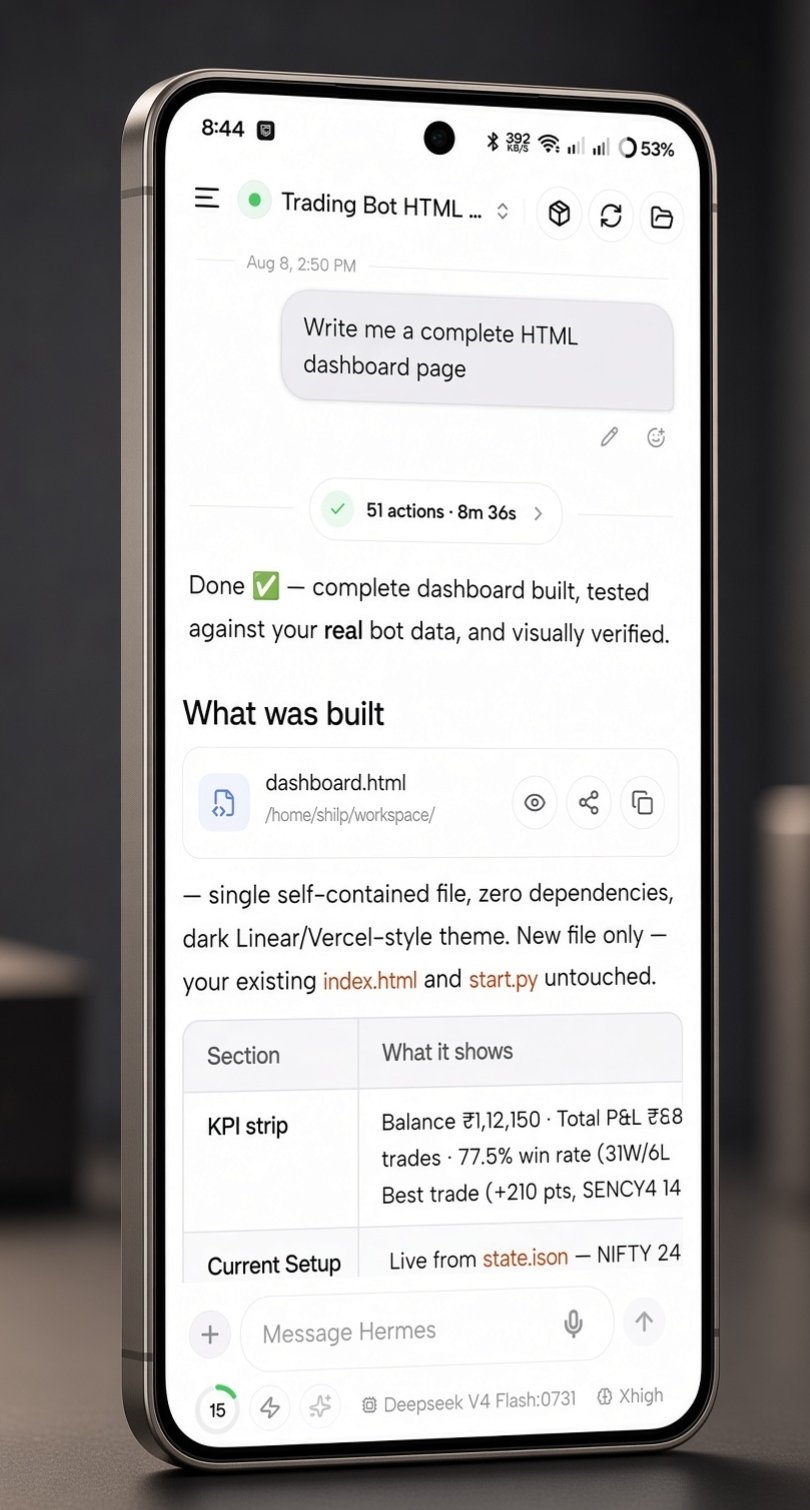
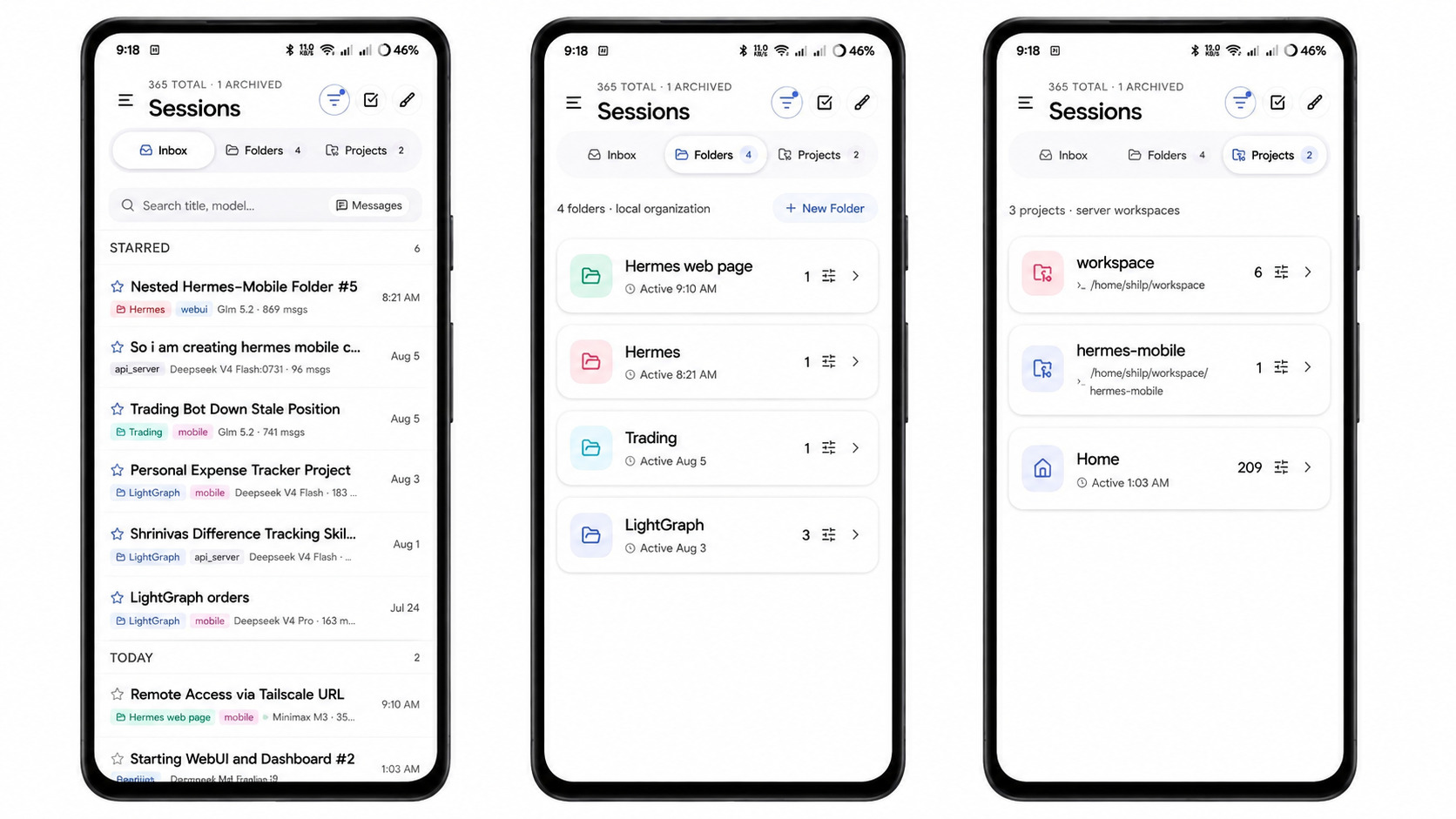
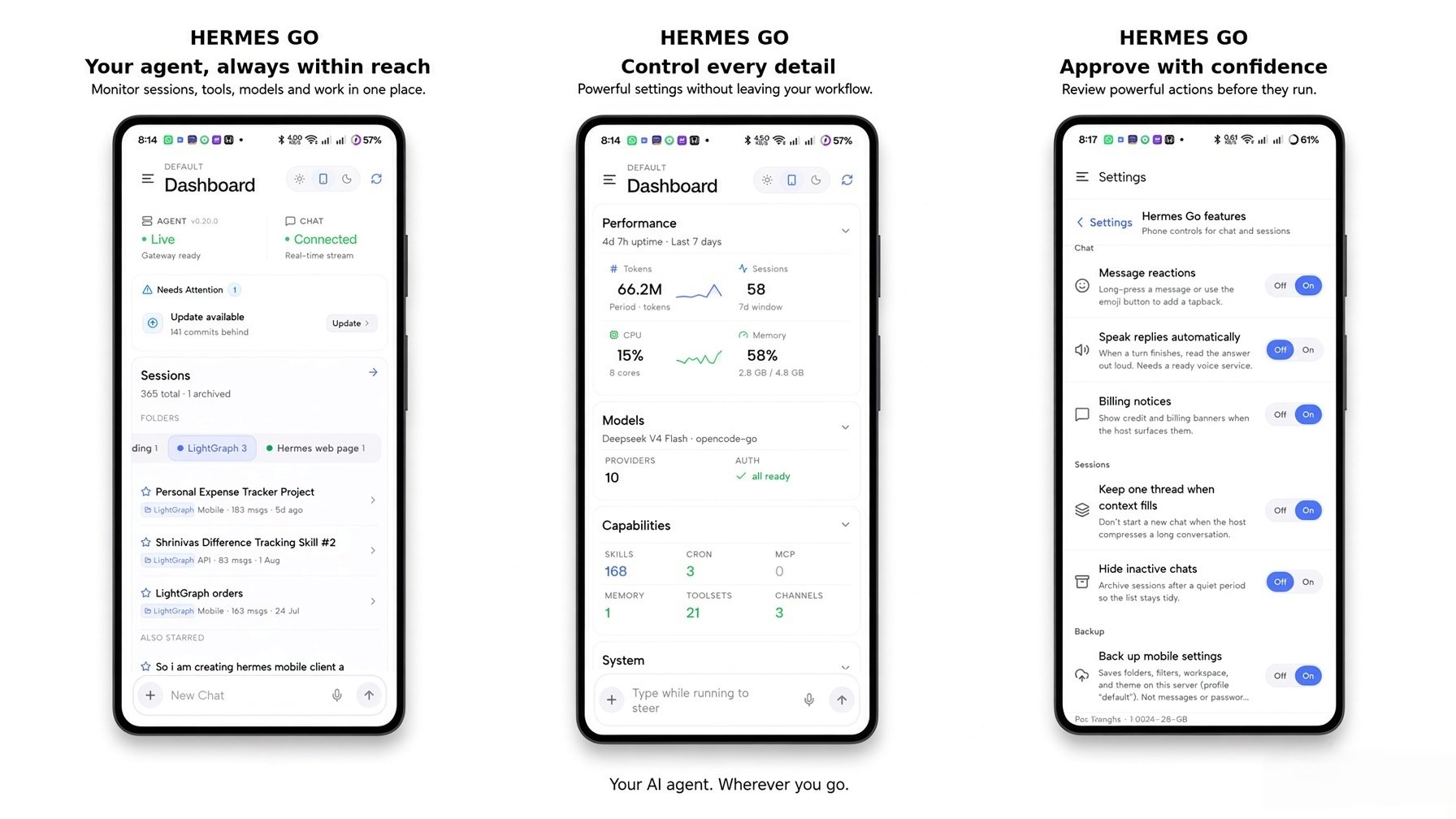
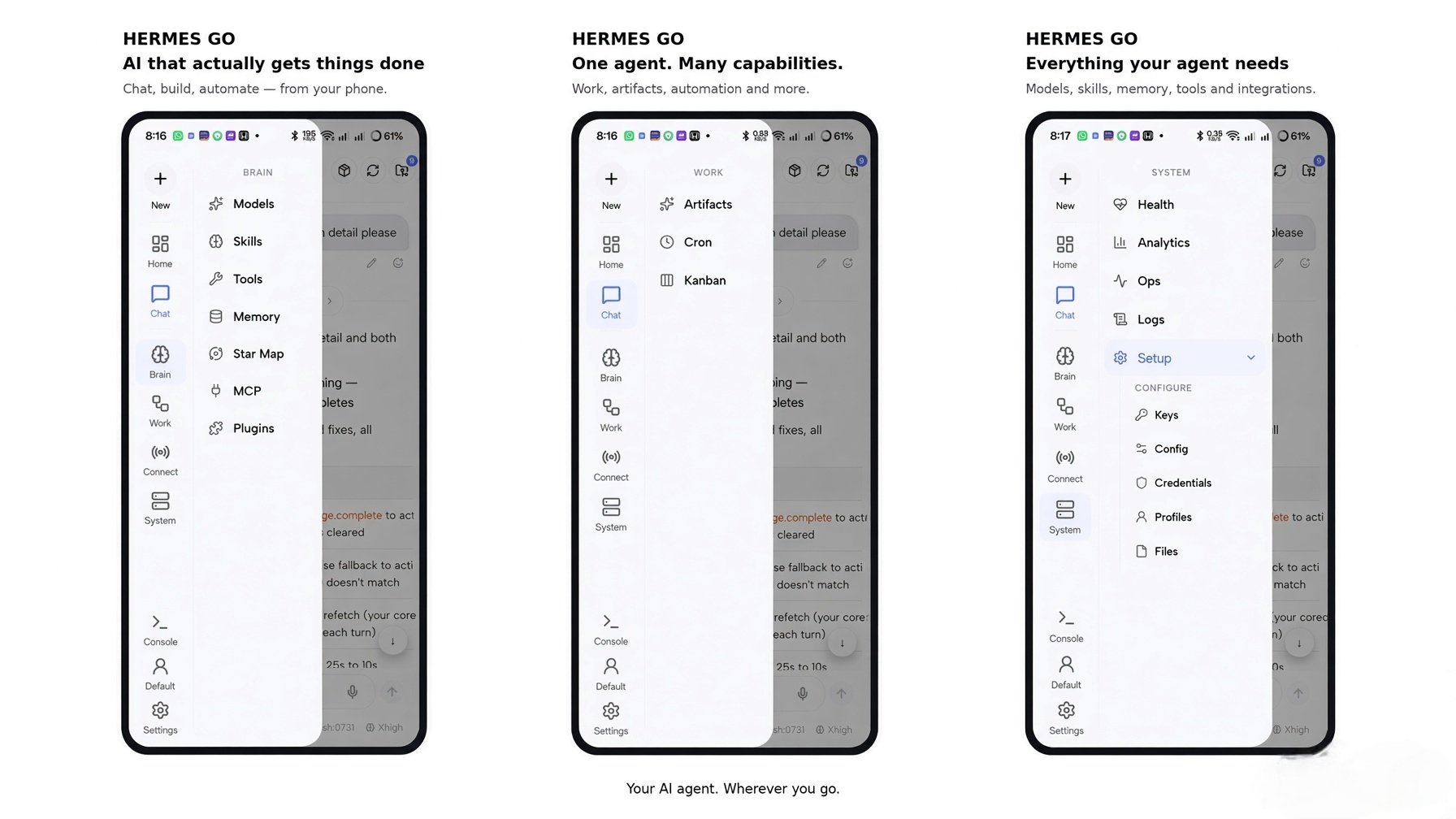
| Sessions | Dashboard & Settings | Drawer |
|---|---|---|
 |
 |
 |
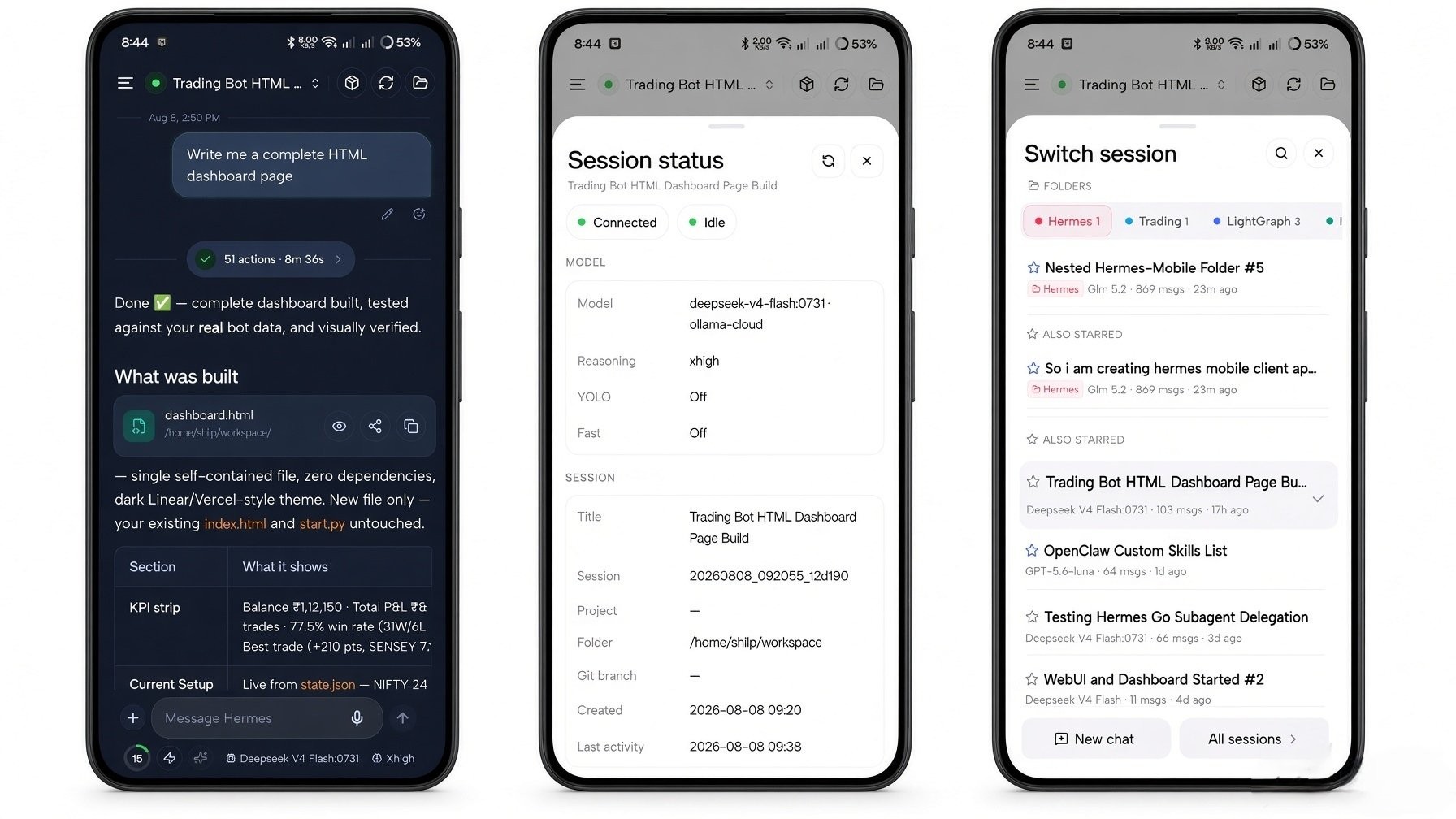
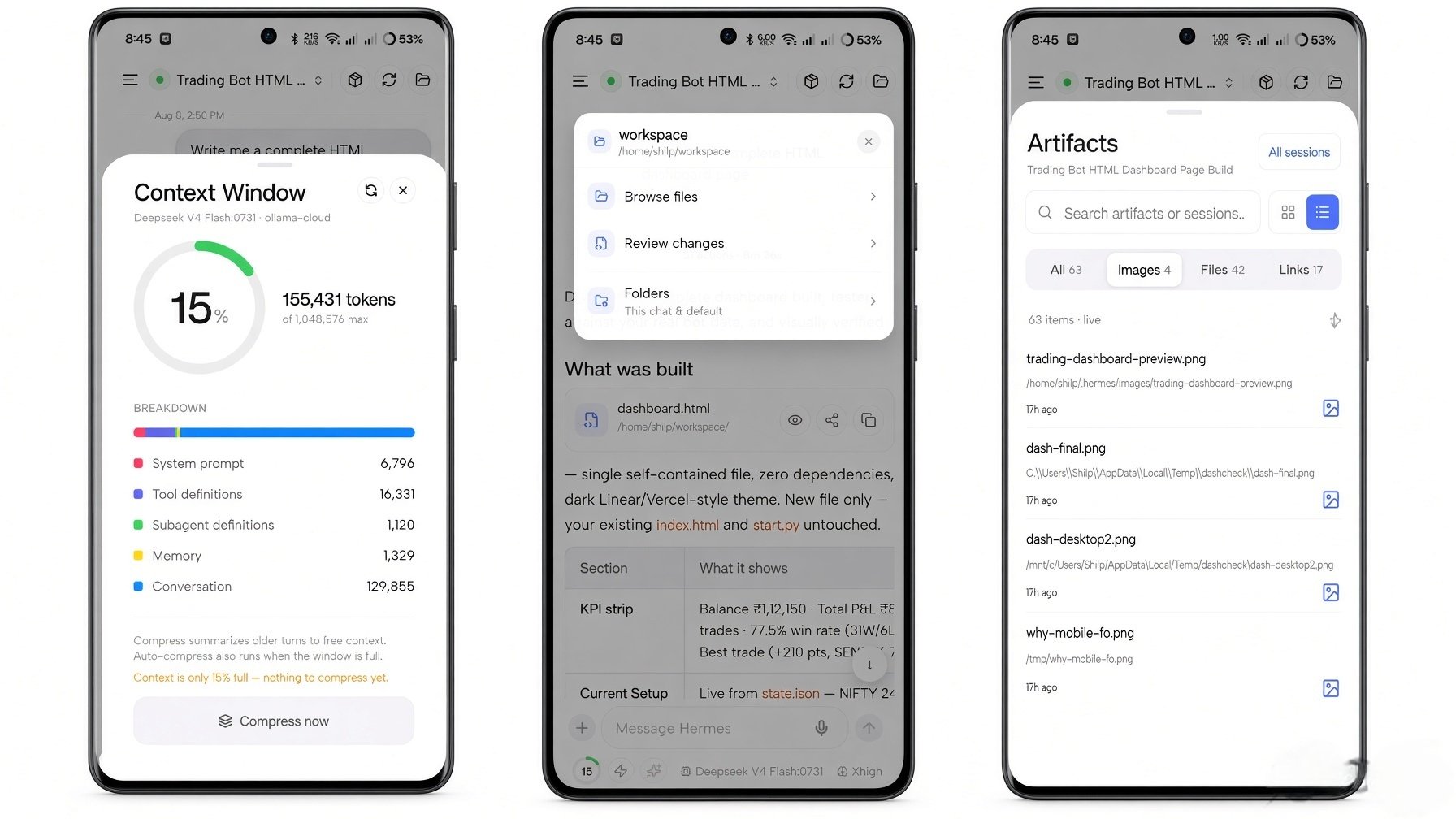
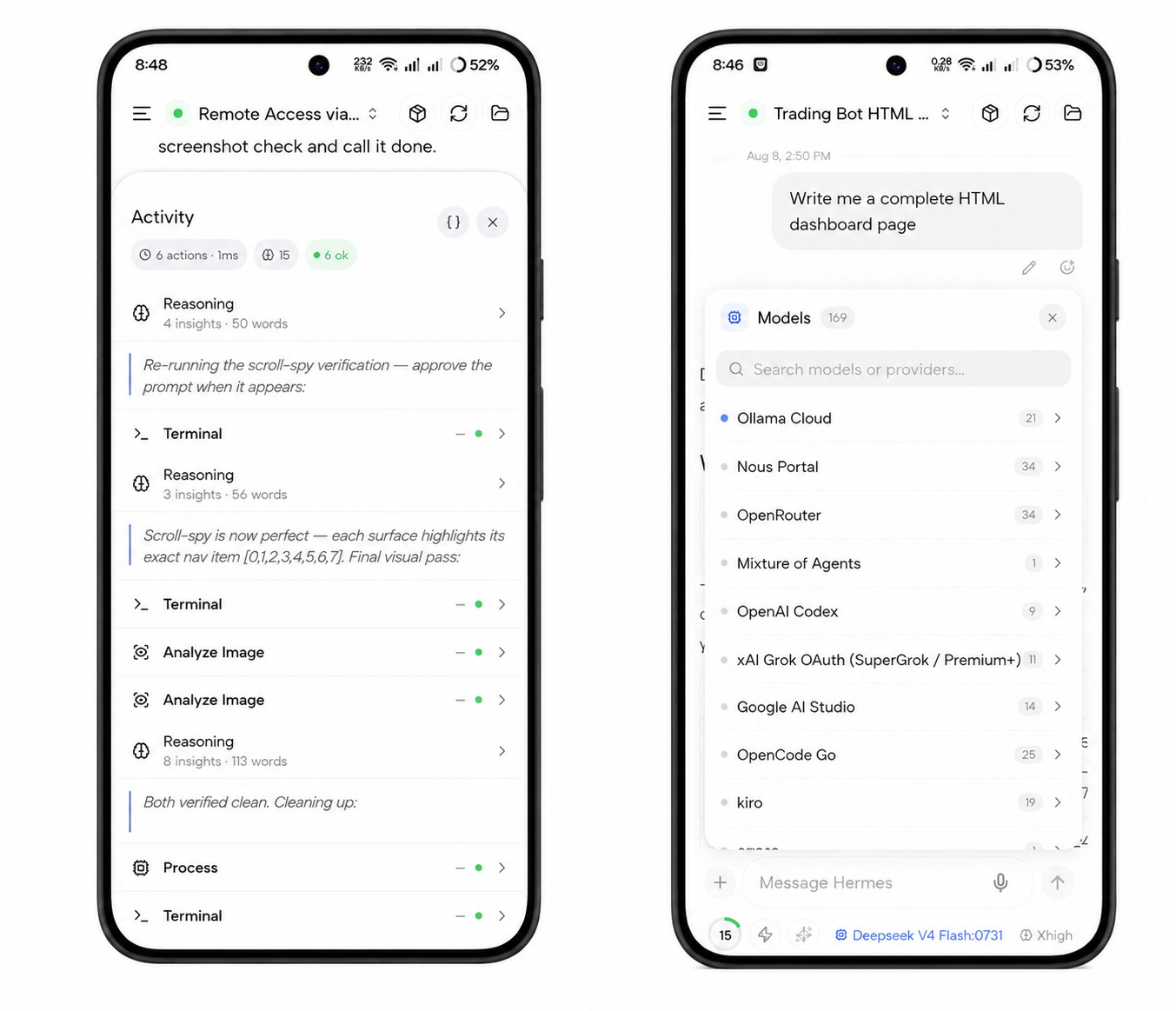
| Session sheets | Context & Artifacts | Activity & Models |
|---|---|---|
 |
 |
 |
App Map
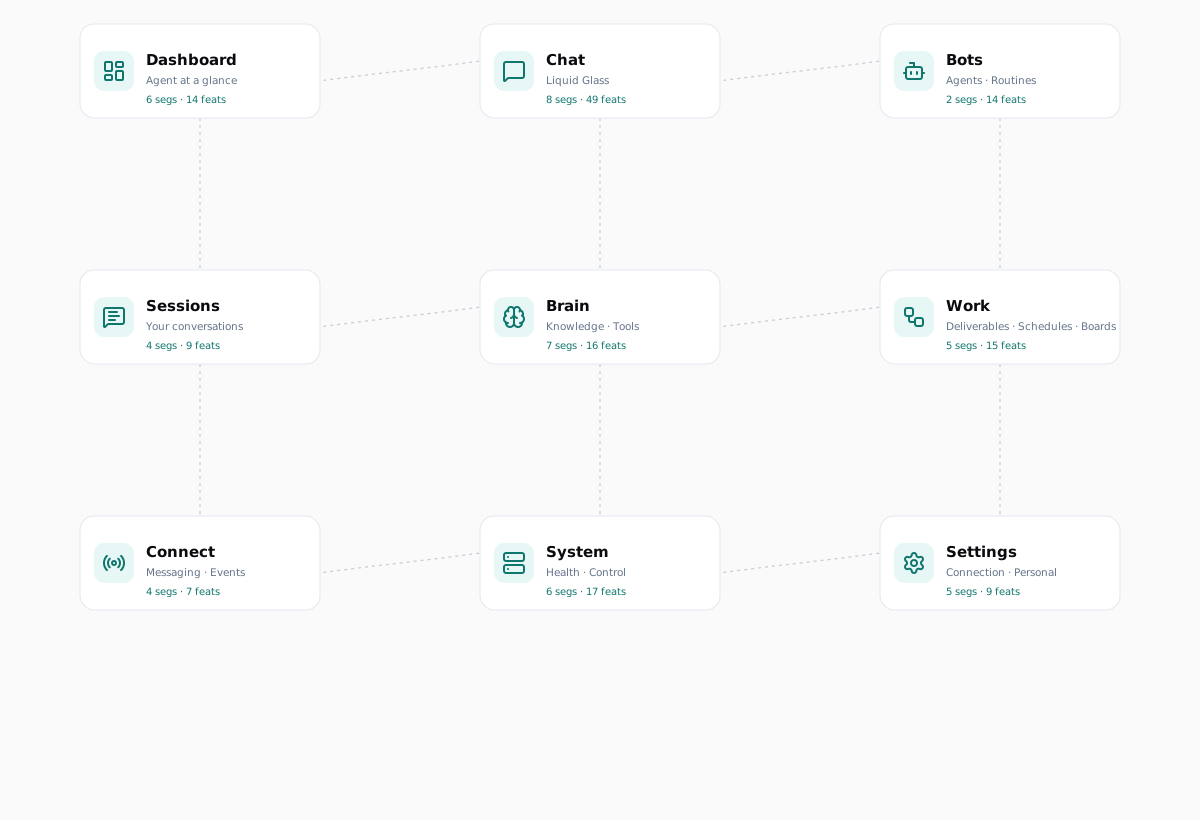
Surfaces
| Surface | Segments | Features | What it does | |
|---|---|---|---|---|
 |
Dashboard | 6 | 14 | Agent status, performance, capabilities, alerts, quick compose, profile switcher |
 |
Chat | 8 | 49 | Live streaming, voice, media & artifacts, approvals, queue & steer, subagents, share from other apps, composer tools |
 |
Bots | 2 | 14 | Agents, Bot Chat, @-assign from any session, assignment receipts, routines, profile identity |
 |
Sessions | 4 | 9 | Inbox, folders & projects, full-text search, bulk management |
 |
Brain | 7 | 16 | Models, skills, tools, memory, Star Map, MCP, plugins |
 |
Work | 5 | 15 | Artifacts browser, cron jobs, kanban board, host files, processes |
 |
Connect | 4 | 7 | Channel status, webhook routes, pairing, Hermes Cloud |
 |
System | 6 | 17 | Health, analytics, setup, ops console, logs, power tools |
 |
Settings | 5 | 9 | Servers, connection, appearance, profile, feedback & info |
Total: 9 surfaces · 47 segments · 150 features
Full interactive map: App Map — Hermes Go
Getting Started
1. Download the APK
Download Hermes Go v1.0.11 (76 MB)
Verify the download — the SHA-256 of the published APK is:
2188b21b164b9fdcd0991c634772d1083227197b31c27173d472a2b19d1da3a1
# Linux / macOS
sha256sum HermesGo.apk

# Windows (PowerShell)
Get-FileHash HermesGo.apk -Algorithm SHA256
If the hash matches, the file is exactly what we published — nothing added, nothing removed.
2. Install
- Open the downloaded
HermesGo.apkon your Android device - If prompted, allow "Install unknown apps" for your browser or file manager
- Tap Install
- Open Hermes Go
A Play Store release is planned.
3. Connect to your agent
- Open Hermes Go
- Self-hosted — enter your agent's address (
http://<host>:9119on your LAN, your Tailscale IP, orhttps://your-domainbehind a TLS reverse proxy) and your basic-auth credentials (set duringhermes-agentsetup) - Hermes Cloud — sign in from the Connect screen with your portal account, pick your org and agent
- Done — the full agent is in your hand
Key Features
🗨️ Chat — Liquid Glass
- Live streaming with reasoning rows and tool timelines
- Markdown, tables, syntax-highlighted code blocks with copy
- Context ring showing live context-window usage
- Inline media: images (full-screen viewer), audio playback, HTML/SVG live previews
- Approvals: approve/deny, clarify, sudo, secret prompts
- Send queue, mid-run steering, clean stop
- Subagent lists with live delegation, async task cards
- Composer: attachments,
/skills,@mentions, prompt improve, YOLO mode, todo status - Share from other apps — send images, PDFs, Word/Excel files, text, or links straight into a chat
- Background job control — inspect output, stop, or dismiss running host processes from the chat meta row
- Fast lane — toggle priority processing on supported models, with Use Fast or Standard choice on pick
- Reasoning effort — set Off → Ultra per session and as a profile default
- Session loops — recurring
/loopcards with countdown, status, pause, resume, and stop controls - Activity stack — keep todos, subagents, and loops organized above the composer
- Persistent task plans — unfinished work stays visible across turns
- Recovered prompts — approvals and clarify prompts return after reconnect
- Readable tool cards — key-values, chips, lists, and markdown instead of raw output
- Assign with @ from any session — choose one or several teammates, keep chatting, and receive their replies back in the current conversation
🤖 Bots Mode
- Agents hub — create or clone named AI teammates with their own chat, memory, skills, toolsets, model, reasoning effort, Fast mode, and SOUL
- Bot Chat — one canonical conversation per teammate, kept out of normal Sessions recents; scratch chats remain separate
- Agent identity — live faces, optional photo avatars, handles, last-active previews, unread dots, Default/In Chat status
- Bot details — edit profile, skills, tools, SOUL, model, Star Map scope, chats, and routines from one sheet
- @-assign — ask a teammate from any chat or Home; multi-agent chips, live Asking/Waiting/Replied receipts, and returned markdown in place
- Routines — schedule agent-owned work daily, at intervals, or once; pause, resume, run, inspect history, or delete
🎙️ Voice
- Hold-to-dictate with STT
- Read any reply aloud (TTS)
- Hands-free conversation loop: listen → think → speak
- Inline audio playback for TTS tool output
📦 Artifacts
- Every media item from a session, searchable
- Full-screen image viewer with pinch-zoom
- Offline-first browsing from cached session media
🧠 Brain
- Model provider catalog with fallback chain and effort control
- Skills with enable toggles — open and edit skills from the Skills hub or skill tool cards
- Toolsets with environment configuration
- Memory block viewer/editor
- Star Map — interactive learning graph: constellation, clusters, timeline, node editor, curator
- MCP server connections
- Plugin toggles
📋 Work
- Artifacts browser (images, audio, files)
- Cron jobs: list, run-now, status badges
- Kanban board with live updates — request review from ready or running tasks
- Host files — browse the agent filesystem, drop
@file/@folderchips into the composer - Processes — manage background jobs from live sessions, filter and start/stop with confirmation
🔌 Connect
- Channel status (Telegram, Discord, Slack) with live dots
- Webhook routes
- Pairing requests + QR provisioning
- Hermes Cloud — portal sign-in, org and agent pick, cookie-based reconnect
🖥️ System
- Health: host gauges, gateway status
- Memory and disk pressure alerts — advisory notices on Home and Health when the host reports elevated pressure
- Analytics: usage trends
- Setup: app features, voice, thinking depth, safety, UI
- Ops console with readable parsed output
- Live log stream with pause-on-scroll
- Power tools: config editor, environment, OAuth, profiles, files, credentials
⚙️ Settings
- Multi-server with URL switching
- Connection details + Tailscale detection
- Theme (dark/light)
- Active profile
- Feedback — submit a bug, feature idea, improvement, or question with screenshots and status tracking
- What's New — release notes in-app, product version in the footer
- Backup preview — see exactly what a prefs restore brings back before accepting
- Feature map — search every screen, jump by area, tap to go straight to a feature
Security & Trust
| Property | Value |
|---|---|
| Distribution | Signed APK via GitHub Releases |
| Telemetry | None. Zero analytics, zero tracking |
| Data path | Direct to your server (LAN / Tailscale) or Hermes Cloud — no telemetry either way |
| Auth | Basic auth (self-hosted) or Hermes Cloud portal sign-in |
| Secrets | Stored in platform secure storage (expo-secure-store) |
| Source | Closed source — the APK is the artifact of record |
| Verification | SHA-256 published with every release |
Tech Stack
| Layer | Technology |
|---|---|
| Framework | Expo SDK 56 · React Native 0.85 |
| Navigation | expo-router (typed routes) |
| State | Zustand 5 |
| Persistence | expo-sqlite (local-first, background sync) |
| Real-time | WebSocket JSON-RPC gateway client |
| Cloud | Hermes Cloud portal (org & agent pick, cookie reconnect) |
| Voice | STT dictation + TTS playback |
| Icons | lucide-react-native |
| Build | EAS Build (APK) + OTA updates (expo-updates) |
Architecture
┌─────────────────────────────────────────────┐
│                 Hermes Go (Android)          │
├──────────────┬──────────────────────────────┤
│  UI Layer    │  Drawer rail · 9 surfaces    │
│  State       │  Zustand stores (sync-aware) │
│  Persistence │  SQLite · background sync    │
│  Transport   │  WebSocket JSON-RPC client   │
│  Auth        │  Basic auth · secure store   │
└──────────────┴──────────────────────────────┘
        │                        │
        │  WebSocket (JSON-RPC)  │  Hermes Cloud (portal
        │  / REST                │  sign-in · org & agent
        ▼                        ▼  pick · cookie reconnect)
┌──────────────────┐  ┌───────────────────────┐
│ Your self-hosted │  │    Hermes Cloud       │
│   Hermes Agent   │  │      agents           │
│ (port 9119 · LAN │  │  (portal-managed)     │
│  or Tailscale)   │  │                       │
└──────────────────┘  └───────────────────────┘
Changelog
See CHANGELOG.md for the full release history.
License
This repository (the website) is open source under the MIT License. The Hermes Go application itself is closed source — distributed as a signed APK with a published SHA-256 for verification. The APK is provided for personal use; redistribution or modification of the binary is not permitted without written consent.
© 2026 Hermes Go by Shilp
Reviews (0)
Sign in to leave a review.
Leave a reviewNo results found