openclaw-claude-bridge
Health Pass
- License — License: MIT
- Description — Repository has a description
- Active repo — Last push 0 days ago
- Community trust — 40 GitHub stars
Code Warn
- network request — Outbound network request in dashboard/src/hooks/use-status.ts
Permissions Pass
- Permissions — No dangerous permissions requested
This tool acts as a translation proxy, allowing OpenClaw agents to communicate with Anthropic's Claude CLI using the standard OpenAI API format. It manages persistent sessions and extended thinking while streaming responses, featuring a real-time React dashboard for cost tracking.
Security Assessment
Overall risk: Low. The bridge operates by passing data via standard input and output streams to the local Claude CLI, which is a safe architectural choice. The README explicitly states that the tool never executes commands itself; it only translates data between formats. No hardcoded secrets were detected in the codebase, and the project does not request any dangerous system permissions. There is a minor warning regarding an outbound network request in the dashboard component (`use-status.ts`), but this is expected behavior for a real-time UI fetching local status updates.
Quality Assessment
The project demonstrates strong health indicators and active maintenance. It is fully licensed under the permissive and standard MIT license. The repository is actively maintained, with the most recent code push occurring today. It enjoys a moderate level of community trust, currently backed by 40 GitHub stars. The documentation is robust, clearly explaining the architecture, request flow, and setup instructions.
Verdict
Safe to use — it employs a secure local proxy design without risky execution capabilities, backed by active maintenance and clear documentation.
HTTP bridge powering OpenClaw's AI agents via Claude Code CLI — manages persistent sessions, auto-resume, extended thinking, and provides a real-time React dashboard with per-agent cost tracking. Exposes an OpenAI-compatible API.
openclaw-claude-bridge



繁體中文 | English
An OpenAI-compatible HTTP proxy that lets OpenClaw agents use Claude through Claude Code CLI — with tool calling, session memory, and extended thinking.
Why This Exists
OpenClaw speaks the OpenAI API format. Claude Code CLI speaks its own format. This bridge sits in between and translates — so your OC agents can talk to Claude without either side needing to change.
  OpenClaw agent                  Bridge                     Claude CLI
  (Discord/Telegram)
        │                           │                              │
        │  POST /v1/chat/           │                              │
        │  completions              │  Translate messages           │
        ├──────────────────────────▶│  Inject tool protocol        │
        │                           │  Map thinking level          │
        │                           │                              │
        │                           │  stdin ──▶ claude --print    │
        │                           │  stdout ◀── stream-json      │
        │                           │                              │
        │  SSE stream               │  Parse response:             │
        ◀──────────────────────────│  ├─ text → clean output      │
        │                           │  └─ <tool_call> → OpenAI fmt │
        │                           │                              │
        │  tool_calls?              │                              │
        │  Yes → OC runs tools      │                              │
        │  No  → answer to user     │                              │
Key principle: The bridge never executes tools. It only translates. OpenClaw owns the tool loop.
Quick Start
# 1. Clone and install (also builds the dashboard automatically)
git clone https://github.com/shinglokto/openclaw-claude-bridge.git
cd openclaw-claude-bridge
npm install

# 2. Configure
cp .env.example .env
# Edit .env — review settings, change DASHBOARD_PASS

# 3. Make sure Claude CLI is installed and logged in
claude --version
claude auth status

# 4. Start
npm start

# 5. Health check
curl http://localhost:3456/health
How It Works
Request Flow
- OpenClaw sends a standard OpenAI chat completion request (messages, tools, model)
- Bridge translates the messages into Claude CLI's text format and injects tool-calling instructions into the system prompt
- Claude CLI processes the request and streams back a response
- Bridge parses the response — if Claude wants to call a tool, it converts the
<tool_call>XML into OpenAI'stool_callsformat; otherwise it returns clean text - OpenClaw either executes the requested tools and sends another request, or delivers the final answer to the user
Session Memory
Each agent in each conversation gets its own persistent Claude CLI session. This means Claude remembers previous messages without the bridge needing to resend the full history every time.
Discord #general — two agents sharing the same channel:

  researcher (first message)  → new session created (session-aaa)
  helper-bot (first message)  → new session created (session-bbb)
  researcher (second message) → resumes session-aaa (only sends new messages)
  user runs /new in OC        → old session purged, fresh one created
The routing key is channel + agent name, so agents in the same channel never interfere with each other.
Session state survives restarts — mappings and request history are saved to state.json and restored on startup. Stale sessions (where the CLI session file no longer exists) are automatically pruned.
For more details on the three-tier session lookup and edge cases, see docs/architecture.md.
Tool Calling
The bridge reads the tools array from OpenClaw's request and dynamically generates tool-calling instructions that get injected into Claude's system prompt. Claude outputs <tool_call> XML blocks, which the bridge converts into standard OpenAI tool_calls.
This means any new tools added in OpenClaw are automatically available to Claude — no bridge changes needed.
Claude's native tools (Bash, Read, Write, etc.) are disabled via --tools "" so it can only call tools through OpenClaw's gateway.
Extended Thinking
The bridge supports Claude's extended thinking via the reasoning_effort parameter:
reasoning_effort |
Claude CLI --effort |
Behaviour |
|---|---|---|
| (not set) | (default) | Thinking OFF |
minimal / low |
low |
Quick intuition |
medium |
medium |
Moderate reasoning |
high / xhigh |
high |
Deep step-by-step |
When reasoning_effort is not provided, thinking is disabled entirely (MAX_THINKING_TOKENS=0).
Dashboard
The bridge includes a React dashboard accessible at http://<server-ip>:3458/.
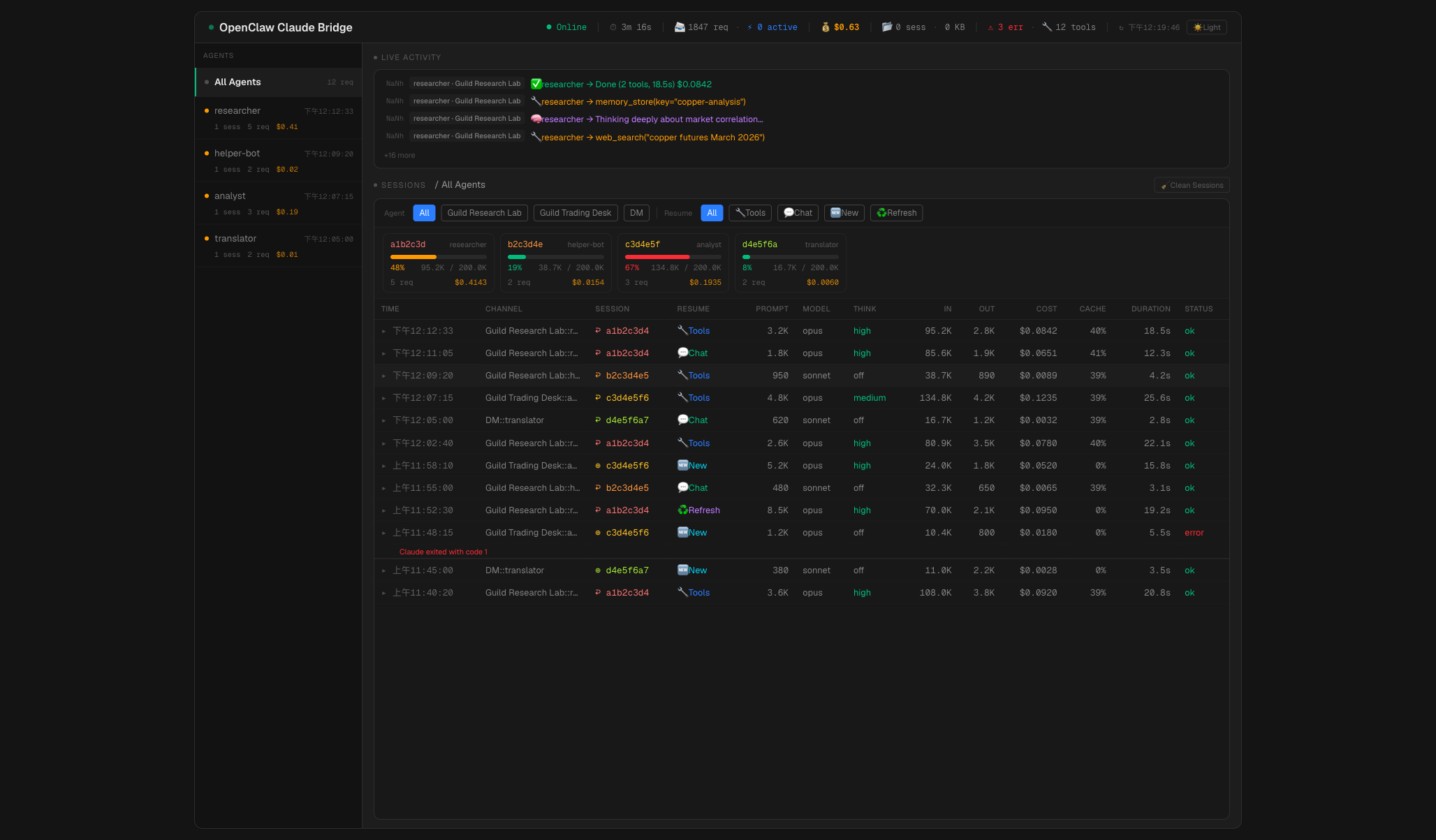
Header bar — live metrics across the top: online/offline status, uptime, total requests, active requests, total cost, session count + disk size, error count, available tools, and a dark/light theme toggle.
Agent sidebar — lists all agents sorted by recency. Each shows an activity indicator (green if active in last 5 min, amber if 30 min, gray if idle), session count, request count, and cost. Selecting an agent filters all panels. On mobile, collapses to a horizontal pill bar.
Live activity feed — real-time event stream with emoji-coded messages: 🧠 thinking, 🔧 tool calls, 🔄 resume, ♻️ context refresh, ✅ done, ❌ error. Shows relative timestamps and agent/channel labels.
Context cards — per-session context window usage with progress bars. Color-coded: green (<40%), amber (40–65%), red (>65%). Each card shows session ID, agent, token counts, and cost.
Request table — 13-column table showing every request: time, channel, session (color-coded), resume method (emoji badges: 🔧 Tools, 💬 Chat, 🆕 New, ♻️ Refresh, etc.), prompt size, model, thinking level, input/output tokens, cost, cache hit rate, duration, and status. Rows expand to show activity logs and errors. Supports channel and resume method filtering, and pagination.
Session cleanup — one-click button to delete CLI sessions older than 24 hours.
Password protection: Set DASHBOARD_PASS in your environment to enable HTTP Basic Auth (user: admin). If not set, the dashboard is open.
For detailed architecture of the dashboard, see docs/architecture.md.
Configuration
Environment Variables
| Variable | Required | Default | Description |
|---|---|---|---|
DASHBOARD_PASS |
No | — | Dashboard password (Basic Auth, user: admin) |
OPUS_MODEL |
No | opus |
CLI model alias for Opus (use opus[1m] for 1M context) |
SONNET_MODEL |
No | sonnet |
CLI model alias for Sonnet (use sonnet[1m] for 1M context) |
HAIKU_MODEL |
No | haiku |
CLI model alias for Haiku |
IDLE_TIMEOUT_MS |
No | 120000 |
Kill CLI subprocess after this many ms of no output |
OPENCLAW_BRIDGE_PORT |
No | 3456 |
API server port |
OPENCLAW_BRIDGE_STATUS_PORT |
No | 3458 |
Dashboard port |
CLAUDE_BIN |
No | claude |
Path to Claude Code CLI binary |
MAX_PER_CHANNEL |
No | 2 |
Max concurrent requests per channel |
MAX_GLOBAL |
No | 20 |
Max concurrent requests globally |
Ports
| Port | Bind | Purpose |
|---|---|---|
3456 |
127.0.0.1 |
OpenAI-compatible API (localhost only) |
3458 |
0.0.0.0 |
Dashboard (LAN accessible) |
OpenClaw Setup
Add this provider to your OpenClaw config (~/.openclaw/openclaw.json):
{
  "models": {
    "providers": {
      "claude-bridge": {
        "baseUrl": "http://localhost:3456/v1",
        "apiKey": "not-needed",
        "api": "openai-completions",
        "models": [
          {
            "id": "claude-opus-latest",
            "name": "Claude Opus",
            "contextWindow": 1000000,
            "maxTokens": 128000,
            "reasoning": true
          },
          {
            "id": "claude-sonnet-latest",
            "name": "Claude Sonnet",
            "contextWindow": 1000000,
            "maxTokens": 64000,
            "reasoning": true
          }
        ]
      }
    }
  }
}
Then assign the model to your agent. The apiKey can be any non-empty string — the bridge doesn't check it.
Service Setup (Auto-Start on Boot)
macOS (launchd)
# Recommended: auto-detects paths, reads .env, generates plist
./service/install-mac.sh
Manual management:
# Status
launchctl list | grep openclaw-claude-bridge

# Restart (reload plist config)
launchctl bootout gui/$(id -u)/com.openclaw.claude-bridge
launchctl bootstrap gui/$(id -u) ~/Library/LaunchAgents/com.openclaw.claude-bridge.plist

# Logs
tail -f ~/openclaw-claude-bridge/bridge.log
Linux (systemd)
cp service/openclaw-claude-bridge.service ~/.config/systemd/user/
# Edit the file if your project path differs from ~/openclaw-claude-bridge
systemctl --user daemon-reload
systemctl --user enable --now openclaw-claude-bridge
loginctl enable-linger $USER  # start at boot without login
systemctl --user status openclaw-claude-bridge
journalctl --user -u openclaw-claude-bridge -n 50
systemctl --user restart openclaw-claude-bridge
API Reference
| Method | Path | Port | Description |
|---|---|---|---|
POST |
/v1/chat/completions |
3456 | OpenAI-compatible chat completions (SSE or JSON) |
GET |
/v1/models |
3456 | Available model list |
GET |
/health |
3456 | Health check → {"status":"ok"} |
GET |
/status |
3458 | Runtime stats JSON (uptime, requests, sessions, activity) |
POST |
/cleanup |
3458 | Delete CLI sessions older than 24h |
GET |
/ |
3458 | Dashboard (React SPA) |
Project Structure
openclaw-claude-bridge/
├── src/
│   ├── index.js         Entry point, HTTP servers, graceful shutdown
│   ├── server.js        Request handling, session management, state persistence
│   ├── claude.js        CLI subprocess, stream parsing, thinking/effort mapping
│   ├── tools.js         Dynamic tool protocol builder
│   └── convert.js       OpenAI message format → Claude CLI text format
├── dashboard/           React/TypeScript/Tailwind dashboard (Vite)
│   ├── src/             Components, hooks, lib, types
│   ├── dist/            Production build (npm run build)
│   └── package.json
├── service/
│   ├── openclaw-claude-bridge.service     Linux systemd user service
│   ├── com.openclaw.claude-bridge.plist   macOS launchd agent (template)
│   └── install-mac.sh                    macOS one-line installer
├── docs/                Technical documentation
├── .env.example         Environment variable template
├── state.json           Runtime state (auto-generated, gitignored)
└── package.json
Security
- Port 3456 binds to localhost only — not reachable from outside the machine
- Port 3458 is LAN-accessible, protected by HTTP Basic Auth when
DASHBOARD_PASSis set --tools ""disables all Claude native tools — no host command execution--dangerously-skip-permissionsis required for headless operation (no terminal to prompt for confirmation; safe because native tools are disabled).envcontains secrets and is gitignored
Documentation
- Architecture Deep Dive — session lookup, token caching, state persistence
- README 繁體中文
Requirements
| Dependency | Version | Notes |
|---|---|---|
| Node.js | >= 18 | Runtime |
| Claude Code CLI | latest | Must be logged in (claude auth login) |
| OpenClaw | >= 2026.1 | Gateway on port 18789 |
Platforms: macOS (Apple Silicon / Intel), Linux (x64 / ARM)
Disclaimer
This project is an independent, community-built tool and is not affiliated with or endorsed by Anthropic. Users are responsible for ensuring their usage complies with Anthropic's Terms of Service.
Reviews (0)
Sign in to leave a review.
Leave a reviewNo results found