onlyclaws-esp
Health Uyari
- License — License: MIT
- Description — Repository has a description
- Active repo — Last push 0 days ago
- Low visibility — Only 5 GitHub stars
Code Gecti
- Code scan — Scanned 12 files during light audit, no dangerous patterns found
Permissions Gecti
- Permissions — No dangerous permissions requested
Bu listing icin henuz AI raporu yok.
Flash an ESP32 once, then let your AI agent program it with Lua over HTTP: screens, audio, sensors, a robot arm and on-device TFLite models. Self-hostable FastAPI control plane.
OnlyClaws ESP
Give your agent a claw in the real world.
Flash an ESP32 once. After that your AI agent sends Lua over HTTP,
and the board draws, plays sound, moves a robot arm, reads sensors and reports back.








Website · Console · Agent API · 中文
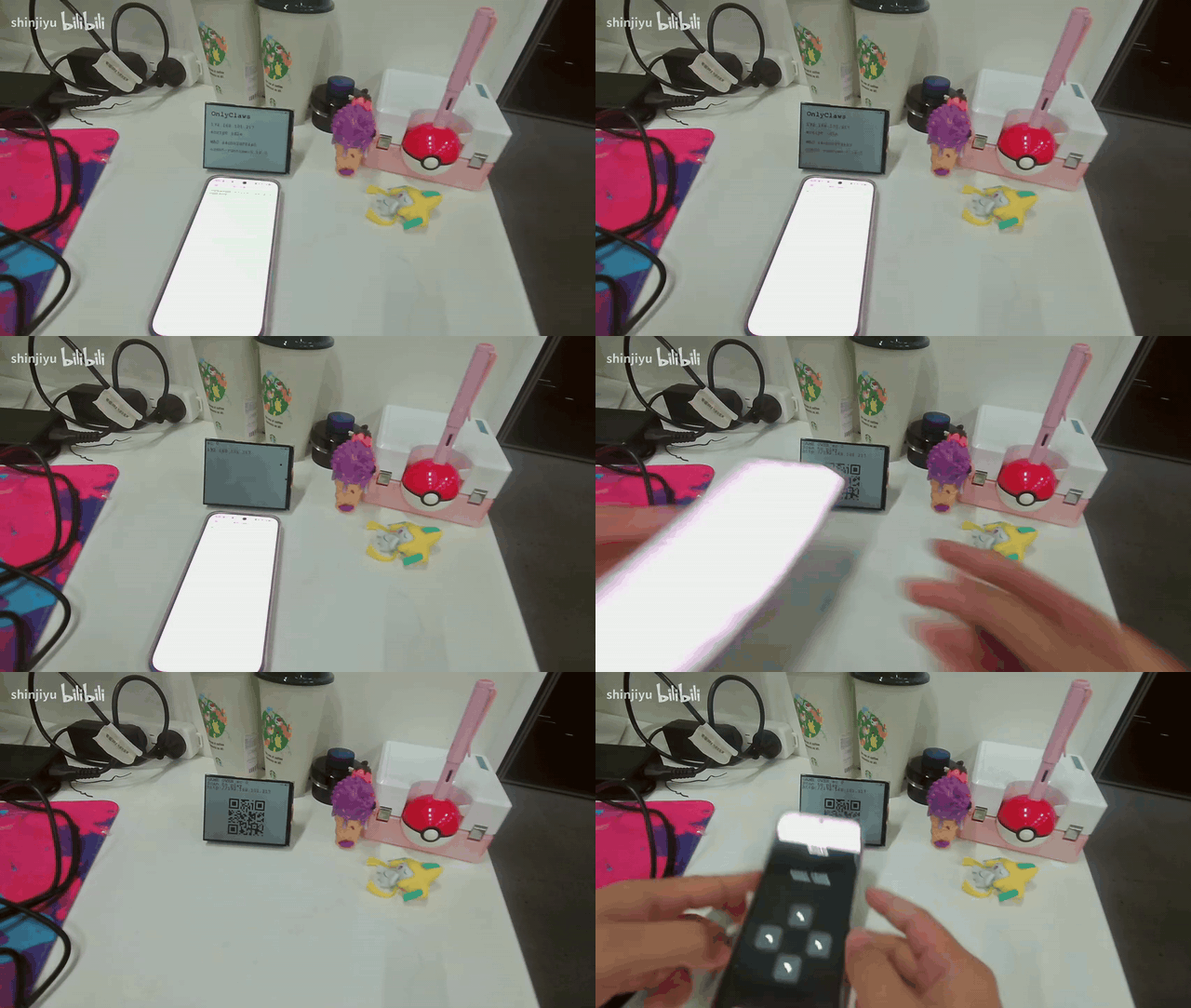
▶ Full demo video: bilibili.com/video/BV179p76zEQN
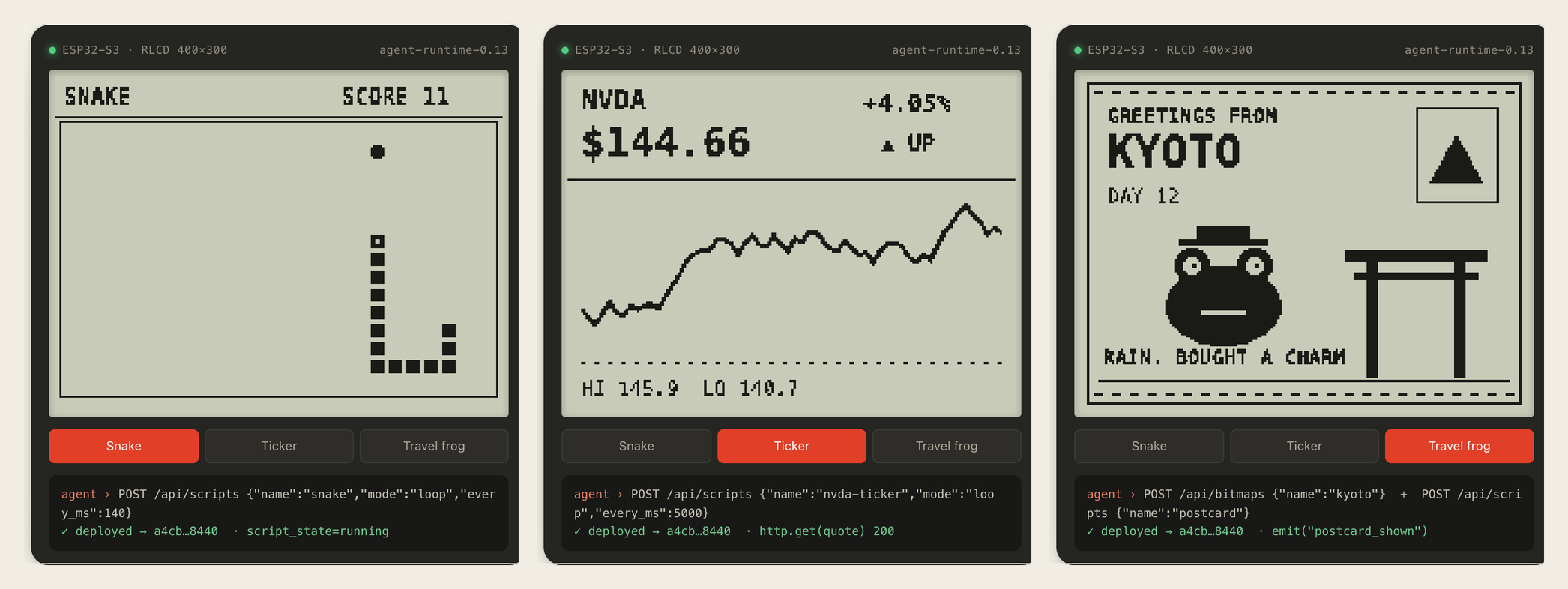
Three apps, one firmware. Each one is a Lua script the agent deployed. (Rendered from the website simulator; board photos coming.)
5-minute quickstart
- Get access — apply for the hosted console (manual review), or self-host.
- Flash —
cd rlcd && pio run -e esp32-s3-rlcd-42 -t upload(pick your env from Hardware). - Mint a token — in the console, create an
oct_…agent token. - Hand it to your agent — give it skill.md and the token.
- Watch it run — the agent posts a script to
/api/scripts; read events from/api/events.
Detailed steps for each path are in Get started.
Why
Agents are good at deciding what should happen. They have no hands. OnlyClaws turns a cheap ESP32-S3 board into a peripheral an agent can program on its own:
- Flash once. No more rebuilding firmware for every new screen or game. Apps are Lua scripts, swapped in seconds.
- No model on the board. The agent thinks in the cloud; the board runs the script and reports events.
- Safe to hand over. The agent holds a scoped
oct_…token, never your password. Each board has its owndevice_token. - Same Lua everywhere. Panel and audio are compile-time plugins. On a bare module,
gfx.*andaudio.*safely do nothing. - Screens and arms. The same runtime drives a Waveshare RoArm-M2 desk arm: the agent reads joint angles and sends poses through the same token and queue.
How it works
flowchart LR
    A["AI agent<br/>reads skill.md"] -- "deploy Lua<br/>oct_ token" --> C["Control plane<br/>FastAPI · MIT"]
    C -- "events" --> A
    C -- "script<br/>long-poll" --> B["ESP32-S3<br/>Lua runtime"]
    B -- "emit()" --> C
    B --- P["panel · audio · arm · sensors · keys · HTTP"]
- Flash the firmware for your board and register its device ID.
- Mint an
oct_…token in the console and give your agent skill.md. - The agent deploys scripts, the board runs them, and
emit()events flow back.
An app is a Lua script
function on_start()
  gfx.clear(0)
  gfx.text(12, 30, "hello from my agent", 1)
  gfx.fill_circle(gfx.W // 2, 150, 40, 1)
  gfx.flush()
  audio.beep(1000, 80)
end

function on_loop()
  local s = sensors()
  if input.key() then
    emit("pressed", { temp = s.temp_c })
  end
  return 200  -- ms until the next tick
end
The agent deploys it with one request and reads what the board reported:
curl -X POST https://onlyclaws.world/api/scripts \
  -H "Authorization: Bearer oct_…" -H "Content-Type: application/json" \
  -d '{"name":"hello","language":"lua","mode":"loop","device_id":"YOUR_DEVICE_ID","source":"…"}'

curl https://onlyclaws.world/api/events -H "Authorization: Bearer oct_…"
| Module | What it gives a script |
|---|---|
gfx |
1-bit drawing, text, gfx.qr, full-frame gfx.blit, named bitmaps via gfx.image, gfx.slow() for e-paper pacing |
audio |
beep and PCM playback through the ES8311 |
sensors() |
Temperature, humidity, battery |
input |
On-board KEY and BOOT buttons |
http |
http.get / http.post to any HTTP(S) endpoint (no device credentials attached) |
emit(name, table) |
Report an event to the control plane for the agent |
ble, net |
BLE controller direction, Wi-Fi status |
claude |
RLCD: Claude desktop session state and permission prompts over BLE (claude.state(), claude.allow(id)) |
arm |
RoArm builds only: arm.feedback() joint angles, arm.move / arm.stream poses in radians, arm.stop() |
An arm board runs the same kind of script. This one reads the pose, reports it, then folds the arm upright:
function on_start()
  local p = arm.feedback()          -- {base, shoulder, elbow, hand, q={...}} in radians
  emit("pose", { q = p.q })
  arm.move({ base = 0, shoulder = 0, elbow = 3.05, hand = 3.14, spd = 200 })
end
For low-latency control the agent can skip Lua and send one-shot arm.move / arm.feedback / arm.stop tools through POST /api/invoke. The board reports capabilities[] (for example ["core","arm"]), and the control plane rejects tools a board does not have.
Full contract: skill.md. More apps: demos/.
Agent & MCP integration
Any agent, over HTTP. The control plane is a plain REST API with a Bearer
oct_…token. Give the agent skill.md (function-call spec: Agent API); no SDK needed.MCP server (stdio) for the arm.
jev_servo/ships an MCP server for presence-driven arm control, used from Cursor:bash jev_servo/run_mcp.sh # = python3 -m jev_servo mcp, console at JEV_CONSOLE_URL (default http://127.0.0.1:8765)Tools:
arm_ensure_console,arm_status,arm_ops,arm_start(find_any / find_id / follow),arm_stop,arm_snap,arm_faces.Claude desktop Hardware Buddy. On the RLCD board, pair over BLE to approve or deny Claude tool calls with physical keys (see Hardware).
Get started
Pick the path that fits.
1. Use the hosted console
Apply for access. Applications are reviewed by hand. Once approved you get an email with a link to set your password, then you can register boards and mint agent tokens at onlyclaws.world/console.
2. Flash the firmware
Requires Python 3 and PlatformIO 6.
python3 -m pip install -U platformio --user
bash scripts/fetch_tflm.sh   # once: TFLite Micro + esp-nn for the ESP32-S3 builds
cd rlcd
cp include/device_secrets.h.example include/device_secrets.h
# Set EPD_DEVICE_ID and EPD_DEVICE_TOKEN, or leave the token empty and provision it over NVS.

pio run -e esp32-s3-rlcd-42 -t upload --upload-port /dev/cu.usbmodem*
pio device monitor -b 115200
To reflash without wiping the Wi-Fi credentials and token already on the board, from the repo root run bash rlcd/scripts/safe_upload_keep_nvs.sh /dev/cu.usbmodem101. Build notes and a China mirror helper are in rlcd/DEV.md.
3. Self-host the control plane
The control plane in server/ is a single FastAPI app with SQLite.
cd server
python3 -m venv .venv && . .venv/bin/activate
pip install -r requirements.txt
cp config.example.env .env   # set EPD_SESSION_SECRET, EPD_PUBLIC_BASE, EPD_AUTH_UPSTREAM ...
set -a && . ./.env && set +a
uvicorn app:app --host 127.0.0.1 --port 8787
Sign-in is delegated to an auth service set by EPD_AUTH_UPSTREAM: it must accept POST /api/auth/login and POST /api/auth/register with {"email","password"} and answer {"success": true, ...}. A systemd unit and nginx snippet are in server/deploy/. Point the firmware at your host in rlcd/include/cloud_config.h.
Hardware
One source tree, four PlatformIO environments. Rewire any of them by editing rlcd/include/board_pins.h; the Lua and cloud APIs stay the same.
| Environment | Board | What's compiled in |
|---|---|---|
esp32-s3-bare |
Any ESP32-S3 module with 16 MB flash and octal PSRAM | Core only: cloud channel, Lua, HTTP, events. Status goes to serial |
esp32-s3-rlcd-42 |
Waveshare ESP32-S3-RLCD-4.2 | ST7305 400×300 reflective LCD (~140 ms/frame), ES8311 audio, sensors, BLE Claude-OC-XXXX (D-pad + Claude desktop Hardware Buddy) |
esp32-s3-epaper-397 |
Waveshare ESP32-S3-ePaper-3.97 | 800×480 e-paper with partial refresh, ES8311 audio. BLE off to leave heap for TLS |
esp32-roarm-m2 |
Waveshare RoArm-M2 driver board (classic ESP32) | Feetech STS servo bus on GPIO18/19, arm.* in Lua and invoke. Headless: no panel, audio or BLE, and the factory open Wi-Fi joint API is not compiled in |
On e-paper, gfx.slow() returns true so animations can stretch frames to about 900 ms. The same script runs on both panels. Both panels show a battery badge in the top-right corner by default, with a lightning bolt while charging (RLCD reads the cell through an ADC divider and estimates charging from USB and the voltage trend; the e-paper board asks its TG28 power chip); gfx.badge(false) hides it.
On the RLCD, pair the board with Claude desktop (Developer → Hardware Buddy, enter the passkey shown on the panel). When Claude asks to run a tool, the panel shows the request: press KEY to allow it once or BOOT to deny. Arm product notes: doc/structurizr/ROARM-PRODUCT.md.
The ESP32-S3 builds also run small neural networks that an agent uploads at runtime, with no reflash: a keyword spotter, a sound classifier, a sensor model. The agent posts a TensorFlow Lite Micro model to /api/ml/models; the control plane rejects ops the firmware can't run and signs the manifest; the board verifies the signature and the hash, caches the model in flash, and Lua calls ml.listen("micro_speech") or ml.run(name, inputs). On the RLCD, the micro_speech yes/no model takes about 50 ms per one-second clip. Format and op set: doc/structurizr/ML-PLUGIN.md.
Repository
| Path | What's there |
|---|---|
rlcd/ |
Firmware. Build and flash from here |
server/ |
Control plane: devices, scripts, events, bitmaps, console |
demos/ |
Lua apps to deploy: Snake (key, phone D-pad or HTTP controller), a live RL-training dashboard, a Wi-Fi quality monitor, RoArm pose hold, and yes/no keyword spotting |
ml/ |
Models ready to upload to /api/ml/models (.tflite + meta) |
jev_servo/ |
Host-side arm control: forward kinematics, USB and cloud arm channels, MCP server, web console |
vision/ |
Host-side camera pipeline (YuNet, SFace, YOLOv8n) the agent can bridge into arm moves. Models: bash vision/scripts/fetch_models.sh (YOLOv8n), bash vision/scripts/fetch_sface.sh (SFace) |
doc/structurizr/ |
Architecture model and product notes (python scripts/adl_check.py) |
scripts/ |
Host setup helpers |
src/, include/ and the root platformio.ini are the earlier e-paper-only firmware. They are kept for reference; new work goes in rlcd/.
Status
Firmware line agent-runtime-0.18.x: panel and audio plugins since 0.13.6, RoArm-M2 arm plugin since 0.16.0, Claude Hardware Buddy since 0.17.0, on-device models since 0.18.0. The hosted console is invite-only while we keep costs and abuse in check. Issues and pull requests are welcome, especially new panel plugins and demo apps.
Contributing
Issues and pull requests are welcome, especially new panel plugins and demo apps. Architecture decisions live in doc/structurizr/; run python scripts/adl_check.py before changing modules.
Links
Website · Console · Agent API · skill.md · 中文 README
License
Source in this repository is MIT.
The esp32-s3-epaper-397 environment links GxEPD2 (GPL-3.0-or-later), so firmware built with that environment is distributed under GPL-3.0-or-later. The bare and RLCD environments do not link it. See NOTICE.
Yorumlar (0)
Yorum birakmak icin giris yap.
Yorum birakSonuc bulunamadi