lifestream
Health Pass
- License — License: Apache-2.0
- Description — Repository has a description
- Active repo — Last push 0 days ago
- Community trust — 49 GitHub stars
Code Fail
- process.env — Environment variable access in dashboard/lib/door.mjs
- network request — Outbound network request in dashboard/lib/door.mjs
- exec() — Shell command execution in dashboard/lib/faces.mjs
- exec() — Shell command execution in dashboard/lib/principals.mjs
Permissions Pass
- Permissions — No dangerous permissions requested
No AI report is available for this listing yet.
A record of your life, updated as you live it, owned by you, and readable by the agents you choose. Messages, mail, photos, places, health and screen in one encrypted folder on your Mac. Private and open source.

Lifestream
A record of your life, updated as you live it, owned by you, and readable by the agents you choose.
Download for Mac · iPhone beta · Docs · What leaves your Mac · Issues
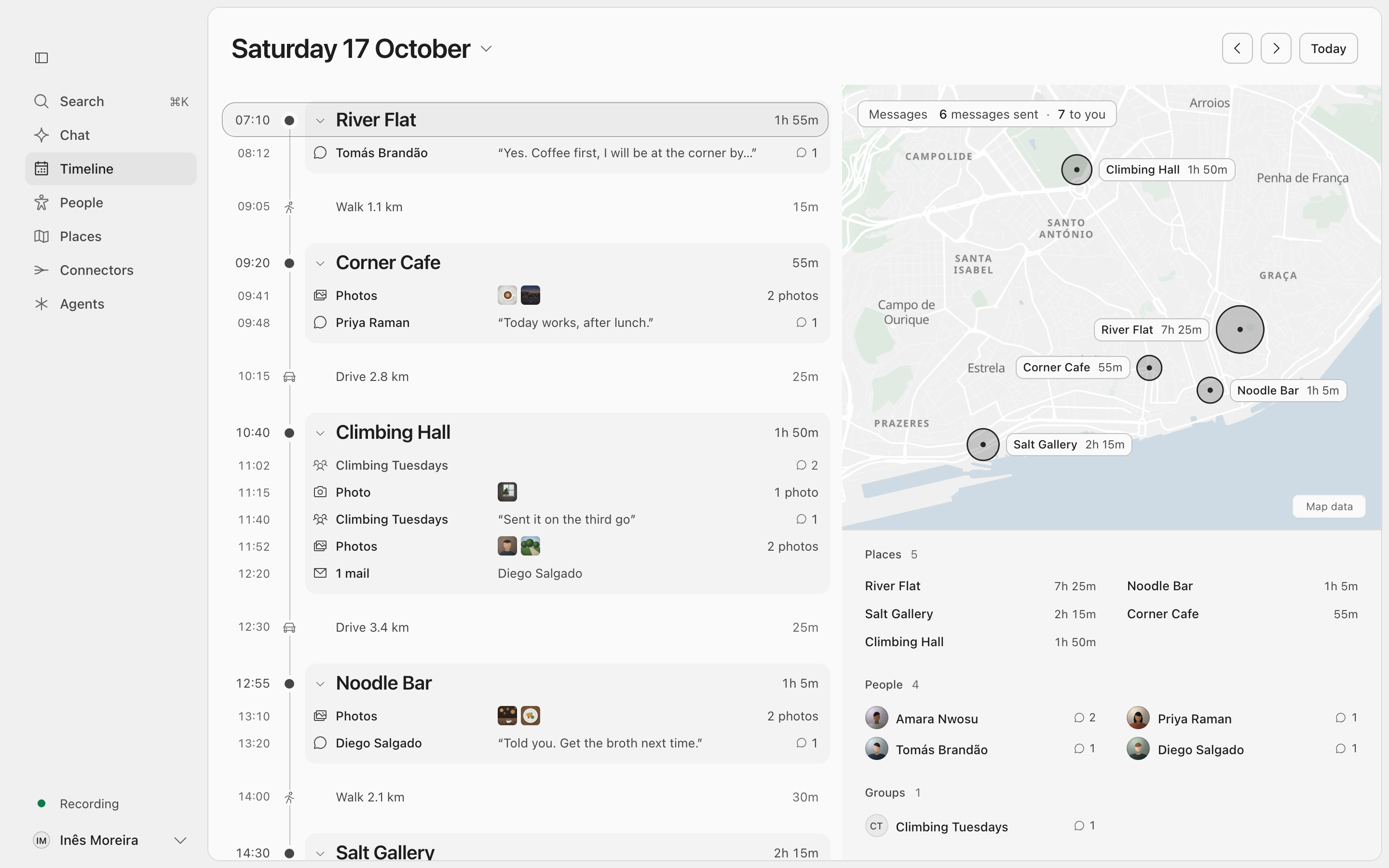
Set Lifestream up once, and from then on it gathers your life as you live it, from 40+ sources
including your messages, mail, photos, places, health, calendar and screen. It brings in your past
too, from exports such as Google Takeout and your iPhone's backups, so your record goes back years.
All of it is stored locally, in one encrypted folder on your Mac, and you can search all of it.
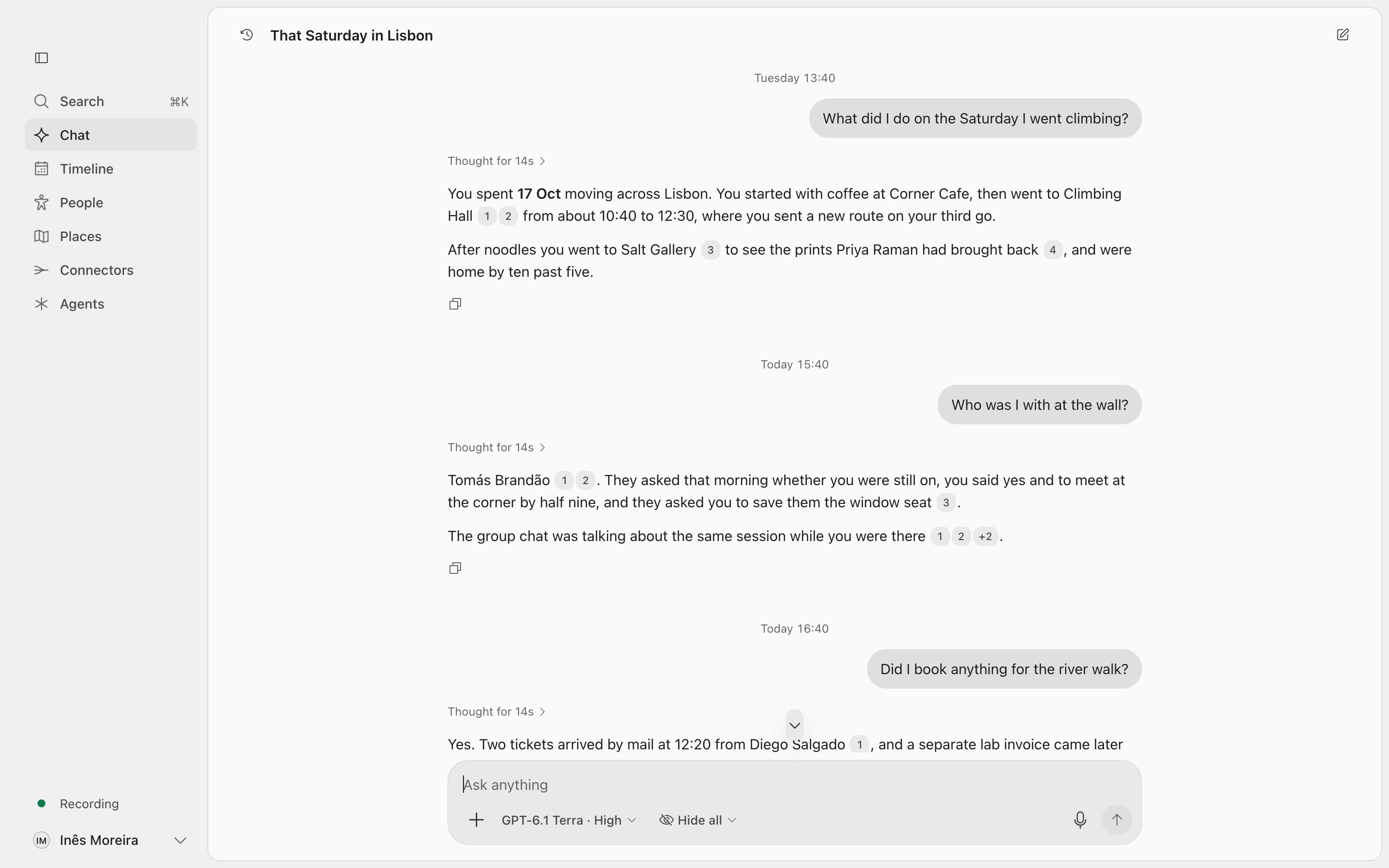
Your agents, such as ChatGPT, Claude, Instinct and Muse, can read your record, and you choose
which parts each one sees. Private and open source, Lifestream is the foundation for your personal
AI.
Get Lifestream
| Device | Get it | You need |
|---|---|---|
| Mac | Download for Mac | A Mac with Apple silicon and macOS 14.2 or later |
| iPhone, recommended | Join the beta on TestFlight | iOS 26 or later |
| Chrome, recommended | Add the Chrome extension | Chrome, or a browser like it, on the same Mac |
The Mac app keeps your data, and it works alone. The iPhone app adds your location, motion and
iPhone photos. The Chrome extension reads your Claude, ChatGPT and WHOOP data in your own browser.
The quick start installs the Mac app, pairs your iPhone, and ends
with today on Timeline and your first search. The Mac app is notarised by Apple, and built
from a commit on this repository's main branch.
Lifestream is free. It needs three things from you:
- A paid AI plan for Chat. Chat needs a paid ChatGPT or Claude plan, or an OpenRouter key with
credit. Without one, the rest of Lifestream works. - Disk space. Lifestream plans for about 3 GB a week from your Mac and 5 GB more from an
iPhone, and your past on top of that while it arrives. - A Mac that is awake. Lifestream runs only while your Mac is awake. Your iPhone keeps what it
records meanwhile.
What you get
Gathered for you, once it is set up
- Connectors. WhatsApp, iMessage, Gmail, Google Calendar, Photos and Google Photos, Apple Health
and WHOOP, Notes and Granola, calls, Spotify, your browsing, GitHub, and your ChatGPT, Claude,
Claude Code and Codex conversations. Connectors lists every
one. - Your Mac and iPhone. The Mac app records your screen, the sound of your calls and when you
work. The iPhone app sends where you go, how you move, your health and photos, and the voice
notes and notes you make in it. - Your past. Google Takeout, an iPhone backup, and your ChatGPT, Claude, Spotify and Google
Maps exports bring in the years before you set Lifestream up.
Bring in your past from an export says how. - Any other source. For a source Lifestream does not have,
add a connector with your coding agent.
Search your life
- Search. Find anything you wrote, read, saw or were sent, across every source. Ask questions
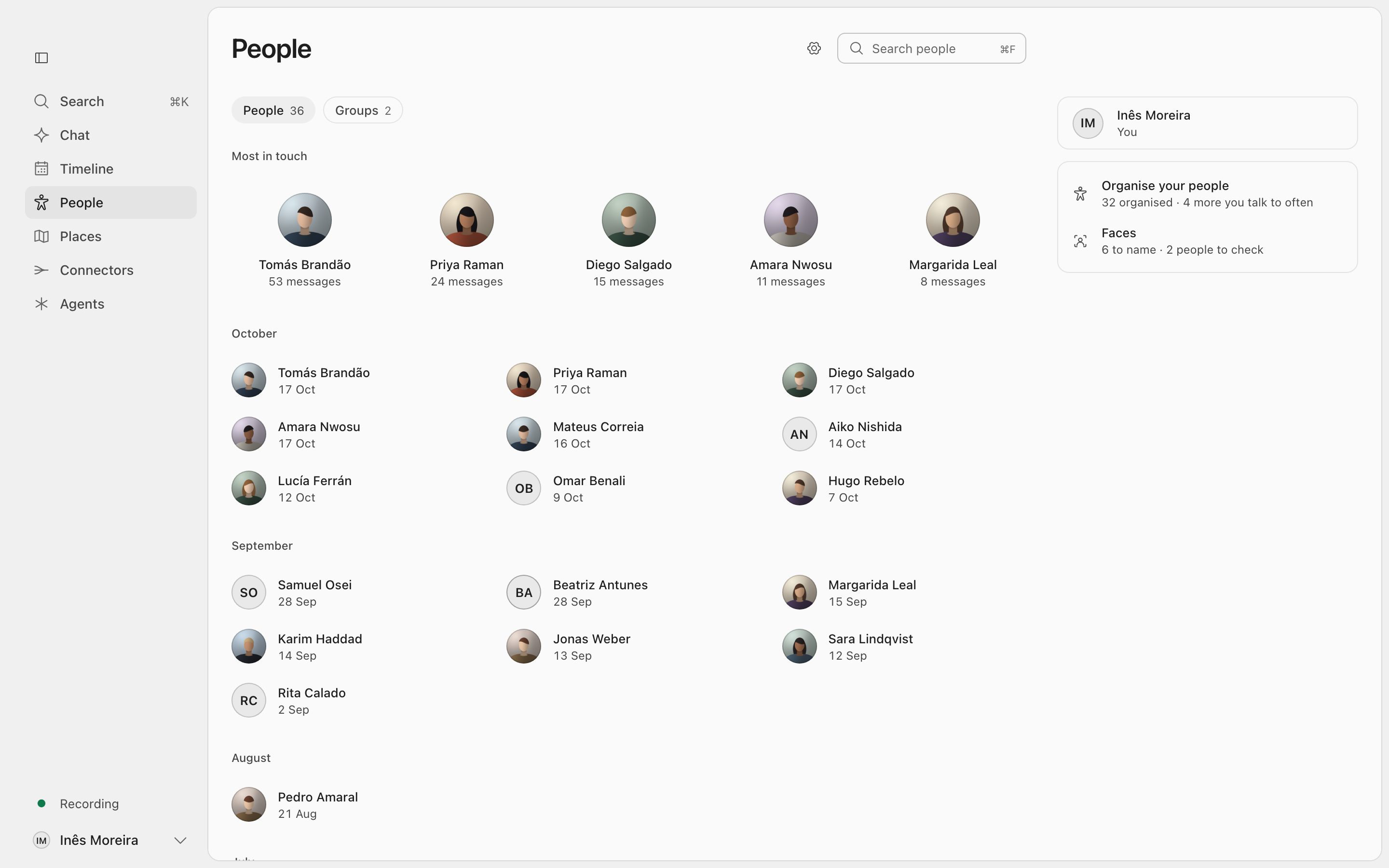
about your life, such as "when did I last see Priya?". - Timeline, People and Places. Your life day by day, the people in it, joined across messages,
contacts and photos, and the places you go. - On your iPhone too. The iPhone app shows all of it, read from your Mac.
Shared with the agents you choose
- Your agents. ChatGPT, Claude, Instinct, Muse, Grok Bot and other AI apps read your record
through MCP, the standard way AI apps connect to data.
Connect an agent has a guide for each. - Only what you allow. Each agent reads only the connectors and the time span you choose, and
you can disconnect it at any time. - Any model, for each job. Pick the model that describes your photos or sums up your mail, a
model on your Mac included. Choose which AI models read your data. - What left, on record. Settings › Privacy › What left Lifestream today counts the
items that went to each company, and shows each one as the model got it.
Yours to keep
- Yours to move. Move Lifestream's folder to another drive or another Mac:
Move Lifestream's folder.
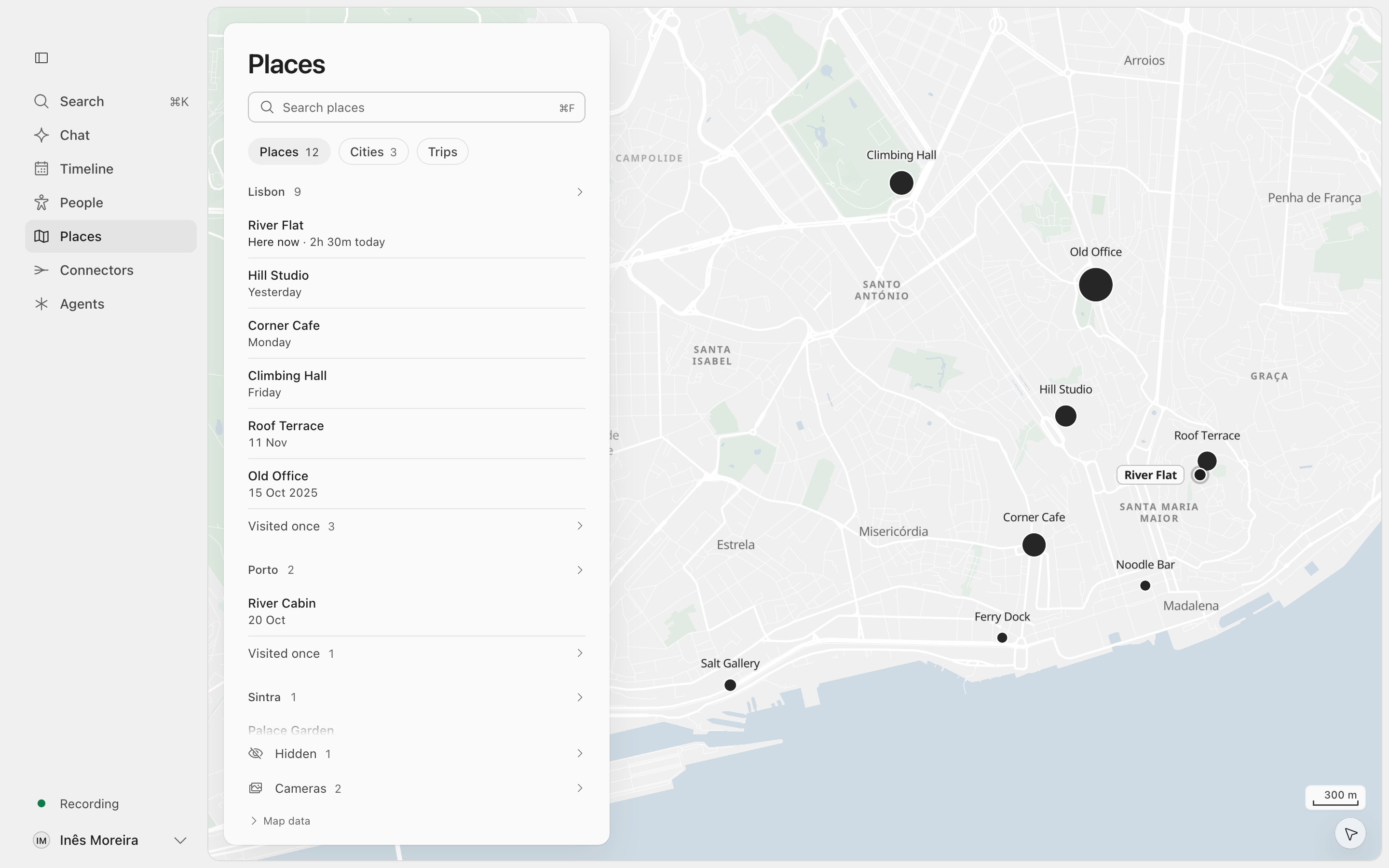
Map data © OpenStreetMap contributors, OpenMapTiles, OpenFreeMap.
Who can read your data
- Nobody at Lifestream. Lifestream has no service that receives your data, and no account to
make. Everything it keeps is in one folder on your Mac, or on a drive you choose.
What leaves your Mac names every request that leaves. - No analytics. The apps' own code sends no analytics and no crash reports. Two requests always
leave, and neither holds your data: an hourly update check to Lifestream's update server, and the
area of each map you open, to the map's company. The iPhone app comes through Apple's TestFlight:
under its terms, Apple passes the app's crash reports, how often you open it, and the feedback
you send to the people who make Lifestream. - Keys that only you hold. Setup encrypts Lifestream's folder unless you choose not to. Only
this Mac's key, in its Keychain, or the recovery key that you keep can open it.
How Lifestream keeps your data safe says what this protects. - Personal details hidden first. Before an item goes to an AI model at a company, Lifestream
replaces names, phone numbers, addresses and other personal details with placeholders such as[[Person 3]]. A model on your Mac reads the item and sends nothing.
Choose which AI models read your data says how to pick one. - Agents read what you allow. An agent reads only the connectors and the time span that you
allow, and you can disconnect it at any time.
Choose what an agent reads says how.
Hiding finds most personal details, not all. A code, an account number or a name that Lifestream
has never seen can still leave. Sound cannot be hidden, so a voice note leaves your Mac only when
you allow it: a connector's voice notes once you set them to Don't hide, and a question you speak
once you pick Scribe v2 to write it out. To report a security problem, follow
SECURITY.md.
Why
A model can only understand you as well as its context allows, and today that context is in dozens
of apps, each with one part of your life. Whoever holds that context knows a person well, and can
reach nearly every decision they make. Lifestream gives that record to its owner: in an open format,
on your own Mac, where you can read every line of it and take it anywhere. The models above it will
change every few months; the record stays.
FAQ
What does it cost?Nothing. Lifestream is free and open source. Answering your questions uses your own ChatGPT or Claude plan, or an OpenRouter key with credit. Everything else works without one.
Where is my data kept?In one encrypted folder on your Mac. There’s no account, and no server of ours receives your data.
Does anything leave my Mac?Only what you turn on: an item an AI model reads for you, with names, numbers and addresses hidden first, and what your agents read. Settings › Privacy lists every item that left. Two requests always go out, and neither carries your data: an hourly update check, and the map of the area you’re viewing.
What do I need?A Mac with Apple silicon and macOS 14.2 or later. The iPhone app, in beta on TestFlight, and the Chrome extension are optional, and add a lot. Lifestream records while your Mac is awake; your iPhone holds what it records until then.
How much disk space does it use?About 3 GB a week from your Mac and 5 GB from an iPhone, plus the past you import.
Can I bring in my past?Yes. Import Google Takeout, iPhone backups, and your ChatGPT, Claude, Spotify and Google Maps Timeline exports, and your record reaches back years before you installed Lifestream.
Which agents can read it?ChatGPT, Claude, Instinct, Muse, Grok Bot, and any app that connects over MCP. Each reads only the sources and time span you allow, and you can disconnect it at any time.
Can I stop it recording?Yes. Pause everything from the menu bar, keep an app or a site out for good, or turn off a single connector. Password fields are never recorded.
What if I lose my Mac?Lifestream doesn’t back itself up, so keep a Time Machine backup. On a new Mac, your recovery key opens it. Lose both your Mac’s key and your recovery key, and no one can open an encrypted Lifestream, not even us.
Does it work on Windows or Android?Not yet. Lifestream runs on the Mac today, with an iPhone app alongside.
Can I add my own connectors?Yes. Ask a coding agent such as Claude Code or Codex to write one for any source you use, then set it up like any other.
Documentation
- Quick start: install Lifestream and see your first day.
- How Lifestream works: your devices, your connectors, and
how a day is made from them. - Pair your iPhone: send your location, motion and photos to
your Mac. - Search your life: find anything, ask questions,
and follow each answer back to your data. - Connect an agent: let Claude, ChatGPT or another AI app read
Lifestream. - Back up Lifestream: Lifestream makes no backup of its own, so keep one.
- Problems and fixes: what a message in the apps means, and what to do.
Status
Lifestream is young. One person builds it in the open, with AI agents doing much of the building. It already keeps one real life end to
end: millions of records over more than fourteen years. Each Lifestream keeps one person's life. It
runs on macOS, with an iPhone app beside it, and its formats can still change.
For developers
On the Mac, Lifestream runs a process called the home. The home is the only program that writes the
record: it keeps every delivery from a device or a provider as it arrived, derives what code can
derive, and asks a model only about single items, such as one photo. It then writes one plain-text
file for each day. The Lifestream window and agents read the record through one HTTP process, the
door.
A day file, from the test suite (every name and number in this repository is synthetic):
Day 2026-10-31 (Saturday) in America/New_York, 04:00 to 2026-11-01 04:00 (25 h)
15 atoms: chat 10, ledger 0, vitals 5
Heart rate 61 today against 65 over the 3 days before

07:12–08:07 Person A (2)
  07:12 Person A: message 157 [photo: a synthetic picture 157]
  08:07 the user: message 159
14:07 Heart rate 52
20:23 Group Alpha · +15550000003: message 160

Coverage
chat: chat:mac-0001 read through the day; chat:phone-aa01 read into the day
vitals: vitals:watch-aa07 read through the day
- Architecture names every part, the rules the home keeps
and the repository's folders, and follows one message from a device to a day file. - The code's words defines each term, such as delivery and
record. - Set up to develop takes you from a fresh clone to the apps
built and the tests run. You need a Mac with Apple silicon, Xcode 27 and Node 22.23.3. - packages/connect/SKILL.md is the guide to writing a connector.
Contributing
Every issue is read, and an issue is the best way to report a bug, ask for a connector or
suggest an idea. Reviewing a pull request often takes more work than writing one: a small fix for
an obvious bug is welcome, and a new feature is best sent as an issue. CONTRIBUTING.md says what to put in an issue and
which pull requests are welcome.
License
Lifestream is licensed under the Apache License 2.0. Copyright The Lifestream authors.
Reviews (0)
Sign in to leave a review.
Leave a reviewNo results found