godspeed-code
Health Uyari
- License — License: MIT
- Description — Repository has a description
- Active repo — Last push 0 days ago
- Low visibility — Only 5 GitHub stars
Code Gecti
- Code scan — Scanned 12 files during light audit, no dangerous patterns found
Permissions Gecti
- Permissions — No dangerous permissions requested
Bu listing icin henuz AI raporu yok.
One native app for every AI coding agent. Rust + GPUI.

Godspeed Code
One native app for every AI coding agent. Rust + GPUI.


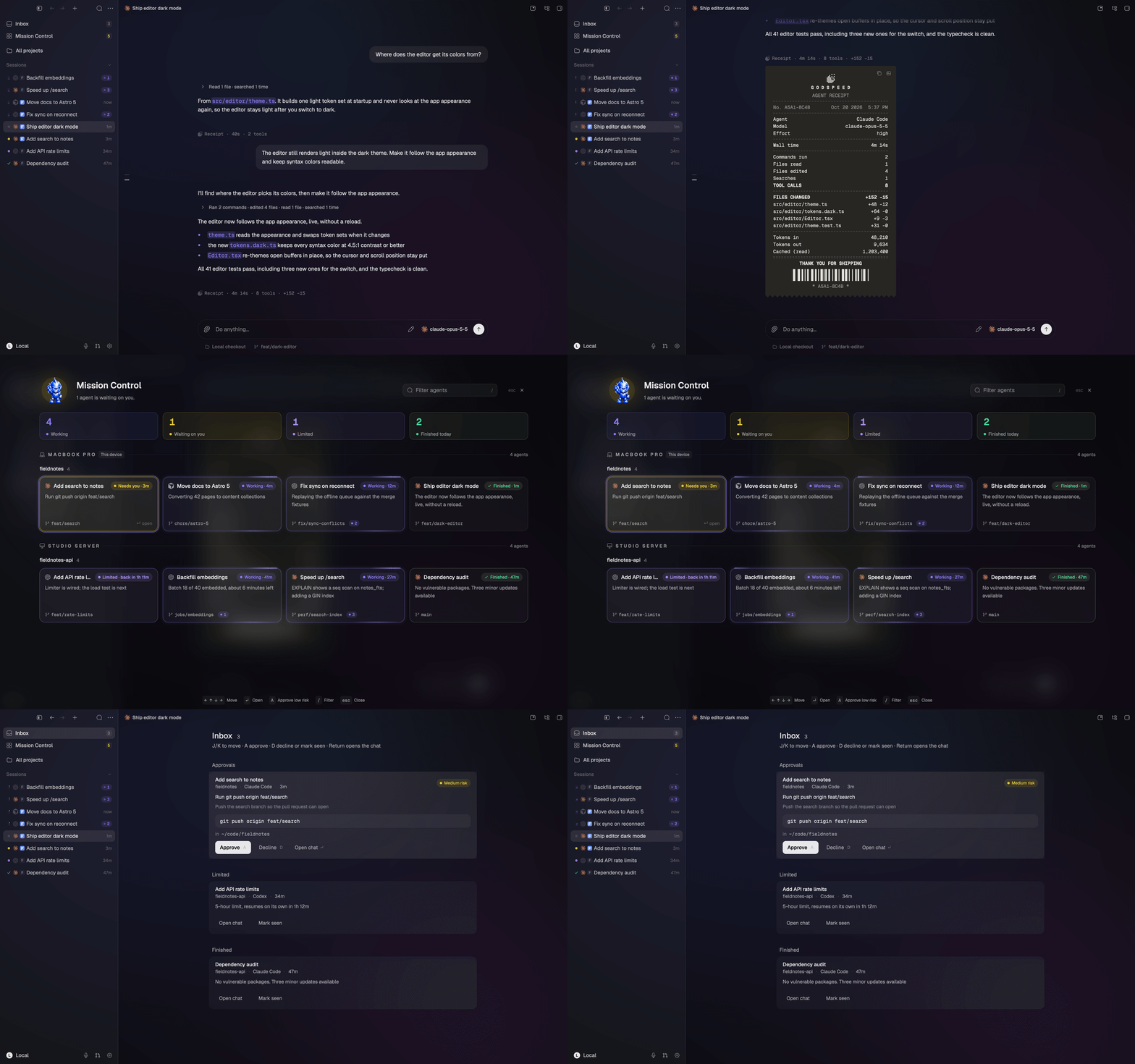
Early access. Godspeed 0.5 is an early release. Expect rough edges. See
ROADMAP.md for what is done and what is next.
Godspeed Code (Godspeed for short) runs the coding-agent CLIs you already have (Claude Code, Codex, Cursor and more) in one
GPU-rendered desktop app. It drives each agent over its own protocol, keeps every chat in a local
store, and can keep agents running on a schedule or trigger. It never resells model access: you sign
in to each agent with its own CLI.
Built on Zeron
Godspeed is a fork of Zeron by Wing, used under the MIT license.
Zeron built the native GPUI shell, the headless engine and most of the agent drivers. Godspeed adds
the features listed below on top. If you like this app, go star Zeron.
What Godspeed adds over Zeron
| Zeron | Godspeed | |
|---|---|---|
| Approvals | Agents run without asking | Four access modes per chat, approval cards with the exact command or diff |
| Git | View diffs and PRs | Commit, push, pull, sync and open PRs with generated messages |
| Zoomies (always-on agents) | None | Cron, webhook and file triggers, memory, inbox, Telegram bot |
| Muse Code | Not supported | Native driver |
| Moving in | Start from scratch | Import from T3 Code, Claude Code, Codex and Cursor; sessions continue |
| Search | Chat titles | Every message, locally indexed, plus Cmd+F in a chat |
| Usage limits | Run fails | Resumes on the same account when the limit resets |
| Chat lifecycle | Archive | Settle, snooze, wake, unread, undo |
| Attention | Check each chat | One Needs-you inbox for every approval and question, ranked by risk |
| Overview | Sidebar | Mission Control: every agent on every device on one board |
| Receipts | None | A receipt per turn: time, tools, files, tokens, cost |
| Usage | Account ring | Usage cockpit, tachometer, continue on another account |
| Worktrees | Setup script | Per-worktree ports, copied .env files, setup/teardown, sleep and wake |
| Upstream bugs | Open | 16 Zeron and 36 T3 Code issues fixed |
| Account | Zeron's cloud sign-in | Local by default, no account needed; optional sync, hosted or on your own Cloudflare |
All of that at the same speed: cold start is 65 ms for both, and memory after a 400-chat workload is
within 1 MiB (benchmark). Zeron is still ahead on Windows and
Linux builds and a shipped iPhone app (Godspeed's is in development). Full comparison and issue list:
VS-ZERON.md.
Download
Download Godspeed for macOS (Apple silicon)
- Apple silicon (arm64) only. The bundle declares macOS 12 as its minimum; it has only been tested
on macOS 27. - Open the DMG and drag Godspeed into Applications.
Releases from 0.3.0 on are signed with a Developer ID and notarized by Apple, so the app opens
normally. (0.1.0 and 0.2.0 were unsigned; for those, use System Settings → Privacy & Security →
Open Anyway.)
There is no auto-update yet. Download new releases from the
releases page.
iPhone app
Godspeed for iOS follows and drives your Mac's chats from your phone: transcripts, the composer,
approvals and voice. Agents keep running on the Mac (or a headless server); the phone is a remote.
- Status: in development. A TestFlight beta is next; until then, build it from source.
- Needs: cloud sync. On the Mac, choose Enable sync in the account menu and sign in, then
sign in with the same account on the phone. - Build it: see apps/ios/README.md (Xcode 26+, Rust iOS targets). Open
apps/ios/Godspeed.xcodeproj, pick your iPhone and press Run.
Supported agents
Install the agent CLIs you want (Settings → Providers can run the vendor installer for most of
them) and sign in with each one.
| Agent | How Godspeed drives it | Access modes |
|---|---|---|
| Claude Code | claude CLI, stream-json |
All four |
| Codex | codex app-server, JSON-RPC |
All four |
| Cursor | Pinned @cursor/sdk through a small Node shim |
Auto and full access only |
| Grok Build | grok agent stdio, ACP |
Mapped onto the agent's own modes |
| OpenCode | opencode serve, HTTP + SSE |
All four |
| Pi | Pi's JSONL RPC | Full access only (Pi has no permission system) |
| Antigravity | agy_acp_server, ACP, installed from a pinned archive |
Mapped onto the agent's own modes |
| Devin | devin acp, ACP |
Mapped onto the agent's own modes |
| Hermes | hermes acp, ACP |
Mapped onto the agent's own modes |
| Muse Code | muse serve, MSP |
All four |
Cursor's SDK sign-in is separate from cursor-agent login: connect it in Settings → Accounts or setCURSOR_API_KEY.
Features
- Approvals and access modes. Supervised, auto-accept edits (default), auto, or full access, per
chat. Approval cards show the exact command or path. Cycle modes with Cmd+Shift+M. - Git actions. Commit, push, pull, sync and open pull requests from the Changes pane or the
command palette, with generated commit messages and PR descriptions. A setting (on by default)
strips agent credit lines from generated text. - Zoomies. Named prompts that fire on a cron schedule, an interval, a one-off time, a webhook
or a file change, with a memory file injected into each run and an inbox of results (Settings →
Zoomies). Zoomies run on the headless engine too, so a server can keep them going while your
laptop sleeps. - Chat import. Bring in chats from T3 Code, Claude Code, Codex and Cursor (Settings → Import or
godspeed import). Imported Claude Code and Codex chats continue their original sessions; Cursor
chats import as history. - Instant search. Cmd+F finds text in the open chat, and the command palette searches message
text across every chat, including imported history, from a local index. - Chat lifecycle. Settle, snooze, wake and mark chats unread from the sidebar, with Snoozed and
Settled shelves. Optional auto-settle. Mod+Z undoes. - Delegation. Agents can create, message and wait on other chats through the built-in MCP server
(godspeed mcp), and the parent chat wakes when a delegated child finishes, fails or needs
approval. - Needs-you inbox. Every approval, question, finished, failed and limited chat in one queue at
the top of the sidebar, ranked by risk, answered from the keyboard (j/k, a, d, Shift+A for all
low-risk approvals). - Worktree environments.
godspeed.jsoncan copy.envfiles into new worktrees, give each
worktree its own ports, run setup and teardown commands, and sleep idle worktrees to free memory.
See WORKTREES.md. - Mission Control. Cmd+Shift+K opens a board of every agent on every device: status, elapsed
time, latest activity, branch and diff counts, with keyboard navigation and inline approvals. - Receipts. Each finished turn ends with a receipt: time, tool calls by kind, files changed,
tokens and, on API-billed accounts, an estimated cost. Copy it as text or an image. - Usage. A tachometer in the composer, and Settings → Usage with live 5-hour and weekly limits
per account, history charts of tokens and cost at API prices (including your earlier Claude Code
and Codex sessions), and breakdowns by model, provider, project and chat. - Usage limits. Chats that hit a provider usage limit show as Limited and can resume
automatically when the limit resets, or continue on another account you choose. - The speedster. The Dock icon animates to show what your agents are doing: jogging, sprinting,
waving when something needs you, celebrating when a chat finishes. Settings → Appearance turns
it off. - Voice dictation. On-device speech-to-text with NVIDIA Parakeet v3 (the model is an optional
download, never bundled).
Everything is local by default; sync is opt-in. See Sync.
Benchmarks
Headless engine only, Godspeed vs T3 Code 0.0.40, six interleaved trials on an M2 MacBook Air.
Medians:
| Metric | Godspeed | T3 Code |
|---|---|---|
| Spawn to first RPC answered | 133 ms | 877 ms |
| Physical footprint, idle 30 s | 12.1 MiB | 166.0 MiB |
| List 1 project with 200 threads | 0.8 ms | 23.0 ms |
| Search 2,000 imported messages (rare word) | 0.45 ms | 3.99 ms |
These numbers compare the headless servers, not the GUIs, and measure no agent or model work. The
machine was not idle during the run, and the two search calls do different work. Full method, raw
data and limitations: BENCHMARKS.md.
Build from source
Requires the stable Rust toolchain pinned in rust-toolchain.toml and, on macOS, Xcode.
git clone https://github.com/ShriD5/godspeed-code.git
cd godspeed
cargo run -p godspeed               # desktop app
cargo run -p godspeed -- headless   # engine only
scripts/package-macos.sh            # release build, Godspeed.app and DMG in target/package/
The packaging script needs dmgbuild (it installs it with pip --user if missing). See
CONTRIBUTING.md for tests and running a dev build next to an installed copy.
Sync
Local-only by default: chats live on your Mac and no account is needed. Choose Enable sync in
the account menu to sign in and follow your chats from other devices (and the iPhone app).
To run your own sync server instead, deploy edge/ (a Cloudflare Worker with Durable Objects and
R2, see edge/DEPLOY.md) and set GODSPEED_EDGE_URL andGODSPEED_WORKOS_CLIENT_ID. An empty GODSPEED_WORKOS_CLIENT_ID turns sign-in off entirely.
Privacy
Godspeed sends one anonymous usage ping a day (version, platform, how much you used it, token
totals and estimated spend) so we know it's working. No prompts, code, paths, repo names or
account details. Turn it off in Settings → General, or with GODSPEED_TELEMETRY=0 orDO_NOT_TRACK=1. Exactly what's sent: docs/PRIVACY.md.
Docs
- Roadmap
- Benchmarks vs T3 Code and vs Zeron
- Godspeed vs Zeron
- Parity with T3 Code
- Architecture (inherited from Zeron)
- Agent installation
- Privacy: the anonymous usage ping
- Changelog
Contributing
See CONTRIBUTING.md. Please follow the Code of Conduct, and
report security issues as described in SECURITY.md.
License
MIT. See LICENSE and THIRD_PARTY_NOTICES.md. Original Zeron code
is copyright Wing; Godspeed changes are copyright Shrithan.
Yorumlar (0)
Yorum birakmak icin giris yap.
Yorum birakSonuc bulunamadi