agentoast
Health Gecti
- License — License: MIT
- Description — Repository has a description
- Active repo — Last push 0 days ago
- Community trust — 11 GitHub stars
Code Basarisiz
- rm -rf — Recursive force deletion command in Makefile.toml
Permissions Gecti
- Permissions — No dangerous permissions requested
This macOS menu bar application monitors AI coding agents (like Claude Code or Codex) working inside tmux. It sends you a toast notification when a task finishes or needs input, and clicking the notification automatically switches you to the correct tmux pane.
Security Assessment
Overall risk: Low. The tool is designed to interact directly with your local system's process tree and terminal sessions, so it naturally requires access to `tmux`, `git`, and `ps`. It does not request dangerous overarching permissions. There are no hardcoded secrets detected, and as a local UI tool, it has no obvious need to make suspicious external network requests. The automated security scan did flag a `rm -rf` recursive force deletion command inside a `Makefile.toml` build file, but this is a standard and expected practice for cleaning up build directories in Rust projects, not a malicious action.
Quality Assessment
The project is active and well-maintained, with its most recent code push happening today. It uses the permissive MIT license and has a clear, comprehensive README with straightforward Homebrew installation instructions. It currently has 11 GitHub stars. While this represents a small user base and limited community auditing, the tool's premise is highly focused and its codebase is openly available for manual review.
Verdict
Safe to use — it is an active, locally focused utility with standard development practices and low security risk.
🍞 Toast notifications from AI coding agents on your macOS menu bar, with tmux pane switching

agentoast

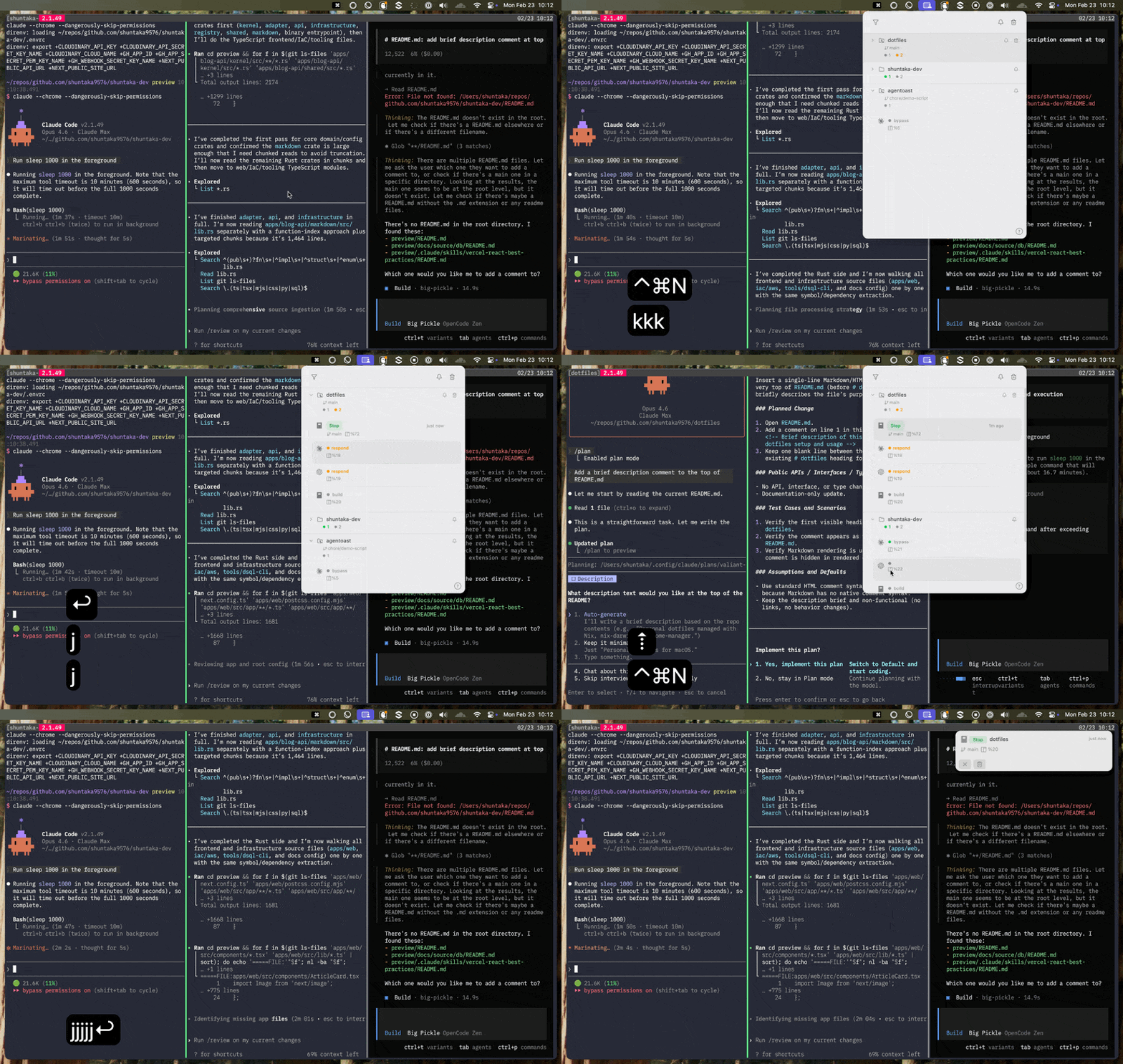
A macOS menu bar app for tmux users. Get a toast notification whenever an AI coding agent (Claude Code, Codex, Copilot CLI, opencode) finishes or needs your input — click it to jump right back to the tmux pane it came from.
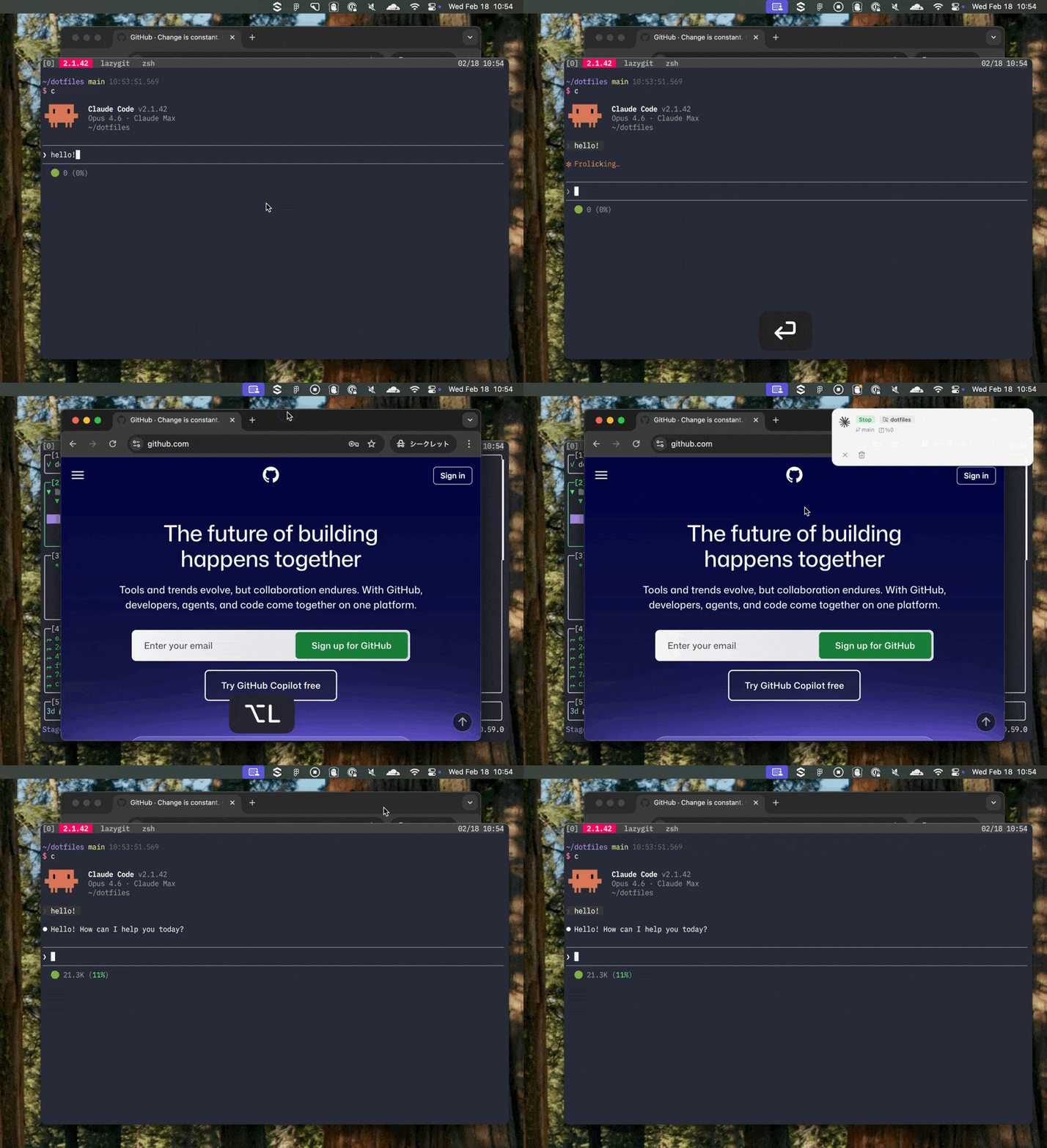
You kick off a long-running agent task, switch over to a browser or another window, and completely miss the moment it wraps up or asks for permission. agentoast makes sure you never miss it.
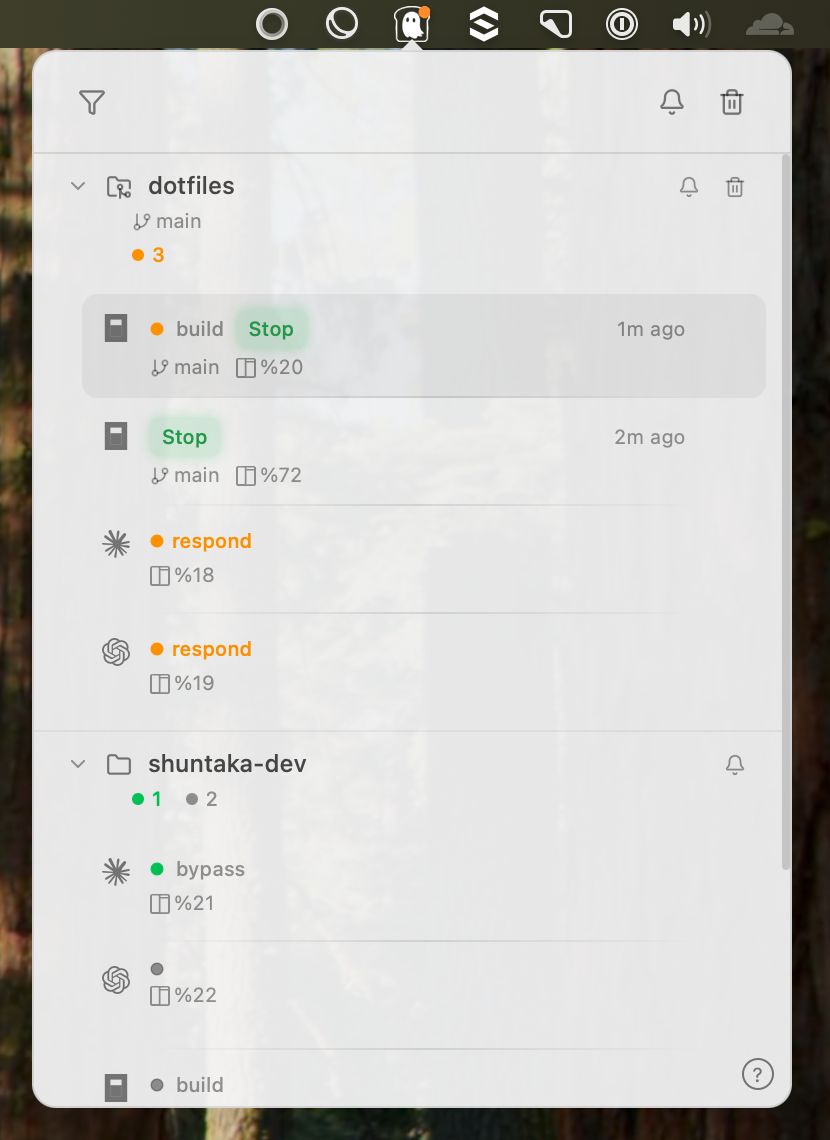
Add a hook to your agent's config. All notifications are grouped by repository in the menu bar — clicking one takes you straight to its tmux pane.
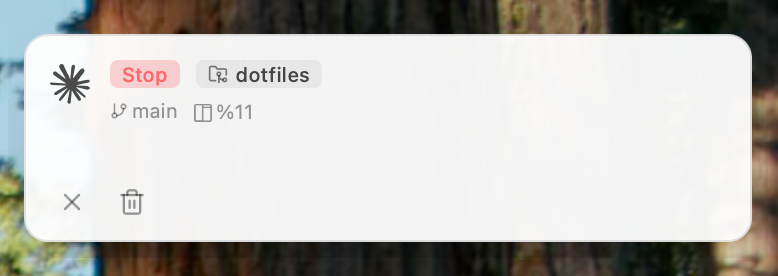
A toast pops up whenever an agent completes or needs attention — click it to jump right back to the tmux pane.
Requirements
| Command | Purpose | Required |
|---|---|---|
tmux |
Session/pane management, agent status | Yes |
git |
Repository detection, branch info | Yes |
ps |
Agent process detection (process tree) | Built-in |
agentoast auto-detects binary paths by searching well-known locations (Homebrew, system, Nix). If the Sessions panel is empty, see the [system] config to set paths manually.
Installation
brew install shuntaka9576/tap/agentoast-cli
brew install --cask shuntaka9576/tap/agentoast
Or download the DMG from Releases.
To uninstall:
brew uninstall --cask shuntaka9576/tap/agentoast
brew uninstall shuntaka9576/tap/agentoast-cli
Usage
Works With
| Agent | Hook Config | Events | Status Detection |
|---|---|---|---|
| Claude Code | ~/.claude/settings.json |
Stop, Permission, Auth, Elicitation | Running / Idle / Waiting / Agent Teams |
| Codex | ~/.codex/config.toml |
Turn Complete | Running / Idle / Waiting |
| Copilot CLI | .github/hooks/*.json |
Agent Stop, Error | Running / Idle / Waiting |
| opencode | Plugin (~/.config/opencode/plugins/) |
Session Idle, Error, Permission | Running / Idle / Waiting |
| 🚧 Kiro CLI | — | — | — |
All agents utilize the built-in CLI (agentoast hook <agent>). See the Integration section for setup details. If you'd like to see support for other agents, please feel free to open an issue.
Config
Opens ~/.config/agentoast/config.toml in your editor, creating a default one if it doesn't exist yet.
agentoast config
Editor resolution priority is config.toml editor field → $EDITOR → vim
# agentoast configuration

# Editor to open when running `agentoast config`
# Falls back to $EDITOR environment variable, then vim
# editor = "vim"

# Toast popup notification
[toast]
# Display duration in milliseconds (default: 4000)
# duration_ms = 4000

# Keep toast visible until clicked (default: false)
# persistent = false

# Notification settings
[notification]
# Mute all notifications (default: false)
# muted = false

# Show only groups with notifications (default: false)
# filter_notified_only = false

# Claude Code agent settings
[notification.agents.claude_code]
# Events that trigger notifications
# Available: Stop, permission_prompt, idle_prompt, auth_success, elicitation_dialog, TeammateIdle, TaskCompleted
# idle_prompt, TeammateIdle, TaskCompleted are excluded by default
# events = ["Stop", "permission_prompt", "auth_success", "elicitation_dialog"]

# Events that auto-focus the terminal (default: none)
# These events set force_focus=true, causing silent terminal focus without toast (when not muted)
# focus_events = []

# Include last-assistant-message as notification body (default: true, truncated to 200 chars)
# include_body = true

# Codex agent settings
[notification.agents.codex]
# Events that trigger notifications
# Available: agent-turn-complete
# events = ["agent-turn-complete"]

# Events that auto-focus the terminal (default: none)
# focus_events = []

# Include last-assistant-message as notification body (default: true, truncated to 200 chars)
# include_body = true

# OpenCode agent settings
[notification.agents.opencode]
# Events that trigger notifications
# Available: session.status (idle only), session.error, permission.asked
# events = ["session.status", "session.error", "permission.asked"]

# Events that auto-focus the terminal (default: none)
# focus_events = []

# Copilot CLI agent settings
[notification.agents.copilot_cli]
# Events that trigger notifications
# Available: agentStop, subagentStop, errorOccurred
# events = ["agentStop"]

# Events that auto-focus the terminal (default: none)
# focus_events = []

# Include error message as notification body (default: true, truncated to 200 chars)
# include_body = true

# Keyboard shortcuts
[keybinding]
# Shortcut to toggle the notification panel (default: super+ctrl+n)
# Format: modifier+key (modifiers: ctrl, shift, alt/option, super/cmd)
# Set to "" to disable
# toggle_panel = "super+ctrl+n"

# System settings
# Override auto-detected binary paths (useful when auto-detection fails)
# [system]
# tmux = "/custom/path/to/tmux"
# git = "/custom/path/to/git"
System Binary Paths
agentoast auto-detects tmux and git by searching in this order.
- Well-known paths — Homebrew (Apple Silicon / Intel), system (
/usr/bin) - Nix paths — Home Manager (
/etc/profiles/per-user/$USER/bin/), single-user (/nix/var/nix/profiles/default/bin/) $PATHfallback — scans$PATHentries (mise, asdf, etc.)
Note: The
$PATHfallback only works when the app is launched from a terminal. Finder / Dock / Spotlight launches do not inherit the shell$PATH.
If auto-detection fails (Sessions panel is empty), override the path in config.toml.
[system]
tmux = "/your/custom/path/to/tmux"
git = "/your/custom/path/to/git"
Keyboard Shortcuts
Panel shortcuts (press ? in the panel to see this list).
| Key | Action |
|---|---|
j / k |
Next / Previous |
Enter |
Open / Fold |
d |
Delete notif |
D |
Delete all notifs |
C / E |
Collapse all / Expand all |
F |
Filter notified |
Tab / Shift+Tab |
Jump to next / prev notified pane |
Esc |
Close |
? |
Help |
The global shortcut to toggle the panel is Cmd+Ctrl+N (configurable in config.toml).
Notification
Integration
Ready-to-use integration scripts are provided for each agent. All agents use built-in CLI subcommands (agentoast hook claude / agentoast hook codex / agentoast hook opencode). opencode uses its plugin system to receive events, then delegates to the CLI subcommand. See examples/notify/ for source code.
Claude Code
~/.claude/settings.json
{
  "hooks": {
    "Stop": [
      {
        "matcher": "",
        "hooks": [
          {
            "type": "command",
            "command": "agentoast hook claude"
          }
        ]
      }
    ],
    "Notification": [
      {
        "matcher": "",
        "hooks": [
          {
            "type": "command",
            "command": "agentoast hook claude"
          }
        ]
      }
    ]
  }
}
No Deno dependency required. The CLI reads hook data from stdin and writes directly to the notification database. See examples/notify/claude.ts for a Deno-based alternative.
Codex
~/.codex/config.toml
notify = [
  "agentoast hook codex",
]
No Deno dependency required. The CLI reads hook data from the last command-line argument and writes directly to the notification database. See examples/notify/codex.ts for a Deno-based alternative.
opencode
Drop the plugin file into ~/.config/opencode/plugins/ and it gets picked up automatically. The plugin forwards all events to agentoast hook opencode. Event filtering and notification mapping are configured in config.toml [notification.agents.opencode].
mkdir -p ~/.config/opencode/plugins
cp examples/notify/opencode.ts ~/.config/opencode/plugins/
Supported events
| Event | Notification |
|---|---|
session.status (idle) |
Stop (green) |
session.error |
Error (red) |
permission.asked |
Permission (blue) |
Copilot CLI
~/.copilot/config.json (global) or .github/hooks/*.json (per-repo):
{
  "hooks": {
    "agentStop": [
      {
        "type": "command",
        "bash": "agentoast hook copilot --event agentStop",
        "timeoutSec": 10
      }
    ],
    "errorOccurred": [
      {
        "type": "command",
        "bash": "agentoast hook copilot --event errorOccurred",
        "timeoutSec": 10
      }
    ]
  }
}
Unlike other agents, Copilot CLI configures separate hook entries per event. The --event flag tells agentoast which event triggered the hook. The notification body is extracted from the session transcript (events.jsonl).
Supported events
| Event | Notification |
|---|---|
agentStop |
Stop (green) |
subagentStop |
Stop (green) |
errorOccurred |
Error (red) |
Send Notification
agentoast send \
  --badge "Stop" \
  --body "Task Completed" \
  --badge-color green \
  --icon claude-code \
  --repo my-repo \
  --tmux-pane %0 \
  --meta branch=main
| Option | Short | Required | Default | Description |
|---|---|---|---|---|
--badge |
-B |
No | "" |
Badge text displayed on notification card |
--body |
-b |
No | "" |
Notification body text |
--badge-color |
-c |
No | gray |
Badge color (green, blue, red, gray) |
--icon |
-i |
No | agentoast |
Icon preset (agentoast / claude-code / codex / copilot-cli / opencode) |
--repo |
-r |
No | auto | Repository name for grouping notifications. Auto-detected from git remote or directory name if omitted |
--tmux-pane |
-t |
No | "" |
tmux pane ID. Used for focus-on-click and batch dismiss (e.g. %0) |
--bundle-id |
— | No | auto | Terminal bundle ID for focus-on-click (e.g. com.github.wez.wezterm). Auto-detected from __CFBundleIdentifier env var if not specified |
--focus |
-f |
No | false |
Focus terminal automatically when notification is sent. A toast is shown with "Focused: no history" label, but the notification does not appear in the notification history |
--meta |
-m |
No | - | Display metadata as key=value pairs (can be specified multiple times). Shown on notification cards |
Clicking a notification dismisses it and brings you back to the terminal. With --tmux-pane, all notifications sharing the same --tmux-pane are dismissed at once. Sending a new notification with the same --tmux-pane replaces the previous one, so only the latest notification per pane is kept.
When a terminal is focused and the notification's originating tmux pane is the active pane, notifications are automatically suppressed — since you're already looking at it.
For a quick test, you can fire off notifications straight from the CLI.
Claude Code
agentoast send \
  --badge "Stop" \
  --badge-color green \
  --icon claude-code \
  --repo your-repo \
  --tmux-pane %0 \
  --meta branch=your-branch
Codex (OpenAI)
agentoast send \
  --badge "Notification" \
  --badge-color blue \
  --icon codex \
  --repo your-repo \
  --meta branch=your-branch
opencode
agentoast send \
  --badge "Stop" \
  --badge-color green \
  --icon opencode \
  --repo your-repo \
  --tmux-pane %0 \
  --meta branch=your-branch
Tips
Set up a shell alias for command completion notifications. With --tmux-pane, clicking the notification jumps back to the pane.
alias an='agentoast send --badge Done --badge-color green --tmux-pane "$TMUX_PANE"'
sleep 10; an -b "body"
Yorumlar (0)
Yorum birakmak icin giris yap.
Yorum birakSonuc bulunamadi