oysterworkflow
Health Uyari
- License — License: NOASSERTION
- Description — Repository has a description
- Active repo — Last push 0 days ago
- Low visibility — Only 5 GitHub stars
Code Gecti
- Code scan — Scanned 4 files during light audit, no dangerous patterns found
Permissions Gecti
- Permissions — No dangerous permissions requested
Bu listing icin henuz AI raporu yok.
Workflow-to-capability infrastructure for AI agents on macOS.
OysterWorkflow
Workflow-to-capability infrastructure for AI agents on macOS and Windows.
Download Latest Release | Release Notes | Marketing Website Workspace | Report an Issue | Commercial Licensing
OysterWorkflow captures real workflow evidence, turns it into reviewable artifacts, and helps install the finished capability into OpenClaw. The current release focuses on reviewable OpenClaw skills today, while the broader direction is reusable agent experience built from real computer work.
This public repository is the release home for OysterWorkflow. It is intended for downloads, release notes, screenshots, product documentation, issue tracking, and links to the parallel public marketing-site workspace. The source code for OysterWorkflow is currently private in this release.
Why It Matters
Prompts and SOPs miss the texture of real computer work: page states, retries, local context, UI transitions, and the order that makes a task actually succeed. OysterWorkflow turns that invisible path into a reusable artifact.
Who Should Try It?
OysterWorkflow is most relevant if you:
- repeat desktop or browser workflows and want to capture the real path once
- build AI agent, RPA, workflow automation, or developer productivity tools
- need to turn messy operational procedures into reviewable artifacts
- want human review before generated skills are installed or reused
Current release scope is intentionally narrow: macOS on Apple Silicon, Windows x64, public noncommercial release, and private source code.
What OysterWorkflow Does
- Capture workflow evidence from screen activity, OCR, UI events, input traces, and optional voice narration
- Distill one recorded session into candidate workflows worth reviewing
- Generate reviewable OpenClaw skill artifacts such as
skill.json,assets.json, andsummary.json - Keep humans in the loop before export or installation
- Install finished skills directly into an OpenClaw skill directory
From Workflow To Capability
- Record a real workflow once.
- Review the detected workflow candidates and choose the path that matters.
- Validate the generated skill draft and its evidence notes.
- Install the finished capability into OpenClaw for reuse.
Product Screens
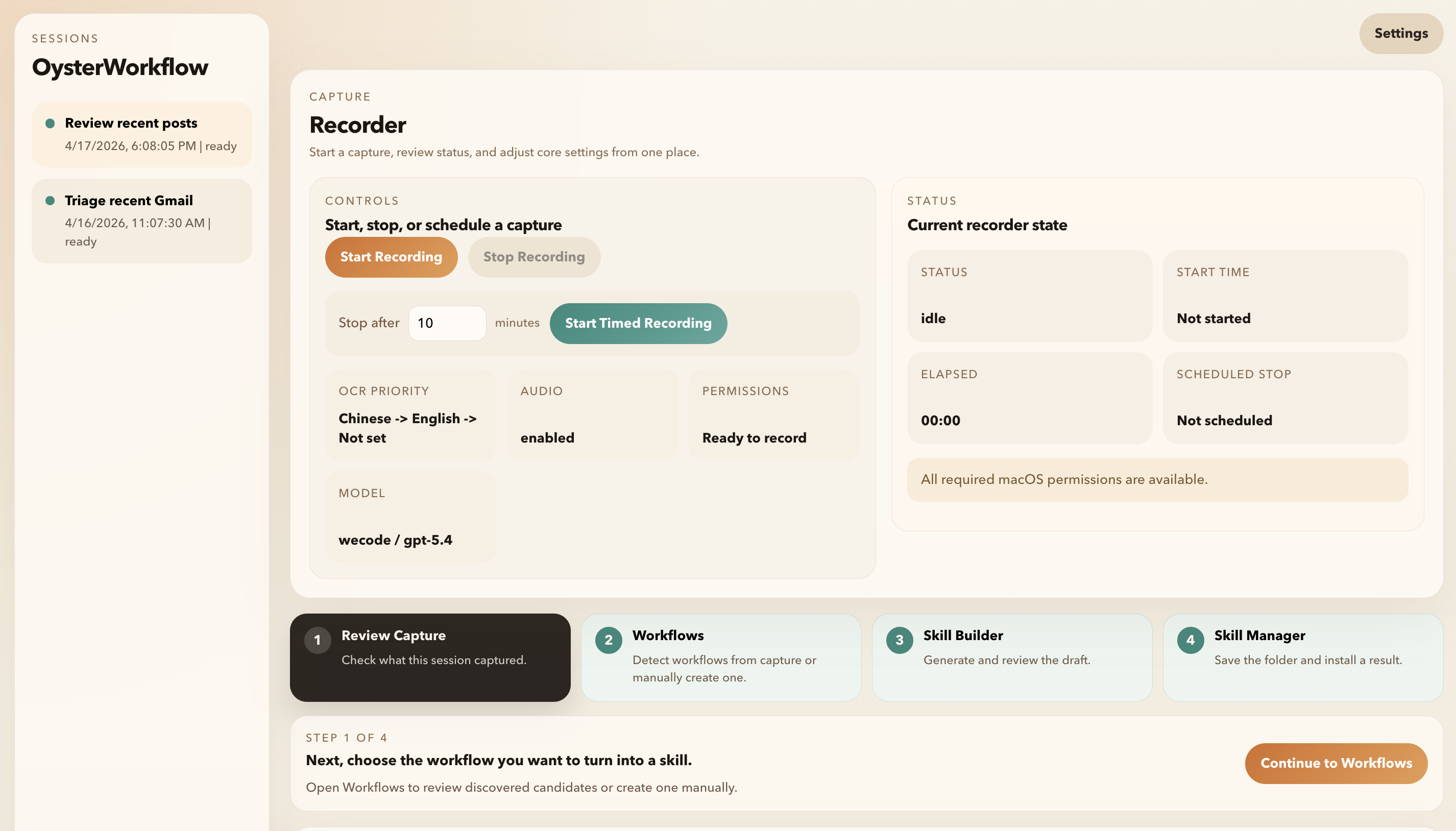
Capture and recorder status
Start, stop, or schedule a capture from one place while checking OCR language priority, audio capture, recorder status, and desktop recorder readiness.
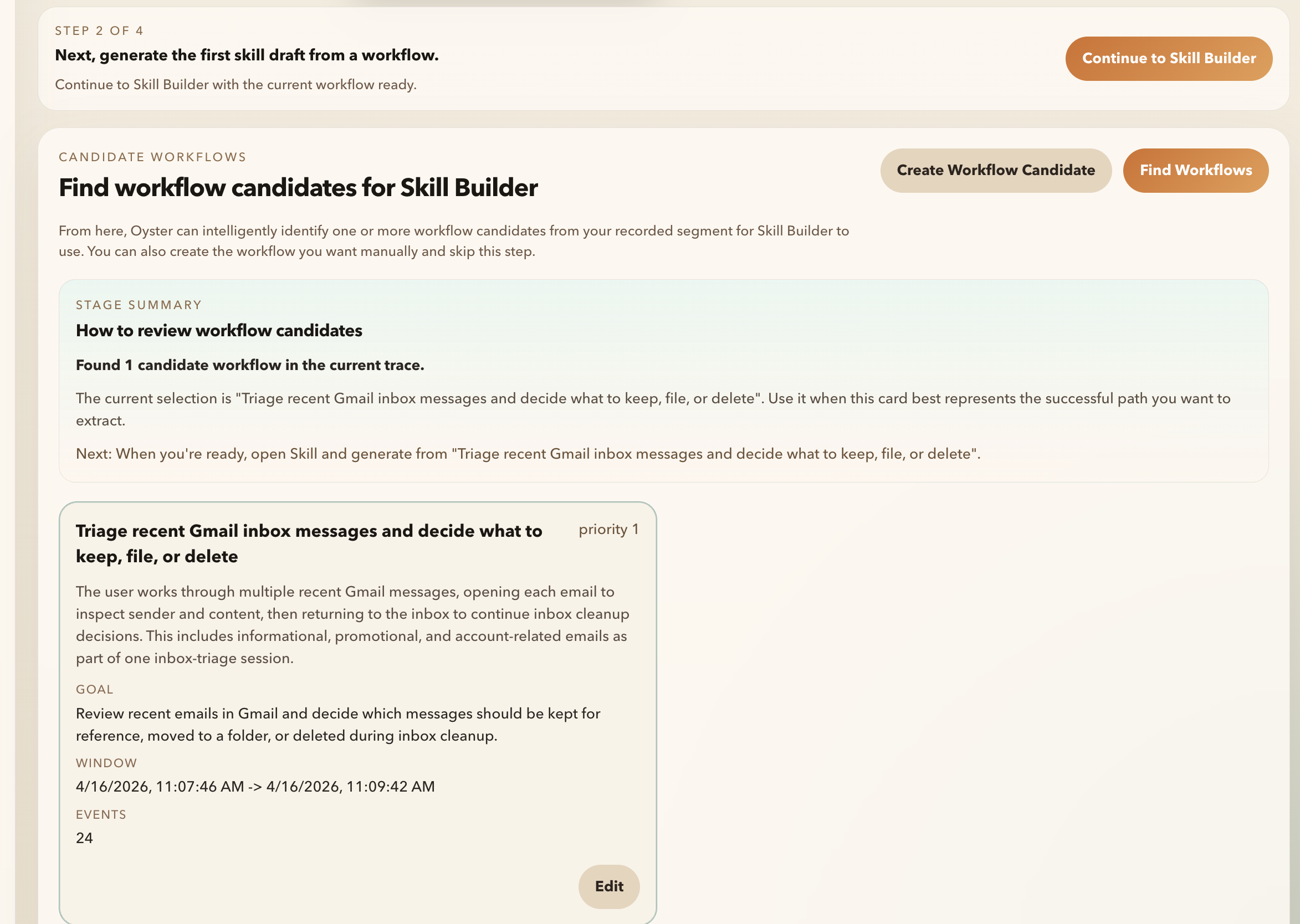
Workflow candidate discovery
Review candidate workflows detected from a recorded session, see the stage summary, and choose whether to continue with the generated candidate or create one manually.
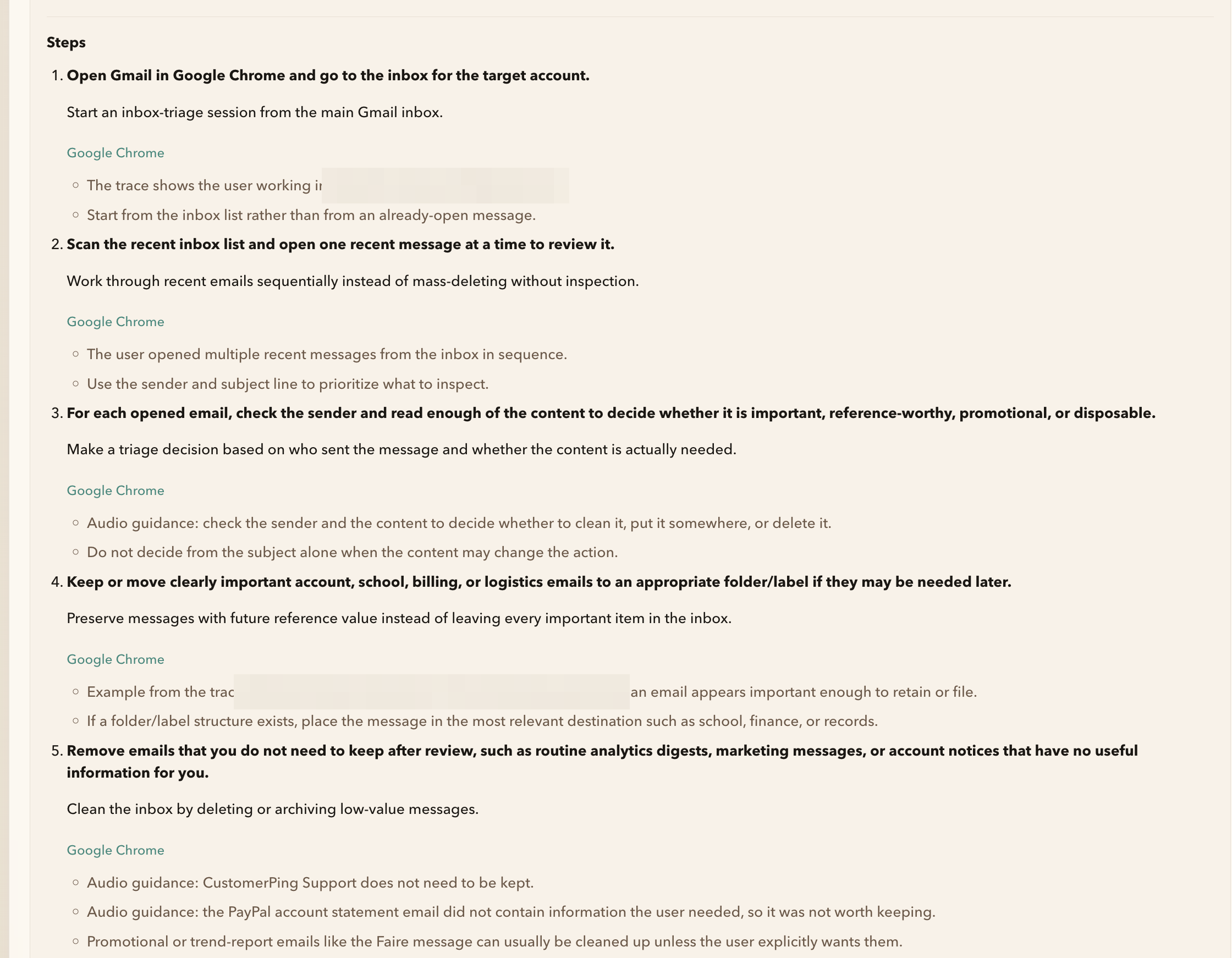
Skill draft review
Inspect the generated OpenClaw skill steps and evidence notes before installing the result. Sensitive personal and account-specific details are redacted in this screenshot.
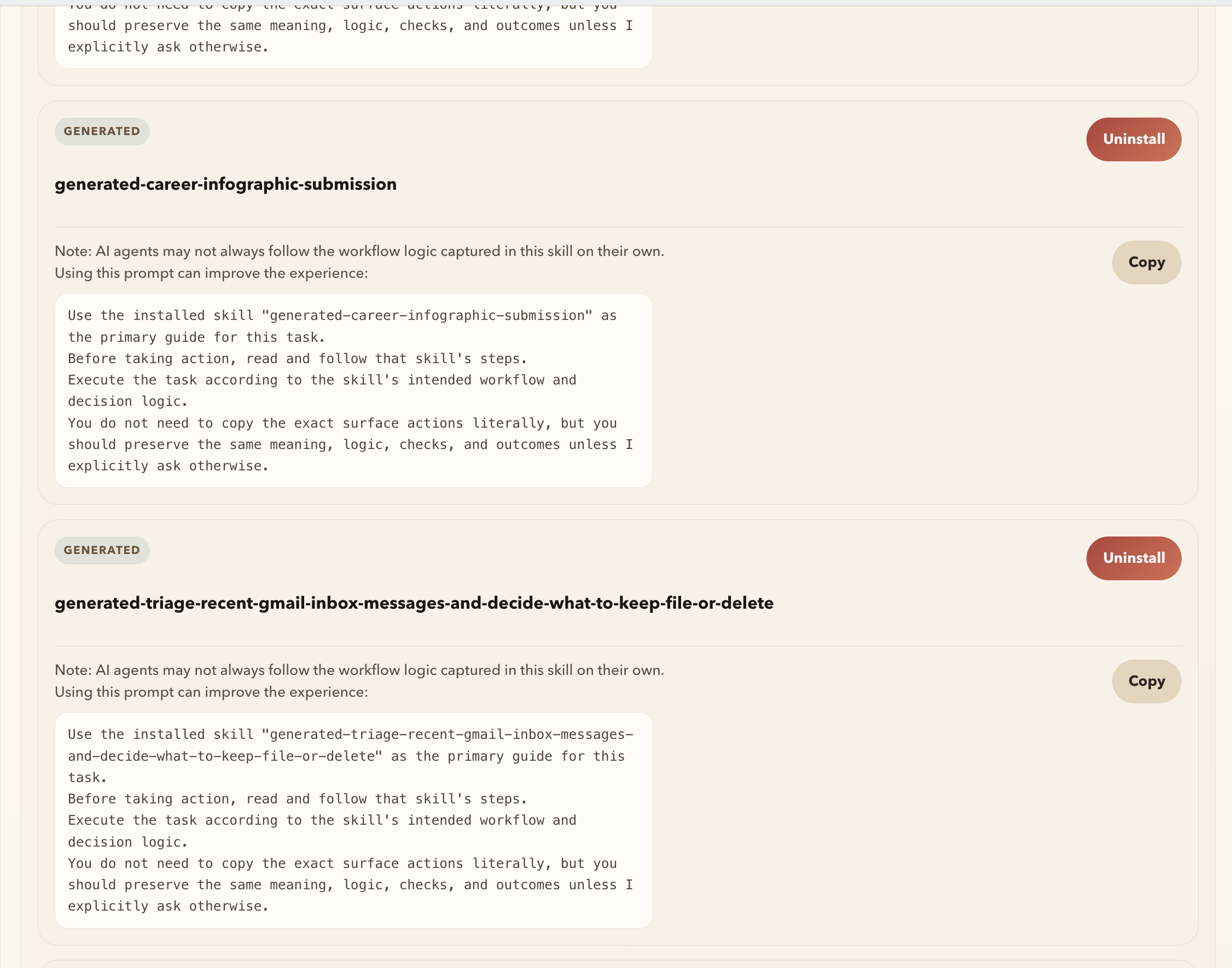
Skill manager and install prompts
Manage installed skills, copy the recommended execution prompt, and uninstall generated skills when they are no longer needed.
Download
Download the latest macOS or Windows build from Releases.
Current release assets:
OysterWorkflow-0.1.0-arm64.dmgOysterWorkflow-Setup-0.1.0.exe
SHA-256:
macOS arm64 dmg:
711fe49c3abeb66e109c1ab78476b09978d3c83c042b922a58a6affa46d16187

Windows x64 installer:
78dad16a0e9152173d128ca5c2674a4987c61a4245e5f67bd2650654687bf0cf
System Requirements
- macOS on Apple Silicon (
arm64) - Windows x64
Installation Notes
macOS
- Download
OysterWorkflow-0.1.0-arm64.dmgfrom the latest release. - Open the
.dmgand dragOysterWorkflow.appintoApplications. - Launch OysterWorkflow from
Applications. - Grant the required macOS permissions when prompted.
- If a recorder permission was just enabled, quit and reopen the app once before starting a recording.
Because OysterWorkflow records workflow evidence, macOS may ask for:
- Screen Recording
- Accessibility
- Input Monitoring
- Microphone, when voice narration is enabled
Windows
- Download
OysterWorkflow-Setup-0.1.0.exefrom the latest release. - Run the installer.
- Launch OysterWorkflow from the Start menu or install location.
- Enable recorder audio only when you want voice narration captured.
Windows notes:
- The Windows build is x64.
- The Windows version currently does not support Chinese text input in the app.
- Voice transcription on Windows currently works best for English. Chinese speech transcription is not reliable in this release.
Public Repo Scope
- macOS and Windows release downloads
- release notes
- screenshots and product documentation
- issue tracking for installation and usage problems
- links to the parallel public marketing-site workspace
The private source code for OysterWorkflow is not included here.
Roadmap and Feedback
- See ROADMAP.md for the current direction.
- See CONTRIBUTING.md for useful feedback areas and issue guidelines.
- Use GitHub Issues for installation problems, workflow-generation feedback, and feature requests.
FAQ
Is this repo open source?
No. This public repository hosts release binaries, documentation, screenshots, and issue tracking. The OysterWorkflow source code is currently private.
Will any source code or SDK be opened later?
Possibly. Future partial source, SDK, or integration surfaces are being considered, especially around artifacts and runtime integration, but this release does not promise a timeline or scope.
What does OysterWorkflow generate?
The current workflow generates reviewable OpenClaw skill artifacts, typically including files such as skill.json, assets.json, and summary.json.
Is commercial use allowed?
Not under the public release license. Public releases are licensed for noncommercial use under PolyForm Noncommercial 1.0.0. Commercial use requires separate written permission.
Does OysterWorkflow fully automate every workflow after one recording?
No. The current product focuses on capturing workflow evidence, discovering candidate workflows, generating reviewable artifacts, and letting the user inspect the result before reuse.
What should I avoid sharing in public issues?
Do not share credentials, private URLs, account data, customer data, or sensitive screenshots. Redacted workflow descriptions are much more useful than raw private data.
License
Public releases are licensed under PolyForm Noncommercial 1.0.0.
In plain language:
- you may download and use the public release for noncommercial purposes
- you do not receive rights to the private source code
- commercial use is not licensed under the public release terms
See LICENSE-SUMMARY.md for the plain-language summary.
For commercial licensing, contact: [email protected]
Yorumlar (0)
Yorum birakmak icin giris yap.
Yorum birakSonuc bulunamadi