SFP
Health Uyari
- License — License: MIT
- Description — Repository has a description
- Active repo — Last push 0 days ago
- Low visibility — Only 6 GitHub stars
Code Uyari
- fs module — File system access in bench/agent/rule.js
Permissions Gecti
- Permissions — No dangerous permissions requested
Bu listing icin henuz AI raporu yok.
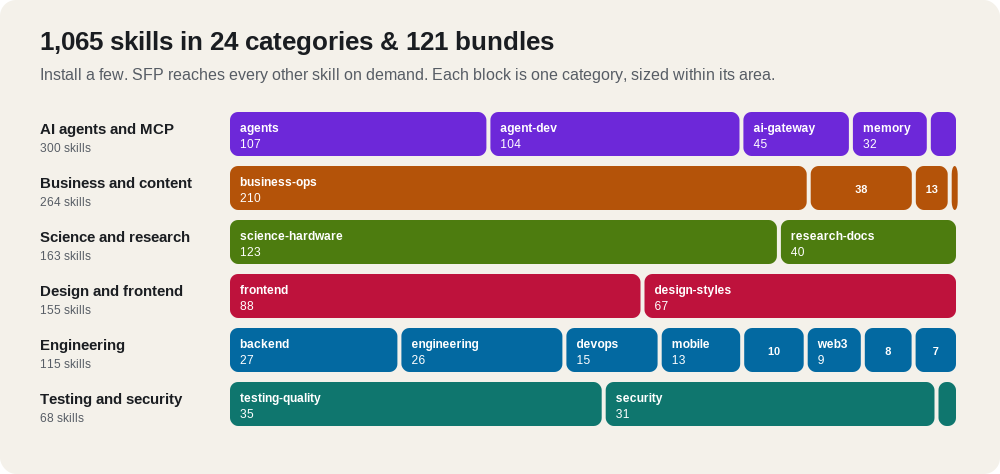
Stop burning 41% of your agent's context on unused skills (96% saved). 1,065 curated skills across 24 categories, 121 bundles, and 20 AI coding tools. One local hive equipping the exact 1-3 skills you need in 3ms with 0.0% junk and adaptive taste.
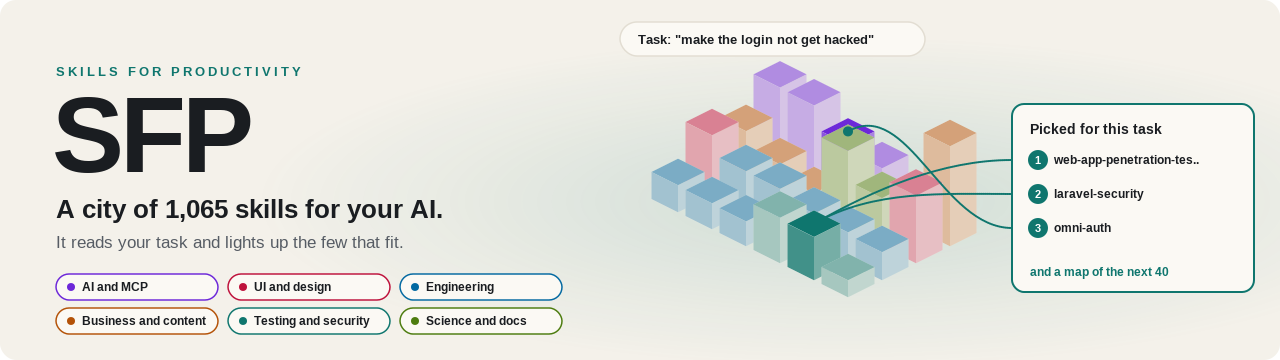
A city of skills for your AI. It lights up the few that fit your task, and shows a map of the rest.
Less to carry: 91% · Right skill on the map: 93% · Fits your project · Says when nothing fits · Runs on your machine





What is this? · Start here · Why SFP · See it choose · UI & design · Business & marketing · The proof · Install
What Is This?
AI coding tools like Claude Code, Cursor and Copilot do better work when they are given skills: short written guides that teach one job well, such as "how to write good tests in Rust". Thousands exist, but your AI can only hold so much in mind at once. Load them all and there is little room left for your code.
SFP is a librarian for your AI. It curates 1065 skills across 24 categories and 121 bundles (every skill belongs to one), reads your task and your project, and hands your AI only the few that fit. It remembers what helped you, so its choices improve over time.
| What you get | |
|---|---|
| The right few | 1 to 3 skills for the job, chosen from your words and your project |
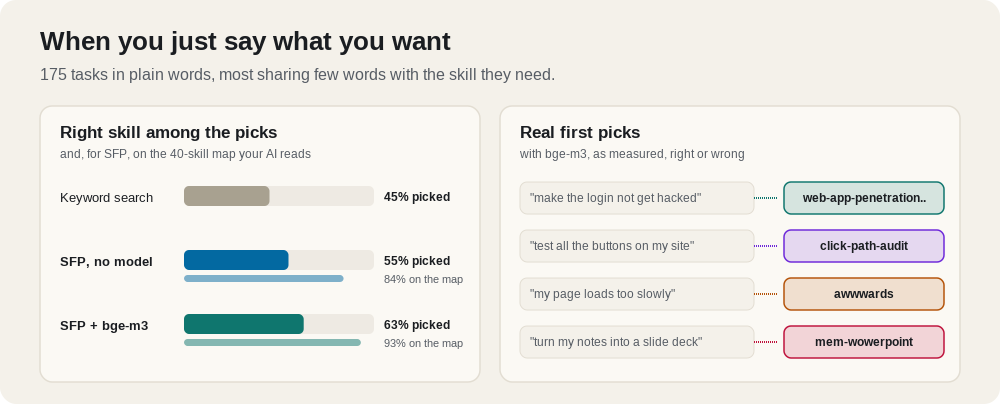
| A map | The next 40 best skills in one short list, so your AI can swap one in. The right skill is on it for 93% of plain tasks with a local model, 84% with none |
| Nothing, when nothing fits | It says "no skill selected" and why. On tasks that need none, it stayed out of the way 92% of the time (keyword search: 0%) |
| Room for your code | 91% less to carry than every skill switched on |
| Trust | Free (MIT), no telemetry, works with 20 AI coding tools |
The Skill City
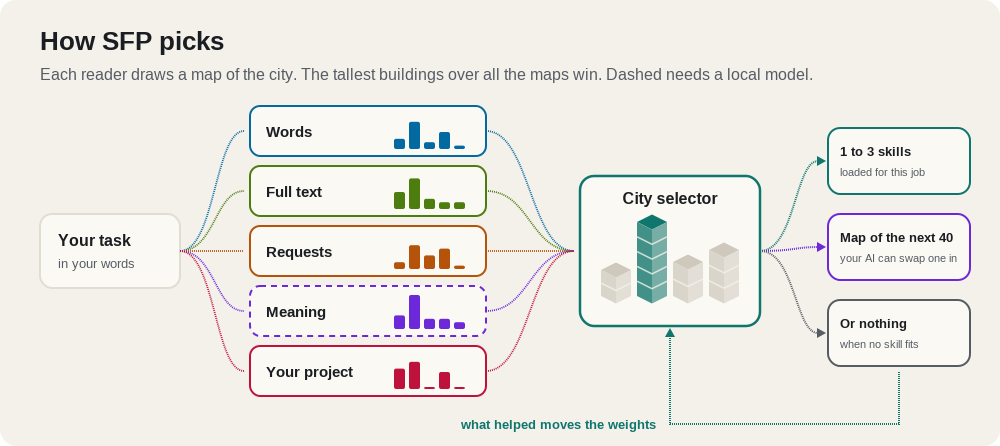
Think of every skill as a building. Each has a story: what it does, the words that call it, what it makes, what it needs, and which buildings stand next to it. When you ask for something, several readers each draw a map of the city, where taller means a better match. SFP adds the maps up. The tallest buildings are your skills, and the towers around them are the map your AI can choose from.
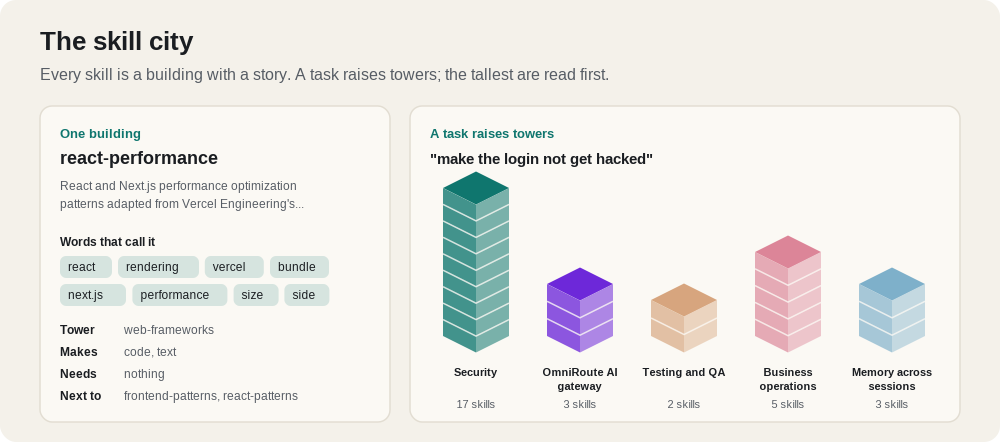
sfp story react-performance                                # one building's story
sfp select "make the login not get hacked" --map           # the picks, and the towers around them
Why Not Just Use Search, or Turn Everything On?
| Keyword search | Every skill always on | SFP | |
|---|---|---|---|
| What your AI carries | Only what it finds | 81,690 tokens (41% of its memory) | About 7,300 tokens, map included |
| Right skill, plain words | 45% | Your AI must find it among 1065 | 55% with no model, 63% with one |
| Right skill, in a project | 35% | No | 77% |
| Knows when no skill is needed | No (0%) | No | 92% of the time |
| Learns what you like | No | No | Yes, on your machine |
| Time to choose | Instant | Nothing to choose | About 7 ms with no model, 413 ms with one |
Why SFP
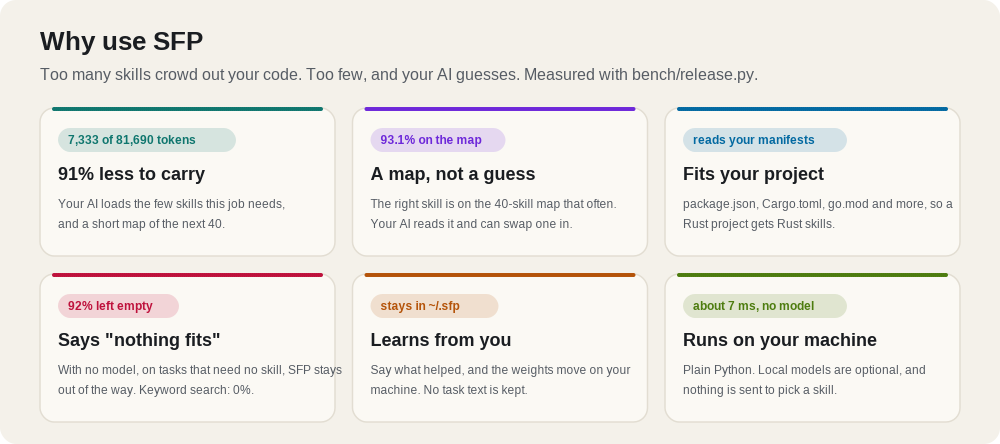
Most setups fail in one of two ways. Load everything, and there is little room left for your code. Load nothing, and your AI guesses. SFP does neither:
- It loads only what the job needs. Your AI carries a small router until you ask for something.
- It reads your project.
package.json,Cargo.toml,go.mod,pyproject.toml,pubspec.yaml,*.csprojand more. A skill written for another technology is dropped. - It gives your AI a map, not only a guess. Your AI knows the task better than any score does, so it can leave a pick and take a better one.
- It says "no skill selected". A typo fix needs no skill, and SFP says so instead of forcing one in.
- It learns from you. Say what helped, and the weights move on your machine. No task text is kept.
- It grows. It can watch new research on your topics and draft skills from it. Nothing is used until you approve it.
- One brain for 20 tools. Claude Code, Antigravity, Cursor, VS Code Copilot, Codex, Windsurf, Gemini CLI and 13 more.
| Word | In plain language |
|---|---|
| AI coding tool, agent | The AI that writes code with you: Claude Code, Cursor, Copilot, Antigravity and others |
| Skill | A short guide your AI reads before a job. Written in plain text, in a file called SKILL.md |
| Hive | The part of SFP that chooses skills. Many small signals vote, like bees choosing a new home |
| Map, tower, floor | The list of the next best skills, grouped by kind. A tower is a group, a floor is a skill in it |
| Token | The unit AI models read text in, roughly three quarters of a word. An AI can only hold so many at once |
| Context | Everything your AI is holding in mind right now |
| IDE | The program you write code in, such as VS Code |
| MCP | A standard way for AI tools to use outside helpers. SFP can run as one |
| Local model | An AI model running on your own computer, through a free program like Ollama or LM Studio |
Start Here
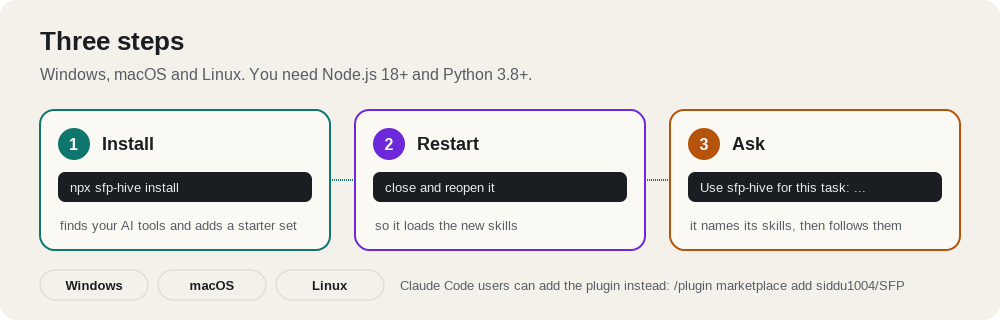
You need Node.js (download), Python 3.8 or newer (download; on Windows tick "Add python.exe to PATH") and an AI coding tool.
1. Open a terminal and run this. It finds the AI tools on your computer and installs a starter set of skills into each.
npx sfp-hive install
2. Restart your AI tool.
3. Ask it something, and mention SFP:
Use sfp-hive for this task: add tests for the checkout form.
How do you know it worked? Your AI names the skills it chose and why, then follows them. You can also ask SFP directly, without any AI, from your project's folder:
npx sfp-hive select "write tests for the orders" --project .
In a Rust project, that prints (shortened):
Stack for: write tests for the orders
Project: rust
Phase of work: test 100%
1. [check] rust-testing  (testing-quality, test, about 2,949 tokens)
   why: task words: tests; fits project: rust; backed by: words, project, role, category
If nothing fits, it says so: "No skill selected. Carry on without one."
4. Tell it how it went. Say whether the skill helped. That is how SFP learns what works for you.
Using Claude Code? You can install SFP as a plugin instead: /plugin marketplace add siddu1004/SFP, then /plugin install sfp@sfp. Something wrong? Run npx sfp-hive doctor: it names the problem and the fix.
See It Choose
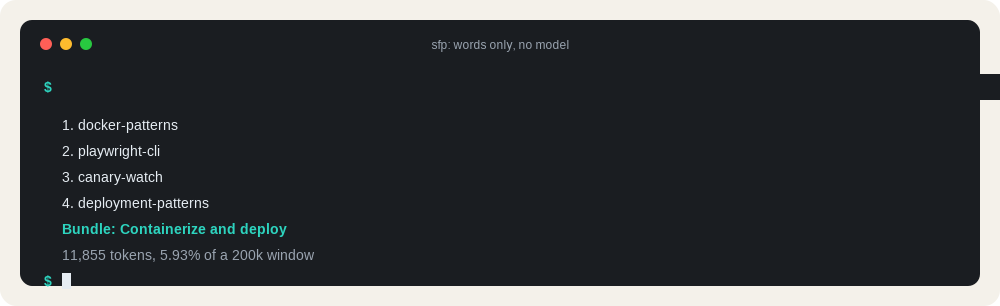
The same words, "write tests for the orders", in five different projects. The hive itself generates this table each time this page is built:
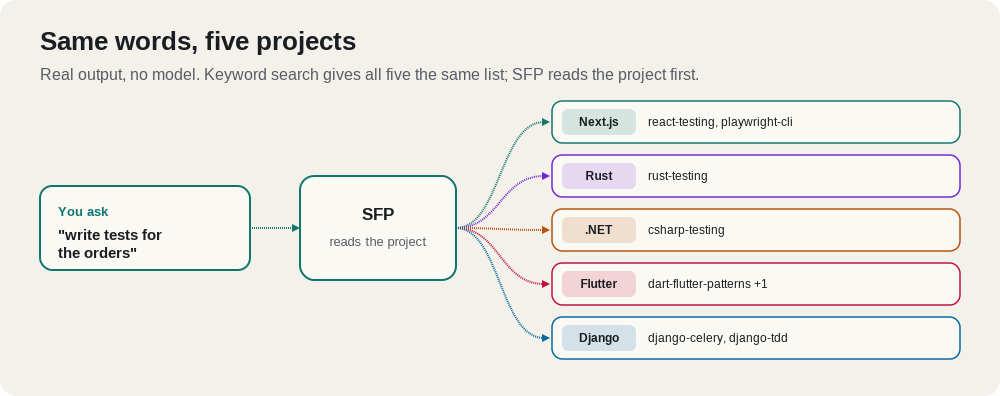
| Your project | The hive chooses |
|---|---|
| Next.js | react-testing, playwright-cli |
| Rust | rust-testing |
| .NET | csharp-testing |
| Flutter | dart-flutter-patterns, flutter-dart-code-review |
| Django | django-celery, django-tdd |
A keyword search gives all five the same list.
And in plain words, with no project to read (real output with the meaning model on, whatever it was):
| What you ask | SFP's picks |
|---|---|
| "make the login not get hacked" | web-app-penetration-testing, laravel-security, omni-auth |
| "test all the buttons on my site" | click-path-audit, web-app-penetration-testing, awwwards |
| "my page loads too slowly" | awwwards, animation-performance, benchmark |
| "turn my notes into a slide deck" | mem-wowerpoint, frontend-slides, presentation-design |
It does not always get it right. Where it still fails lists real misses.
Common Questions
| Question | Answer |
|---|---|
| Is it free? | Yes. MIT license, no account, no sign-up |
| Do I need a powerful computer or a GPU? | No. SFP works on any computer with Python. Local models are an optional upgrade: the meaning model (bge-m3) is about 1 GB, and a good small chat model is about 14 GB of disk and memory |
| Is my code sent anywhere? | SFP picks skills on your machine and sends nothing. Your AI tool still talks to its own provider, as it does today. Two opt-in exceptions: the research features send topic names to paper libraries, and a hosted model you add receives what you allow it |
| Which tools does it work with? | Claude Code, Codex, Cursor, Gemini CLI, Antigravity, GitHub Copilot, VS Code, Windsurf, Kiro, OpenCode and more. Anything that speaks MCP works too |
| Will it slow things down? | Barely. A choice takes about 7 ms with no model, and about 413 ms with a local meaning model |
| Do I have to change how I work? | No. Add the standing instruction (step 5) and your AI consults SFP by itself |
| How do I remove it? | python3 scripts/install.py uninstall removes only what SFP installed (details) |
| How do I update? | sfp update, or /plugin marketplace update sfp in Claude Code. Updates follow releases, and never move you to an older version |
It Learns How You Learn
A parent who notices a child lighting up at music finds them a good teacher. SFP does the same for you.
Taste. When a skill helps you, SFP notes what kind of help it was: an animation, a step-by-step text, hands-on code, a video. Over time it leans towards the kind you learn from best: on 40 new tasks for simulated learners, with no model, the first pick in the format they like went from 70% to 82%.
sfp taste            # what SFP has learned about you
sfp taste --reset    # start again from neutral
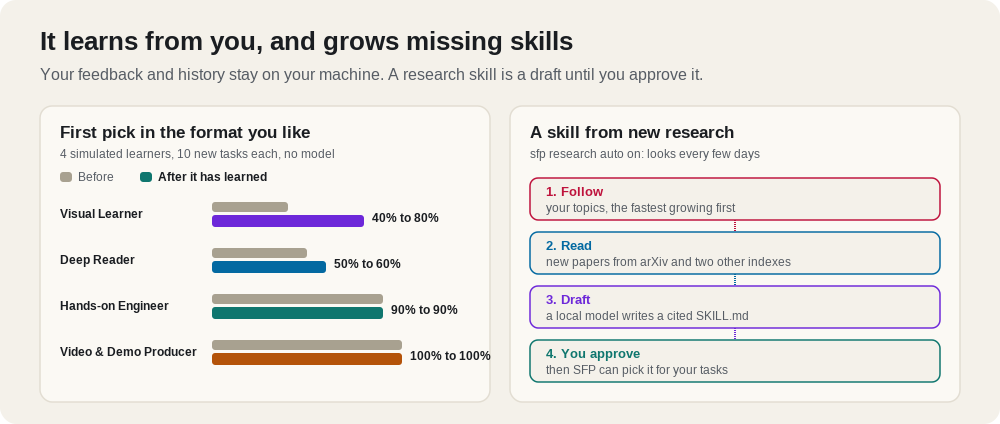
The mentor. SFP notices what you lean towards and where its library falls short. It then goes to the research library (OpenAlex, arXiv, Semantic Scholar), picks the best papers, has a local model read them, and writes a practical skill with its sources. Every skill it writes is a draft until you approve it; once you do, SFP can pick it for your tasks.
sfp research auto on                       # look for new papers on your topics every few days (off until you turn it on)
sfp research trend "agent skill retrieval" # is research on a topic growing?
sfp mentor                                 # your areas, your gaps, and research topics it suggests
sfp mentor grow --topic "RAG evaluation"   # read the best papers and draft a skill
sfp research drafts                        # review what it wrote
sfp research approve <name>                # only you add a skill to the library
Your history stays in ~/.sfp on your machine, as numbers and word stems, never your task text.
Make It Smarter (Optional)
SFP works with no model at all. Run a free local meaning model and it also understands what you mean, not just the words you used. It finds models by itself in Ollama, LM Studio, llama.cpp, Jan and vLLM. No chat model is asked when it picks, unless you turn that on (SFP_RERANK=1): measured, it was slower and about as accurate.
ollama pull bge-m3         # the meaning model, about 1 GB
sfp doctor                 # checks that SFP sees it
sfp models                 # every chat model found, and how it did when tested
sfp models probe           # test each one, so SFP picks what really answers best
Prefer a hosted model? Add any OpenAI-compatible service. Your key stays in an environment variable, never in a file. With --research-only, the model only reads papers; your coding tasks never reach it.
sfp models add groq https://api.groq.com/openai/v1 llama-3.3-70b-versatile --key-env GROQ_API_KEY
sfp models add deep https://api.deepseek.com/v1 deepseek-reasoner --key-env DEEPSEEK_API_KEY --research-only
Who It Is For
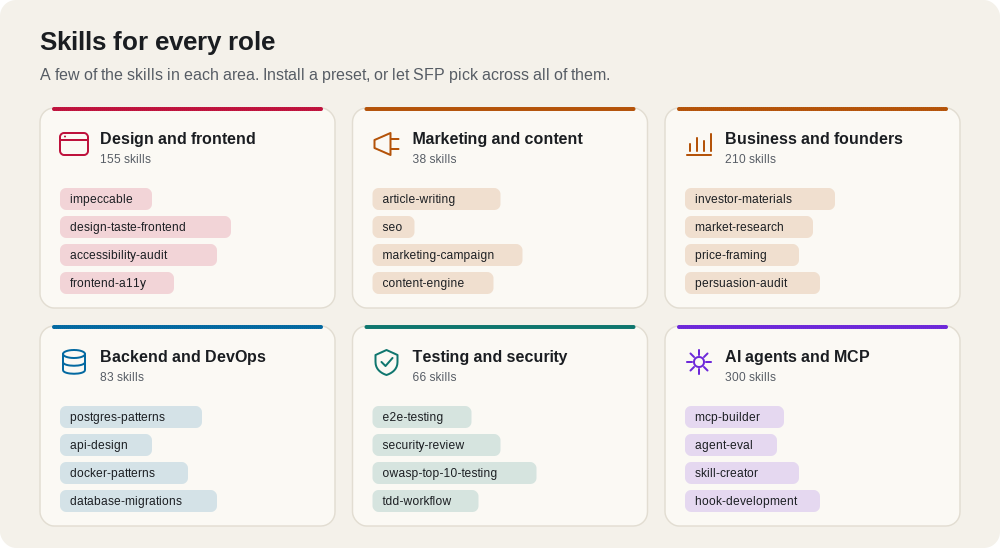
| You are | Install | You get, for example | Try asking |
|---|---|---|---|
| A frontend developer | frontend-dev |
impeccable, design-taste-frontend, animate, accessibility-audit, break-ui |
"Critique this page and fix the hierarchy." |
| A backend developer | backend-dev |
postgres-patterns, database-migrations, api-design, docker-patterns, tdd-workflow |
"Plan a zero-downtime migration for this table." |
| A mobile developer | mobile-dev |
swiftui-patterns, dart-flutter-patterns, android-clean-architecture, compose-multiplatform-patterns |
"Review this Flutter screen for state-management problems." |
| Building agents, plugins or MCP servers | agent-builder |
skill-creator, hook-development, mcp-builder, agent-eval, mem-search |
"Help me design an MCP server for our ticket system." |
| Security-minded | backend-dev and security |
penetration-testing-with-strix, owasp-top-10-testing, find-security-vulnerabilities-in-code, security-review |
"Check this service against the OWASP top 10." |
| Learning something new | research-docs and content-media |
teach-me, manim-video, understand-explain |
"Explain how a B-tree splits a node." |
| A founder or marketer | business-ops and content-media |
investor-materials, marketing-campaign, article-writing, persuasion-audit, price-framing |
"Draft this month's investor update." |
| Job hunting | career |
career-ops |
"Evaluate this job posting against my CV." |
| Using an IDE with no skills folder | the MCP server | every skill, through search_skills and get_skill |
"Search SFP for a skill that fits this task." |
Install a set with npx sfp-hive install --profile frontend-dev. The hive can still reach every other skill on demand through the MCP server.
UI, Design and Front-End Skills
SFP includes 155 UI, design-system, accessibility and motion skills (frontend + design-styles) so your AI builds clear, accessible interfaces instead of generic templates.
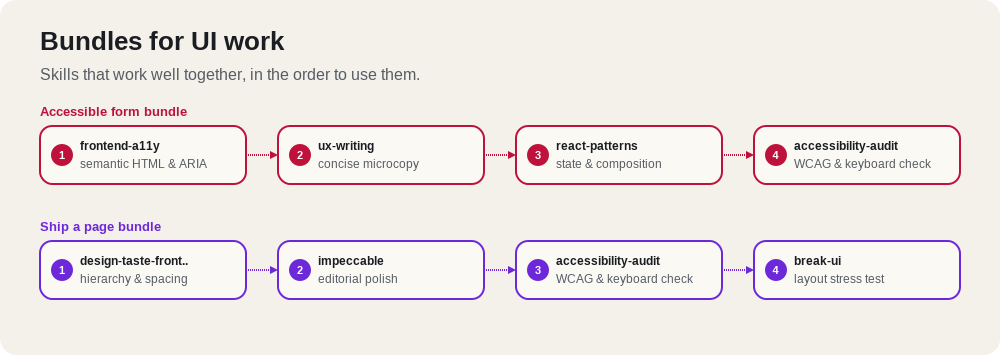
| Area / Bundle | Skills Included | What It Solves |
|---|---|---|
| Accessible Form Bundle | frontend-a11y -> ux-writing -> react-patterns -> accessibility-audit |
Semantic HTML, aria-describedby error wiring, keyboard traps, screen-reader labels |
| Visual Taste & Polish | design-taste-frontend, impeccable, emil-design-eng, make-interfaces-feel-better |
Typography hierarchy, spacing rhythm, tactile micro-interactions, anti-template rules |
| Motion & Stress Testing | animate, motion-foundations, interaction-design, break-ui, design-critique |
Reduced-motion-safe transitions, layout stress testing, hierarchy critique |
| Design Systems & Aesthetics | design-system, shadcn, bento, glassmorphism, theme-factory, frontend-slides |
Tokenized components, modular bento grids, editorial and dark-mode palettes |
Prompts to try:
- "Review this modal component with
frontend-a11yand wire up keyboard traps and ARIA labels." - "Apply
design-taste-frontendandimpeccableto fix the typography scale and layout breathing room."
# Install the full frontend & design profile
npx sfp-hive install --profile frontend-dev
Business, Marketing and Growth Skills
For founders, product managers and growth teams, SFP ships 248 business and content skills (business-ops + content-media) covering market research, fundraising, pricing, SEO and multi-channel publishing.
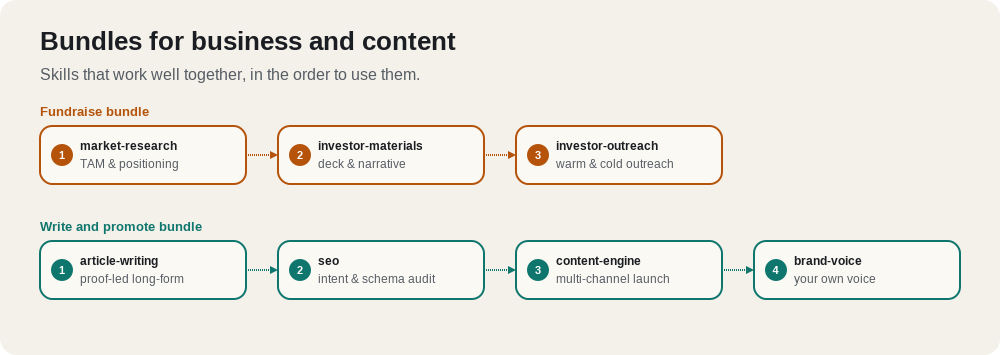
| Area / Bundle | Skills Included | What It Solves |
|---|---|---|
| Fundraise Bundle | market-research -> investor-materials -> investor-outreach |
TAM/SAM/SOM sizing, pitch narratives, financial models, warm/cold investor sequences |
| Publish Content Bundle | article-writing -> seo -> content-engine |
Long-form technical/product articles, search intent optimization, multi-channel repurposing |
| Positioning & Conversion | price-framing, persuasion-audit, dark-pattern-check, brand-voice, brand-guidelines |
Packaging & tier design, landing-page conversion audits, ethical UX checks |
| Product & GTM Operations | product-lens, marketing-campaign, lead-intelligence, competitive-report-structure, customer-billing-ops |
Go-to-market launches, competitive teardowns, lead enrichment, billing workflows |
Prompts to try:
- "Run a
persuasion-auditandprice-framingcheck on this SaaS pricing page draft." - "Use
market-researchandinvestor-materialsto outline a defensible seed pitch narrative."
# Install business-ops and content-media categories into your AI tools
npx sfp-hive install --categories business-ops,content-media
The Proof
Every number here comes from one file, bench/results/release.json, written by python3 bench/release.py. The images read the same file. A task counts as right when the chosen skills include one a person marked correct.
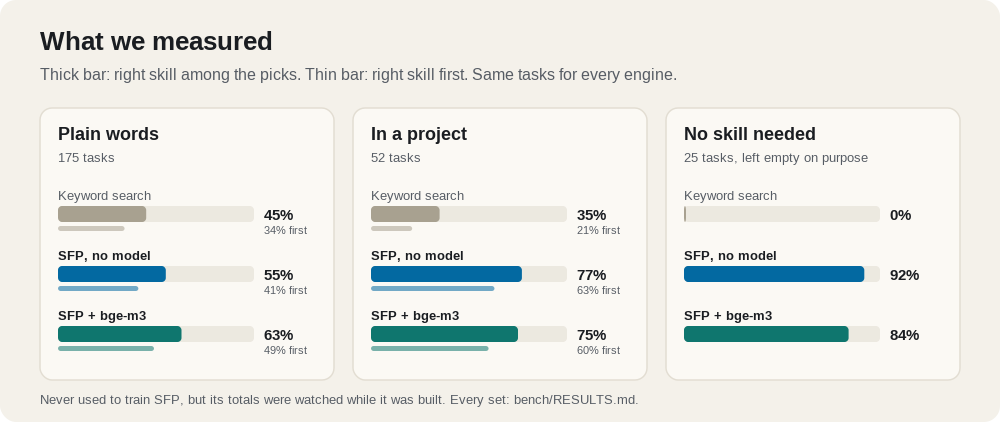
| Measured on | Keyword search | SFP, no model | SFP + bge-m3 |
|---|---|---|---|
| 175 plain-words tasks, no project | 45% / 34% first (37 to 52) | 55% / 41% first (48 to 63) | 63% / 49% first (56 to 70) |
| 52 tasks in sample projects | 35% / 21% first (23 to 48) | 77% / 63% first (64 to 86) | 75% / 60% first (62 to 85) |
| 24 tasks in sample projects (used for tuning) | 25% / 21% first (12 to 45) | 79% / 62% first (60 to 91) | 83% / 62% first (64 to 93) |
| 25 tasks that need no skill, left empty | 0% | 92% | 84% |
| Right skill on the 40-skill map, plain words | - | 84.0% | 93.1% |
| Right skill on a 60-skill map, plain words | - | 86.9% | 95.4% |
These tasks were never used to train SFP, but their totals were watched while it was built, so a brand new set may score a little lower. The right skill is often one of several good ones, and only the ones a person named count. Every set is in bench/RESULTS.md.
Why the map matters. SFP has to pick from 1065 skills that overlap. Nothing we tried, and nothing we found published, gets a small local picker to 90% at that size. The map is how we get past it: the right skill is among the best 40 for 93% of plain tasks, and your AI reads that list in about 1,200 tokens.
Words only, recomputed from this repository each time this page is built, so it is the same on every machine (python3 mcp/sfp_hive.py evaluate):
| Task set | Hive 3.20.1 | Earlier engine | Plain search |
|---|---|---|---|
| 22 held-out tasks in 8 new projects, written first and scored once | 91% | 64% | 9% |
| 24 tasks in 10 sample projects | 79% | 79% | 25% |
| 91 tasks with no project | 86% | 87% | 84% |
| Stacks with a skill for the wrong technology, all sets | 0 | 0 | 0 |
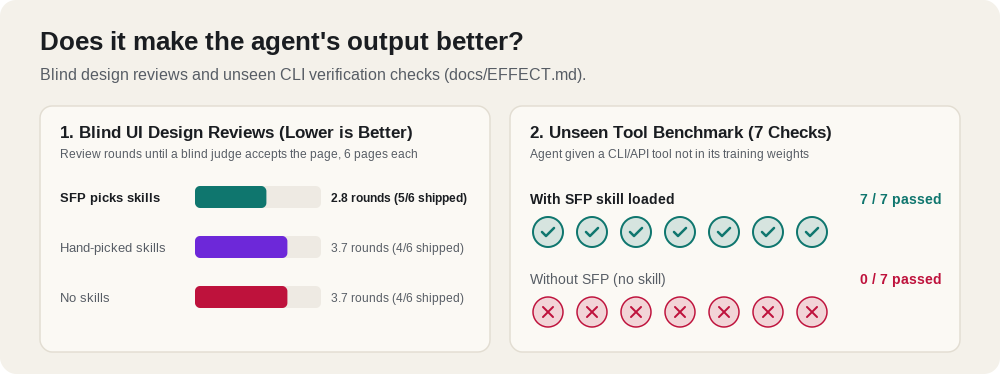
Does it make the work better? In blind design reviews, agents with SFP produced a page a reviewer would accept in 2.8 rounds, against 3.7 with no skills. Given a tool they had never seen, agents with no skills passed 0 of 7 checks, and with SFP passed all 7 (docs/EFFECT.md).
What does it cost your agent?
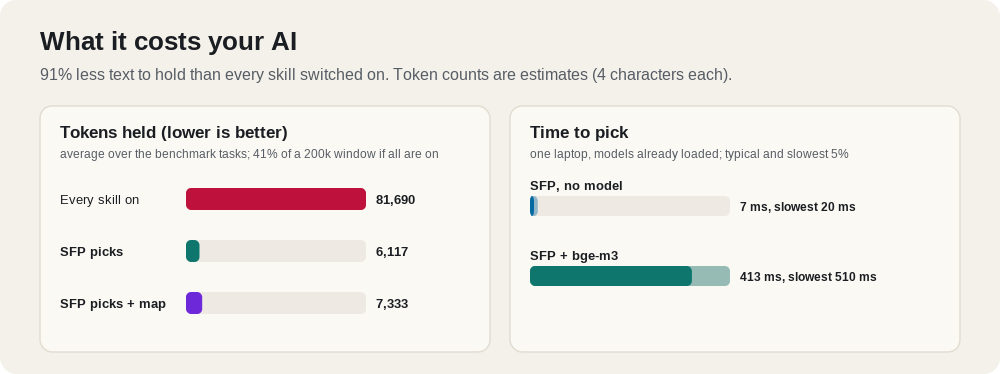
| What you install | Skills your agent can use | Skill descriptions it carries each session | Share of a 200k-token window |
|---|---|---|---|
sfp and sfp-hive only (the rest on demand) |
2 + all 1063 through them | about 265 tokens | 0.1% |
starter preset |
174 | about 15,371 tokens | 7.7% |
frontend-dev preset |
225 | about 16,453 tokens | 8.2% |
backend-dev preset |
151 | about 13,406 tokens | 6.7% |
mobile-dev preset |
84 | about 6,892 tokens | 3.4% |
agent-builder preset |
309 | about 20,674 tokens | 10.3% |
everything |
1065 | about 81,690 tokens | 40.8% |
How fast is it?
A choice takes about 7 ms with no model (slowest 5%: 20 ms) and about 413 ms with the meaning model already loaded (slowest 5%: 510 ms), measured on one laptop. The first choice builds an index once, in a few seconds (docs/HIVE.md).
Where It Still Fails
We would rather you hear this from us. These are real results from version 3.20.1:
- Plain words are hard. With no project to read, the right skill is among the picks for 55% of tasks with no model and 63% with one. Look at the map when a pick seems off.
- It can be drawn to a shared word. A product's own skill sometimes wins because a word in your task is in its name.
- It sometimes picks when it should not. On tasks that need no skill, it stayed out of the way 92% of the time with no model and 84% with one.
- A named format is not always followed. Ask for "a video" and the first pick usually makes video, not always.
- The chat model check is off by default. On every task it took about 7 seconds here, and gained little.
- Research drafts need your eye. A local model writes them from abstracts, not from whole papers.
What has not been measured. Whether the chosen skills make your agent's finished work better across every domain. Whether your AI picks better from the map than SFP does alone: one small blind test says yes (13 of 18 against 10 of 18), which is not enough to claim. Learning is measured on a simulated user, not on real long-run use. Task sets are small: read the ranges, not just the headline. Token counts are estimated at 4 characters per token.
For Experts
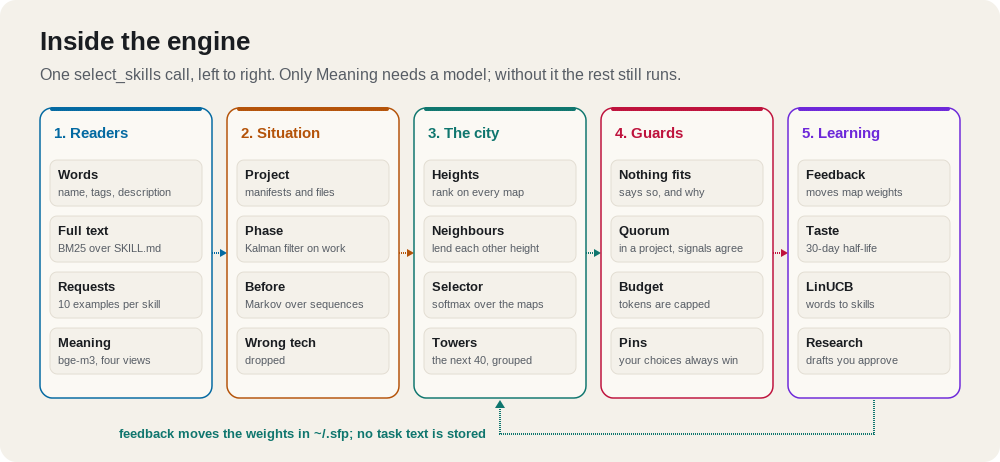
| Layer | What it does | Needs |
|---|---|---|
| 1. Readers | Words (name, tags, description), full text (BM25 over each SKILL.md), requests people make, the skill's story, and meaning: closeness to the description, to the nearest request, to the nearest three, and to the whole text (shipped vectors for bge-m3) |
Nothing; bge-m3 for meaning |
| 2. Situation | Project manifests, phase of work (a Kalman filter over your activity), what usually comes next (a Markov chain), and the technology check | Nothing |
| 3. The city | A skill's height on a map is 21 / (21 + rank), next to how far it rises above the sixtieth. Neighbours in meaning lend height. The kind of work asked for lifts the skills made for it. A softmax policy over the heights, trained on the tuning sets only (scripts/make_city.py), ranks the skills |
Nothing |
| 4. Guards | Micro-edits and fields the library does not hold get no skill. In a project the signals must agree. Substitutes do not stack, tokens are capped, your pins win | Nothing |
| 5. Learning | Feedback moves the map weights by the policy gradient of the expected reward, held near the shipped weights. A LinUCB model learns words, and taste fades with a 30-day half-life | Your feedback |
| Setting | Effect |
|---|---|
SFP_SEMANTIC=0 |
Words only: no embeddings and no chat model |
SFP_RERANK=1 |
Let a local chat model judge the candidates too. Off by default: slow for a small gain |
SFP_MAP=0 |
Leave the map out of the MCP answer |
SFP_FUSED=0 |
Choose the way versions before 3.20.1 did |
SFP_RESEARCH=0 |
Never start the research watch from here |
OPENALEX_API_KEY |
Your own free OpenAlex key, for a larger daily paper budget |
SFP_REWRITE=1 |
Also rewrite each task in expert terms first. Off by default: slow for a small gain |
SFP_EXPLORE |
Exploration strength of the LinUCB bonus |
SFP_DATA_DIR |
Where history and taste live (default ~/.sfp). Set a temporary folder for scripted runs |
SFP_EMBED_URL, SFP_EMBED_MODEL |
Use this embedding endpoint |
SFP_REWRITE_URL, SFP_REWRITE_MODEL |
Use this chat endpoint |
SFP_AUTO_UPDATE=1 |
Move to new release tags automatically |
In ~/.sfp |
Holds |
|---|---|
decisions.jsonl, feedback.jsonl, skill_history.jsonl |
What was chosen and how it went: numbers and word stems, not your task text |
taste.json |
Learned format, style and depth preferences |
city_weights.json, city_log.jsonl |
Your map weights, and the heights recent choices were made from: numbers and skill names |
research.json, research_found.json |
The research watch: on or off, and papers waiting for a local model |
models.json, api_models.json |
Model probe results; API models you added (the name of the key's variable, never the key) |
embeddings/, rewrites.json |
Rebuildable caches |
skills/drafts/ |
Skills the mentor wrote, waiting for your approval |
MCP tools: select_skills, search_skills, get_skill, use_skill, read_skill_file, list_categories, find_api, install_command, give_feedback, learning_status, predict_next, research_skill, grow_skills.
Trust. Skills are text your agent will follow, from 91 upstream repositories. Versions are pinned in sources.lock.json, licenses are listed in NOTICE.md, and research drafts are never installed without your approval. Read a skill before you rely on it.
Reproduce everything:
python3 -m unittest discover -s tests         # the test suite
python3 mcp/sfp_hive.py evaluate              # words-only figures, no models
python3 bench/release.py                      # every figure on this page; writes bench/results/release.json and bench/RESULTS.md
python3 scripts/readme_art.py                 # redraws every image from that file
Install
Most people only need Start Here. Here is the one command for each tool:
| Your tool | Run this | What happens |
|---|---|---|
| Claude Code | /plugin marketplace add siddu1004/SFP, then /plugin install sfp@sfp |
The hive and skill router, inside Claude Code |
| Antigravity, Cursor, VS Code with Copilot, Windsurf, Codex, Cline | npx sfp-hive install |
Finds each tool's skills folder and installs the starter set |
| Any MCP client | npx sfp-hive mcp --tools <your tool> |
Registers the MCP server, so all 1065 skills are available on demand |
Using Antigravity or VS Code? The SFP Hive sidebar (step 7) follows your work and keeps your AI's skills current:
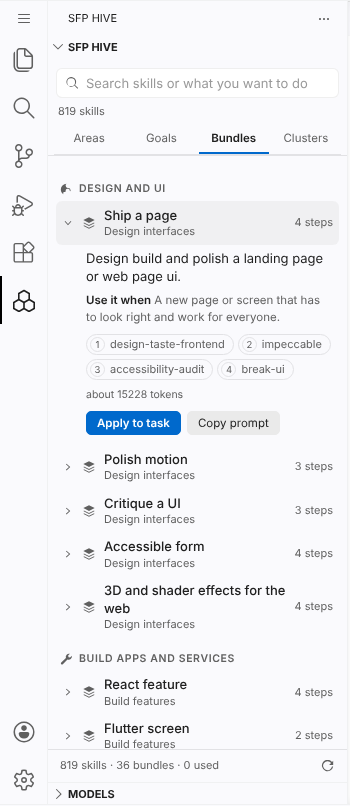
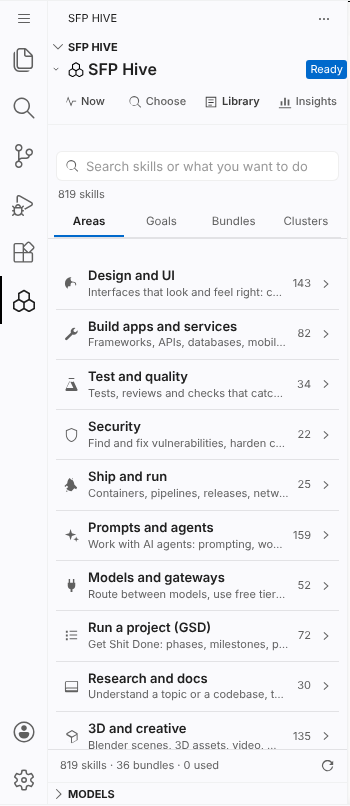
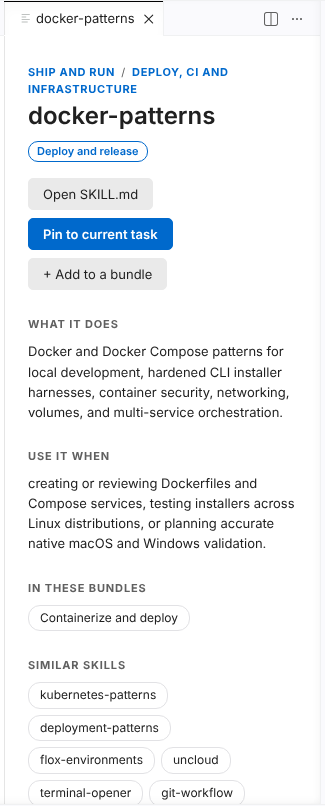
The full guide covers everything else: other install methods, choosing a skill set, the extension, local models and the router.
Open the full step-by-step guideThis guide takes you from a bare machine to an agent that gets the right skills on its own. Every step ends with a Check, so you know it worked before you move on. Allow about fifteen minutes; steps 7 to 10 are optional.
| Step | What you get | Needed? |
|---|---|---|
| 1. Install the prerequisites | Python, Git, Node.js | Yes |
| 2. Get SFP | SFP on your machine | Yes |
| 3. Check the install | A health report | Yes |
| 4. Install skills into your tools | Skills your agent can use | Yes |
| 5. Add the standing instruction | The agent asks the hive on every real task | Recommended |
| 6. Register the MCP server | All 1065 skills on demand, nothing copied | Recommended |
| 7. Install the SFP Hive extension | The sidebar in Antigravity or VS Code | Optional |
| 8. Use SFP in Antigravity | Your first task with the hive | Use it |
| 9. Let the hive use local models | Meaning, your taste, skills from research | Optional |
| 9b. Set up the local model router | Local models first, free tiers next | Optional |
| 10. Extras | Companion apps, skills from any Git repo | Optional |
Also: Claude Code plugin, Keeping it current, When something is wrong, Removing everything.
Windows: type
pythonwherever this guide sayspython3. Run the commands in PowerShell.
1. Install the prerequisites
| Program | Why SFP needs it | Get it | Check |
|---|---|---|---|
| Python 3.8 or newer | runs the hive, the MCP server, the router and the checks | python.org/downloads (Windows: tick Add python.exe to PATH) | python3 --version |
| Git | downloads SFP and keeps it current | git-scm.com/downloads | git --version |
| Node.js 18 or newer, with npm | for npx sfp-hive, and to build the extension (step 7) |
nodejs.org | node --version |
| An agent tool | where the skills are used | Antigravity, Claude Code, Cursor, VS Code with Copilot, Windsurf, Codex, Gemini CLI, Kiro and more | |
| Optional: Ollama or LM Studio | local models for meaning, research and the router (step 9) | ollama.com, lmstudio.ai |
Check: each command in the last column prints a version number. If one says "not found", install that program and open a new terminal.
2. Get SFP
Pick one of these.
A. npm (simplest).
npx sfp-hive install          # run once, nothing installed globally
npm install -g sfp-hive       # or keep the `sfp` command around
sfp install
B. One line. Downloads SFP into ~/.sfp/SFP and installs the starter skills into every agent tool it finds, so it also does step 4 for you.
# macOS and Linux
curl -fsSL https://raw.githubusercontent.com/siddu1004/SFP/main/get.sh | sh
# Windows PowerShell
irm https://raw.githubusercontent.com/siddu1004/SFP/main/get.ps1 | iex
Running it again later updates SFP and reinstalls. To use a different folder, set SFP_DIR first.
C. Clone it yourself. Use this if you want SFP somewhere else, or want to contribute.
git clone https://github.com/siddu1004/SFP.git
cd SFP
D. Rust. If you have Cargo: cargo install --git https://github.com/siddu1004/SFP.git, then sfp install.
Check: sfp help (A) lists the commands, or the folder holds catalog.json (B, C):
ls ~/.sfp/SFP/catalog.json # B, or the folder you cloned into for C
The python3 commands below are run from the SFP folder: cd ~/.sfp/SFP (or your clone). With npm, use sfp <command> instead.
3. Check the install
python3 mcp/sfp_hive.py doctor # or: sfp doctor
Check: it reports Python, the catalog, the search index, the hive and any local models as working. Anything that is not names the command that fixes it.
4. Install skills into your tools
If you used 2A or 2B, this is done; read on only to change what is installed.
SFP has 1065 skills. Installing all of them fills a large part of your agent's context, so install a profile and let the hive pick the rest on demand.
python3 scripts/install.py list                       # all categories, profiles and the tools found on this machine
python3 scripts/install.py install                    # the starter profile into every tool found
| Profile | Categories |
|---|---|
starter (default) |
sfp, engineering, testing-quality, data-apis, agent-dev |
frontend-dev |
sfp, frontend, design-styles, testing-quality, engineering, data-apis |
backend-dev |
sfp, backend, languages, testing-quality, devops, security, engineering, data-apis |
mobile-dev, agent-builder |
see install.py list |
everything |
all categories (heavy) |
Useful variations:
python3 scripts/install.py install --profile frontend-dev --tools antigravity     # one profile, one tool
python3 scripts/install.py install --categories frontend,security --tools cursor,codex
python3 scripts/install.py install --project .        # into this project's tool folders instead of your home folder
python3 scripts/install.py install --link             # symlinks, so updates change skills in place
--tools takes names such as antigravity, claude, cursor, copilot, windsurf, codex, gemini, kiro, cline, roo, opencode, trae, qoder; auto (the default) means every tool found. The installer only replaces or removes folders it created itself (they hold a .sfp marker); --force overrides that.
Check: restart your agent tool and ask it:
Use sfp-hive for this task: add tests for the checkout form.
It names a few skills that fit your project, says why, and follows them in order.
5. Add the standing instruction
This tells the agent to consult the hive on every substantial task, without you asking each time.
python3 scripts/install.py rules                          # every tool found (Antigravity: ~/.gemini/GEMINI.md)
python3 scripts/install.py rules --project .              # only this project (AGENTS.md)
Check: the file named in the output contains an SFP section. Undo with --remove.
6. Register the MCP server
The MCP server lets any MCP client search and read all 1065 skills on demand, with nothing copied into your tools.
python3 scripts/install.py mcp                            # every tool found
python3 scripts/install.py mcp --tools antigravity        # Antigravity only: ~/.gemini/config/mcp_config.json
It registers a server called sfp. The agent gets tools such as select_skills, search_skills, get_skill, use_skill, find_api, predict_next, give_feedback, research_skill and grow_skills.
Or add it to any MCP client by hand:
{ "mcpServers": { "sfp": { "command": "npx", "args": ["-y", "sfp-hive", "mcp"] } } }
Check: restart the tool; sfp is listed among its MCP servers, with its tools. Undo with --remove.
7. Install the SFP Hive extension
The sidebar for Antigravity and other VS Code-based editors: choose skills for a task, browse the library, see what the hive learned, and run the model router.
python3 extensions/antigravity-hive/install.py                       # build, test, package, install into every editor found
python3 extensions/antigravity-hive/install.py --editor antigravity  # one editor only
It builds the .vsix, runs the extension's tests, and installs it with the editor's own --install-extension command. If no editor command is on your PATH, it prints the manual steps: in the editor, open Extensions, then ..., then Install from VSIX... and pick the built file.
Then reload the editor: Ctrl+Shift+P (macOS: Cmd+Shift+P), Developer: Reload Window.
Check:
python3 extensions/antigravity-hive/verify.py --editor antigravity
Every line says PASS. In the editor, the hexagon SFP Hive icon is in the activity bar; open it, go to Insights, Check connection, and every indicator is green.
8. Use SFP in Antigravity
Open the SFP Hive icon in the activity bar. It has three views: SFP Hive (the studio), Skill Library and Models. The studio has four tabs:
| Tab | What it is for |
|---|---|
| Now | Follows your work (saved files, test runs, commits) to tell which phase you are in, and shows the skills and bundle for it |
| Choose | Type a task; the hive picks a few skills and orders them. Click one to see why it was chosen, + to pin another, x to drop one |
| Library | Browse all 1065 skills by area, goal, bundle and cluster; open a skill, pin it or add it to a bundle |
| Insights | What the hive has learned from your feedback, and Check connection |
There are three ways to get the skills to the agent:
- Automatic (default). Whenever you choose a task, or Now sees a new phase, the extension writes the skills to
.agents/rules/sfp-active-skills.mdin your workspace. The agent reads that rule on every turn, so there is nothing to paste. Turn it off with SFP Hive: Turn automatic skills on or off. - Chat. Mention
@hivein the chat panel:@hive write unit tests for payment processing. - MCP tools (step 6). The agent calls
select_skillsitself.
After a task, tell the hive how it went: This skill helped / This skill did not help in the sidebar, or give_feedback through MCP. That is how it chooses better next time, and how it learns your taste.
9. Optional: let the hive use local models
Start Ollama or LM Studio. Load an embedding model (bge-m3 works best; the vectors of every skill's full text are included for it). A chat model is only needed for research drafts. Then:
python3 mcp/sfp_embed.py build          # embed the library once; later runs only embed what changed
python3 mcp/sfp_intent.py probe         # test each chat model and keep the score and speed (or: sfp models probe)
python3 mcp/sfp_role.py .               # your role, read from this project, and the stacks the library covers thinly
The hive then matches tasks by meaning, and learns your taste. When it reports a gap, grow a skill from research:
sfp mentor grow --topic "tune the PI controller of a buck converter"
sfp research approve <name> --install antigravity     # after you have read the draft
Check: sfp doctor shows Meaning search with every skill embedded and your chat model under Task rewrite. SFP_SEMANTIC=0 turns all of this off.
9b. Optional: set up the local model router
An OpenAI-compatible router on 127.0.0.1:8787 that sends requests to your local models first, then free tiers, then paid ones, and moves to the next model when one is rate limited, out of quota or down. The hive itself never uses the router; it asks local models directly.
python3 mcp/sfp_route.py discover        # find models running here (Ollama, LM Studio, llama.cpp, Jan, vLLM)
python3 mcp/sfp_route.py setup --yes     # write the routes from what was found and the API keys you have set
python3 mcp/sfp_route.py serve           # run it; leave this terminal open
Point any tool that takes a custom OpenAI endpoint at it: base URL http://127.0.0.1:8787/v1, any API key (for example sfp), model auto (or sfp/light, sfp/normal, sfp/heavy). The Models view in the sidebar can start, stop and set it up too.
Check: python3 mcp/sfp_route.py status lists your models as ready.
10. Optional: extras
Programs some skills need (OmniRoute, FreeLLMAPI, Strix):
python3 scripts/install.py apps list
python3 scripts/install.py apps install omniroute          # shows the plan and changes nothing
python3 scripts/install.py apps install omniroute --yes    # runs it
Turn any Git repository into a skill: in the Library tab press + and paste a URL, owner/repo or a folder; or
python3 scripts/repo_to_skill.py https://github.com/owner/repo --install antigravity
The skill is written to ~/.sfp/skills/<name>/ and copied into the tool you name.
Claude Code plugin (instead of steps 2-6)
In Claude Code:
/plugin marketplace add siddu1004/SFP
/plugin install sfp@sfp
/plugin install frontend@sfp
sfp is the router and hive; add the category plugins you want (frontend, backend, testing-quality, ...). Check: /plugin lists them as installed. Update later with /plugin marketplace update sfp.
Keeping it current
sfp update # moves to the newest release and refreshes your skills
Updates follow tagged releases, never unreleased work, and never move you back to an older version. Without npm: python3 scripts/install.py update from the SFP folder, or re-run the one-line command from step 2B. Set SFP_AUTO_UPDATE=1 to update automatically when a release lands.
When something is wrong
| You see | Do this |
|---|---|
python3 or python: not found |
Install Python (step 1); on Windows, reinstall with Add python.exe to PATH ticked, then open a new terminal |
git is required |
Install Git (step 1) and open a new terminal |
| The agent does not mention any skills | Restart the tool after installing; run step 5 so it consults the hive on its own |
| "SFP checkout not found" in the sidebar | Set the sfpHive.sfpPath setting to your SFP folder, then reload the window |
| No SFP Hive icon after installing the extension | Developer: Reload Window; then python3 extensions/antigravity-hive/verify.py names what is missing |
| The agent uses other skills than the sidebar shows | Choose the task again; check .agents/rules/sfp-active-skills.md exists in the workspace and automatic skills are on |
| Search index: stale | python3 scripts/sync.py, or update (above) |
sfp missing from the MCP servers |
Run step 6 again for that tool and restart it |
| Picks feel slow | Keep the embedding model loaded, or set SFP_SEMANTIC=0 to choose with no model |
| Local models: none found | Start Ollama (port 11434) or LM Studio's server (port 1234), then sfp models |
| Anything else | sfp doctor names the failing part and the command that fixes it |
Removing everything
cd ~/.sfp/SFP
python3 scripts/install.py uninstall              # the skills SFP installed (and nothing else)
python3 scripts/install.py mcp --remove           # the MCP server entries
python3 scripts/install.py rules --remove         # the standing instruction
Uninstall SFP Hive from the editor's Extensions view. Your history, taste, feedback and settings are in ~/.sfp; delete that folder to remove them and SFP itself.
Supported IDEs
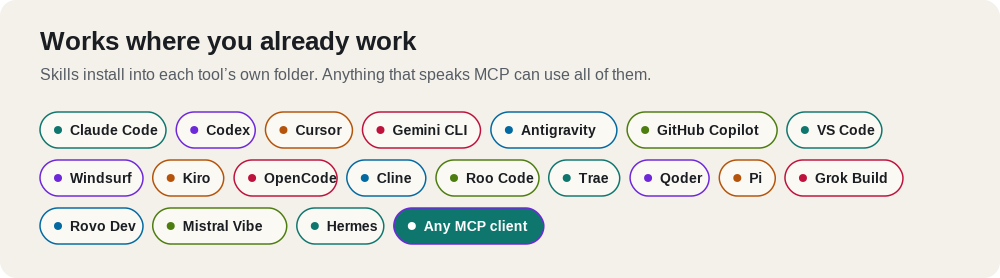
1. Quick Install by Operating System
| Operating System | Recommended (npx) |
One-Liner Script (~/.sfp/SFP) |
Notes |
|---|---|---|---|
| Windows 10 / 11 (PowerShell) | npx sfp-hive install |
irm https://raw.githubusercontent.com/siddu1004/SFP/main/get.ps1 | iex |
Tick Add python.exe to PATH when installing Python; run python instead of python3 |
| macOS (Zsh / Bash) | npx sfp-hive install |
curl -fsSL https://raw.githubusercontent.com/siddu1004/SFP/main/get.sh | sh |
Works on Apple Silicon (arm64) and Intel (x86_64) |
| Linux (Ubuntu, Debian, Fedora, Arch, WSL2) | npx sfp-hive install |
curl -fsSL https://raw.githubusercontent.com/siddu1004/SFP/main/get.sh | sh |
Uses symlinks cleanly with --link |
| Rust / Cargo (Any OS) | cargo install --git https://github.com/siddu1004/SFP.git |
sfp install |
Native CLI wrapper around the Python hive |
2. Every Supported IDE & Agent (Skills, MCP & Standing Rules)
| IDE / Agent Tool | --tools ID |
Skills Folder | MCP Config File | Standing Rules File | One-Command Setup |
|---|---|---|---|---|---|
| Claude Code | claude |
~/.claude/skills |
Plugin / ~/.claude.json |
~/.claude/CLAUDE.md |
/plugin marketplace add siddu1004/SFP then /plugin install sfp@sfp |
| Google Antigravity | antigravity |
~/.gemini/config/skills |
~/.gemini/config/mcp_config.json |
~/.gemini/GEMINI.md |
npx sfp-hive install --tools antigravity |
| Cursor | cursor |
~/.cursor/skills |
~/.cursor/mcp.json |
~/.cursor/rules/sfp.mdc |
npx sfp-hive install --tools cursor |
| VS Code / GitHub Copilot | copilot (vscode) |
~/.copilot/skills |
VS Code mcp.json |
~/.copilot/copilot-instructions.md |
npx sfp-hive install --tools copilot |
| OpenAI Codex | codex |
~/.agents/skills |
~/.codex/config.toml |
~/.codex/AGENTS.md |
npx sfp-hive install --tools codex |
| Windsurf | windsurf |
~/.codeium/windsurf/skills |
~/.codeium/windsurf/mcp_config.json |
~/.codeium/windsurf/memories/global_rules.md |
npx sfp-hive install --tools windsurf |
| Gemini CLI | gemini |
~/.gemini/skills |
~/.gemini/settings.json |
~/.gemini/GEMINI.md |
npx sfp-hive install --tools gemini |
| Kiro | kiro |
~/.kiro/skills |
~/.kiro/settings/mcp.json |
~/.kiro/steering/sfp.md |
npx sfp-hive install --tools kiro |
| Cline | cline |
~/.cline/skills |
~/.cline/mcp_settings.json |
~/.cline/AGENTS.md |
npx sfp-hive install --tools cline |
| Roo Code | roo |
~/.roo/skills |
~/.roo/mcp_settings.json |
~/.roo/rules/sfp.md |
npx sfp-hive install --tools roo |
| OpenCode | opencode |
~/.config/opencode/skills |
~/.config/opencode/mcp.json |
~/.config/opencode/AGENTS.md |
npx sfp-hive install --tools opencode |
| Trae | trae |
~/.trae/skills |
~/.trae/mcp.json |
~/.trae/user_rules.md |
npx sfp-hive install --tools trae |
| Qoder | qoder |
~/.qoder/skills |
~/.qoder/mcp.json |
~/.qoder/AGENTS.md |
npx sfp-hive install --tools qoder |
| Pi | pi |
~/.pi/agent/skills |
~/.pi/mcp.json |
~/.pi/agent/AGENTS.md |
npx sfp-hive install --tools pi |
| Grok Build | grok |
~/.grok/skills |
~/.grok/mcp.json |
~/.grok/AGENTS.md |
npx sfp-hive install --tools grok |
| Mistral Vibe | vibe |
~/.vibe/skills |
~/.vibe/mcp.json |
~/.vibe/AGENTS.md |
npx sfp-hive install --tools vibe |
| Hermes | hermes |
~/.hermes/skills |
~/.hermes/mcp.json |
~/.hermes/AGENTS.md |
npx sfp-hive install --tools hermes |
# Install starter skills, MCP server, and standing rules across multiple tools at once:
npx sfp-hive install --tools claude,cursor,antigravity,codex
npx sfp-hive mcp --tools claude,cursor,antigravity,codex
npx sfp-hive rules --tools claude,cursor,antigravity,codex
Sources and Licenses
SFP's selection engine, installer, and MCP server are licensed under the MIT License. The 1065 skills come from 91 repositories, and each keeps the license and copyright of its original author. Attributions are listed in NOTICE.md and SKILLS.md.
Built by siddu1004. If SFP saves your agent some context, a star helps others find it.
Yorumlar (0)
Yorum birakmak icin giris yap.
Yorum birakSonuc bulunamadi