paper-figure-to-figma
Health Gecti
- License — License: MIT
- Description — Repository has a description
- Active repo — Last push 0 days ago
- Community trust — 68 GitHub stars
Code Gecti
- Code scan — Scanned 12 files during light audit, no dangerous patterns found
Permissions Gecti
- Permissions — No dangerous permissions requested
Bu listing icin henuz AI raporu yok.
Agent skill that rebuilds research paper figures as editable Figma vectors — native text, curves and gradients, with SVG/PDF export.

Rebuild research figures with high fidelity. Keep every step editable.








English · 简体中文
Quick Start • How it works • Examples • Demo • FAQ

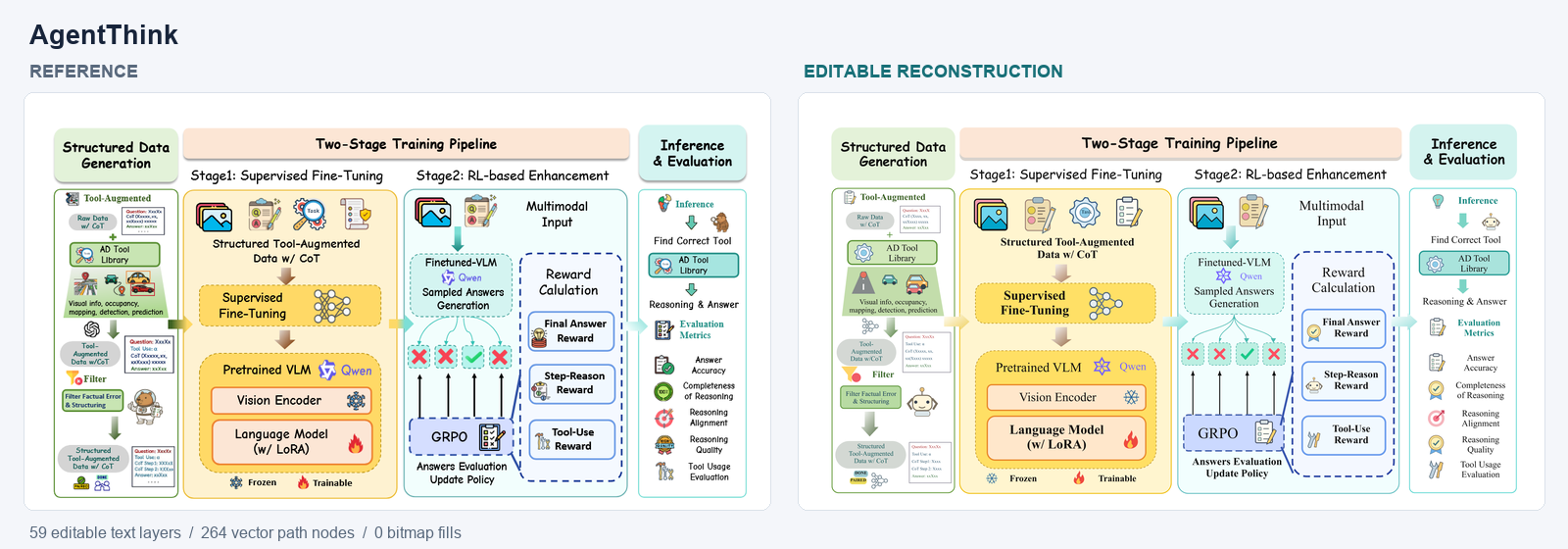
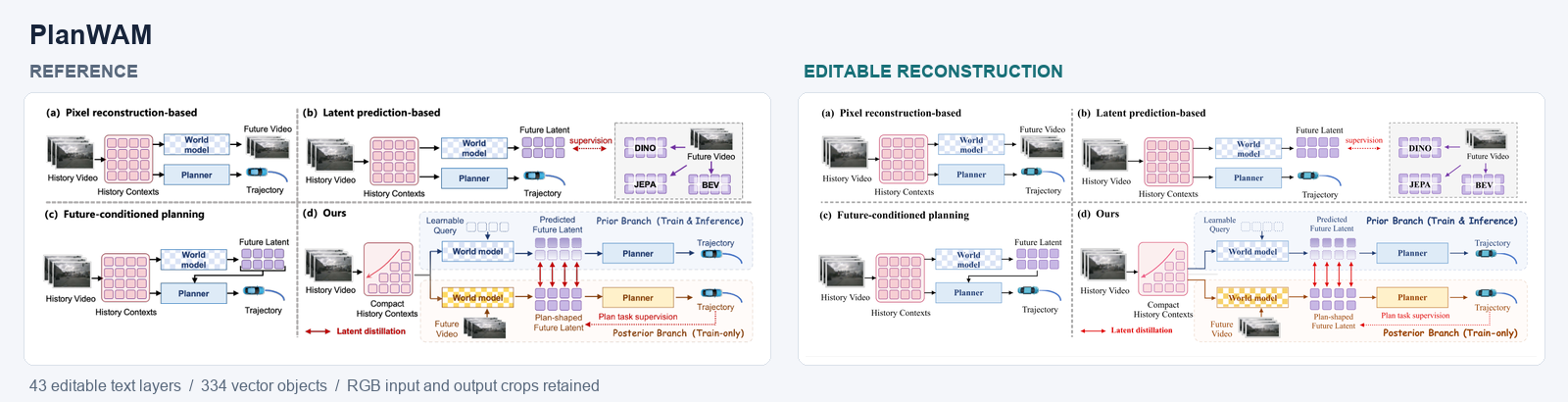
Left: reference figure · Right: native Figma reconstruction · Open SVG · Example notes
Paper Figure to Figma is an agent skill that turns an image of a research figure into native, editable Figma artwork. Give your AI assistant the figure and a Figma file: it redraws every label, shape and connection as real layers, compares the result with the reference at whole-figure and detail level, fixes what differs, and exports SVG and PDF.
It is built for the moment when all you have is the image — a lost source file, a figure from a paper, or a draft from an image generator — and you still need to edit it.
✨ Features
- Native, editable layers — labels stay text, shapes and arrows stay vectors. Only input/output photos are kept as image layers.
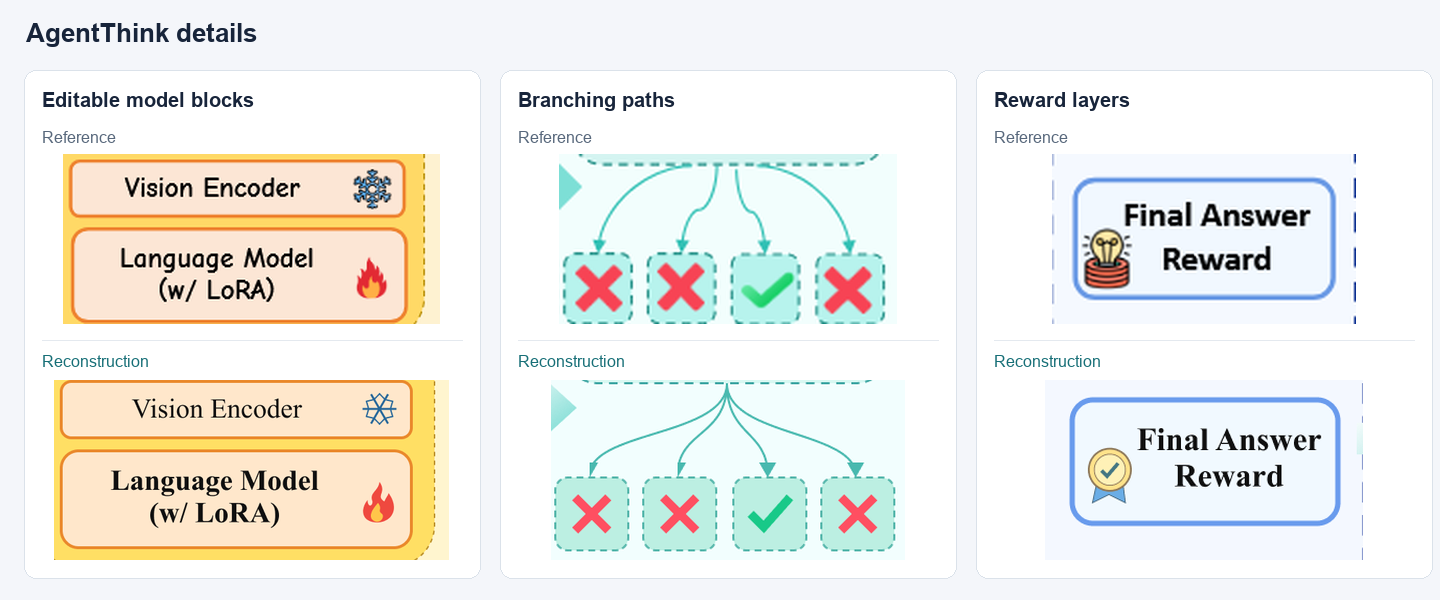
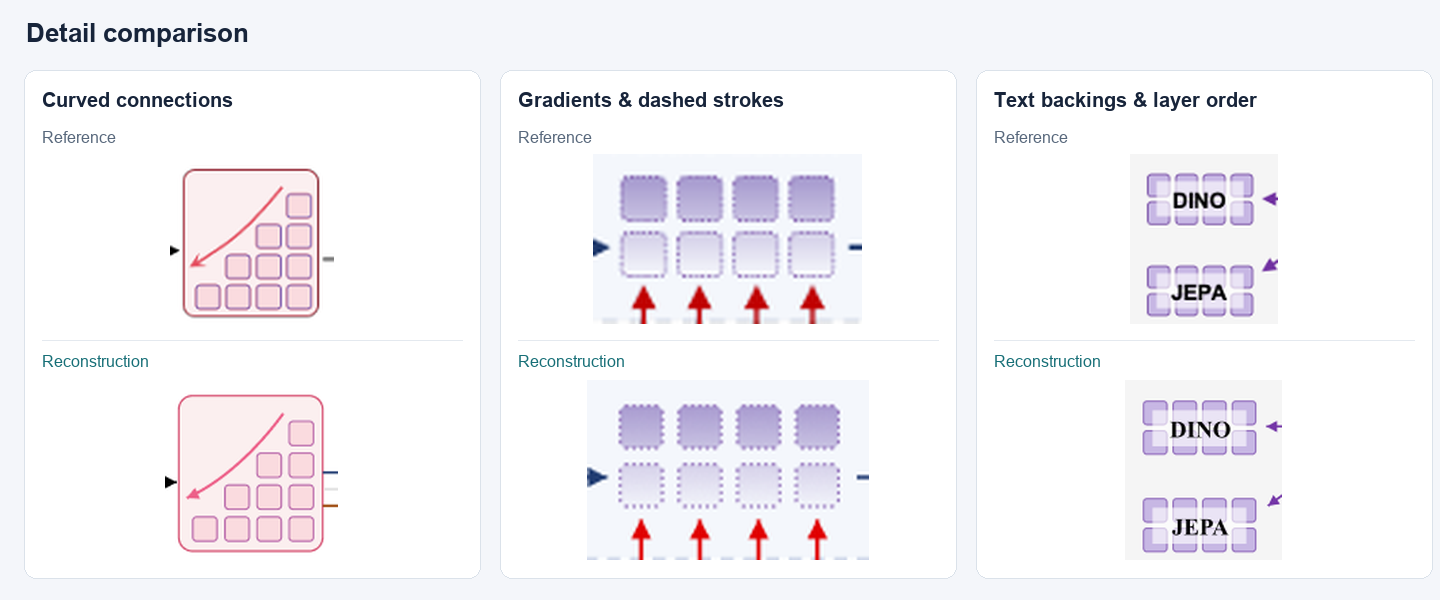
- Details that usually get lost — gradients, local text backings, transparency, dashed strokes, Bézier curves and stacking order.
- Built-in review loop — checks the whole figure, then enlarged details and editability, and revises only the affected elements.
- Revise without starting over — follow-up requests update the existing Figma frame and leave the elements you protect untouched.
- Paper-ready typography — Times New Roman body text and a clear size hierarchy by default; override any of it.
- No extra API key — runs inside your assistant with its Figma connection. No VLM API key or original generation prompt needed.
- Portable output — editable SVG, PDF and a reusable
.scene.jsonproject file.
🚀 Quick Start
Requirements
- An AI assistant that can view images, load local skills, run scripts and call external tools (verified with Codex).
- A Figma connection in that assistant with edit access to the target Design file.
- Python 3.10+. Pillow is needed only when the figure contains photo crops.
1. Install the skill
git clone https://github.com/sidiangongyuan/paper-figure-to-figma.git
cd paper-figure-to-figma
python tools/install_skill.py
This installs to $CODEX_HOME/skills/paper-figure-to-figma (default ~/.codex/skills/paper-figure-to-figma). Use --update to upgrade an existing install, or --dest <skills-dir>/paper-figure-to-figma for another assistant. To skip installation, open the repository in your assistant and ask it to read .agents/skills/paper-figure-to-figma/SKILL.md.
2. Connect Figma
Enable the Figma tool connection in your assistant and authorize your account.
3. Rebuild a figure
Attach the complete reference image and send:
Use $paper-figure-to-figma to reconstruct this image in the linked Figma canvas,
review the whole figure and details, then export editable SVG and PDF.
Figma: <your Design file link>
Need specific fonts, colors or edits? Compose the request with the Prompt Builder.
Full installation and connection guide: docs/CODEX_QUICKSTART.md
🔄 How it works
flowchart LR
    A[Reference image + preferences] --> B[AI assistant runs the skill]
    B --> C[Connected Figma tools]
    C --> D[Editable Figma artwork]
    D --> E[Compare whole figure and details]
    E -->|Revise affected elements| D
    E --> F[Export SVG / PDF]
The skill reads the figure, writes a scene description, draws it as native Figma layers, then reviews real Figma exports against the reference. Content and connection errors are fixed first, then readability, then appearance.
What the review checks| Review | What to check | Result |
|---|---|---|
| Whole figure | Missing content, panel arrangement, relative sizes, grouping and cross-panel arrow endpoints | Structural differences located |
| Enlarged details | Text accuracy and fit, spacing, curves, gradients, backings, repeated elements and layer order | Region, observed difference and correction |
| Editability | Editable text, independent vector elements, useful groups and protected content | Result can be revised without disturbing protected elements |
Full instructions: prompts/02-review.md
🎨 Examples
| AgentThink | PlanWAM |
|---|---|
 |
 |
| Data generation, two-stage training, inference and evaluation pipeline. 59 text layers · 264 vector path nodes · 0 bitmap fills |
Four-panel comparison of world-model planning approaches. 43 text layers · 334 vector objects · 8 gradients |
| Paper · Reference · SVG · Scene | Paper · Reference · SVG · Scene |
AgentThink — model blocks, curved branches and reward layers
PlanWAM — curved connections, gradients and text backings
Reference figures belong to their original authors; see each example's notes for sources and approximations.
🎮 Demo
Download the repository and open demo/index.html in a browser — no install, works offline. Drag the divider to compare the reference with the reconstruction, edit text, fills and curves, then download the edited SVG.
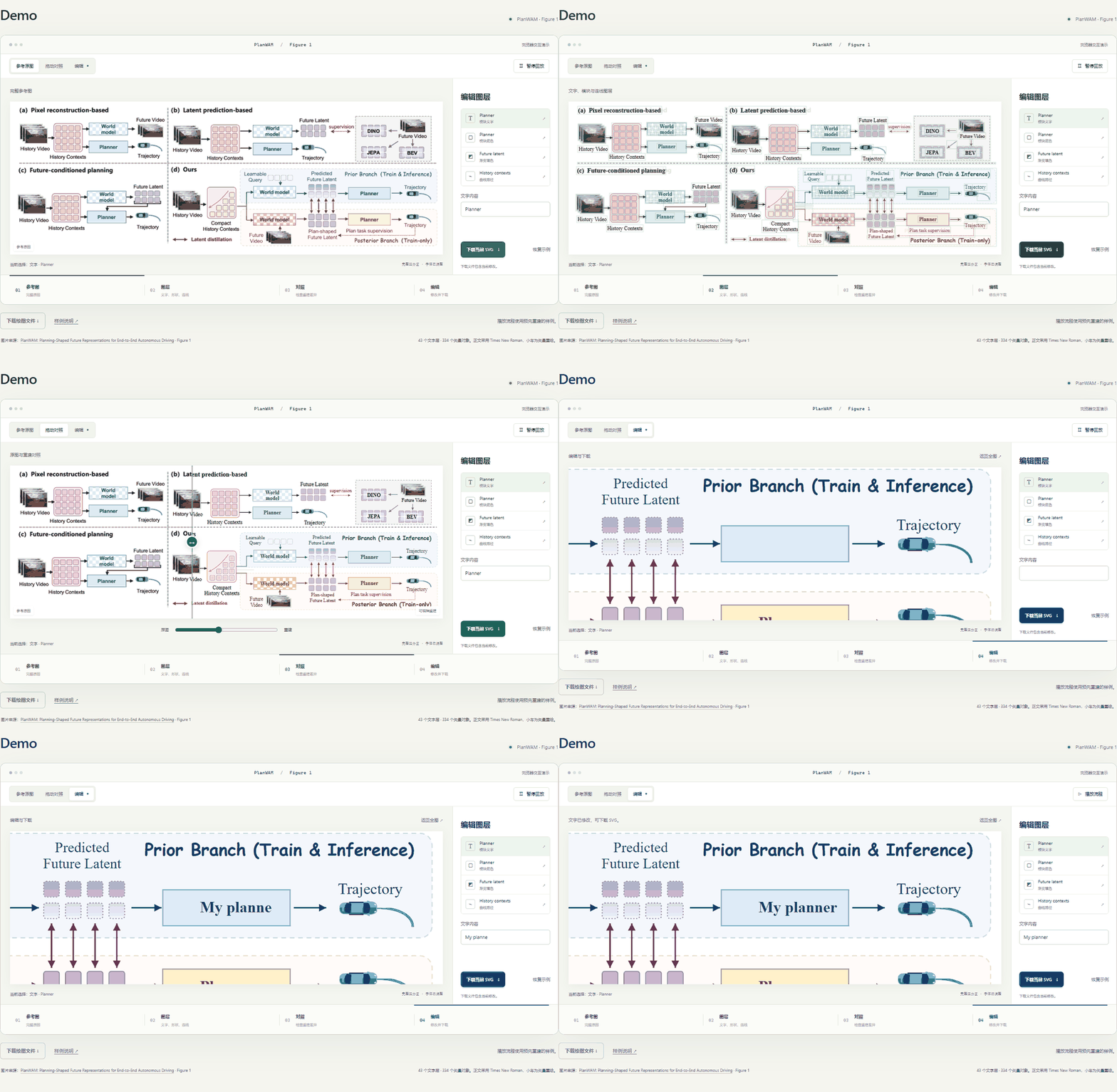
The demo uses a pre-built PlanWAM reconstruction to show the editable result; it does not run the AI reconstruction. Demo controls
🧭 Roadmap
- Agent skill with connected Figma drawing, review and export
- PlanWAM and AgentThink examples with editable files and visual comparisons
- Prompt Builder and offline demo
- Check font size, line width and spacing at the final paper dimensions
- Better selective updates that preserve manual Figma edits
- Better mathematical notation and formula reconstruction
- Style transfer for colors, typography and appearance while keeping content and structure
- Editable import/export with PowerPoint, draw.io and other drawing tools
- More examples and reproducible fidelity evaluations
- Compatibility testing across more assistants and operating systems
🚧 Limitations
- Not pixel-identical. Fidelity is judged through the whole-figure and detail review, not a universal accuracy score.
- Small illustrations are approximations. Complex icons, logos and tiny drawings are vector redraws; unreadable source text is flagged rather than guessed.
- Photo crops follow the reference resolution. Use original dataset images for final layouts when available.
- Full reimports can overwrite manual edits to managed layers. Duplicate hand-edited artwork before a full rebuild.
- Verified with Codex and its Figma connection; other assistants and operating systems are not yet fully tested.
- Check readability at the final paper size once the physical dimensions are known.
❓ FAQ
Do I need an API key or the original generation prompt?No. The skill runs inside your AI assistant and works from the image alone.
Which AI assistants are supported?It is verified with Codex. Other assistants need image input, local skill and script execution, and external tool calls; install with --dest pointing to their skill directory.
No custom plugin is required. The skill uses the Figma tools connected to your assistant and needs edit access to the target Design file.
What happens if Figma is not connected?The skill prepares the scene file and SVG locally, tells you which step is missing — no connection, expired authorization, read-only access or no file access — and continues writing to Figma once it is fixed.
Can I keep editing after the first version?Yes. Edit directly in Figma, or send the assistant the same Figma link with your changes and list the elements that must stay unchanged.
🤝 Contributing
Issues, ideas and new examples are welcome.
- Bug or unexpected result — open an issue with the reference image (if shareable), your request and the assistant you used.
- New example — include the source paper, a reference image you may redistribute, the
.scene.jsonand the exported SVG. - Code changes — run the checks in docs/DEVELOPMENT.md before opening a pull request.
🙏 Acknowledgements
The workflow draws on Image To Slice and the Linux.do discussion on AI and design workflows. Example figures come from AgentThink and PlanWAM.
📄 License
Code is released under the MIT License. Reference figures, paper content and figure-derived example assets retain their original rights; see the source attribution in each example.
Yorumlar (0)
Yorum birakmak icin giris yap.
Yorum birakSonuc bulunamadi