BranchBoard
Health Uyari
- License — License: MIT
- Description — Repository has a description
- Active repo — Last push 0 days ago
- Low visibility — Only 5 GitHub stars
Code Gecti
- Code scan — Scanned 12 files during light audit, no dangerous patterns found
Permissions Gecti
- Permissions — No dangerous permissions requested
Bu listing icin henuz AI raporu yok.
A whiteboard for AI chats: branch any answer, keep chats side by side on a canvas, connect the answers you build on.

BranchBoard
A whiteboard for AI chats.
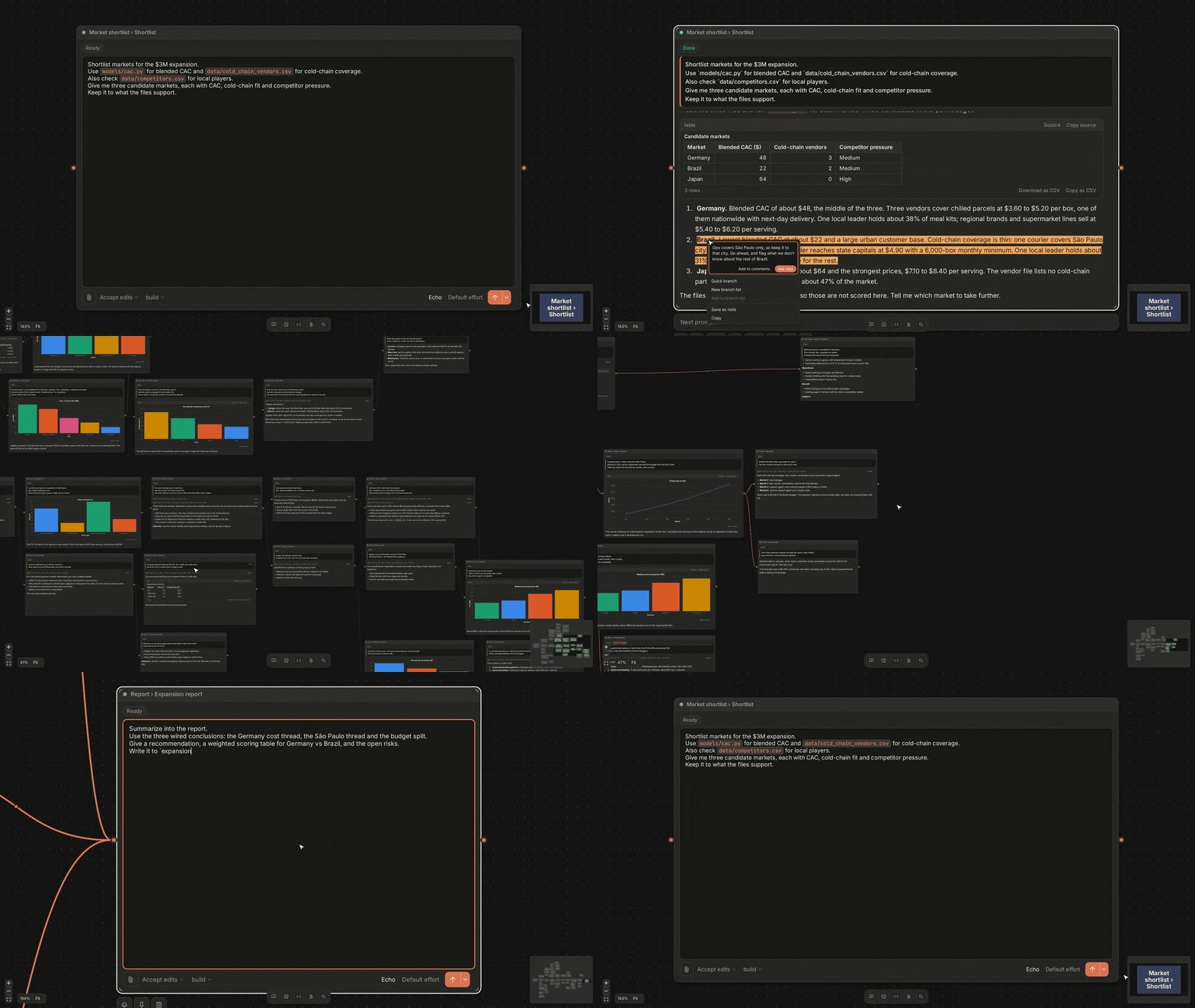
BranchBoard is a whiteboard for AI chats. A board runs several chats side by side on a diagram-like canvas. Branch any answer to try another direction, and connect the answers you want to build on. It is a free, open-source local web app that uses the claude, codex or opencode command-line tool or an Anthropic or OpenAI API key, and your boards are stored on your machine.
Features
- Wires set context. Connecting one node to another adds its context to the other node's prompt.
- Branching. Fork any turn to explore different options.
- Context control. Combine nodes' and branches' answers later to start a chat based on their combined context.
- Code nodes. Inspect changes and produced files right on the board. Pass them as context to other nodes with a simple connect.
- Tables & graphs. See and interact with tables and graphs right in the node's answer.
- Your choice of platform. Claude, Codex, OpenCode, Anthropic, OpenAI, OpenRouter, Ollama and LM Studio.
Get started
Requires Node.js 22.13 or newer and one of: a signed-in claude, codex or opencode command, or an Anthropic or OpenAI API key.
npx branchboard
To install it globally, run npm install -g branchboard and start it with branchboard.
BranchBoard opens the browser with a link that contains an access key. Do not share the link.
Using it
- Create nodes with the bottom toolbar or by right-clicking empty board space. Double-click empty space for a chat node. Pick a model and agent, write the prompt and press Enter.
- Connect nodes: drag from a node's handle onto another node to feed it, or onto empty canvas to create a child. Connected nodes run in order and unconnected nodes run in parallel. Select a node to see its context in the right panel.
- Manage context: a node shows context changed when its inputs differ from the ones it ran with. Regenerate the node to update its answer, and switch between earlier answers with the arrows.
- Attachments: use the paperclip, or drop files on a node or on empty canvas.
- Composer: type
/for slash commands and@for workspace files and agents. Thevnext to Send opens Schedule Run. - Code nodes show a workspace file with git changes and a Diff view. Revert undoes the files an agent edited.
- Comments: select text in an AI answer, code or doc and add a comment. Comments go with the next prompt, or use Ask now to send one right away.
- Top bar: Search (
Ctrl+F), Active jobs, Trash and Help.
Options
branchboard [options]

  --port <number>    Port to listen on
  --data-dir <dir>   Folder for boards and logs
  --host             Accept connections from other devices on the local network
  --no-key           Open without the access key
  --no-open          Do not open the browser
  --offline          Make no internet requests
  --no-auto-update   Do not install updates at start
  -v, --version      Print the version
  -h, --help         Print this help

  update             Install the newest version
  update --check     Only report the newest version
Boards are stored in %LOCALAPPDATA%\Branchboard on Windows, ~/Library/Application Support/Branchboard on macOS and ~/.local/share/branchboard on Linux. To back up, stop BranchBoard and copy that folder. It also contains the access key.
License
Yorumlar (0)
Yorum birakmak icin giris yap.
Yorum birakSonuc bulunamadi