ashfox
mcp
Basarisiz
Health Uyari
- License — License: MIT
- Description — Repository has a description
- Active repo — Last push 44 days ago
- Low visibility — Only 6 GitHub stars
Code Basarisiz
- execSync — Synchronous shell command execution in .github/workflows/release-please.yml
- process.env — Environment variable access in .github/workflows/release-please.yml
- fs module — File system access in .github/workflows/release-please.yml
- rm -rf — Recursive force deletion command in agents/scripts/unix/sync-codex-skills.sh
Permissions Gecti
- Permissions — No dangerous permissions requested
Purpose
This plugin acts as a bridge between Blockbench (a 3D modeling application) and AI agents. It allows users to generate and edit 3D models, textures, and animations using natural language prompts via a local MCP server.
Security Assessment
Overall Risk: Low. The tool operates entirely locally, binding specifically to `127.0.0.1:8787`. It does not request dangerous global permissions, leak data externally, or contain hardcoded secrets. The automated scan did flag some code issues, such as environment variable access, file system usage, synchronous shell execution, and a recursive force deletion command (`rm -rf`). However, these were all found strictly within GitHub Actions workflows and developer build scripts (`agents/scripts/`), meaning they do not affect the end-user plugin. Developers should be aware that because it modifies local files, macOS, Windows, or Linux may correctly prompt the user to grant Blockbench local filesystem access.
Quality Assessment
The project is relatively new and niche, reflected by a low community footprint of only 6 GitHub stars. Despite the low visibility, it is a healthy and active project. It benefits from a standard MIT license, has seen recent updates, and features exceptionally well-written documentation. The README is comprehensive, clearly detailing installation steps, OS-specific permission requirements, and standard usage flows.
Verdict
Safe to use.
This plugin acts as a bridge between Blockbench (a 3D modeling application) and AI agents. It allows users to generate and edit 3D models, textures, and animations using natural language prompts via a local MCP server.
Security Assessment
Overall Risk: Low. The tool operates entirely locally, binding specifically to `127.0.0.1:8787`. It does not request dangerous global permissions, leak data externally, or contain hardcoded secrets. The automated scan did flag some code issues, such as environment variable access, file system usage, synchronous shell execution, and a recursive force deletion command (`rm -rf`). However, these were all found strictly within GitHub Actions workflows and developer build scripts (`agents/scripts/`), meaning they do not affect the end-user plugin. Developers should be aware that because it modifies local files, macOS, Windows, or Linux may correctly prompt the user to grant Blockbench local filesystem access.
Quality Assessment
The project is relatively new and niche, reflected by a low community footprint of only 6 GitHub stars. Despite the low visibility, it is a healthy and active project. It benefits from a standard MIT license, has seen recent updates, and features exceptionally well-written documentation. The README is comprehensive, clearly detailing installation steps, OS-specific permission requirements, and standard usage flows.
Verdict
Safe to use.
A deterministic Blockbench MCP plugin for generating and editing 3D models, UVs, textures, and animations from natural language.
README.md
Ashfox
Blockbench MCP bridge plugin for low-level modeling, texturing, and animation.
Showcase
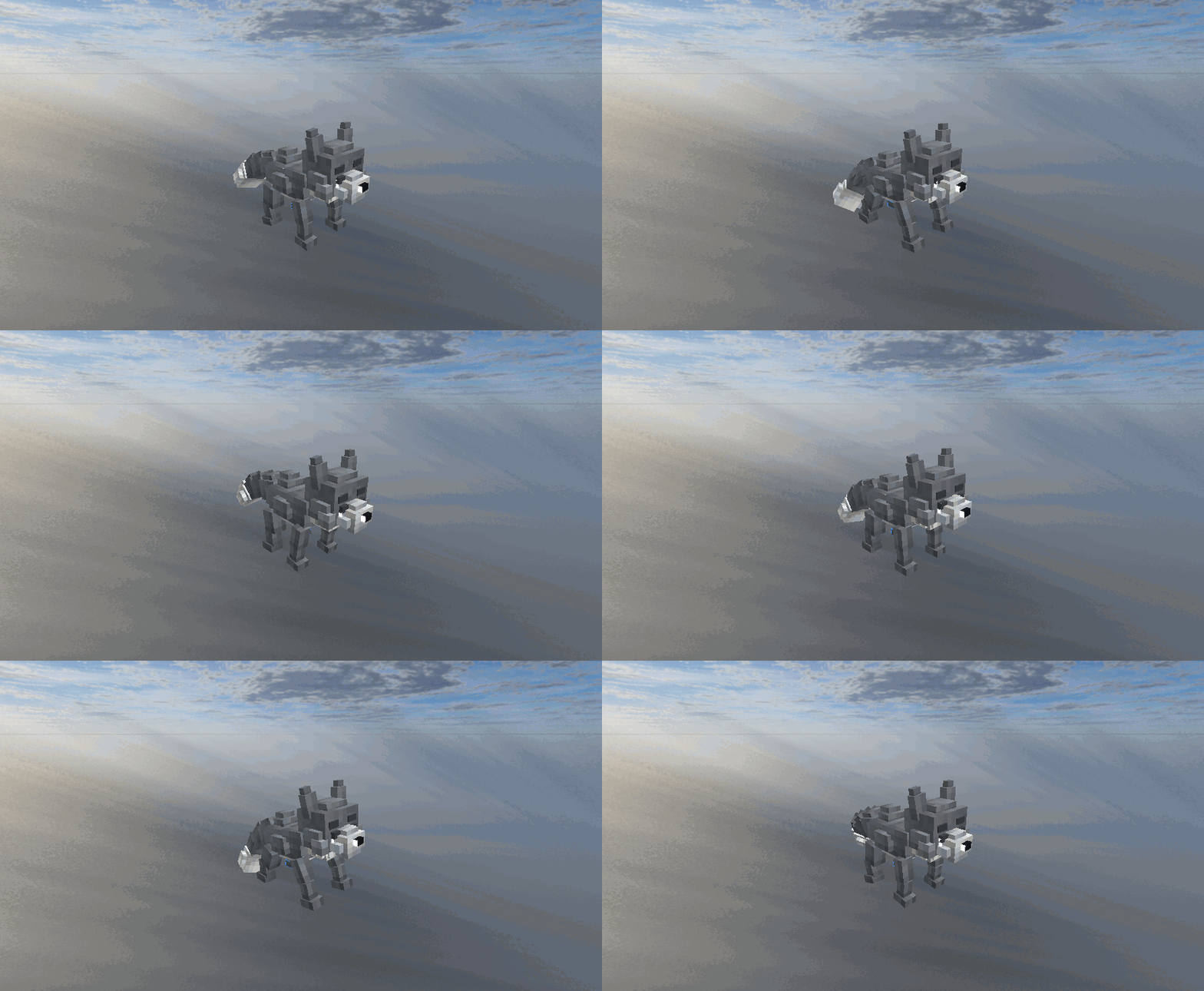
This model, texture, and animation were created from prompts only in about 10 minutes.
Model used: GPT-5.2 (extra high).
Who This Is For
- Creators using Blockbench Desktop
- MCP clients/agents that need deterministic, tool-level control
Requirements
- Blockbench Desktop (latest stable)
- If you export/use
geckolibmodels: add GeckoLib dependency in your target mod project.- Ashfox does not bundle GeckoLib runtime/library.
- Ensure the
geckolibformat is enabled in Blockbench/Ashfox capabilities.
Install
Option A (recommended): Load from release URL
In Blockbench Desktop:
- Open
File > Plugins > Load Plugin from URL - Paste:
https://github.com/sigee-min/ashfox/releases/latest/download/ashfox.js
- Click install/load
Option B: Build locally
git clone https://github.com/sigee-min/ashfox.git
cd ashfox
npm install
npm run build
Then load dist/ashfox.js in Blockbench Plugin Manager.
OS Permission Checklist (First Run)
macOS
- If Blockbench shows:
"The plugin \"ashfox\" requires permission to see information about your computer.""Filesystem access required"
approve it for theashfoxplugin.
- If macOS system permission prompts appear for folders, approve
Blockbenchfor the folders you use (for exampleDesktop,Documents,Downloads).
Windows
- If Windows Defender Firewall prompts for Blockbench, allow it on Private networks (Ashfox uses local
127.0.0.1MCP). - If Controlled Folder Access blocks save/export, allow Blockbench in Windows Security.
Linux
- If using sandboxed installs (Flatpak/Snap), grant filesystem access for your project/export paths.
- Ensure localhost access (
127.0.0.1) is not blocked by sandbox/firewall policy.
Default Endpoint
http://127.0.0.1:8787/mcp
First Connection Check
curl -s http://127.0.0.1:8787/mcp \
  -H "Content-Type: application/json" \
  -d '{"jsonrpc":"2.0","id":1,"method":"tools/list"}'
First Capability Check
curl -s http://127.0.0.1:8787/mcp \
  -H "Content-Type: application/json" \
  -d '{"jsonrpc":"2.0","id":2,"method":"tools/call","params":{"name":"list_capabilities","arguments":{}}}'
Recommended Usage Flow
ensure_project(orget_project_state) to get current revision- Run mutating tools with
ifRevision validaterender_previewexport
What Ashfox Exposes
- Modeling:
add_bone,add_cube,add_mesh, updates/deletes - Texturing:
assign_texture,paint_faces,paint_mesh_face,read_texture - Animation:
create_animation_clip,set_frame_pose,set_trigger_keyframes - Project/ops:
ensure_project,get_project_state,validate,render_preview,export
Common Problems
- Plugin fails to load from URL:
- Make sure you are loading
ashfox.js(not old filenames).
- Make sure you are loading
- Port/host/path settings reset after reload:
- Change settings in
ashfox: Server(MCP Host,MCP Port,MCP Path), then reload plugin. - Verify the status popup/log:
ashfox MCP inline|sidecar: <host>:<port><path>. - If values still reset, capture Blockbench console logs and open an issue.
- Change settings in
- MCP client cannot connect:
- Verify Blockbench plugin is loaded and status shows
ashfox MCP inline: ...orashfox MCP sidecar: .... - Re-run
tools/listagainst the endpoint shown in the status message.
- Verify Blockbench plugin is loaded and status shows
- Revision mismatch errors:
- Re-read state with
get_project_stateand retry with latestifRevision.
- Re-read state with
Security
Use only local/trusted MCP clients against your Blockbench session.
License
MIT. See LICENSE.
Yorumlar (0)
Yorum birakmak icin giris yap.
Yorum birakSonuc bulunamadi