kakaocli
Health Pass
- License — License: MIT
- Description — Repository has a description
- Active repo — Last push 0 days ago
- Community trust — 22 GitHub stars
Code Warn
- Code scan incomplete — No supported source files were scanned during light audit
Permissions Pass
- Permissions — No dangerous permissions requested
No AI report is available for this listing yet.
KakaoTalk CLI for AI agents - read and send messages via database + UI automation
kakaocli
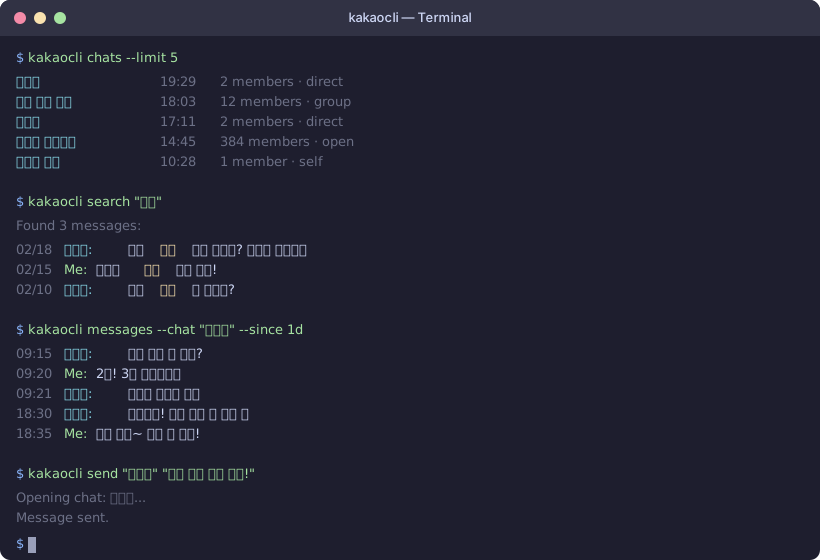
CLI tool for KakaoTalk on macOS — read chats, search messages, send texts, and integrate with AI agents.
macOS용 카카오톡 CLI 도구 — 채팅 읽기, 메시지 검색, 텍스트 전송, AI 에이전트 연동.
[!NOTE]
This tool reads KakaoTalk's local database and automates the UI via macOS Accessibility APIs. It does not reverse-engineer the KakaoTalk protocol or call any Kakao APIs. See Disclaimer for details.
Overview
kakaocli lets AI agents (Claude Code, Cursor, custom bots) check and send your KakaoTalk messages — something Kakao's official APIs simply can't do.
- AI Agent Integration — JSON output for every command, MCP skill definition, webhook delivery, auto-login
- Read — list chats, view messages, full-text search, raw SQL queries
- Send — send messages to any chat via UI automation
- Sync — real-time NDJSON message stream with webhook support
- Harvest — bulk-capture chat names and load older message history
Why?
Kakao's official APIs cannot read chat history, export conversations, or send free-form messages. If you want an AI agent to check your messages, summarize conversations, or reply on your behalf — there's no official way to do it. kakaocli fills that gap by reading the local database and automating the native macOS client.
개요
kakaocli는 AI 에이전트(Claude Code, Cursor, 커스텀 봇)가 카카오톡 메시지를 확인하고 보낼 수 있게 해줍니다 — 카카오 공식 API로는 불가능한 기능입니다.
- AI 에이전트 연동 — 모든 명령의 JSON 출력, MCP 스킬 정의, 웹훅 전달, 자동 로그인
- 읽기 — 채팅 목록, 메시지 조회, 전체 텍스트 검색, SQL 쿼리
- 전송 — UI 자동화를 통한 메시지 전송
- 동기화 — 실시간 NDJSON 메시지 스트림 및 웹훅 지원
- 수집 — 채팅방 이름 일괄 수집 및 이전 메시지 로드
왜 필요한가요?
카카오 공식 API로는 채팅 기록을 읽거나, 대화를 내보내거나, 자유로운 메시지를 보낼 수 없습니다. AI 에이전트가 메시지를 확인하거나, 대화를 요약하거나, 대신 답장하게 하고 싶어도 공식적인 방법이 없습니다. kakaocli는 로컬 데이터베이스를 읽고 네이티브 macOS 클라이언트를 자동화하여 이 부분을 해결합니다.
Getting Started / 시작하기
1. Install / 설치
Option A: Homebrew (recommended)
brew install silver-flight-group/tap/kakaocli
This installs sqlcipher automatically and builds from source (~20 seconds).
Option B: Build from source
brew install sqlcipher
git clone https://github.com/silver-flight-group/kakaocli.git
cd kakaocli
swift build -c release
# Binary is at .build/release/kakaocli
# Either add to PATH or run directly:
.build/release/kakaocli status
# Or use swift run:
swift run kakaocli status
2. Grant permissions / 권한 부여
Your terminal app needs two permissions in System Settings > Privacy & Security:
터미널 앱에 다음 두 가지 권한이 필요합니다 (시스템 설정 > 개인정보 보호 및 보안):
- Full Disk Access (전체 디스크 접근) — to read KakaoTalk's encrypted database
- Accessibility (접근성) — for UI automation (sending messages, harvest)
[!NOTE]
Full Disk Access is required for all commands. Accessibility is only needed forsend,harvest, andinspect.
3. Verify it works / 동작 확인
# Check KakaoTalk installation and permissions
kakaocli status

# Verify database decryption
kakaocli auth

# List your most recent chats
kakaocli chats --limit 10
If auth succeeds, you're all set. All read commands work immediately — no KakaoTalk login or window required.
auth가 성공하면 준비 완료입니다. 모든 읽기 명령은 카카오톡 창 없이도 바로 작동합니다.
4. Try it out / 사용해보기
# Search across all your messages
kakaocli search "점심"

# Read recent messages from a chat (substring match on name)
kakaocli messages --chat "지수" --since 7d

# Send a message (opens KakaoTalk UI automatically)
kakaocli send "지수" "안녕!"

# Send to self-chat (나와의 채팅) — safe for testing
kakaocli send --me _ "test message"

# Stream new messages as JSON
kakaocli sync --follow

# Run a custom SQL query against the database
kakaocli query "SELECT COUNT(*) FROM NTChatMessage"
[!TIP]
Use--meto send to your self-chat (나와의 채팅) when testing. This is the safest way to verify send functionality.
Commands
Read / 읽기
| Command | Description |
|---|---|
kakaocli status |
Check KakaoTalk installation and permissions |
kakaocli auth |
Verify database decryption |
kakaocli chats |
List chats sorted by last activity |
kakaocli messages --chat "name" |
Show messages from a chat (substring match) |
kakaocli search "keyword" |
Full-text search across all messages |
kakaocli schema |
Dump raw database schema |
kakaocli query "SQL" |
Run read-only SQL against the decrypted database |
All read commands support --json for structured output.
모든 읽기 명령은 --json 옵션으로 구조화된 출력을 지원합니다.
Send / 전송
kakaocli send "chat name" "message"    # Send to a chat
kakaocli send --me _ "message"         # Send to self-chat (나와의 채팅)
kakaocli send --dry-run "name" "msg"   # Preview without sending
Sync / 동기화
kakaocli sync --follow                              # NDJSON stream of new messages
kakaocli sync --follow --interval 1                  # Poll every 1 second
kakaocli sync --follow --webhook http://localhost:8080/kakao  # POST to webhook
See AGENTS.md for AI agent integration instructions.
Harvest / 수집
kakaocli harvest                   # Capture display names for all chats
kakaocli harvest --scroll          # Also load older message history
kakaocli harvest --scroll --top 20 # Process top 20 most recent chats
kakaocli harvest --dry-run         # Preview without changes
The harvest command iterates through your chat list to:
- Capture display names from the UI (many group chats show
(unknown)in the database) - With
--scroll: open each chat, scroll to top, click "View Previous Chats" to load older messages - Auto-dismiss Talk Drive Plus paywall popups
- Save metadata to
~/.kakaocli/metadata.json
Chats with unread messages are skipped to avoid marking them as read.
Login / 로그인
kakaocli login                                       # Store credentials (interactive)
kakaocli login --email [email protected] --password pw # Non-interactive
kakaocli login --status                               # Check status
kakaocli login --clear                                # Remove credentials
When you run send, sync, or any command that needs KakaoTalk, the tool automatically launches the app, detects the login screen, fills credentials, and waits for login to complete.
AI Integration / AI 연동
kakaocli is designed to work with AI coding assistants and agents. Every read command outputs structured JSON, and the tool handles KakaoTalk's full lifecycle automatically (launch, login, window management).
Claude Code
Add kakaocli as a skill in your project's CLAUDE.md:
## KakaoTalk Integration

Use `kakaocli` to read and send KakaoTalk messages:
- `kakaocli chats --json` — list all chats
- `kakaocli messages --chat "name" --json` — read messages
- `kakaocli search "keyword" --json` — search messages
- `kakaocli send "name" "message"` — send a message
- `kakaocli send --me _ "message"` — send to self-chat (safe for testing)
Or copy the skill file directly:
# Copy the skill definition to your project
cp skills/kakaocli/SKILL.md /path/to/your/project/.claude/skills/
Claude Code can then read your KakaoTalk messages, search conversations, and send messages on your behalf.
Cursor / Windsurf / Other AI Editors
Add to your project rules or .cursorrules:
You have access to kakaocli for KakaoTalk messaging.
Run `kakaocli chats --json` to list chats.
Run `kakaocli messages --chat "name" --since 1d --json` to read messages.
Run `kakaocli send "name" "message"` to send messages.
Always use --me flag when testing: `kakaocli send --me _ "test"`.
Always ask for confirmation before sending messages to other people.
Webhooks & Real-time Agents
For agents that need to react to incoming messages in real-time:
# Stream new messages as NDJSON (pipe to your agent)
kakaocli sync --follow | your-agent-processor

# Or POST to a webhook endpoint
kakaocli sync --follow --webhook http://localhost:8080/kakao
Each new message is delivered as a JSON object:
{"chatId": 123, "logId": 456, "author": "김지수", "message": "안녕!", "sentAt": "2026-02-20T09:15:00Z"}
OpenClaw
A kakaocli skill definition is included for use with OpenClaw or similar skill registries.
See AGENTS.md for detailed integration instructions including credential setup, lifecycle management, and error handling.
How It Works / 동작 원리
kakaocli reads KakaoTalk's local SQLCipher-encrypted database in read-only mode — it never modifies the database. For sending messages and UI interactions, it uses macOS Accessibility APIs (AXUIElement) to automate the native KakaoTalk client.
kakaocli는 카카오톡의 로컬 SQLCipher 암호화 데이터베이스를 읽기 전용 모드로 읽습니다 — 데이터베이스를 절대 수정하지 않습니다. 메시지 전송 및 UI 상호작용에는 macOS 접근성 API(AXUIElement)를 사용하여 네이티브 카카오톡 클라이언트를 자동화합니다.
Known Limitations / 알려진 제한 사항
[!WARNING]
macOS only. This tool works exclusively with KakaoTalk for Mac. It does not support Windows, mobile, or web versions.
- Incomplete message history. KakaoTalk Mac only syncs messages from the server when you open a chat. If you haven't opened a chat on your Mac in a while (or ever), older messages won't be in the local database. Use
kakaocli harvest --scrollto trigger loading older history, but this is limited by KakaoTalk's own sync behavior and the Talk Drive Plus paywall. - Group chat names may show as
(unknown). The database doesn't always store display names for group chats. Runkakaocli harvestto capture names from the UI. - Sending requires KakaoTalk to be running. Read commands work without the app open, but
send,sync, andharvestneed the KakaoTalk window. kakaocli launches and logs in automatically if credentials are stored. - One Mac at a time. KakaoTalk only allows one Mac logged in per account.
- Media and non-text messages. Currently only text messages are fully supported. Photos, videos, stickers, and other media types are visible in the database but not rendered.
[!WARNING]
macOS 전용. 이 도구는 카카오톡 Mac 버전에서만 작동합니다.
- 불완전한 메시지 기록. 카카오톡 Mac은 채팅을 열어야 서버에서 메시지를 동기화합니다. Mac에서 오래 열지 않은 채팅은 이전 메시지가 로컬 데이터베이스에 없을 수 있습니다.
kakaocli harvest --scroll로 이전 메시지 로드를 시도할 수 있지만, 카카오톡 자체 동기화 및 톡드라이브 플러스 페이월에 의해 제한됩니다. - 그룹 채팅 이름이
(unknown)으로 표시될 수 있습니다.kakaocli harvest를 실행하여 UI에서 이름을 수집하세요. - 전송 시 카카오톡 실행 필요. 읽기 명령은 앱 없이 작동하지만,
send,sync,harvest는 카카오톡 창이 필요합니다. - 계정당 Mac 1대. 카카오톡은 계정당 하나의 Mac만 로그인을 허용합니다.
- 미디어 및 비텍스트 메시지. 현재 텍스트 메시지만 완전히 지원됩니다.
Disclaimer
This project is not affiliated with, endorsed by, or associated with Kakao Corp. in any way.
"KakaoTalk" and "카카오톡" are trademarks of Kakao Corp. This tool is an independent, unofficial project.
What this tool does:
- Reads the KakaoTalk local database on your own machine (read-only, never modifies it)
- Automates the native KakaoTalk Mac client via standard macOS Accessibility APIs
What this tool does NOT do:
- Does not reverse-engineer or reimplement the KakaoTalk protocol (LOCO)
- Does not call any Kakao APIs or servers
- Does not decompile or modify the KakaoTalk application
- Does not bypass any authentication or security mechanisms
This tool accesses only your own data stored locally on your own computer. Use responsibly and at your own risk. The authors are not responsible for any consequences of using this software, including but not limited to account restrictions by Kakao.
면책 조항
이 프로젝트는 카카오와 제휴, 보증, 또는 관련이 없습니다.
"KakaoTalk" 및 "카카오톡"은 카카오의 상표입니다. 이 도구는 독립적인 비공식 프로젝트입니다.
이 도구가 하는 것:
- 사용자의 컴퓨터에 있는 카카오톡 로컬 데이터베이스를 읽기 전용으로 읽습니다
- 표준 macOS 접근성 API를 통해 카카오톡 Mac 클라이언트를 자동화합니다
이 도구가 하지 않는 것:
- 카카오톡 프로토콜(LOCO)을 역분석하거나 재구현하지 않습니다
- 카카오 API나 서버를 호출하지 않습니다
- 카카오톡 애플리케이션을 디컴파일하거나 수정하지 않습니다
이 도구는 사용자 본인의 컴퓨터에 저장된 본인의 데이터에만 접근합니다. 책임감 있게 사용하시기 바랍니다. 카카오의 계정 제한 등 이 소프트웨어 사용으로 인한 결과에 대해 저자는 책임지지 않습니다.
Credits / 크레딧
Developed by Brian ByungHyun Shin at Silver Flight Group.
Database decryption approach based on research by blluv.
Inspired by wacli by Peter Steinberger — a similar CLI tool for WhatsApp on Mac.
Built with Claude Code.
License
MIT License. Copyright (c) 2026 Silver Flight Group, LLC. See LICENSE for details.
Changelog
Reviews (0)
Sign in to leave a review.
Leave a reviewNo results found